
The best 12 inch table fan 2026: Cool Picks That Fit

A sticky room can drain concentration faster than expected, yet a bulky pedestal fan often creates another problem by eating up valuable floor space. The best 12 inch table fan strikes a practical middle ground, delivering noticeably broader airflow than a tiny personal fan while remaining compact enough for a desk, dresser, kitchen counter, or bedside table. That extra blade span matters because it can move air across a wider area without forcing the motor to run at its loudest setting all day. Still, size alone doesn’t guarantee comfort, so airflow control, stability, and motor noise deserve just as much attention.
A useful 12-inch tabletop fan should offer more than a blast of air aimed in one fixed direction. Adjustable tilt helps send the breeze above computer monitors, across a bed, or toward a favorite chair without stacking the fan on books. Oscillation can spread cooling around a shared room, though it may feel weaker when only one spot needs relief. Frankly, a fixed setting with a strong directional grille often works better for focused cooling, while oscillation makes more sense in kitchens, dorm rooms, and compact living areas.
Noise can make or break the experience, especially during calls, study sessions, or sleep. A fan doesn’t need to be silent, but its lowest setting should create a steady background hum rather than a rattling grille or pulsing motor tone. Multiple speed settings give more control over that tradeoff, allowing gentle circulation at night and stronger airflow during warm afternoons. Three speeds are usually enough, although finer controls can help when the difference between low and medium feels too wide.
Build details deserve a closer look because table fans are moved, tilted, and bumped more often than larger floor models. A broad base with rubber feet helps prevent creeping across smooth countertops, while a sturdy carry handle makes room-to-room use less awkward. Metal grilles may feel more rigid, but they can add weight and occasionally amplify vibration; plastic housings are lighter, though thin panels may develop annoying buzzes over time. The fan grille should also be removable or easy to access since dust buildup on the blades gradually reduces airflow and can scatter debris back into the room.
Controls should be simple enough to adjust without squinting at tiny icons. Mechanical knobs tend to be straightforward and dependable, while electronic buttons may add timers, remote operation, or extra speed levels. Those conveniences are handy, sure, but they also introduce more lights and components that might feel unnecessary beside a bed. A bright display can become irritating after dark, so dimmable indicators or plain manual controls may be the smarter call for nighttime use.
Power use is another quiet consideration, particularly when the fan runs for hours beside an air conditioner. Good air circulation can help distribute cooled air through a small room, reducing hot pockets around desks or beds without pretending the fan actually lowers room temperature. Placement makes a bigger difference than many people expect: setting the fan near an open doorway can move air between rooms, while aiming it across the body creates faster perceived cooling. Even so, anyone expecting whole-room performance in a large open space may need a taller circulator or a larger floor fan instead.
The strongest pick balances airflow with everyday livability rather than simply chasing the highest speed. A powerful model that rattles, slides, or requires constant cleaning soon becomes more trouble than it’s worth. The better approach is to prioritize a stable base, usable low speed, adjustable head, accessible grille, and controls suited to where the fan will spend most of its time. Get those basics right, and a compact cooling fan can handle muggy mornings, warm work sessions, and stuffy evenings without dominating the room.

- LFR Score9.4
LFR Score is a ranking system developed by lightfansreviews.com. LFR Score has no relationship or impact from any manufacturers or sales agent websites. Learn more
- Brandshinic

- LFR Score9.2
LFR Score is a ranking system developed by lightfansreviews.com. LFR Score has no relationship or impact from any manufacturers or sales agent websites. Learn more
- BrandHoneywell

- LFR Score8.8
LFR Score is a ranking system developed by lightfansreviews.com. LFR Score has no relationship or impact from any manufacturers or sales agent websites. Learn more
- BrandBEYOND BREEZE

- LFR Score8.6
LFR Score is a ranking system developed by lightfansreviews.com. LFR Score has no relationship or impact from any manufacturers or sales agent websites. Learn more
- BrandComfort Zone
- LFR Score8.6
LFR Score is a ranking system developed by lightfansreviews.com. LFR Score has no relationship or impact from any manufacturers or sales agent websites. Learn more
- BrandComfort Zone

- LFR Score8.2
LFR Score is a ranking system developed by lightfansreviews.com. LFR Score has no relationship or impact from any manufacturers or sales agent websites. Learn more
- BrandEZ-CHILL

- LFR Score8.2
LFR Score is a ranking system developed by lightfansreviews.com. LFR Score has no relationship or impact from any manufacturers or sales agent websites. Learn more
- BrandBLACK+DECKER
Last update on 2026-07-18 / Affiliate links / Images, Product Titles, and Product Highlights from Amazon Product Advertising API
Best 12 Inch Table Fan For Flexible Room Cooling
A warm desk, stuffy bedroom, or steamy kitchen can make a compact fan feel less like a convenience and more like daily equipment. The best 12 inch table fan needs enough reach to cool more than one narrow spot, yet it shouldn’t crowd a nightstand or drown out a phone call. The shinic model tackles that balance with three speeds, broad oscillation, adjustable tilt, and a guarded 12-inch blade assembly. Its design stays refreshingly straightforward, though buyers expecting remote controls, timers, or digital settings will need to look elsewhere.
Shinic 12-Inch Oscillating Table Fan
The shinic fan takes the old-school approach: physical push buttons, a familiar round grille, and no app or display to fuss with. That simplicity suits rooms where the fan gets switched on, adjusted once, and left alone for a few hours. The push-button controls also make speed changes easy to identify by touch, which beats cycling through one multifunction button. Still, anyone who prefers changing settings from bed may miss having a remote.
Its 12-inch format lands between tiny personal fans and larger floor-standing units. That middle size gives the blades room to create a broader stream of air while keeping the fan portable enough for a dresser, counter, or roomy desktop. The tabletop footprint does require a stable surface, so cramped desks filled with monitors and paperwork may feel crowded. A narrow shelf or shallow bedside table could also limit how freely the fan oscillates.
The supplied description emphasizes quick, tool-free assembly, with the front grille and base designed to click together. That’s a welcome detail because awkward fan assembly often involves tiny screws, slippery blade caps, and instructions that read like a puzzle. The stated setup time is under 60 seconds, though actual speed will naturally depend on how quickly the pieces align. The key advantage is the no-tool assembly, which removes the need to hunt for a screwdriver before getting some air moving.
Three Speeds Keep Cooling Simple
Low, medium, and high cover the basic cooling situations most rooms throw at a fan. The low setting is intended for gentle circulation, which can help keep air from feeling stale without creating a constant breeze across papers, plants, or bedding. Medium handles ordinary warm-weather use, while high provides the strongest available airflow for muggy afternoons. This three-speed range isn’t unusually elaborate, but it’s practical and easy to understand.
A physical speed button can be more satisfying than touch controls that fail to register damp fingers or require repeated tapping. Each setting has a clear job, and there’s no menu to navigate. That said, three speeds leave less room for fine adjustment than models with five or more levels. Someone sensitive to airflow may feel that low is too soft while medium jumps a bit farther than preferred, a common tradeoff with basic speed controls.
The description calls the transition between settings effortless, and the layout supports that claim by keeping the controls direct. During cooking, studying, or folding laundry, a quick button press is easier than aiming a remote or reading a small display. The manual operation also means there are fewer electronic features competing for attention. On the flip side, there’s no stated timer, sleep mode, or automatic speed adjustment, so the fan relies on hands-on control.
Oscillation Spreads Air Across More Space
A fixed fan can cool one chair nicely while leaving the rest of the room untouched. The shinic unit adds a 70-degree oscillation range, allowing the head to sweep from side to side and distribute air across a wider zone. That movement is useful in bedrooms with two sides of a bed, kitchens with several work areas, or shared study spaces. It won’t circulate air through a large open floor plan like a dedicated air circulator, but it should feel less narrowly focused than a stationary desk fan.
Oscillation brings a small compromise: each position receives airflow only during part of the sweep. For a single person seated in one spot, locking the head in place may feel cooler than letting it travel across an empty room. Shared spaces benefit more from the wide side-to-side movement, especially when several people are sitting along the same general line. The better setting depends on whether broad coverage or concentrated airflow matters most at that moment.
The 45-degree manual tilt adds another layer of control. Air can be directed upward from a low counter, slightly downward from a dresser, or level across a desk. This adjustable tilt matters because fan height rarely lines up perfectly with where the breeze is needed. Since the tilt is manual, repositioning requires walking over to the unit, but the mechanism avoids the complexity and price that motorized vertical movement can bring.
Quiet Operation Fits Work And Sleep
Fan noise has a funny way of disappearing during the day and becoming impossible to ignore at midnight. Shinic describes this model as an ultra-quiet fan with a discreet hum rather than an intrusive mechanical sound. No exact decibel figure is provided, so expectations should remain grounded rather than assuming near-silent performance. Blade noise and airflow will also become more noticeable as the speed increases.
The low setting should be the natural starting point for sleep, reading, or video calls because slower blade movement generally produces less air turbulence. Medium may offer the best balance in a home office where cooling matters but speech still needs to sound clear. High speed is more likely to be heard, especially in a small bedroom with hard surfaces that reflect sound. The low-noise design is therefore most meaningful when paired with sensible speed selection.
Shared dorms and compact apartments can expose every hum, click, and vibration. A stable surface becomes important because even a quiet motor can sound irritating if the base rattles against a thin desk. Placing the fan on a flat, solid surface can help preserve the intended discreet operating sound. Loose objects near the grille should also be moved since paper edges and cords can create noise that gets blamed on the fan itself.
Safety Features Add Everyday Reassurance
The metal safety grille uses tight spacing intended to reduce accidental contact with the moving blades. That design adds reassurance in active rooms where curious fingers, paws, or loose objects may get too close. The closely spaced safety grille doesn’t eliminate the need for careful placement, but it provides a useful physical barrier. Keeping the cord out of walkways and setting the fan on a stable surface remain just as important.
Shinic states that the fan is ETL listed, indicating that the product has been evaluated to applicable safety standards by a recognized testing organization. That’s more meaningful than vague wording such as “built for safety” because it points to an identifiable compliance process. The ETL listing doesn’t make careless use risk-free, of course. It does add a concrete safety credential to a product that may run for hours in bedrooms, offices, or kitchens.
The grille’s metal construction may also feel sturdier than a very thin plastic guard, though metal can pick up dust and require occasional wiping. Cleaning access isn’t explained in the supplied details, so it would be unwise to assume the grille removes easily after assembly. Dust buildup can reduce airflow and make a fan sound rougher over time. A soft brush or vacuum attachment used with the unit unplugged can help maintain the guarded airflow path without forcing debris deeper inside.
Practica hãy kiểm tra lại bạn đã tạo hyperlink chưa. Lưu ý yêu cầu: Create hyperlink as below rules. In addition, always add relevant CTA hyperlink or relevant hook before hyperlink to increase interaction. Structrue CTA or hooks ANCHOR_TEXT. Only 1 hyperlink in the response. I will provided you url part. "Here is list link:" Anchor text selected a 2–6 word phrase (or longer only if it reads more naturally) that still clearly represents the path topic. Rewrite full response with hyperlinkl Fit And Honest Tradeoffs
This fan makes the most sense where simple cooling matters more than electronic extras. Its oscillation and tilt combination can adapt to a kitchen counter in the afternoon, a desk during work, and a bedroom later that evening. The 12-inch blade size should feel more substantial than a miniature USB fan while remaining easier to relocate than a pedestal model. Carrying it still requires a free hand and a clear surface at the destination, so “portable” here means movable around the home rather than travel-sized.
The strongest qualities are clear controls, broad horizontal movement, directional tilt, stated quiet operation, and a protective grille. The main limitations are just as plain: there’s no provided mention of a remote, timer, digital display, rechargeable battery, or smart controls. Those omissions aren’t flaws for someone who wants a dependable plug-in fan without bells and whistles. They do matter for bedside use where remote convenience or automatic shutoff may be high priorities.
Room size also shapes the experience. A bedroom, dorm, kitchen, or home office fits the stated purpose, while a large living area may demand more focused circulation power or a taller fan that can move air above furniture. Oscillation spreads the breeze, but spreading it also reduces the amount of time the airflow stays on one location. The shinic fan’s best 12 inch table fan appeal rests on controlled personal and small-room cooling, not on replacing whole-room climate control.
Placement can squeeze more usefulness from the design without asking the motor to do all the work. Setting the fan near a doorway may help move cooler air between adjacent spaces, while aiming it across a bed or workstation can improve perceived comfort quickly. A few feet of clear space in front of the grille prevents nearby objects from disrupting the airflow. Used within those realistic boundaries, the Shinic 12-Inch Oscillating Table Fan offers a sensible mix of coverage, straightforward controls, and everyday safety.
Honeywell TurboForce HT900 Air Circulator
Hot air has a habit of settling exactly where concentration is supposed to happen, whether that’s beside a laptop, over a kitchen counter, or around a bed at night. A bulky pedestal fan can solve part of the problem, but it also takes over valuable floor space and becomes one more object to sidestep. The best 12 inch table fan should move a useful amount of air without turning a small room into an appliance showroom. The Honeywell TurboForce HT900 approaches that job with three speeds, a sharply pivoting head, compact placement options, and an aerodynamic design built for focused circulation.
Honeywell HT900 TurboForce Fan
The HT900 looks more like a compact air circulator than a traditional round table fan. Its deep housing and shaped grille are designed to push air forward instead of scattering it immediately around the fan. Honeywell states that airflow can be felt from up to 25 feet away, giving this small unit a useful reach across bedrooms, offices, and other modestly sized spaces. That claim doesn’t mean it will cool an entire home, of course, but it does set a clearer expectation than vague promises about “powerful performance.”
Its small footprint makes the fan easier to place where airflow is actually needed. A corner of a desk, a dresser, a sturdy shelf, or even the floor can work, provided the intake and front grille remain unobstructed. The tabletop or floor placement is handy in rooms where furniture arrangements change during the day. One minute it can face a desk chair, and later it can sit lower to help move cooler air from an air conditioner across the room.
Wall mounting adds another option that many small fans don’t provide. Raising the unit can free crowded surfaces and direct air over furniture rather than straight into nearby paperwork. The product information identifies the HT900 as wall-mountable, though proper hardware selection and secure installation still matter. Renters or anyone reluctant to drill into a wall may prefer keeping it portable, which preserves the fan’s grab-and-relocate convenience.
Focused Airflow With A Long Reach
The aerodynamic TurboForce design is the central feature here, not decorative trim or electronic extras. Air is channeled into a concentrated stream that can feel more direct than the broad, softer breeze produced by a standard oscillating table fan. That focused air movement can be useful across a room, especially when the fan is aimed along an open path. Furniture, curtains, and clutter will naturally shorten its effective reach, so placement has a real impact on what the fan can do.
A concentrated breeze also comes with a tradeoff. The HT900 doesn’t oscillate, which means it won’t sweep air automatically between two chairs or across both sides of a bed. Instead, the fan favors directional circulation, staying aimed at one chosen zone until it’s manually repositioned. That setup works nicely for a workstation or sleeping area, but shared spaces may benefit more from an oscillating model if evenly distributed airflow is the priority.
Air circulation can do more than blow directly onto the body. Pointing the fan across a room can help break up warm pockets, while aiming it toward an open doorway may encourage air exchange between adjoining spaces. Used alongside an air conditioner, the TurboForce airflow can help distribute cooled air rather than letting it collect near one vent. It won’t lower the room temperature by itself, but moving air can make the environment feel less stagnant and improve how existing cooling is experienced.
Three Speeds Keep Operation Straightforward
Three speed settings provide a sensible range without burying basic controls beneath menus or glowing displays. Low suits steady background circulation, medium offers a stronger personal breeze, and high pushes the fan toward its maximum stated reach. The three-speed control is simple enough to adjust quickly during work, cooking, or bedtime routines. There’s no need to cycle through specialty modes that may never get used.
That simplicity won’t suit every preference. The supplied details don’t mention a remote, timer, digital screen, or sleep program, so adjustments must be made directly on the fan. A bedside setup may feel less convenient once the lights are off and the room is settled. Still, the lack of added electronics keeps the manual operation uncomplicated, which can be appealing when the goal is simply to move air without babysitting another gadget.
Speed selection affects more than cooling strength. High airflow can disturb loose papers, dry eyes, or feel too sharp at close range, while low speed may seem mild from across the room. The 90-degree pivoting head helps manage that difference by directing the breeze above, below, or beside the seating position. Instead of immediately raising the speed, a small adjustment to the airflow angle may produce a more comfortable result.
A Pivoting Head Solves Awkward Placement
Furniture rarely puts a fan at exactly the right height. A desk may sit below shoulder level, a dresser may tower over the bed, and floor placement can send air into chair legs rather than toward anyone sitting there. The HT900’s 90-degree pivoting head helps correct those mismatches without balancing the fan on boxes or books. Its broad vertical adjustment is especially useful because the unit itself doesn’t need to move every time the desired airflow height changes.
Upward airflow can support room circulation by pushing cooler air toward warmer areas instead of concentrating everything near the floor. A level angle provides direct personal cooling, while a slightly downward position may work from a high shelf or wall mount. The adjustable fan head gives the HT900 flexibility that its non-oscillating design might otherwise lack. Horizontal direction still depends on physically turning the fan, so the pivot mainly solves vertical aiming.
The strongest setup usually leaves open space behind and in front of the housing. Crowding the intake against a wall or curtain can restrict air entering the fan, while objects directly in front of the grille can break up the concentrated stream. A stable surface also prevents vibrations from turning into an irritating buzz. With sensible positioning, the compact air circulator can work harder without automatically needing its highest setting.
Quieter Cooling Has Sensible Limits
Honeywell describes the HT900 as being 25% quieter than comparable fans, based on the comparison referenced in the supplied product information. That figure gives the noise claim some context, though it doesn’t provide an exact decibel level or guarantee silent operation. Every moving-air appliance produces some combination of motor sound and wind noise. Expectations should lean toward a controlled background hum rather than complete quiet.
Low speed is the obvious place to begin during calls, reading sessions, or sleep. Higher settings move more air and will usually create more audible turbulence, particularly when the fan sits close to the listener. The quiet personal fan description is most realistic when the speed and distance match the room. Sitting inches away on high may feel forceful and sound prominent, while several feet of separation can soften both effects.
Surface choice can change the perceived sound as much as the motor itself. A hollow desk, lightweight shelf, or uneven tabletop may amplify vibration that would barely register on a solid dresser or floor. Rubber padding beneath the base may help if the furniture resonates, though nothing should block the fan’s vents. Keeping the grille and airflow path clean also supports steadier operation, since accumulated dust can contribute to rougher sound over time.
Portable Cooling And Energy Awareness
Running a portable fan alongside air conditioning can help spread cooled air through a room, potentially reducing the urge to lower the thermostat further. Honeywell presents this approach as a way to support energy-saving air circulation, not as a promise that the fan will replace mechanical cooling. Results will vary with room size, insulation, outdoor temperature, and how the fan is positioned. The practical benefit is greater control over where existing cool air travels.
The HT900 is compact enough to move between common trouble spots without dragging a tall stand or wide base through the house. It can sit near a desk during the afternoon, shift to the kitchen while dinner is being prepared, and move to a bedroom later. That portable indoor design is useful, although it remains a corded appliance and therefore depends on nearby outlets. Cord placement should stay clear of walking paths, especially when the fan is used on the floor.
Small and medium-sized rooms align best with the supplied description. Large open areas, long hallways, or rooms divided by heavy furniture may need multiple circulation points or a larger fan. The stated 25-foot reach reflects unobstructed airflow rather than guaranteed whole-room coverage in every layout. Used within realistic limits, the best 12 inch table fan role here is focused cooling and air redistribution, not replacing a full-size whole-room system.
Strengths, Tradeoffs, And Daily Fit
The HT900’s strongest qualities are its concentrated airflow, flexible pivot, three uncomplicated speeds, compact size, and placement versatility. The option to use it on a desk, floor, or wall gives the fan more flexibility than a tabletop-only design. Its aerodynamic TurboForce housing is built around moving air rather than adding decorative features. That practical focus makes sense in work areas, bedrooms, kitchens, and other spaces where function matters more than appearance.
The compromises deserve equal attention. There’s no oscillation, so broad side-to-side coverage requires manually turning the unit or accepting a fixed airflow path. The supplied information also doesn’t identify a timer, remote control, rechargeable battery, or app support. Those missing features won’t bother someone who values simple mechanical cooling, but they may feel limiting beside a bed or in a shared room.
Its black housing is visually restrained and should blend into many office or home setups without demanding attention. The compact body is easier to tuck away than a pedestal fan, though the deeper circulator shape may occupy more front-to-back space than a slim desk fan. Measuring the intended surface before placement can prevent an awkward squeeze beside monitors, lamps, or kitchen appliances. A clear intake zone remains essential for maintaining effective air movement.
The Honeywell TurboForce HT900 makes the clearest case for itself through reach and adjustability rather than a long list of extras. It provides three usable speeds, a 90-degree pivot, wall-mounting potential, and airflow intended to remain noticeable across a room. Noise expectations should stay reasonable, and the lack of oscillation is a genuine consideration rather than a footnote. Within a compact room and a focused cooling setup, the Honeywell TurboForce HT900 Air Circulator offers a grounded, no-nonsense way to keep air moving.
Beyond Breeze 12-Inch Oscillating Table Fan
A stuffy room can turn ordinary work into a slow grind, especially once warm air collects around a desk, bed, or kitchen counter. Moving a giant pedestal fan from room to room isn’t much fun either, and tiny personal fans often run out of useful reach beyond arm’s length. The best 12 inch table fan should land between those extremes, offering practical airflow without swallowing valuable space. The Beyond Breeze model aims for that middle ground with three speeds, oscillation, adjustable tilt, quiet operation, and a protective metal grille.
Beyond Breeze 12-Inch Table Fan
The Beyond Breeze keeps its design familiar rather than dressing a basic appliance in unnecessary electronics. Its round fan head sits on a compact plastic base, making the unit suitable for a tabletop or floor depending on where the heat tends to gather. That flexible placement can be useful through the course of a day, since the fan can cool a workstation in the afternoon and move beside the bed later. It remains a corded room fan, though, so outlet position and cord routing will shape where it can sit safely.
A 12-inch fan head provides a broader airflow pattern than the breeze from most miniature desk fans. That extra size matters in a bedroom, office, or dorm where air needs to reach beyond one narrow spot. At the same time, the compact tabletop format is less intrusive than a tall floor fan with a wide base. Crowded desks may still feel cramped, particularly if monitors, notebooks, lamps, and charging cables already occupy most of the surface.
The stated setup process is straightforward, with the fan attaching to its accompanying plastic base in a few minutes. Simple assembly is a practical benefit because nobody wants to wrestle with tiny fasteners while the room keeps getting hotter. The supplied details don’t claim tool-free construction or give an exact assembly time, so it’s sensible to expect a brief setup rather than instant use. Once assembled, the portable design should make occasional room-to-room moves more manageable than hauling a full-size pedestal model.
Three Speeds Handle Changing Heat
Three speed settings keep everyday adjustments easy to understand. A lower setting can provide mild circulation during reading, studying, or nighttime use, while medium offers a more noticeable breeze for routine daytime cooling. High speed is there for warmer periods when gentle airflow simply won’t cut it. This three-speed control covers the basic range most people expect, though it won’t provide the fine-tuned adjustment of a model with several incremental levels.
Fewer settings aren’t automatically a drawback. Clear speed choices can be easier to manage than cycling through a long sequence just to return to low. The real question is whether the gaps between speeds feel comfortable in a particular room, since airflow preference can change with distance, humidity, and placement. Moving the fan farther away may soften a strong setting, while adjusting its angle can make a lower speed feel more effective.
The product description emphasizes powerful personal cooling, which is a more realistic goal than expecting one tabletop fan to control the temperature of a large open space. Direct airflow can help the body feel cooler even though the fan doesn’t actually reduce the room’s air temperature. That distinction matters because the cooling sensation comes from moving air across the skin and breaking up stagnant pockets. In a small or moderately sized room, thoughtful positioning can make those three speeds feel more useful than raw motor power alone.
Oscillation Shares The Breeze
A stationary fan can feel terrific in one chair and nearly useless two feet to the side. Oscillation changes that experience by moving the airflow across a wider area instead of locking it onto a single target. The Beyond Breeze fan’s side-to-side movement suits shared desks, bedrooms, dorm rooms, and kitchens where people don’t remain in one exact spot. It also helps prevent a constant stream of air from drying the eyes or hitting the face without a break.
Broad coverage comes with a simple tradeoff: the breeze spends only part of each sweep on any one location. Sitting alone at a desk may feel cooler with oscillation switched off and the fan pointed directly toward the chair. A shared room, on the other hand, benefits more from the oscillating airflow because several nearby zones receive periodic cooling. The right mode depends less on room labels and more on whether focused or distributed air feels better at that moment.
Furniture can interrupt an oscillating fan’s path, so a little clearance around the head matters. A wall, tall monitor, or stack of books placed too close may block part of the sweep and turn wide coverage into a narrow, choppy pattern. Giving the fan room to move allows its oscillation feature to do what it’s meant to do. Floor placement may open up the sweep, although air directed too low can disappear beneath desks and beds unless the head is tilted upward.
Adjustable Tilt Improves Airflow Direction
Fan height rarely matches the exact spot that needs cooling. A low table may send air toward the torso, while a tall dresser can push the breeze over the top of a bed. The Beyond Breeze includes adjustable tilt, allowing the fan head to aim airflow higher or lower without propping the base on unstable objects. That small mechanical feature can make a bigger difference than another decorative mode or indicator light.
Upward tilt can help move air from floor level into the occupied part of a room. A level position works well for direct cooling across a desk, and a downward angle may suit placement on a higher shelf or dresser. The directional fan head also lets the fan support existing air conditioning by pushing cooled air toward warmer corners. It won’t replace an air conditioner, but it can help prevent cooled air from lingering around one vent.
Manual tilt requires a quick physical adjustment, which may feel old-fashioned beside remote-controlled fans. Still, the mechanism keeps operation simple and avoids adding another motor that could increase size, complexity, or noise. Once the angle is set, the fan can oscillate across that selected vertical plane. This pairing of tilt and oscillation gives the Beyond Breeze more placement flexibility than a fixed-head tabletop fan.
Quiet Operation Supports Focus
Mechanical noise can be surprisingly distracting once a room becomes otherwise quiet. A repetitive rattle, uneven hum, or high-pitched motor tone may pull attention away from writing, studying, or sleep. Beyond Breeze describes this model as having a virtually silent motor, although the supplied information doesn’t include a measured decibel level. A reasonable expectation is restrained fan noise rather than complete silence, especially at the highest speed.
Air itself creates sound as it passes through the grille and moves around nearby objects. Low speed will generally be the least intrusive choice for calls, reading, or bedtime, while high speed is likely to produce a more noticeable rush. The fan’s stated quiet operation should be considered alongside distance and room acoustics. Hard walls, bare floors, and a hollow desktop can make a modest sound feel louder than it would in a furnished bedroom.
A stable surface helps preserve quieter performance. Thin shelves and uneven tables can amplify vibration, while loose papers near the grille may flutter and create their own irritating soundtrack. Keeping the base level and the intake clear supports smooth operation without requiring any special setup. Dust should also be removed periodically, since buildup around the grille and blades can interfere with airflow and contribute to rougher sound over time.
Metal Grille Adds Practical Protection
The sturdy metal grille serves two jobs: it helps keep fingers away from the moving blades and shields the blade area from larger debris. That barrier is especially valuable in busy rooms where the fan may sit near the edge of a desk or on the floor. The safety grille doesn’t make careless placement harmless, but it provides a firmer layer of separation than exposed blades. Cords should still stay outside walking paths, and the base needs a flat surface that won’t wobble.
Metal guards often feel more rigid than very thin plastic ones, which can help the front assembly resist casual bumps. They also collect dust, pet hair, and lint over time, particularly when the fan operates near the floor. The supplied description doesn’t explain whether the grille is removable for cleaning, so easy access shouldn’t be assumed. A soft brush or vacuum attachment used while the unit is unplugged can help maintain the protected airflow path.
Durability also depends on how the fan is moved and stored. Grabbing the grille instead of supporting the body may bend the guard or strain its attachment points, and dropping the fan can damage more than the visible shell. The plastic base keeps weight manageable, but it may not tolerate rough treatment like a heavier industrial stand. Everyday indoor use fits the design better than a dusty workshop, wet patio, or other demanding environment not mentioned in the product details.
Energy Savings Need Realistic Expectations
A fan can make a room feel more comfortable without forcing an air conditioner to do every bit of the work. By circulating conditioned air and providing direct cooling, the Beyond Breeze may reduce the urge to lower the thermostat repeatedly. That’s the practical idea behind its energy-saving benefit, not a guarantee of a specific reduction in electricity costs. Actual results depend on climate, insulation, room size, air-conditioner efficiency, and daily habits.
Placement near an air-conditioning vent can help move cool air beyond the immediate area around the vent. A doorway setup may also encourage airflow between two nearby rooms, provided furniture doesn’t block the path. The room circulation produced by a tabletop fan can reduce warm pockets, though a single unit may struggle to influence a large or divided floor plan. In bigger spaces, a dedicated whole-room circulator or multiple fans may make more sense.
Using the fan alone during moderately warm periods may be enough for personal comfort, particularly while sitting near the airflow. Hotter, humid conditions can demand air conditioning because a fan moves air but doesn’t remove moisture or lower ambient temperature. The Beyond Breeze works best as a personal cooling tool and circulation aid rather than a substitute for climate control. Keeping that boundary in mind prevents disappointment and leads to smarter speed and placement choices.
Everyday Strengths And Tradeoffs
The strongest parts of this fan are easy to spot: straightforward speeds, oscillating coverage, adjustable tilt, compact placement, and a protective metal grille. Those features address common annoyances without turning the controls into a science project. The simple cooling setup should suit spaces where the fan is switched on, aimed, and left to run for a while. Its modern but restrained shape also avoids dominating a desk or dresser visually.
Feature-heavy shoppers may notice what isn’t mentioned. The supplied information doesn’t identify a remote, timer, digital display, rechargeable battery, sleep program, or smart-home connection. That makes the Beyond Breeze less convenient for changing settings from bed, yet it also keeps the manual controls free from menus and pairing steps. Someone who values straightforward operation may see that restraint as a strength rather than a missing opportunity.
Room coverage deserves an honest boundary as well. A 12-inch oscillating fan can distribute a useful breeze through a bedroom, office, dorm, or similar space, but large living areas may expose its limits. Oscillation spreads air more broadly while reducing the time spent on each spot, and direct mode concentrates cooling at the expense of wider reach. The best 12 inch table fan label fits this model most naturally in personal and small-room applications.
Assembly, surface space, and routine cleaning are the practical chores attached to ownership. None sounds especially demanding, but they shouldn’t be ignored, particularly if the fan will operate near a kitchen or close to the floor where grime gathers faster. With an open intake, stable base, and sensible angle, the Beyond Breeze 12-Inch Oscillating Table Fan can provide focused or shared airflow without bringing oversized equipment into the room. Its appeal rests on familiar controls and useful mechanical flexibility, not flashy extras or unsupported promises.
Comfort Zone 12-Inch Oscillating Table Fan
Warm air around a desk can turn a simple afternoon task into a fidgety, distracted mess. A tiny personal fan often pushes a narrow stream that barely reaches past the keyboard, while a full-size floor model hogs room that may already be tight. The best 12 inch table fan needs enough airflow to feel useful without becoming awkward furniture, and the Comfort Zone CZ121WT tackles that job with three speeds, oscillation, adjustable tilt, push-button controls, and a stated airflow speed of 7.25 feet per second. It keeps the feature list grounded, though anyone expecting a remote, timer, or digital display won’t see those extras in the supplied details.
Comfort Zone CZ121WT Table Fan
The CZ121WT follows a familiar tabletop design: a round fan head, a stable plastic base, and controls that don’t require a manual every time the room heats up. Its 12-inch size gives it more physical presence than a miniature desk fan, yet it remains manageable for a nightstand, dorm desk, office table, or kitchen counter. That middle-ground footprint is useful because it can move a broader patch of air without bringing in a tall pedestal and its oversized base. Still, a crowded workspace may need some rearranging before the fan has enough clearance to oscillate freely.
Comfort Zone lists the airflow at 7.25 feet per second, which gives the cooling claim a specific reference point rather than relying on fuzzy language. That figure describes air speed, not the distance the breeze will travel or the amount of space the fan can cool. Furniture, fan angle, speed selection, and room layout all influence how the airflow feels in daily use. Even so, having a stated airflow measurement helps set more realistic expectations for focused cooling.
The fan is designed for home, bedroom, dorm, and office settings, all places where surface space and noise matter nearly as much as raw airflow. Its compact format should be easier to relocate than a standing fan when the warm spot shifts from the desk to the bed or from the bedroom to the kitchen. The portable tabletop design doesn’t mean cordless operation, however, so access to an outlet remains part of the placement decision. Keeping the cord away from chair wheels, walkways, and busy counter edges will make day-to-day use less troublesome.
Three Speeds Keep Adjustments Quick
Low, medium, and high provide the basic cooling range most rooms need. Low can maintain gentle air movement during reading or sleep, medium suits ordinary daytime warmth, and high supplies the strongest available breeze when the room starts feeling sticky. The three-speed settings aren’t fancy, but they let the fan adapt without sending anyone through a maze of modes. One button press handles the change, which is exactly how straightforward fan controls ought to behave.
Push buttons have a practical advantage over touch panels in busy rooms. They’re easy to identify at a glance, and a firm press gives clear physical feedback that the setting has changed. The convenient controls also avoid glowing screens that might become annoying beside a bed after dark. On the other hand, every adjustment requires reaching the base, so bedside placement won’t offer the same convenience as a remote-controlled model.
Three speeds leave some space between one airflow level and the next. A person who prefers extremely fine control may feel that low is too mild while medium is slightly stronger than desired. Distance can soften that jump, and changing the tilt may reduce direct pressure without dropping to a weaker setting. That’s the practical trick here: speed and positioning work together, so the buttons don’t have to solve every comfort problem by themselves.
Oscillation Broadens The Cooling Zone
Direct airflow feels satisfying when someone stays planted in one chair, but daily life rarely remains that still. Moving between a filing cabinet, desk, and doorway can quickly reveal the limits of a fixed fan. The Comfort Zone model uses oscillating airflow to sweep the breeze across a wider area rather than leaving it locked on one narrow target. That broader movement suits shared desks, dorm rooms, bedrooms, and kitchens where cooling needs shift across several nearby spots.
Oscillation isn’t automatically better in every situation. A moving fan sends air toward one position for only part of each sweep, so direct mode may feel stronger during focused work or sleep. Shared seating benefits more from the wider airflow coverage, since the breeze can pass across multiple chairs rather than favoring one. The choice comes down to whether steady personal cooling or periodic room coverage feels more useful.
Clearance around the fan head matters more than it first appears. A monitor, wall, lamp, or stack of books placed too close can interrupt the sweep and create an uneven airflow pattern. Allowing open space on both sides helps the oscillation function complete its motion without bumping nearby objects or wasting part of the breeze. A stable, level surface also prevents movement at the base while the head travels from side to side.
Adjustable Tilt Fixes Awkward Fan Height
Tables and dressers rarely place a fan at exactly the right level. A low desk may send the breeze toward the stomach, while a high shelf can push air over the top of the bed. The CZ121WT includes adjustable tilt, allowing the fan head to direct airflow higher or lower without balancing the base on books. That flexibility makes placement less of a guessing game, especially in compact rooms where only one clear surface may be available.
An upward angle can help circulate air from floor level into the occupied part of a room. A level position works for direct desk cooling, while a slight downward tilt makes more sense when the fan sits above shoulder height. The combination of tilt and oscillation offers more control than either feature alone because the breeze can be aimed vertically and then spread horizontally. Manual adjustment does require walking over to the fan, but the mechanism stays simple and predictable.
Airflow often improves through better aiming rather than simply increasing speed. A fan pointed straight at the face on high can feel harsh, dry the eyes, or scatter loose paper, while an angled stream may cool the same area more comfortably. The directional airflow control lets the breeze pass across the body or around the room instead of striking one point continuously. A little experimenting with height and distance can make medium speed feel more useful than high.
Quiet Operation Has Practical Value
Noise that seems harmless during the afternoon can become maddening during a late meeting or at two in the morning. Comfort Zone describes the motor as operating almost silently, with the goal of avoiding a loud hum or other irritating sounds during study and office work. No decibel measurement is included, so the quiet performance claim should be treated as a description rather than a promise of complete silence. Air moving through a 12-inch grille will still create some audible sound, particularly at high speed.
Low speed is the sensible starting point for sleeping, reading, or recording a call. Medium may offer the more practical balance for office work, delivering noticeable cooling without immediately using the strongest setting. High will naturally produce more wind noise because greater airflow creates more turbulence around the grille. The fan’s low-noise operation will therefore depend partly on how close it sits and which speed is selected.
Furniture can change the sound more than expected. A hollow desk or lightweight shelf may amplify vibration, turning a fairly restrained motor into an annoying buzz. Placing the fan on a solid, even surface can support steadier operation, while clearing cords and paper away from the grille prevents fluttering noises that aren’t actually coming from the motor. Dust buildup should also be addressed periodically because dirty blades and blocked grilles can make airflow sound rougher.
Metal Grille Adds A Useful Safety Barrier
The metal grille separates hands and nearby objects from the moving blades. That barrier matters in bedrooms, dorms, and active work areas where the fan may sit within easy reach or get bumped while running. The protective metal grille also helps keep larger debris from contacting the blade assembly. It can’t replace sensible placement, but it adds a practical layer of protection around the working parts.
Metal guards tend to feel more rigid than thin plastic grilles, though they still need careful handling. Lifting the fan by the grille or pushing objects against it may bend the wires and reduce clearance around the blades. Supporting the body or base during moves is a safer habit for preserving the fan guard and its attachment points. The plastic base keeps the design manageable, but rough workshop use would be outside the ordinary indoor settings described for this model.
Dust and lint will eventually collect across the front and rear guard, especially if the fan spends time near the floor. The supplied details don’t explain whether the grille removes for deep cleaning, so easy disassembly shouldn’t be assumed. A soft brush or vacuum attachment can help clear the airflow openings while the unit is unplugged. Regular cleaning supports both airflow and motor efficiency without requiring harsh products or wet cleaning around electrical components.
Assembly Stays Refreshingly Simple
Some fans turn setup into a scavenger hunt for screws, washers, and oddly shaped clips. The CZ121WT is described as using a hassle-free assembly process that attaches the fan to the accompanying plastic base in a matter of minutes. The tool-free setup removes one common frustration and gets the unit ready without dragging a toolbox into the room. Following the included instructions still matters because a poorly secured base can cause wobbling or extra vibration.
Quick assembly is especially useful in a dorm, temporary office, or seasonal setup where the fan may be unpacked only during warmer months. Fewer loose parts also mean less hardware to misplace when the unit goes back into storage. The simple base attachment sounds convenient, though it’s worth checking that every connection is fully seated before switching the fan on. A stable assembly protects the oscillation mechanism from unnecessary movement.
Storage space deserves a thought before the heat fades. A 12-inch fan won’t slip into a shallow drawer, and the round grille keeps its full width even if the base can be detached. Keeping the original packaging may help protect the fan head and grille from dents and dust between seasons. Anyone with very limited closet space may prefer a smaller folding design, but that choice would likely trade away some airflow coverage.
Room Cooling Comes With Realistic Limits
A fan cools people through moving air, not by lowering the room’s actual temperature. That distinction explains why the CZ121WT can make a workstation feel more comfortable without replacing air conditioning during extreme heat. The stated 7.25 ft/sec airflow supports personal and nearby cooling, while oscillation helps distribute that effect across a wider zone. Large open rooms may expose the limits of a compact tabletop unit fairly quickly.
Using the fan alongside air conditioning can help spread cooled air away from a vent or into a warmer corner. This circulation may reduce the urge to keep lowering the thermostat, though no specific energy savings are provided for this model. Results depend on room size, insulation, climate, and placement, so energy-conscious cooling should be viewed as a possible benefit rather than a guaranteed dollar amount. A clear path in front of the fan usually matters more than running it at maximum speed.
The strongest fit is a bedroom, office, dorm, or similarly contained indoor space. A large living room divided by sofas and shelving may need a taller circulator or more than one fan to move air effectively. The best 12 inch table fan role is personal cooling and localized circulation, not whole-house temperature control. Matching the fan to that scale helps its three speeds and adjustable head feel useful instead of underpowered.
Strengths And Tradeoffs In Daily Use
The CZ121WT covers the mechanical basics well on paper: three speeds, push-button controls, oscillation, adjustable tilt, a metal safety grille, and quick assembly. Its straightforward feature set avoids turning a common appliance into another screen-filled gadget. That simplicity works nicely where the fan is adjusted once and allowed to run for a while. It also means fewer convenience features are available from across the room.
No remote control, timer, rechargeable battery, digital display, or sleep program appears in the supplied information. Those omissions matter beside a bed, where getting up to change the speed can feel like a bigger nuisance than it would at a desk. At the same time, the manual push-button design is easy to understand and doesn’t rely on pairing, charging, or tiny icons. The tradeoff is convenience versus uncomplicated operation.
The white finish may blend into light-colored bedrooms and offices, though it can show dust more clearly than a dark housing. A visible layer of dust isn’t entirely bad news because it provides a clear reminder that the grille needs attention. The fan’s 12-inch tabletop footprint should be measured against the intended surface before purchase, particularly on narrow nightstands or crowded desks. Oscillation requires more side clearance than a stationary fan of the same size.
Comfort depends on placement as much as the specifications printed on the box. A stable surface, open intake, clear sweep, and sensible angle will help the fan deliver its stated airflow without creating needless rattling or blocked circulation. Within a compact indoor room, the Comfort Zone CZ121WT Table Fan offers practical cooling controls and wider coverage while keeping setup and operation fairly old-school. Its limitations are plain, but so are its useful strengths.
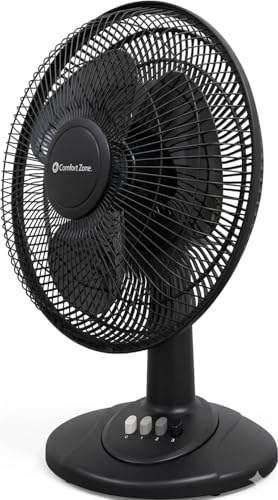
Comfort Zone CZ121BK Oscillating Table Fan
A black desktop covered with cables, notebooks, and a warm laptop doesn’t leave much room for oversized cooling equipment. Tiny fans save space, sure, but they often push a narrow breeze that disappears the moment a chair rolls back. The best 12 inch table fan needs enough reach to matter while still fitting into an ordinary bedroom, dorm, or office setup. The Comfort Zone CZ121BK takes a straightforward route with three speeds, oscillation, adjustable tilt, push-button controls, and a stated airflow speed of 7.25 feet per second.
Comfort Zone CZ121BK Table Fan
The CZ121BK uses a familiar round-head design rather than trying to look like a futuristic appliance. Its black housing blends easily with monitors, speakers, office furniture, and darker bedroom decor without drawing much attention. The 12-inch fan head gives the unit more airflow coverage than a miniature personal fan, yet it remains compact enough for a desk, dresser, or sturdy side table. Surface space still matters, though, especially once the head begins moving from side to side.
Comfort Zone provides a specific airflow figure of 7.25 feet per second. That number refers to air speed rather than guaranteed cooling distance or total room coverage, so it shouldn’t be mistaken for a promise that every corner will feel the same breeze. Furniture, fan height, selected speed, and placement all affect how the airflow behaves. Even so, the measurement offers a more concrete reference than loose phrases about powerful cooling.
The fan is intended for home, bedroom, dorm, and office use, which suits its combination of compact size and simple controls. Moving it between rooms should be less awkward than relocating a pedestal fan with a long pole and wide base. The portable tabletop format remains dependent on an electrical outlet, however, and the supplied details don’t mention battery operation. Cord placement deserves a little thought so chair wheels, pets, or passing feet don’t turn convenience into a daily nuisance.
Push Buttons Make Speed Changes Easy
Three speeds cover the usual range from mild circulation to stronger personal cooling. Low can keep air moving during quiet work or sleep, medium suits routine daytime use, and high provides the strongest breeze when the room feels especially stuffy. The low, medium, and high settings are easy to understand without decoding icons or scrolling through electronic modes. That simplicity feels refreshingly practical in a fan meant to be used several times a day.
Push buttons offer clear physical feedback, which can be handy in dim bedrooms or busy workspaces. A firm press changes the setting, and there’s no touch-sensitive panel that might ignore damp fingers or require repeated taps. The manual controls also avoid bright displays that could become distracting at night. The tradeoff is obvious: every speed change requires reaching the fan rather than using a remote from across the room.
Three settings won’t satisfy someone who wants tiny adjustments between airflow levels. Medium may feel a bit too lively at close range, while low may seem too soft from several feet away. Distance and tilt can fill part of that gap, and sometimes moving the fan back six inches does more than changing the speed. The airflow control works best as a combination of button choice, placement, and angle rather than speed alone.
Oscillation Spreads Air Beyond One Chair
A fixed fan can cool one spot beautifully and leave everything beside it untouched. The CZ121BK adds oscillating movement, allowing the head to sweep the breeze across a broader area. That wider path helps in shared bedrooms, dorm rooms, compact kitchens, and offices where movement between several nearby positions is common. It also gives the face and eyes short breaks from constant direct airflow.
Oscillation isn’t always the strongest-feeling setup. Since the breeze moves away during part of each sweep, someone sitting still at a desk may prefer locking the fan in one direction. Shared spaces gain more from the widespread airflow because several positions receive periodic cooling instead of one chair getting all of it. The useful choice depends on whether steady personal cooling or broader circulation matters more.
The head needs open space to complete its sweep properly. Monitors, walls, lamps, and stacked books can block part of the movement or interrupt the airflow before it reaches the room. Leaving clearance around the fan supports smoother oscillation and prevents the grille from bumping nearby objects. A stable table also keeps the base from shifting as the head travels from side to side.
Adjustable Tilt Corrects Poor Fan Height
Furniture height rarely cooperates with airflow. A low table may aim the breeze at the waist, while a tall dresser can send it above a pillow or chair. The CZ121BK includes adjustable tilt, which lets the head direct air upward or downward without balancing the fan on books. That mechanical flexibility helps the same unit work in several rooms with very different surfaces.
An upward angle can help move cooler air from floor level into the occupied portion of a room. Level positioning makes sense for a desk, while a downward angle works better from a higher shelf or chest. The combination of tilt and oscillation allows vertical direction and horizontal coverage to work together. Manual adjustment requires walking over to the fan, but the mechanism stays simple and doesn’t add another motor or control system.
Directing the airflow properly may reduce the need to run the fan on high. A strong breeze aimed straight at the face can feel harsh, stir papers, or dry the eyes, while a slightly angled stream may cool the same area more comfortably. The directional head gives room to experiment with placement rather than relying only on maximum speed. That’s a small detail, but it often separates comfortable circulation from an annoying blast.
Quiet Operation Supports Work And Rest
Noise tends to become more noticeable once everything else in the room settles down. A hum that disappears during daytime activity can suddenly feel intrusive during study, video calls, or sleep. Comfort Zone describes the CZ121BK motor as operating almost silently, which points toward quiet office and bedroom use. No decibel rating is supplied, so complete silence shouldn’t be assumed.
Moving air naturally creates some sound as it passes through the metal grille. Low speed should be the gentlest choice for reading or nighttime use, while high speed will likely produce more wind noise. The fan’s low-noise performance therefore depends on the chosen setting, distance, and room acoustics. Hard floors and bare walls can reflect sound more sharply than carpets, curtains, and upholstered furniture.
The surface underneath the fan can also change what the motor sounds like. Hollow desks and lightweight shelves may amplify vibration, creating a buzz that wouldn’t occur on a solid dresser. Keeping the base level supports steadier operation, while moving loose papers and cords away from the grille prevents fluttering noises. Routine dust removal can also help preserve smoother airflow and reduce rough mechanical sounds over time.
Metal Grille Adds Everyday Protection
The robust metal grille creates a physical barrier around the moving blades. That protection matters in active rooms where hands, cords, hair, or loose objects may drift close to the fan. The protective blade guard also helps block larger debris from contacting the blades. It doesn’t eliminate the need for safe placement, but it adds useful separation between the moving parts and the surrounding room.
Metal guards generally resist casual bumps better than very thin plastic grilles, though they can still bend if handled roughly. Carrying the unit by the grille may strain its attachment points or reduce clearance around the blades. Supporting the fan body and base during a move is the safer habit. The plastic base keeps the unit manageable, but this is still an indoor table fan rather than equipment meant for dusty or demanding workshop conditions.
Dust, lint, and pet hair will eventually collect on the grille, especially if the fan spends time near the floor. The provided information doesn’t explain whether the guard is removable, so effortless deep cleaning shouldn’t be assumed. A soft brush or vacuum attachment can help clear the airflow openings while the unit is unplugged. Keeping the grille clean supports airflow and reduces the chance of debris working its way toward the blade assembly.
Assembly Avoids A Toolbox Headache
Fan assembly can become surprisingly irritating when the room is already hot. The CZ121BK is designed to attach to its accompanying plastic base in a matter of minutes, with no complicated steps or tools required. That hassle-free setup removes one obstacle between unpacking and getting air moving. The included instructions should still be followed carefully so the base sits securely and the fan doesn’t wobble.
Simple assembly makes sense in dorms, temporary workspaces, or seasonal setups where the fan may be stored for part of the year. Fewer fasteners mean fewer pieces to misplace during packing and unpacking. The tool-free base attachment also avoids the common problem of searching for the correct screwdriver while sweat keeps building. Once connected, every joint should feel firmly seated before the unit is switched on.
Storage may require more room than the compact description suggests. A 12-inch grille keeps its full width even if the base can be separated, and the rounded head won’t fit neatly into a shallow drawer. Saving the packaging may protect the metal grille and fan head from dents during cooler months. Very tight closets could favor a smaller folding fan, although that choice would likely sacrifice some airflow coverage.
Airflow Works Best Within Sensible Limits
The fan moves air, but it doesn’t lower the actual temperature of the room. Its cooling effect comes from airflow across the skin and from breaking up stagnant pockets around furniture. The stated 7.25 ft/sec airflow supports personal cooling and nearby circulation rather than whole-house temperature control. That distinction matters during very hot or humid weather, when air conditioning may still be necessary.
Positioning the fan near an air-conditioning vent can help distribute cooled air beyond the immediate area around the vent. A doorway setup may also encourage movement between adjoining rooms if the airflow path stays clear. This kind of supplemental circulation may reduce the urge to lower the thermostat, though no specific energy savings are provided. Results will vary with climate, insulation, room layout, and daily habits.
Bedrooms, dorm rooms, offices, and other contained spaces are the natural fit. A large living room split by sofas, shelves, and doorways may expose the limitations of a compact table fan. The best 12 inch table fan role here is focused cooling with optional broader circulation, not replacing a whole-room system. Matching the fan to a realistic room size helps its three speeds feel useful rather than underwhelming.
Black Finish And Practical Tradeoffs
The black housing gives the CZ121BK a more understated appearance than a bright white fan on a dark desk. It should blend comfortably with common office electronics and darker bedroom furniture. The neutral black finish may hide light dust at first, although the grille will still need regular cleaning. Visual restraint is a small advantage, but it can matter in a workspace where another bright appliance would feel distracting.
The supplied features stay firmly mechanical. There’s no mention of a remote, timer, digital display, rechargeable battery, sleep program, or smart-home control. Those omissions make the push-button design less convenient from bed but easier to operate without charging accessories or navigating menus. The better choice depends on whether simple reliability or remote convenience carries more weight.
Surface dimensions deserve attention before the fan arrives. The head itself is 12 inches across, and oscillation requires extra clearance on both sides. A narrow nightstand crowded with a lamp, phone, and water glass may not provide enough room for the moving fan head. A dresser, wider desk corner, or clear shelf will allow the fan to operate with fewer obstructions.
The CZ121BK’s strongest points are its specific airflow rating, adjustable tilt, oscillation, three direct speeds, metal grille, and easy assembly. Its limitations are equally clear, including manual-only control and the absence of advanced convenience features in the supplied description. With a steady surface and a clear airflow path, the Comfort Zone CZ121BK Table Fan can handle everyday personal cooling without turning a simple task into a technical project. It’s a practical, old-school approach, and for many rooms, that’s precisely the appeal.


Best Quiet Ceiling Fan For Bedroom 2026 Ultimate Comfort Picks

Best Ceiling Fan For Master Bedroom 2026 With Ultimate Comfort

Best White Ceiling Fan With Light For Bedroom 2026 Top Picks

Best Quorum Medallion Ceiling Fan 2026 With Style & Breeze

Best Outdoor Fan For Pergola 2026 Comfort Boost

Best Ceiling Fan For Great Room 2026 With Ultimate Comfort

Best Outdoor DC Ceiling Fans 2026 For Breezy Comfort

Best ceiling exhaust bath fan with light and heater 2026





