
Best Cold Fan for Bedroom 2026: Sleep Without the Sweat

A stuffy room can turn bedtime into a nightly wrestling match with the sheets. The best cold fan for bedroom use should move enough air to ease that trapped, sticky feeling without producing a harsh draft across the face. Raw power matters, but it isn't the whole ball game. Quiet airflow, smooth speed changes, and sensible controls often make a bigger difference once the lights go out.
One common frustration is a fan that sounds tolerable during the day but becomes painfully obvious in a silent room. Motor hum, blade chopping, rattling covers, and electronic beeps can all interrupt light sleepers. A well-designed bedroom fan should create a steady sound rather than an uneven pulse that grabs attention every few seconds. Still, complete silence isn't always necessary, since a soft and consistent breeze can help mask traffic, voices, or household noise.
Airflow pattern deserves a close look, too. A narrow blast may cool one shoulder while leaving the rest of the room muggy, whereas wide oscillation spreads the breeze across the bed more evenly. Tower fans usually save floor space and distribute air vertically, while pedestal fans offer stronger directional control. Compact table fans fit tight rooms, but their shorter reach can feel limited unless they're placed on a stable nightstand or dresser.
Controls can either simplify bedtime or become one more annoyance. A remote, dimmable display, and sleep mode make late-night adjustments easier without forcing anyone to get out of bed. Timers help when a room cools naturally before dawn, preventing the fan from running longer than needed. On the flip side, bright indicator lights and loud confirmation beeps can spoil an otherwise thoughtful design, so those small details shouldn't be brushed aside.
Cooling expectations also need to stay realistic. A fan doesn't lower the room's actual temperature like an air conditioner; instead, it helps sweat evaporate and reduces the sensation of stagnant heat. That effect feels stronger when air can circulate through an open doorway or window, yet it may seem modest in a sealed room during extreme heat. Pairing steady airflow with breathable bedding, closed daytime curtains, and better nighttime ventilation usually delivers more relief than simply buying the largest fan available.
Maintenance matters because dust builds up quickly on blades, grilles, and intake vents. Removable covers or accessible filters make routine cleaning far less irritating, especially in rooms where lint and pet hair collect. A dirty fan can lose airflow and produce extra noise, so easy cleaning has a direct impact on long-term comfort. Slim tower models look tidy, but some are harder to open than traditional bladed designs.
The strongest pick ultimately balances cooling reach, sound character, space, and control rather than chasing one dramatic specification. Smaller rooms rarely need an oversized machine roaring beside the bed, while larger bedrooms may expose the weak airflow of a tiny desktop model. A thoughtful cold fan for sleeping should feel present enough to cool the body but unobtrusive enough to fade into the background. That's the sweet spot, and frankly, it matters more than flashy extras that won't be used after the first week.

- LFR Score9.4
LFR Score is a ranking system developed by lightfansreviews.com. LFR Score has no relationship or impact from any manufacturers or sales agent websites. Learn more
- BrandDREO

- LFR Score9.2
LFR Score is a ranking system developed by lightfansreviews.com. LFR Score has no relationship or impact from any manufacturers or sales agent websites. Learn more
- BrandDREO

- LFR Score9.2
LFR Score is a ranking system developed by lightfansreviews.com. LFR Score has no relationship or impact from any manufacturers or sales agent websites. Learn more
- BrandLevoit

- LFR Score9.2
LFR Score is a ranking system developed by lightfansreviews.com. LFR Score has no relationship or impact from any manufacturers or sales agent websites. Learn more
- BrandDREO

- LFR Score9.2
LFR Score is a ranking system developed by lightfansreviews.com. LFR Score has no relationship or impact from any manufacturers or sales agent websites. Learn more
- BrandGoveeLife
- LFR Score9.2
LFR Score is a ranking system developed by lightfansreviews.com. LFR Score has no relationship or impact from any manufacturers or sales agent websites. Learn more
- BrandDREO

- LFR Score9.2
LFR Score is a ranking system developed by lightfansreviews.com. LFR Score has no relationship or impact from any manufacturers or sales agent websites. Learn more
- BrandLevoit

- LFR Score8.8
LFR Score is a ranking system developed by lightfansreviews.com. LFR Score has no relationship or impact from any manufacturers or sales agent websites. Learn more
- BrandKopBeau

- LFR Score8.6
LFR Score is a ranking system developed by lightfansreviews.com. LFR Score has no relationship or impact from any manufacturers or sales agent websites. Learn more
- BrandAntarctic Star

- LFR Score8.6
LFR Score is a ranking system developed by lightfansreviews.com. LFR Score has no relationship or impact from any manufacturers or sales agent websites. Learn more
- BrandKopBeau
Last update on 2026-07-08 / Affiliate links / Images, Product Titles, and Product Highlights from Amazon Product Advertising API
Dreo PolyFan Quiet Bedroom Pedestal Fan
Rest gets harder when a room feels sticky, yet blasting air directly across the bed can be just as irritating. The Dreo PolyFan approaches the best cold fan for bedroom role by combining long-distance circulation, broad oscillation, and low-speed control in one adjustable floor unit. Its practical appeal isn't simply stronger wind. The real benefit is being able to move stale air around the room without turning one side of the mattress into a wind tunnel.
Dreo PolyFan Bedroom Fan
The PolyFan sits somewhere between a traditional pedestal fan and a compact air circulator. Its 13.07-inch depth, 7.28-inch width, and adjustable 35-to-40-inch height give it a relatively narrow footprint while keeping the airflow above low furniture. That arrangement makes sense beside a dresser, near the foot of a bed, or in a corner where a wide round base would become a toe-stubbing nuisance. It still needs clear space around the intake, though, so squeezing it tightly between furniture can limit the circulation you paid for.
Eight speed settings provide more breathing room than the usual low, medium, and high setup. The lower levels suit light nighttime circulation, while the stronger settings can push air across a larger room or help mix conditioned air after an air conditioner starts running. Three operating modes add flexibility without making the control scheme feel like a cockpit. Fine speed control is the standout here because bedroom comfort often falls between two fixed settings, with one feeling weak and the next feeling annoyingly forceful.
The fan's adjustable height also changes how the breeze lands. Raising it can send air above the mattress and encourage broader circulation, while lowering it brings airflow closer to a seated desk or low bed frame. That sounds like a small detail, but airflow placement can decide whether a fan feels soothing or bothersome after twenty minutes. The height range isn't dramatic, so it won't replace a tall commercial pedestal fan, yet it offers enough movement for normal bedroom layouts.
Wide Oscillation Without Constant Repositioning
A fixed fan tends to create two zones: one spot gets hammered by air, and the rest of the room barely notices. The PolyFan uses 120-degree horizontal oscillation to sweep air across a much wider area, which can help equalize the feel of a room instead of cooling only the person closest to it. Horizontal movement can be controlled from the fan or remote, saving the familiar late-night shuffle across a dark room. Broad coverage also works well in shared bedrooms because neither side has to claim the only useful airflow angle.
Vertical adjustment reaches up to 120 degrees, although this movement is manual rather than motorized. That distinction matters. You can aim the fan upward to circulate warmer air near the ceiling, direct it across the room, or angle it lower toward the bed, but you must set that position by hand. The manual design isn't a deal breaker, yet anyone expecting full remote control over both axes may find the limitation a little disappointing.
The combination of horizontal sweep and vertical tilt gives the fan more placement freedom than a basic oscillating pedestal model. Set near a wall, it can push air upward and outward instead of blowing straight into bedding, papers, or curtains. Indirect cooling is especially useful during sleep because it reduces the dry-eye and chilly-skin feeling caused by continuous direct airflow. Rooms with awkward furniture may still require some trial and error, but the adjustment range makes that process less frustrating.
Long-distance airflow is rated to reach as far as 85 feet under the manufacturer's stated conditions. A bedroom rarely needs that full distance, of course, but the specification suggests the fan is built for circulation beyond its immediate surroundings. Real-world reach will vary with furniture, doorways, fan speed, and placement. In plain English, don't hide it behind a chair and expect the same result as an open, unobstructed setup.
Quiet Cooling and Nighttime Control
Noise can make or break a bedroom fan, and Dreo lists operation as low as 20 dB at its quietest setting. That figure likely applies under favorable low-speed conditions rather than every mode, so stronger airflow should naturally produce more audible air movement. Even so, the brushless DC motor is a sensible foundation for smoother, quieter operation than a rougher motor that hums or buzzes at low speed. The most useful kind of quiet isn't total silence, anyway; it's a steady sound that fades into the background instead of changing pitch every few seconds.
The large LED display makes settings easy to read across the room, while the remote handles speed, modes, and horizontal oscillation from bed or a desk. Convenience matters most at 2 a.m., when getting up to change one setting feels oddly unreasonable. The included eight-hour timer allows the fan to shut off after the room cools or after sleep has settled in. That can reduce unnecessary overnight operation without forcing anyone to guess whether the fan should run until morning.
Dreo states that the DC motor produces 30 percent more air while using 40 percent less energy, based on the product information provided. Those claims are useful for understanding the design goal, though they shouldn't be treated as a universal comparison against every fan on the market. Energy savings will depend on speed, runtime, and the model being replaced. Still, a DC motor paired with multiple low-speed options is generally a practical setup for long nightly use because it offers more control than simply running a powerful AC motor at full tilt.
A separate airflow approach may suit rooms where overhead circulation is preferable, and that distinction is discussed naturally in ceiling fan options for spaces that need broader coverage without using floor area. The PolyFan remains more flexible because it can be moved, aimed, and adjusted as room conditions change. A ceiling fan, however, won't occupy a corner or require storage outside the hot season. The better format depends on whether mobility or permanent whole-room circulation matters more.
Cleaning, Setup, and Everyday Tradeoffs
Dust is the unglamorous part of owning any bedroom fan. Dreo describes the PolyFan as straightforward to install and clean, which matters because buildup on the grille and blades can reduce airflow while adding unwanted noise. Accessible cleaning helps keep performance consistent, especially in rooms with pets, open windows, or fabric-heavy bedding. Regular wiping is still required, so the fan isn't maintenance-free just because the housing looks streamlined.
The compact width and adjustable stand make placement easier, but the unit is still a floor appliance with a cord, base, and moving head. Small bedrooms may feel crowded if the only open corner also holds a hamper, nightstand, or charging station. Its slim footprint softens that problem rather than eliminating it. Careful cord routing is also worth the extra minute, particularly around walkways used in the dark.
Three modes and eight speeds give the fan plenty of flexibility, though some people will use only two or three favorite settings after the novelty wears off. More controls aren't automatically better if the buttons feel confusing, but the remote and display should make routine adjustments fairly direct. The practical win is having a gentle setting for sleep, a stronger one for hot afternoons, and broader oscillation when the whole room feels stagnant. Useful range beats flashy complexity, and this feature set mostly stays on the right side of that line.
The biggest limitation is that this remains a fan, not an air conditioner. It won't reduce room temperature on its own, remove humidity, or rescue a sealed bedroom during severe heat. What it can do is improve evaporation, distribute cooler air from another source, and prevent warm pockets from settling around the bed. Realistic expectations make the PolyFan easier to appreciate because its strength lies in controlled circulation, not artificial refrigeration.
Where th hãy kiểm tra lại bạn đã tạo hyperlink chưa. Lưu ý yêu cầu: Create hyperlink as below rules. In addition, always add relevant CTA hyperlink or relevant hook before hyperlink to increase interaction. Structrue CTA or hooks ANCHOR_TEXT. Only 1 hyperlink in the response. I will provided you url part. "Here is list link:" Anchor text selected a 2–6 word phrase (or longer only if it reads more naturally) that still clearly represents the path topic. Rewrite full response with hyperlinke Dreo PolyFan Fits Best
The PolyFan makes the strongest case in rooms where quiet operation and flexible airflow matter equally. Light sleepers can use lower speeds, shared bedrooms benefit from wide horizontal movement, and changing the vertical angle helps avoid a constant stream across faces or bedding. Its 120-degree oscillation is more valuable than raw force in these situations. The fan can cool the body's immediate environment while still circulating air beyond one narrow lane.
Larger bedrooms may benefit from the rated long-distance airflow, especially when the fan is used to move conditioned air from one side of the room to another. Open doors and uncluttered pathways will help, while tall furniture can interrupt the flow. The fan may also serve a home office during the day, making its adjustable height and remote more useful outside bedtime. That versatility helps justify the floor space for anyone who dislikes storing a single-purpose appliance most of the year.
A basic fan may be the smarter buy when only one speed, direct airflow, and a low purchase price matter. The PolyFan's extra settings, DC motor, remote, oscillation range, and timer are worthwhile only if those features solve real annoyances. Someone who never changes the angle or speed could end up paying for controls that sit untouched. The main strength is adaptability, while the main weakness is that the added capability may be unnecessary in a tiny room with simple cooling needs.
For the best cold fan for bedroom search, this Dreo model stands out less as a machine that creates cold air and more as a careful manager of the air already in the room. Quiet low-speed operation, broad horizontal movement, manual vertical aiming, and an eight-hour timer address the small details that often disturb sleep. The design isn't flawless, particularly if full motorized vertical control or true temperature reduction is expected. Still, its combination of quiet circulation, adjustable coverage, and practical bedside control makes it a thoughtful option for cooling without constant fiddling.
Dreo Nomad One Quiet Tower Fan
Summer sleep can go sideways fast when warm air hangs over the bed and a bulky fan eats up the last open patch of floor. The Dreo Nomad One tackles the best cold fan for bedroom role with a slim 36-inch body, concentrated airflow, and controls designed for late-night adjustments. It doesn't refrigerate the room, but its rated 24 ft/s air velocity can create a brisk cooling sensation while helping conditioned air travel farther. That distinction matters because this is a circulation tool, not a substitute for an air conditioner during severe heat.
Dreo Nomad One Tower Fan
The Nomad One packs its airflow system into a vertical housing that takes up less usable space than a traditional pedestal fan with a broad circular head. Its compact tower shape slips more naturally beside a dresser, desk, or narrow bedroom corner where furniture already feels packed shoulder to shoulder. A hidden handle makes moving it between rooms less awkward, and the remote has a built-in storage compartment rather than becoming another small object lost under the bed. The floor-standing design still needs an open intake area, so burying it behind curtains or laundry will work against the airflow.
Dreo states that the motor and airflow path can deliver air at up to 24 feet per second. That number describes outlet velocity rather than a guaranteed cooling result across every room, since furniture, distance, speed selection, and room layout all affect what reaches the bed. Even so, concentrated velocity can help the breeze feel noticeable without parking the fan inches from the mattress. The practical payoff is stronger perceived cooling from a placement that doesn't crowd the bedside.
Four speeds cover a useful range from gentle circulation to a much firmer stream of air. A basic three-speed fan can leave an uncomfortable gap between barely there and too aggressive, while the extra step offers a little more control. The Nomad One isn't overloaded with tiny speed increments, though, which keeps daily operation straightforward. Its four-speed balance suits anyone who wants meaningful adjustment without tapping through a long menu every night.
Fast Airflow With Wider Room Coverage
Direct airflow feels refreshing for a few minutes, but keeping it fixed on one shoulder all night can become chilly and irritating. The Nomad One uses 90-degree oscillation to move its breeze across a broader part of the room rather than drilling into a single spot. That sweep can serve both sides of a bed, circulate air around nearby furniture, and reduce pockets of still warmth. It won't provide the nearly room-spanning rotation of some wider-angle models, but 90 degrees is a sensible range for most straightforward layouts.
The calibrated airflow path is intended to carry the moving air beyond the immediate area around the fan. Paired with an air conditioner, that circulation may distribute cooled air more evenly instead of letting it collect near one vent or one side of the room. Air-conditioner support is one of the fan's more practical jobs because a steady breeze can make a higher thermostat setting feel more tolerable. Actual energy savings will depend on climate, insulation, thermostat choices, and daily runtime, so the fan itself can't promise a particular reduction.
Placement changes the experience more than many feature lists admit. Set the tower where its oscillating arc remains clear, and the breeze can sweep across the sleeping area without needing constant repositioning. Tuck it behind a tall chair, and part of that airflow will simply hit furniture. The slim profile gives you more placement choices, but smart positioning still separates effective circulation from a lot of motor noise aimed at a nightstand.
Bedrooms that rely on overhead airflow involve a different set of space and coverage tradeoffs, and a useful related reference appears in contemporary bedroom ceiling fans. A ceiling-mounted design frees the floor and circulates from above, while the Nomad One can be carried, redirected, and stored as needs change. The tower format also avoids permanent installation, which suits rentals or rooms with limited ceiling clearance. The key difference is portable directional cooling versus fixed overhead circulation.
Sleep Features That Address Small Annoyances
Fan noise becomes more noticeable after the room goes dark and everything else settles down. Dreo uses an algorithmic impeller design and its described Conada effect to reduce disruptive sound while maintaining airflow. The supplied information doesn't state one fixed decibel rating for every setting, so it would be misleading to call all four speeds silent. A more realistic expectation is that lower settings should suit sleep better, while the strongest speed will produce more audible air movement.
Sleep mode deals with more than motor sound. The fan can automatically mute control sounds and turn off the display, removing two common irritations that rarely seem important until they're glowing or beeping beside the bed. That display auto-off feature is especially welcome in dark rooms where even a small panel can cast unwanted light. Auto mute also means changing a setting at night won't announce the decision to everyone nearby.
The eight-hour timer offers enough range for a typical sleep period or a shorter cooling session before dawn. It can prevent the fan from running after the room becomes comfortable, and it removes the need to wake up solely to switch the unit off. Timer use can also help on mild nights when continuous airflow eventually feels too cool. The limit is simple: anyone who sleeps longer than eight hours and wants nonstop circulation will need to leave the timer unused.
The remote handles adjustments without forcing a trip across the room, while the top control panel remains available when the remote isn't within reach. That two-way setup sounds ordinary, yet it solves a real bedtime nuisance. Buttons on the unit prevent the fan from becoming useless when the remote hides in a blanket fold, and the storage compartment gives it a proper home during the day. Bedside control is hardly glamorous, but it can matter more in practice than a flashy mode that rarely gets touched.
Four Modes Without Needless Complexity
Normal mode provides steady airflow at the selected speed, making it the most predictable setting for direct cooling. Natural mode varies the breeze, which can feel less relentless than one unchanging stream. Sleep mode softens the fan's nighttime behavior through muted operation and display management, while Auto mode adjusts performance according to its programmed response. The four-mode layout gives each setting a recognizable purpose rather than filling the panel with novelty labels.
Natural mode won't suit every sleeper. Some people enjoy shifting airflow because it feels more like an open-window breeze, while others notice every rise and fall and prefer the consistency of Normal mode. There's no universally correct choice here. The useful part is having both steady airflow and variable airflow available without manually changing speeds throughout the evening.
Auto mode can reduce button pressing as room conditions change, although automatic behavior may not always match personal comfort at a given moment. Temperature sensors respond to the surrounding air, not whether someone's feet feel warm under a heavy blanket. Manual control remains valuable for that reason. The fan's strength lies in offering automation without locking out direct adjustments from the panel or remote.
Four speeds and four modes create several combinations, but the interface remains more approachable than a fan packed with app menus and elaborate scheduling. Most nights will probably settle into a few favorite settings, and that's perfectly fine. Extra capability earns its keep only when it addresses a real change in weather, noise tolerance, or room use. The Nomad One's simple customization stays broad enough to be useful without turning cooling into homework.
Cleaning and Safety Details That Matter
Tower fans often look neat from the outside while collecting dust in places that are maddening to reach. The Nomad One addresses that problem with a removable rear grille and accessible impeller wheel. Easier access can make routine cleaning more thorough, helping prevent lint buildup from restricting airflow or adding rough mechanical noise. The parts still need careful handling and proper reassembly, so accessible doesn't mean careless.
Regular cleaning becomes especially important in bedrooms filled with fabric, pet hair, open-window dust, or carpeting. A quick exterior wipe won't remove everything that settles inside the airflow path. Being able to reach the grille and impeller makes seasonal maintenance less of a wrestling match. That serviceable design is a meaningful advantage over sealed-looking towers that leave owners poking through narrow slots with a brush.
Dreo lists fingertip pinch-proof grilles, a fused plug, and built-in circuit protection among the safety features. The model is also described as ETL listed in the supplied product information. These measures don't remove the need for basic electrical care, such as keeping the plug dry, avoiding damaged cords, and using the fan on a stable surface. They do, however, show attention to common concerns around moving internal parts and household electrical faults.
The tall, narrow body saves floor area, though any tower fan can be bumped if placed in a busy walkway. A bedroom corner or a spot beside sturdy furniture usually makes more sense than the edge of a doorway. The hidden carrying handle simplifies relocation, but the fan should be lifted rather than dragged by its cord. Stable placement and clear intake space will do more for everyday safety and performance than constantly shifting it around clutter.
Strengths, Weaknesses, and Realistic Cooling
The main strength is the way several bedroom-friendly features work together: a compact body, 90-degree oscillation, remote operation, display shutoff, muted Sleep mode, and an eight-hour timer. None of those details is unusual by itself. Combined, they reduce the annoying little interruptions that can turn a basic fan into poor company at night. The strong rated outlet velocity also gives the unit enough muscle for daytime circulation instead of limiting it to whisper-soft bedside use.
The main weakness is that the fan offers only four speeds, which may feel coarse beside models with more finely graduated settings. Ninety-degree oscillation is respectable but not especially wide for an irregularly shaped room. The tower also lacks vertical tilt, so airflow height depends largely on where the outlet sits and where the fan is positioned. Anyone who needs to aim a breeze sharply upward or downward may prefer an adjustable pedestal or circulator-style head.
A second limitation comes from the phrase “cold fan” itself. The Nomad One moves air and improves evaporative cooling, but it doesn't lower actual room temperature like refrigeration does. In humid, sealed bedrooms, the breeze may offer relief without solving the heavy, muggy feeling. Its realistic role is to circulate air, support an air conditioner, and make skin feel cooler, not manufacture cold air from warm indoor air.
The unit makes the most sense where floor space is tight, nighttime lights and beeps are unwelcome, and airflow needs change between sleep and daytime use. A cheap fixed-speed fan may be enough for a small room with one obvious placement, while this model earns its keep through flexibility and cleaner bedside operation. Its 24 ft/s rated velocity provides the force, and its modes, timer, oscillation, and remote make that force easier to live with. For the best cold fan for bedroom search, the Dreo Nomad One offers a sensible mix of brisk airflow and sleep-aware controls, provided its limited tilt and four-speed range fit the room.
LEVOIT Classic 36-Inch Bedroom Tower Fan
A warm bedroom rarely becomes uncomfortable all at once. First the pillow feels a little too warm, then the air turns still, and before long every position seems wrong. The LEVOIT Classic 36-Inch Tower Fan enters the best cold fan for bedroom discussion with a practical mix of brisk airflow, low-noise operation, and automatic nighttime adjustments. It won't chill the room like an air conditioner, but it can keep air moving across the bed without demanding constant attention.
LEVOIT Classic Bedroom Tower Fan
The 36-inch vertical body makes sense in bedrooms where floor space is already spoken for. A traditional pedestal fan needs room for a round head and wide base, while this slim tower design can sit beside a dresser, near a desk, or along a wall without dominating the layout. Its white finish also looks less visually heavy than many black floor fans in a bright room. Still, the intake and outlet need open space, so wedging it behind curtains or furniture will limit the airflow.
LEVOIT rates the maximum air velocity at 25 feet per second, giving the fan enough force for more than a faint bedside breeze. The strongest setting can help clear out stagnant air after a hot afternoon or move cooled air from an air conditioner farther across the room. That number describes air speed near the fan rather than a guaranteed result at every distance. Furniture placement, room size, and oscillation all influence how much of that airflow actually reaches the bed.
Five speed settings offer a useful middle ground between simplicity and precise control. Lower speeds suit gentle overnight circulation, while the upper range handles stuffier conditions or quick daytime cooling. The extra step beyond a four-speed design can matter because bedroom comfort often sits in an awkward gap between too soft and slightly too forceful. Five-level adjustment gives the fan a better shot at landing on a setting that feels steady without becoming distracting.
Sleep Mode That Reacts Instead of Guessing
Bedroom fans often advertise quiet operation, but sound is only one part of sleep-friendly design. LEVOIT lists noise as low as 28 dB, which should apply under quieter operating conditions rather than at full speed. Advanced Sleep Mode also shuts off the display lights, removing the small glow that can become surprisingly irritating in a dark room. The result is a fan that pays attention to both audible disturbance and visual distraction.
The more unusual feature is the way Advanced Sleep Mode uses a temperature sensor to adjust speed gradually. Instead of pushing the same airflow all night, the fan changes its output as conditions shift and the sleep period progresses. That can help prevent the familiar 3 a.m. problem where a setting that felt comfortable at bedtime becomes too chilly before dawn. Automatic adjustment won't read personal comfort perfectly, but it reduces the need to keep reaching for the remote.
A temperature sensor responds to room conditions, not blankets, body heat, or whether one side of the bed feels warmer than the other. That distinction keeps expectations grounded. Someone who prefers an unchanging breeze may still favor Normal Mode and a manually chosen speed. The sensor-guided control works best as a convenience feature, not as a replacement for personal preference.
The 12-hour timer provides more scheduling room than the eight-hour timers found on many tower fans. It can cover a full night, an extended nap, or a long work session without forcing the fan to run indefinitely. Longer timer control also helps during mild weather, when airflow is useful at bedtime but unnecessary by morning. Anyone who wants continuous circulation can simply leave the timer off.
Four Modes With Clear Everyday Roles
Normal Fan Mode keeps operation direct: choose a speed, and the fan maintains it. That predictability suits anyone who knows exactly how much airflow feels comfortable. Auto Mode takes a more hands-off approach by using temperature information to regulate output. The manual-versus-automatic choice is useful because not every evening calls for the same style of control.
Turbo Mode is built for faster relief, using the fan's stronger output when a room feels stale or overheated. It makes the most sense after returning to a closed bedroom, during a hot afternoon, or while helping an air conditioner distribute cool air. Stronger airflow naturally brings more sound, so Turbo Mode isn't likely to be the preferred setting for light sleepers. Its value lies in rapid air movement, not whisper-soft operation.
Advanced Sleep Mode takes the opposite approach by emphasizing gradual adjustment, muted lighting, and nighttime comfort. Rather than simply labeling the lowest speed as a sleep setting, LEVOIT ties the mode to changing room temperature. That's a more thoughtful use of automation, though the exact behavior may still feel too active for someone who notices every shift in airflow. The practical benefit is fewer manual changes as the room cools.
Four operating modes could sound like control-panel clutter, but each one handles a recognizable situation. Normal covers predictable daily use, Auto reduces fiddling, Turbo moves air quickly, and Advanced Sleep supports overnight operation. Most people will settle on two favorite modes and ignore the rest, which is perfectly reasonable. Useful variety matters more than using every button simply because it's there.
Oscillation and Airflow Across the Bed
A narrow stream of air can cool one arm while the rest of the room stays stuffy. The optional 90-degree oscillation spreads airflow across a wider section, helping the fan serve a double bed or circulate around nearby furniture. This sweep also reduces the harsh feeling of nonstop air landing on one spot. Ninety degrees isn't the broadest oscillation range available, but it fits many rectangular bedroom layouts without sending airflow toward an unnecessary wall.
Placement still decides whether the oscillation feels useful. Set near the foot of the bed, the fan can sweep across both sides without sitting too close to anyone's face. Positioned beside the mattress, the same arc may spend part of each cycle blowing into a nightstand or curtain. The calibrated placement matters almost as much as the motor because blocked airflow wastes much of the fan's available velocity.
The fan's vertical tower outlet distributes air across more height than a small desktop model. That helps the breeze reach a mattress without requiring the unit to sit on furniture. It doesn't offer adjustable vertical tilt, though, so the airflow angle can't be aimed sharply upward or downward. Rooms with unusually low beds or elevated sleeping platforms may require more experimentation than they would with a tilting pedestal fan.
Some bedrooms benefit more from broader airflow patterns or different tower controls, and that contrast is reflected in Honeywell whole-room tower fans as a related reference for circulating air across larger spaces. The LEVOIT model leans heavily on sensor-based sleep adjustments, a 12-hour timer, and five-speed control. Another tower design may prioritize a different balance of coverage, noise character, or interface. The meaningful question is which airflow behavior fits the room rather than which housing looks more impressive.
Remote Control and Nighttime Convenience
The LED display keeps speed and mode information visible from across the room. During the day, that clarity helps prevent guessing which setting is active. At night, Advanced Sleep Mode turns the display off so it doesn't cast light toward the bed. This combination avoids the common tradeoff between a panel that's readable and one that's annoyingly bright.
The remote handles speed, mode, timer, and oscillation adjustments without requiring a walk across the room. That sounds like a small luxury until the fan needs changing after the lights are out. Remote operation is particularly handy when the unit sits near the foot of the bed or across the room for better airflow coverage. Physical controls remain on the fan, so a misplaced remote doesn't shut down basic operation.
Automatic modes reduce dependence on the remote, but they don't make it irrelevant. Temperature-based changes may not match comfort under thick bedding, during a humid night, or when two people prefer different airflow strengths. A quick manual adjustment can solve that mismatch without abandoning the automatic features entirely. The control setup supports both hands-off operation and immediate overrides.
No app or voice-control system is mentioned in the supplied information, which may actually suit a straightforward bedroom setup. The remote avoids account setup, Wi-Fi pairing, and another phone notification. On the other hand, anyone building a connected home routine may view that simplicity as a missing feature. The LEVOIT fan stays focused on direct controls rather than adding digital layers that aren't necessary for basic cooling.
Cleaning and Assembly Without Much Fuss
Tower fans hide their moving parts neatly, yet that enclosed shape can make dust frustrating to remove. LEVOIT addresses the issue with a removable, washable back cover and access for wiping the inside of the fan. Easier cleaning helps maintain airflow and can prevent buildup from adding roughness to the fan's sound. Fabric-heavy bedrooms, pet hair, and open windows will make that maintenance more important.
The washable cover should be fully dry before reassembly and use. Internal areas still need careful wiping rather than aggressive soaking, since the fan contains electrical components. The design improves access, but it doesn't turn cleaning into a zero-effort chore. Routine maintenance remains necessary if the fan runs nightly through a long hot season.
Assembly requires snapping the base pieces together and securing them to the tower body without tools. That approach keeps setup simple, though the supplied alignment tip deserves attention. The tower should be lined up correctly before the base nut is tightened, or the finished unit may sit skewed. Taking an extra minute at this stage can prevent an awkward lean and uneven appearance later.
A narrow tower needs a properly assembled base to remain stable during oscillation. Tightening the parts carelessly or placing the fan on an uneven rug could undermine that stability. Hard, level flooring offers the cleanest setup, while thick carpet may require closer attention. The tool-free base is convenient, but careful alignment matters more than rushing through the job.
Strengths, Weaknesses, and Cooling Limits
The main strength is the combination of sleep-focused automation and useful manual range. Five speeds, four modes, a temperature sensor, display shutoff, remote control, and a 12-hour timer address the everyday annoyances that basic fans tend to ignore. The rated 25 ft/s maximum velocity also gives the fan enough power for quicker daytime circulation. It isn't limited to a barely noticeable nighttime whisper.
The main weakness is the lack of vertical tilt. Horizontal oscillation spreads air from side to side, but the outlet angle remains fixed by the tower's design and placement. Ninety-degree coverage may also feel restrictive in an unusually wide room or an open-plan space. A pedestal circulator with adjustable tilt would offer more directional freedom, though it would usually occupy more floor area.
Automatic adjustment can be helpful, but it may frustrate anyone who wants the fan to behave exactly the same all night. Temperature doesn't tell the whole comfort story, especially with humidity, heavy blankets, or changing body heat. Normal Mode solves that issue by preserving manual control. The biggest difference is that this model gives automation as an option rather than forcing it.
The phrase best cold fan for bedroom can create an unrealistic expectation because the LEVOIT doesn't generate refrigerated air. It improves the cooling sensation by moving air across the skin and can help distribute air from an existing cooling system. During severe heat or high humidity, it won't replace air conditioning or dehumidification. Its strongest role is delivering controlled bedroom airflow with fewer light, noise, and adjustment annoyances throughout the night.
Dreo Cruiser Pro T1 Tower Fan
A bedroom can feel stubbornly warm even after the thermostat drops, especially when cooled air settles in one area and never reaches the bed. The Dreo Cruiser Pro T1 approaches the best cold fan for bedroom role with a tall airflow outlet, six speed settings, and room-spanning oscillation rather than relying on one sharp stream. Its 42-inch frame is larger than many compact tower fans, yet that extra height helps move air across more of the body while standing on the floor. The practical goal is simple: circulate stale air quickly, then dial the breeze back once the room feels livable.
Dreo Cruiser Pro T1
The Cruiser Pro T1 uses a narrow tower shape instead of the broad head and exposed blades found on a standard pedestal fan. That layout preserves more usable floor area beside beds, desks, and dressers, although the 42-inch height makes the fan visually noticeable. Its extended vertical outlet is useful near taller mattresses because the airflow doesn't stay trapped around ankle level. The fan still needs an open intake area, so pushing it tightly against curtains or furniture will choke the circulation.
Dreo states that the motor can spin at up to 1,350 RPM and move air as far as 29.5 feet under the manufacturer's stated conditions. That reach sounds generous for a bedroom, but obstacles, fan speed, and placement will affect how much air actually travels across the space. A clear path toward the bed will produce a better result than hiding the unit behind a chair. The figure is best treated as a sign of long-range intent, not a promise that every room will feel identical.
Air enters from the back and sides, allowing the internal system to draw in more room air before sending it forward. That approach can help the fan circulate rather than merely create a narrow breeze close to the grille. The multi-directional intake also makes clear space around the housing more important than it might seem. A slim body saves room, but it shouldn't be wedged into a slot with nowhere to breathe.
Six Speeds Make Small Adjustments Easier
Three-speed fans often create an irritating choice between weak airflow and a setting that feels too aggressive for sleep. The Cruiser Pro T1 offers six speed levels, giving more room to adjust the breeze as the bedroom warms or cools. Lower settings can maintain gentle circulation without hammering the face, while stronger levels help clear stagnant heat after the room has been closed all day. That wider range is one of the fan's most useful strengths because nighttime comfort rarely stays fixed for eight straight hours.
The stronger settings suit hot afternoons, workout rooms, or moments when an air conditioner has just started and cooled air needs help spreading. Once the temperature becomes more comfortable, stepping down to a lower speed can reduce sound and prevent the breeze from feeling chilly. This kind of staged cooling makes more sense than leaving the fan at full force until someone wakes up cold. Six levels won't guarantee the exact perfect setting, but they offer finer control than a basic low-medium-high layout.
More speed choices do add a few extra button presses. Anyone who prefers a dead-simple control panel may end up using only two favorite settings and ignoring the rest. That's hardly a flaw if those levels solve the problem, but it does mean the feature count shouldn't be mistaken for constant usefulness. The real advantage is having options available when weather and room conditions change, not feeling obligated to cycle through all six every night.
The fan doesn't produce refrigerated air, despite the cooling language used around bedroom fans. Moving air helps sweat evaporate and can make the body feel cooler, but it won't lower humidity or reduce the room's actual temperature by itself. Pairing the fan with an air conditioner can improve circulation and reduce warm pockets around furniture. Its strongest role is air distribution, not replacing mechanical cooling during severe heat.
Quiet Airflow Without a Rough Motor Hum
Noise is rarely just about volume. A steady rush of air may fade into the background, while a faint rattle or changing motor pitch can keep pulling attention back to the fan. Dreo describes the Cruiser Pro T1 as using an acoustically designed airflow system and hyper-precision bearing to reduce motor and fan noise across its speeds. No exact decibel figure is provided in the supplied details, so claiming a specific loudness level would go beyond the information available.
The phrase “quiet at all speeds” still deserves realistic interpretation. Higher speeds move more air, and moving air naturally creates more audible sound even when the motor remains smooth. The important distinction is whether that sound stays even or develops buzzing, knocking, and rough mechanical notes. The precision bearing design is intended to address those distracting noises rather than make powerful airflow physically silent.
Sleep Mode takes a practical approach to nighttime disruption by muting the controls and turning off the display after 15 seconds. That short delay leaves enough time to confirm the selected setting before the room goes dark again. The display shutoff matters more than it sounds because a glowing panel can become surprisingly bright once every lamp is off. Muted button feedback also prevents a midnight adjustment from announcing itself across the bedroom.
Light sleepers may still prefer one of the lower speeds, while people who use a fan as background sound might enjoy the stronger airflow. There isn't one universally comfortable noise level. Bedding, distance from the bed, and room acoustics all change how the fan sounds in practice. Placing the unit several feet away and using oscillation can soften the sensation without sacrificing whole-room circulation.
Four Modes Cover Different Cooling Habits
Normal Mode provides steady airflow at the chosen speed, which is useful when consistency matters more than automation. Natural Mode varies the output to create a less uniform breeze, though some sleepers may notice those shifts rather than relax into them. Sleep Mode focuses on muted operation and a darkened display. Auto Mode handles adjustments with less button pressing, giving the fan a broader range of behavior than speed control alone.
Natural Mode can make airflow feel less relentless during long sessions. A changing breeze may reduce the numb or dry feeling caused by one continuous stream landing on the same area. On the other hand, anyone sensitive to changing sound may prefer the predictability of Normal Mode. The setting works best as an option rather than a feature everyone is expected to love.
Auto Mode is helpful when room conditions shift through the evening, although automatic decisions won't always match the comfort beneath a thick blanket. Sensors react to surrounding conditions, not warm feet, body temperature, or personal preference. Manual control remains useful for those moments. The mode flexibility lets the fan handle routine changes without taking away direct adjustment.
Four modes and six speeds create plenty of combinations, but the controls remain grounded in recognizable tasks. One setting handles steady airflow, another varies it, one supports sleep, and one reduces manual input. That's easier to live with than a panel full of vaguely named effects. The fan offers practical customization without depending on an app or a complicated setup process.
Wide Oscillation and a Taller Airflow Path
A fixed tower fan can cool one strip of the room while leaving the opposite side untouched. The Cruiser Pro T1 uses 90-degree oscillation to sweep air across a wider area, which is useful for a double bed, shared workspace, or furniture layout that traps warm pockets. The motion also prevents one person from taking the full breeze continuously. Ninety degrees isn't unusually broad, but it covers a practical arc for many rectangular bedrooms.
The internal fan wheel measures 530 millimeters, according to the supplied product information. Its longer shape allows the tower to release air across more vertical space at once rather than concentrating everything through a small outlet. That extended airflow zone can feel more natural across the body while sitting or lying down. It also makes the 42-inch height functional rather than merely decorative.
Horizontal coverage doesn't solve every placement problem. The tower lacks the obvious vertical tilt of a pedestal fan, so changing airflow height mostly depends on where the unit stands and how the outlet aligns with the bed. Very low mattresses or unusually high platforms may expose that limitation. A fan with an adjustable head offers more aiming freedom, though it usually takes up additional floor space.
Compact tabletop airflow follows a different pattern, and the tradeoff appears naturally in Honeywell turbo table fans, which focus on concentrated circulation from a smaller placement area. The Dreo tower spreads air across a taller outlet and wider oscillating arc, while a table fan can be aimed more directly from a shelf or desk. Neither format wins every room. The meaningful difference is broad floor-standing coverage versus compact directional airflow.
Timer, Remote, and Everyday Bedroom Use
The 12-hour timer gives the Cruiser Pro T1 enough range for a full night, a long workday, or a shorter pre-sleep cooling period. That extended window is useful for anyone who doesn't want the fan shutting down after eight hours. It can also prevent unnecessary operation after the coolest part of the morning arrives. Continuous airflow remains available by leaving the timer disabled.
Remote operation keeps speed, mode, oscillation, and timer changes within reach of the bed. This feature earns its keep after lights-out, when walking across the room for one small adjustment feels like a chore. The LED display shows the active settings clearly before Sleep Mode darkens it. Bedside control and automatic display shutoff work together better than either feature would alone.
A tall tower fan can serve more than one room, but portability depends on weight, carrying design, and available storage. The supplied details don't provide a specific weight or describe a carrying handle, so portability shouldn't be overstated. Moving it occasionally between a bedroom and office may be reasonable, yet this isn't a tiny desk fan tucked under one arm. Its 42-inch frame is meant to stand in the room, not disappear into a drawer.
Placement near a doorway can help move conditioned air between spaces, although the cord and base shouldn't create a nighttime trip hazard. A level surface will also keep oscillation steady and reduce wobbling. The tower shape consumes less width than many pedestal fans, but it still claims a permanent patch of floor. Careful placement supports both safer movement and better airflow.
Strengths, Weaknesses, and Best-Fit Rooms
The main strength is the balance between strong airflow and fine control. Six speeds, four modes, a tall outlet, 90-degree oscillation, remote access, and a 12-hour timer cover most bedroom cooling routines without requiring connected-home features. The display's 15-second shutoff also addresses a small but genuine sleep annoyance. Together, these features make the fan easier to adapt as nighttime conditions change.
The main weakness is limited directional aiming. Horizontal oscillation spreads air from side to side, but the fixed tower outlet can't be tilted toward a ceiling, low mattress, or specific vent. The 42-inch body may also feel oversized in a cramped bedroom, even though its footprint remains narrow. A smaller tower or adjustable circulator could fit better where every inch counts.
Another tradeoff lies in the number of settings. Six speeds and four modes are useful for changing conditions, but a basic fan can handle straightforward direct cooling with fewer controls and a lower learning curve. The Cruiser Pro T1 makes more sense when quiet operation, broader coverage, and nighttime convenience solve recurring frustrations. Its added flexibility has value only when those features will actually be used.
For the best cold fan for bedroom search, the Dreo Cruiser Pro T1 offers controlled air movement rather than actual cold production. Its rated 29.5-foot reach, 1,350 RPM motor, elongated fan wheel, and wide oscillation are designed to circulate air beyond the immediate area around the housing. Sleep Mode, six speeds, and the long timer make that airflow easier to manage overnight. The fan fits bedrooms that need strong circulation with fewer light and noise distractions, provided the fixed vertical direction and tall body suit the available space.
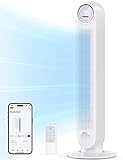
GoveeLife 42-Inch Smart Tower Fan
Hot bedrooms have a sneaky way of becoming uncomfortable long before the thermostat looks alarming. Air sits still around the bed, one corner feels warmer than the rest, and a basic fan often leaves you choosing between barely noticeable airflow and a full-force blast. The GoveeLife 42-Inch Smart Tower Fan enters the best cold fan for bedroom conversation with 12 speeds, app control, broad oscillation, and sensor-based automation. Its appeal isn't simply that it blows harder, but that it gives much finer control over how, where, and when that airflow moves.
GoveeLife Smart Tower Fan
The 42-inch body gives this fan a taller airflow path than many compact tower models. That extra height can help distribute air across more of the body while you're sitting at a desk or lying on a raised mattress. Its vertical tower shape also keeps the footprint narrow, which is helpful in rooms crowded with nightstands, dressers, charging cables, and laundry baskets. The fan still needs open space around its intake, so squeezing it behind curtains or furniture would undercut the circulation.
GoveeLife lists airflow reaching up to 26 feet per second, placing this model firmly in the brisk-cooling category rather than the faint-breeze camp. That rating describes maximum air velocity under stated conditions, not a guaranteed sensation at every point in the room. Distance, furniture, oscillation angle, and speed selection all change how much air reaches the bed. Even so, the available force should be useful for clearing stagnant warmth before switching to a quieter nighttime setting.
The product is built around a brushless DC motor, which is intended to reduce turbulence while supporting smoother speed changes. That matters because a bedroom fan can be technically quiet yet still irritating if the motor whines, pulses, or changes pitch. GoveeLife states operation can be as low as 27 dB, though the quietest figure should reasonably be associated with gentler settings rather than maximum airflow. A steady low-speed sound is often easier to ignore than an uneven mechanical hum.
Twelve Speeds Offer Unusually Fine Control
Twelve speed levels may sound excessive at first, but bedroom comfort often lives in tiny differences. One setting can feel too weak, while the next step on a basic fan leaves your eyes dry or your shoulders cold. The 12-speed range gives more room to settle on a breeze that feels present without becoming intrusive. That precision is especially useful overnight, when temperature and comfort tend to shift gradually rather than all at once.
The lower settings suit gentle circulation near the bed, while the upper levels are better for hot afternoons, post-workout cooling, or helping conditioned air travel farther. You don't need to use every speed, and most people will probably settle on a handful of favorites. Still, having a broad range means the fan can behave very differently depending on the room and season. The main benefit is flexibility, not the novelty of tapping through twelve buttons.
Five modes add another layer of control beyond raw speed. Different operating patterns can support steady airflow, changing breezes, sleep routines, or sensor-guided adjustments, depending on the selected mode. That variety works best for people who enjoy tailoring their environment rather than leaving the fan on one setting all summer. The tradeoff is a steeper learning curve compared with a simple three-button model.
More options can occasionally feel like too much of a good thing. A guest or less technical user may prefer a straightforward physical control rather than navigating multiple modes and app settings. Fortunately, the fan isn't dependent on one single control method. The combination of panel control, app access, and voice compatibility gives several ways to operate it according to personal preference.
Adjustable Oscillation Changes Room Coverage
Most tower fans offer one fixed oscillation angle, but this model supports symmetric oscillation from 30 degrees to 150 degrees. That adjustable range is a meaningful distinction because not every room needs the same sweep. A narrow angle can keep airflow focused around one side of the bed, while a wider setting can serve a shared room or distribute air across a larger living area. The ability to choose the arc reduces wasted airflow toward empty walls.
A 150-degree sweep gives the fan much broader coverage than the standard 90-degree movement found on many tower units. In a larger bedroom, that can help circulate air around furniture and reduce warm pockets near corners. A smaller sweep, on the other hand, may feel better during sleep because the breeze returns more frequently to the occupied area. The adjustable coverage lets the fan adapt instead of forcing one oscillation pattern on every setup.
Placement still matters. A wide sweep loses much of its value if half the arc is blocked by a dresser, curtain, or doorway. Setting the fan where its outlet has a clear path toward the sleeping area will improve the useful reach. Its tall body helps, but no oscillation system can push air cleanly through solid furniture.
Overhead circulation creates a different airflow pattern, and a related room-planning reference appears in modern farmhouse ceiling fans for bedrooms where floor space is limited. A ceiling fan spreads air from above and stays permanently installed, while the GoveeLife tower can be repositioned, narrowed to a smaller sweep, or carried between rooms. The practical difference is fixed whole-room airflow versus flexible directional circulation. Each format solves a different space problem.
Smart Controls Add Real Convenience
The fan connects to the GoveeLife app and supports Alexa, Google, and Siri compatibility. That means speed, mode, oscillation, and scheduling can be adjusted without reaching for the physical panel. Voice control is particularly handy at bedtime, when the remote is across the room or the lights are already off. The feature also fits households where several smart devices are managed through one routine.
The Wi-Fi limitation deserves attention because 5 GHz Wi-Fi isn't supported. The fan requires a compatible 2.4 GHz connection, which is common for smart-home products but can create setup friction on networks that combine bands automatically. That isn't a problem for every router, yet it's worth knowing before assuming the device will pair instantly. A smart fan is only convenient once the connection behaves reliably.
App control can go beyond simple on-and-off commands by helping different GoveeLife devices work together. Paired routines may allow the fan to react to environmental information instead of waiting for manual changes. This is where the model separates itself from ordinary remote-controlled towers. The smart ecosystem support has the most value for someone already using compatible sensors or voice assistants.
Smart features aren't essential for basic cooling, and they may feel unnecessary in a guest room or rarely used office. Physical controls still matter because internet connections fail and phones run out of battery. The fan's connected functions should be viewed as an extra layer of convenience rather than the only usable interface. That balance keeps the product practical even for mixed-tech households.
Temperature Sensing and Thermostat Functions
A built-in sensor supports basic thermostat behavior, allowing the fan to respond to room temperature rather than running blindly at one level. That can reduce the need for constant manual changes as the bedroom cools during the night. The automatic temperature response is useful for sleepers who tend to wake up either overheated or uncomfortably chilled. It doesn't measure how warm someone feels under a blanket, but it does provide a more informed starting point.
Pairing the fan with a compatible GoveeLife thermo-hygrometer expands the environmental monitoring. Supported models include the H5075, H5179, H5100, H5074, H5174, H5102, H5051, H5052, H5071, H5072, H5101, H5177, H5103, H5106, and B5178. With compatible data, the system can use calculated recommended fan speeds based on temperature readings. That broader setup makes the fan more responsive than a standalone unit using only its onboard sensor.
Sensor-driven control still has limits. Temperature readings don't account for mattress heat, heavy bedding, humidity discomfort, or two people with different preferences. The fan may choose a sensible speed for the room while one sleeper still feels too warm. Manual adjustments remain valuable, so automation should be treated as assistance rather than perfect judgment.
The thermostat function is most useful in rooms where temperature changes steadily over several hours. It may help the fan start stronger, then settle into a softer breeze as the air cools. That can reduce unnecessary noise and prevent overcooling without requiring someone to wake up and adjust settings. For users who dislike fiddling with controls, this is one of the model's more practical strengths.
Quiet Cooling With Adjustable Ambient Light
GoveeLife lists noise levels as low as 27 dB, making the fan suitable for quiet bedrooms under appropriate settings. The brushless motor is designed to minimize turbulence, which may help the sound remain smooth rather than rough or choppy. Stronger speeds will naturally create more audible airflow, so maximum cooling shouldn't be mistaken for near silence. The realistic advantage is a broader quiet range, not an absence of sound at full power.
The ambient light adds a feature that many fans skip. Adjustable colors can create a soft bedside glow, replace a harsh overhead light during late-night movement, or match an existing room setup. Some sleepers will enjoy that atmosphere, while others will want the light completely off. The adjustable lighting is useful precisely because it can support different preferences rather than forcing one bright display into the room.
Light features can also become clutter if they're difficult to control or remain active during sleep. App access makes color and brightness adjustments easier, though relying on a phone for every change may feel excessive. The best use is likely subtle, low-level illumination rather than turning the fan into the visual center of the bedroom. It should support rest, not compete with it.
The quiet motor, adjustable light, and speed range work together better than they would separately. A soft airflow level paired with dim lighting can create a calmer bedtime environment without sacrificing ventilation. On hotter nights, the light can stay off while the airflow increases. That flexibility gives the fan a more nuanced bedroom role than a basic appliance that only moves air.
Cleaning and Aromatherapy Features
Tower fans tend to collect dust inside narrow housings, where cleaning can become a tedious chore. This model includes a removable grille and accessible impeller wheel, making internal maintenance more manageable. Regular cleaning helps preserve airflow and prevents lint from adding roughness to the sound. Bedrooms with pets, carpeting, or open windows will likely need more frequent attention.
The removable parts don't make the fan maintenance-free. Dust still settles along the outlet, intake, and internal surfaces, especially during long periods of daily use. Proper reassembly is also important after cleaning. The accessible design simply reduces the frustration compared with sealed towers that offer little internal access.
An aromatherapy box provides space for adding essential oils, allowing airflow to carry a light scent through the room. Some people may enjoy that feature during relaxation or bedtime routines. Others may prefer unscented air, particularly around allergies, pets, or fragrance sensitivity. The aromatherapy option is best treated as optional atmosphere rather than a core cooling function.
Essential oils should be used cautiously and only in the designated compartment rather than placed on internal fan parts. Too much fragrance can become overwhelming once the airflow distributes it through the room. A small amount is likely to feel more balanced. The feature adds personality, but it doesn't replace proper ventilation or air purification.
Strengths, Weaknesses, and Realistic Use
The main strength is control. Twelve speeds, five modes, adjustable oscillation up to 150 degrees, app access, voice compatibility, sensor functions, and a 24-hour timer give this fan far more flexibility than a standard tower model. It can be set for narrow bedside airflow, wide room circulation, automated temperature response, or scheduled operation. That range suits changing routines and shared spaces particularly well.
The main weakness is complexity. Setup may take longer, especially for users unfamiliar with 2.4 GHz Wi-Fi, smart-home pairing, or sensor integration. The feature list also creates more choices than some people need. A simpler tower fan may be easier to live with in a room where one speed and one oscillation setting are enough.
The 42-inch height and broad oscillation fit medium or larger bedrooms better than cramped spaces with no clear floor area. Its tower footprint remains narrow, but the fan still needs enough room to draw air from the sides and back. The fixed vertical outlet also lacks the directional tilt of a pedestal circulator. The tradeoff is broad horizontal coverage instead of precise upward or downward aiming.
The fan is described as ETL certified, which indicates compliance with the stated safety standard in the supplied product details. That certification doesn't remove the need for proper placement, dry electrical connections, and clear airflow paths. It does add reassurance for a device intended to run for long periods indoors. The 24-hour timer can also help manage runtime without relying entirely on memory.
For the best cold fan for bedroom search, the GoveeLife model stands out for intelligent control rather than actual cold production. It circulates air, improves evaporative cooling, and can help distribute air from an existing air conditioner, but it doesn't lower humidity or refrigerate the room. Its strongest fit is a bedroom where fine airflow adjustment, wide oscillation, and connected automation will be used regularly. Someone seeking a simple plug-in fan may see unnecessary complexity, while a smart-home user may appreciate how thoroughly the settings can be tailored.


Best Quiet Ceiling Fan For Bedroom 2026 Ultimate Comfort Picks

Best Ceiling Fan For Master Bedroom 2026 With Ultimate Comfort

Best White Ceiling Fan With Light For Bedroom 2026 Top Picks

Best Quorum Medallion Ceiling Fan 2026 With Style & Breeze

Best Outdoor Fan For Pergola 2026 Comfort Boost

Best Ceiling Fan For Great Room 2026 With Ultimate Comfort

Best Outdoor DC Ceiling Fans 2026 For Breezy Comfort

Best ceiling exhaust bath fan with light and heater 2026





