
Best Cooling Desk Fan 2026: Small Fan, Serious Air

A stuffy desk can turn an ordinary afternoon into a slow, sticky slog. The best cooling desk fan fixes that problem with focused airflow that reaches your face and upper body without blasting papers across the room. Compact dimensions matter, but a tiny footprint alone won't guarantee comfort. A useful model also needs a stable base, sensible controls, and enough airflow to make a noticeable difference from a normal seated distance.
Airflow control deserves more attention than raw power because full speed isn't always the setting you'll use. A softer breeze works better during video calls, reading, or detailed work, while a stronger setting helps after a warm commute or during the hottest part of the day. Multiple speed levels let the fan adapt instead of forcing one noisy, aggressive stream of air. Better still, a tilting head or adjustable angle keeps the breeze where it's needed rather than cooling a keyboard, coffee mug, or stack of notes.
Noise can make or break the experience, especially in a quiet room. A constant mechanical buzz gets old fast, and rattling plastic is even worse when concentration is already hanging by a thread. A well-designed quiet desk fan produces a smooth background hum that fades into the room rather than competing with calls, music, or thought. Still, maximum speed usually sounds louder, so realistic expectations matter if silence is the top priority.
Power options shape how convenient the fan feels from day to day. A USB-powered fan works neatly beside a laptop, docking station, or power bank, though some USB ports may not deliver enough power for peak performance. Rechargeable models clear away cable clutter and travel easily between a desk, kitchen counter, and bedside table. The catch is simple: batteries need charging, and airflow may weaken as the charge drops on cheaper designs.
Cleaning is another detail that's easy to shrug off until dust starts clinging to the grille and blades. Removable front covers make routine care less of a chore, while sealed housings can leave dirt trapped in awkward corners. Dust buildup doesn't just look shabby; it can also reduce airflow and add an irritating smell to the breeze. A quick wipe every week or two keeps a personal cooling fan running more smoothly, particularly in rooms with pets, open windows, or fabric-heavy furniture.
Desk space brings its own tradeoffs. A broad base tends to stay planted when bumped, but it may crowd a small workstation. Clip-on models save surface area, yet they need a sturdy edge and can transfer vibration into lightweight shelves. Tower-shaped fans fit neatly beside monitors, while traditional round fans often provide a wider, more direct breeze. The right layout depends less on appearance and more on where the air needs to travel.
Practical controls also separate a pleasant fan from an annoying one. Buttons should be easy to reach without holding the unit steady, and indicator lights shouldn't glow like a dashboard during evening use. Oscillation helps spread air across a wider area, but it may feel unnecessary when only one seat needs cooling. Timers, memory settings, and remote controls add convenience, though they can raise the price without improving the basic breeze.
The best cooling desk fan should feel balanced rather than overloaded with flashy extras. Strong airflow is useful, but not if the motor drowns out conversation. Portability is handy, but not if the base wobbles every time the angle changes. Focus on steady cooling, manageable noise, simple cleaning, and controls that fit the daily routine. That combination makes hot work sessions far easier to tolerate without running a full-room air conditioner all afternoon.

- LFR Score9.2
LFR Score is a ranking system developed by lightfansreviews.com. LFR Score has no relationship or impact from any manufacturers or sales agent websites. Learn more
- BrandHoneywell

- LFR Score9.2
LFR Score is a ranking system developed by lightfansreviews.com. LFR Score has no relationship or impact from any manufacturers or sales agent websites. Learn more
- BrandDREO

- LFR Score9.0
LFR Score is a ranking system developed by lightfansreviews.com. LFR Score has no relationship or impact from any manufacturers or sales agent websites. Learn more
- BrandKIMMOO

- LFR Score9.0
LFR Score is a ranking system developed by lightfansreviews.com. LFR Score has no relationship or impact from any manufacturers or sales agent websites. Learn more
- BrandPlayHot
- LFR Score8.8
LFR Score is a ranking system developed by lightfansreviews.com. LFR Score has no relationship or impact from any manufacturers or sales agent websites. Learn more
- BrandCoolhill

- LFR Score8.6
LFR Score is a ranking system developed by lightfansreviews.com. LFR Score has no relationship or impact from any manufacturers or sales agent websites. Learn more
- BrandHoneywell

- LFR Score8.6
LFR Score is a ranking system developed by lightfansreviews.com. LFR Score has no relationship or impact from any manufacturers or sales agent websites. Learn more
- BrandKopBeau

- LFR Score8.4
LFR Score is a ranking system developed by lightfansreviews.com. LFR Score has no relationship or impact from any manufacturers or sales agent websites. Learn more
- Brandlet'me

- LFR Score8.2
LFR Score is a ranking system developed by lightfansreviews.com. LFR Score has no relationship or impact from any manufacturers or sales agent websites. Learn more
- BrandIeysl

- LFR Score8.2
LFR Score is a ranking system developed by lightfansreviews.com. LFR Score has no relationship or impact from any manufacturers or sales agent websites. Learn more
- BrandKONSIDEN

- LFR Score7.6
LFR Score is a ranking system developed by lightfansreviews.com. LFR Score has no relationship or impact from any manufacturers or sales agent websites. Learn more
- BrandKIMMOO
Last update on 2026-07-18 / Affiliate links / Images, Product Titles, and Product Highlights from Amazon Product Advertising API
Best Cooling Desk Fan: Honeywell TurboForce HT900
A warm workspace gets uncomfortable long before the whole room feels hot. Stagnant air gathers around monitors, lamps, and charging devices, leaving the desk feeling stuffier than the rest of the space. The best cooling desk fan should solve that local problem without eating up half the work surface or drowning out a conversation. Honeywell’s compact HT900 takes a direct approach, using concentrated airflow and a pivoting head rather than loading the design with controls most people rarely touch.
Honeywell TurboForce HT900
The Honeywell TurboForce HT900 is small enough to sit beside a laptop, printer, or bedside lamp without turning the area into an appliance showroom. It can also rest on the floor or mount to a wall, which gives it more placement flexibility than a basic tabletop-only fan. That adaptability matters in cramped rooms where every clear patch of surface already has a job. Still, wall mounting takes more effort than simply setting the fan down, so renters or frequent movers may prefer its portable setup.
Honeywell describes this model as suitable for small to medium-sized rooms, although its strongest benefit is focused personal cooling rather than lowering the temperature across an entire room. The airflow can be felt from up to 25 feet away, according to the supplied product information, giving the little housing more reach than its size suggests. At a desk, that means the fan doesn’t need to sit inches from your face to be useful. A little distance also softens the breeze, helping prevent the dry-eye feeling that can come from overly close airflow.
The aerodynamic TurboForce design aims to move air with more force than an ordinary compact fan. That concentrated stream feels noticeably different from the broad, lazy breeze produced by some small oscillating models. It’s better suited to aiming air directly across a chair, bed, or narrow section of a room. The tradeoff is that it doesn’t automatically sweep from side to side, so airflow direction depends on where the unit is placed and how the head is angled.
Focused Airflow Without a Bulky Footprint
Compact fans often fall into one of two camps: quiet but weak, or powerful but awkwardly large. The HT900 tries to split the difference with a relatively small body and an airflow pattern designed for reach. Its aerodynamic turbo design pushes air forward in a defined path, making it useful when a distant vent barely reaches the desk. Rather than cooling empty corners, it sends the breeze where it can actually be felt.
The 90-degree pivoting head is the feature that makes that airflow practical. Tilt it upward from the floor to circulate cooler air, point it straight ahead from a desk, or angle it slightly above shoulder level to avoid blowing directly into your eyes. This adjustable head also helps in bedrooms, where a fan aimed across the bed often feels gentler than one pointed directly at a pillow. The adjustment is manual, though, so there’s no remote control or motorized tilt to change the direction from across the room.
Three speed settings keep the controls refreshingly simple. The lowest speed suits steady background circulation, while the higher settings provide stronger relief during muggy afternoons or after a warm commute. A three-speed fan won’t offer the tiny incremental adjustments found on pricier digital models, but it avoids menus, touch panels, and blinking displays. Sometimes a straightforward dial is less fuss, plain and simple.
The fan’s compact proportions also make repositioning easy. It can move from a home office to a kitchen counter or bedside table without dragging a heavy pedestal around the house. Even so, this is a corded model, so its mobility ends where outlet access does. Anyone expecting cordless freedom will need a different design, while those who dislike battery charging may see the continuous power supply as a practical advantage.
Noise That Stays More Manageable
Fan noise becomes far more noticeable at arm’s length than it does from across a room. Honeywell states that the HT900 is 25% quieter than comparable fans, based on the comparison referenced in the supplied product description. That claim doesn’t mean silent operation, especially on the highest setting, but the motor and airflow are intended to remain manageable for personal spaces. The lower setting makes the most sense during calls, reading sessions, or focused work.
The sound profile matters as much as the raw volume. A steady rush of air often fades into the background, while clicking, rattling, or uneven vibrations tend to grab attention again and again. Proper placement on a firm, level surface can help keep vibration noise from traveling through a lightweight desk or hollow shelf. A soft, unstable surface may muffle some sound, but it can also restrict the base and make the fan less secure.
Maximum speed naturally produces more airflow noise. That setting is better for quick cooling or stronger room circulation than for whisper-quiet work. The middle speed will likely be the practical sweet spot in many setups, balancing cooling power with a sound level that doesn’t dominate the room. Expectations matter here because any compact fan moving a concentrated stream of air will make itself heard at full power.
Useful Cooling With Sensible Energy Habits
A personal fan can reduce the urge to lower the thermostat just because one chair feels warm. By placing the HT900 near a desk or bed, targeted air circulation reaches the body directly instead of trying to cool every unused corner. Honeywell presents this approach as a way to give an air conditioner a break and potentially reduce energy consumption. Actual savings will vary with climate, room size, electricity rates, and cooling habits, so the fan shouldn’t be treated as a guaranteed bill-cutting shortcut.
Air movement can also help an air-conditioned room feel more evenly cooled. Pointing the fan upward or across the room may move settled cool air toward warmer areas, reducing those annoying pockets where one side feels chilly and the other feels stale. The 90-degree pivot makes this kind of circulation easier than it would be with a fixed-head desk fan. It won’t replace a whole-room circulator in a large open space, but it can help in a bedroom, office, or modest living area.
Wall mounting adds another route for rooms with limited furniture space. Mounted higher, the fan can direct airflow over obstacles and keep cords, papers, and small objects away from the grille. The setup also leaves the desk clear, which is handy in compact work areas. On the flip side, wall installation reduces grab-and-go convenience and requires a secure mounting location near an outlet.
The HT900 makes the most sense as a supplement rather than a replacement for air conditioning during severe heat. It moves air; it doesn’t chill or dehumidify it. In dry or moderately warm conditions, that moving air can feel plenty refreshing against the skin. During hot, humid weather, the personal cooling effect remains useful, but the surrounding room temperature and moisture level won’t change on their own.
Simple Controls and Everyday Maintenance
The lack of a digital panel keeps operation uncomplicated. Pick a speed, set the angle, and let the fan run. There’s no timer, remote, app, temperature sensor, or automatic mode, which may sound sparse beside feature-heavy models. Yet simple mechanical controls can be easier to live with when the main goal is immediate airflow rather than programming a cooling schedule.
Dust is the quiet enemy of any compact air circulator. It collects on the grille and blades, gradually making the fan look tired and potentially restricting airflow. Regular exterior wiping and careful cleaning according to the manufacturer’s instructions can help preserve consistent air movement. Unplugging the fan before cleaning is the sensible first step, even for a quick dusting around the front grille.
Placement deserves a little thought as well. Loose papers, lightweight curtains, and plant leaves can flutter constantly in the concentrated breeze, so a few inches of adjustment may prevent an everyday nuisance. The strong directional stream also means the fan shouldn’t be aimed at drying-sensitive plants for long periods. A stable, unobstructed position gives the motor room to pull in air while keeping nearby clutter from interfering with the grille.
Strength hãy kiểm tra lại bạn đã tạo hyperlink chưa. Lưu ý yêu cầu: Create hyperlink as below rules. In addition, always add relevant CTA hyperlink or relevant hook before hyperlink to increase interaction. Structrue CTA or hooks ANCHOR_TEXT. Only 1 hyperlink in the response. I will provided you url part. "Here is list link:" Anchor text selected a 2–6 word phrase (or longer only if it reads more naturally) that still clearly represents the path topic. Rewrite full response with hyperlinks, Limits, and Realistic Expectations
The biggest strength is the balance between size and reach. Up to 25 feet of stated airflow reach, three speeds, and a pivoting head give the HT900 more flexibility than its compact shell first suggests. It fits neatly into places where a pedestal fan would be ridiculous and a large tower fan would feel excessive. That makes the compact air circulator especially useful for focused cooling and modest rooms.
Its limitations are equally straightforward. There’s no oscillation, no rechargeable battery, and no remote operation. The airflow stays aimed in one direction until the head or entire fan is repositioned, which works nicely for one seat but less so for several people spread around a room. Anyone wanting broad automatic coverage may prefer an oscillating desk fan, even if that means accepting a larger footprint or softer airflow.
The black housing has a functional, understated look rather than a decorative one. It blends easily beside electronics and office equipment, though it won’t satisfy someone shopping for a polished metal fan or a design-focused accent piece. Honeywell’s emphasis here is clearly on practical cooling, not touchscreens or furniture-inspired styling. That no-frills character is part of the appeal, provided the missing extras aren’t deal breakers.
As a candidate for the best cooling desk fan, the Honeywell TurboForce HT900 stands out through concentrated airflow, adjustable direction, and placement flexibility. It’s most convincing in a small office, bedroom, or workstation where steady air matters more than automatic movement. The higher setting won’t be silent, and the cord keeps it tied to an outlet, but neither drawback is hidden behind a pile of unnecessary features. It’s a focused little machine with a clear job, and it sticks to that job without making a song and dance about it.
Dreo 12-Inch Whole-Room Air Circulator Fan
A desk can become the warmest spot in the room once a monitor, lamp, and charging laptop have been running for a few hours. Turning down the air conditioner may cool spaces nobody is using, while a weak personal fan barely reaches beyond the keyboard. The best cooling desk fan needs enough reach to stir the surrounding room without becoming an irritating presence beside a chair or bed. The Dreo 12-inch air circulator tackles that problem with a stated 70-foot airflow range, low-noise operation, and a compact frame that can sit on a desk, rest on the floor, or hang on a wall.
Dreo 12-Inch Air Circulator
The Dreo 12-Inch Air Circulator is more substantial than a tiny USB fan, yet its 9-by-11-by-12-inch dimensions keep it manageable in a home office, bedroom, kitchen, or modest living space. That middle-ground size is useful because it gives the blades room to move a meaningful amount of air without requiring the footprint of a pedestal fan. Set beside a monitor, it may take more space than a palm-sized model, but the stronger circulation can reach well beyond one seated position. That difference matters when stale air builds up across an entire room rather than in one narrow corner.
Dreo’s WingBoost system combines deep-pitched blades with an aerodynamic housing to propel air as far as 70 feet, based on the supplied product information. Reach like that changes how the fan can be used. It doesn’t have to sit inches from your face, where concentrated airflow may dry the eyes or send paperwork skittering across the desk. Positioned farther away, the breeze has room to spread and can feel less harsh while still keeping air moving.
The design acts as an air circulator rather than merely a close-range personal fan. That means its job is to push air through the room, helping reduce the stuffy pockets that often gather near beds, desks, and corners with poor ventilation. A whole-room airflow pattern can be especially helpful when an air-conditioning vent sits on the opposite side of the space. Still, the fan moves existing air rather than actively lowering its temperature, so it shouldn’t be mistaken for a small air conditioner.
Three speed settings keep the operation simple. A physical knob lets you move from a softer breeze to stronger circulation without tapping through a digital menu or waking a bright display. The controls won’t satisfy anyone looking for a remote, timer, app, or automatic temperature mode, but straightforward speed control has its own charm. Turn the knob, adjust the angle, and the fan gets on with the job.
Strong Airflow That Reaches Beyond the Desk
Airflow distance is the main reason this Dreo stands apart from many compact desktop fans. A short-range model can feel refreshing from two feet away yet do little for the rest of the room. The stated 70-foot air reach gives this unit a broader role, allowing it to circulate air from a dresser, shelf, floor position, or desk corner. In a smaller room, full power may be more than necessary, which is where the lower settings become useful.
The deep-pitched blades are designed to grab and push more air through the housing. That focused movement can help carry cooler air from a window or vent toward a warmer workspace, rather than letting it settle in one area. During chilly weather, the same principle may help distribute heat from a space heater more evenly, provided the fan is positioned safely and isn’t placed too close to the heating appliance. Directional circulation is the real benefit here, not a claim that the fan creates cold or warm air on its own.
A narrow desk may expose the main compromise. At 12 inches tall and 11 inches wide, the fan isn’t enormous, but it’s not a miniature accessory either. It needs a stable patch of surface and enough clearance around the intake to breathe properly. The compact whole-room design fits more comfortably on a side table, broad desk, nightstand, or floor than on a crowded workstation already packed with speakers, notebooks, and charging gear.
Loose papers and lightweight objects may also react to the stronger settings. Aiming the fan above shoulder height or placing it farther away can keep the cooling effect while reducing desk clutter in motion. That adjustment takes a little trial and error, but the long reach gives more freedom than a weak fan that must remain close. Once placed well, the airflow can cover a seated area without constantly rearranging everything nearby.
Quiet Operation for Work and Sleep
Strong airflow often brings an unwelcome side effect: noise. Dreo states that this model can operate as quietly as 28 decibels, with NACA-inspired airflow technology and a bionic design intended to move air efficiently. That figure applies to the quietest operating conditions rather than every speed. Higher settings naturally produce more blade and air noise, especially when the fan is close to the bed or desk.
The low setting suits moments when a constant breeze matters more than maximum reach. During reading, focused work, or sleep, a smooth background sound is usually easier to ignore than a rattling motor or uneven pulse. The quiet airflow design can also help during video calls, where a loud fan placed next to a microphone may become distracting. Placement still matters, since a hollow shelf or lightweight table can amplify vibration that would barely register on a solid surface.
Nighttime comfort benefits from the lack of a bright digital control panel. A simple knob won’t light up a dark bedroom or require repeated button presses to reach the desired speed. The 120-degree tilt also lets the breeze pass across the bed instead of blowing directly into the face. That indirect angle can feel less drying while maintaining steady overnight circulation.
Silent is too strong a word for any fan moving a serious amount of air. On its highest setting, this Dreo will be more noticeable than it is at 28 decibels on low. The practical question is whether the sound remains smooth and predictable rather than sharp or mechanical. Anyone who needs near-total quiet may prefer the lowest speed, while stronger settings make more sense during the day or from farther across the room.
A 120-Degree Tilt Adds Placement Freedom
The 120-degree adjustable tilt gives this fan a wider aiming range than a basic fixed-head model. From the floor, it can point upward to move settled air through the room. On a desk, it can aim slightly above the face, reducing the blast against the eyes while keeping the upper body comfortable. Mounted on a wall, the broad tilt range helps direct air over furniture that might otherwise block the stream.
Manual adjustment has one obvious advantage: fewer moving parts and no oscillation motor adding noise or complexity. The chosen angle stays put, which is useful when the same chair, bed, or work area needs consistent airflow. The downside is equally plain. Because the fan doesn’t automatically sweep from side to side, fixed directional cooling works better for a defined area than for several people sitting in different parts of the room.
Wall mounting can free up valuable surface space. A high position also allows air to travel above desk equipment, plants, lamps, and other obstacles. That setup makes sense in small bedrooms or work areas where furniture is already doing double duty. However, installation reduces portability, and the power cord still needs a safe path to a nearby outlet.
The built-in base and handle support easier movement between rooms. Carrying the unit from a home office to a kitchen or bedroom takes less effort than shifting a pedestal fan. Even so, this is a corded air circulator rather than a rechargeable model, so portable placement depends on outlet availability. The cord brings continuous power, but it won’t suit spaces where cable-free operation is essential.
Seasonal Circulation and Energy Tradeoffs
Personal cooling can reduce the temptation to lower the thermostat just because one workstation feels warm. A fan moving air across the skin may improve comfort while the air conditioner remains at a less aggressive setting. Dreo also suggests pairing the unit with cooling, heating, humidifying, and purifying appliances to distribute treated air more quickly. The energy-saving potential depends on room conditions and how those appliances are used, so specific bill reductions can’t be assumed.
Summer use is the obvious case. Aiming the fan across an air-conditioned room may help carry cool air toward a desk, sofa, or bed that the vent doesn’t reach well. The fan can also draw in cooler evening air from an open window when outdoor conditions are suitable. It won’t remove humidity, though, so sticky weather may still call for air conditioning or a dehumidifier.
Cold-weather circulation is less obvious but just as practical. Warm air often rises and gathers near the ceiling while the occupied part of the room remains chilly. Tilting the fan upward or across the space may help mix those layers, making heat feel more evenly distributed. Careful spacing around a heater remains essential because safe air circulation should never block vents or place a plastic fan near high heat.
Air purifiers and humidifiers can also benefit from better room movement. A fan may help carry filtered or humidified air away from the appliance instead of allowing it to remain concentrated nearby. Still, very strong airflow can disturb lightweight dust before a purifier captures it or make a humidifier’s mist settle unevenly. The lower or middle speed will often provide a better balance for those pairings.
Cleaning Access and Everyday Upkeep
Dust collects quickly on fan grilles and blade edges, especially in bedrooms, kitchens, and spaces shared with pets. Dreo states that parts can be removed for easier cleaning, which addresses one of the most annoying problems with enclosed air circulators. Better access makes it simpler to clear buildup before it restricts airflow or creates a dusty smell. Removable cleaning parts add real value because maintenance affects performance long after the novelty of a new fan has worn off.
Cleaning still requires care. The fan should be unplugged before any parts are removed or wiped, and the manufacturer’s instructions should guide disassembly. A dry or lightly damp cloth may handle ordinary surface dust, while water should stay away from the motor and electrical components. Reassembling each piece securely helps prevent vibration and rattling during the next use.
The intake also needs breathing room. Pushing the back of the fan against a wall, curtain, or stack of books can restrict airflow and force the motor to work less efficiently. A few inches of clearance supports consistent air intake and reduces the chance of fabric being pulled toward the grille. That small placement habit can matter more than adding another electronic feature.
The handle and stable base make routine repositioning less awkward, but the fan should still rest on a level surface. Uneven furniture can create vibration or allow the unit to shift at higher speeds. Wall installation needs equally careful attention so the mounting hardware can support the fan securely. Practical upkeep isn’t complicated, yet it rewards a little common sense.
Strengths, Weaknesses, and Best-Fit Situations
The Dreo’s strongest argument is its combination of long-range airflow and relatively quiet low-speed operation. It can serve as a close desk fan, but limiting it to arm’s-length use overlooks much of its circulation ability. A position several feet away may provide a broader, softer breeze while keeping valuable desk space clear. That flexibility helps in rooms where the warmest spot changes throughout the day.
Its three-speed knob is easy to understand, though the control set is basic. There’s no remote for changing settings from bed, no timer for scheduled shutoff, and no oscillation for automatic side-to-side coverage. Those omissions may be refreshing for anyone tired of complicated controls, but they’re genuine feature limitations beside more advanced circulators. The choice comes down to whether strong, adjustable airflow matters more than electronic convenience.
The 12-inch housing also creates a clear tradeoff. It moves more air than many tiny desk fans, but it demands more room on the surface. A cluttered desk may feel cramped with the fan beside a monitor, while a nightstand, shelf, floor, or wall placement may suit it better. Calling it compact is fair beside a pedestal or tower fan, though not beside a pocket-sized USB model.
As a best cooling desk fan candidate, the Dreo makes the most sense where one fan needs to handle both personal comfort and broader room circulation. The stated 70-foot reach, 120-degree tilt, three speeds, wall-mounting option, and accessible cleaning design give it more range than a basic desktop breeze maker. Its strongest setting won’t remain at the quoted 28-decibel minimum, and the fixed head won’t spread air automatically. Those tradeoffs are easy to understand, leaving a capable air circulator that favors reach, simple operation, and flexible placement over flashy controls.
KIMMOO Rechargeable USB Desk Fan
A crowded desk leaves little room for a bulky fan, yet a palm-sized breeze maker can feel hopeless once the afternoon heat settles in. The awkward middle ground is familiar: enough airflow to cool the face and shoulders, but not so much noise that every call picks it up. The best cooling desk fan also needs controls that match changing comfort levels instead of jumping from barely there to full blast. KIMMOO approaches that problem with 100 speed settings, a rechargeable battery, a digital display, and a compact body built for moving between work, rest, and travel.
KIMMOO 100-Speed Rechargeable Desk Fan
The KIMMOO Rechargeable Desk Fan measures 5.5 by 3.11 by 6.58 inches, so it occupies less surface area than many traditional tabletop fans. Its 0.92-pound weight makes moving it from a desk to a bedside table fairly painless. That portability is useful in rooms where one fan needs to follow the warmest spot rather than stay parked all season. The compact body won’t circulate a large room like a full-size air circulator, but it’s far easier to fit beside a laptop, books, or travel gear.
A rechargeable design removes the outlet from the immediate cooling equation. The supplied specifications list up to 8.5 hours of continuous cooling on one charge, though actual runtime will naturally depend on the selected speed. Lower airflow should stretch battery life farther, while the turbo end of the range will demand more power. That tradeoff is worth keeping in mind because maximum wind and maximum runtime rarely go hand in hand.
The fan takes about 2.5 hours to recharge with a 5V/2A adapter, according to the provided details. That turnaround is manageable for an overnight charge or a top-up between work sessions. A USB charging setup also makes the fan easier to power from common adapters or compatible portable power sources. Still, the 5V/2A requirement matters, since an underpowered port may charge it more slowly than expected.
Black housing and a straightforward tabletop shape keep the styling low-key. The fan looks more like a practical desk tool than a decorative accent, which suits a monitor-heavy workspace or compact bedroom. A digital display adds a modern touch without changing the basic purpose. Small as it is, the unit clearly puts portable cooling ahead of ornamental design.
One Hundred Speeds Change the Usual Fan Routine
Most compact fans offer three or four fixed levels, and the gap between them can be surprisingly annoying. One setting feels too weak, the next pushes loose papers around, and the strongest sounds like overkill. KIMMOO provides 100 adjustable speed levels, allowing finer changes in airflow rather than a few big jumps. That degree of control makes more sense at close range, where even a small increase can noticeably change how the breeze feels.
The specified motor range runs from 2,000 to 2,900 RPM. At the lower end, the fan can provide a mild stream for reading, typing, or resting without continually drying the face. Higher levels are intended to deliver stronger movement when the room feels stuffy or quick relief matters more than quietness. The broad wind-speed range lets the same fan shift between background circulation and more forceful personal cooling.
One hundred settings sound impressive, though they also introduce a practical question: how often will every individual step be used? Most people will probably settle on a handful of favorite levels rather than treating each number as a separate mode. Even so, fine control can solve the common problem of being stuck between two uncomfortable presets. It’s less about using all 100 speeds and more about landing on the right one without compromise.
Turbo airflow is supported by what the supplied description calls an ultra-high-speed motor and a 200% power boost. That wording points to a stronger top-end output, but it doesn’t provide a measured airflow volume or room-size rating. The safest expectation is focused personal airflow rather than whole-room climate control. Positioned nearby, it should provide more direct relief than a passive breeze, but it won’t lower the actual room temperature.
Digital Feedback Takes Out the Guesswork
Battery fans often leave one nagging question unanswered: how much charge is left? The KIMMOO uses an LED digital display to show battery status and the selected wind speed. That information helps prevent an unexpected shutdown halfway through a meeting, study session, or warm night. It also makes the 100-level control system easier to repeat because a comfortable setting can be identified by number.
The display is especially useful while charging. Instead of guessing whether the fan has been connected long enough, the battery information offers a clearer picture of progress. That’s a small detail, but small details are often what separate a convenient rechargeable appliance from one that’s constantly catching its owner off guard. A visible speed number also avoids the usual counting of button presses.
A screen can create its own tradeoff in a dark room. Bright indicators sometimes become more noticeable beside a bed than they are during daytime use. The provided information doesn’t specify adjustable brightness or a display-off mode, so light-sensitive sleepers should keep that unknown in mind. The real-time display adds useful feedback, though it may not appeal equally to anyone who prefers a completely dark bedside setup.
Quiet Airflow With a Realistic Noise Floor
KIMMOO lists a noise level of 35 decibels at Speed 1. That lowest setting is intended for gentle airflow during relaxation, desk work, or sleep. A soft mechanical hum may blend into ordinary room noise more easily than the sharper buzz produced by some tiny high-RPM fans. Placement still matters, since a hollow desk or lightweight shelf can amplify vibration that would sound less noticeable on a solid surface.
The 35-decibel figure shouldn’t be applied to all 100 speeds. Pushing more air requires faster blade movement, and the higher settings will naturally be louder. That’s not a flaw unique to this model; it’s simply the physics of compact fans. The real advantage is having enough fine speed adjustment to choose the quietest level that still feels effective.
Close placement changes the experience as well. A fan sitting six inches from a keyboard may sound more prominent than the same unit positioned at the back of a desk. Moving it a little farther away and raising the wind level slightly can sometimes produce a smoother balance of reach and sound. The compact frame makes experimenting with that setup easy rather than forcing one fixed position.
Calls and recordings deserve extra attention. Even a quiet fan can send air directly toward a microphone and create more disturbance than the motor itself. Angling the airflow away from the microphone while keeping it directed toward the upper body can reduce that problem. The multi-directional cooling design gives enough positioning flexibility to make such adjustments without abandoning the breeze.
Battery Freedom Comes With Predictable Tradeoffs
Cordless operation is the KIMMOO’s most practical difference from a standard plug-in desk fan. It can run on a dining table, patio surface, temporary workstation, or bedside shelf without requiring an outlet directly behind it. That freedom reduces cable clutter and makes short moves less of a production. For travel, the rechargeable battery also means the fan can provide airflow during situations where power access is limited.
Runtime of up to 8.5 hours sounds suited to a work block or much of a night, but the wording “up to” matters. Stronger speeds will likely shorten that duration, and battery performance can change over time with repeated charging. Anyone planning to run the fan at high output for an entire day should expect to recharge it or use compatible power during operation if supported by the manufacturer’s instructions. The fan’s flexibility is real, though not unlimited.
The 2.5-hour charging time creates a fairly reasonable use cycle. A depleted battery can be restored during a break, commute, or evening downtime rather than needing a full day. Still, forgetting to charge it can leave the fan unavailable right when the room gets uncomfortable. Plug-in fans avoid that issue, while the KIMMOO exchanges permanent power access for cord-free placement.
Battery status on the display helps manage that compromise. Seeing the remaining charge makes it easier to lower the speed before power runs out or connect the fan before a longer session. That feedback is particularly useful on higher settings, where consumption may rise more quickly. A rechargeable fan works best when its remaining energy isn’t a mystery.
Adjustable Direction Keeps the Breeze Personal
The fan supports up to 90-degree rotation, allowing the airflow to be aimed rather than forcing the whole base into an awkward position. Tilt it slightly upward from a low table, point it across a desk, or direct it above the face to reduce dry eyes. That range is practical in temporary setups where the available surface sits lower or higher than the seated position. A fixed-angle fan would require books, stands, or improvised wedges to do the same job.
Directional control also helps contain side effects. Strong airflow pointed straight across a desktop may scatter receipts, flutter notebook pages, or disturb lightweight craft materials. A slight upward tilt preserves cooling around the head and shoulders while leaving the work surface calmer. The adjustable airflow angle turns out to be more useful than it sounds once desk clutter enters the picture.
This model rotates for positioning rather than offering stated automatic oscillation. The breeze therefore stays in one chosen direction until the fan is adjusted again. That setup favors one chair, one side of a bed, or a defined work zone. Shared spaces may benefit more from an oscillating design that sweeps air between several positions.
Safety Details Suit Busy Shared Spaces
A dual guard rail design surrounds the moving blades with a protective grille. That barrier helps reduce accidental contact when the fan sits near curious hands, paws, cables, or everyday desk clutter. The protective grille is especially relevant for a small portable model because it may be placed in more varied and reachable locations than a permanently mounted fan. Even with a guard, sensible positioning remains necessary around children and pets.
The small base should rest on a flat, stable surface. Edge placement invites bumps, and the lightweight 0.92-pound body won’t have the planted feel of a heavy metal circulator. Keeping the intake and front grille clear also helps the fan move air without obstruction. Curtains, loose fabric, and long pet hair should remain away from both sides of the housing.
Portability shouldn’t turn into careless handling. The fan should be switched off before being packed, cleaned, or repositioned inside a bag. Its compact travel size makes transportation simple, but the grille and display still deserve protection from crushing pressure or loose objects. A dedicated pocket or lightly padded compartment would be kinder to the housing than tossing it beneath heavier gear.
Practical Strengths and Everyday Limitations
The clearest strength is control. One hundred speeds provide far more adjustment than the usual low, medium, and high arrangement, while the screen shows exactly where the fan is set. Combined with rechargeable operation and a 90-degree angle range, the KIMMOO desk fan adapts easily to changing rooms and routines. It can sit close for a whisper-light breeze or work harder from farther back on the desk.
Its small scale also creates firm boundaries. The fan is designed around personal comfort, not broad circulation through a large open room. Turbo power may push a stronger stream, but no supplied airflow distance or volume supports a claim of whole-room cooling. Anyone expecting it to replace a pedestal fan or air conditioner will be asking too much from a 6.58-inch-tall device.
The minimum 35-decibel noise rating applies only at Speed 1, while higher speeds will be more audible. Battery life likewise depends on the selected output, and the quoted 8.5 hours represents the upper end rather than a guarantee at maximum power. Those are normal performance tradeoffs, not hidden surprises. Stronger wind consumes more energy and produces more sound, especially inside a compact housing.
As a best cooling desk fan contender, the KIMMOO is most convincing where fine control, portability, and battery monitoring matter more than room-wide air movement. The 100-speed system solves the irritating gap between rigid presets, while the digital readout keeps speed and charge visible. Its light body travels easily, though it won’t feel as anchored as a heavier tabletop fan. For close-range cooling during work, rest, or travel, the feature set is thoughtfully matched to the job without pretending the unit can change the climate of an entire room.
PlayHot 3-in-1 Ice Cooling Handheld Fan
Summer heat rarely waits for a convenient outlet or an air-conditioned room. A stuffy commute, crowded outdoor event, or warm desk can leave an ordinary fan feeling like it’s merely pushing hot air around. The best cooling desk fan should offer more than a weak breeze while still being easy to carry from one place to another. PlayHot takes a different route with a cooling plate designed to reach 60°F, five wind levels, a fast 25,550 RPM motor, and a folding body that works as a handheld, neck-hanging, or desktop fan.
PlayHot 3-in-1 Ice Cooling Fan
The PlayHot 3-in-1 Ice Cooling Fan isn’t shaped like a conventional round desk fan. Its compact folding design favors portability, allowing the unit to move between a bag, desk, hand, and neck without requiring separate accessories for each setup. That flexibility makes sense on days when comfort needs change from hour to hour. It can sit upright during desk work, hang from the included lanyard while walking, or stay in hand when direct cooling matters most.
The feature that separates it from an ordinary pocket fan is the built-in 60°F cooling surface. According to the supplied product details, the plate can lower its surface temperature to 60°F within seconds. Pressing that chilled area against the face, neck, back, or head can provide a more immediate sensation than airflow alone. The cooling plate affects the contact area rather than lowering the temperature of the surrounding room, so expectations should stay grounded.
Five fan speeds provide a simpler control range than models offering dozens of tiny adjustments. The lowest level handles a mild breeze, while the upper settings are meant for stronger relief in hotter surroundings. A five-speed control system gives enough variety to match quiet desk use, walking outdoors, or a quick cooldown after physical activity. It also avoids the fuss of scrolling through a long sequence just to move from soft airflow to something more forceful.
The green housing gives the fan a more casual, travel-friendly appearance than a standard black office appliance. That may suit bags, outdoor routines, and informal workspaces, though it won’t disappear visually beside dark monitors and conservative desk equipment. Style aside, the design is clearly built around mobile personal cooling. It isn’t pretending to be a whole-room air circulator, and that honesty helps define where it makes the most sense.
Cooling Plate Relief Goes Beyond Ordinary Airflow
Traditional handheld fans rely entirely on evaporation and moving air across the skin. That can feel refreshing in moderate heat, but the breeze may become less satisfying once the surrounding air turns hot and muggy. The PlayHot adds a chilled contact surface, creating a separate cooling sensation that can be applied directly to warm areas. A quick touch against the neck or forehead may feel more immediate than waiting for a small fan to cool the entire upper body.
The stated 60°F temperature refers to the surface of the cooling plate, not the air coming from the fan. That distinction matters because the device won’t blow 60°F air across a room like an air conditioner. Instead, it combines direct skin contact with moving air, giving two forms of relief in one compact unit. Used thoughtfully, the one-touch cooling feature can take the edge off moments when a regular breeze feels too warm.
Direct contact also requires a bit of common sense. Holding a chilled surface against one spot for too long may become uncomfortable, especially on sensitive skin. Short applications to the neck, face, or back make more practical sense than prolonged pressure. The cooling plate is a useful tool, but it’s not medical equipment and shouldn’t be treated as a remedy for heat-related illness.
Humidity remains another limitation. The fan can improve personal comfort, but it doesn’t remove moisture from the air or reduce the temperature of an enclosed room. During severe heat, proper hydration, shade, ventilation, and air conditioning still matter. The ice-cooling plate works best as a portable comfort feature rather than a substitute for safer environmental cooling.
A Fast Motor Delivers Concentrated Turbo Wind
The three-phase brushless motor reaches a stated maximum speed of 25,550 RPM. That figure helps explain how a compact handheld unit can produce a more concentrated breeze than its size might suggest. PlayHot also lists wind speeds of up to 10 meters per second, giving the highest setting enough force for close-range personal cooling. Naturally, maximum output will be louder and more demanding on the battery than the gentler levels.
Strong airflow can be useful after stepping out of a hot vehicle, waiting outdoors, or returning to a desk after a warm walk. Aim the fan toward the face or neck, and the high-speed stream can provide rapid relief without needing a full-size appliance nearby. The turbo wind output is focused rather than broad, which suits one person better than a group gathered around a table. Distance also matters because the breeze will weaken as the fan moves farther away.
At a desk, full speed may be excessive. Papers can flutter, microphones may pick up wind noise, and the concentrated stream can dry the eyes if aimed directly at the face for a long stretch. Lower speeds should provide a calmer balance for typing, reading, and calls. The five available levels make it easier to reserve the maximum airflow setting for short bursts rather than running it constantly.
A brushless motor generally supports a compact design with strong rotational speed, but the supplied information doesn’t include measured airflow volume or long-term durability data. Claims should therefore stay tied to the stated RPM and wind-speed figures rather than stretching into unsupported promises. What’s clear is that this fan favors fast, direct air movement. It won’t circulate a large bedroom like a 12-inch table fan, but that isn’t really its lane.
Five Speeds Keep Adjustment Straightforward
Five settings create a sensible ladder from light airflow to a strong turbo breeze. Speed one can handle close-range cooling where noise and battery preservation matter, while the middle levels suit ordinary desk or travel use. The top setting is there for those “whew, that’s hot” moments when subtlety can take a back seat. This practical speed range covers more situations than a basic low-and-high switch without turning adjustment into a chore.
Fine-grained control sounds appealing on paper, but dozens of levels aren’t always necessary on a portable fan. Five distinct stages are easier to remember and quicker to cycle through. A couple of presses can shift the fan from a mild breeze to serious airflow. That simplicity helps when the fan is being used one-handed or while moving.
Noise will rise with speed, even though a specific decibel rating wasn’t provided. The lower settings are the better fit for quiet rooms, calls, or close placement beside a pillow. Higher levels trade subtle sound for stronger personal cooling, which is a fair exchange outdoors or in noisy public settings. Anyone needing verified whisper-quiet performance should note that the supplied description doesn’t include a measured noise floor.
Battery Runtime Fits Work, Travel, and Short Outings
PlayHot lists a runtime range of 3 to 12 hours, depending on the selected wind speed and operating conditions. That spread is realistic for a portable fan because stronger output consumes energy more quickly. Low-speed use may stretch through much of a day, while turbo operation will sit closer to the shorter end. The cooling plate may also affect total runtime when used alongside the fan.
A three-hour recharge time keeps downtime manageable. Type-C charging is convenient because compatible cables and power sources are widely used across phones, tablets, and travel accessories. The fast Type-C charging setup also makes it easier to restore power from a wall adapter or suitable portable battery. Actual charging performance may vary if the connected source delivers less power than the fan expects.
Cordless operation is especially useful at temporary workstations, outdoor seating areas, or public transportation stops. No nearby outlet is required, and there’s no cable dragging across the desk during use. That freedom is the real appeal of a battery-powered design. Still, forgetting to recharge it can leave the fan out of action at exactly the wrong moment.
Long runtime shouldn’t be read as a promise of 12 hours at maximum power. The fan’s fastest setting and cooling plate demand more energy than a light breeze. Planning around the variable battery life prevents disappointment, especially before a long trip or outdoor event. A quick charge before leaving home is the sort of small habit that makes portable cooling far more dependable.
Three Modes Make the Folding Body More Useful
The fan can switch among handheld, neck, and desktop modes. Handheld use provides the most precise aiming because the airflow and cooling plate can be brought directly to the warmest area. Desktop mode frees both hands for typing, eating, reading, or makeup application. Neck-hanging mode offers movement without requiring a constant grip, though airflow direction will depend on how the fan rests against the body.
The foldable body helps the fan fit into a pocket or bag more easily than a rigid tabletop model. Folding also changes the angle for desktop placement, letting the breeze point toward the upper body instead of blowing flat across the surface. This adjustable folding design supports more varied setups without adding a separate stand. Hinges do introduce moving parts, so they should be adjusted with reasonable care rather than forced beyond their intended range.
A lanyard is included to reduce the chance of dropping or misplacing the fan. That small addition makes sense at festivals, theme parks, sporting events, or crowded transportation hubs where both hands may be occupied. The lanyard also keeps the fan accessible instead of buried at the bottom of a bag. Neck use may feel less comfortable during long periods if the unit bounces while walking, so the best mode can change with the activity.
Desktop stability depends on the surface and folding angle. A solid, level table should give the fan a more reliable footing than a soft bed, uneven tray, or crowded shelf. The strong upper speeds may produce some vibration, especially if the fan is positioned awkwardly. Careful placement helps the desk fan mode stay useful rather than becoming another object that needs constant readjustment.
Desk Use Brings Clear Benefits and Tradeoffs
As a desk fan, the PlayHot takes up less room than a conventional circular model. Its narrow folding body can sit beside a keyboard, laptop stand, or stack of notebooks without claiming a wide patch of surface. The small desktop footprint is helpful in dorm rooms, shared offices, or makeshift work areas where space is already tight. Portability also means the fan can leave the desk whenever the day moves elsewhere.
Close-range cooling is its strongest desk role. The airflow can target the face and shoulders, while the chilled plate offers quick contact relief during hotter moments. It’s less suited to circulating air through an entire office or bedroom. A larger fan with a wider grille would be the better tool for broad room coverage.
The lack of supplied details about automatic oscillation means the airflow should be treated as directional. One chosen spot receives the breeze until the fan is moved or re-angled. That’s fine for an individual workstation, though several people around a table won’t receive equal coverage. The focused airflow pattern favors personal comfort over shared circulation.
Microphone placement needs attention during meetings. High-speed air aimed toward a laptop or headset microphone can create distracting wind noise even if the motor itself isn’t especially loud. Tilting the fan slightly away from the microphone can preserve cooling without spoiling call quality. A little repositioning goes a long way with any powerful compact fan.
Realistic Expectations Matter in Serious Heat
The PlayHot can create a strong personal breeze and a cool contact point, but it doesn’t lower the temperature of a room. That boundary is important during high heat or humid weather. The portable cooling effect may improve comfort, yet it shouldn’t encourage anyone to remain in unsafe conditions longer than they otherwise would. Shade, water, ventilation, and climate-controlled spaces remain the bigger priorities.
The stated 60°F plate temperature may feel pleasantly cold against warm skin, but individual comfort varies. Sensitive areas may need shorter contact, and the plate shouldn’t be pressed against irritated or injured skin without appropriate guidance. The safest approach is brief, controlled use rather than treating colder contact as automatically better. More cooling isn’t always more comfortable.
Maximum performance also comes with ordinary compromises. The 25,550 RPM setting will use more battery, create more sound, and produce a sharper airflow than the lower levels. That’s useful in short bursts but may become tiring at arm’s length for hours. The middle settings will often deliver the best balance of cooling strength and runtime.
Strengths and Limitations Without the Hype
The main strength is the combination of a 60°F cooling plate and a high-speed personal fan. Either feature could provide relief on its own, but together they address both moving-air comfort and direct-contact cooling. The five speeds keep adjustment simple, while the folding structure supports more than one style of use. That mix is especially practical when the same fan needs to work at a desk and away from it.
Battery flexibility is another clear advantage. Up to 12 hours on lower-demand use offers enough range for work sessions, commuting, or day trips, while Type-C charging keeps the power routine familiar. The included lanyard and pocket-friendly design support mobility without turning the fan into bulky luggage. For portable everyday cooling, those details fit together logically.
The limitations are just as plain. It isn’t a whole-room circulator, the highest settings will shorten runtime, and no measured noise level is supplied. The cooling plate affects only the area it touches, while the fan’s breeze remains focused on one position. Anyone wanting automatic oscillation, remote control, or broad bedroom circulation will be better served by a larger tabletop design.
As a best cooling desk fan candidate, the PlayHot stands out most for flexibility rather than traditional desk-only performance. It can cool at a workstation, fold into a bag, hang from the neck, and bring a chilled surface directly to overheated skin. That versatility comes with a narrower airflow field and battery dependence, but those tradeoffs are easy to understand. For close, mobile relief in hot settings, it offers a more hands-on style of cooling than a basic fan that simply pushes warm air forward.
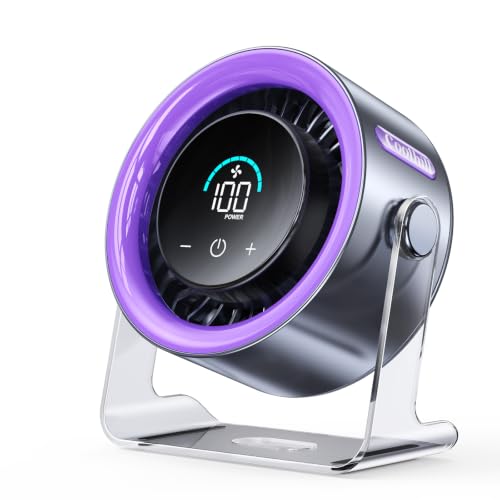
Coolhill 100-Speed Rechargeable Desk Fan
Heat around a workstation has a sneaky way of building up, especially once a laptop, monitor, lamp, and charger have been running for hours. A basic fan may offer one weak setting and one noisy setting, leaving little room between barely noticeable and downright distracting. The best cooling desk fan should make those small adjustments easier while staying compact enough for a bedroom, kitchen counter, camper, or crowded office surface. Coolhill answers that need with 100 speed levels, a digital readout, 120-degree oscillation, USB-C charging, and a rechargeable 5,500 mAh battery.
Coolhill 100-Speed Digital Desk Fan
The Coolhill 100-Speed Digital Desk Fan takes a more adjustable approach than the usual low, medium, and high setup. Its control system allows wind speed to rise from level 1 through level 100, giving far more room to fine-tune the breeze. Short presses jump through preset levels of 1, 20, 40, 60, 80, and 100, while a long press increases the setting gradually. That combination keeps large changes quick without taking away the option to dial in a very specific level.
A clear numeric display shows the selected fan speed, which removes the guesswork common with button-operated models. Instead of counting presses or trying to remember whether the fan is on level two or three, the exact number remains visible. The digital speed display is particularly handy at night, since the supplied description says the screen remains easy to read in the dark. The information provided doesn’t mention a display-dimming function, so light-sensitive sleepers may want to consider where the fan sits beside the bed.
The purple housing gives this fan a more playful appearance than the usual black or white desktop appliance. That color won’t blend into every workspace, but it may feel less clinical in a bedroom, dorm, craft area, or camper. Looks aside, the feature set is built around portable personal cooling rather than decoration alone. It can operate from its internal battery or draw power through USB-C, making it useful in both permanent and temporary setups.
The fan is intended for close and medium-range comfort rather than cooling an entire building. Turbo airflow reaches a stated maximum wind speed of 6 meters per second, which should create a noticeable breeze near a desk, bed, or kitchen work area. Still, the unit moves existing air rather than reducing the room’s actual temperature. That distinction matters because strong airflow can improve comfort without replacing air conditioning during severe heat.
One Hundred Speeds Offer Unusually Fine Control
Three-speed fans often force an annoying compromise. The first setting may feel too faint, while the second suddenly becomes noisy or dries the eyes. With 100 adjustable speeds, the Coolhill allows smaller changes between one comfort level and the next. That precision is especially useful at arm’s length, where a minor increase can feel much more dramatic than it would across a room.
The short-press presets keep the fan from becoming tedious to operate. A quick tap moves directly through widely spaced levels, so reaching stronger airflow doesn’t require dozens of button presses. Once the general range feels right, a long press can make smaller incremental adjustments. This dual adjustment method balances convenience with control rather than forcing one slow method for every change.
Most people probably won’t use every single level as a distinct daily setting. A few preferred numbers will likely become the regular choices for sleep, desk work, cooking, or outdoor use. Even so, having a broad scale helps avoid the familiar “too low or too high” problem. The value lies less in using all 100 settings and more in landing precisely on the breeze that feels comfortable.
Fine control can also help preserve battery life. A lower setting may provide enough relief without drawing the power required by turbo airflow. During a long work session or camping trip, dropping from an unnecessarily strong level to a moderate one could extend usable time. The supplied information doesn’t provide runtime for each individual speed, but variable power demand is an expected tradeoff with any rechargeable fan.
Turbo Airflow and Oscillation Cover More Space
Coolhill lists a maximum wind speed of 6 meters per second, supported by a turbocharged airflow design. That output is intended to create both gentle lower-level breezes and stronger upper-level airflow. On a desk, maximum power may feel excessive at close range, particularly around loose papers or a microphone. From farther away, the stronger setting can help the breeze reach across a room more effectively.
The 120-degree oscillation function spreads air from side to side instead of locking the stream onto one fixed position. That movement can cool a wider desk, reach both sides of a bed, or share airflow across a small seating area. A 120-degree oscillating range also reduces the need to keep moving the fan whenever the seated position changes. For one person who prefers constant direct airflow, oscillation may be unnecessary, but it’s easy to appreciate in a shared or active space.
Oscillation changes the character of the breeze. Rather than a continuous blast against the face, the air passes through in intervals, which may feel less drying during long sessions. This can be useful while reading, working, or resting, especially when strong fixed airflow becomes irritating after a while. The downside is that cooling won’t remain concentrated on one spot unless oscillation is turned off.
Strong airflow doesn’t mean the fan can lower room temperature by itself. It circulates warm or cool air already present, which may help reduce stale pockets around furniture and equipment. Used near an air-conditioning vent, open window, or shaded outdoor area, the air circulation effect may make existing cooling feel more evenly distributed. During hot, humid conditions, though, the fan won’t remove moisture from the air.
Low Noise Makes It Better Suited to Quiet Rooms
The supplied specifications list a minimum operating noise of 28 decibels. That figure applies to the quietest conditions rather than every speed setting. At lower levels, the fan is designed to provide a soft breeze without dominating a bedroom or home office. Higher settings and oscillation will naturally create more motor and airflow noise.
Noise character matters almost as much as volume. A consistent hum usually fades into the background, while rattling plastic or uneven vibration keeps pulling attention back. A stable surface can help the quiet fan design perform as intended because hollow desks, metal shelves, and uneven counters may amplify vibration. Placing the unit on a solid, level base is a small adjustment with a surprisingly noticeable effect.
Video calls introduce another wrinkle. Even a relatively quiet motor can cause trouble if the fan blows directly across a laptop or headset microphone. Angling the unit slightly away from the microphone, lowering the speed, or using oscillation can reduce wind interference. The wide speed range makes that easier because the fan doesn’t have to jump from strong airflow straight down to barely moving air.
Sleep use looks promising on paper, though the digital display deserves consideration. The 28-decibel minimum supports quiet overnight airflow, while the rechargeable battery allows placement without a cord stretching across the bedside area. On the other hand, the screen may remain visible in a dark room, and the supplied details don’t confirm whether its brightness can be changed. A little distance from the pillow may provide the best balance of airflow, sound, and light.
Battery Power Adds Freedom From Nearby Outlets
A built-in 5,500 mAh battery allows the fan to operate away from wall power. Coolhill lists a runtime of approximately 3 to 10 hours, depending on speed and operating conditions. That range is broad because the motor’s energy use changes considerably between a gentle level and full turbo output. Lower settings should sit closer to the longer end, while maximum airflow will likely reduce operating time.
The stated charging time is about 2.5 hours. That’s short enough for an afternoon top-up, an overnight charge, or a break between uses. USB-C power adds flexibility because the fan can connect to a suitable wall adapter, laptop, power bank, car charger, or USB port. The USB-C charging system is particularly practical for travel since it may reduce the number of different cables needed.
Battery operation clears cable clutter from a desk and makes the fan easier to move. A warm kitchen, camper, patio table, bedroom, or temporary workspace can all receive airflow without rearranging furniture around an outlet. That freedom is valuable, but it comes with the responsibility of keeping the battery charged. A corded model never runs flat, while this fan trades uninterrupted power for mobility.
The fan can also be used while connected to compatible USB power, based on the supplied description. That means it can stay at a permanent desk without depending entirely on the battery, then unplug when portability matters. This dual power flexibility gives the unit a broader role than a battery-only travel fan. Actual charging speed may vary with the power source, especially if an older USB port delivers limited output.
Practical Use Across Work, Rest, and Travel
A home office is an obvious fit because the fan combines quiet lower settings with stronger airflow for warmer afternoons. The 100-level control helps avoid blowing documents around, while oscillation can spread the breeze across a wider workstation. The compact desk fan format also makes it easier to place near a monitor without bringing in a full-size floor fan. Microphone placement still needs attention during calls, particularly at the higher speeds.
Kitchen use brings different demands. Heat from cooking can gather around a counter even when the rest of the room feels comfortable. A rechargeable fan can sit away from crowded outlets and direct air toward the person cooking rather than toward open flames or hot cookware. Sensible placement is essential because portable airflow should never interfere with gas burners, lightweight ingredients, steam, or loose towels.
Bedroom use benefits from the low stated noise level and oscillating coverage. A gentle sweeping breeze can feel less aggressive than fixed airflow aimed at one spot all night. The battery also allows the fan to sit where the air reaches best rather than where the nearest outlet happens to be. Runtime should be matched to the selected speed, since a high setting may not last through an entire night.
Campers, barbecues, and outdoor gatherings suit the fan’s cordless side, provided it stays protected from moisture and unstable surfaces. The purple housing is easy to spot among bags and gear, which may reduce the chance of leaving it behind. Still, the unit isn’t described as weatherproof, so outdoor use should remain dry and sheltered. Windy open areas may also overpower the fan’s focused airflow more quickly than an indoor room would.
Strengths, Weaknesses, and Sensible Expectations
The strongest feature is the combination of 100-speed control and quick preset jumps. Fine adjustment solves the common problem of rigid speed levels, while the 1, 20, 40, 60, 80, and 100 shortcuts prevent the controls from feeling slow. Add a visible numeric display, and comfortable settings become easy to repeat. That system is more thoughtful than simply adding a long list of speeds for the sake of a bigger number.
Oscillation is another meaningful advantage. Many compact rechargeable fans remain fixed in one direction, which limits their usefulness in shared spaces or wider rooms. The 120-degree sweep allows this model to distribute air across a broader area without manual repositioning. The oscillating airflow may not replace a large room circulator, but it gives the fan more reach than a basic personal unit.
The limitations are fairly clear. Battery life drops as speed rises, the 28-decibel rating applies to the quietest operation, and the display may be noticeable in a dark bedroom. No supplied dimensions or weight are included, so claims about pocket-sized portability would go beyond the available information. The fan is portable and rechargeable, but its exact carrying convenience can’t be judged from the provided details alone.
As a best cooling desk fan contender, the Coolhill stands out through adjustment range, oscillation, and flexible power. It suits situations where one fixed breeze never feels quite right and where outlet access changes throughout the day. The fan won’t cool an entire building or replace air conditioning, but it can create a more comfortable personal zone with unusually precise control. Its most appealing quality is simple: it lets the breeze adapt to the moment instead of forcing the moment to adapt to the fan.


Best Quiet Ceiling Fan For Bedroom 2026 Ultimate Comfort Picks

Best Ceiling Fan For Master Bedroom 2026 With Ultimate Comfort

Best White Ceiling Fan With Light For Bedroom 2026 Top Picks

Best Quorum Medallion Ceiling Fan 2026 With Style & Breeze

Best Outdoor Fan For Pergola 2026 Comfort Boost

Best Ceiling Fan For Great Room 2026 With Ultimate Comfort

Best Outdoor DC Ceiling Fans 2026 For Breezy Comfort

Best ceiling exhaust bath fan with light and heater 2026





