
Best Little Desk Fan 2026: Small Fan, Serious Breeze

A stuffy workspace can drain patience surprisingly fast. Papers start fluttering with a large fan, the room stays warm with a weak one, and constant motor noise can make a quiet task feel harder than it should. The best little desk fan avoids those headaches by delivering a controlled stream of air without taking over the entire desktop. Small dimensions matter, but focused airflow, steady footing, and sensible controls matter just as much.
Compact fans vary more than their similar shapes suggest. Some push a narrow but forceful breeze that feels refreshing from a few feet away, while others spread softer air across the face and hands. A fan with several speed settings offers more flexibility because full power isn’t always comfortable during calls, reading, or detailed computer work. Still, extra modes aren’t worth much if the buttons are awkwardly placed or the lowest setting sounds like a tiny lawn mower.
Noise deserves close attention, especially in shared rooms and late-night spaces. A quiet hum can fade into the background, but rattling plastic, clicking bearings, and pulsing motor sounds quickly become irritating. Stable construction and a balanced blade assembly usually help a quiet desk fan feel less distracting. Oddly enough, a slightly larger compact model may sound calmer than an ultra-tiny fan because it doesn’t need to spin as aggressively to move similar air.
Power options also shape everyday convenience. A USB-powered fan works neatly beside a laptop, monitor, power bank, or wall adapter, though a short cable can limit placement. Rechargeable designs reduce cord clutter and keep air moving during travel or brief outages, but battery capacity adds weight and requires another charging routine. Plug-in models remove battery worries, yet they’re less useful on crowded tables where every outlet is already spoken for.
Adjustment range can make or break the experience. A tilting head directs air toward the face, upper body, or hands without forcing the whole fan onto a stack of books. Some small fans include oscillation, which feels gentler over longer periods, although the moving base needs more free space. A fixed fan is simpler and often cheaper, but it should have a firm hinge that won’t slowly droop after repeated repositioning.
Desk clutter exposes another practical tradeoff. A wide base improves stability, but it steals room from keyboards, notebooks, charging docks, and coffee mugs. Clip-on models free up the work surface, though thin clips can wobble or leave marks on softer furniture. The sweet spot is a compact footprint with rubberized feet, enough weight to resist vibration, and a grille that won’t catch loose cables.
Cleaning shouldn’t be an afterthought, either. Dust gathers on the front grille and blade edges, gradually weakening airflow and making the motor work harder. A removable grille saves plenty of fiddling, while sealed designs may require a small brush or compressed air. Frankly, the smartest pick isn’t always the one with the longest feature list; it’s the fan that fits the available space, stays tolerably quiet, and can be cleaned without turning a five-minute chore into a wrestling match.
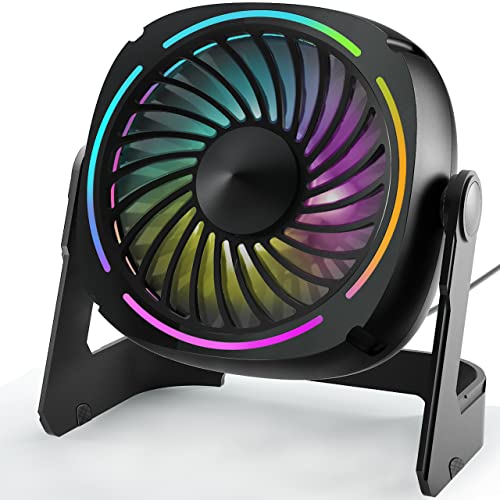
- LFR Score9.4
LFR Score is a ranking system developed by lightfansreviews.com. LFR Score has no relationship or impact from any manufacturers or sales agent websites. Learn more
- BrandPunoge
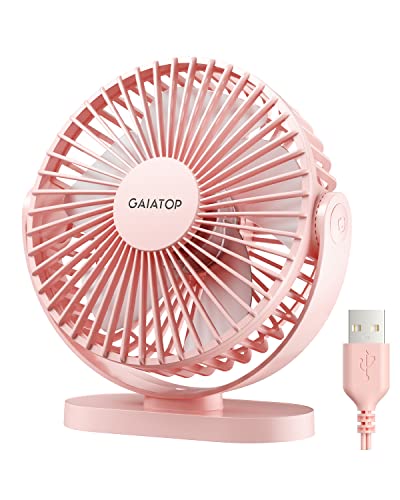
- LFR Score9.4
LFR Score is a ranking system developed by lightfansreviews.com. LFR Score has no relationship or impact from any manufacturers or sales agent websites. Learn more
- BrandGaiatop

- LFR Score9.2
LFR Score is a ranking system developed by lightfansreviews.com. LFR Score has no relationship or impact from any manufacturers or sales agent websites. Learn more
- BrandYOSHENMO

- LFR Score9.2
LFR Score is a ranking system developed by lightfansreviews.com. LFR Score has no relationship or impact from any manufacturers or sales agent websites. Learn more
- BrandTriPole

- LFR Score9.2
LFR Score is a ranking system developed by lightfansreviews.com. LFR Score has no relationship or impact from any manufacturers or sales agent websites. Learn more
- BrandHoneywell

- LFR Score9.0
LFR Score is a ranking system developed by lightfansreviews.com. LFR Score has no relationship or impact from any manufacturers or sales agent websites. Learn more
- BrandGaiatop

- LFR Score9.0
LFR Score is a ranking system developed by lightfansreviews.com. LFR Score has no relationship or impact from any manufacturers or sales agent websites. Learn more
- BrandJZCreater

- LFR Score8.6
LFR Score is a ranking system developed by lightfansreviews.com. LFR Score has no relationship or impact from any manufacturers or sales agent websites. Learn more
- BrandComfort Zone

- LFR Score8.4
LFR Score is a ranking system developed by lightfansreviews.com. LFR Score has no relationship or impact from any manufacturers or sales agent websites. Learn more
- Brandlet'me

- LFR Score8.4
LFR Score is a ranking system developed by lightfansreviews.com. LFR Score has no relationship or impact from any manufacturers or sales agent websites. Learn more
- BrandTHRRLY
Last update on 2026-07-08 / Affiliate links / Images, Product Titles, and Product Highlights from Amazon Product Advertising API
Punoge Small USB Desk Fan With LED Lights
A cramped desk can feel even smaller once heat, cables, and everyday clutter start piling up. The best little desk fan needs to cool close-range space without shoving papers around, swallowing half the tabletop, or adding an irritating mechanical buzz. Punoge approaches that problem with a compact 5.3-inch body, three airflow levels, colorful lighting, and a stand that rotates through a full 360 degrees. It’s a practical little setup, though the wired-only design creates a few tradeoffs that are worth understanding before it earns a permanent spot beside a keyboard.
Punoge 5.3-Inch USB Desk Fan
The first thing this model gets right is its small footprint. Its listed dimensions are roughly 5.5 by 3.5 by 5.8 inches, so it can sit beside a monitor, on a narrow nightstand, or near a gaming console without elbowing everything else out of the way. That matters more than it sounds because many so-called mini fans still come with wide bases that steal useful working room. Punoge keeps the body compact while leaving enough structure around the base to support regular repositioning.
The design also leans more playful than plain. Eight LED color options turn the fan into a small source of ambient light, which can make a dim workspace or gaming corner feel less sterile. The 8-color lighting isn’t necessary for cooling, of course, but it gives the product a little personality without changing how the fan operates. Anyone who prefers a simple, distraction-free desk may leave the lights off, while those who enjoy a softer visual atmosphere can switch colors with a dedicated button.
The body uses ABS material and has a smooth, rounded shape rather than an industrial grille-and-frame look. That makes the fan blend more naturally with modern computer gear, small speakers, and desk accessories. Still, the appearance shouldn’t distract from the fact that this is a lightweight personal fan, not a heavy-duty circulator. Its best work happens within a close range, where direct personal airflow matters more than moving air across an entire room.
Airflow That Fits Close-Range Cooling
Three fan speeds give the Punoge more flexibility than a basic single-speed model. The lowest setting suits steady background airflow, the middle level adds a firmer breeze, and the highest setting reaches a listed maximum of up to 3300 RPM. That upper speed can feel useful after stepping in from the heat or during a long afternoon at a warm desk. The tradeoff is predictable: stronger airflow usually brings more audible motor and wind noise.
The lowest level is listed below 45 dB, which places the focus on relatively subdued personal cooling rather than near-silent operation. That distinction matters because “quiet” means different things in different spaces. In a room with computer fans, normal conversation, or air-conditioning noise, the low-speed sound level is less likely to stand out. In a nearly silent bedroom, recording setup, or meditation space, even a soft mechanical hum may remain noticeable.
Air direction is one of the stronger features here. The stand rotates through 360 degrees, allowing the fan to point upward, forward, or at a lower angle without moving the entire base. This full-angle adjustment is useful on cramped desks where the fan may need to sit off to one side rather than directly in front. It also helps avoid the annoying habit of stacking a fan on books just to aim the breeze at face level.
USB Power Keeps Things Simple, Not Cordless
Punoge powers the fan through an included 4.9-foot USB cable. That setup works with laptops, desktop computers, power banks, and other USB-enabled power sources, so the fan can travel between a home office, dorm room, or temporary workstation without needing a proprietary adapter. The USB-powered design also removes the worry of replacing batteries. Plug it in, select a speed, and the fan is ready to run.
The limitation is equally clear: there is no internal battery. This fan is not rechargeable, so it won’t keep spinning once the cable is disconnected unless it remains attached to a power bank or another portable USB source. That may be a deal-breaker for anyone expecting true cordless freedom. On the flip side, there’s no battery to age, lose capacity, or require another charging schedule.
Cable length deserves some credit because 4.9 feet gives more placement freedom than the short leads found on many tiny USB accessories. The fan can sit on a shelf, across a desk, or farther from the computer without immediately requiring an extension. Cable management may still become a nuisance in a setup already crowded with chargers, headphones, and peripheral wires. A small clip or reusable tie can keep the power cord from sliding across the work area.
LED Lighting Adds Mood Without Changing Cooling
The color lighting is separate from the main airflow controls, which keeps the feature from becoming a forced part of everyday use. A press of the light button changes the displayed color, letting the fan match a keyboard, room lighting, or a preferred evening tone. The atmosphere light adds visual interest during gaming sessions or late-night work without requiring another lamp on the desk. Still, it’s decorative rather than functional, so buying the fan solely for lighting would miss the point.
Some compact fans bury extra functions behind confusing button combinations. Punoge keeps the controls straightforward, using one button for airflow selection and another for the lighting feature. That simple layout makes it easier to adjust the fan by feel instead of staring at the controls. A clearer interface also reduces the chance of changing the light while trying to lower the fan speed.
The lighting may be less appealing in a bedroom where any glow becomes distracting at night. Since the fan’s cooling function doesn’t depend on the LEDs, leaving them off solves that problem without sacrificing airflow. This flexibility is useful because it prevents the decorative feature from dictating how the fan must be used. Punoge treats the lights as an optional extra, which is exactly where they belong.
Everyday Comfort And Practical Limits
The Punoge makes the most sense as a personal cooling tool for a single seat rather than a substitute for a room fan. Its compact blades and housing are designed to push air across a desk, bedside area, or close gaming position. That kind of targeted cooling can make warm conditions easier to tolerate without disturbing loose documents across the room. Expect a direct breeze, not whole-room circulation.
Cleaning will eventually matter because dust tends to settle on the grille and blade edges of every desktop fan. The provided details don’t describe a removable front grille, so buyers shouldn’t assume quick tool-free access to the blades. A soft brush, microfiber cloth, or gentle burst of air may be the more realistic cleaning method. Keeping the air intake and grille clear should help preserve airflow and reduce the dusty buildup that can make small fans sound rougher over time.
Stability is another area where placement matters. A compact, lightweight fan can vibrate or shift if it sits on an uneven surface, especially at its highest setting. A flat desk and a little clearance around the base will help the 360-degree stand hold the chosen angle more reliably. It’s also wise to keep loose charging cables, paper corners, and lightweight notes away from the front airflow path.
Where The Punoge Fan Makes The Most Sense
This model fits naturally into small spaces where convenience matters more than raw airflow. It can sit beside a laptop during remote work, cool a warm corner of a dorm desk, or provide a steady breeze during gaming without crowding the mouse area. The combination of three speed levels and adjustable direction gives it more practical range than a basic novelty fan. Its small dimensions also make storage easy once cooler weather arrives.
The strongest reasons to choose it are the compact size, simple controls, adjustable airflow, and optional lighting. The biggest limitation is the absence of a battery, followed by the reality that higher speeds may be more noticeable in quiet rooms. Those tradeoffs aren’t hidden once the product is viewed for what it is: a wired mini personal fan built for close-range comfort. Buyers expecting cordless use or room-wide circulation should look elsewhere.
Punoge includes the fan, USB cable, and user manual, so there aren’t many pieces to sort through. The setup is refreshingly direct, and the adjustable stand reduces the need for awkward repositioning throughout the day. For a small desk, bedside table, or gaming station, the Punoge USB desk fan offers a sensible blend of airflow control and visual character. It won’t replace a larger circulator, but it can make one hot seat noticeably more comfortable without taking over the space.
Gaiatop USB Desk Fan For Compact Personal Cooling
Heat becomes harder to ignore once it settles around a keyboard, nightstand, or parked car seat. A bulky room fan often feels like overkill, yet a flimsy mini model may barely stir the air and can rattle across the desk at full speed. The best little desk fan should deliver a noticeable breeze without hogging space, drowning out thought, or demanding a complicated setup. Gaiatop’s 5.5-inch USB fan tackles that narrow job with three speeds, a 90-degree tilting head, a removable cover, and a base designed to stay put.
Gaiatop 5.5-Inch USB Desk Fan
The compact body is one of this fan’s clearest strengths. At 5.5 inches and about 0.6 pounds, it fits beside a laptop, under a monitor shelf, or near a bedside lamp without turning the surface into an obstacle course. That smaller footprint also makes it easier to move between rooms, tuck into luggage, or carry out to a patio table. Small doesn’t mean invisible, though, and the pink finish gives it a more cheerful look than the usual black or gray desk accessory.
Gaiatop builds this model around personal airflow rather than whole-room circulation. The fan head rotates through 90 degrees, letting the breeze aim toward the face, upper body, or hands without forcing the entire base to move. That range is handy on a low desk where a fixed fan would blow into the keyboard instead of upward. It also helps on a nightstand, since the airflow can be angled toward the bed while the base remains flat and stable.
The shape stays simple, and that works in its favor. There aren’t decorative lights, wireless controls, or extra modes competing for attention. The focus remains on three-speed cooling, straightforward placement, and USB power. Frankly, that stripped-down approach makes sense for a fan meant to run beside work, sleep, travel, or a quiet afternoon indoors.
Three Speeds With Noticeable Close-Range Airflow
The three speed settings cover the basic situations most small fans encounter. Low produces a gentler breeze for long work sessions or nighttime use, medium adds more direct cooling, and high pushes stronger air when the heat feels stubborn. Gaiatop lists a maximum wind speed of 5.3 meters per second, which gives the fan a more serious upper setting than its compact size might suggest. That doesn’t turn it into a room circulator, but it should make a meaningful difference within personal range.
High speed is the setting to use when quick relief matters more than quiet background operation. It moves more air and can cool the face or upper body faster, especially in a warm office, parked vehicle, or tent. The tradeoff is predictable because stronger airflow creates more wind sound. A mini fan can’t move a larger volume of air in complete silence, so realistic expectations matter here.
Low speed tells a different story. It creates a softer stream that’s less likely to dry the eyes, disturb papers, or feel harsh during a long session at the computer. That makes the gentle breeze setting useful for reading, sleeping, or keeping air moving in a stuffy corner without feeling constantly blasted. The middle speed lands between those extremes and will probably be the everyday sweet spot for many desks.
Noise Levels Suit Work Better Than Total Silence
Gaiatop lists the operating noise between 30 and 50 decibels, depending on the selected speed. The lower end is better suited to quiet work, while the upper end reflects the stronger airflow available at higher power. That range is reasonable for a small fan with three distinct output levels, but it shouldn’t be mistaken for silent operation. In a calm bedroom, the motor and moving air may still be noticeable, particularly on high.
Background conditions play a big role in how the fan sounds. In an office with typing, air conditioning, and conversation, the fan noise is less likely to demand attention. Beside a bed in an otherwise silent room, even a smooth hum may feel more present. Some people actually prefer that steady sound, while others need near silence, so the lowest setting is the safer choice for sensitive sleepers.
The upgraded motor is intended to balance stronger output with reduced noise. That pairing is useful because weak fans often force people to run them at full power all day, which can make a modest motor sound harsher than expected. A fan with usable airflow at medium speed offers more flexibility. The Gaiatop model’s adjustable output lets cooling and sound be traded off instead of locking both into one fixed setting.
A Stable Base Makes Daily Use Less Annoying
Lightweight fans have a bad habit of creeping across smooth desks. Vibration, a stiff power cable, or an uneven surface can slowly turn a fan away from the intended direction. Gaiatop addresses that issue with four silicone pads positioned around the base. Those pads add grip and help reduce the chance of the fan sliding or tipping while it runs.
That stable footing matters most on glossy desks, bedside tables, and vehicle consoles where lightweight plastic products can shift easily. It also helps the 90-degree tilt remain useful because the base doesn’t need to be held down every time the angle changes. A secure anti-skid base sounds like a small detail, but it can separate a fan that quietly does its job from one that needs constant repositioning. Nobody wants to nudge a wandering fan back into place every twenty minutes.
Surface choice still matters. A flat, firm tabletop will give the silicone pads the best contact, while thick fabric, loose papers, or uneven camping furniture may reduce stability. Keeping some clearance behind the fan also prevents the intake from being blocked. Used on a suitable surface, the steady tabletop design should feel more composed than an ultra-light fan resting on plain plastic feet.
Cleaning Is Easier With The Detachable Cover
Dust buildup quietly weakens many desk fans. Fine particles settle on the front grille and blade edges, gradually reducing airflow and sometimes adding a rougher sound. Gaiatop’s detachable front cover makes routine cleaning less awkward because access doesn’t depend entirely on brushes pushed through narrow grille openings. That feature is especially useful in bedrooms, pet-friendly homes, and workspaces where lint collects quickly.
A removable cover also helps maintain the fan’s appearance. Pink plastic can show gray dust around the grille more clearly than a dark housing, so easier access keeps the front from looking neglected. The blades and inner grille should still be cleaned gently, and the fan must be disconnected from power first. Simple maintenance, done occasionally, can preserve cleaner airflow without turning the job into a disassembly project.
The removable cover doesn’t eliminate every maintenance concern. Hair and fine debris may still gather deeper around the motor housing, where access is limited. Harsh cleaners and excessive moisture are poor choices around any USB-powered device. A dry cloth, soft brush, and patient cleaning routine suit the compact fan housing better than aggressive scrubbing.
USB Power Adds Flexibility With One Clear Limitation
The fan runs from USB power and can connect to a laptop, computer, power bank, USB socket, wall adapter, or car charger. That broad compatibility makes it easy to use in several settings without hunting for a special proprietary cord. Gaiatop recommends a 5-volt, 2-amp power supply for proper operation, so the available USB source matters. A weak port may not deliver the same performance as a suitable adapter or power bank.
The included cable is about five feet long, giving the fan more placement freedom than models with very short leads. It can sit farther from a laptop or reach a charger beneath a desk without immediately needing an extension. The long USB cord is helpful in cars and hotel rooms too, where ports rarely appear exactly where they’re needed. Of course, the extra cable still needs to be managed so it doesn’t snake across the work area.
No wall charger is included, and the fan doesn’t contain a rechargeable battery. That means true cordless use requires an external power bank, while stationary use depends on an available USB power source. The lack of an internal battery keeps the fan lighter and removes charging-cycle concerns, but it limits spontaneous placement. The wired-only design is practical around electronics yet less convenient on a picnic table or shelf with no nearby power.
Where This Little Fan Fits Best
A compact desk, nightstand, or travel setup plays to the Gaiatop fan’s strengths. Its modest weight and 5.5-inch body make it easy to move, while the adjustable head directs air without rearranging the whole workspace. The combination of portable size and three speeds suits close personal cooling during computer work, studying, sleep, or a warm commute. It can also run from a power bank at outdoor events or during camping, provided the power source stays connected.
Cars present another practical use, especially when a built-in vent doesn’t reach a passenger comfortably. A USB car charger can power the fan, and the tilting head helps direct the airflow toward a specific seat. Placement needs care, though, because a loose fan should never obstruct controls, visibility, or safe movement inside the vehicle. The stable silicone base helps, but it can’t replace secure positioning on a level surface.
The fan is less suitable for cooling a large room or circulating air across several people. Its strength lies in a narrow, personal zone, not broad coverage. The best little desk fan should solve the heat right in front of you without pretending to replace an air conditioner, and that’s the sensible way to view this Gaiatop model. Its strongest points are controllable airflow, easy cleaning, stable footing, and flexible USB compatibility, while wired operation and audible high-speed airflow remain the main compromises.
YOSHENMO Portable Turbo Desk Fan
A warm room gets irritating fast when the air barely moves and every available outlet is already occupied. Small fans often promise easy relief, yet weak airflow, short battery life, or fussy controls can turn that promise into another desk-side annoyance. The best little desk fan should feel compact without acting timid, and the YOSHENMO portable model aims for that balance with rechargeable power, adjustable airflow, a 360-degree tilting body, and an LED display. Its six-inch frame stays travel-friendly, while the broader speed range and battery readout make it more flexible than a bare-bones USB fan.
YOSHENMO 6-Inch Rechargeable Desk Fan
The six-inch body strikes a sensible middle ground between palm-size convenience and usable airflow. At about 0.97 pounds, it remains light enough for a backpack, handbag, or camping tote without feeling like a bulky appliance. That portability matters during summer travel because space disappears quickly once chargers, water bottles, and other essentials pile in. YOSHENMO keeps the fan compact while still fitting a 4000mAh battery inside the housing.
The ink-black finish gives the fan a cleaner, more understated look than bright novelty models. A smile icon on the LED display adds a playful detail, but the overall design still works comfortably beside office equipment or neutral bedroom furniture. The LED status screen carries more value than decoration alone because it displays battery information and the active airflow level. That means less guesswork, especially when the fan is being used away from a dependable power source.
Portability isn’t only about weight. A small fan also needs a shape that packs without snagging cables, taking up half a shelf, or demanding a separate carrying case. The rounded six-inch format should fit more easily among everyday items than a tall tower-style model. Still, the compact housing doesn’t make it pocket-sized, so it belongs in a bag rather than a jacket pocket.
Rechargeable Cooling Without An Outlet Nearby
The built-in 4000mAh lithium-ion battery is one of the strongest reasons to consider this fan over a wired-only desk model. YOSHENMO lists an operating range of approximately 2.5 to 17 hours, depending on speed and usage conditions. That spread makes sense because stronger airflow demands more power, while lower settings stretch the battery considerably longer. A full day of intermittent desk use may be realistic at modest speeds, while maximum output will drain the battery much sooner.
Cordless operation opens up locations that ordinary USB fans handle poorly. A picnic table, tent, bedside shelf, patio chair, or car passenger area becomes easier to cool without draping a cable across the space. The rechargeable design also helps during short power interruptions or in rooms where the nearest outlet sits awkwardly far away. Freedom from a permanent cord is a genuine comfort upgrade, though remembering to recharge the fan becomes part of the routine.
Battery life claims should always be read as a range rather than a guarantee. Airflow level, display use, battery age, and charging habits can all affect actual runtime. The LED battery indicator helps manage that uncertainty because it gives a clearer idea of remaining power before the fan is packed for an outing. That real-time battery display is especially handy outdoors, where an unexpected shutdown feels far more annoying than it does beside a wall charger.
Airflow Control Goes Beyond Basic Low And High
The product description presents the fan as having five adjustable speeds with airflow ranging from 2.8 to 4.6 meters per second. That range covers gentle personal cooling at the lower end and a more assertive stream for sticky afternoons at the upper end. Five steps are enough to avoid the all-or-nothing feel of simpler fans. A softer breeze works better near the face during long sessions, while stronger output can quickly cut through stagnant air after returning from outside.
The supplied control instructions also mention adjustment from levels 1 through 120 using plus and minus buttons. That creates a noticeable inconsistency with the five-speed description, so the exact control behavior may differ from the simplified marketing summary. Based strictly on the provided information, the safe takeaway is that the fan offers fine airflow adjustment through two control buttons. Buyers who care about the precise number of steps should treat the listed five-speed and 120-level references as conflicting details rather than assume both describe separate modes.
Two-button operation keeps the physical interface from becoming cluttered. A long press on the power control turns the fan on or off, while single presses on the plus or minus controls adjust airflow. The display reportedly turns off after a short period, followed by the smile icon going dark later, which helps reduce unnecessary light in a bedroom. That screen timeout is a thoughtful touch because bright indicators can become surprisingly distracting once the room lights are off.
Quiet Operation Fits Work And Sleep Better
YOSHENMO lists a maximum operating sound of only 30 decibels. Taken at face value, that suggests the fan is designed to remain subdued even while providing personal airflow. Quiet performance matters beside a microphone, during focused work, or on a nightstand where uneven buzzing can become impossible to ignore. Still, perceived sound depends on distance, surface vibration, and the chosen speed, so no small fan should be expected to disappear acoustically in every room.
A smooth fan tone is often easier to tolerate than a rattling or pulsing one, even when the measured volume is similar. The YOSHENMO model is positioned as a low-noise personal fan, making it more suitable for close placement than a louder utility fan. Low settings should make the most sense for sleep, reading, or calls, while higher airflow may produce more audible wind movement. That tradeoff is normal and preferable to a fan that stays quiet only because it barely moves air.
Placement can influence noise almost as much as motor design. A hard, level desk usually produces fewer vibrations than a hollow shelf, loose tray, or uneven outdoor table. Keeping the fan stable and clear of nearby objects reduces the chance of plastic pieces or cables tapping against the housing. A quiet motor paired with careless placement can still create an annoying setup, so the low-noise benefit depends partly on where the fan sits.
Full Rotation Makes The Airflow Easier To Aim
The fan offers 360-degree tilt adjustment, allowing the airflow to be aimed toward the face, chest, hands, or upper bed area without shifting the entire unit. That flexibility is useful on small desks where the only open spot may sit below shoulder height or off to one side. A fixed-angle fan often ends up balanced on books or pushed into an awkward corner. Full rotation solves that problem more neatly.
Targeted airflow also prevents wasted cooling. Rather than blasting papers, curtains, or an empty section of the room, the fan can point directly toward the occupied space. This makes the six-inch size feel more capable because the available air is concentrated where it matters. The adjustable direction won’t increase total output, but it can make the existing airflow feel more effective.
Frequent repositioning does introduce a practical concern. The tilt mechanism needs enough resistance to hold its angle after repeated adjustments, particularly at steeper positions. The provided description doesn’t specify hinge construction or long-term tension, so durability in that area shouldn’t be assumed. Even so, a full-rotation design offers a clear usability advantage over a fan with only a narrow tilt range.
Realistic Strengths And Everyday Tradeoffs
The YOSHENMO fan brings together several features that solve common problems with little desk fans. Rechargeable power removes the need for constant outlet access, five listed speeds provide more control than a basic three-setting model, and the LED screen shows useful operating information. The portable six-inch size also travels more easily than a conventional tabletop fan. Those strengths make it suitable for rotating between a home office, bedroom, living room, and outdoor setup.
The fan’s main uncertainty lies in the conflicting speed information. One section describes five adjustable wind speeds, while the operating instructions refer to a 1-to-120 level range. That doesn’t automatically signal poor performance, but it does make the control system less clear than it should be. A straightforward manual should settle the issue in practice, yet the written specifications leave room for confusion before use.
Battery-powered convenience carries another tradeoff. The lowest settings may support extended runtime, but maximum airflow reduces that duration to the shorter end of the listed 2.5-to-17-hour range. Anyone planning a long camping day will need to balance cooling strength against remaining power. The battery indicator helps with that decision, which is far better than relying on guesswork until the fan abruptly stops.
Best Uses For This Compact Turbo Fan
A bedside table is a natural fit because the fan combines quiet operation, cordless placement, and a display that eventually darkens. The adjustable head can aim above the mattress without needing a tall stand, while the lower airflow settings should feel less harsh during sleep. Its 30-decibel maximum claim also positions it as a calmer option than many small utility fans. Light sleepers may still prefer the lowest level and a little distance from the pillow.
Workspaces benefit from a different mix of features. Fine speed adjustment helps control how much air reaches the face, while the compact body leaves more space for notebooks, keyboards, and mugs. The smile icon is a quirky addition, but the practical advantage comes from seeing speed and battery status at a glance. For a desk with limited outlets, the rechargeable battery removes one more cable from the tangle.
Outdoor use may be where the fan separates itself most clearly from wired mini models. At a picnic, campsite, bleacher seat, or shaded patio, the combination of low weight and cordless operation is genuinely useful. It remains a personal fan, though, so breezy conditions or wide-open areas may reduce how noticeable the airflow feels. The YOSHENMO portable desk fan is best viewed as a focused cooling companion rather than a device meant to cool a group or change the temperature of an entire space.
TriPole 4.5-Inch USB Desk Fan
A crowded desk leaves little patience for an appliance that wobbles, blocks the screen, or pushes warm air in the wrong direction. Compact cooling has to earn its space, especially beside a laptop, lamp, charger, and the usual pile of everyday odds and ends. The best little desk fan should provide a useful personal breeze without becoming another bulky object to work around. TriPole takes a straightforward route with a 4.5-inch frame, three airflow settings, a wide padded base, full vertical rotation, and a long USB cable.
TriPole Mini USB Personal Fan
The 4.5-inch diameter gives this fan a genuinely compact footprint. It can settle beside a keyboard, on a narrow nightstand, or near a monitor stand without swallowing the useful surface around it. That smaller body also makes packing less of a headache during a trip, since the fan won’t compete with clothing and electronics for half the bag. Still, its size signals a clear purpose: close-range relief rather than broad room circulation.
TriPole keeps the design practical rather than dressing it up with lights, displays, or complicated controls. A single button on the back cycles through the three airflow levels, which makes operation easy to understand from the first use. The simple control layout suits a fan that may move between a home office, bedroom, hotel desk, and temporary workspace. There’s less to fiddle with, and frankly, that’s often a blessing during a hot afternoon.
The black finish is neutral enough to blend with common office equipment and bedroom furniture. More important, the fan’s structure leaves room for a wide base beneath the small head. That combination helps the unit feel less top-heavy than some ultra-compact models. The space-saving body remains the headline feature, but the support underneath is what keeps that small size from becoming a stability problem.
Three Speeds Keep The Breeze Under Control
Three airflow modes provide the basic range needed for personal cooling. The lowest level can keep air moving during quiet work, while the middle setting adds a firmer stream without immediately jumping to maximum output. High speed is there for hotter moments when a stronger directed breeze matters more than subtle background comfort. That familiar low, medium, and high arrangement is simple, predictable, and easier to use than a long list of barely different settings.
A small fan feels most useful when its lower setting isn’t too weak and its upper setting doesn’t become unbearable at close range. TriPole’s adjustable speeds let the distance and airflow level work together. Placed near the face, low may be enough; positioned farther across the desk, medium or high will make more sense. The three-speed adjustment gives enough flexibility to avoid moving the whole unit every time the room warms up.
Expect the airflow to stay concentrated around one seated position. A 4.5-inch fan isn’t built to sweep cool air through a large bedroom or across a conference table. Its advantage lies in putting the available air exactly where it’s needed, whether that’s toward the face, hands, or upper body. Used with that realistic expectation, the personal cooling range becomes a strength rather than a limitation.
Full Rotation Solves Awkward Desk Placement
The fan head rotates 360 degrees up and down, giving it far more aiming freedom than a fixed desktop model. That matters on a low table where straight-ahead airflow may hit the keyboard instead of the person sitting behind it. A quick tilt can redirect the breeze upward without propping the base on books or boxes. The 360-degree adjustment also allows the fan to point downward from a shelf or raised stand.
Flexible positioning helps preserve desk space because the fan doesn’t have to sit directly in front of the user. It can stay off to one side, behind a laptop, or near the edge of the surface while the head turns toward the occupied spot. That arrangement reduces interference with papers, cups, and charging gear. The adjustable fan head makes the little body feel more adaptable than its dimensions suggest.
The rotation is vertical rather than automatic oscillation, so the airflow remains focused after the angle is set. That’s useful for steady personal cooling, though it won’t spread air across several seats. A firm hinge is important because repeated adjustments can become irritating if the head starts drooping, but the supplied information doesn’t describe long-term hinge resistance. Even with that unknown, the full tilt range is a practical difference over small fans with narrow adjustment limits.
A Wide Base Keeps The Fan From Wandering
Lightweight fans can buzz across smooth desks once the blades reach higher speeds. TriPole counters that problem with a wide supporting base that gives the compact head a more planted stance. Four silicone pads underneath add friction against hard surfaces and help absorb some of the vibration. Those small pads matter because a stable fan is easier to ignore, which is exactly what a desk appliance should be during focused work.
Reduced vibration can also make operating noise feel less intrusive. Even a modest motor may sound rough if the base taps against a hollow shelf or polished tabletop. The silicone contact points help separate the housing from the surface, limiting that extra rattle. The anti-slip padding won’t silence moving air, but it addresses the secondary noise caused by a shifting or vibrating frame.
Surface choice still affects the result. A flat desk gives all four pads proper contact, while thick fabric, an uneven tray, or a cluttered nightstand may reduce grip. The wide base also occupies more width than a narrow pedestal, so the fan needs a clear patch of tabletop despite its small head. That’s a fair trade for better stability, especially at the highest setting.
USB Power Works Across Everyday Setups
TriPole uses a 5V USB-A connection and can run from a compatible USB charger, computer, or power bank. This USB-powered setup fits naturally into modern desks where standard USB ports are already available. It also avoids the issue of region-specific plug shapes during overseas travel, provided a suitable USB power source is on hand. The fan itself doesn’t depend on a dedicated wall adapter.
The 4.9-foot cable is longer than the short leads attached to many mini fans. That extra reach helps when the power source sits under a desk, across a nightstand, or on the opposite side of a hotel workspace. A longer cord can also keep the fan positioned where the airflow feels right instead of where the outlet happens to be. The extended USB cable solves a common placement headache, though it may need a tie to keep excess wire tidy.
This model relies on external power and isn’t described as having an internal battery. A power bank can make it portable, but the fan remains physically connected while running. That arrangement avoids battery aging and charging downtime, yet it offers less freedom than a rechargeable fan used completely cordless. The wired operation makes the most sense around desks, vehicles, and travel setups where a USB source is already part of the picture.
Power Requirements Matter At The Highest Speed
The fan needs a working current of 0.8A, according to the provided details. TriPole specifically notes that the third speed may not function properly if the USB source cannot deliver enough current. A charger supporting 5V and 1A output is recommended for testing if high speed fails. That note is valuable because an underpowered port can make a capable fan appear defective or unusually weak.
Older keyboards, passive USB hubs, and low-output accessory ports may not provide the required power consistently. A computer’s main USB port, a suitable wall charger, or a capable power bank is a safer bet for full performance. The power-source compatibility affects more than whether the fan turns on; it can determine whether all three speeds remain available. Switching the power source should come before assuming the motor has a problem.
No wall charger is mentioned as part of the package, so an existing adapter may be needed for outlet use. That isn’t unusual for a USB accessory, but it’s worth accounting for before placing the fan far from a computer. The specification is refreshingly clear about the current requirement instead of hiding the issue behind vague troubleshooting language. Proper power lets the high-speed setting operate as intended.
The Detachable Cover Simplifies Dust Removal
Small fans collect dust quickly because they often sit close to keyboards, bedding, open windows, and busy work surfaces. TriPole uses a detachable front cover, allowing better access to the fan mask and blades during routine cleaning. That design saves the frustration of trying to reach buildup through narrow grille openings. Cleaner blades can also move air without carrying a visible layer of lint around the edges.
Maintenance should stay gentle and dry around the motor and USB components. Disconnecting the fan before opening the cover is the sensible first step, followed by a soft cloth or brush for the grille and blade surfaces. Excess moisture can create more trouble than a little dust, so soaking parts near the housing isn’t a smart shortcut. The removable grille makes careful cleaning easier without encouraging a full teardown.
Regular attention can reduce the chance of dust buildup affecting airflow or adding rough mechanical sounds. A fan used beside a bed or in a pet-friendly room may need cleaning more often than one stored in a closed office. The detachable design won’t prevent debris from collecting, but it makes the inevitable chore less fiddly. That easy-maintenance feature adds practical value long after the novelty of a new fan wears off.
Where The TriPole Fan Fits Best
A crowded desktop is the clearest match for this model. The small head leaves room for work essentials, the long cord reaches common power sources, and the adjustable angle helps direct air around monitor stands or laptop screens. Its stable desk placement also suits long sessions where constant readjustment would become annoying. Low and medium speeds should cover routine use, with high available for warmer periods.
Travel is another sensible use, though “portable” here means easy to pack rather than cordless. The fan can run from a laptop, USB charger, or power bank in a hotel room, car, campsite, or temporary office. A five-foot cable offers welcome flexibility, but it remains one more wire to organize. The compact travel size is useful as long as an appropriate USB power source comes along for the ride.
The TriPole won’t suit anyone expecting battery operation, automatic oscillation, or room-wide cooling. Its strengths are narrower and more grounded: three useful airflow levels, a fully adjustable head, a steady base, a cleanable front cover, and broad USB compatibility. As a candidate for the best little desk fan, it makes the strongest case in tight spaces where direct airflow and simple operation matter more than extras. The main caveat is power quality, since the highest speed depends on a USB source capable of meeting the stated current requirement.
Honeywell TurboForce HT900 Air Circulator
A tiny fan can look harmless right up until it starts rattling, wobbling, or blowing warm air two feet in front of itself. Desk space is precious, and nobody wants to surrender a large corner of it for a fan that barely earns its keep. The best little desk fan should move enough air to matter while staying compact, adjustable, and tolerable during long work sessions. Honeywell’s TurboForce HT900 takes a more muscular approach than most personal fans, pairing a small frame with an aerodynamic design, three speeds, and airflow that can be felt from up to 25 feet away.
Honeywell TurboForce HT900 Fan
The HT900 sits in an interesting spot between a basic desk fan and a small room circulator. It’s compact enough for a tabletop, office corner, bedroom floor, or shelf, yet Honeywell positions it for small to medium-sized rooms rather than arm’s-length cooling alone. That broader reach gives it more flexibility than a palm-size USB model. It can cool one person directly or help keep air from going stale across a modest room.
The black housing is simple, sturdy-looking, and refreshingly free of decorative extras. There’s no display, mood lighting, remote, or app to distract from the main job. The aerodynamic turbo design focuses on pushing air with more force than the fan’s footprint suggests. For a desk crowded with practical gear, that no-nonsense design feels like the right call.
Placement is unusually flexible because the fan can sit on a table, rest on the floor, or mount on a wall. Wall mounting helps reclaim surface space in a tight office, workshop, or bedroom where every square inch already has a purpose. The multi-position design also lets the fan serve different roles as seasons and room layouts change. Few little desk fans adapt that easily without needing a separate stand or bracket system.
Airflow Reaches Beyond The Edge Of The Desk
Honeywell states that the TurboForce airflow can be felt from up to 25 feet away. That claim sets the HT900 apart from compact fans designed only for close facial cooling. Its airflow can travel across a room, reach a bed from a dresser, or circulate air from a corner without sitting directly beside the user. The result is a small fan that behaves more like a compact air mover than a novelty desktop accessory.
The turbo-style housing is shaped to concentrate and direct the moving air. Rather than creating a weak, scattered breeze, it aims to send a more focused stream outward. That strong directional airflow can help reduce hot pockets around desks, exercise areas, or rooms with uneven ventilation. It also means papers and lightweight items near the front may need to be moved out of the airflow path.
Room size still matters. The HT900 can improve circulation in a small or medium area, but it doesn’t replace central air or a full-size high-velocity fan. Its strength lies in helping existing cooled air travel farther and making one section of a room feel less stagnant. Viewed realistically, the extended airflow reach is impressive for the size without turning the fan into something it isn’t.
Three Speeds Keep The Output Manageable
Three speed settings make the fan easier to live with across different conditions. Low works for steady background circulation, medium adds a firmer breeze, and high delivers the strongest cooling effect. The three-speed control avoids an all-or-nothing experience, which matters when the fan moves more air than a typical mini model. A setting that feels refreshing from across the room could feel excessive at arm’s length.
High speed is the obvious choice after a room has heated up or during the hottest stretch of the afternoon. It can push air with enough force to create noticeable movement beyond the immediate desk area. Medium may be the more comfortable everyday setting because it balances airflow with less intensity. Low is better suited to sleeping, reading, or keeping air moving without turning loose papers into confetti.
The controls are intentionally basic, and that simplicity fits the product. There’s no complicated menu or hidden button combination to remember. A straightforward speed selector lets the fan be adjusted quickly and left alone. That matters in a home office, where every extra interruption feels bigger than it should.
The Pivoting Head Solves Awkward Angles
The fan head pivots through 90 degrees, allowing airflow to be directed upward, forward, or somewhere between. That range is useful when the fan sits below desk level, on the floor, or mounted on a wall. Instead of moving the entire unit, the angle can be adjusted to send air toward the occupied part of the room. It’s a small mechanical feature with a big effect on everyday convenience.
Upward airflow can help circulate cooler air through a room rather than blasting one fixed spot. A floor placement, for example, can direct air toward a bed or chair without requiring a tall stand. The adjustable head also makes the HT900 useful in rooms where furniture blocks a straight airflow path. This flexibility helps the fan fit the room rather than forcing the room to fit the fan.
The head doesn’t oscillate automatically, so the fan won’t sweep from side to side. That may disappoint anyone who wants broad, moving coverage across several people. On the other hand, a fixed stream often feels more efficient for targeted cooling and room circulation. The focused pivoting design suits users who prefer air aimed exactly where it’s needed.
Quiet Operation Has A Practical Limit
Honeywell describes the TurboForce as 25% quieter than comparable fans. That comparison suggests reduced operating noise for the amount of airflow it produces, rather than complete silence. Strong air movement naturally creates wind sound, especially on the highest setting. The useful question isn’t whether the fan can be heard, but whether the sound feels steady and acceptable during normal use.
Low speed is likely the better choice for a bedroom, phone call, or focused work session. High speed will push more air, but it may become more noticeable in a quiet room. That’s a fair trade because the fan is designed to move air beyond a tiny personal bubble. The quieter turbo performance makes the HT900 easier to tolerate than a similarly forceful fan with a rougher motor tone.
Surface vibration can affect perceived noise too. A hollow desk, thin shelf, or loose wall mount may amplify the fan more than a firm tabletop or solid wall. Placing it on a stable surface helps preserve the low-noise advantage built into the design. A strong fan can still sound irritating if its base is allowed to buzz against nearby objects.
Wall Mounting Gives Small Rooms More Breathing Room
Wall mounting is one of the most useful differences between the HT900 and many little desk fans. A mounted fan clears the tabletop, reduces cable clutter around work materials, and keeps the airflow above obstacles. The wall-mount capability works particularly well in narrow bedrooms, compact offices, workshops, and utility rooms. It also places the fan out of the way of spills and accidental bumps.
A higher mounting position can improve air distribution because the fan isn’t trapped behind a monitor, stack of books, or furniture edge. The pivoting head then directs airflow downward or across the room as needed. That setup can make the HT900 feel less like a personal appliance and more like a small circulation tool. Even so, secure installation matters, especially because the fan generates stronger airflow than a lightweight USB model.
Wall use does sacrifice portability. Once mounted, the fan becomes less convenient to move between rooms, desks, and sleeping areas. A tabletop placement keeps the portable flexibility intact, while wall mounting trades mobility for space savings. The better option depends on whether the fan will stay in one room or move around throughout the day.
Energy Savings Depend On How It Is Used
Honeywell suggests using the fan to support air-conditioning and improve airflow, which can help reduce reliance on lower thermostat settings. A fan doesn’t actually lower room temperature, but moving air across the skin can make the space feel more comfortable. The air-circulation effect may allow the air conditioner to work less aggressively in mild or moderately warm conditions. That benefit depends heavily on climate, room layout, and personal comfort preferences.
Placing the HT900 near an air-conditioning vent can help distribute cooled air more evenly. It may also move cool air from one part of a room toward a desk or bed that otherwise feels warmer. This is where the 25-foot airflow reach becomes more useful than a weaker personal fan. Better distribution can reduce the temptation to keep lowering the thermostat just because one corner feels stuffy.
The fan can also circulate air during cooler months. Pointing it strategically may help move warm air that has collected near the ceiling, though the provided details focus mainly on cooling. That year-round circulation potential adds value without pretending the fan creates heat or cold on its own. The energy-saving role comes from moving conditioned air more effectively, not replacing climate control.
Where The HT900 Fits Best
A home office is one of the strongest settings for this fan. It can sit on a desk for direct cooling, move to the floor for broader circulation, or mount on the wall to preserve workspace. The compact air-circulator design gives it more range than a tiny battery fan without requiring the floor space of a pedestal model. Three speeds also make it easier to adjust output around calls, paperwork, and long computer sessions.
Bedrooms benefit from the adjustable head and quieter operating design. The fan can sit on a dresser and aim toward the bed, or remain on the floor while sending air upward. Low speed makes more sense for overnight use, while high can cool the room before sleep. The 90-degree pivot helps avoid the awkward stacking and tilting tricks often needed with fixed-head fans.
The HT900 is less suited to travel, cordless use, or outdoor situations without access to household power. It’s a plug-in air circulator, not a rechargeable camping fan. Its real strengths are powerful airflow, flexible placement, and room-level usefulness from a compact body. For anyone seeking the best little desk fan with more muscle than a standard USB model, the Honeywell TurboForce HT900 makes a convincing case, provided portability means moving between rooms rather than running without an outlet.


Best Quiet Ceiling Fan For Bedroom 2026 Ultimate Comfort Picks

Best Ceiling Fan For Master Bedroom 2026 With Ultimate Comfort

Best White Ceiling Fan With Light For Bedroom 2026 Top Picks

Best Quorum Medallion Ceiling Fan 2026 With Style & Breeze

Best Outdoor Fan For Pergola 2026 Comfort Boost

Best Ceiling Fan For Great Room 2026 With Ultimate Comfort

Best Outdoor DC Ceiling Fans 2026 For Breezy Comfort

Best ceiling exhaust bath fan with light and heater 2026





