
Best Micro USB Mini Fan 2026: Small Fan, Smart Relief

A hot desk can turn an ordinary afternoon into a sticky, distracted mess. Full-size fans eat up precious space, while air conditioning often cools the whole room except the exact spot that feels uncomfortable. A best micro USB mini fan offers a more focused answer by moving air across a small personal area without taking over the workspace. It won't chill an entire bedroom, but that's not really the point.
The compact body is the first practical advantage. A small fan can sit beside a keyboard, under a monitor, near a bedside lamp, or on a crowded plant shelf where a conventional desk fan simply won't fit. That smaller footprint also makes storage less of a headache once summer fades. Toss it in a drawer, backpack, or electronics pouch, and you're done.
Micro USB power keeps the setup familiar and flexible, especially in spaces filled with older charging cables, power banks, laptop ports, and USB wall adapters. There's no need to hunt for a proprietary power supply, though cable quality still matters. A worn or overly long cable may cause weak or inconsistent operation, so a short, dependable lead usually makes more sense. Battery-free models also stop as soon as power is disconnected, which can be either reassuring or mildly inconvenient.
Airflow deserves realistic expectations. Small blades produce a narrow stream that works best at close range, usually beside the face, hands, electronics, or a small cluster of indoor plants needing gentle air circulation. The focused breeze can ease that stuffy feeling during computer work, help makeup dry a little faster, or reduce stagnant air around damp potting mix. Move the fan several feet away, though, and much of that effect disappears.
Noise can make or break the experience. A tiny motor running at full speed may create a noticeable hum, vibration, or faint mechanical buzz, especially on a hollow desk or metal shelf. Rubber feet, a stable base, and balanced blades help keep that racket under control. Placing a thin mat underneath can also soften vibration without blocking airflow.
Adjustability matters more than flashy extras. A tilting head lets the breeze reach the right spot without stacking books under the base or nudging the fan every ten minutes. Multiple speed settings are useful, but even a simple on-and-off design can feel satisfying when the airflow is steady and the switch is easy to reach. Honestly, a reliable low speed often gets more daily use than an aggressive setting that scatters papers.
Cleaning shouldn't be ignored because dust collects quickly on miniature grilles and blades. A removable front cover makes upkeep easier, while sealed housings usually require a soft brush or compressed air used carefully. Regular cleaning protects airflow and keeps the motor from fighting through a fuzzy layer of debris. For plant shelves, it also prevents dust from blowing directly onto leaves.
The strongest pick balances compact size, stable positioning, sensible noise, and useful close-range airflow. Ultra-cheap designs may wobble, slide across smooth surfaces, or become irritating after an hour of constant humming. Heavier construction feels steadier but adds bulk to a travel kit. The sweet spot is a fan small enough to disappear into the setup yet sturdy enough to stay put once switched on.
- LFR Score9.4
LFR Score is a ranking system developed by lightfansreviews.com. LFR Score has no relationship or impact from any manufacturers or sales agent websites. Learn more
- BrandAeergured

- LFR Score9.2
LFR Score is a ranking system developed by lightfansreviews.com. LFR Score has no relationship or impact from any manufacturers or sales agent websites. Learn more
- BrandTriPole

- LFR Score9.0
LFR Score is a ranking system developed by lightfansreviews.com. LFR Score has no relationship or impact from any manufacturers or sales agent websites. Learn more
- BrandGaiatop

- LFR Score8.8
LFR Score is a ranking system developed by lightfansreviews.com. LFR Score has no relationship or impact from any manufacturers or sales agent websites. Learn more
- BrandMACMORE

- LFR Score8.8
LFR Score is a ranking system developed by lightfansreviews.com. LFR Score has no relationship or impact from any manufacturers or sales agent websites. Learn more
- BrandDIGIX
- LFR Score8.8
LFR Score is a ranking system developed by lightfansreviews.com. LFR Score has no relationship or impact from any manufacturers or sales agent websites. Learn more
- BrandNinonly

- LFR Score8.8
LFR Score is a ranking system developed by lightfansreviews.com. LFR Score has no relationship or impact from any manufacturers or sales agent websites. Learn more
- BrandUMLIFE

- LFR Score8.8
LFR Score is a ranking system developed by lightfansreviews.com. LFR Score has no relationship or impact from any manufacturers or sales agent websites. Learn more
- BrandAecooly
- LFR Score8.6
LFR Score is a ranking system developed by lightfansreviews.com. LFR Score has no relationship or impact from any manufacturers or sales agent websites. Learn more
- BrandELUTENG
Last update on 2026-07-28 / Affiliate links / Images, Product Titles, and Product Highlights from Amazon Product Advertising API
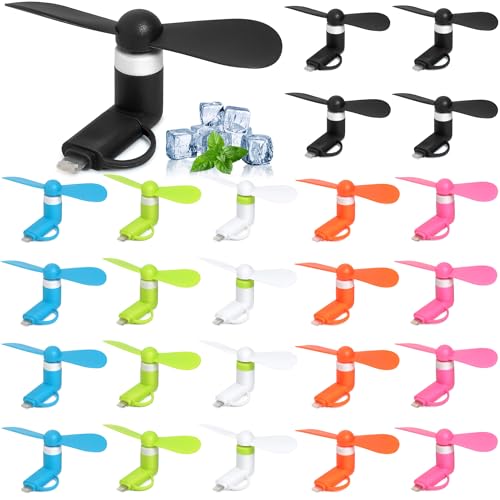
Aeergured 24-Pack 2-in-1 Phone Fans
A crowded bag, a warm phone, and a long afternoon can make even a tiny cooling tool feel worth carrying. The best micro USB mini fan category usually revolves around compact convenience, but this Aeergured bundle takes a slightly different route by offering 24 plug-in phone fans in six colors. That quantity changes the value proposition because the package is less about owning one personal fan and more about keeping several available for events, classrooms, travel kits, party favors, or shared family use. The design is simple, almost toy-like at first glance, yet the combination of portable airflow, broad phone compatibility, and removable blades gives it practical appeal.
Aeergured 24-Pack Phone Fans
The bundle includes 24 miniature fans in black, blue, green, white, orange, and pink. That color mix makes sorting easier when several people are using them at once, and it also keeps the package from feeling repetitive or overly utilitarian. A group can grab different colors without arguing over whose fan belongs to whom, which sounds minor until several identical accessories are scattered across a table. The variety also works nicely for gift bags, summer events, school activities, or small promotional bundles where visual variety matters.
Each unit measures about 3.4 by 1.8 by 1.4 inches, so the overall design stays genuinely pocketable. The blades can be removed before storage, reducing the chance of bending them inside a purse, backpack, or drawer. That removable construction also makes packing easier because the fan body takes up very little room once separated. Still, loose blades can disappear quickly, so storing each fan in a small pouch or compartment would be the sensible move.
The bulk format is both the strongest selling point and the biggest limitation. Anyone needing only one or two fans may find 24 pieces excessive, while people organizing gatherings or preparing multiple travel bags may appreciate having extras on hand. The per-unit simplicity means these aren’t intended to replace rechargeable handheld fans with batteries, displays, or several speed settings. Instead, the bulk quantity favors convenience, sharing, and quick deployment over advanced controls.
Plug-In Cooling Without Extra Charging
The Aeergured fan starts working as soon as it’s connected to a compatible device, so there’s no separate battery to charge or power button to remember. That direct connection keeps the routine wonderfully uncomplicated: attach the fan, let it spin, then remove it when the breeze is no longer needed. The plug-and-run design is especially handy during brief waits, outdoor queues, warm commutes, or moments when carrying a larger fan feels like overkill. The catch, naturally, is that the phone supplies the power.
Power consumption is described as low, and the compact motor is designed to create a strong but soft stream of air. Since no measured airflow or battery-drain figures are provided, expectations should stay grounded. This is a close-range fan meant for the face, neck, or hands, not a device that will cool an entire room. The focused breeze should feel most noticeable when the fan sits fairly close, while its effect will fade quickly with distance.
Direct phone power also introduces a practical tradeoff: using the fan can occupy the charging port and add a small amount of strain around the connector. Holding the phone by the fan body would be a bad habit, since repeated sideways pressure could stress the port over time. A steadier approach is to support the phone normally and let the fan extend outward without being bumped. That little bit of care protects both the connector fit and the phone’s port.
Compatibility And Safety Details
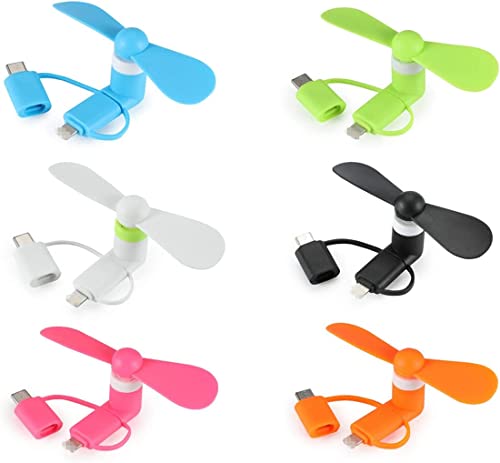
The 2-in-1 design supports Apple devices and certain Android phones, covering iPhone, iPad, Android smartphones, and tablets according to the supplied description. Android compatibility is more specific because the phone needs a USB Type-C port and must support OTG functionality. That OTG requirement matters, since a Type-C connector alone doesn’t guarantee the fan will operate. Checking the device settings or manufacturer specifications beforehand can prevent the frustrating moment when the fan fits physically but refuses to spin.
The soft rotating blades are designed to reduce the chance of painful contact. A finger brushing a flexible fan blade is far less alarming than touching a rigid metal or hard plastic propeller, and that matters when the accessory is being used close to the face. Even so, soft blades shouldn’t be treated as completely risk-free around hair, loose threads, or curious children. Long hair can wrap around a spinning blade, so tying it back before use is a smart, no-fuss precaution.
An integrated IC protection board is intended to help prevent damage to the connected phone. That added protection is reassuring because inexpensive plug-in accessories can raise concerns about power irregularities or poor electrical design. The product description doesn’t provide technical certification details or test results, so the protection claim should be understood as a stated design feature rather than independent proof. Still, including a dedicated protection component shows more thought than a bare motor wired directly to the connector.
Materials, Noise, And Everyday Handling
The fans use TPE material, which gives the blades and body a softer, lighter feel than rigid plastic. TPE is useful here because flexibility supports safer contact and helps the blades tolerate small knocks without immediately cracking. The lightweight construction also keeps the accessory from pulling too heavily on the phone port. On the flip side, lightweight parts can feel less substantial, so these fans should be treated as compact convenience tools rather than rugged equipment.
The motor is described as quiet, though no decibel measurement is supplied. A tiny fan can still create a faint buzz or vibration, especially when connected to a tablet resting on a hard table. The low-noise operation should suit casual personal use, but a completely silent experience would be unrealistic because the motor and blades are still moving at speed. Any rattling may indicate that a blade isn’t seated correctly or has become slightly bent during storage.
Cleaning is straightforward but easy to overlook. Dust, lint, and strands of hair can collect around the fan hub, reducing smooth rotation and making the motor work harder. Removing the blades allows better access, though they should be wiped gently rather than stretched or twisted. Regular light cleaning helps preserve steady airflow and prevents grime from being blown directly toward the face.
Where The 24-Pack Makes The Most Sense
This set is particularly practical anywhere several small cooling accessories are needed at once. Summer parties, camp bags, classroom reward boxes, travel groups, and family outings all benefit from having plenty of extras without sharing a single device. The six-color assortment adds a playful touch while making distribution easier. The real strength isn’t sophisticated engineering; it’s the ready-to-share format paired with a tiny footprint.
A single household may also spread the fans across purses, desks, glove compartments, and emergency kits. That approach reduces the familiar annoyance of owning one useful gadget that’s never in the right place at the right time. Because the blades detach, each unit can be stored compactly, though keeping the blade and connector together requires some organization. A labeled pouch or divided container would solve that small but predictable problem.
The included URL points to a different cooling subject rather than another phone accessory, so it fits best as a separate reference. Broader room ventilation can involve very different constraints, and small-space ceiling airflow is discussed in small bathroom ceiling fans. That topic doesn’t change how this phone fan performs, but it highlights the difference between close-range personal cooling and fixed room-level air movement. The Aeergured pack belongs firmly in the first category.
Strengths And Tradeoffs In Daily Use
The clearest strength is convenience without charging. There’s no internal battery to degrade, no cable to remember, and no waiting for a recharge before use. The fan draws power directly from the connected device and starts immediately, which suits short bursts of cooling. That simplicity also reduces the number of parts that can fail, though the motor and connector still need careful handling.
The most obvious weakness is dependence on phone compatibility and available battery power. A depleted phone can’t provide much help, and using the fan while relying on the same port for wired charging isn’t practical. OTG support may also confuse some Android owners because the requirement isn’t always clearly advertised on the phone itself. Those limitations don’t ruin the product, but they do make compatibility checks essential before handing the fans out in bulk.
Airflow will also be modest compared with larger rechargeable fans. The compact blades are built for immediate personal relief, not sustained cooling across a desk or bedroom. Still, the soft breeze, removable design, and colorful 24-piece assortment create a sensible niche. Used with realistic expectations, the Aeergured bundle offers a playful, portable way to handle brief pockets of heat without adding another rechargeable gadget to the pile.
TriPole 4.5-Inch USB Desk Fan
A warm desk can turn focused work into a fidgety battle with sticky hands, stale air, and constant trips to adjust the thermostat. The best micro USB mini fan should cool the exact spot that feels uncomfortable without stealing half the table or rattling through a quiet call. TriPole approaches that problem with a compact 4.5-inch frame, three airflow settings, and a head that rotates through a full vertical circle. It’s a straightforward plug-in fan, but several thoughtful details make it more practical than its plain black shell initially suggests.
TriPole Portable Desk Fan Review
The 4.5-inch diameter keeps this model small enough for a crowded desktop, narrow nightstand, or temporary travel setup. It can sit beside a monitor without blocking the screen, and it won’t demand the footprint of a standard tabletop fan. That size also makes packing less troublesome, though the fixed base means it won’t flatten inside a bag. For a device meant to stay within arm’s reach, the balance between compact dimensions and usable airflow makes sense.
Three speed modes offer more control than a basic one-speed fan, and the rear button handles each adjustment. Low speed suits quiet desk work or a mild room, while the stronger settings can handle the stuffier stretch of an afternoon. The product details don’t provide measured airflow figures, so it’s better to think of this as personal cooling rather than whole-room circulation. Set within a few feet, the breeze should feel direct; placed across a large room, its effect will naturally fade.
The control placement is uncomplicated, but a button on the back may take a little reaching if the fan sits against a wall or behind office supplies. That’s hardly a deal-breaker, yet front-mounted controls would be quicker during frequent speed changes. On the bright side, a single physical button avoids menus, touch panels, or decorative extras that add complexity without helping airflow. The simple operation fits a fan designed to be plugged in, aimed, and left alone.
Three Speeds For Focused Airflow
Variable airflow is the feature that shapes daily use most clearly. A gentle setting can keep air moving around the face and hands without sending loose receipts skittering across the desk, while the upper setting provides a firmer breeze during hotter periods. That flexibility matters because maximum speed isn’t always comfortable at close range. The three-speed adjustment lets the fan respond to changing temperatures instead of forcing one fixed level all day.
Small fans often produce a narrow column of air, and that can actually be useful. Rather than stirring every paper on the table, the TriPole can direct cooling toward one chair, one side of a bed, or one warm workstation. The result is a more controlled experience, especially in shared rooms where lowering the thermostat would bother someone else. Its targeted breeze solves a local comfort problem without pretending to replace a ceiling fan or air conditioner.
Higher speed does require the right power source. TriPole states that the fan needs 0.8A while operating, and a weak USB port may not supply enough current for the third setting. If the fan runs at lower speeds but stalls or behaves inconsistently at the highest level, a 5V/1A USB charger is the recommended test. That note is refreshingly specific because it addresses a common frustration that might otherwise be mistaken for a faulty motor.
USB Power And The Longer Cable
The fan connects through a 5V USB-A plug, so it can draw power from a computer, USB wall charger, or power bank. This setup removes the need for disposable batteries and keeps the fan useful in offices, hotel rooms, or temporary workspaces. It also avoids concerns about regional outlet voltage during overseas travel, provided a suitable USB power adapter is available. The fan doesn’t contain a rechargeable battery, though, so it stops the moment the power source is disconnected.
A 4.9-foot cable gives the TriPole more placement freedom than short-cord mini fans. That extra reach helps when the nearest charger sits behind a bed, beneath a desk, or on the opposite side of a nightstand. No one enjoys balancing a fan on the edge of a table because the cord falls a few inches short. The longer power cable makes sensible positioning easier without immediately reaching for a USB extension.
The cable can still create clutter in a minimalist workspace, particularly when it runs from the front of a laptop to the fan. A reusable tie or desk clip can keep the excess length from tangling with a mouse cable or charging lead. Also, the USB-A connector may require an adapter with newer laptops that provide only USB-C ports. That compatibility wrinkle doesn’t affect performance, but it’s worth checking before travel so the power connection doesn’t become an unpleasant surprise.
Stable Base And Quieter Desk Use
A wide base gives this little fan a steadier stance than narrow clipless designs. Four silicone pads sit underneath, helping the unit grip smooth surfaces while reducing vibration transferred into the desk. That detail matters because even a modest motor can sound much louder when a hollow tabletop acts like a drum. The combination of a firm base and vibration-damping pads should keep everyday operation less distracting.
Quiet operation is always relative with a spinning fan. The supplied information describes the TriPole as quiet, but no decibel rating is provided, so complete silence shouldn’t be expected. Low speed will likely be the least intrusive choice for video calls, sleep, reading, or concentrated work, while higher speeds may produce more motor and airflow noise. A stable surface also helps because an uneven shelf can introduce buzzing that isn’t coming from the motor itself.
The broad footing improves security, yet it takes up more surface area than a slim pedestal or clamp. On a packed desk, that tradeoff may require moving a mug, speaker, or stack of notebooks. Still, a fan that stays planted is usually less irritating than one that creeps backward whenever the speed increases. The anti-slip design favors reliability over an ultra-tiny footprint, and that’s a sensible call for a desktop appliance.
Full-Rotation Head And Better Direction
The fan head rotates 360 degrees vertically, giving much more aiming freedom than a fixed-angle model. It can point upward from a low shelf, tilt downward from a raised stand, or direct air straight ahead at desk height. That range removes the need to prop the base on books just to reach the right spot. Once positioned, the airflow can follow the seating arrangement rather than forcing the seating arrangement to follow the fan.
Angle control also helps with uses beyond direct face cooling. A gentle breeze aimed across a damp workspace can improve comfort, while upward airflow may keep warm air from settling around a tight desk nook. The fan could also move stagnant air near houseplants, although strong airflow shouldn’t be aimed continuously at delicate leaves or quickly drying potting mix. The adjustable direction is useful precisely because not every situation calls for air blowing straight ahead.
Large spaces demand a different scale of air movement, and room-wide circulation is addressed separately in ceiling fans for big rooms. That distinction keeps expectations fair: this TriPole model handles close-range comfort, while a ceiling fixture moves air across a broader area. Trying to make a 4.5-inch desk fan perform like a room fan would only lead to disappointment. Its personal-scale airflow is the point, not a limitation the product attempts to hide.
Detachable Cover And Routine Cleaning
Dust gradually collects on fan blades and protective grilles, especially near open windows, bedding, or busy work surfaces. TriPole includes a detachable front cover, making the interior easier to reach than a permanently sealed housing. Regular cleaning can prevent the fuzzy buildup that weakens airflow and gives the blades an uneven, grimy appearance. A soft cloth or brush should handle ordinary dust without putting stress on the blade assembly.
Cleaning also protects the quietness of the fan. Dirt around the hub or uneven deposits on the blades can contribute to wobble, extra vibration, and a rougher sound. Unplugging the unit before removing the cover is the obvious safety step, and the blades should be fully dry before power is restored. The serviceable grille makes maintenance less of a chore, which increases the odds that it’ll actually get done.
The removable cover is useful, but it introduces one more part that needs careful handling. Plastic clips can wear or snap if the grille is forced in the wrong direction, so gentle removal beats wrestling with it. This isn’t a fan built for workshop dust, kitchen grease, or damp bathroom exposure; it’s better suited to relatively clean, dry spaces. With ordinary upkeep, the accessible blade area should help preserve consistent airflow over time.
Practical Strengths And Honest Limitations
The main strength is how several modest features work together: three speeds, a long cable, a steady base, and full vertical rotation. None of them sounds dramatic alone, but together they reduce the little annoyances that often make compact fans frustrating. The unit can sit where it’s needed, aim accurately, and adjust to different comfort levels without occupying much room. That practical mix suits desks, bedside tables, hotel rooms, and temporary workstations.
The clearest weakness is its complete dependence on an external USB source. There’s no cordless freedom, and underpowered ports may not support the third speed correctly. Travelers carrying only USB-C chargers may also need an adapter, while anyone hoping to cool a large bedroom will need a bigger solution. These aren’t hidden flaws, but they define where the fan fits and where it doesn’t.
TriPole’s small USB fan makes the most sense as a focused comfort tool rather than a substitute for room cooling. Its stable positioning and adjustable airflow address the everyday hassles that matter during close-range use, while the removable grille helps keep maintenance manageable. The design stays refreshingly plain, with no battery display, lights, or decorative gimmicks competing for attention. For a desktop that needs a direct breeze and very little fuss, that restraint is part of the appeal.
Gaiatop Compact USB Desk Fan
Heat tends to settle in the most annoying places: beside a glowing laptop, inside a parked car, or around a desk wedged into a poorly ventilated corner. A full-size fan can feel excessive there, while a tiny one often looks useful but barely moves enough air to matter. The best micro USB mini fan should close that gap, and the Gaiatop model does so with a sub-8-ounce body, three speeds, and a compact frame designed for close-range cooling. It’s simple, portable, and refreshingly clear about what it can and can’t do.
Gaiatop Small USB Fan Review
The Gaiatop fan leans into a classic desktop shape rather than a folding handle, clip, or phone-mounted connector. That choice makes it easier to place on a nightstand, office table, car console, or narrow shelf without learning a fiddly setup. Its body weighs less than eight ounces, so moving it from room to room won’t feel like hauling another appliance around. The small size is a practical win wherever surface space is already being rationed between chargers, notebooks, mugs, and computer gear.
Compact doesn’t mean invisible, of course. The fan still needs a flat spot for its base, and it won’t tuck into a pocket as neatly as a bare phone fan with removable blades. A backpack, tote, or travel case is the more realistic home for it during transport. The upside is better stability than many ultra-small plug-in designs because the fan stands on its own rather than hanging from a device port.
The blue finish gives the unit a little personality without turning it into a decorative centerpiece. Its appeal comes from being easy to place and easy to understand, not from lights, displays, or elaborate controls. That stripped-down approach will suit a setup where extra features mostly become extra clutter. The small footprint stays the headline feature, while the familiar form keeps everyday use straightforward.
Three Speeds Without Fussy Controls
Low, medium, and high settings cover the basic range needed for personal cooling. Pressing the power button repeatedly cycles through the available speeds, so there’s no separate dial or row of switches taking up space. Low speed can keep air moving during reading, calls, or light desk work, while the upper setting offers a firmer breeze during warmer stretches. The three-speed control gives enough flexibility without making a tiny fan feel needlessly complicated.
Close-range placement matters more than the highest setting. A small fan can feel surprisingly effective from a couple of feet away, yet that same airflow becomes much less noticeable across a bedroom or living room. The Gaiatop is best understood as a personal breeze source, aimed toward one chair, one side of a bed, or one workstation. Expecting it to circulate air through a large room would be asking a pocket-size motor to do a ceiling fan’s job.
The single-button arrangement is convenient, though it does require cycling through speeds rather than jumping directly from high to low. That’s a small nuisance if settings are changed often during the day. Still, one control reduces visual clutter and leaves little room for confusion. The simple speed sequence fits the product’s no-nonsense personality, especially for quick use in temporary workspaces or travel accommodations.
Strong Airflow With Manageable Noise
The product description places operating noise below 50 decibels, even while the fan produces its stronger airflow. That figure suggests a sound level intended to remain manageable during office work, casual conversation, or rest, though room acoustics and the chosen speed will affect what the ear actually notices. A hard, hollow desk can amplify vibration more than a solid nightstand or padded surface. Low speed will naturally be the calmer option for quiet environments.
Air movement itself produces sound, so silence isn’t a realistic promise from any fan with exposed blades. The useful question is whether the noise becomes irritating after an hour beside a keyboard or pillow. Gaiatop’s stated sub-50dB operation puts emphasis on balancing airflow with comfort rather than chasing an aggressive, high-pitched blast. A steady whoosh is generally easier to live with than rattling, buzzing, or uneven motor chatter.
Placement can improve the experience more than people expect. Setting the fan on a stable surface helps prevent resonance, while keeping loose cables, paper edges, and fabric away from the intake reduces fluttering noises. Dust buildup can also make a small fan sound rougher over time, so occasional cleaning is worth the trouble. The combination of quiet positioning and sensible speed selection should matter just as much as the motor specification.
Limited Tilt With Useful Direction
The fan head rotates vertically from 0 to 30 degrees, allowing the breeze to rise toward the face instead of traveling straight across the tabletop. That adjustment is useful when the fan sits below eye level, beside a laptop, or on a low vehicle console. A few degrees can be the difference between cooling your hands and actually reaching your neck or face. The mechanism isn’t dramatically flexible, but it handles the most common upward-angle correction.
A 30-degree range is more limited than fans offering full vertical rotation. It may not aim downward effectively from a high shelf, and it won’t point straight upward for broader air circulation. That restriction keeps expectations in check: the Gaiatop is built for ordinary desktop positioning, not elaborate mounting arrangements. The modest tilt range works best when the base already sits close to the intended airflow height.
Small directional changes can also help around plants, electronics, and hobby spaces, though airflow should be used thoughtfully. A constant strong breeze can dry delicate leaves or lightweight potting mix faster than expected, while a gentle setting may help reduce stagnant air around a crowded shelf. The fan shouldn’t be treated as a substitute for proper ventilation. Its adjustable head simply makes localized airflow easier to manage.
USB Power Across Several Settings
The fan receives power through USB and can connect to PCs, laptops, power banks, AC adapters, car chargers, and other compatible supplies. That range gives the Gaiatop a useful edge over outlet-only fans, especially during travel or in cars without convenient household sockets. A USB-powered design also means there’s no internal battery to recharge, replace, or leave forgotten at zero percent. Plug it into an available source and the fan is ready to operate.
Battery-free operation brings a tradeoff. The fan can’t run independently, so a power bank, computer, charger, or vehicle USB port must remain nearby. That dependence may be inconvenient outdoors, but it also avoids the gradual battery wear that affects rechargeable fans after repeated cycles. The external power requirement is less of a problem at a desk and more noticeable during walking, camping, or places without a reliable USB source.
Compatibility is broad, yet power output still deserves attention. Weak or unstable USB ports can reduce performance, particularly at higher fan speeds, even if the connector fits correctly. A dependable adapter or power bank will usually provide a more consistent experience than an old, low-output port. The USB flexibility helps most when the power source is capable of supporting the fan without interruption.
Travel, Car, And Office Use
Portable fans often sound ideal for travel until their shape makes packing awkward. Gaiatop avoids excessive bulk, and its sub-8-ounce weight won’t add much to a carry-on or day bag. The fixed desktop form still needs protection from pressure around the grille, so tossing it beneath heavy books or shoes wouldn’t be wise. Packed with a little care, its lightweight build suits hotel desks, temporary offices, and warm waiting areas.
Car use is another sensible fit, particularly for a passenger needing extra airflow without redirecting every dashboard vent. A USB car charger can power the fan, and the compact base may sit on a stable console or flat tray where permitted. Loose placement during driving can become a hazard, though, so the fan needs a secure surface and should never block controls or visibility. The car-friendly power setup is useful, but safe positioning comes first.
Room-scale cooling follows an entirely different set of rules, and a taller unit may suit broader circulation needs discussed in Lasko tower fan options. That reference highlights the distinction between focused desktop airflow and a fan designed to move air through a larger occupied zone. Gaiatop’s compact model belongs beside one person, not across the room from several. Its close-range cooling makes the most sense where portability and limited surface space matter more than reach.
Practical Strengths And Real Limitations
The biggest strength is balance. Gaiatop combines three speeds, low weight, adjustable tilt, USB compatibility, and stated noise below 50dB without stuffing the product with features that complicate operation. Each detail supports a familiar use case: sitting at a desk, reading beside a bed, riding in a car, or working in a warm corner. The fan’s value comes from reducing discomfort with very little setup.
The clearest weakness is limited reach. Its compact blades and 30-degree tilt aren’t intended for large spaces, elevated shelves, or broad room circulation. The lack of an internal battery also means portability ends wherever access to USB power ends. Those compromises are reasonable for the size, but they matter for anyone expecting cordless freedom or a breeze that travels several yards.
Maintenance isn’t described in detail, so the grille may require careful brushing or wiping rather than quick disassembly. Dust on small blades can reduce airflow and make the fan sound busier, particularly after regular use in a car or near an open window. Keeping the intake clear and storing the unit away from lint will help protect its steady airflow. Small fans don’t ask for much care, but neglect shows up quickly because every bit of blade surface matters.
The Gaiatop USB desk fan earns its place through restraint rather than spectacle. It won’t cool a room, run without external power, or aim in every direction, yet its portable size, three useful speeds, and manageable noise address the everyday problems compact fans are actually bought to solve. It fits the desk, travels without much fuss, and delivers airflow where a full-size fan would be clumsy. That practical focus is its most convincing feature.
MACMORE Portable Clip-On Turbo Mini Fan
Standing in a slow-moving line under summer sun can make both hands feel occupied before you’ve even pulled out a water bottle. A regular handheld fan helps, but holding it through a concert, commute, makeup session, or stroller walk gets old fast. The best micro usb mini fan should reduce that hassle rather than create another object to juggle, and this MACMORE model tackles the problem with a rotating clip, rechargeable battery, four wind levels, and an LED status display. Its hands-free flexibility is the real attraction, though the compact body and 13,500 RPM motor bring a few practical tradeoffs along for the ride.
MACMORE Clip-On Mini Fan
The design blends a handheld fan, clip-on fan, and miniature desk fan into one 4.16-ounce body. It can be held during a short walk, clipped to a bag strap during a commute, or placed on a table while eating outdoors. That mix saves space inside a purse or travel bag because there’s no need to pack several cooling gadgets for different situations. Compact as it is, the fan still needs enough clearance around the blades, so an overstuffed pocket isn’t the safest storage spot.
The ivory finish gives the device a softer, more polished look than the usual black utility fan. Style won’t improve airflow, of course, but a small accessory used near the face, clipped to clothing, or placed beside a dressing mirror becomes fairly visible. The pocket-size format fits luggage, purses, clutches, and day bags without adding the bulk of a conventional rechargeable fan. It’s lighter than many smartphones, which matters once it’s hanging from a hat brim or shoulder strap for a while.
Versatility is this fan’s strongest argument. A fixed desktop model cools one position well, while a basic handheld fan demands constant grip; MACMORE’s multi-position design sits between those two approaches. The clip can attach to stroller frames, chairs, luggage handles, grocery carts, car sun visors, or pet crates when the mounting surface is suitable. Still, the grip will only be as stable as the object beneath it, and thick, rounded, or slippery surfaces may require extra care.
Turbo Airflow In A Tiny Frame
The supplied specifications place the motor’s maximum speed at 13,500 RPM. That figure indicates a fast-spinning compact motor rather than a measurement of how far or widely the air travels. A turbo motor can produce a concentrated breeze close to the body, which is useful around the face, neck, or hands during hot outdoor waits. It won’t cool a whole patio or stadium row, and expecting room-scale circulation from such a small fan would miss the point.
Four airflow levels provide more control than the familiar low-medium-high setup. The gentlest setting fits makeup application, lash work, desk use, or quieter surroundings where a hard blast would feel distracting. Middle settings cover ordinary walks and commuting, while the upper modes are intended for workouts, sporting events, beaches, and other hotter situations. That four-speed range helps avoid the all-or-nothing feel common with tiny fans.
Maximum airflow comes with predictable compromises. Higher motor speed can increase sound, use battery power more quickly, and feel overly sharp at very close range. The product is described as quiet enough for restrained environments, yet no decibel measurement is supplied, so silence shouldn’t be assumed. A lower wind level will generally suit churches, offices, restaurants, or indoor appointments better than turbo mode.
Direction also affects how powerful the fan feels. Air aimed squarely toward the face from a short distance will feel stronger than airflow escaping past the shoulder because the clip shifted. Positioning takes a little experimenting, especially on a moving bag strap or stroller. Once the angle is dialed in, the focused airflow should take the edge off heat without requiring the device to be held continuously.
Rotating Clip And Tilting Fan Head
The clip rotates through 360 degrees, while the fan head tilts through 180 degrees. Together, those movements make the device far more adaptable than a clip that points in only one direction. It can sit upright on a table, turn sideways from a luggage handle, or angle upward from a lower chair rail. That freedom reduces the need to twist straps or reposition an entire bag just to aim the breeze correctly.
Hat mounting is possible, but comfort depends on balance. Even at 4.16 ounces, a fan clipped far to one side may tug at a lightweight brim or make the hat feel uneven. A sturdier baseball cap should handle the weight better than a floppy sun hat, while shorter sessions will feel more natural than wearing it there all afternoon. The lightweight construction helps, yet physics still gets a vote.
Strollers and pet crates present different concerns. The clip should be positioned where fingers, hair, fabric, and curious paws can’t reach the moving blades, and airflow shouldn’t stay fixed directly on a baby or animal for long periods. A gentle setting aimed across the surrounding area is usually more sensible than a concentrated blast at close range. The adjustable mounting system offers options, but careful placement remains part of responsible use.
Desk use is pleasantly straightforward. The fan can rest on a table during meals, skin-care routines, or computer work, provided its base and clip assembly sit steadily. A compact multi-use model may not feel as planted as a wide-base desk fan, especially on an uneven outdoor table. Even so, the stand-and-clip flexibility earns its keep when one device needs to move between a restaurant table, dressing area, and walking route.
LED Display And Charging Behavior
The LED screen shows both battery level and the selected wind speed. That removes the guesswork common with tiny rechargeable fans that offer only a blinking light before shutting down. A visible percentage or status reading makes it easier to judge whether the battery needs attention before leaving for a concert, airport, or sports event. It also helps separate a low-charge problem from a motor or control issue.
Charging uses a USB Type-C connection, and the stated full-charge time is about four hours. Type-C is convenient because the plug is reversible and commonly shared with newer phones, tablets, earbuds, and power banks. The provided details don’t state the battery capacity or exact runtime at each speed, so claims about all-day operation would be guesswork. Actual endurance will naturally vary with the chosen wind level and how often the display is checked.
The fan can continue operating while connected to power, but the description specifies use at speed three while charging. That detail matters because someone expecting full turbo performance during charging may run into a limit. Pass-through use is still handy at a desk, hotel, airport terminal, or car where a USB source remains nearby. It turns the fan into a semi-fixed cooling tool while the battery recovers.
A charging cable adds one more item to remember, though Type-C compatibility reduces the odds of needing a dedicated lead. A power bank can keep the fan running away from an outlet, but it also adds weight to the bag and partially defeats the appeal of a featherlight setup. The rechargeable design makes cordless use possible; it doesn’t remove the need for basic battery planning before a long outing.
Makeup, Travel, And Daily Carry
Makeup and lash appointments are sensible uses because the fan can provide a controlled breeze without occupying one hand. Low speed may help set cosmetic layers or reduce that overheated feeling beneath bright dressing lights. Strong airflow can dry the skin uncomfortably or disturb loose powder, so restraint pays off. The hands-free clip is more useful here than raw motor speed.
Travel exposes the fan’s practical side. It can attach to luggage handles in a warm terminal, sit on a hotel nightstand, or cool a seat during a delayed bus or train departure. The small body leaves more room for essentials, while the LED display shows whether charging should happen before the next leg. Its travel-friendly weight is appealing, though the fan should be protected from crushing pressure inside tightly packed luggage.
Outdoor events create a tougher test. Heat, constant movement, crowding, and limited access to outlets make clip positioning and battery management more important than they are at home. Securing the fan to a chair or strap leaves both hands free for a drink, phone, bag, or stadium gear. The portable cooling setup is practical, but the strongest setting may not overcome hot wind, direct sun, or high humidity by itself.
Full-size table fans serve a separate purpose, particularly when a steady surface and broader airflow matter more than pocket portability. That older appliance style is discussed through vintage table fan designs, which highlights how differently fixed and wearable fans handle space. The MACMORE model prioritizes mobility, clipping, and close-range relief. A heavier table fan prioritizes stability and sustained airflow from one location.
Everyday Strengths And Tradeoffs
The clearest strength is the all-in-one shape. Four speeds, a status screen, rotating clip, tilting head, rechargeable power, and handheld use cover a wide range of everyday situations without making the unit bulky. That flexibility helps during routines that shift constantly between standing, sitting, walking, and waiting. One minute it’s clipped to a mirror; the next, it’s resting beside a laptop.
The main weakness is that versatility can introduce instability. A small clip-based body won’t feel as solid on a table as a fan with a broad weighted base, and moving straps can push airflow off target. Turbo mode may also drain the battery faster and produce more audible motor noise, although exact runtime and sound figures aren’t provided. Realistic expectations matter more here than flashy motor language.
Hair and loose fabric deserve attention because the fan often sits near the head, shoulder, hat, or bag strap. Long strands can drift toward the intake, particularly while walking outdoors or turning suddenly. Tying hair back and keeping scarves, drawstrings, and loose sleeves away from the blades protects both the fan and the person using it. The close-body mounting is convenient, but it requires more awareness than placing a fan several feet away.
The MACMORE fan makes the most sense when hands-free cooling matters more than broad airflow. Its low weight, four wind settings, visible battery status, and flexible clip solve the little irritations that show up during commutes, outdoor events, makeup routines, and travel delays. It won’t replace air conditioning or a larger desk fan, and turbo output won’t change brutal weather into a cool afternoon. What it offers is a direct breeze, pointed where it’s needed, without keeping one hand busy the whole time.
DIGIX 100-Speed Turbo Handheld Fan
A sticky commute can make a fixed three-speed fan feel surprisingly crude. One setting barely reaches the face, the next scatters loose papers, and the highest sounds busier than the relief it provides. The best micro USB mini fan should offer finer control without becoming a pocket-sized science project, and this DIGIX model answers with 100 speed levels, a 3,600mAh battery, a foldable body, and a digital status screen. Its feature list is ambitious for such a small device, though the real value lies in how those features handle changing heat, noise, and portability needs.
DIGIX Portable Handheld Fan
The DIGIX fan combines handheld, desktop, and neck-worn use in one folding design. Held upright, it behaves like a familiar personal fan for walking or waiting outdoors. Folded into a supported angle, it can sit beside a laptop, makeup mirror, or bedside lamp without needing a separate stand. The included lanyard adds hands-free convenience, though a fan hanging from the neck may shift as the body moves.
Black housing gives the fan a restrained look that fits work bags, travel kits, and office setups without drawing much attention. The frame folds through a stated 120-degree range, allowing the airflow direction and body shape to change with the situation. That hinge also makes storage easier than carrying a rigid, full-length handle. Still, folding joints deserve gentle handling because repeated force or rough packing can wear any adjustable mechanism over time.
The design packs plenty of functions into a compact format, but it isn’t as minimal as a one-button pocket fan. Speed adjustment, the screen, charging, folding, and lanyard use create a slightly busier experience. That’s not necessarily a flaw; it simply means the DIGIX favors control and adaptability over bare-bones simplicity. Someone wanting one fixed breeze may consider 100 levels excessive, while frequent travelers may appreciate the added precision.
One Hundred Speeds Without Big Jumps
The headline feature is 100 adjustable speed levels. Instead of jumping from low to medium and then straight to high, the fan allows smaller changes in airflow. That precision can be useful during makeup application, desk work, commuting, or outdoor events where the temperature shifts throughout the day. A gentle setting can stay subtle, while higher levels provide a firmer response once the heat becomes harder to ignore.
Fine control solves a problem that ordinary three-speed fans often create. Low can feel too weak, yet medium may be louder or sharper than needed at close range. The DIGIX lets the airflow land somewhere between those familiar presets, making personal comfort easier to tune. Realistically, most people will settle on a few favorite ranges rather than deliberately using every single number.
A large speed scale also requires more interaction than a simple switch. Moving from a very low level to maximum power could take longer depending on how the control is designed, and frequent adjustments may become fussy during walking. The supplied description doesn’t explain whether speed changes occur through a wheel, repeated presses, or press-and-hold operation. The wide adjustment range is useful, but control convenience will shape how pleasant it feels in practice.
Lower settings make sense near loose powder, drying mascara, delicate lashes, paperwork, or quiet indoor spaces. Higher output better suits outdoor lines, camping areas, beach trips, and crowded summer events where surrounding heat can overwhelm a soft breeze. That range gives the fan a broader role than a basic cosmetic dryer or desk accessory. The custom airflow works best when expectations remain personal rather than room-wide.
Turbo Motor And Concentrated Airflow
DIGIX lists a 20,000 RPM three-phase brushless motor paired with six blades. The supplied specifications also state airflow reaching up to 10 meters per second. Those numbers suggest a concentrated, high-velocity stream rather than broad circulation across a room. Close to the face or neck, that focused airflow should feel more immediate than the diffuse breeze from a slower miniature fan.
The product description says the motor spins three times faster than an ordinary handheld mini fan, but no reference model or test method is provided. That comparison is best treated as brand-supplied positioning rather than an independent benchmark. The firm specifications, such as 20,000 RPM and the six-blade layout, still help explain why the fan is presented as a turbo model. They don’t guarantee the same sensation at every distance, angle, or speed.
Maximum output carries familiar tradeoffs. Faster blade movement generally creates more audible airflow and consumes battery energy more quickly than a restrained setting. Holding the fan inches from the face at full power may also feel harsher than refreshing, especially around dry eyes or sensitive skin. The benefit of 100-step control is that turbo power doesn’t need to be the default.
A narrow airflow pattern performs best when aimed accurately. Tilting the body toward the face while it sits on a table can make the breeze feel stronger without raising the speed. Outdoors, wind direction and movement may push the air off course, so handheld positioning can work better than setting the fan several feet away. The DIGIX is a close-range cooling tool, not a replacement for room ventilation.
Battery Capacity And Everyday Runtime
The built-in battery has a stated capacity of 3,600mAh. DIGIX claims up to 12 hours of continuous operation on one charge, though actual runtime will depend heavily on speed selection. Lower settings should place less demand on the battery than sustained turbo use. Without separate runtime figures for different speeds, the 12-hour claim should be understood as a maximum rather than a promise at full output.
USB recharging allows the fan to draw power from laptops, power banks, vehicle chargers, and compatible wall adapters. That flexibility is useful during road trips, long airport waits, camping weekends, or workdays away from a convenient outlet. A power bank can extend practical use, though carrying both devices adds weight and another cable to manage. The rechargeable system removes disposable batteries but still rewards a little planning.
The battery size strikes a middle ground between portability and endurance. A larger cell could increase runtime, but it would also make the handle heavier during long handheld sessions. A smaller battery would lighten the unit while demanding more frequent charging. DIGIX’s 3,600mAh capacity aims to support extended personal use without turning the fan into a bulky power brick.
Heat itself can affect charging habits. Leaving any rechargeable device inside a hot parked car isn’t wise, and charging beneath bedding or inside an enclosed bag can trap warmth. A dry, ventilated surface is the sensible place for routine charging. Basic care helps preserve the internal battery and keeps the fan ready for the situations where cordless operation matters most.
Digital Display And Power Awareness
The built-in LED screen shows current speed and remaining battery level. That information is more useful than a single indicator light that changes color only when the battery is nearly empty. A visible power reading helps with deciding whether the fan needs charging before a train ride, concert, or afternoon outdoors. Speed feedback also makes the 100-level system easier to repeat from one session to the next.
Real-time status can reduce the irritation of unexpected shutdowns. If the battery is running low, there’s time to lower the speed or connect a power bank instead of waiting for the motor to stop without warning. That’s particularly helpful during makeup work or crowded events where restarting the setup would be inconvenient. The clear battery display turns power management into a quick glance rather than guesswork.
The screen does add another electronic component that uses a small amount of energy and may remain visible in dim rooms. The supplied details don’t mention brightness adjustment or whether the display turns off automatically. Bedside use could feel different depending on how bright the numbers appear after dark. The digital readout is practical, though people sensitive to light may prefer positioning it away from direct view.
Foldable Desk And Neck Use
The 120-degree folding mechanism allows the fan to shift from a straight handheld form into a tabletop position. That flexibility is useful beside a monitor, during skin-care routines, or while eating at an outdoor table. A stable surface still matters because a lightweight folded fan may vibrate or shift at higher speeds. Adjusting both the angle and output can help keep it planted.
Neck use frees both hands during walks, festivals, travel, or light chores. The lanyard supports that mode, but airflow depends on where the fan rests against the body and whether the head remains aimed upward. Movement can make the unit bounce or rotate, especially during exercise. The hands-free arrangement is convenient for casual motion, not necessarily vigorous activity.
Makeup use benefits from the same folding structure. The fan can sit near a mirror while a low setting moves air gently across the face, avoiding the awkwardness of holding a fan in one hand and a brush in the other. Stronger settings may disturb powder or dry skin too quickly, so precision matters more than raw force. The low-speed control earns its keep during these closer, more delicate tasks.
Fixed room fixtures solve an entirely different cooling problem, and lighting integration is discussed separately in ceiling fan light fixtures. That distinction keeps the DIGIX fan in its proper lane: portable, close-range relief rather than whole-room circulation. A ceiling fixture spreads air across a broader area and stays installed in one place. This foldable fan trades that reach for mobility and direct control.
Outdoor Travel And Daily Carry
Travel is where the design makes the strongest case for itself. The fan can move from a hotel nightstand to a sightseeing bag, campsite table, airport seat, or beach setup without needing a household outlet during operation. Folding reduces its overall length, and the lanyard offers another carrying option. The three-in-one design means one device can cover several positions instead of filling a bag with separate fans.
Outdoor use exposes the limits of any miniature fan. Direct sunlight, humidity, and hot surrounding air can reduce how refreshing the breeze feels, even at maximum speed. A personal fan moves existing air; it doesn’t lower the actual temperature like refrigeration. The DIGIX can provide localized relief, but hydration, shade, and sensible heat precautions still matter.
Beach and camping environments also introduce sand, dust, and moisture. Fine debris can gather around the grille and blades, while water exposure may damage internal electronics. The provided description doesn’t state a water-resistance rating, so the unit should be kept dry and stored away from loose sand when possible. A small protective pouch would help preserve the motor and display during rougher trips.
Daily carrying raises a different issue: accidental activation inside a bag. The supplied details don’t mention a travel lock, so the control area should be protected from pressure by other items. Folding the fan and placing it in a separate compartment can reduce unwanted operation and blade damage. Compact gear lasts longer when it isn’t rattling around beside keys, bottles, and chargers.
Support Coverage And Realistic Limits
DIGIX states that the fan includes three-year coverage along with round-the-clock customer and technical support. The provided information doesn’t outline claim requirements, exclusions, response times, or whether coverage varies by seller or region. Keeping the purchase record and reviewing the supplied warranty terms would be sensible. The length sounds reassuring, but the written policy determines what assistance actually includes.
The most obvious strength is the level of control packed into a portable body. One hundred speeds, a digital display, three use modes, a 3,600mAh battery, and a high-speed motor create a fan that can adapt from quiet makeup work to hotter outdoor conditions. Its folding form also reduces the awkwardness of carrying separate desk and handheld models. Those features address real annoyances rather than merely decorating the housing.
The biggest weakness may be complexity relative to a basic personal fan. A broad speed scale can feel excessive, the hinge introduces a moving part, and maximum power may reduce battery endurance noticeably. The supplied information also leaves out the fan’s exact dimensions, weight, charging duration, and speed-specific runtime. Those missing details make it harder to judge pocket comfort and day-long use before purchase.
DIGIX’s fan is best viewed as a precision-oriented personal cooler rather than a miniature room fan. Its turbo airflow offers extra headroom for hotter settings, while the lower end of the 100-speed range supports quieter, gentler use. The battery display and folding body make it easier to live with during travel, makeup routines, office hours, and outdoor waits. Its appeal rests on having choices, lots of them, inside one portable device.


Best Quiet Ceiling Fan For Bedroom 2026 Ultimate Comfort Picks

Best Ceiling Fan For Master Bedroom 2026 With Ultimate Comfort

Best White Ceiling Fan With Light For Bedroom 2026 Top Picks

Best Quorum Medallion Ceiling Fan 2026 With Style & Breeze

Best Outdoor Fan For Pergola 2026 Comfort Boost

Best Ceiling Fan For Great Room 2026 With Ultimate Comfort

Best Outdoor DC Ceiling Fans 2026 For Breezy Comfort

Best ceiling exhaust bath fan with light and heater 2026




