
Best Personal Computer Fan 2026: Cooler, Quieter Picks

A dependable best personal computer fan should move heat away from critical components without filling the room with an irritating hum. That sounds simple, yet fan shopping gets messy fast because diameter, thickness, bearing type, connector style, and airflow direction all affect the final result. A powerful model can still disappoint if its tone is sharp, its cable can’t reach the motherboard header, or its frame won’t clear nearby memory and radiator hardware. The smart pick balances cooling performance, noise character, fit, and long-term reliability rather than chasing the largest airflow number on the box.
Size deserves attention first because a larger fan often moves useful air at a lower rotational speed. Common 120 mm and 140 mm models suit many modern cases, while compact systems may require 80 mm, 92 mm, or slim-profile designs. Bigger isn’t automatically better, though. A wide fan squeezed against a solid front panel can struggle for air, and a thick model may collide with a graphics card, CPU cooler, or cable bundle.
Static pressure matters around radiators, dense dust filters, and restrictive case panels because the fan must push air through resistance. Open mesh cases usually benefit from airflow-focused blades that move a broader volume of air with less effort. Mixing the wrong design with the wrong location won’t ruin a computer, but it can create extra noise for only a small temperature improvement. That’s the rub: Raw speed means little without the right installation point.
Noise ratings also need a skeptical eye. A single decibel figure can’t describe ticking bearings, motor buzz, turbulence, or the pulsing sound created by an aggressive fan curve. PWM control offers a practical advantage by letting the motherboard raise fan speed only when temperatures climb. A smooth curve keeps everyday browsing and office work quiet, then adds cooling during gaming, rendering, or other heavy loads.
Bearing construction influences both sound and lifespan. Fluid-dynamic and magnetic-levitation designs often suit systems that run for long hours, though they usually cost more than basic sleeve-bearing models. Ball-bearing fans handle heat and varied mounting positions well, but some develop a more noticeable mechanical tone. Sleeve bearings can be perfectly serviceable in a budget build, yet horizontal mounting and constant high temperatures may shorten their useful life.
Airflow direction causes more mistakes than flashy specifications. Front and lower fans generally pull cooler air inward, while rear and upper fans usually exhaust warm air. Slight positive pressure, created by bringing in a bit more filtered air than the system exhausts, can help limit dust entering through unfiltered gaps. Too much intake, however, may trap heat if exhaust paths are cramped, so balanced case airflow remains the safer goal.
Convenience features can tip the scale between two closely matched choices. Rubber corner pads reduce vibration against thin case panels, daisy-chain connectors simplify cable routing, and removable cables make tight builds less frustrating. Lighting adds personality, sure, but it also introduces controller compatibility questions and more wires to hide. A plain black fan with clean acoustics may deliver greater day-to-day satisfaction than an elaborate RGB model that needs proprietary software.
The strongest choice fits the case, works with available headers, and stays unobtrusive during normal use. Expect some tradeoffs: Quiet fans may cost more, slim fans may sacrifice pressure, and maximum-speed models can become distracting under load. Sensible placement and a tuned fan curve often improve results more than replacing every fan at once. Start with the hottest or noisiest area, fix that weak point, and let real temperatures guide the next step.

- LFR Score9.8
LFR Score is a ranking system developed by lightfansreviews.com. LFR Score has no relationship or impact from any manufacturers or sales agent websites. Learn more
- BrandNoctua
- LFR Score9.4
LFR Score is a ranking system developed by lightfansreviews.com. LFR Score has no relationship or impact from any manufacturers or sales agent websites. Learn more
- BrandGaiatop

- LFR Score9.2
LFR Score is a ranking system developed by lightfansreviews.com. LFR Score has no relationship or impact from any manufacturers or sales agent websites. Learn more
- BrandTriPole

- LFR Score9.2
LFR Score is a ranking system developed by lightfansreviews.com. LFR Score has no relationship or impact from any manufacturers or sales agent websites. Learn more
- BrandSWEETFULL

- LFR Score9.2
LFR Score is a ranking system developed by lightfansreviews.com. LFR Score has no relationship or impact from any manufacturers or sales agent websites. Learn more
- BrandGaiatop

- LFR Score9.2
LFR Score is a ranking system developed by lightfansreviews.com. LFR Score has no relationship or impact from any manufacturers or sales agent websites. Learn more
- BrandGaiatop

- LFR Score9.2
LFR Score is a ranking system developed by lightfansreviews.com. LFR Score has no relationship or impact from any manufacturers or sales agent websites. Learn more
- BrandCorsair

- LFR Score9.0
LFR Score is a ranking system developed by lightfansreviews.com. LFR Score has no relationship or impact from any manufacturers or sales agent websites. Learn more
- BrandGaiatop

- LFR Score9.0
LFR Score is a ranking system developed by lightfansreviews.com. LFR Score has no relationship or impact from any manufacturers or sales agent websites. Learn more
- BrandKoonie

- LFR Score9.0
LFR Score is a ranking system developed by lightfansreviews.com. LFR Score has no relationship or impact from any manufacturers or sales agent websites. Learn more
- BrandKoonie
- LFR Score8.4
LFR Score is a ranking system developed by lightfansreviews.com. LFR Score has no relationship or impact from any manufacturers or sales agent websites. Learn more
- BrandVornado
Last update on 2026-07-08 / Affiliate links / Images, Product Titles, and Product Highlights from Amazon Product Advertising API
Noctua NF-A12x25 PWM Quiet 120mm Computer Fan
A warm desktop can go from barely noticeable to downright distracting once the cooling system starts whining through a long gaming session or demanding workload. The best personal computer fan needs to handle heat without trading one annoyance for another, and the Noctua NF-A12x25 PWM takes that challenge seriously with a 120mm frame, automatic speed control, and a stated maximum noise level of 22.6 dB(A). Its design isn’t centered on flashy lighting or decorative hardware. Instead, it puts controlled airflow, pressure performance, and mechanical refinement front and center.
Noctua NF-A12x25 PWM
The Noctua NF-A12x25 PWM is built for systems where cooling has to remain effective across several different jobs. Noctua positions it as both a case fan and a suitable option for CPU coolers, radiators, and all-in-one liquid cooling systems. That flexibility matters because an ordinary airflow fan may struggle against a dense radiator or restrictive dust filter, while a pressure-focused model may not be the most graceful choice for an open exhaust position. The NF-A12x25 aims for a middle ground by combining high airflow with strong static pressure.
Its physical dimensions follow the familiar 120 x 120 x 25mm format, so it fits many standard case mounts and cooling assemblies designed around 120mm fans. The fan operates at 12 volts and connects through a four-pin PWM plug, allowing a compatible motherboard or controller to adjust speed automatically. Maximum rotational speed reaches 2,000 RPM, while the included Low-Noise Adaptor lowers that ceiling to roughly 1,700 RPM. That gives the best personal computer fan setup more room for tuning instead of forcing one fixed acoustic profile.
Noctua lists a maximum noise figure of 22.6 dB(A), though any published noise specification should be read as a controlled measurement rather than a promise about an entire computer. Case grilles, radiator fins, mounting pressure, fan curves, and nearby panels can all change what reaches the ear. Even so, the supplied specifications suggest a design intended to keep sound restrained while still offering meaningful cooling at higher speeds. The real benefit is usable speed range, not silence under every condition.
Engineering That Serves A Practical Purpose
The NF-A12x25 uses Noctua’s Sterrox liquid-crystal polymer material, which is designed to support a very tight blade-tip clearance. Noctua specifies a gap of only 0.5mm between the blade tips and the inner frame. That narrow spacing helps reduce air slipping backward around the blade edges, a detail that becomes especially useful when the fan is pushing through a radiator or filter. Rather than being decoration for a specification sheet, the tight tip clearance supports more consistent pressure where resistance is present.
A metal-reinforced hub and metal bearing shell add rigidity around the moving assembly. Those components help the fan maintain the precise geometry required by such a small tip gap, since flex or wobble could undermine the entire design. Noctua also gives the fan a stated mean time to failure of more than 150,000 hours. That figure isn’t a guarantee for every installation, but it does indicate that long-term durability was treated as a core design goal rather than an afterthought.
Flow Acceleration Channels appear along the blades to influence the air near their outer edges. In plain English, they’re meant to manage airflow where blade speed is highest and turbulence can become troublesome. The AAO frame also incorporates features intended to reduce vibration and improve airflow behavior around the intake side. These details make the NF-A12x25 more than a high-RPM fan with a premium label; its aerodynamic design is built around controlling how air enters, moves through, and leaves the frame.
That engineering won’t matter equally in every computer. A lightly powered office tower with open mesh panels may run comfortably using a cheaper fan at modest speed. A dense workstation, compact gaming case, radiator-equipped build, or dust-filtered enclosure can place greater demands on the cooling system, and that’s where the NF-A12x25’s pressure capability becomes more relevant. The tradeoff is simple: refined construction costs more than basic cooling hardware, so the value rises with the difficulty of the cooling job.
Noise Control Without Giving Up Cooling Headroom
PWM control is one of the strongest everyday features here because it lets fan speed respond to changing temperatures. Light browsing, document work, and media playback rarely require the full 2,000 RPM ceiling, so a properly configured fan curve can keep the NF-A12x25 spinning at a calmer pace. Heavy gaming, rendering, or sustained processor loads can then call for more airflow only when it’s actually needed. This automatic range makes the best personal computer fan easier to live with across mixed workloads.
The supplied Low-Noise Adaptor provides another way to limit maximum speed. Capping the fan near 1,700 RPM may suit a system where low acoustic output matters more than squeezing out every last degree of cooling. Still, the adaptor can reduce thermal headroom during demanding workloads, particularly on a dense radiator or restrictive intake. The better choice depends on the build, but the inclusion of both PWM control and a hardware speed limiter creates useful tuning flexibility.
Sound quality matters just as much as a headline decibel figure. A fan can measure reasonably low yet remain irritating if it produces ticking, rattling, or a sharp motor tone. The NF-A12x25’s rigid materials, bearing design, anti-vibration accessories, and carefully shaped frame are all meant to limit those rougher noises. It won’t make a poorly ventilated case silent, but its acoustic refinement can prevent the fan itself from becoming the weakest link in an otherwise quiet setup.
Placement still changes the result. A fan pressed close to a stamped steel grille may create turbulence, while loose panels or poorly secured radiators can amplify vibration. Aggressive motherboard fan curves can also cause constant speed surges, making even a smooth fan sound restless. The NF-A12x25 provides solid hardware for quiet operation, but sensible mounting and careful fan-curve tuning remain necessary to get the most from it.
Accessories That Reduce Installation Friction
Noctua includes anti-vibration mounts, standard fan screws, a radiator gasket, an extension cable, and a Y-cable. That bundle covers several installation styles without requiring a separate accessory order. The soft mounts help isolate the fan from a case panel, while the radiator gasket can reduce air leaking around the edges between the fan and cooling surface. These additions strengthen the installation experience because they address common little problems before they turn into rattles, cable strain, or wasted pressure.
The extension cable helps in large cases or layouts where the nearest PWM header sits farther away than expected. Cable routing can get awkward around graphics cards, large air coolers, and rear cable channels, so extra length is often more useful than it sounds. The included Y-cable allows two PWM fans to share one compatible header, which can simplify a dual-fan radiator or paired intake arrangement. That said, the combined electrical load should still remain within the header’s supported limit, making header compatibility worth checking before installation.
The radiator gasket is particularly relevant because gaps between a fan frame and radiator can let pressurized air escape instead of passing through the fins. Sealing that edge improves how effectively the fan uses its pressure capability. The gain may be modest in a casual case installation, but it becomes more meaningful in radiator setups where airflow resistance is already high. This is a small accessory with a clear purpose, not filler tossed into the package.
The brown and beige color scheme remains a practical limitation for builds centered on a specific visual theme. Some cases hide fans behind solid panels, filters, or radiators, making color almost irrelevant. Glass-sided systems leave everything on display, though, and the traditional Noctua palette may clash with black, white, or RGB-heavy hardware. The NF-A12x25 prioritizes function over visual matching, which will suit some systems and look out of place in others.
Where The Fan Makes The Most Sense
Radiator duty is one of the clearest fits for this model because the blade design and tight clearance are intended to maintain pressure through resistance. A 120mm tower cooler, compact radiator, or multi-fan liquid cooling setup can benefit from a fan that doesn’t lose its footing once airflow meets dense fins. The included gasket also supports that use case directly. For those installations, the NF-A12x25’s static-pressure capability may justify its higher cost more easily than a basic exhaust position would.
Filtered front intakes are another sensible location. Dust filters and narrow ventilation slots can choke weaker airflow designs, forcing them to spin faster and sound rougher for the same cooling effect. A more pressure-capable fan can keep air moving through those restrictions without relying solely on brute speed. The best personal computer fan isn’t necessarily the one that moves the most unrestricted air; it’s the one that still performs once the case starts getting in the way.
Open rear exhaust mounts present a less demanding task, and the NF-A12x25 can certainly handle it. The question is whether that position makes full use of its engineering. A simpler fan may provide adequate exhaust airflow in an unrestricted opening for considerably less money. Installing the Noctua there can still make sense in a noise-focused build or where matching fan behavior across the system matters, but the cost-to-benefit balance won’t be as compelling as it is on a radiator or filtered intake.
Small-form-factor systems may also benefit from the fan’s blend of airflow and pressure, provided a full 25mm-thick model fits. Tight cases often have short airflow paths, crowded components, and limited intake area, so every fan position has to pull its weight. Clearance becomes the catch because compact layouts sometimes require a slim 15mm fan instead. The NF-A12x25 offers strong cooling versatility, but it can’t solve a physical fit problem.
Strengths, Weaknesses, And Realistic Expectations
The central strength is balance. The NF-A12x25 isn’t confined to one narrow cooling role, and its 2,000 RPM ceiling leaves useful reserve for demanding situations. PWM control keeps that power from being active all the time, while the Low-Noise Adaptor offers a straightforward speed cap. Together, those features make performance control more practical than a fan that is either permanently timid or needlessly loud.
Build quality is another notable advantage based on the materials and construction details provided. Sterrox LCP blades, a metal-reinforced hub, a metal bearing shell, and a stated MTTF beyond 150,000 hours point toward a fan designed for sustained use. The accessory package also reduces the number of extra parts needed for common installations. Those qualities support long-term value, especially in a system expected to run for many hours each day.
Price is the obvious drawback, even without attaching a specific current figure. Premium engineering, extra accessories, and specialized materials generally place this model above basic 120mm case fans. A low-heat computer with generous ventilation may see little practical benefit from paying more for pressure capability it rarely uses. The NF-A12x25 makes the strongest case for itself where cooling restrictions, noise sensitivity, or radiator use create a real problem to solve.
Appearance is the other sticking point. Brown and beige have become part of Noctua’s identity, but that doesn’t make the palette easy to blend into every build. Performance-first systems may shrug it off, while display-oriented setups may treat it as a deal breaker. Beneath that visual quirk, the Noctua NF-A12x25 PWM remains a carefully engineered 120mm cooling fan with broad application, thoughtful speed control, and accessories that support both case and radiator installation.
Gaiatop 5.5-Inch USB Desk Fan Review
Desk heat has a way of wearing down concentration long before the room feels truly hot. A laptop, monitor, charger, and closed window can turn a small workspace into a stuffy little pocket, and a full-size fan often creates more clutter than relief. The Gaiatop USB Desk Fan approaches the best personal computer fan role from a simpler angle, using a compact 5.5-inch body, three airflow settings, and USB power to deliver focused cooling close to the face and upper body. It isn’t built to cool an entire room, but it can make a warm desk, bedside table, car seat, or temporary work area noticeably more comfortable.
Gaiatop USB Desk Fan
The first thing that stands out is the fan’s small footprint. At 5.5 inches and about 0.6 pounds, it takes up far less desk space than a traditional table fan, which matters on crowded surfaces already holding a keyboard, mouse, notebook, and coffee mug. The compact shape also makes it easier to move from a home office to a bedroom or pack for travel. That lightweight design is useful because personal cooling tends to follow the person rather than stay fixed in one room.
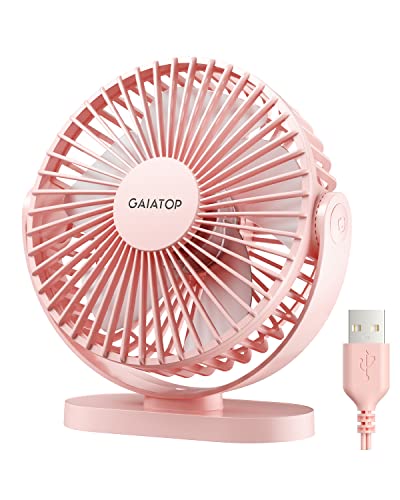
Its pink finish gives the fan a softer, more playful look than the usual black or white office accessory. Color doesn’t affect airflow, of course, but it can matter in a bedroom, dorm, vanity area, or workspace where plain industrial-looking gear feels out of place. The design stays practical despite the bright finish, with a stable base and a front cover that can be removed for cleaning. That mix of compact styling and basic maintenance access keeps the fan from feeling like a disposable novelty.
The fan rotates vertically through a 90-degree range, allowing the airflow to be aimed upward, straight ahead, or somewhere in between. That adjustment is especially helpful on desks with different seating heights or when the fan sits on a shelf rather than directly in front of the person. It doesn’t oscillate from side to side, so the airflow remains focused on one area. For a personal fan, that targeted cooling can be more useful than spreading a weaker breeze across an entire room.
Three Speeds For Everyday Cooling
Three airflow settings keep operation straightforward. Low speed creates a gentler breeze suited to reading, quiet desk work, or sleeping, while medium offers a stronger stream without immediately jumping to the most forceful setting. High speed is intended for faster relief during hot afternoons, workouts, or outdoor breaks. This three-speed control gives enough range for common situations without adding complicated menus or remote controls.
The manufacturer lists a maximum wind speed of 5.3 meters per second. That figure suggests a surprisingly concentrated airflow for a fan with such a small frame, though the sensation will depend on distance and placement. Sitting several feet away will naturally soften the effect, while positioning the fan closer to the keyboard or bedside makes the breeze feel more direct. The practical sweet spot is close-range airflow, not whole-room circulation.
Low speed is likely to be the setting used most often during long periods at a computer. A mild breeze can reduce that sticky, stagnant feeling without drying the eyes too quickly or sending loose papers across the desk. Medium speed adds more noticeable cooling when the room warms up, and high speed provides a sharper burst when quick relief matters more than quietness. The range gives the fan a useful comfort-to-noise balance.
Speed changes are manual, so there’s no thermostat or automatic adjustment. That keeps the design simple, but it also means the fan won’t react to temperature changes on its own. A person working through several hours may need to switch speeds as the room warms or cools. The tradeoff is fair for a small USB model, especially since the simple controls reduce setup and make the fan easy to use in unfamiliar places.
Noise Levels And Workday Comfort
The listed noise range is 30 to 50 dB, depending on speed. At the lower end, the fan should blend more easily into ordinary background noise, while the upper end will be more noticeable in a silent room. That range fits the typical reality of a compact fan: Lower settings suit quiet tasks, while higher settings trade some calm for stronger airflow. The key strength is adjustable noise, not complete silence at every speed.
High speed may be too prominent for recording audio, joining a sensitive microphone call, or sleeping in a very quiet bedroom. The stronger motor movement and faster blades naturally produce more sound, especially when the fan sits close to the ears. Moving it a little farther away or angling it across the body rather than directly at the face can make the noise less intrusive. Placement plays a major role in perceived sound.
Low speed makes more sense for sustained office use because the airflow remains present without demanding much attention. A soft mechanical hum can even help mask keyboard clicks, hallway noise, or distant conversations, though that depends on personal preference. The fan won’t suit someone who expects near-silent cooling from inches away. Still, the low-speed setting offers a practical compromise for long work sessions.
The stable base also affects noise. A fan that vibrates against a hard desk can sound much louder than its motor alone, so the silicone pads at four points underneath the base serve a real purpose. They help reduce sliding and limit the buzzing that can occur when plastic meets wood, glass, or metal. That anti-vibration support improves both comfort and perceived build quality.
USB Power And Portable Use
USB power gives the fan broad compatibility with everyday charging sources. It can connect to a computer, laptop, power bank, USB wall adapter, car charger, or another USB-enabled supply. The manufacturer recommends a 5V/2A power source for proper performance, which is worth following because a weaker port may not deliver the expected airflow. This flexible power setup makes the fan useful in places without a dedicated wall outlet nearby.
No wall charger is included, so one must already be available or purchased separately. That omission won’t matter much in a home filled with USB adapters, but it can be inconvenient for travel if every charger is already assigned to a phone, watch, or tablet. The fan also doesn’t include a rechargeable battery, meaning it must remain connected while running. Its portability comes from USB compatibility, not cordless operation.
The five-foot cord gives more placement freedom than a short built-in cable. It can reach from a desktop tower under the desk, a wall adapter behind furniture, or a power bank tucked into a bag. Extra cable length also helps in cars, where the nearest USB port may sit low on the console. The cord can create clutter, though, so basic cable management may be needed to preserve a tidy workspace.
A power bank turns the fan into a more flexible outdoor companion for camping, sports events, patios, or temporary workstations. Runtime will depend on the power bank’s capacity and the selected speed, so there isn’t one fixed number that applies to every setup. High speed will generally draw more power than low speed. Even without an internal battery, the portable power options make the fan adaptable beyond a permanent desk.
Cleaning, Stability, And Daily Handling
Dust collects quickly on small fan blades, especially near computers, bedding, or open windows. The detachable front cover makes that buildup easier to reach instead of forcing awkward cleaning through narrow grille openings. Regular cleaning helps maintain airflow and prevents the fan from blowing dust back across a desk or nightstand. This removable cover is a modest feature that becomes more valuable after weeks of daily use.
The cover should be removed only after the fan is unplugged. A soft brush or slightly damp cloth can handle most dust, while the motor housing should stay dry. Reattaching the cover securely matters because loose plastic can create rattling at higher speeds. Straightforward care supports consistent airflow without requiring tools or complicated disassembly.
Silicone pads on the base help the fan stay put during operation. That matters most on smooth desks, polished counters, and vehicle surfaces where lightweight devices tend to creep or vibrate. The 0.6-pound body is easy to carry, but low weight can make stability difficult without some grip underneath. The anti-skid base addresses that weakness reasonably well.
The fan can still tip if the cord is pulled sharply or if it’s placed near the edge of a narrow shelf. Its small base is designed for convenience, not for withstanding knocks or heavy movement. Outdoor use also calls for care because uneven surfaces and wind can reduce stability. Realistic placement remains part of the safe daily setup.
Strengths, Limits, And Best Uses
The Gaiatop fan’s strongest trait is the way it combines small size with a fairly forceful personal breeze. A 5.5-inch body fits into spaces where larger table fans feel clumsy, and the three speed levels allow quick adjustment without fuss. USB power broadens the number of places where it can operate. These qualities make compact cooling the central benefit.
Its limitations are equally clear. The fan won’t lower the temperature of an entire room, and high speed may be too noisy for very quiet environments. It also needs a constant power connection because there’s no built-in battery. Those drawbacks don’t make it ineffective, but they define the situations where the personal-scale design makes sense.
A desk, bedside table, dorm shelf, car console, or small travel setup suits this model better than a large living room. It works best close to the body, where the 90-degree tilt can direct airflow toward the face, neck, or hands. Crowded workspaces benefit from the small base, while temporary setups benefit from the light weight. The focused airflow is most effective within a limited area.
The pink finish, removable cover, silicone feet, five-foot cord, and three speeds give the fan more practical substance than its small appearance might suggest. Still, expectations should stay grounded: It is a lightweight USB desk fan, not a replacement for air conditioning or a full-size circulator. Used within that role, the Gaiatop USB Desk Fan offers simple cooling control without taking over the desk.
TriPole USB Desk Fan With 360° Rotation
A cramped desk can feel even smaller once heat starts collecting around a monitor, laptop, charger, and lamp. The TriPole model takes a direct approach to the best personal computer fan category with a compact 4.5-inch body, three speed settings, USB-A power, and a head that rotates through a full 360 degrees. Nothing about it suggests room-wide cooling, and that’s actually the point. Its job is focused personal airflow without eating up valuable space or demanding a dedicated wall outlet.
TriPole USB Desk Fan
The TriPole USB Desk Fan is built around close-range comfort rather than broad circulation. Its 4.5-inch diameter keeps the footprint modest, which helps on a desktop already crowded with peripherals, notebooks, cables, and the usual odds and ends. The small frame also makes it easier to pack for work trips, hotel stays, or temporary setups. That space-saving design gives it a practical edge where a conventional table fan would feel bulky.
Three speed modes provide a simple way to adjust the breeze without dealing with menus, remotes, or touch panels. A button on the back controls the settings, so operation stays straightforward even in dim rooms or unfamiliar spaces. Low speed suits light airflow during reading or sleep, while the higher settings are better for warm afternoons and stuffy work areas. The three-speed control keeps the experience uncomplicated and predictable.
The fan doesn’t include an internal battery, so it needs to remain connected while running. That limits true cordless use, but it also avoids the weight and battery aging issues that come with rechargeable models. A power bank can still make it portable away from outlets, provided the power source delivers enough current. The tradeoff is clear: USB flexibility replaces built-in battery convenience.
Airflow Control And Adjustable Direction
The 360-degree vertical rotation is one of the more useful features in daily use. The fan head can tilt upward, downward, or straight ahead, allowing airflow to reach the face, neck, hands, or upper body depending on where the unit sits. That matters on shelves, low desks, nightstands, and car surfaces where the fan may not line up naturally. The full-angle adjustment helps the small airflow stream land where it actually feels useful.
Focused airflow also reduces the need to run the fan at its highest setting all the time. A carefully aimed low or medium breeze can feel more effective than a stronger stream blowing past the body. This is especially helpful beside a keyboard, where too much air can dry the eyes or send lightweight papers sliding. Good positioning makes the personal cooling range feel more controlled.
The three speed levels suit different levels of heat, but they don’t create automatic temperature control. The fan won’t adjust itself as a room warms up, so speed changes remain manual. That simplicity may be preferable for a small desk accessory, though it means a little more interaction during long work sessions. The manual airflow settings are easy to understand, but they aren’t hands-off.
Expect the strongest effect at close distance. A 4.5-inch fan can move a helpful stream of air across a desk or bedside area, yet it won’t replace a larger circulator in a spacious room. Its strength lies in keeping one spot more comfortable without disturbing everyone nearby. That makes targeted cooling more realistic than expecting broad room coverage.
USB Power And Cable Reach
The included USB-A connection works with computers, USB chargers, power banks, and other compatible power sources. That setup is convenient in offices, dorms, cars, and travel situations where a USB port is easier to access than a standard outlet. The manufacturer notes that the fan needs 0.8 amps while operating. For reliable use, a 5V power source with enough current is essential.
The product information also warns that the third speed may not work properly with a weak USB supply. A charger rated for 5V/1A is recommended for testing if the highest setting fails to run. That’s a useful detail because low-power laptop ports, older adapters, and overloaded USB hubs may not provide steady output. The fan’s maximum-speed performance depends partly on the power source, not just the motor.
A 4.9-foot cable solves a common annoyance with compact USB fans. Short cords can force awkward placement beside a laptop or leave the fan stranded near the edge of a desk, but the longer cable gives more freedom to position it where the breeze feels right. It can reach a charger behind furniture, a desktop tower under the table, or a power bank tucked farther away. The added cable length improves placement, though excess cord may need to be managed.
Travel use becomes simpler because USB voltage is widely supported across common charging accessories. The fan itself doesn’t eliminate the need for a suitable adapter in another country, but a compatible USB charger or power bank can handle the connection. That reduces the worry of matching the fan to different outlet voltages directly. The USB-powered design is convenient, provided the chosen charger delivers the required output.
Stability, Noise, And Desk Behavior
A wide base helps keep the fan upright during normal use. Lightweight desk fans can vibrate, shuffle across smooth surfaces, or tip after a small cable tug, so the base design matters more than it first appears. Four silicone pads underneath add grip while helping isolate vibration from the desk. This stable foundation supports quieter operation and reduces unwanted movement.
Noise depends on the selected speed, mounting surface, and distance from the fan. The product is described as quiet, but no specific decibel range is provided, so expectations should stay grounded. Low speed will generally be the calmer option for calls, reading, and nighttime use, while stronger settings may become more noticeable. The silicone padding helps with vibration noise, but blade and motor sound won’t disappear completely.
Hard surfaces can amplify humming if the fan isn’t sitting flat. Glass, thin metal, and hollow furniture sometimes make a small motor sound louder than it does on wood or a padded surface. Keeping the silicone feet clean improves their grip and lets them do their job properly. A level placement can make the perceived noise less distracting.
The rear control button is simple, though its location may require reaching behind the fan each time the speed changes. That’s not difficult on an open desk, but it can be slightly awkward if the fan sits close to a wall or between other objects. The control layout favors a clean front rather than fingertip access. This basic control design is functional, if not especially refined.
Cleaning And Long-Term Upkeep
Dust buildup is hard to avoid around computers, bedding, open windows, and busy desks. The detachable front cover makes the fan mask and blades easier to reach for routine cleaning. That’s valuable because a layer of dust can reduce airflow, create imbalance, and send particles back into the surrounding area. The removable cover makes maintenance less frustrating than cleaning through a fixed grille.
Power should be disconnected before the cover is removed. A soft brush, microfiber cloth, or lightly dampened cloth can handle ordinary buildup, while the motor housing should remain dry. Reassembling the cover securely helps prevent rattling after cleaning. Simple care preserves steady airflow and keeps the fan looking presentable.
The compact size makes the unit easier to handle during cleaning, but small blades and tight spaces still require patience. Aggressive scrubbing or bending the grille could affect alignment, so gentle cleaning is the safer route. Regular light maintenance is easier than waiting for a heavy layer of dust to form. The easy-access design supports that routine well.
Long-term reliability will also depend on how the cable is treated. Pulling the fan by the cord, wrapping it tightly around the base, or crushing it behind furniture can strain the connection over time. Loose routing with a little slack near the USB plug is kinder to the cable. That ordinary habit protects the fixed power lead, which can’t be swapped as easily as a detachable cord.
Practical Strengths And Clear Limits
The strongest part of the TriPole design is its balance of size, aiming flexibility, and USB convenience. A 4.5-inch body fits into cramped work areas, while the 360-degree tilt allows the airflow to be directed with much more precision than a fixed-head model. Three speeds cover gentle and stronger cooling without adding needless complexity. Those features make desktop comfort the fan’s clearest role.
Its limits are equally straightforward. The fan isn’t rechargeable, doesn’t oscillate side to side, and depends on a suitable USB power source for full-speed operation. It also won’t cool an entire room or replace air conditioning during heavy heat. These boundaries matter because the small personal format works best when expectations stay realistic.
The model makes the most sense on a desk, nightstand, travel table, or other small surface where a directed breeze is more valuable than broad circulation. The wide base and silicone pads help it stay planted, while the long cord makes placement less restrictive. Close-range use also allows lower speed settings to feel effective. That combination supports practical everyday cooling without turning the workspace into a wind tunnel.
The black finish blends easily with most office equipment and doesn’t call attention to itself. Its appearance is plain, but that may suit a setup where the fan needs to disappear beside monitors, speakers, and computer accessories. The TriPole USB Desk Fan earns its place among best personal computer fan options through compact dimensions, flexible aiming, simple speed control, and a power setup that works with common USB sources.
SWEETFULL 6.5-Inch USB Desk Fan
Warm air gathering around a monitor can sap patience faster than expected, especially during long work sessions in a small room. A large floor fan may cool the space, but it also takes up room, moves papers, and adds another noticeable appliance to the setup. The SWEETFULL model enters the best personal computer fan conversation with a compact 6.5-inch frame, three speed settings, quiet operation, and a head that can be aimed through a full vertical circle. Its purpose is modest but useful: Put a controlled breeze exactly where discomfort tends to build.
SWEETFULL USB Desk Fan
The SWEETFULL USB Desk Fan measures 6.5 by 2.5 by 7.4 inches and weighs roughly 10 ounces. Those dimensions leave enough room for a reasonably broad front grille without making the fan a desk hog. It can sit beside a laptop, behind a keyboard, or on a narrow nightstand while leaving space for the things that actually need to be within reach. The compact footprint is one of its strongest practical advantages.
Portability comes from low weight rather than a built-in battery. Tossing a 10-ounce fan into a work bag or camping tote is easy enough, and the slim depth helps it slide beside chargers and other small gear. Still, it must remain connected to a USB power source while operating. That distinction matters because portable use here means easy transport, not completely cordless cooling.
The black wood-grain base adds a warmer visual touch than plain glossy plastic. It won’t fool anyone into thinking it’s real wood, but the pattern softens the usual office-electronics look and blends more naturally with desks, shelves, and bedside furniture. Aesthetic details are secondary to airflow, sure, yet a fan sitting in plain sight all day benefits from not looking overly industrial. The wood-grain finish gives this model a bit more personality without becoming flashy.
Quiet Airflow For Focused Spaces
SWEETFULL lists the operating noise at under 25 dB. That specification places quietness near the center of the design, which makes sense for computer work, reading, or sleeping where a rough motor hum can become more irritating than the heat itself. Real sound will still depend on speed, placement, and the surface beneath the fan. Even so, the stated low-noise operation is a meaningful feature for close-range use.
A fan placed within arm’s reach doesn’t need to overpower the room to feel effective. The breeze only has to cross a short distance, so the lower setting may be enough for routine typing, video calls, or late-night browsing. Keeping the motor at a modest speed also reduces the chance of papers shifting or eyes becoming dry from constant strong airflow. That gentle cooling suits long sessions better than an all-or-nothing blast.
Higher speed will naturally make the fan more audible, even if the motor remains relatively restrained. Blade movement and air passing through the grille create sound that no compact fan can eliminate entirely. A quiet room at night can make subtle noise seem more noticeable, while an office with keyboards and air conditioning will mask it more easily. The acoustic experience depends as much on the surroundings as the listed figure.
The anti-slip rubber base helps reduce vibration before it spreads into the desk. That detail is easy to overlook, yet a hollow table or glass surface can amplify a small motor into an annoying buzz. Rubber contact points also keep the fan from wandering as the blades spin. Less movement means steadier airflow and fewer little rattles during extended use.
Three Speeds Without Extra Fuss
Low, medium, and high settings cover the basic range expected from a personal desk fan. Repeated presses of the power button cycle through those speeds, keeping the controls simple enough to operate without looking. Low works for mild warmth, medium adds a firmer stream, and high is there for hotter periods or faster relief. The three-speed arrangement provides useful choice without crowding the unit with unnecessary buttons.
Simple controls have one small drawback. Cycling through settings can require several presses if the desired speed was just passed, and there’s no separate button for each level. That’s hardly a major inconvenience, but it’s less immediate than a dial or dedicated speed controls. The design favors minimal operation over precise one-touch access.
Airflow expectations should remain tied to the fan’s physical size. A 6.5-inch personal fan can cool the upper body at close range, but it won’t meaningfully lower the temperature across a large living room. Its sweet spot sits beside a computer, near a bed, or on a small outdoor table. The best personal computer fan doesn’t have to cool every corner if it can relieve the exact spot where heat becomes distracting.
Placement changes how useful each speed feels. A fan positioned two feet away and aimed directly at the face may deliver enough comfort on low, while one sitting farther across a desk may need medium or high. Obstacles such as monitors, stacked books, and laptop screens can interrupt the airflow path. A clear line between the grille and the body makes the available breeze feel stronger without increasing motor speed.
Full Vertical Rotation And Better Aiming
The fan head rotates vertically from 0 to 360 degrees. That full range allows the breeze to point forward, upward, downward, or even backward depending on how the unit is positioned. A low shelf can send air toward the face, while a taller surface can direct it toward the hands and chest. The 360-degree adjustment makes a small fan much easier to fit into irregular spaces.
Vertical rotation shouldn’t be confused with automatic oscillation. The SWEETFULL stays aimed in the selected direction rather than sweeping airflow across a room. That fixed stream is useful at a personal workstation because it doesn’t repeatedly move away from the person who needs it. The limitation appears when several people expect to share the breeze.
A stable hinge matters because loose adjustment would let the fan slowly droop under its own weight. The provided information describes full manual positioning, though it doesn’t state how stiff the hinge feels over long-term use. Careful handling is sensible, especially since repeatedly forcing the head at an angle can strain plastic joints. The main benefit remains precise manual direction rather than automated movement.
Flexible aiming also helps at night. The fan can sit below pillow height and point upward without being placed directly beside the face, reducing clutter near the bed. On a desk, angling it slightly across the shoulders may feel more comfortable than sending air straight into the eyes. Small changes in direction can make the personal airflow feel calmer and less intrusive.
USB Power And Everyday Flexibility
A 4.7-foot USB cable gives the fan a useful reach across desks, vehicle consoles, and bedside furniture. It can connect to a desktop computer, laptop, power bank, AC adapter, car charger, or another compatible USB source. That range of power options removes the need for a dedicated wall plug near the fan itself. The USB-powered design is especially handy in places already filled with charging accessories.
No battery is included, so the fan stops as soon as power is disconnected. A power bank can create a semi-cordless setup, though the fan will still remain physically tethered to it. Runtime will vary with the power bank and selected speed, so there’s no single reliable figure without more electrical details. This is a clear mobility tradeoff, not a hidden flaw.
Connecting the fan to a laptop is convenient, but it uses one USB port that might otherwise serve a mouse, drive, or headset. A powered hub or wall adapter can solve that issue on crowded setups. Cable length helps, yet the fixed cord may still need a clip or tie to keep it from crossing the keyboard area. The power flexibility is broad, though tidy routing still takes a little thought.
Car and camping use depend on the available power source. A USB car charger makes sense for parked use, while a power bank can support a picnic table, tent, or outdoor seat. The lightweight body travels easily, but it isn’t described as weatherproof. Moisture, dust, and unstable surfaces remain valid concerns around any indoor-style USB appliance.
Cleaning Access And Routine Maintenance
The detachable front cover makes regular cleaning less of a chore. Fan grilles collect lint and fine dust, while blade edges gradually develop a film that can reduce airflow and create imbalance. Removing the cover provides direct access instead of forcing a cloth through narrow openings. That cleaning-friendly design supports better performance over time.
The fan should be unplugged before any cover is removed. A soft brush or microfiber cloth can lift most dry buildup, and a lightly damp cloth can handle stubborn marks on accessible plastic surfaces. The motor housing shouldn’t be soaked or sprayed. Gentle care protects the electrical components while keeping the blades clear.
Reassembly deserves a quick check before the fan runs again. A cover that isn’t seated correctly may vibrate, buzz, or touch the blade assembly. Small tabs and clips can also wear if they’re bent aggressively during removal. The detachable design is useful, but careful handling helps preserve that convenience.
Rubber feet need occasional attention as well. Dust on the pads can reduce grip and allow the fan to slide across a smooth desk. Wiping the base restores better contact without requiring special products. A clean underside supports both stability and quieter operation.
Strengths, Weaknesses, And Sensible Expectations
The strongest feature set centers on close-range comfort. The SWEETFULL combines a modest footprint, low weight, three speeds, full vertical rotation, and USB compatibility in one straightforward unit. It doesn’t demand much surface area or setup time. Those qualities make personal desk cooling easier in small and temporary spaces.
Quiet operation is another notable strength based on the listed under-25-dB specification. The rubber base and adjustable angle further support a calmer experience by reducing vibration and allowing lower speeds to remain useful through better aiming. Still, high speed may be more noticeable, and surface resonance can change the sound. The noise advantage is credible within realistic limits, not a promise of absolute silence.
The main weakness is the absence of a battery. Anyone hoping to carry the fan from room to room while it runs will need to bring a power bank or reconnect it each time. Side-to-side oscillation is also absent, so coverage stays narrow. These limitations define the SWEETFULL as a stationary personal fan rather than a room circulator.
The black wood-grain finish, detachable grille, and 4.7-foot cable round out a design that feels practical rather than overloaded. It suits a computer desk, nightstand, compact office, vehicle stop, or powered campsite where a direct breeze matters more than broad cooling. Large rooms and shared spaces call for something stronger, but close work areas benefit from the fan’s small footprint and flexible tilt. Within that lane, the SWEETFULL 6.5-Inch USB Desk Fan offers a measured blend of quiet airflow, easy positioning, and uncomplicated daily use.
Gaiatop 5.5-Inch USB Desk Fan Review
Heat around a laptop or monitor rarely arrives with much drama. It creeps in, makes the air feel stale, and slowly turns an ordinary work session into a sweaty annoyance. The Gaiatop USB Desk Fan takes a compact route into the best personal computer fan category, pairing three measured airflow levels with a 5.5-inch frame, 90-degree tilt, and USB power. Its appeal rests on close-range cooling, not room-wide circulation, so the fan makes the most sense where desk space is tight and a direct breeze matters more than raw size.
Gaiatop USB Desk Fan
The fan measures 5.5 by 5.9 by 2.2 inches and weighs about 6.5 ounces. That’s light enough to slip into a work bag, carry between rooms, or pack beside a laptop without adding much bulk. A small frame also leaves more room for the keyboard, mouse, speakers, and whatever else tends to pile up around a computer. The compact footprint is a genuine strength, especially on narrow desks and crowded dorm surfaces.
Blue coloring gives the fan a more casual look than plain office black, though the design remains simple enough to blend into most everyday setups. The body is slim, the base is broad, and the control layout avoids unnecessary clutter. Nothing about it suggests luxury, but that isn’t really the job here. The fan aims for practical portability and straightforward cooling rather than decorative features or complicated controls.
The 4.9-foot cord also deserves more credit than it might get at first glance. Short USB cables can force a fan to sit beside the computer instead of where the airflow actually feels useful. Extra reach allows placement near the edge of a desk, beside a bed, or farther from a power bank tucked out of sight. That longer power cable reduces one of the most common frustrations with small USB accessories.
Three Speeds With Clear Airflow Differences
The three speed levels are defined with more detail than vague low, medium, and high labels. Speed 1 runs at 1,500 RPM with a listed air speed of 3.1 meters per second, giving a softer breeze for light cooling. Speed 2 rises to 2,000 RPM and 4.0 meters per second, while Speed 3 reaches 2,500 RPM and 4.8 meters per second. Those stated figures make the airflow progression easier to understand before the fan is placed on a desk.
Low speed fits long periods of typing, reading, or studying because the breeze should feel present without becoming pushy. Medium brings more cooling during warmer afternoons, especially when the fan sits a little farther away. High speed is the setting for quick relief, though stronger airflow may also feel too direct if the fan is only a few inches from the face. The useful part is three distinct cooling levels, not simply having three buttons that feel nearly identical.
Close placement changes how effective each setting feels. A fan sitting one or two feet away can deliver noticeable cooling at a lower speed, while a unit placed across a wide desk may need the middle or highest level. Monitors, stacks of paper, and laptop screens can interrupt the airflow path, so careful positioning matters. The best personal computer fan works better through smart placement than through constant maximum speed.
The fan does not include automatic temperature adjustment or app-based control. Speed changes remain manual, which keeps operation simple but requires occasional attention as the room warms or cools. That tradeoff is reasonable for a compact USB model with a small control panel. The manual speed system favors reliability and ease over advanced features that may not add much value at this scale.
Quiet Cooling For Work And Rest
Gaiatop describes the upgraded motor as producing stronger wind with less noise. No exact decibel rating is included in the supplied information, so silence shouldn’t be assumed. Still, the fan is presented as suitable for working and resting, which suggests that noise control is part of the design rather than an afterthought. The key expectation should be restrained operating sound, not complete silence at every speed.
Low speed will likely be the most comfortable setting during calls, concentrated work, or nighttime use. A gentler blade speed usually creates less air turbulence, and the reduced motor pace tends to blend into ordinary room noise more easily. High speed will naturally sound more noticeable because 2,500 RPM moves more air through the grille. That’s the familiar tradeoff between faster cooling and a quieter background.
Surface choice can affect perceived noise more than many people realize. A hollow desk, metal shelf, or glass tabletop may amplify vibration, making a small fan sound rougher than it does on a solid wooden surface. The four rubber pads beneath the base help break that vibration path and reduce buzzing. This anti-vibration support improves the experience without relying solely on motor design.
Distance also changes how sound is perceived. A fan sitting inches from the ears may seem louder than the same unit placed farther away and angled toward the upper body. The 90-degree tilt helps here because the fan can sit lower or farther back while still directing air where it’s needed. Better aiming supports quieter everyday use by reducing the need to keep the fan extremely close.
USB Power And Travel-Friendly Use
The fan connects through USB and can run from a desktop computer, laptop, power bank, AC adapter, car charger, or another compatible USB power source. That flexibility suits temporary workstations, dorm rooms, libraries, hotel desks, and parked vehicles. A dedicated wall outlet isn’t required as long as an appropriate USB source is available. The USB-powered setup makes the fan easy to move between common environments.
No built-in battery is mentioned, so the fan must remain plugged in during operation. A power bank can create a portable arrangement, but the fan will still be connected by its cable. That may be perfectly fine at a campsite table or outdoor event, though it isn’t the same as carrying a cordless handheld fan. The main distinction is easy transport rather than completely wireless use.
Running from a laptop is convenient, but it occupies a USB port that may already be needed for storage drives, a mouse, or other peripherals. A wall adapter or powered hub can free that port while keeping the fan close to the computer. The 4.9-foot cord gives enough flexibility to route power from behind a monitor or under a desk. This power-source versatility helps the fan fit different layouts without forcing one setup.
Energy use is described as economical, though the supplied details do not include exact wattage. A small USB fan will generally draw less power than a full-size room fan, but its cooling reach is also much smaller. That balance makes sense for personal airflow during desk work rather than whole-room temperature control. The fan’s low-scale cooling role keeps expectations grounded and practical.
Stable Placement And Easy Upkeep
The wide base supports the fan during operation, while four rubber pads underneath help prevent sliding. Lightweight fans sometimes creep across smooth desks at higher speeds, especially when vibration transfers into the surface. The pads add grip and reduce movement without making the base bulky. That stable desk behavior matters most on polished furniture, narrow shelves, and busy work areas.
A 90-degree tilt range allows the head to angle upward or downward. The adjustment is useful when the fan sits below face level, beside a monitor, or on a higher shelf. It does not provide automatic side-to-side oscillation, so the breeze remains focused in one direction. For personal cooling, that directed airflow often feels more useful than a sweeping pattern that repeatedly moves away.
The product details emphasize stability and cleaning convenience, though they specifically describe the base and rubber pads rather than a fully detachable front grille. Dust will still collect on the grille and blades over time, particularly near computers, bedding, and open windows. A soft brush or dry cloth can handle visible buildup without forcing dirt deeper into the housing. Regular care supports steady airflow and helps keep the fan from blowing dust across the desk.
Power should always be disconnected before cleaning or adjusting anything near the grille. Water shouldn’t reach the motor housing, and the cable should be kept free from sharp bends or repeated pulling. Those habits sound basic, but they protect the fixed power connection and reduce unnecessary wear. The maintenance demands remain light as long as dust isn’t allowed to build up heavily.
Strengths, Weaknesses, And Best-Fit Situations
The strongest part of the Gaiatop design is its balance of airflow and portability. Three clearly defined speeds, a 6.5-ounce body, a long USB cable, and a tilting head create a useful set of features without making the fan complicated. It can sit beside a computer during work, move to a nightstand later, and travel in a bag without much fuss. That everyday flexibility gives the fan a practical reason to stay within reach.
Its cooling range is also honest and easy to understand. The listed 4.8 meters per second at the highest setting suggests a firm close-range breeze, but the 5.5-inch size still limits room coverage. Large bedrooms, shared offices, and open living spaces will need a bigger fan or air circulator. The Gaiatop is strongest as a personal cooling tool, not a replacement for broader ventilation.
Noise expectations require some restraint because no measured decibel level is provided. The upgraded motor may keep operation comfortable, but high speed at 2,500 RPM won’t be as discreet as the first setting. Anyone sensitive to sound during sleep or microphone use may prefer low speed and a little more distance. That noise-versus-airflow tradeoff is normal for a compact fan and worth accepting upfront.
The lack of a built-in battery and side-to-side oscillation may also rule it out for certain situations. Outdoor movement is easier with a rechargeable model, while shared cooling benefits from a wider sweep. On a desk, though, USB power and a fixed, well-aimed stream can be simpler and more dependable. The Gaiatop USB Desk Fan fits the best personal computer fan role through compact dimensions, useful speed separation, stable placement, and a direct breeze that targets the spot where heat becomes distracting.


Best Quiet Ceiling Fan For Bedroom 2026 Ultimate Comfort Picks

Best Ceiling Fan For Master Bedroom 2026 With Ultimate Comfort

Best White Ceiling Fan With Light For Bedroom 2026 Top Picks

Best Quorum Medallion Ceiling Fan 2026 With Style & Breeze

Best Outdoor Fan For Pergola 2026 Comfort Boost

Best Ceiling Fan For Great Room 2026 With Ultimate Comfort

Best Outdoor DC Ceiling Fans 2026 For Breezy Comfort

Best ceiling exhaust bath fan with light and heater 2026





