
Best Portable Table Fan 2026: Cool Air Anywhere

A stuffy desk can turn a normal work session into a sweaty battle with concentration. A best portable table fan solves that problem with focused airflow that stays close instead of trying to cool the whole room. The useful models are compact enough for a crowded nightstand, office desk, kitchen counter, or camper shelf, yet strong enough to move air beyond a weak little breeze. That balance matters because a fan that hogs space or rattles through every video call quickly becomes more annoying than the heat.
Rechargeable battery power makes these fans far more flexible than cord-only designs. You can carry one from a home office to the patio, then set it beside the bed without hunting for another outlet. Still, battery claims deserve a raised eyebrow because runtime usually drops as fan speed rises. A model that lasts through the afternoon on low may need charging much sooner when pushed at full blast, so realistic speed settings matter more than an impressive maximum-hour figure.
Noise is another make-or-break detail. A loud motor can bury quiet music, interrupt calls, or make falling asleep harder, while a well-tuned quiet table fan fades into the background at lower settings. Oddly enough, the strongest mode doesn’t always provide the nicest experience. A steady medium breeze often feels cooler and sounds less harsh than a choppy high-speed blast aimed directly at your face.
Practical controls also separate genuinely useful fans from clutter. Several speed levels help match airflow to changing temperatures, while a simple front button is easier to reach than a tiny switch hidden around the back. Adjustable tilt is especially helpful because the fan can point toward your upper body rather than blowing papers around the desk. Oscillation can spread air across a wider area, but it adds weight, cost, and another moving part, so a fixed-head model may suit tight spaces better.
Size can be deceptive, too. A tiny fan slips into a tote with no fuss, though its narrow airflow may feel weak beyond arm’s length. Larger portable models move more air and tend to stay planted on the table, but they’re less convenient for daily travel. The sweet spot is a sturdy base, manageable footprint, and enough grille area to create a smooth breeze without turning the fan into a bulky appliance.
Charging details deserve a close look before buying. USB-C charging is easier to live with because the same cable may already power a phone, tablet, or headphones. Some fans can run while charging, which is handy during long workdays, while others limit speed or stop operating altogether. Also, exposed charging ports can collect dust in workshops, potting areas, or garages, so occasional cleaning keeps the connection reliable.
A portable fan won’t replace air conditioning in a sweltering room, and it shouldn’t be expected to. Its job is personal cooling, air circulation, and quick relief in the few feet around a chair, bed, or work surface. Pick a model with honest airflow, sensible controls, stable footing, and a battery that fits the way it’ll actually be used. Get those basics right, and the fan becomes the sort of small appliance that quietly earns its place every day.

- LFR Score9.2
LFR Score is a ranking system developed by lightfansreviews.com. LFR Score has no relationship or impact from any manufacturers or sales agent websites. Learn more
- BrandHoneywell

- LFR Score9.2
LFR Score is a ranking system developed by lightfansreviews.com. LFR Score has no relationship or impact from any manufacturers or sales agent websites. Learn more
- BrandHoneywell
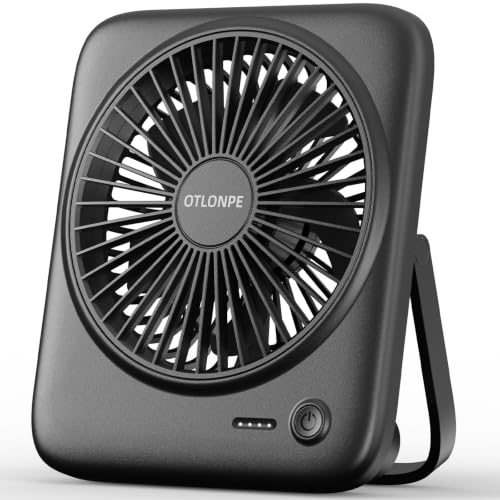
- LFR Score9.0
LFR Score is a ranking system developed by lightfansreviews.com. LFR Score has no relationship or impact from any manufacturers or sales agent websites. Learn more
- BrandOtlonpe
![Gaiatop Portable Pedestal Fan 16000mAh Battery [Max 74h Runtime], Foldable Oscillating Standing Fan, Collapsible Desk Fans, LED Light, Case & Remote Control 4 Speeds for Outdoor Travel Camping (Black)](https://m.media-amazon.com/images/I/41LWVA726wL._SL500_.jpg "Gaiatop Portable Pedestal Fan 16000mAh Battery [Max 74h Runtime], Foldable Oscillating Standing Fan, Collapsible Desk Fans, LED Light, Case & Remote Control 4 Speeds for Outdoor Travel Camping (Black)")
- LFR Score9.0
LFR Score is a ranking system developed by lightfansreviews.com. LFR Score has no relationship or impact from any manufacturers or sales agent websites. Learn more
- BrandGaiatop

- LFR Score9.0
LFR Score is a ranking system developed by lightfansreviews.com. LFR Score has no relationship or impact from any manufacturers or sales agent websites. Learn more
- BrandGaiatop

- LFR Score9.0
LFR Score is a ranking system developed by lightfansreviews.com. LFR Score has no relationship or impact from any manufacturers or sales agent websites. Learn more
- BrandKIMMOO

- LFR Score8.8
LFR Score is a ranking system developed by lightfansreviews.com. LFR Score has no relationship or impact from any manufacturers or sales agent websites. Learn more
- BrandONLYNEW
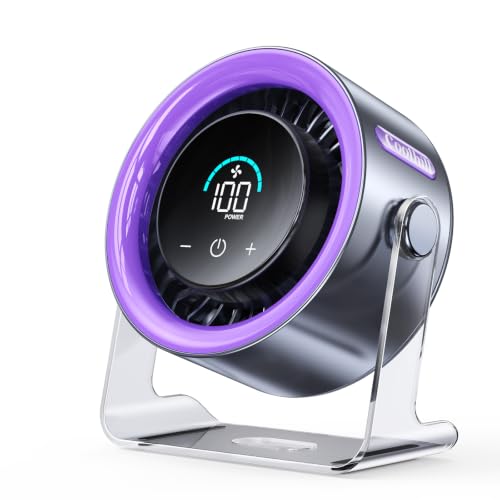
- LFR Score8.8
LFR Score is a ranking system developed by lightfansreviews.com. LFR Score has no relationship or impact from any manufacturers or sales agent websites. Learn more
- BrandCoolhill

- LFR Score8.8
LFR Score is a ranking system developed by lightfansreviews.com. LFR Score has no relationship or impact from any manufacturers or sales agent websites. Learn more
- BrandFRIZCOL

- LFR Score8.6
LFR Score is a ranking system developed by lightfansreviews.com. LFR Score has no relationship or impact from any manufacturers or sales agent websites. Learn more
- BrandAmazon Basics

- LFR Score7.6
LFR Score is a ranking system developed by lightfansreviews.com. LFR Score has no relationship or impact from any manufacturers or sales agent websites. Learn more
- BrandBGYUA
Last update on 2026-07-08 / Affiliate links / Images, Product Titles, and Product Highlights from Amazon Product Advertising API
Honeywell TurboForce Fan For Portable Table Cooling
A warm room rarely becomes unbearable all at once. The discomfort builds through stale air, a crowded desk, and an air conditioner that feels wasteful for one occupied corner. The best portable table fan should tackle that smaller problem without demanding much space, and the Honeywell TurboForce HT900 takes a direct approach with concentrated airflow, a compact housing, and simple manual controls. It isn’t cordless, and it won’t cool an entire house, but its focused design makes sense wherever personal cooling and steady circulation matter more than flashy extras.
Honeywell TurboForce HT900
The shortened name fits the product well because the Honeywell TurboForce HT900 is built around one clear idea: move a useful amount of air from a relatively small frame. Honeywell describes the aerodynamic turbo design as a way to maximize air movement, and the airflow can reportedly be felt from up to 25 feet away. That distance gives the fan more flexibility than a tiny desktop model that only feels effective when it’s practically touching your keyboard. Set across a bedroom, beside a couch, or near a home-office wall, it can circulate air without occupying the center of the room.
Size is one of the HT900’s strongest practical advantages. It can sit on a desk or tabletop, rest on the floor, or be mounted on a wall, so placement flexibility is better than the fixed footprint suggests. A crowded workstation doesn’t always have room for a tall pedestal fan, and a floor model can become a nuisance around chair legs or charging cables. The wall-mount option helps clear the surface entirely, though installation requires a suitable location and a nearby electrical outlet.
The black exterior is plain and functional rather than decorative. That may sound dull, yet the understated body tends to blend into an office, bedroom, utility room, or hobby space without drawing much attention. The controls also keep things straightforward, with three fan speeds instead of touch panels, timers, screens, or app features. Anyone expecting remote control, oscillation, or battery operation will need to look elsewhere, but the lack of electronic extras means there’s less to learn before getting the air moving.
Focused Airflow And Adjustable Direction
The 90-degree pivoting head makes the airflow easier to aim than a basic fan with a fixed grille. Tilt it upward from the floor to push cooler air through a room, aim it across a desk to avoid blowing directly into your eyes, or angle it toward a bed without placing it on the nightstand. That range matters because personal comfort depends as much on airflow direction as raw fan speed. A strong breeze pointed at papers, plants, or an open drink can be more trouble than help.
Three speed settings offer enough control for common situations without turning adjustment into a chore. Low speed can maintain gentle circulation during calls or quiet work, while the higher settings suit muggy afternoons and rooms where air has gone flat. The turbo-style airflow is more concentrated than the broad sweep produced by an oscillating fan, so it works best when aimed with purpose. It won’t automatically distribute air from side to side, which is a real limitation if several seats need cooling at once.
Honeywell states that the fan is sized for small to medium-sized rooms, though expectations should stay grounded. A compact air circulator helps mix room air, relieve a hot spot, and support an air conditioner, but it doesn’t lower the actual temperature by itself. Its strength lies in personal cooling and circulation, especially in spaces where opening a window isn’t enough. Used near an air-conditioning vent, it may also help carry cooled air farther instead of letting it pool in one section of the room.
Noise, Comfort, And Everyday Use
Noise can make or break a small fan, particularly beside a bed or computer microphone. Honeywell describes this model as 25% quieter than comparable fans, which suggests the design puts some thought into reducing the usual mechanical hum. The actual sound will still rise with the speed setting, and a turbo air circulator shouldn’t be mistaken for a silent fan. Even so, having three speeds lets you choose a lower setting when background noise matters more than maximum airflow.
Bedroom use is a reasonable fit because the fan can be angled without taking up much floor space. A low or medium setting may keep air from feeling stagnant through the night, while the pivoting head can direct the stream above the mattress instead of straight at a sleeper’s face. The compact tabletop footprint also suits a dresser or side table, provided the power cord reaches safely and the base sits on a stable surface. Light sleepers who react to any motor noise may still prefer a larger fan designed specifically for ultra-quiet nighttime operation.
At a desk, the HT900 avoids some of the frustrations tied to miniature USB fans. It uses household power rather than relying on a small rechargeable battery, so airflow doesn’t gradually weaken as a charge runs down. That makes the corded design dependable for long work sessions, but it also limits portability between places without convenient outlets. The fan is easy to move around a home or office, yet it isn’t the sort of portable fan you’d carry to a picnic table, campsite, or power-free patio.
Energy-Saving Potential And Practical Limits
Running a personal fan can make a room feel more comfortable without lowering the thermostat as aggressively. Honeywell positions the HT900 as a way to give an air conditioner a break, and that logic holds up for occupied zones where whole-room cooling feels excessive. The targeted airflow helps sweat evaporate faster and keeps warm air moving, so a slightly warmer thermostat setting may feel tolerable. Actual energy savings will depend on climate, room size, air-conditioner efficiency, fan speed, and how consistently the cooling system is adjusted.
The fan’s simplicity supports everyday efficiency in another way: there’s little setup involved. Place it, aim it, choose a speed, and let the airflow do its job. The manual controls are easy to understand, though they lack the convenience of a remote, sleep timer, or automatic shutoff. That tradeoff matters in a bedroom or across a large office because changing the setting requires walking over to the fan.
Portability also needs a fair definition here. The HT900 is compact enough to carry from room to room, yet it lacks a battery, folding structure, or travel-focused design. For someone seeking the best portable table fan for use around the house, that may be perfectly acceptable because reliable plug-in power often beats charging another device. For outdoor use, frequent travel, or desks with no spare outlet, the cord becomes the biggest drawback.
Where The HT900 Fits Best
Small rooms with uneven airflow are where this fan’s design makes the most sense. A home office may feel warm near the computer, a bedroom corner can stay stuffy despite air conditioning, and a kitchen may need temporary circulation after cooking. The up-to-25-foot airflow reach gives the fan enough range to work from a shelf or across a modest room rather than sitting inches away. Still, the strongest results will come from thoughtful positioning, not simply turning the speed to its highest setting.
Wall mounting adds value in tight rooms, workshops, and areas where surfaces are already crowded. Raising the fan can improve airflow over furniture and keep the unit away from spills, loose papers, or curious hands. The multi-position setup also lets one product fill several roles, from desk fan to floor circulator. Mounting reduces grab-and-go convenience, though, so it’s better treated as a semi-permanent arrangement.
The absence of oscillation creates a clear dividing line. Concentrated airflow is handy for one chair, one workstation, or one side of a room, but shared spaces may benefit more from a fan that sweeps across a wider angle. The HT900 favors directional cooling over broad coverage, and that isn’t automatically a weakness. It simply means the fan rewards careful aim and suits focused comfort better than evenly cooling several people.
Maintenance And Long-Term Practicality
Compact air circulators tend to collect dust around the front grille and blades, especially when placed on the floor. Regular surface cleaning helps preserve steady airflow and keeps accumulated dust from being pushed back into the room. The provided description doesn’t specify a removable grille, so cleaning access shouldn’t be assumed. A soft brush, cloth, or vacuum attachment may be useful, but the fan should always be unplugged first.
The simple mechanical layout may appeal to anyone tired of appliances packed with fragile electronic features. There’s no app connection to fail, no rechargeable cell to age, and no display glowing beside the bed. That stripped-down approach supports straightforward daily use, though it also means convenience features are missing by design. Buyers who value timers and remote operation more than simplicity may feel the compromise every day.
The Honeywell name and HT900 model have a recognizable place in the small-fan category, but brand familiarity shouldn’t replace a fit check. Measure the available surface, confirm outlet access, and consider whether focused airflow matches the room’s layout. The three speeds, pivoting head, and compact body solve a common cooling problem without pretending to be a whole-room climate system. For a desk, bedroom corner, shelf, or small office, that honest scope is arguably its most useful trait.
Honeywell HT-904 TurboForce Tabletop Air Circulator Fan
A cramped desk can feel twice as uncomfortable once warm air starts hanging around the monitor, lamp, and charging gear. Small fans often promise relief, yet many barely move air beyond arm’s reach or sound rough at higher speeds. The best portable table fan should feel useful without swallowing surface space, and the Honeywell HT-904 aims for that middle ground with a compact body, focused circulation, and straightforward controls. Its corded design limits outdoor freedom, but inside a bedroom, office, or small living space, the setup is refreshingly uncomplicated.
Honeywell HT-904 TurboForce Fan
The Honeywell HT-904 TurboForce Fan keeps its purpose clear from the start. It’s small enough for a tabletop or desk, yet the housing can also sit on the floor or be mounted on a wall. That flexibility solves a familiar headache in tight rooms where every inch of desk space is already claimed. A fan that can move from a shelf to the floor without becoming awkward earns more day-to-day usefulness than a model locked into one position.
Honeywell describes the aerodynamic turbo design as a way to maximize air movement, and the company states that the airflow can be felt from up to 25 feet away. That claim suggests more reach than a typical tiny personal fan, especially in a small or medium-sized room. Still, distance doesn’t mean the fan will cool an entire room in the same way an air conditioner does. Its real strength is moving stagnant air and creating a noticeable breeze where the room feels stuffy.
The white finish gives the HT-904 a lighter visual presence than darker utility-style fans. It can blend into a bedroom, home office, craft room, or kitchen without looking overly industrial. The design is plain, but that’s not necessarily a drawback. A compact fan usually works best when it fades into the background and handles personal cooling without becoming another distracting object on the desk.
Airflow That Reaches Beyond The Desktop
Air circulation matters because heat often collects unevenly. One side of a room may feel comfortable while the desk corner near electronics turns muggy and stale. The HT-904 uses a concentrated airflow pattern rather than a wide oscillating sweep, so directional cooling becomes the key benefit. Aim it toward the occupied area, and the breeze can feel more effective than a broader fan that spreads weaker airflow everywhere.
The turbo-style approach also helps with room circulation. Positioned near an air-conditioning vent, doorway, or cooler section of the room, the fan can push that air toward a warmer spot. This doesn’t create cold air, of course, but it can help distribute existing cooling more evenly. That practical role makes the aerodynamic fan design useful beyond simply blowing air at someone’s face.
There’s a tradeoff, though. The fan doesn’t oscillate, so it won’t automatically share airflow between several chairs or sweep across a wide room. Focused air is handy for one workstation, one side of a bed, or a reading chair, but a shared space may need more frequent repositioning. The HT-904 feels better suited to targeted comfort than broad, automatic coverage.
Three Speeds Keep The Controls Simple
Three speed settings offer enough range for common indoor situations. Low speed suits quiet work, background circulation, or nighttime use, while the upper settings provide a stronger stream of air during hotter periods. The controls stay direct, with no app, display, timer, or complicated menu to learn. That simple three-speed setup makes the fan easy to use, though convenience seekers may miss remote operation.
A lower speed can be the better choice more often than expected. Strong airflow aimed too closely may dry the eyes, scatter loose papers, or create an annoying blast across the face. Medium or low speed often produces a steadier, more comfortable breeze at a desk. The adjustable airflow lets the fan adapt to the moment instead of forcing one aggressive setting all day.
Manual controls also mean every adjustment happens at the fan itself. Across a bedroom or from a couch, that can feel less convenient than a remote-controlled model. On a desk or nearby shelf, the limitation barely matters because the fan stays within reach. The design favors mechanical simplicity over extra electronics, which keeps the experience clean but undeniably basic.
The 90-Degree Pivot Adds Real Flexibility
The 90-degree pivoting head changes how the fan can be positioned around a room. From the floor, it can angle upward to send air over furniture; from a tabletop, it can point above paperwork or below eye level. That range helps prevent the common problem of strong airflow hitting the wrong place. A small fan becomes much more useful once direction can be adjusted without stacking books underneath it.
Wall mounting opens another option in rooms where surfaces are crowded. A raised position can move air above furniture and keep the fan away from spills, cords, or everyday clutter. It also makes sense in a workshop, compact office, or bedroom with limited nightstand space. The wall-mount capability adds versatility, although mounting makes quick room-to-room movement less convenient.
The pivoting head doesn’t replace oscillation, but it does make focused airflow easier to manage. A fan that tilts accurately can cool a seated area without disturbing everything around it. That’s particularly useful near plants, papers, lightweight decorations, or open drinks. The difference is subtle but practical: precise airflow direction often matters more than simply turning the speed higher.
Quiet Operation For Work And Rest
Noise is one of the first things people notice about a desk fan. A steady hum may disappear into the background, while rattling or harsh motor noise becomes impossible to ignore during calls or quiet work. Honeywell presents the HT-904 as a quiet personal fan, making it a logical fit for bedrooms and offices. Sound will naturally increase at higher speeds, so quieter operation is most likely on the lower settings.
At a workstation, the fan’s concentrated airflow can help without filling the room with unnecessary noise. Positioning matters here. Setting it slightly off to the side and angling the head toward the upper body can reduce direct wind noise near a microphone. The combination of compact size and controlled direction is better suited to desk use than a large fan sitting several feet away on full power.
Bedroom use comes with a similar balance. Low or medium speed may keep air moving through the night without creating an overly forceful stream. The pivoting head can aim airflow above the mattress or toward the foot of the bed instead of directly at the face. Light sleepers may still prefer a fan specifically built around near-silent operation, but the HT-904’s quiet-focused design makes sense for ordinary nighttime circulation.
Portable Indoors, But Not Cord-Free
The word portable needs a little honesty here. The HT-904 is compact and easy to carry between rooms, but it relies on a power outlet. That makes it portable inside a home or office rather than portable in the camping, travel, or outdoor sense. Anyone seeking a best portable table fan for patios, tents, or outage use may be better served by a rechargeable battery model.
Corded power brings its own advantage, though. The fan can run for long stretches without battery anxiety or declining airflow as a charge fades. For all-day office work, overnight circulation, or regular room use, that reliability may matter more than cordless freedom. The continuous plug-in operation suits fixed indoor routines where an outlet is always nearby.
The cord also affects placement. A desk near a wall outlet presents no problem, while a centered table or distant shelf may require an extension cord. Cable routing deserves attention so the fan doesn’t create a tripping hazard or pull against the base. The HT-904 stays convenient when its power requirements match the room layout, but awkward outlet access can quickly undermine the compact design.
Cooling Support Without Overworking The AC
A fan can make a room feel cooler by moving air across the skin, even though it doesn’t reduce the room’s actual temperature. Honeywell suggests using the HT-904 to support air conditioning and help reduce energy consumption. The idea is sensible: personal airflow may allow a thermostat to remain at a less aggressive setting while the occupied area still feels comfortable. Actual savings will depend on climate, room conditions, air-conditioner efficiency, and how the fan is used.
Placement makes that strategy more effective. Directing the fan from a cooler area toward a warmer desk or bed can help distribute conditioned air instead of letting it settle near a vent. In a small room, even modest circulation may reduce hot spots. The air-circulation role is often more valuable than using the fan as a simple face-level breeze source.
Running the fan in an empty room won’t provide meaningful cooling benefit because moving air mainly affects how people feel. That’s an easy mistake to make with any air circulator. Turn it toward the occupied zone and use it alongside natural ventilation or air conditioning where appropriate. The HT-904 delivers its best value through focused, occupied-space cooling, not unattended room operation.
Practical Limits Worth Knowing
The compact size creates obvious advantages, but it also sets boundaries. Large living rooms, open-plan spaces, or areas with several occupied zones may need a bigger circulator or oscillating fan. The HT-904 is designed for small to medium-sized rooms, and that scope should guide expectations. Its small-room focus is a strength only when the space and cooling task match.
Feature seekers may also find the design sparse. There’s no timer, remote, digital display, battery, or automatic oscillation listed in the provided details. What remains is a fan with three speeds, a pivoting head, and flexible placement. The minimal feature set keeps operation uncomplicated, but it won’t satisfy someone who wants scheduled nighttime use or adjustments from across the room.
Cleaning is another ordinary but necessary consideration. Dust can gather around the grille and reduce airflow over time, especially if the fan sits on the floor. The provided product information doesn’t state whether the grille is removable, so easy internal access shouldn’t be assumed. Regular exterior cleaning supports consistent airflow, and the fan should always be unplugged before dust is removed.
Where The Honeywell HT-904 Makes The Most Sense
A desk crowded with monitors, notebooks, and cables benefits from a fan that occupies little room. The HT-904 can sit near the edge, angle toward the chair, and deliver focused air without requiring a large stand. Its compact tabletop footprint is especially useful where a tower or pedestal fan would feel excessive. The plain controls also make quick adjustments easy during a busy workday.
Bedrooms, dorm rooms, craft spaces, and small home offices are similarly logical settings. Wall mounting can free a shelf or dresser, while floor placement can push air upward through the room. The up-to-25-foot airflow claim gives the fan more positioning freedom than a close-range USB model. Still, the directional airflow pattern works best when one main area needs relief rather than several scattered spots.
The Honeywell HT-904 doesn’t try to be a travel fan, smart appliance, or whole-room cooling system. It offers three speeds, a 90-degree pivoting head, quiet operation, and flexible placement in a small white housing. Those basics address the everyday frustrations of stale air, limited surface space, and uneven cooling without piling on features that may never be used. For indoor personal circulation near an outlet, its focused and uncomplicated design is the part that carries the most weight.
Otlonpe Rechargeable Portable Desk Fan
Hot air has a habit of settling exactly where concentration is supposed to happen. A crowded desk, a stuffy hotel room, or a quiet afternoon outdoors can make a large floor fan feel impractical and a cord-only model downright useless. The best portable table fan needs to travel easily, run without an outlet, and stay quiet enough that relief doesn’t come with a distracting mechanical buzz. The Otlonpe F16 tackles those everyday snags with a slim folding body, a 4000mAh battery, four speed settings, and an emergency power-bank function.
Otlonpe F16 Rechargeable Desk Fan
The Otlonpe F16 Rechargeable Desk Fan squeezes several practical functions into a body measuring 6.6 by 5.6 by 1.5 inches. At 9.3 ounces, it’s light enough to move between a desk, nightstand, carry-on bag, or outdoor table without becoming dead weight. The folding bracket helps the fan pack flatter than many round tabletop designs, which matters when bag space is already tight. Small footprint aside, the feature set is geared toward more than occasional close-range cooling.
Battery operation gives the fan its strongest everyday advantage. The built-in 4000mAh rechargeable battery removes the need to stay tethered to a wall socket, so the fan can work during travel, outdoor breaks, power interruptions, or long stretches away from a desk. Otlonpe states a cooling range of 7.5 to 23 hours per full charge, with actual runtime tied to the selected speed. That’s a wide spread, but it’s a useful reminder that stronger airflow naturally drains the battery faster.
USB power adds another layer of flexibility. The fan can run in battery mode or remain connected for continuous USB-powered operation, which suits full workdays when portability isn’t needed every minute. Keeping it plugged in at a desk also preserves the battery for later use away from an outlet. The tradeoff is familiar: USB operation still requires a suitable power source, and the supplied information doesn’t specify charging speed or the type of wall adapter needed.
Four Speeds Make Personal Cooling Easier
Four speed settings provide more control than the common three-speed layout. The lower levels suit gentle circulation beside a laptop or bed, while the stronger settings can cut through heavier, stagnant air. That range makes adjustable personal airflow easier to match to the moment rather than forcing a choice between barely noticeable and overly forceful. A softer breeze also helps prevent loose papers, lightweight receipts, or plant leaves from being blown around the table.
The fourth setting uses variable-frequency airflow intended to feel closer to natural wind. Instead of delivering one completely steady stream, the fan varies the breeze to reduce the harsh, constant sensation that some compact fans create. This natural-wind mode may feel more comfortable during longer sessions, particularly when the fan sits fairly close. It won’t duplicate an outdoor breeze perfectly, but changing airflow can feel less tiring than an unbroken blast.
Distance remains an important limitation with any 6.5-inch personal fan. The Otlonpe F16 is designed around close, targeted cooling rather than pushing air across a large living room. It makes more sense beside a chair, laptop, bed, or picnic setup than across an open floor plan. That focused cooling range isn’t a flaw by itself, though anyone expecting whole-room circulation will need a larger fan.
Quiet Operation Without A Bulky Housing
Fan noise can wreck the mood faster than the heat itself. A rough motor tone is hard to ignore during online meetings, reading, or sleep, especially when the fan is only a couple of feet away. Otlonpe lists the maximum noise level at less than 35 dB, positioning the F16 as a quiet table fan for work, study, and nighttime use. Sound perception varies by setting and room, so the strongest speed will naturally be more noticeable than the gentler modes.
The slim body also helps the fan fit into places where larger models become intrusive. It can sit beside a monitor without blocking much of the screen, rest on a narrow nightstand, or occupy the corner of a small travel table. The 6.6-inch compact frame won’t dominate the surface, leaving space for a drink, notebook, phone, or other daily gear. Stability still depends on how the folding bracket is positioned, especially on uneven outdoor surfaces.
Sleeping with a fan nearby often requires a delicate balance. Too little airflow does nothing, while too much can feel drying or create a repetitive noise that keeps the mind awake. The lower speeds and quiet motor design appear better suited to that role than an oversized fan running across the room. Battery operation also avoids stretching a power cord across the floor, though charging beforehand becomes part of the bedtime routine.
A Foldable Design Built For Movement
Portability involves more than simply making a fan small. A round fan with a thick fixed base can still be a pain to pack, while the F16’s folding bracket lets the body sit flatter in a backpack or suitcase. At 9.3 ounces, it shouldn’t add much strain during a commute or day trip. The exposed fan frame still deserves sensible packing so the grille isn’t crushed beneath heavier items.
The foldable stand doubles as a positioning tool. Adjusting the bracket changes the angle of the airflow, allowing the breeze to reach the face, upper body, or sleeping area without stacking objects beneath the fan. That adjustable viewing-style angle is especially handy on low tables and uneven work surfaces. The product details don’t state a full rotation range, so extreme positioning shouldn’t be assumed.
Outdoor use is possible because the fan doesn’t depend on an outlet, but it isn’t described as weatherproof. A sudden shower, damp picnic table, or dusty campsite could expose the controls and charging port to conditions they weren’t designed to handle. The portable indoor-outdoor function is best understood as mobility rather than rugged protection. Keeping it dry and away from loose dirt will likely make daily ownership less troublesome.
Battery Runtime In Everyday Situations
The stated 7.5-to-23-hour runtime gives the F16 enough flexibility for several types of use. Low-speed circulation may stretch through a long workday or much of the night, while higher settings are better treated as shorter bursts of relief. That’s the usual give-and-take with rechargeable fans: stronger wind feels better in serious heat, but it asks more from the battery. Planning around that tradeoff keeps the fan from running flat at the worst moment.
Travel days show why the broad runtime range matters. A gentle setting may be enough in a waiting area, hotel room, or shaded outdoor seat, preserving power for later. On a hot train platform or stuffy campsite, the stronger modes may be worth the quicker drain. The four-speed battery control lets airflow and endurance be balanced rather than leaving the fan stuck with one compromise.
Continuous USB operation is the fallback once battery power becomes less important. A laptop, compatible charging brick, or portable power source can keep the fan running while stationary. This makes the F16 useful as both a rechargeable travel fan and a regular desktop fan. Still, using it from a laptop will draw power from the computer, so that setup isn’t free energy during mobile work.
The Power-Bank Feature Has A Practical Catch
The built-in battery can provide emergency charging for a cellphone, adding a second purpose during travel or an outage. That backup power-bank function could be useful when a phone is nearly dead and no outlet is available. The word emergency is the right framing, though, because the same 4000mAh battery also powers the fan. Charging another device reduces the energy left for cooling.
Battery capacity numbers don’t translate directly into a full phone recharge because energy is lost during voltage conversion and transfer. The product details don’t state output wattage, charging protocol, or expected phone-charge percentage, so fast charging shouldn’t be assumed. The emergency charging option is better viewed as a way to add some phone power rather than replace a dedicated high-capacity power bank. In a pinch, that modest role can still be valuable.
Using both functions demands a little judgment. A nearly empty phone may matter more than several extra hours of airflow, while severe heat may make battery preservation the smarter call. The F16 gives that choice instead of forcing one purpose, which is handy. Its dual-use battery adds flexibility, but the shared capacity means there’s no free lunch.
Cleaning Is Less Of A Chore
Small desk fans collect dust faster than they appear to. Grilles trap lint, blades develop a gray film, and airflow gradually pushes that buildup back toward the occupied area. The F16 includes a detachable fan frame, making routine cleaning more approachable than designs with a permanently sealed front. Easier access can help preserve airflow and prevent a simple appliance from becoming a dusty little eyesore.
Cleaning still requires care around the motor and battery housing. The fan should be switched off and disconnected from USB power before the frame is removed, and liquid shouldn’t reach the internal electronics. A dry cloth or soft brush is a safer approach for routine dust. The removable grille design reduces frustration, but it doesn’t turn the entire unit into something washable.
Frequent cleaning matters more in workshops, pet-friendly rooms, kitchens, or spaces filled with fabric lint. Dust buildup can make a quiet fan sound rougher and may restrict airflow over time. The removable frame means that maintenance doesn’t have to become a wrestling match with narrow grille openings. That easy-access construction is an unglamorous feature, yet it may have more long-term value than another decorative light or digital display.
Where The Otlonpe F16 Fits And Where It Doesn’t
The F16 makes the most sense where close-range comfort and easy movement matter. It can follow a daily routine from a work desk to the kitchen table, then fold into a bag for a trip or outdoor break. The combination of rechargeable power and a slim profile addresses situations where full-size fans are too bulky and wall outlets aren’t guaranteed. Its straightforward size also makes storage easier during cooler months.
Larger rooms expose the limits quickly. A 6.5-inch fan won’t replace a floor circulator, pedestal fan, or air conditioner, and its airflow is meant to stay personal. Shared spaces may also need frequent repositioning because no oscillation feature is listed. The lack of wide-room coverage is worth accepting only if focused cooling is the real goal.
Feature expectations should stay equally realistic. The supplied details mention four speeds, a foldable bracket, detachable frame, battery operation, USB power, and emergency phone charging, but they don’t list a timer, remote control, display, or automatic oscillation. That leaves the F16 feeling functional rather than fancy. For the best portable table fan conversation, its strongest case rests on long adjustable runtime, quiet close-range airflow, light weight, and the freedom to keep running away from an outlet.
Gaiatop Portable Pedestal Fan With 16000mAh Battery
A hot campsite, crowded bedroom, or stuffy balcony can expose the weakness of an ordinary desk fan pretty fast. Fixed height limits where the breeze lands, short battery life creates charging anxiety, and weak airflow forces the fan to sit far too close. The best portable table fan should adapt instead of asking the room to adapt around it, and this Gaiatop model takes that idea seriously with a collapsible frame, adjustable height, oscillation, remote control, lighting, and a large rechargeable battery. It’s more involved than a basic personal fan, but the extra functions make sense for spaces where one compact appliance needs to cover several jobs.
Gaiatop 16000mAh Foldable Pedestal Fan
The Gaiatop 16000mAh Foldable Pedestal Fan works as both a tabletop unit and a standing fan. Its adjustable frame stretches from 3.6 inches to 36.4 inches, while a 14.2-inch setup is listed for tabletop use. That range changes the fan from a low-profile travel companion into a room-height air mover without requiring separate bases or extension poles. A crowded desk can keep the fan short, while a tent, bedroom, or patio chair benefits from the taller position.
The folding design is equally important because full-height pedestal fans usually aren’t easy to pack. This one collapses to roughly 4 by 8 by 8 inches and weighs about 2.5 pounds, making it more realistic for a backpack, vehicle, cruise cabin, or storage shelf. A leather handle strap and carry case help keep the folded parts together during transport. The compact shape won’t disappear into a tiny purse, but it’s far easier to move than a traditional standing fan.
Its multifunctional layout does add complexity. Height adjustments, head angles, oscillation, lighting, fan modes, and charging functions create more controls than a simple three-speed desk fan. That’s useful once the setup is understood, though anyone wanting one button and instant airflow may find it a bit busy. The four-in-one design earns its space best when several functions will actually be used.
Battery Capacity Built For Longer Outings
A built-in 16000mAh rechargeable battery is the headline feature, and Gaiatop lists an operating range of 13 to 74 hours. That wide window reflects the usual relationship between speed and battery drain: lower settings stretch runtime, while stronger airflow consumes power much faster. The long end of the range is useful for gentle overnight circulation or extended outdoor use. High-speed operation should be treated as a shorter-session setting rather than an all-week promise.
The fan charges through a Type-C connection rated at 5V/2A, with a stated full charging time of up to 12 hours. That isn’t a quick top-up, so charging before a trip or overnight makes more sense than waiting until the battery is nearly empty. The large capacity explains part of the longer charging period. For camping weekends, backyard gatherings, or travel days, planning ahead will matter more than plugging it in at the last minute.
Wireless operation gives the fan freedom that corded pedestal models simply don’t have. It can stand beside a picnic table, move into a tent, or sit on a balcony without an extension cord snaking across the floor. The long-runtime battery also reduces the need to carry a separate power source for every short outing. Still, cold conditions, high fan speeds, frequent light use, and phone charging can all reduce the available cooling time.
Four Speeds And Natural Wind Mode
The fan offers four airflow options described as breeze wind, soft wind, strong wind, and natural wind. That range gives more control over comfort than a basic low-medium-high setup. The natural wind setting varies the airflow instead of holding one constant blast, which can feel less tiring during long use. A steady high speed is useful in serious heat, but it may feel harsh at close range and will draw more battery power.
A brushless motor supports the fan’s quiet-operation claim while helping move air efficiently. Quiet performance matters most at night, during meetings, or beside a laptop microphone where a rough motor hum can quickly become irritating. The provided details don’t include an exact decibel figure, so silence shouldn’t be assumed. The energy-saving motor is better understood as a design aimed at calmer operation rather than a guarantee of inaudibility.
Four speeds also make the fan easier to share. A low setting can circulate air across a bedroom without creating a draft, while a stronger mode suits outdoor seating where wind and open space weaken the breeze. The natural mode may be more comfortable for longer periods because the changing airflow feels less mechanical. That adjustable cooling range helps the fan cover both close personal use and broader room circulation.
Oscillation And Flexible Airflow Direction
A fixed fan can move plenty of air and still miss the spot that needs it. This model provides 90-degree horizontal oscillation, allowing the airflow to sweep across a table, sleeping area, or group of chairs. Shared cooling becomes more practical because the fan doesn’t remain locked on one person. Oscillation will use additional battery compared with a stationary setting, but the wider coverage can be worth the tradeoff.
The fan head also offers broad manual adjustment. The product details mention up to 270 degrees of head movement in one section and 180 degrees in another, so the exact range is presented inconsistently. What remains clear is that the head can be tilted substantially to direct air higher, lower, or across the room. The adjustable fan angle helps avoid blowing directly into faces, papers, food, or lightweight camping gear.
Height adjustment works together with oscillation in a way most tabletop fans can’t match. Extended to standing height, the fan can push air over furniture or toward a bed. Collapsed lower, it can sit on a desk, picnic table, or tent floor without becoming awkward. This tabletop-to-pedestal flexibility is arguably the product’s biggest difference from compact fans that only work at one level.
Remote Control Makes The Extras Easier To Use
The included remote controls fan speed, oscillation, sleep mode, and lighting. That convenience becomes more noticeable once the fan is stretched to full height or placed across a room. Adjusting a setting from bed or a camping chair is far easier than getting up every time the temperature changes. The remote-operated controls also make the fan feel more like a small room appliance than a basic travel gadget.
Sleep mode is particularly useful for nighttime cooling, though the provided information doesn’t explain exactly how that mode changes airflow. It may alter speed or operating behavior, but those details shouldn’t be invented. Even without a precise description, having a dedicated nighttime setting suggests the fan is designed for more than brief daytime use. The quiet sleep-focused operation pairs naturally with the long battery range and adjustable airflow.
Remote controls do introduce one small nuisance: they’re easy to misplace. The fan’s manual buttons remain important during travel, especially in tents, hotel rooms, or shared spaces where small accessories tend to wander. A carry case helps keep everything together while packed. The dual control setup gives useful convenience without making the fan dependent on the remote alone.
Three-Level Lighting Adds Real Camping Value
The built-in light has three brightness levels, giving the fan another job after sunset. Strong brightness is listed for up to 15 hours, medium for up to 50 hours, and weak brightness for up to 90 hours. Those figures make the light useful as a camping lamp, table light, or low-output night light. Runtime will depend on battery condition and whether the fan is operating at the same time.
Low light makes sense beside a bed or inside a tent because it provides visibility without flooding the space. Medium brightness can handle card games, meals, or general campsite tasks, while the strongest setting suits shorter periods when more illumination is needed. The dimmable LED light reduces the need to pack a separate lamp for simple trips. Still, serious outdoor lighting may require a dedicated lantern with broader coverage or weather resistance.
The light can be controlled from the fan or the remote, which is handy after dark. That small detail prevents fumbling around the base when the room is already dim. The combination of fan and light also cuts down on cable clutter in temporary spaces. Its fan-and-lamp combination feels especially practical in tents, cruise cabins, balconies, and bedside setups where outlet access is limited.
Power Bank Function With Sensible Limits
A USB output lets the fan’s battery supply emergency power to phones, headphones, or speakers. That backup power-bank function can help during travel or outdoor activities when a device battery drops unexpectedly. The same 16000mAh capacity that supports long fan runtime also gives the feature more practical value than the tiny battery found in many personal fans. Even so, charging other devices reduces the energy available for airflow and lighting.
The product information lists a 5V/2A Type-C connection but doesn’t provide detailed output performance for every device. Fast charging, full phone recharges, or compatibility with power-hungry electronics shouldn’t be assumed. The power-bank feature is best treated as a backup rather than a replacement for a dedicated charger. Its shared battery capacity creates flexibility, but each function competes for the same stored power.
Outdoor use often involves exactly that kind of tradeoff. A low phone battery may matter more than another hour of strong airflow, while extreme heat may make cooling the priority. The fan lets that decision be made in the moment instead of requiring another piece of gear. This multi-use battery system is useful precisely because real trips rarely go according to plan.
Where The Fan Earns Its Space
Camping, picnics, fishing trips, backyard gatherings, and hotel stays are natural fits for this design. The folding body, carry case, long battery range, and light reduce the number of separate items needed for temporary setups. At home, it can switch between a desk fan, bedside fan, and standing circulator depending on the room. The adjustable 3.6-to-36.4-inch height gives it a wider practical range than a standard portable tabletop model.
The 2.5-pound weight is manageable, though it isn’t featherlight. A smaller personal fan may be better for daily commuting or ultralight travel, especially when only close-range airflow is needed. The Gaiatop model makes more sense when extended runtime and standing height matter enough to justify the extra weight. Its folded dimensions are compact, but the fan still occupies meaningful bag space.
Outdoor durability also deserves realistic expectations. The details describe travel and camping use, but they don’t state that the unit is waterproof, dustproof, or built for rough weather. Rain, sand, and damp surfaces should be treated carefully around the motor, battery, controls, and ports. The portable outdoor design supports mobility, not careless exposure to the elements.
Tradeoffs Behind The Feature List
The large battery, telescoping stand, oscillation motor, LED light, and remote all add convenience, but they also create more parts that can wear or require care. A simpler fan has fewer moving pieces and may be quicker to set up. This model trades that simplicity for broader functionality. The bargain makes sense where multiple modes are useful, but it may feel excessive on a tiny office desk.
Charging time is another meaningful compromise. Up to 12 hours is a long wait compared with smaller rechargeable fans, and forgetting to charge before departure could leave several headline features unavailable. USB operation may help near a power source, but outdoor freedom depends on a full battery. The slow full-charge cycle is the price paid for carrying substantial capacity in a portable form.
The stated runtimes also require sensible interpretation. Seventy-four hours likely reflects a low-demand setting, while strong wind, oscillation, bright lighting, and external device charging will shorten operation. None of that makes the figures useless; it simply means the fan’s endurance depends on how heavily its features are used. For the best portable table fan discussion, its strongest case rests on adaptability, long low-speed runtime, remote convenience, and the rare ability to grow from a compact desk fan into a full-height pedestal fan.
Gaiatop USB Desk Fan For Portable Personal Cooling
A warm laptop, crowded work surface, and stale afternoon air can make a small desk feel downright miserable. Large fans solve the heat but create a fresh problem by taking over the room, while rechargeable models eventually need another charging routine. The best portable table fan should stay compact, draw power from equipment already nearby, and provide enough airflow to matter at close range. The Gaiatop USB Desk Fan follows that practical formula with a body weighing less than 8 ounces, three speeds, quiet operation, and broad USB compatibility.
Gaiatop USB Desk Fan
The Gaiatop USB Desk Fan is built for situations where surface space is scarce and cooling needs to stay personal. Its compact frame takes up less room than a traditional tabletop circulator, making it easier to fit beside a keyboard, monitor stand, cup holder, or bedside lamp. Weighing under 8 ounces, it’s also light enough to move between a home office, car, hotel room, or outdoor table without feeling like extra baggage. That small scale is a strength, though it naturally limits how far the airflow can reach.
The blue exterior gives the fan a little personality without changing its simple layout. One button handles power and speed selection, so there’s no display, remote, or crowded control panel to navigate. The single-button operation is handy during work because repeated presses move through low, medium, and high settings. It’s basic, yes, but basic can be a relief when the goal is simply to get air moving.
Portability here means lightweight movement rather than cordless independence. The fan relies on USB power, so it needs a laptop, power bank, car charger, wall adapter, or another compatible source nearby. That distinction matters because the fan can travel easily but can’t operate on its own. The USB-powered design fits connected spaces better than campsites or tables where no power source is available.
Three Speeds Cover Everyday Cooling Needs
Low, medium, and high settings provide a sensible range for close-range comfort. Low speed can keep air moving beside a computer without creating too much noise or scattering loose notes. Medium offers a stronger everyday breeze, while high is better for hot cars, stuffy rooms, or moments when gentle circulation just won’t cut it. The three-speed control gives useful flexibility without overcomplicating the experience.
Airflow preference changes throughout the day. A forceful stream may feel refreshing after coming indoors, yet the same setting can become tiring when aimed at the face for several hours. Dropping to low or medium helps reduce dry eyes and keeps lightweight objects from skittering across the desk. That adjustable wind output makes the fan easier to live with during long work or study sessions.
The highest setting should still be judged within the limits of a mini fan. It’s intended for personal cooling rather than circulating air through a large bedroom or open office. Sitting a few feet away may work better than placing it across the room and expecting a strong breeze. The fan’s close-range airflow is useful when the cooling zone is a chair, dashboard area, bedside spot, or compact workspace.
Quiet Enough For Work And Rest
Small fans can produce a surprisingly sharp motor tone, especially when their blades spin quickly inside a narrow housing. Gaiatop states that this model remains below 50 dB even while providing strong airflow. That figure suggests sound intended to remain manageable during office work, reading, or ordinary rest. Still, the fan won’t be silent, and the high setting will likely be more noticeable than the lower two.
Desk use highlights why sound character matters as much as volume. A smooth, steady hum often fades into the background, while rattles and changing mechanical noises keep pulling attention away from the task at hand. The provided details describe quiet operation, though they don’t offer specific information about tone, vibration, or microphone pickup. Stable placement on a solid surface can help prevent extra buzzing caused by the desk itself.
Nighttime use is possible if a USB power source remains nearby. Low speed may provide enough circulation for a warm bedside area without creating the stronger noise of high mode. The fan’s small footprint also leaves room for a phone, clock, or glass of water. Light sleepers should keep expectations realistic, but the sub-50 dB specification gives the model a more sleep-friendly profile than louder utility fans.
Thirty Degrees Of Vertical Adjustment
The fan head rotates vertically from 0 to 30 degrees, giving some control over where the breeze lands. A slight upward tilt can direct air toward the face from a low desk, while a flatter position works better from a dashboard or higher shelf. The adjustable fan head prevents the airflow from being locked at one inconvenient angle. That’s a small feature on paper, yet it makes a noticeable difference in cramped spaces.
The adjustment range is useful but modest. Thirty degrees won’t match fans with wide pivoting heads or fully flexible stands, so positioning the base still matters. A very low table may not allow the fan to aim high enough, while a tall shelf could send airflow over the occupied area. The limited tilt range is a fair tradeoff for the compact construction, but it deserves attention before settling on a permanent spot.
No horizontal oscillation is listed, either. The fan sends air in one direction until it’s manually repositioned, which works well for one seat but less well for a shared table. Focused airflow can actually be an advantage near documents, houseplants, or food because the breeze stays predictable. The key difference is simple: directional cooling favors one personal zone rather than broad coverage.
USB Compatibility Adds Everyday Flexibility
Broad USB compatibility is one of the fan’s most practical traits. It can draw power from PCs, laptops, portable batteries, AC adapters, car chargers, and other USB-capable supplies. That multiple-source compatibility makes it easy to move between common indoor and travel settings without carrying a specialized power brick. The product details don’t specify the exact connector type or cable length, so those points shouldn’t be assumed.
A laptop connection works well at a desk, though the fan will draw some power from the computer. That’s usually a minor concern while the laptop is plugged in, but it can shorten battery life during mobile work. A separate power bank avoids that issue and gives the fan more freedom outdoors or inside a parked vehicle. The USB power arrangement is flexible precisely because the source can change with the situation.
Car use is another sensible fit, especially for close-range airflow before the cabin cools down. A USB car adapter can power the fan without relying on an internal battery, and the lightweight body is easy to reposition. Placement needs care so the fan doesn’t interfere with visibility, vehicle controls, or loose cables. The compact car-friendly size helps, but safe positioning matters more than squeezing it into the nearest open spot.
Compact Size Makes Packing Easier
Weight below 8 ounces gives the Gaiatop fan an obvious advantage over bulkier circulators. It can slip into a work bag or suitcase without adding much strain, and moving it between rooms takes almost no effort. The lightweight construction also suits temporary setups where the fan may be packed away after every use. Its grille still needs protection from heavier objects that could bend or crack the housing during travel.
A small body also means less desk clutter. The fan can sit beside a monitor, near a sewing machine, or on a narrow bedside surface without crowding out everything else. That matters in dorm rooms, shared offices, hotel spaces, and compact apartments where large appliances quickly become a nuisance. The space-saving footprint is one of the clearest reasons to choose this design over a full-size tabletop fan.
Light weight may create a downside on unstable surfaces. A stiff cable, uneven picnic table, or accidental bump could shift the fan more easily than a heavier model with a broad base. The supplied information doesn’t describe anti-slip feet or base materials, so extra stability shouldn’t be assumed. The under-8-ounce body favors easy carrying over planted, heavyweight stability.
Where The Fan Performs Best
Home offices and study desks are natural settings for this model. The fan stays close, runs from a computer or adapter, and offers enough speed control to match changing room conditions. Its personal desktop cooling can relieve the warm pocket that forms around electronics without running a larger room fan. That focused role is especially useful when only one occupied spot needs a breeze.
Travel use also makes sense as long as a USB source is available. A hotel desk, cruise cabin, camper table, or power-bank-equipped picnic setup gives the fan everything it needs. Its low weight and small body reduce packing hassle, but the lack of a built-in battery keeps it dependent on other equipment. The portable wired setup suits organized travel better than spontaneous, power-free outings.
Outdoor use requires equally realistic expectations. The product is described for outdoor settings, yet no weatherproof or water-resistant rating is provided. It should remain protected from rain, damp surfaces, dust, and loose sand around the motor and USB connection. The indoor-outdoor portability refers to where it can be carried, not permission to leave it exposed to rough conditions.
Limitations That Shape The Buying Decision
The lack of an internal battery is the most obvious compromise. A rechargeable fan can work during outages or far from power, while this model stops as soon as its USB source disappears. On the other hand, there’s no battery to recharge, age, or run flat halfway through a long session. The corded USB operation favors dependable use near existing power over complete wireless freedom.
Feature seekers may also consider the design too plain. No timer, remote control, oscillation, light, power-bank output, or digital display appears in the supplied details. What remains is a compact fan with three speeds and a small adjustable head. The minimal feature set keeps operation straightforward, though it won’t satisfy anyone hoping to control the fan from across a room.
Room size is the final reality check. A fan this light and compact isn’t intended to move air through a large living room or cool several seats at once. It’s better treated as a personal tool that improves comfort within a limited radius. In the best portable table fan category, the Gaiatop USB Desk Fan makes its strongest case through low weight, broad USB compatibility, manageable noise, and simple airflow control rather than battery endurance or room-filling power.


Best Quiet Ceiling Fan For Bedroom 2026 Ultimate Comfort Picks

Best Ceiling Fan For Master Bedroom 2026 With Ultimate Comfort

Best White Ceiling Fan With Light For Bedroom 2026 Top Picks

Best Quorum Medallion Ceiling Fan 2026 With Style & Breeze

Best Outdoor Fan For Pergola 2026 Comfort Boost

Best Ceiling Fan For Great Room 2026 With Ultimate Comfort

Best Outdoor DC Ceiling Fans 2026 For Breezy Comfort

Best ceiling exhaust bath fan with light and heater 2026





