
Best silent desk fan 2026, calm airflow that actually helps

Best silent desk fan shopping sounds simple until the wrong little fan starts rattling beside a laptop during a call. A quiet fan has to do more than spin softly, because desk comfort depends on steady airflow, stable placement, and controls that don't feel fussy. Small rooms, shared offices, and nightstands make every hum more noticeable, so the difference between “quiet enough” and “please turn that off” gets real fast. The sweet spot is a fan that cools the immediate space without making papers flutter or drying out tired eyes.
A good desk fan should feel almost invisible after a few minutes. Low-noise airflow matters most during focused work, reading, gaming, studying, or sleeping near a desk setup. Fan size also matters, because a tiny unit can sound strained when pushed to its highest setting, while a slightly larger blade can move air more gently. That’s the little trick many people miss: quieter comfort often comes from using a lower speed on a better-designed fan.
Blade design, motor quality, and base stability usually decide whether the fan feels calm or cheap. A lightweight base may slide around, especially on smooth desks, and that tiny vibration can become the whole soundtrack of the room. Rubber feet help a lot, and so does an adjustable head that aims airflow at your chest instead of blasting your face. Nobody wants a fan that cools one elbow while leaving the rest of the setup stuffy.
Power style deserves a second look too. USB desk fans are handy near monitors and power banks, while plug-in models usually feel better for all-day use. Rechargeable fans add flexibility, but battery life can drop when higher speeds run for long stretches. So, yes, cordless sounds convenient, but a dependable cable may be less annoying than a fan dying halfway through a hot afternoon.
Noise claims should be treated with a raised eyebrow. Some fans sound quiet in a product listing yet whine at close range, especially if the motor produces a high-pitched tone. Soft, low-frequency sound is easier to live with than sharp buzzing, even when both are technically “quiet.” A practical choice balances volume, airflow reach, build feel, and cleaning access, because dusty blades can make even a decent fan louder over time.
The right pick won’t make a room icy, and that’s fine. Personal cooling is the real goal here, especially around a desk where heat builds from laptops, lamps, monitors, and closed windows. A fan with multiple speeds gives better control when the day shifts from mildly warm to sticky and uncomfortable. Small details like a tilt head, washable grille, grippy base, and simple buttons can make the fan feel less like a gadget and more like part of the desk.

- LFR Score9.2
LFR Score is a ranking system developed by lightfansreviews.com. LFR Score has no relationship or impact from any manufacturers or sales agent websites. Learn more
- BrandSWEETFULL

- LFR Score9.2
LFR Score is a ranking system developed by lightfansreviews.com. LFR Score has no relationship or impact from any manufacturers or sales agent websites. Learn more
- BrandGaiatop

- LFR Score9.2
LFR Score is a ranking system developed by lightfansreviews.com. LFR Score has no relationship or impact from any manufacturers or sales agent websites. Learn more
- BrandHoneywell

- LFR Score9.2
LFR Score is a ranking system developed by lightfansreviews.com. LFR Score has no relationship or impact from any manufacturers or sales agent websites. Learn more
- BrandDREO

- LFR Score9.0
LFR Score is a ranking system developed by lightfansreviews.com. LFR Score has no relationship or impact from any manufacturers or sales agent websites. Learn more
- BrandKIMMOO

- LFR Score9.0
LFR Score is a ranking system developed by lightfansreviews.com. LFR Score has no relationship or impact from any manufacturers or sales agent websites. Learn more
- BrandKoonie

- LFR Score8.8
LFR Score is a ranking system developed by lightfansreviews.com. LFR Score has no relationship or impact from any manufacturers or sales agent websites. Learn more
- BrandYOSHENMO

- LFR Score8.6
LFR Score is a ranking system developed by lightfansreviews.com. LFR Score has no relationship or impact from any manufacturers or sales agent websites. Learn more
- BrandHoneywell
- LFR Score8.6
LFR Score is a ranking system developed by lightfansreviews.com. LFR Score has no relationship or impact from any manufacturers or sales agent websites. Learn more
- BrandCoolhill

- LFR Score8.2
LFR Score is a ranking system developed by lightfansreviews.com. LFR Score has no relationship or impact from any manufacturers or sales agent websites. Learn more
- BrandKONSIDEN

- LFR Score8.2
LFR Score is a ranking system developed by lightfansreviews.com. LFR Score has no relationship or impact from any manufacturers or sales agent websites. Learn more
- BrandKONSIDEN
Last update on 2026-06-30 / Affiliate links / Images, Product Titles, and Product Highlights from Amazon Product Advertising API
Best Silent Desk Fan
Heat has a funny way of creeping into a workspace. A laptop starts running warm, the room feels stuffy, and suddenly concentration slips away for reasons that aren't immediately obvious. That's where the best silent desk fan category earns its reputation, and the SWEETFULL 6.5 Inch USB Small Desk Fan takes a practical approach rather than chasing flashy gimmicks. Its compact footprint, quiet operation, and flexible positioning focus on solving everyday comfort issues without demanding extra desk space.
SWEETFULL USB Desk Fan
Compact dimensions are the first thing that stand out. Measuring 6.5 x 2.5 x 7.4 inches and weighing roughly 10 ounces, this fan doesn't dominate a desk or bedside table. Small accessories often become clutter when they take up too much room, but this unit feels easy to place beside a monitor, notebook, or keyboard. The lightweight design also makes moving it between rooms surprisingly effortless.
The appearance deserves a quick mention because many small fans look purely functional. The wood grain base adds a warmer look than plain black plastic and helps the fan blend into different environments. Home offices, dorm rooms, and even travel setups tend to benefit from accessories that don't scream "cheap gadget." It feels a little more thoughtful than the average budget desktop fan.
Portability isn't just about size. A fan that can move from a desk to a campsite, vehicle, or hotel room without becoming a burden has obvious advantages. The combination of light weight and USB power gives this model flexibility that larger tabletop fans simply can't match.
Quiet Airflow Without Constant Distraction
Noise often becomes the deciding factor in this category. Plenty of compact fans move air effectively, but some introduce a constant hum, rattle, or vibration that becomes impossible to ignore after an hour. SWEETFULL lists operation at under 25 dB, and the design clearly prioritizes low-noise performance. That matters during video calls, focused work sessions, reading time, or late-night use.
The anti-slip rubber base contributes more than people might expect. Tiny vibrations transferred into a desk surface can amplify sound dramatically. By reducing movement and vibration, the rubberized support helps maintain a calmer experience. Small engineering decisions like this often separate comfortable fans from irritating ones.
Quiet doesn't automatically mean weak airflow. The challenge is balancing both factors, and this model approaches that balance through multiple speed settings rather than relying on a single aggressive airflow profile. Users can tailor output according to room temperature instead of running maximum power all day.
A realistic tradeoff remains worth mentioning. Higher speed settings naturally create more airflow and slightly more sound. That's true of virtually every compact fan. The benefit here is having options rather than being locked into a single operating mode.
Flexible Airflow Direction Makes A Difference
The ability to adjust airflow often gets overlooked during shopping comparisons. Yet airflow aimed a few inches too high or too low can completely change comfort levels. The SWEETFULL fan includes 360-degree vertical adjustment, allowing users to direct air exactly where it's needed.
A desk setup can vary throughout the day. Sometimes airflow feels best directed toward the face, while other situations call for cooling hands, shoulders, or a nearby laptop stand. The fully adjustable head makes those changes simple without requiring the entire fan to be repositioned.
Camping situations highlight this feature particularly well. Tent layouts rarely provide perfect placement options. Being able to rotate the fan vertically creates more flexibility when working with limited surfaces or awkward angles.
The adjustment mechanism also helps reduce a common annoyance. Instead of increasing speed to compensate for poor positioning, airflow can simply be redirected. That often leads to a quieter and more comfortable experience overall.
Three Speed Settings For Everyday Conditions
Temperature doesn't stay constant throughout the day. Morning comfort levels rarely match afternoon heat, especially in smaller rooms. The inclusion of three speed settings gives the fan useful versatility without complicating operation.
Control remains refreshingly straightforward. Pressing the power button cycles through low, medium, and high airflow levels. There are no confusing menus, unnecessary displays, or extra functions competing for attention. Simplicity works well in a product designed for daily use.
The lowest setting often suits quiet environments where subtle airflow matters more than maximum cooling. Medium speed strikes a practical balance for many indoor situations. High speed becomes useful during warmer periods when stronger circulation is needed.
Different environments create different expectations. A fan running beside a workstation may spend most of its time on low or medium. Outdoor use during warmer weather may push users toward higher airflow levels. The three-speed setup accommodates both scenarios comfortably.
USB Power Expands Placement Options
USB compatibility remains one of the most useful aspects of modern desk fans. Traditional plug-only models restrict placement based on outlet availability. SWEETFULL's design works with laptops, desktops, power banks, car chargers, USB adapters, and other compatible power sources.
The included 4.7-foot cable provides helpful reach. Short cables frequently force awkward positioning or create cable tension across a workspace. The added length makes it easier to place the fan where airflow is most effective rather than wherever the nearest USB port happens to be.
Travel situations benefit significantly from USB operation. Hotel rooms, vehicles, temporary workstations, and camping setups often already include a power bank or USB charging solution. The fan can integrate into those environments without requiring special accessories.
An important detail should be noted. No internal battery is included. Users seeking cordless operation will need an external power source such as a power bank. For many people that won't be a drawback, but it's worth understanding before purchase.
Easy Maintenance And Long-Term Use
Dust buildup is inevitable. Fans naturally pull airborne particles toward blades and grilles, gradually reducing performance if cleaning gets ignored. SWEETFULL addresses this through a detachable front cover that simplifies maintenance.
Cleaning accessibility often determines whether maintenance actually happens. Complicated disassembly procedures tend to be postponed indefinitely. A removable front section encourages quick cleaning sessions that keep airflow consistent over time.
The practical nature of this design choice becomes more noticeable after several months of use. Dust accumulation can increase noise, reduce airflow efficiency, and make a fan look neglected. Easy access helps avoid those issues before they become frustrating.
An interesting side note fits naturally here. Some people researching compact cooling solutions also look into specialized airflow options for smaller spaces, and a related reference appears in best small fan for bathroom. The comparison highlights how airflow needs can vary depending on room size and ventilation challenges.
SWEETFULL's overall approach feels grounded in everyday practicality. Quiet operation, 360-degree adjustment, USB flexibility, and easy cleaning access address common frustrations that often surface with compact fans. Rather than trying to do everything, it focuses on a handful of useful features that directly affect comfort and convenience.
Best Silent Desk Fan
Desk comfort often falls apart because of small things rather than major problems. A room might not feel particularly hot, yet stale air around a monitor, keyboard, or notebook slowly becomes distracting. The search for the best silent desk fan usually starts after dealing with noisy models that cool effectively but never stop reminding everyone they're running. Gaiatop USB Desk Fan approaches the problem from a different angle by combining compact sizing, adjustable airflow, and relatively quiet operation into a straightforward package.
Gaiatop USB Desk Fan
Compact dimensions define the first impression of this fan. Weighing less than eight ounces, it occupies very little desk space and can easily fit beside a monitor, on a bedside table, or inside a travel bag. Tiny accessories sometimes feel flimsy, but the smaller footprint here serves a practical purpose. Crowded workspaces benefit from equipment that stays useful without becoming another obstacle.
The design follows a familiar formula rather than chasing trendy styling. That classic appearance helps the fan blend naturally into different environments, whether it's sitting next to office equipment or tucked into a temporary travel setup. Space-saving convenience becomes especially noticeable in smaller rooms where every inch matters. A fan that disappears visually can be surprisingly valuable during long workdays.
Mobility is another strength. Moving between home, office, vehicle, or hotel room requires little effort because of the fan's lightweight construction. Instead of feeling tied to one location, the unit adapts to changing routines with minimal hassle. Portable cooling remains one of its most practical advantages.
Quiet Operation With Practical Airflow
Noise can ruin an otherwise decent fan. Plenty of compact models generate airflow successfully but introduce buzzing, humming, or vibration that becomes difficult to ignore after a while. Gaiatop states that operating noise stays below 50 dB while still delivering strong airflow. That balance gives the fan a more comfortable personality during work sessions, reading periods, or quiet evenings.
Low-noise performance matters because desk fans often sit much closer to the user than larger room fans. Every sound becomes more noticeable at close range. A quieter fan doesn't necessarily attract attention every few minutes, which helps maintain focus during tasks that require concentration.
Airflow itself feels more useful when paired with reasonable noise levels. Strong cooling loses some appeal if the motor becomes the loudest thing in the room. Gaiatop aims for moderation rather than brute force. The result is a cooling experience that feels more balanced than aggressive.
A realistic expectation remains important. Even a relatively quiet fan produces some sound, especially at higher speeds. The key difference is that the airflow and noise relationship feels proportionate rather than excessive.
Three Speeds For Different Conditions
Three-speed control gives this fan flexibility that a single-speed model simply can't provide. Temperature changes throughout the day, and airflow preferences often shift depending on activity levels. Low, medium, and high settings make it easier to adjust without overcomplicating the controls.
The operation stays refreshingly simple. Pressing the power button repeatedly cycles through available speeds, allowing quick adjustments without navigating menus or extra settings. Straightforward controls often age better than feature-heavy designs because they're intuitive from day one.
Lower speeds work well during quiet work periods where gentle circulation is enough. Medium settings often strike a comfortable balance between airflow and sound. High speed becomes useful when a room starts feeling stagnant or warmer than expected. Customizable airflow makes the fan feel adaptable rather than restrictive.
Different environments naturally influence which setting gets used most. A fan sitting beside a laptop may spend hours on medium speed, while outdoor use could push it toward higher output. Having options keeps the experience flexible.
Adjustable Airflow Direction
Fan placement isn't always perfect. Sometimes the only available spot sits slightly below eye level, off to the side, or behind other desk accessories. The ability to rotate the head vertically from 0 to 30 degrees helps solve that problem without requiring constant repositioning. Targeted airflow can make a noticeable difference in day-to-day comfort.
Directing air exactly where it's needed often works better than simply increasing speed. A properly aimed breeze can feel stronger and more effective even when the fan operates at a lower setting. That approach can also help reduce unnecessary noise.
The adjustment range isn't massive, but it covers the most common positioning needs. Small desk fans typically sit close to the user, so dramatic movement isn't always necessary. Minor angle corrections often provide all the flexibility required.
Cooling efficiency frequently depends on placement rather than raw power. The adjustable head allows users to fine-tune airflow based on desk height, seating position, and room layout. Directional control adds practical value without adding complexity.
USB Power And Everyday Convenience
USB-powered operation remains one of the most useful aspects of this model. Compatibility extends across laptops, desktop computers, power banks, AC adapters, car chargers, and other USB-supported power sources. That versatility makes the fan easy to integrate into existing setups.
Travel scenarios benefit from this approach. Carrying a separate power solution for a small fan would be inconvenient, but USB connectivity allows the device to share equipment already being used for phones, tablets, or other electronics. Less clutter often means fewer headaches.
Energy-conscious users may also appreciate the simplicity of USB power. The fan doesn't require complicated installation or dedicated outlets in many situations. Plugging into an available USB source usually gets the job done. Flexible power compatibility broadens where the fan can realistically be used.
Home offices, vehicles, temporary workstations, and outdoor seating areas all present different challenges. USB support helps bridge those environments without requiring a new setup every time the fan moves locations.
Strengths And Practical Tradeoffs
Portability, quiet operation, and compact sizing form the core strengths of this desk fan. It handles personal cooling tasks without demanding much space, making it a practical addition to desks, bedside tables, and travel kits. The adjustable airflow and multiple speeds add flexibility that improves everyday usability.
The smaller size naturally creates a tradeoff. Larger desk fans can move air across greater distances and cover wider areas. Gaiatop focuses more on personal airflow than whole-room circulation. Expectations should align with that purpose.
USB dependency may also influence buying decisions. Some people prefer built-in battery systems for fully cordless use. This model relies on external USB power, which works well in many situations but won't suit every preference. Understanding that distinction helps avoid mismatched expectations.
Practical design choices define the overall experience. Rather than loading the fan with unnecessary extras, Gaiatop concentrates on airflow, portability, and ease of use. Those fundamentals often matter more in daily life than long feature lists that rarely get used.
Honeywell TurboForce HT900 Fan
Stuffiness has a sneaky way of making a desk feel smaller than it is. The air gets heavy, the laptop throws off heat, and a regular little fan either whines too much or barely pushes air past the keyboard. For anyone chasing a best silent desk fan that feels more like a serious air mover than a toy, the Honeywell TurboForce HT900 Fan brings a stronger, roomier personality to the category. It’s compact enough for a tabletop, but the aerodynamic turbo design gives it a different edge from tiny USB-style fans.
Honeywell TurboForce HT900 Fan
Tabletop flexibility is the first real advantage here. This fan can sit on a desk, rest on the floor, or be wall-mounted, which makes it more adaptable than many personal fans that only work from one angle. That matters in tight rooms where airflow needs to move around furniture, monitors, shelves, or a bed. It doesn't demand a permanent spot, and that makes daily use less fussy.
The HT900 is described as suitable for small to medium-sized rooms, so it reaches beyond the usual personal breeze. That broader cooling purpose helps if a desk sits in a warm corner or near electronics that trap heat. Instead of cooling only one hand or one cheek, it can help move air across more of the surrounding space. That’s a big difference for people who hate the feeling of stale indoor air.
Honeywell also positions this model as a quieter fan, listed as 25% quieter than comparable fans. That claim fits the product’s purpose because a fan placed near a workstation can’t act like a background appliance from across the room. Any hum, rattle, or sharp motor tone becomes more noticeable up close. The quieter design makes the stronger airflow easier to live with during focused work, reading, or sleeping nearby.
The build feels more utility-minded than decorative. Black housing, a rounded grille, and a sturdy stance give it a practical look rather than a soft lifestyle aesthetic. That won’t charm everyone, but it suits a fan built around air circulation first. A desk fan doesn’t need to look fancy if it solves the heat problem without nagging the room.
Airflow Strength That Feels Less Wimpy
Air movement is where this fan separates itself from smaller desk models. Honeywell says the TurboForce design can be felt from up to 25 feet away, which gives the HT900 a stronger reach than many compact fans. That doesn’t mean it replaces a full-size room fan in every situation, but it does make the airflow feel more purposeful. On a sticky afternoon, that extra push can make a room feel less boxed in.
The aerodynamic turbo design is the practical reason behind that stronger feel. Instead of simply spinning small blades and hoping for the best, the fan is shaped to maximize directed airflow. That helps create a more focused stream rather than a weak breeze that fades before it reaches the chair. For a best silent desk fan candidate, that balance between strength and manageable noise is the whole point.
Strong airflow also helps with air circulation, not just direct cooling. A room with poor ventilation can feel warmer than the thermostat suggests because air sits still around corners and surfaces. The HT900 can help stir that stagnant pocket near a desk or bed, especially when aimed across the room rather than straight at the face. That gives it more usefulness than a fan meant only for close-range comfort.
The tradeoff is size and presence. This isn’t the tiniest fan for a packed minimalist desk, and its airflow can feel too direct if placed very close on high speed. A little distance helps it perform better. Used thoughtfully, the powerful cooling reach becomes a strength instead of an annoyance.
Three Speeds And A Pivoting Head
Three speed settings give the HT900 enough control for changing conditions throughout the day. Low speed can handle mild warmth, medium adds a stronger breeze, and high speed is there for those muggy moments when the room feels stuck. Simple controls matter because nobody wants to fiddle with complicated buttons just to get comfortable. This fan keeps adjustment straightforward.
The 90-degree pivoting head adds another useful layer. Airflow can be aimed upward, outward, or toward a specific area without moving the whole fan around. That’s especially helpful when the fan sits below desk level or across the room. Directional cooling often makes a fan feel stronger because the air lands where it’s actually needed.
The pivoting design also makes wall mounting more practical. A fixed-head fan on a wall can feel limiting, but an adjustable head gives more control over airflow direction. It can point down toward a work area, across a room, or upward to help circulate warm air. That flexibility gives the HT900 a bit more staying power in different room layouts.
Still, this fan doesn’t oscillate, based on the provided details. That means it won’t sweep air side to side across a wide area. The focused airflow is useful, but anyone wanting constant side-to-side movement may prefer a different style. The HT900 works best when steady directed airflow is the goal.
Quiet Comfort For Work And Rest
Quiet personal cooling matters most when the fan sits near daily routines. A fan in a garage or hallway can be louder without bothering anyone, but a desk fan lives right beside calls, typing, reading, and small pauses between tasks. Honeywell’s quieter positioning helps the HT900 feel less intrusive than many stronger fans. That’s important because cooling shouldn’t turn into another distraction.
Bedrooms and home offices benefit from this kind of sound control. A harsh fan tone can make sleep feel lighter or concentration feel choppy. The HT900’s appeal comes from pushing meaningful air while keeping noise more restrained than expected for its airflow class. In plain terms, less racket makes the power easier to appreciate.
Fan noise still changes by speed, of course. High speed will always be more noticeable than low speed, and close placement makes any sound easier to hear. That’s not a flaw so much as a normal reality with moving air. The smart move is using the lower speeds for close desk work and saving high speed for warmer rooms or farther placement.
The fan’s stronger output may also reduce the need to run it constantly at full blast. A weaker fan often has to stay on high just to feel useful, which can make it louder over time. The HT900 gives more room to dial things back. That’s where airflow efficiency starts to feel like comfort instead of just power.
Energy-Saving Use Around The Home
Air conditioner support is one of the more practical selling points here. A portable indoor fan can help circulate cooled air, making a space feel more comfortable without relying solely on the AC. Honeywell specifically frames this fan as a way to give the air conditioner a break. That doesn’t guarantee lower bills in every home, but the idea is sensible: better airflow can make cooling feel more even.
Small rooms often suffer from uneven temperatures. One corner feels fine, another feels stuffy, and the desk area somehow becomes the warmest spot. A compact air circulator helps move air through those pockets. That can make the room feel more livable without constantly changing the thermostat.
This fan also makes sense for transitional weather. During days that feel too warm for still air but not hot enough for full AC, portable circulation can bridge the gap. A fan like the HT900 gives a little relief without turning the whole house into a cooling project. Simple, useful, and not overbuilt.
A related airflow topic sometimes comes up when people want stronger circulation from existing fixtures, and a neutral reference appears in how to make ceiling fan faster for that separate ceiling-fan concern. The HT900 fits a different role because it’s portable, focused, and easy to aim. That distinction matters for rooms where overhead airflow doesn’t reach the desk well.
Practical Limits Worth Knowing
Size expectations should stay realistic. The HT900 is compact for its power level, but it’s not as tiny as a pocket-style USB fan. It needs a bit of room on a desk or shelf, especially if the head needs space to pivot. That’s a fair tradeoff for stronger airflow, but cramped setups may feel it.
The focused airflow can be both a strength and a limitation. It cools with purpose, yet it doesn’t spread air as widely as an oscillating fan. Placement matters more because the breeze goes where the head points. A little trial and error helps unlock the best angle.
The tabletop, floor, and wall-mount options give it more placement freedom than many personal fans. Still, the design leans practical rather than decorative. Anyone wanting a sleek wood-grain desk accessory may find the look plain. The HT900 is more about cooling performance than visual softness.
Honeywell’s broader fan lineup adds some reassurance without needing inflated claims. The provided details mention personal fans, room fans, tower fans, and oscillating fans, which suggests this model sits inside a wider cooling ecosystem. For this specific fan, the strongest case remains simple: quiet-leaning airflow, three speeds, a pivoting head, and enough power to handle more than a tiny bubble of space.
Dreo 12 Inch Quiet Air Circulator
A hot room doesn’t always need colder air first. Sometimes it just needs the air to move properly, especially around a desk where warm pockets build near monitors, lamps, and closed corners. That’s where a best silent desk fan with real circulation muscle starts to make sense, and the Dreo 12 Inch Quiet Air Circulator brings a larger, more room-focused style than the usual mini desktop fan. It’s not trying to be the tiniest gadget on the table, but it does aim to make the whole space feel less stale without turning quiet time into a motor-noise parade.
Dreo Quiet Air Circulator
Room-wide airflow is the main reason this Dreo fan feels different from smaller personal fans. Its WingBoost system combines deep-pitched blades with an aerodynamic design to push air as far as 70 feet, according to the provided details. That kind of reach matters when a desk sits across the room from a window, AC vent, purifier, or heater. Instead of cooling one tiny bubble around the keyboard, it helps move air through the surrounding space.
The 12-inch frame gives it more presence than palm-sized desk fans. With product dimensions listed at 9 inches deep, 11 inches wide, and 12 inches high, it needs a bit more surface space. That’s the tradeoff. In return, the fan brings stronger circulation and a wider usefulness that can suit a bedroom, office, kitchen, or living room setup.
Its design also feels more like an air circulator than a decorative desk accessory. That distinction matters because an air circulator is meant to keep air moving throughout a room, not just blow directly at one person. For anyone dealing with stuffy corners or uneven temperatures, whole-room movement can feel more useful than a narrow breeze aimed at the face.
Desk comfort often depends on where the fan sits. This model can work on a tabletop, floor, or wall, which gives it more placement freedom than a basic desktop fan. That flexibility helps when the best airflow angle isn’t available from the desk itself. A fan that can shift rooms and positions without much fuss earns its keep pretty quickly.
Quiet Cooling With Real Power
Quiet operation is the headline feature for a fan in this category. Dreo lists noise as low as 28 dB, supported by NACA technology and bionic design in the provided description. That matters most at night or during concentrated work, where a fan’s sound can become irritating long before the temperature does. A softer sound profile lets airflow fade into the background rather than taking over the room.
The tricky part is balancing quietness with meaningful airflow. Some silent fans feel polite but weak, almost like they’re apologizing for existing. This Dreo model aims for a stronger middle ground by moving air efficiently instead of relying only on brute-force speed. Efficient air movement is what makes the quiet claim more believable as a practical benefit.
Sleep comfort is another big piece of the story. A bedroom fan can’t drone, rattle, or pulse oddly if it’s supposed to run near bedtime. The Dreo fan’s quieter design fits that need, especially for warm nights when still air makes the room feel heavier than the actual temperature. A steady breeze can be the difference between tossing around and settling down.
Still, no fan becomes completely silent in every condition. Higher speeds will naturally create more audible airflow, and placement can affect how sound bounces off walls or furniture. That’s normal. The advantage here is that the fan gives enough circulation that lower or medium settings may still feel useful in many rooms.
Three Speeds And Simple Knob Control
Three built-in speeds give the fan a practical range without turning controls into a guessing game. Low speed suits calm background circulation, medium adds more push for warmer rooms, and high speed brings stronger airflow when the room feels stuck. The knob control keeps the experience straightforward. No fussy app, no overdone interface, just turn and adjust.
Simple controls age well. Fancy buttons can feel neat on day one, then annoying when all that’s needed is a quick speed change before a meeting or nap. A physical knob is easy to understand by feel, which is especially handy beside a bed or under a desk. Easy adjustment makes the fan feel more natural in daily use.
The speed range also helps manage sound. Running high all the time might not be necessary if the fan is placed well across the room. A lower setting can keep air circulating while staying calmer. That’s a nice bit of control for people who want cooling without a constant blast.
Different rooms call for different settings. A kitchen may need stronger air movement after cooking, while an office may only need gentle airflow during long work stretches. The Dreo fan feels better suited to shifting needs than a single-speed unit. Flexible cooling is one of its more grounded strengths.
Adjustable Tilt And Placement Flexibility
120-degree adjustable tilt gives this fan a generous aiming range. That’s useful because airflow rarely works best from a flat, straight-ahead position. Sometimes air should move upward to circulate warm pockets near the ceiling, and sometimes it should angle toward a bed, desk, or seating area. The tilt range helps the fan adapt instead of forcing the room to adapt around it.
Placement flexibility gives this model a practical edge. It can be used straight out of the box on a tabletop, moved between rooms with its handle design, or hung on a wall for uninterrupted circulation. That variety matters in homes where one fan may need to cover a desk during the day and a bedroom at night. Multi-room usability keeps it from becoming a one-spot appliance.
Wall hanging can be especially helpful in crowded rooms. A fan sitting on a desk takes up space, but a wall-mounted position can keep airflow active without stealing surface area. That’s a clever advantage for compact apartments, small bedrooms, or busy home offices. The fan becomes part of the room instead of another thing in the way.
There is a realistic limitation, though. A larger 12-inch circulator won’t feel as discreet as a tiny USB desk fan. It asks for more room and looks more like equipment than decor. For stronger circulation, that’s a fair trade, but it won’t suit every minimalist desk.
Energy Support Across The Seasons
Seasonal airflow support makes this fan more useful than a summer-only cooling tool. The provided details note that air circulators can help increase the effect of space heaters, humidifiers, and purifiers by moving air faster around the room. That’s a practical point because comfort isn’t only about temperature. Air distribution affects how warm, fresh, or balanced a room feels.
Pairing a fan with a purifier can help move treated air beyond one corner. Using it near a humidifier may help distribute moisture more evenly. During cooler months, circulation can help reduce that awkward feeling where one part of the room is warm and another stays chilly. Air mixing sounds boring, but it can make daily comfort feel more consistent.
Energy-saving claims should be handled carefully, since actual results depend on room size, appliance use, insulation, and habits. Still, the concept is sensible. Better circulation can help existing appliances work more evenly, which may reduce the urge to crank settings higher. That’s a practical benefit, not a magic promise.
Ceiling fans raise similar questions about noise and airflow, especially when something starts sounding off, and a related home airflow concern is covered in clicking ceiling fan danger. The Dreo fan handles a separate job as a portable circulator, but both topics come back to the same basic issue: airflow should feel helpful, not distracting or worrying.
Cleaning Access And Everyday Tradeoffs
Easy cleaning gives the Dreo fan a useful maintenance advantage. The provided description notes that parts can be removed for cleaning, which helps keep the air fresher and the fan ready for regular use. Dust on blades and grilles isn’t just a cosmetic issue. It can affect airflow, add noise, and make a fan feel older than it is.
Cleaning access matters more with air circulators because they often move larger volumes of air through a room. Dust can collect faster in busy areas, pet homes, kitchens, or bedrooms with fabric-heavy setups. A fan that can be opened up without a headache is easier to keep in good shape. Low-hassle maintenance makes long-term use less annoying.
The base and handle design also help with daily movement. Carrying the fan between rooms shouldn’t feel like relocating a piece of furniture. This model’s portability is different from a tiny travel fan, though. It’s portable around the home more than pocketable for light travel.
The main tradeoff is clear: bigger airflow requires a bigger body. People wanting a barely-there fan for a cramped desk may prefer a smaller unit, while those wanting stronger room circulation will likely appreciate the extra size. The Dreo 12 Inch Quiet Air Circulator feels best for spaces where silence matters, but weak airflow simply won’t cut it.
KIMMOO Rechargeable USB Desk Fan
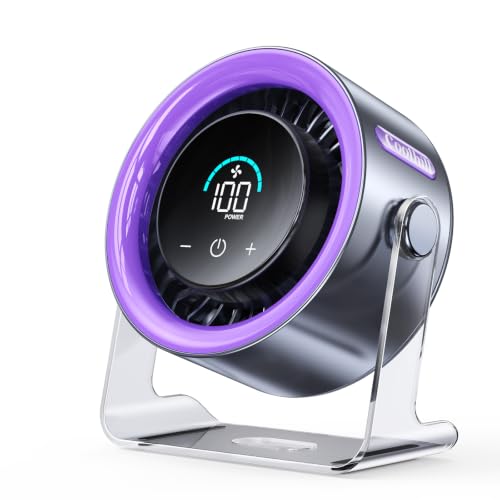
A warm desk can make even a quiet room feel oddly tense. Papers sit still, the laptop throws off heat, and the air around your face feels trapped instead of fresh. That’s where a best silent desk fan has to do more than spin politely, and the KIMMOO Rechargeable USB Desk Fan brings a more control-heavy approach with 100 speed levels, battery power, and a compact body that doesn’t bully the whole workspace. It feels built for people who want a breeze tuned to the moment, not just low, medium, and high.
KIMMOO Rechargeable USB Desk Fan
Compact portability gives this fan a friendly first impression. At 0.92 pounds and 5.5 x 3.11 x 6.58 inches, it’s small enough to move from a desk to a nightstand, kitchen counter, or travel bag without turning into a chore. That matters when cooling needs shift during the day. A fan that can follow the heat feels more useful than one stuck in a single corner.
The black finish keeps the look simple and low-key. It doesn’t try to dress itself up with loud colors or unnecessary trim, which suits a work desk or bedroom setup. Small footprint is the real win here, especially where cables, notebooks, chargers, and mugs already fight for space. The fan sits like a tool, not a decoration trying too hard.
Portability also changes how this fan gets used. A plug-only fan can be useful, sure, but it often ends up living wherever the outlet allows. This model’s rechargeable design gives it more freedom around home, office, and travel routines. Battery-powered cooling makes short moves easier, whether that means shifting to the couch or setting it near a bedside shelf.
The overall design feels personal rather than room-dominating. It’s not pretending to replace a large air circulator across a wide space. Instead, it focuses on the zone right around you, which is often exactly where desk heat becomes annoying. That narrower purpose helps set realistic expectations from the start.
Quiet Operation With More Control Than Usual
Ultra-quiet operation is one of the strongest reasons this fan fits the silent desk fan category. The provided details list 35 dB at Speed 1, which points to a soft operating level for gentle airflow. That matters during reading, typing, calls, or sleep, where even a small buzz can start to feel louder than it is. A quiet low setting gives the fan a more relaxed personality.
The big difference is the 100-speed control. Most small fans hand over three or four choices, then call it a day. KIMMOO gives far more adjustment, letting the breeze move from barely-there comfort to stronger cooling in tiny steps. That level of control can feel surprisingly practical once room temperature keeps changing.
Fine control also helps with noise management. Instead of jumping straight from too weak to too loud, the fan can be nudged upward gradually. That’s useful at a desk where a little more airflow may solve the problem without making the fan more noticeable. Precise wind adjustment turns comfort into something you can dial in rather than tolerate.
The limitation is obvious too. Some people may not need 100 levels, and too many options can feel like overkill if they prefer simple buttons. Still, the digital display helps reduce guesswork. Seeing the current speed setting makes the control system easier to understand after the first few uses.
Turbo Airflow For Quick Personal Cooling
Turbo Wind Technology gives this small fan a more ambitious cooling profile. The provided description mentions an ultra-high-speed motor with a 200% power boost, designed to circulate air quickly. That kind of feature sounds dramatic, but the practical takeaway is simple: the fan is meant to offer stronger airflow than its size might suggest. Small fans often disappoint by feeling timid, so extra wind range matters.
The listed RPM range of 2000 to 2900 supports that broad airflow feel. Lower speeds can create a softer breeze, while higher settings bring more force when the room gets sticky. That flexibility helps when cooling needs bounce between quiet desk use and warmer afternoon relief. Wide airflow range keeps the fan from feeling locked into one mood.
Turbo airflow does come with a normal tradeoff. Stronger air usually means more sound and faster battery drain, especially in a compact fan. That doesn’t ruin the feature, but it does shape how it should be used. High speed is best treated as a short burst of relief rather than the default setting for every hour.
For close-range cooling, the power feels more relevant than whole-room claims. This fan is better judged as a personal airflow tool than a large-room circulator. Pointed at a desk chair, bed, or travel setup, direct cooling becomes the main benefit. Used that way, the stronger motor makes more sense.
Battery Life And Digital Display
Rechargeable convenience gives the KIMMOO fan an edge over USB-only desk fans. The provided details state up to 8.5 hours of continuous cooling on a single charge, with a 2.5-hour recharge time using a 5V/2A adapter. That makes the fan easier to use away from wall outlets or computer ports. Fewer cable limits can make a small fan feel far less annoying.
The LED digital display is more useful than it might sound. Battery anxiety is real with rechargeable desk gadgets, especially if they shut off without warning. Seeing real-time battery status helps avoid that little surprise during work, sleep, or travel. It also shows wind speed settings, which matters with 100 levels available.
Charging speed adds another practical layer. A 2.5-hour recharge time means the fan can recover fairly quickly between uses, based on the provided specs. That’s handy for daytime desk use followed by nightstand use later. Fast charging support helps the fan feel ready more often.
Battery performance still depends on speed. Higher settings will naturally use more power than the quiet low setting. That’s not a flaw, just physics doing its thing. The smart way to use this fan is to lean on lower speeds for long sessions and save stronger settings for short, hotter stretches.
Adjustable Cooling And Safety Details
Multi-directional cooling improves the daily experience because airflow rarely lands perfectly from one fixed angle. A fan can have good power and still feel awkward if the breeze hits the wrong spot. KIMMOO’s flexible positioning lets the air aim more precisely at the face, hands, upper body, or nearby sleeping area. That small adjustment can make lower speeds feel more effective.
The 90-degree rotating design adds useful control without turning the fan into a complicated machine. A desk setup may need airflow angled upward over a keyboard, while a bedside setup may need it softened toward the room. Flexible airflow direction helps adapt to both. Placement matters less when the fan can correct its aim.
The dual guard rail safety design deserves a practical nod. A protective grille can matter in busy homes where fingers, pet noses, or loose items sometimes get too close to small appliances. It doesn’t make the fan a toy, of course. Still, safer blade coverage is a sensible detail for everyday spaces.
The guard design also affects cleaning expectations. Protective grilles can collect dust over time, especially near fabric, bedding, or pet areas. Regular wipe-downs will help keep airflow cleaner and noise steadier. A quiet fan stays more pleasant when dust doesn’t get the chance to become part of the sound.
Best Fit And Honest Tradeoffs
Desk-first cooling is where this fan makes the most sense. It suits close personal use, adjustable comfort, travel setups, and small-space routines where a full-size fan would feel clunky. The battery, digital display, and 100-speed control give it more personality than basic mini fans. It feels especially useful when tiny changes in airflow make a big comfort difference.
The fan may feel too feature-heavy for someone who only wants a simple two-button breeze. A hundred speed levels can be a blessing or a bit much, depending on patience and preference. The digital display helps, but minimalists may still prefer a simpler design. Control depth is the selling point, not everyone’s favorite feature.
Its compact size also sets a natural boundary. This isn’t the fan to rely on for broad living-room circulation or cooling a large open area. It’s more convincing beside a desk, bed, chair, or travel setup where the airflow stays close. That’s where personal cooling performance has the best chance to shine.
Ceiling and desk airflow solve different comfort problems, but faster moving air often becomes part of the same conversation in warm rooms, and a related reference sits naturally in best high-speed ceiling fan. The KIMMOO fan handles the smaller, closer job with rechargeable convenience and unusually fine control. Its strengths are strongest when quiet, adjustable airflow matters more than whole-room power.


Best Quiet Ceiling Fan For Bedroom 2026 Ultimate Comfort Picks

Best Ceiling Fan For Master Bedroom 2026 With Ultimate Comfort

Best White Ceiling Fan With Light For Bedroom 2026 Top Picks

Best Quorum Medallion Ceiling Fan 2026 With Style & Breeze

Best Outdoor Fan For Pergola 2026 Comfort Boost

Best Ceiling Fan For Great Room 2026 With Ultimate Comfort

Best Outdoor DC Ceiling Fans 2026 For Breezy Comfort

Best ceiling exhaust bath fan with light and heater 2026





