
Best Silent Table Fan 2026: Quiet Cooling Picks

A best silent table fan should cool the space around a desk, bedside table, or reading chair without adding a nagging mechanical hum. That sounds simple, yet many compact fans trade quiet operation for aggressive airflow, creating a sharp whir that gets old fast. The better designs balance low-noise airflow, blade shape, motor control, and a stable housing instead of relying on raw speed alone. That balance matters during calls, focused work, light sleep, or any moment when background noise becomes harder to ignore.
Noise labels deserve a little skepticism because sound changes with speed, distance, surface vibration, and room acoustics. A fan that seems whisper-soft on its lowest setting may buzz or rattle once the motor ramps up, especially when placed on a hollow desk. So, look beyond a single decibel claim and pay attention to multiple speed settings, brushless motor construction, solid feet, and smooth controls. A low setting that still moves usable air often proves more valuable than an impressive maximum speed that rarely feels comfortable.
Size also changes the experience more than expected. Tiny models save space, sure, but their smaller blades may need to spin faster to create noticeable airflow, which can produce a higher-pitched sound. A slightly larger desk fan can sometimes move the same amount of air at a calmer speed, giving the breeze a softer, broader feel. On the flip side, oversized housings can crowd keyboards, lamps, notebooks, and charging cables, so compact dimensions still deserve a careful look.
Control layout can make a quiet fan pleasant or oddly frustrating. Buttons that beep loudly, bright display lights, and limited tilt angles become annoying beside a bed, even when the motor itself stays quiet. Practical details such as adjustable tilt, dimmable indicators, memory settings, and a timer help the fan blend into a routine instead of demanding attention. Remote controls are handy across a room, but simple physical controls may be faster and less fiddly on a crowded work surface.
Power options bring another tradeoff. USB-powered models fit naturally beside laptops and power banks, though some deliver weaker airflow through low-output ports. Rechargeable fans provide more placement freedom, but battery capacity, charging time, and gradual power loss can affect everyday convenience. A corded quiet table fan usually offers steadier performance for long sessions, while a rechargeable design makes more sense where outlets are scarce or cables create clutter.
Cleaning shouldn’t be an afterthought either. Dust collects along guards and blade edges, then increases noise and reduces airflow over time. Removable front grilles or easy-access covers make routine care far less irritating, while sealed designs can turn a five-minute task into a wrestling match. The best silent table fan won’t be completely soundless, but it should deliver calm, useful airflow without rattling, whining, or forcing constant adjustments.

- LFR Score9.6
LFR Score is a ranking system developed by lightfansreviews.com. LFR Score has no relationship or impact from any manufacturers or sales agent websites. Learn more
- BrandDREO

- LFR Score9.2
LFR Score is a ranking system developed by lightfansreviews.com. LFR Score has no relationship or impact from any manufacturers or sales agent websites. Learn more
- BrandDREO

- LFR Score9.2
LFR Score is a ranking system developed by lightfansreviews.com. LFR Score has no relationship or impact from any manufacturers or sales agent websites. Learn more
- BrandHoneywell

- LFR Score9.2
LFR Score is a ranking system developed by lightfansreviews.com. LFR Score has no relationship or impact from any manufacturers or sales agent websites. Learn more
- BrandHoneywell

- LFR Score9.2
LFR Score is a ranking system developed by lightfansreviews.com. LFR Score has no relationship or impact from any manufacturers or sales agent websites. Learn more
- BrandDREO

- LFR Score9.0
LFR Score is a ranking system developed by lightfansreviews.com. LFR Score has no relationship or impact from any manufacturers or sales agent websites. Learn more
- BrandDREO
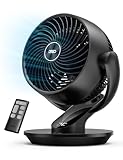
- LFR Score9.0
LFR Score is a ranking system developed by lightfansreviews.com. LFR Score has no relationship or impact from any manufacturers or sales agent websites. Learn more
- BrandDREO

- LFR Score8.6
LFR Score is a ranking system developed by lightfansreviews.com. LFR Score has no relationship or impact from any manufacturers or sales agent websites. Learn more
- BrandHoneywell

- LFR Score8.4
LFR Score is a ranking system developed by lightfansreviews.com. LFR Score has no relationship or impact from any manufacturers or sales agent websites. Learn more
- Brandlet'me

- LFR Score8.2
LFR Score is a ranking system developed by lightfansreviews.com. LFR Score has no relationship or impact from any manufacturers or sales agent websites. Learn more
- BrandKONSIDEN
Last update on 2026-07-08 / Affiliate links / Images, Product Titles, and Product Highlights from Amazon Product Advertising API
DREO Smart Fan For Quiet Whole-Room Airflow
Small fans often solve one problem while creating another: the room feels cooler, but the motor hum becomes impossible to ignore. The best silent table fan should fade into the background, move air beyond arm’s reach, and avoid turning every adjustment into a fiddly little chore. DREO’s 12-inch model takes a broader approach with long-distance airflow, two-axis oscillation, smart controls, and enough speed settings to handle more than a narrow desktop breeze. Its feature list is ambitious, though the real appeal lies in how those features work together during sleep, focused work, and stuffy afternoons.
DREO TurboPoly Smart Table Fan 565S
The shortened name still hints at what separates this fan from basic compact models: it’s built for whole-room circulation, not merely cooling the person sitting directly in front of it. DREO states that TurboWind technology produces up to 950 CFM and pushes air as far as 85 feet, giving the 12-inch housing a surprisingly large job description. Those numbers come from the supplied product information, so room shape, furniture, doorways, and speed selection will still influence the felt result. Even so, the design clearly aims beyond the weak, concentrated airflow common among tiny desk fans.
A claimed one-minute cooling effect sounds dramatic, but it’s better understood as rapid air movement rather than actual air-conditioning. The fan won’t lower the room’s temperature by itself, yet strong circulation can break up stagnant pockets, move cooler air from another part of the room, and help perspiration evaporate faster. That distinction matters because realistic expectations prevent disappointment. Used beside an air conditioner or an open window, the long throw may help spread conditioned or outdoor air more evenly.
The 12-inch footprint sits in a practical middle ground. It’s larger than a personal USB fan, so it needs a real patch of desk, dresser, or shelf space, but it remains easier to place than a pedestal or tower fan. The benefit is a broader airflow pattern and less need to run the motor at maximum speed all day. For tight dorm desks, though, the space tradeoff deserves attention before purchase.
Quiet Operation Without Weak Airflow
DREO lists a minimum operating level of 20 dB, supported by a brushless DC motor. That low figure is most relevant at gentler settings, where bedroom use and quiet office work usually happen. As speed rises, airflow noise will naturally become more noticeable, even if the motor itself stays smooth. No fan is silent once it starts moving a serious amount of air, so the useful question is whether the sound remains steady and unobtrusive rather than whiny or rattly.
Nine speed levels give this model more room for fine adjustment than a typical three-speed fan. That matters at night because the difference between “barely enough” and “slightly too strong” can be frustrating when the control steps are wide. With nine speeds, the airflow can be nudged instead of jumped, making it easier to keep sheets from flapping or papers from skating across a desk. The six airflow modes add another layer of control, although some people may find the menu deeper than they need.
The 60-second automatic screen shutoff is a small detail with outsized value in a dark bedroom. Bright indicators can feel harsher after the lights go out, especially when the fan sits close to the bed. Dimming the display without requiring another nightly button press helps preserve the calm atmosphere that quiet performance is supposed to create. The power-off memory also reduces repetitive setup by restoring previous preferences after the unit is turned back on.
DREO also claims energy savings of up to 20 percent from the next-generation motor. That statement is provided by the manufacturer and doesn’t specify the comparison conditions in the supplied description, so it shouldn’t be treated as a guaranteed household savings figure. Still, a DC motor generally supports finer speed control and efficient low-speed operation, which fits the way a quiet fan is often used. Running only as hard as necessary is usually more sensible than keeping a crude three-speed motor stuck above the comfortable level.
Two-Axis Oscillation Changes The Coverage
Horizontal oscillation is common, but the addition of 90-degree vertical movement makes this fan more flexible. The head can sweep across the room while also changing elevation, creating the 3D oscillation pattern described in the product details. That can help when air needs to move over furniture, toward a lofted bed, or from a low table into the upper part of a room. It also reduces the need to prop the fan on books or repeatedly tilt it by hand.
The combined motion suits shared rooms because the breeze doesn’t stay locked on one chair or one side of the bed. A broad sweep can circulate air around several zones, though it also means each spot receives airflow intermittently rather than continuously. Anyone wanting an unwavering stream can keep oscillation off and aim the fan directly. This mix of focused airflow and wide circulation gives the fan a useful range of personalities.
Automatic vertical and horizontal movement may also help blend temperatures between floor and ceiling. Warm air often gathers higher in a room, while conditioned air can settle or remain concentrated near a vent. Directing airflow through different heights encourages mixing instead of simply pushing air sideways. The effect won’t replace proper heating or cooling, but air distribution can make an uneven room feel less patchy.
Moving parts introduce one realistic maintenance concern. Two-axis oscillation is more mechanically involved than a fixed-head fan, so keeping the base stable and the surrounding area clear becomes important. The fan needs enough clearance to rotate without brushing a wall, lamp, curtain, or stack of papers. Giving the oscillating head breathing room helps prevent noise, blocked movement, and needless wear.
Smart Controls That Go Beyond A Remote
The DREO app allows speed, mode, timing, and oscillation changes without walking over to the fan. That sounds like a luxury until the unit is across the bedroom, tucked on a high shelf, or aimed precisely after several small adjustments. App control can preserve that setup while handling routine changes from a phone. It also avoids the classic problem of a small remote disappearing between cushions or under a pile of papers.
Alexa and Google Home support add voice operation for compatible smart-home setups. A spoken command can be useful with hands full, during a video call, or after settling into bed. Still, voice control depends on a stable network and the surrounding platform, so physical controls remain important whenever connectivity acts up. The smartest design choice here is having multiple control methods rather than forcing everything through an app.
The included 12-hour timer suits overnight use, work blocks, and rooms that don’t need continuous circulation. It can prevent the fan from running long after the room is empty or after cooler nighttime temperatures arrive. A child lock helps prevent accidental control changes, while power-off memory restores preferred behavior after shutdown. These aren’t flashy features, but they address the small daily irritations that determine whether smart controls feel useful or gimmicky.
Smart integration also carries a setup burden that a basic knob-controlled fan avoids. Installing an app, connecting to Wi-Fi, updating firmware, and linking a voice assistant can feel excessive for someone who only wants two speeds and an off switch. Fortunately, the fan’s value doesn’t depend entirely on the connected features. The core airflow controls still matter most, while the app and voice options serve as conveniences rather than the sole operating method.
Realistic Strengths And Everyday Limitations
The standout strength is the combination of long-range airflow and detailed control in a relatively compact body. Nine speeds, six modes, automatic two-axis oscillation, and remote smart access provide far more flexibility than a basic desk fan. That breadth is useful across changing seasons, from a soft bedside breeze to stronger circulation alongside a heater, cooler, or humidifier. It’s less about one spectacular setting and more about having enough adjustment to avoid compromise.
Quiet low-speed operation is another meaningful advantage, particularly where constant background noise becomes tiring. The listed 20 dB minimum suggests a calm baseline, while the auto-dark display supports nighttime comfort. Yet the strongest settings won’t retain that near-silent character because moving up to 950 CFM creates audible air turbulence. The sensible expectation is quiet at gentle speeds, not absolute silence across all nine levels.
The fan’s complexity can be either a strength or a nuisance. Plenty of control means better personalization, but six modes and nine speeds take longer to understand than a simple low-medium-high layout. App dependence is optional, though some advanced functions may feel more natural there than on the physical panel. Anyone who dislikes menus may use only a fraction of the smart feature set, which raises the question of whether the added capability justifies the likely price difference from a basic model.
Placement may be the final deciding factor. A 12-inch fan is still compact compared with floor-standing designs, but it isn’t tiny, and full 90-degree movement needs clearance in more than one direction. On an uncluttered dresser, office credenza, or roomy nightstand, that’s easy enough. On a narrow dorm desk packed with monitors, books, cables, and mugs, the oscillation footprint could feel larger than expected.
DREO’s TurboPoly 565S makes the most sense where a narrow personal breeze isn’t enough and a full-size floor fan feels excessive. Its best silent table fan credentials rest on low-speed quietness, unusually broad oscillation, long-distance airflow, and practical scheduling controls. The model asks for more space, more setup, and a little patience with its many options. In return, it offers a more adaptable style of circulation than the usual compact fan with three buttons and a short reach.
DREO 12-Inch Quiet Whole-Room Air Circulator Fan
A cramped desk can turn into a noisy little wind tunnel once the wrong fan starts humming beside a monitor, lamp, and stack of papers. The best silent table fan should move enough air to matter without rattling through a work session or keeping a light sleeper alert. This 12-inch DREO model takes a simpler route than many app-controlled fans, pairing long-distance circulation with three knob-operated speeds and a manually adjustable head. That stripped-down setup won’t impress anyone chasing elaborate automation, but it may suit a room where quiet airflow, easy cleaning, and straightforward controls matter more than smart-home tricks.
DREO 12-Inch Quiet Air Circulator
The main selling point is whole-room air circulation from a body measuring roughly 9 inches deep, 11 inches wide, and 12 inches high. DREO says its WingBoost system uses deep-pitched blades and an aerodynamic structure to send air as far as 70 feet. That figure comes from the supplied product information, and actual reach will depend on furniture, doorways, fan speed, and room layout. Still, the design clearly aims beyond the short, narrow breeze produced by many tiny desktop fans.
Long-distance airflow changes how the fan fits into everyday use. Instead of parking it inches from a keyboard or pillow, the unit can sit farther away and still help move air across a bedroom, office, or kitchen. That can reduce the annoying blast-to-the-face feeling that comes from keeping a weak fan too close. The broader purpose is circulation rather than spot cooling, which makes placement more flexible.
The 12-inch body lands between a personal fan and a full-size floor model. It needs more surface space than a compact USB fan, so a crowded nightstand may feel tight, but it remains easier to move from room to room than a tower fan. The integrated handle and practical base support that portability. For small work areas, though, the moderate footprint deserves a quick measurement before it claims half the available desk.
Quiet Airflow For Sleep And Focus
DREO lists the minimum sound level at 28 dB, using NACA-inspired airflow work and a bionic design to reduce turbulence. That number suggests a gentle operating character at the lowest setting rather than complete silence at every speed. Air itself becomes audible once the blades move faster, so higher settings will naturally sound stronger. The more realistic benefit is low-speed quietness without the sharp buzzing or rough mechanical note that can make compact fans tiring.
Sleep exposes every little sound flaw. A repeating click, loose grille, or high-pitched motor tone can seem louder after midnight, even when the fan looks quiet on paper. This model’s simpler construction may help because it avoids motorized oscillation mechanisms and electronic display sounds. The tradeoff is less automatic coverage, but the reward may be a steadier, less distracting background airflow.
Focused work presents a similar challenge for different reasons. Constant motor noise can compete with calls, recorded audio, reading, or tasks that demand concentration, while stagnant air can make a room feel heavy and uncomfortable. A quiet circulator lets the fan sit farther from the desk and move air through the space instead of blasting papers directly. That setup supports calmer desk comfort without turning the fan into the center of attention.
The three-speed layout keeps adjustment simple, though it offers less precision than models with six, nine, or more levels. One setting may feel slightly too weak while the next feels stronger than needed, especially during mild weather. Still, a physical knob is quick, familiar, and usable without an app, remote, or Wi-Fi connection. That simple control scheme favors reliability over fine-grained customization.
Adjustable Direction Without Complicated Controls
A 120-degree adjustable tilt gives the fan useful vertical range. The head can aim across a bed, toward a higher shelf, down a hallway, or upward to mix warmer air near the ceiling. Manual positioning also stays exactly where it’s placed, which helps when airflow needs to avoid plants, loose documents, or a sleeping partner. This wide tilt range adds flexibility without introducing extra buttons or moving parts.
The lack of automatic oscillation is the clearest limitation. Air remains directed toward one chosen path unless the fan is repositioned, so it won’t sweep across several chairs or cover changing spots around a room. That may not matter when the goal is steady circulation toward a doorway, vent, or bed. For shared spaces, however, fixed directional airflow can feel less accommodating than a fan that rotates on its own.
Wall mounting offers another placement option, particularly where counters and desks are already packed. Raising the fan can keep airflow above clutter, free valuable surface space, and direct circulation across a wider portion of the room. Installation details aren’t included in the supplied description, so the mounting surface and hardware requirements should be checked carefully before committing. Used appropriately, the wall-mount capability gives this tabletop design a role that many ordinary desk fans can’t fill.
The built-in handle makes temporary placement less of a fuss. Carrying the fan from a home office to a bedroom or kitchen doesn’t require wrestling with an awkward housing. Even so, it remains a corded room appliance rather than a rechargeable travel fan, so outlet access still shapes where it can go. The portable base design helps with room-to-room use, but it doesn’t provide cordless freedom.
Seasonal Circulation Beyond Summer Cooling
Air circulation can help other appliances distribute their output more evenly. A space heater often warms one corner first, a humidifier may concentrate moisture nearby, and a purifier depends on moving room air through its filter. Positioning the DREO fan to push air away from those appliances may reduce stagnant pockets and create a more consistent room feel. This year-round circulation role gives the fan a purpose after peak summer heat has passed.
Pairing a circulator with air conditioning can also help move cooled air beyond the immediate vent area. The fan doesn’t generate cold air, and it won’t lower temperature by itself, but it can help spread existing cool air through an uneven space. That distinction matters because marketing language sometimes blurs circulation and refrigeration. The practical strength is better air distribution, not independent climate control.
Winter use requires thoughtful placement. Pointing the fan toward a wall or upward can encourage warm air to mix without creating a harsh draft across the room. A low speed is usually the sensible starting point because the aim is redistribution, not a chilly blast. The 120-degree tilt makes that indirect airflow setup easier than it would be with a fixed-head desk fan.
DREO mentions possible energy savings through more efficient appliance pairing, but the supplied information doesn’t provide a specific verified percentage for this model. Any reduction in energy use will depend on room insulation, appliance settings, climate, and how the fan is positioned. It’s safer to view circulation as a comfort tool that may help an existing system work more evenly. The energy-saving potential is plausible, but it shouldn’t be treated as a guaranteed bill reduction.
Cleaning, Maintenance, And Daily Practicality
Dust buildup changes both airflow and sound over time. Fine debris clings to the grille and blade edges, forcing the fan to push through more resistance and sometimes creating an uneven hum. DREO states that removable parts make cleaning easier, which is valuable for a fan expected to run through long nights or workdays. Regular care helps preserve airflow efficiency without relying on sprays or complicated tools.
Easy access also matters in kitchens, where airborne grease can mix with dust and create a stubborn film. A fan that can be opened without a wrestling match is more likely to receive routine maintenance instead of being ignored until performance drops. The removable construction should simplify that task, though the supplied details don’t specify exactly which sections detach or whether tools are required. That uncertainty is minor, but it’s still part of the maintenance tradeoff.
Straight-out-of-the-box operation keeps setup brief. There’s no account creation, wireless pairing, voice assistant, or firmware step between unpacking and feeling airflow. Turn the knob, choose one of three speeds, and adjust the angle. That kind of plug-and-use simplicity can feel refreshingly sensible in a category increasingly packed with features that some households never touch.
The downside is equally plain: simplicity limits personalization. There’s no timer mentioned, no remote operation, no automatic oscillation, and no dense ladder of speed settings. A bedside setup may require reaching for the knob, while a large shared room may benefit from broader automatic movement. The DREO 12-inch circulator earns its best silent table fan appeal through quiet operation, strong directional reach, flexible tilt, and uncomplicated upkeep, but it won’t satisfy every preference for automation or precision control.
Honeywell TurboForce HT900 Quiet Air Circulator
A little fan can become a big nuisance once its motor starts droning beside a keyboard, bed, or reading chair. The best silent table fan needs to cool more than a six-inch patch of skin while keeping the sound steady enough to ignore. Honeywell’s HT900 tackles that problem with a compact frame, three speeds, a 90-degree pivoting head, and airflow that the supplied details say can be felt from as far as 25 feet away. It’s a straightforward machine, and honestly, that simplicity is a large part of its appeal.
Honeywell TurboForce HT900 Fan
The HT900 is designed to work on a desk, tabletop, floor, or wall, giving it more placement flexibility than a typical personal fan. Its compact size suits areas where a tower fan would crowd the room, yet Honeywell positions it for small to medium spaces rather than arm’s-length cooling alone. That makes it useful beside a home-office desk, across from a bed, or near a doorway where airflow can travel into an adjoining area. The housing won’t disappear on a tiny nightstand, but it takes up far less visual and physical space than a pedestal model.
Honeywell describes the fan as 25 percent quieter than comparable models, though the supplied information doesn’t identify every model or measurement condition behind that comparison. Even so, the claim points toward a design goal that matters in real rooms: moving useful air without a harsh mechanical racket. The fan still produces airflow noise, particularly at its strongest setting, because spinning blades can’t move air silently. The practical benefit is reduced operating noise, not a promise of total silence.
The aerodynamic TurboForce design is intended to concentrate airflow and improve throw. Honeywell states that the breeze can be felt from up to 25 feet away, which gives the fan more reach than many small desktop units. Furniture, open doors, room shape, and speed selection will change the felt distance, so that figure works best as a manufacturer-stated maximum rather than a guarantee in every setup. Still, longer airflow reach means the fan doesn’t always need to sit inches from a face or computer screen.
That extra distance can make everyday placement more comfortable. A fan positioned farther away is less likely to dry out eyes, scatter paperwork, or create a sharp stream of air across one shoulder. Instead, the HT900 can push air through a broader path and help break up stagnant pockets around a room. For a compact model, that circulation-first approach gives it a more useful role than simply acting as a personal breeze machine.
Three Speeds Keep Operation Simple
Three speed settings cover the basics without turning operation into a menu-driven exercise. Low suits quiet background circulation, medium adds a firmer breeze, and high is the setting for hotter rooms or longer-distance airflow. There’s no app to install, no account to create, and no remote to misplace between couch cushions. The simple speed control is easy to understand, though it offers less precision than fans with five, nine, or more steps.
That limited adjustment range creates a real tradeoff. One setting may feel slightly too gentle while the next lands a bit stronger than desired, especially during mild weather or overnight use. A fan with finer increments can thread that needle more easily, but it also brings more buttons and often a higher price. The HT900 favors quick operation over customized airflow, which can be refreshing or restrictive depending on the room.
The absence of a timer is another practical limitation in a bedroom. Anyone who prefers airflow for the first few hours of sleep may need to switch the fan off manually or use a compatible external timer. There’s also no power-off memory or automatic mode listed in the supplied description. Those omissions keep the design uncomplicated, but they reduce bedside convenience compared with feature-heavy smart fans.
Physical controls do have one quiet advantage: they remain dependable when Wi-Fi drops, phones run out of charge, or voice assistants misunderstand a command. Twist the control, choose a speed, and the fan runs. That no-nonsense behavior is especially useful in offices, guest rooms, workshops, or shared spaces where nobody wants to read instructions. The HT900’s plug-and-use design keeps the learning curve practically flat.
Pivoting Airflow Adds Useful Direction
The 90-degree pivoting head lets the airflow move from a low, forward-facing angle to a much higher direction. That range helps when the fan sits on the floor but needs to push air upward, or when it rests on a desk and must aim over a monitor rather than straight into it. The adjustment is manual, so the head stays fixed once positioned. This directional control is simple, stable, and useful for targeted circulation.
Manual pivoting also makes the fan practical for seasonal air mixing. Angling the airflow upward can help move warm air that gathers near the ceiling, while a forward angle can carry cooler air from an air conditioner into another part of the room. The fan doesn’t heat, cool, purify, or humidify the air on its own. Its strength lies in redistributing existing air so other appliances don’t have to fight uneven pockets as much.
The HT900 doesn’t oscillate from side to side, and that matters in shared spaces. It won’t sweep a breeze across several chairs, alternate between two sides of a bed, or automatically cover a wide seating area. Instead, it directs air along one chosen path until someone moves it. That fixed airflow pattern is efficient for focused circulation, but less convenient where several spots need equal coverage.
Wall mounting offers a workaround for cramped surfaces and awkward room layouts. A higher position can send air across furniture, free up desk space, and keep the fan away from curious hands or crowded counters. The supplied information confirms wall-mount capability but doesn’t specify installation hardware or wall requirements. Careful mounting is essential because the adjustable fan head needs a secure base while being repositioned.
Quiet Performance Has Clear Boundaries
The phrase quiet fan can mean very different things depending on speed and distance. On a lower setting, the HT900 is better suited to reading, sleeping, or focused work because both motor activity and air turbulence are reduced. High speed will sound more noticeable, plain and simple, since stronger airflow creates more rushing noise. The useful expectation is quieter operation for its class, not silence at maximum output.
Sound can also change according to the surface beneath the fan. A hollow desk, loose shelf, or lightweight nightstand may amplify vibration that would barely register on a solid cabinet. Placing the fan on a stable surface and keeping the housing clear of walls, cords, and loose objects can make a noticeable difference. The fan’s own design matters, but surface vibration can turn a calm hum into an irritating buzz.
Distance helps here too. Because Honeywell states that airflow can reach up to 25 feet, the HT900 doesn’t have to sit right beside a pillow or microphone to be useful. Moving it several feet away can soften the perceived sound while still maintaining air movement. That setup may be more comfortable than running a weaker fan at full blast from arm’s length. The combination of airflow reach and flexible positioning is one of this model’s strongest practical traits.
There’s no supplied decibel rating, so it would be misleading to assign one. Honeywell’s stated comparison of 25 percent quieter than similar fans is the only specific noise claim provided here. Without standardized conditions, buyers should treat that figure as directional rather than absolute. What the design promises more convincingly is balanced air movement from a compact housing built to avoid needless bulk.
Energy Savings Depend On Smart Placement
Honeywell suggests using the fan to give an air conditioner a break, and the logic is sound as long as expectations stay grounded. An air circulator can push cooled air farther into a room, reduce warm pockets, and make a thermostat setting feel more comfortable. It doesn’t lower air temperature by itself, so switching off the cooling system during severe heat may not produce the desired result. The potential benefit comes from supporting existing cooling, not replacing it outright.
Placement makes or breaks that strategy. A fan aimed away from an air-conditioning vent can carry cool air deeper into the room, while positioning it near a doorway may help move air between spaces. Randomly pointing the fan at the nearest wall won’t deliver the same result. A little trial and error is needed to turn focused airflow into useful room circulation.
The same principle applies during colder months. Tilting the fan upward can mix warmer ceiling air back into the occupied part of the room, particularly in spaces with high ceilings or uneven heating. Low speed is usually more comfortable for that job because the goal is gentle mixing, not a chilly draft. Used thoughtfully, the HT900 can remain relevant beyond summer through year-round air circulation.
No specific energy-use figures or guaranteed savings amounts are included in the supplied details, so firm claims about lower bills would be guesswork. Insulation, climate, appliance efficiency, room size, and operating habits all influence the outcome. The realistic advantage is that better air distribution may allow heating or cooling equipment to run more efficiently in some setups. That energy-saving potential is helpful, but it depends heavily on how the fan is used.
Practical Strengths And Noticeable Compromises
The HT900’s strongest qualities are easy to name: compact placement, three uncomplicated speeds, a 90-degree pivoting head, wall-mount flexibility, and manufacturer-stated airflow reach of up to 25 feet. Together, those features make it more capable than a tiny personal fan while keeping the footprint manageable. It can sit low, aim high, or work across a room without a complicated setup. That blend of portability and circulation suits everyday use well.
Its limitations are just as clear. There’s no oscillation, remote, timer, app control, or dense selection of airflow modes listed in the provided information. The fan must be aimed manually, and three speeds may not offer the exact comfort level desired at every moment. Those aren’t hidden flaws, but they define the basic operating style that separates this model from newer smart circulators.
The black housing has a practical, low-key look that blends easily into offices, bedrooms, and utility spaces. Still, the design is more functional than decorative, so it may not suit a room where every appliance is expected to look sleek or minimalist. The fan’s compact body helps it avoid dominating the space, but it remains visibly appliance-like. That utilitarian design fits its straightforward personality.
Honeywell’s HT900 earns attention in the best silent table fan category by focusing on useful airflow, quieter operation, and flexible placement rather than piling on electronics. It’s better suited to steady circulation than wide automatic coverage, and its three-speed control favors ease over precision. The model won’t satisfy someone who wants smart scheduling or hands-free adjustment. For a room that needs compact, directional air movement with fewer bells and whistles, its simple functionality is the point, not a compromise to apologize for.
Honeywell HT-904 Quiet Tabletop Air Circulator
Stuffy rooms don’t always need a towering fan or a complicated smart appliance. Sometimes the real nuisance is a compact space that traps warm air while a noisy motor adds one more distraction to the day. The best silent table fan should feel useful from across the room, stay simple enough to operate half-awake, and fit without swallowing the entire desk. Honeywell’s HT-904 leans into that practical middle ground with three speeds, a 90-degree pivoting head, wall-mount capability, and manufacturer-stated airflow reach of up to 25 feet.
Honeywell HT-904 TurboForce Fan
The HT-904 is small enough for a tabletop, desk, floor, or wall-mounted setup, which gives it more flexibility than its compact body might suggest. Honeywell describes it as suitable for small to medium-sized rooms, so the design isn’t limited to cooling someone sitting directly beside it. Its portable footprint makes it easier to move between a bedroom, office, kitchen, or reading corner without rearranging half the room. That versatility matters in homes where one fan may need to handle several jobs during the day.
The white housing gives this model a lighter visual presence than the familiar black version. It can blend more naturally with pale walls, white shelving, or bright office furniture, though appearance remains secondary to airflow. The shape is unmistakably functional rather than decorative, and that honesty suits the product well. The compact air circulator design is built to move air, not pretend to be sculptural décor.
Honeywell’s TurboForce system uses an aerodynamic approach intended to concentrate and project airflow. According to the supplied details, the breeze can be felt from as far as 25 feet away. Furniture, open doors, fan angle, and room shape will affect that distance, so it’s best viewed as a stated maximum rather than an identical result in every space. Even so, longer airflow reach gives the fan an advantage over tiny personal models that lose effectiveness a few feet from the desk.
That reach changes placement in a useful way. The fan doesn’t have to sit beside a pillow, microphone, or paperwork stack to make a difference. Set farther away, it can move air through a room without creating a harsh stream directly against the face. This circulation-focused setup feels more comfortable during long work sessions and can reduce the dry-eye annoyance that comes from close-range airflow.
Quiet Operation Without Extra Fuss
Honeywell positions the HT-904 as a quiet personal fan, though no specific decibel figure is included in the supplied information. That means the safest expectation is subdued operation relative to stronger room fans, especially on the lowest setting. High speed will naturally create more air noise because stronger airflow always has an audible cost. The useful strength is quieter everyday cooling, not absolute silence across all three levels.
A steady sound profile matters more than many buyers realize. Low hum can fade into the background, while clicks, rattles, and uneven vibration tend to grab attention again and again. The HT-904’s straightforward design avoids motorized oscillation, display tones, and app alerts, which removes several possible sources of distraction. That simple mechanical layout may appeal in bedrooms, home offices, and study areas where fewer noises are usually better.
Surface choice can still affect how quiet the fan feels. A hollow desk or lightweight shelf may amplify vibration, while a solid dresser or wall mount can keep the housing more stable. Leaving a little clearance around the intake and front grille also helps prevent stray buzzing against cords, papers, or nearby objects. The fan’s own engineering matters, but stable placement can make just as much difference in day-to-day sound.
The three-speed range keeps operation quick, though it limits fine tuning. Low, medium, and high cover the common needs, but there’s no in-between step if one setting feels too soft and the next feels too strong. A more advanced fan may offer additional precision, yet it also adds more controls and often more setup. The HT-904 favors straightforward speed selection, and for many rooms, that’s plenty.
Adjustable Airflow For Real Rooms
The 90-degree pivoting head gives the fan useful vertical flexibility. It can aim forward across a desk, upward toward warmer air near the ceiling, or at an angle that carries airflow over furniture. That range makes the fan easier to adapt to changing room layouts without stacking it on books or moving it to a higher shelf. The adjustable fan head is manual, so the chosen direction stays fixed until someone changes it.
Fixed direction can be a strength in focused setups. A fan aimed toward a doorway can help move conditioned air into another space, while a low placement with an upward angle can encourage vertical mixing. The airflow stays on task instead of sweeping away every few seconds. This targeted circulation works especially well when the goal is supporting a vent, heater, humidifier, or purifier.
The missing feature is side-to-side oscillation. The HT-904 won’t automatically share a breeze across a sofa, multiple desks, or both sides of a bed. Anyone wanting broad, changing coverage will need to reposition the fan or choose a rotating model. That non-oscillating design keeps the mechanism simple, but it does reduce convenience in shared spaces.
Wall mounting helps offset the lack of automatic movement by opening up better placement choices. A higher position can send air over clutter, free surface space, and direct circulation across a wider path. The provided details confirm wall-mount capability but don’t explain hardware or installation requirements, so those specifics should be checked before mounting. Used securely, the wall-ready construction gives this small fan a surprisingly broad range of possible locations.
Three Speeds Fit A Simple Routine
The lowest speed is the natural choice for overnight airflow, quiet reading, or mild indoor heat. It won’t deliver the strongest reach, but it may offer the most balanced mix of comfort and sound. Medium makes sense for general room circulation, while high is better suited to hot afternoons or pushing air across a longer distance. This three-level control keeps decisions easy, which can be a relief late at night.
Physical controls also avoid dependence on phones, remotes, or home networks. There’s no pairing process, firmware update, or lost accessory standing between the room and a cooler breeze. Turn the control and the fan responds. That no-app operation feels especially practical in guest rooms, dorms, offices, and shared households where several people may use the fan.
The tradeoff is a lack of scheduling and remote convenience. No timer, power-off memory, voice control, or automatic climate response is mentioned in the supplied description. A bedside setup may require reaching over to change the speed, and a wall-mounted unit may be less convenient if placed too high. The HT-904’s basic control system rewards thoughtful placement because the fan expects direct physical interaction.
Simple controls can also support longevity by reducing the number of electronic features that may become unnecessary or confusing over time. That doesn’t guarantee durability, and no lifespan data is provided, but it does keep the operating logic easy to understand years later. There’s something reassuring about a fan that does exactly what the knob says. The low-complexity design is plain, but plain can be a virtue.
Cooling Support And Seasonal Air Mixing
The HT-904 won’t lower room temperature by itself, yet moving air across skin can make a warm space feel more comfortable. That effect comes from faster evaporation and better circulation rather than actual refrigeration. Honeywell suggests pairing the fan with air conditioning to improve airflow and potentially reduce how hard the cooling system needs to work. The realistic benefit is better distribution of cooled air, not a substitute for air conditioning during severe heat.
Placement determines whether that partnership works. A fan near an air-conditioning vent can help carry cool air farther into the room, while a doorway position may move it between spaces. Pointing the fan randomly at a nearby wall may create less useful turbulence. A few minutes of experimenting can turn directed airflow into a more even room feel.
Cold-weather use is possible too. Warm air often gathers near the ceiling, leaving the lower part of the room feeling cooler than the thermostat suggests. Tilting the fan upward on a low setting can encourage gentle mixing without blasting cold air directly across the room. This year-round circulation role gives the HT-904 more value than a fan used only during summer.
Humidifiers and air purifiers may also benefit from better movement around the room. Moisture can remain concentrated near a humidifier, and purifier performance depends partly on how room air reaches its intake. The HT-904 can help move air past those appliances, though it won’t control humidity or filtration itself. Its contribution is air movement support, nothing more complicated than that.
Realistic Strengths And Limitations
The strongest part of the HT-904 is the balance between size and reach. It’s compact enough for a desk or shelf but designed to push airflow farther than a typical personal fan. Add the 90-degree pivot, three speeds, and wall-mount option, and the fan becomes more adaptable than its simple appearance suggests. That small-body versatility is the main reason it fits so many everyday spaces.
Quiet operation also supports its role as a bedroom or office fan. The lack of an exact sound rating means expectations should stay measured, but the design is clearly intended to reduce distraction while maintaining useful airflow. Low speed is likely the most suitable setting for sleep, while high speed will trade calmness for stronger circulation. The quiet-versus-power tradeoff is unavoidable, and this model keeps it easy to understand.
The limitations are equally plain. There’s no oscillation, timer, remote, app, or broad ladder of speed settings in the provided details. Shared rooms may miss automatic side-to-side movement, and light sleepers may wish for a shutoff schedule. Those omissions don’t make the fan ineffective, but they define its traditional operating style.
The white finish may show dust sooner than a darker housing, though that visibility can serve as a reminder to clean the grille and surrounding surfaces. The supplied information doesn’t describe removable parts or a detailed cleaning process, so maintenance expectations should remain modest. Regular exterior dusting and careful access to the blades will likely matter for preserving airflow. Clean surfaces support consistent fan performance and help prevent unnecessary vibration.
The Honeywell HT-904 earns a place in the best silent table fan conversation through compact placement, simple controls, adjustable direction, and manufacturer-stated reach of up to 25 feet. It won’t satisfy someone seeking smart automation, automatic oscillation, or precise speed increments. It suits a room where dependable directional airflow matters more than a long feature list. The practical design is old-school in the best sense: turn it on, aim it where needed, and let it move air.


Best Quiet Ceiling Fan For Bedroom 2026 Ultimate Comfort Picks

Best Ceiling Fan For Master Bedroom 2026 With Ultimate Comfort

Best White Ceiling Fan With Light For Bedroom 2026 Top Picks

Best Quorum Medallion Ceiling Fan 2026 With Style & Breeze

Best Outdoor Fan For Pergola 2026 Comfort Boost

Best Ceiling Fan For Great Room 2026 With Ultimate Comfort

Best Outdoor DC Ceiling Fans 2026 For Breezy Comfort

Best ceiling exhaust bath fan with light and heater 2026





