
Best Small Quiet Desk Fan 2026: Calm Cooling Picks

A stuffy desk can turn a normal workday into a slow grind. Papers stick to damp forearms, concentration slips, and the room still feels stale even with the air conditioner running. A best small quiet desk fan fixes that immediate pocket of heat without taking over the workspace or filling every pause with a mechanical buzz. The useful models deliver focused airflow that feels refreshing at arm’s length rather than blasting loose notes across the room.
Size matters more than product photos suggest. A fan may look compact on a blank background, then crowd a keyboard, monitor stand, lamp, and coffee mug once it reaches an actual desk. A narrow base, stable footing, and an adjustable head usually matter more than decorative extras. Compact desk fans with a sensible footprint can sit beside a monitor or tuck into a shelf without turning cable management into a headache.
Noise deserves equal attention, especially during calls, reading sessions, or late-night work. Some small fans sound harmless on their lowest setting but develop a whine, rattle, or pulsing motor tone as speed increases. A genuinely quiet desk fan produces steady background sound without sharp pitches that cut through speech. Still, silence has a tradeoff: The softest setting may provide only close-range cooling, while stronger airflow naturally brings more audible movement.
Controls should be simple enough to adjust without breaking focus. Multiple speed levels help because the right breeze changes throughout the day, from a faint morning draft to stronger afternoon cooling. A front-facing button is easy to reach, though a rear control may prevent accidental presses on a cramped surface. Models with tilt adjustment also make better use of modest airflow by directing it toward the face, upper body, or hands instead of wasting air below the desk.
Power design shapes where the fan can actually be used. USB-powered models fit neatly into computer setups, yet weak USB ports may limit performance, and the attached cable can become another cord to route. Rechargeable options move easily between a home office, kitchen table, bedroom, or covered patio, but battery life drops faster at higher speeds. An efficient rechargeable fan offers freedom during short outages or room changes, though it still needs regular charging and shouldn’t be treated like a full-room circulator.
Cleaning is easy to overlook until dust gathers across the grille and blade edges. A removable front cover saves frustration because trapped lint can reduce airflow and create uneven noise over time. Sealed designs may look tidy, but cleaning them often requires narrow brushes or compressed air. The better pick balances easy maintenance, steady airflow, a firm base, and noise that stays unobtrusive during normal use.
No single fan suits every desk. Tiny models favor portability but may struggle beyond a few feet, while heavier fans stay planted and move more air at the cost of space. Oscillation spreads the breeze, though it can introduce extra motor noise and may feel unnecessary for one seated position. The practical goal isn’t the longest feature list; it’s a fan that cools the area that feels uncomfortable without creating a new annoyance.

- LFR Score9.4
LFR Score is a ranking system developed by lightfansreviews.com. LFR Score has no relationship or impact from any manufacturers or sales agent websites. Learn more
- BrandSWEETFULL

- LFR Score9.4
LFR Score is a ranking system developed by lightfansreviews.com. LFR Score has no relationship or impact from any manufacturers or sales agent websites. Learn more
- BrandFOWSEEK
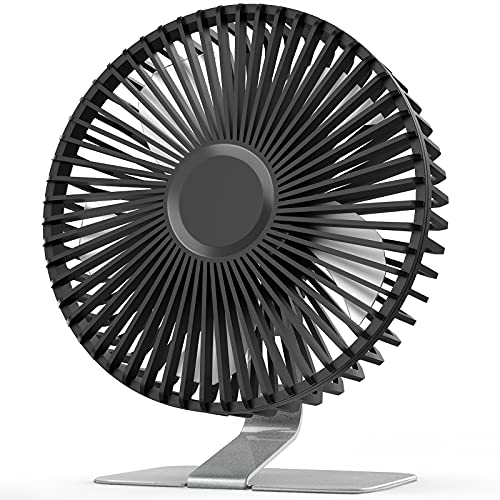
- LFR Score9.2
LFR Score is a ranking system developed by lightfansreviews.com. LFR Score has no relationship or impact from any manufacturers or sales agent websites. Learn more
- BrandSLENPET

- LFR Score9.2
LFR Score is a ranking system developed by lightfansreviews.com. LFR Score has no relationship or impact from any manufacturers or sales agent websites. Learn more
- BrandHoneywell

- LFR Score9.2
LFR Score is a ranking system developed by lightfansreviews.com. LFR Score has no relationship or impact from any manufacturers or sales agent websites. Learn more
- BrandSWEETFULL

- LFR Score9.2
LFR Score is a ranking system developed by lightfansreviews.com. LFR Score has no relationship or impact from any manufacturers or sales agent websites. Learn more
- BrandDREO

- LFR Score9.0
LFR Score is a ranking system developed by lightfansreviews.com. LFR Score has no relationship or impact from any manufacturers or sales agent websites. Learn more
- BrandGaiatop

- LFR Score9.0
LFR Score is a ranking system developed by lightfansreviews.com. LFR Score has no relationship or impact from any manufacturers or sales agent websites. Learn more
- BrandKIMMOO
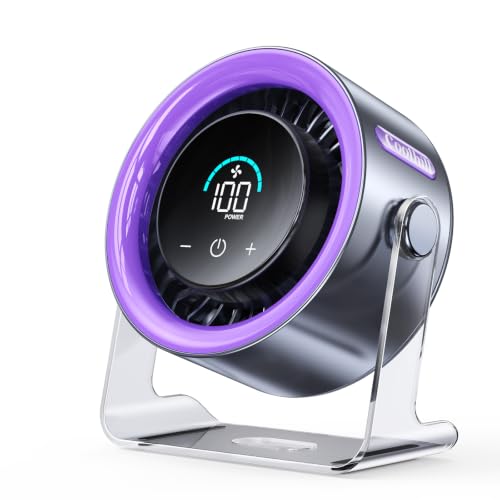
- LFR Score8.8
LFR Score is a ranking system developed by lightfansreviews.com. LFR Score has no relationship or impact from any manufacturers or sales agent websites. Learn more
- BrandCoolhill

- LFR Score8.2
LFR Score is a ranking system developed by lightfansreviews.com. LFR Score has no relationship or impact from any manufacturers or sales agent websites. Learn more
- BrandKONSIDEN
Last update on 2026-07-18 / Affiliate links / Images, Product Titles, and Product Highlights from Amazon Product Advertising API
SWEETFULL USB Small Desk Fan Review
A warm patch around a monitor can make an otherwise comfortable room feel oddly tiring. The best small quiet desk fan should cool that immediate space without stealing half the desk or adding a sharp motor whine to calls, study sessions, and late-night reading. SWEETFULL’s compact USB model tackles that job with a seven-blade design, four speed settings, and a fully adjustable head. Its appeal isn’t complicated: personal airflow stays close, the footprint remains modest, and the controls don’t require a manual every time the temperature climbs.
SWEETFULL 5-Inch USB Desk Fan
The first thing that stands out is how little room this fan asks for. At 5.67 by 2.60 by 6.06 inches, it can sit beside a laptop, lamp, keyboard, or stack of notebooks without forcing a complete desk reshuffle. The 0.61-pound body also makes it easy to move between a home office, bedside table, kitchen counter, or travel bag. That combination of compact sizing and low weight solves a familiar problem: Cooling often helps most in small spaces, yet bulky fans create clutter right where space is already tight.
The black finish keeps the design visually quiet, which suits work areas where bright colors or oversized controls would feel distracting. Its simple desktop shape doesn’t pretend to be decorative equipment, and frankly, that restraint works in its favor. A personal fan should blend into the routine, not become the main attraction. The small footprint also makes it more practical in cruise cabins, shared offices, dorm-style rooms, and narrow nightstands where every spare inch gets claimed quickly.
Portability has one clear boundary, though. This isn’t a cordless model, so the fan must stay connected to a USB power source while running. That means it travels easily, but it won’t operate independently in the middle of a room unless a power bank comes along. The tradeoff is reasonable for a lightweight fan, yet anyone expecting built-in battery freedom should pay attention to the USB-only design before packing it for outdoor use or an outlet-free corner.
Quiet Airflow Without The Distracting Buzz
Noise often determines whether a desk fan gets used daily or shoved into a drawer after a week. SWEETFULL states that this model can operate at noise levels as low as 25 dB, supported by a brushless motor and seven curved blades. On the lower settings, that specification points toward a soft background presence suited to typing, reading, studying, or resting. The key strength is low-speed quietness, not the impossible promise of complete silence.
The curved blade layout is designed to produce a gentler stream of air rather than a harsh, choppy blast. That matters at close range because a desk fan usually sits only a foot or two away, where overly aggressive airflow can dry the eyes or scatter lightweight papers. A smoother breeze feels easier to live with during long sessions, especially while wearing contact lenses or working beside loose notes. The seven-blade airflow aims for comfort first, which fits the role of a personal cooling fan better than room-wide circulation would.
Higher speeds naturally bring more sound, and that’s the honest tradeoff here. The lowest noise figure shouldn’t be assumed across all four settings, particularly at the stated maximum air speed of 5.2 m/s. Still, having several levels lets the fan remain subdued during calls and then push harder after a workout, during a hot afternoon, or inside a stuffy cabin. The practical advantage is adjustable noise and airflow rather than one fixed setting that’s either too weak or too loud.
Quiet operation also makes the fan useful beside a bed, but expectations should stay grounded. A very light sleeper may still notice motor and airflow noise in an otherwise silent room, while others may appreciate the steady sound as mild background masking. Placement makes a difference, too; setting the fan farther away and using a higher speed can sometimes sound less intrusive than placing it inches from the pillow. The 25 dB minimum rating is encouraging, though personal sensitivity will always shape the real experience.
Four Speeds Make The Breeze Easier To Match
Four speed levels give this small fan more flexibility than a basic on-and-off model. The lower settings suit steady desk work, where cooling should be noticeable without constantly pulling attention toward the fan. Higher settings can deliver faster relief when a sunny window, running computer, or cramped room creates a pocket of trapped heat. The four-speed control helps bridge the gap between a barely-there breeze and stronger personal cooling.
Operation stays straightforward through a single-button control. That simplicity is handy on a crowded desk because there’s no remote to lose and no cluster of tiny controls to decipher. Repeated presses cycle through the available settings, so changing airflow takes only a moment. The downside is that button cycling can require several presses to return to a preferred level, but the simple control layout remains easier than dealing with fussy touch panels.
The stated maximum wind speed of 5.2 m/s sounds impressive for a five-inch fan, yet it should be understood in context. This is still a personal cooling device, not a substitute for a full-size circulator or air conditioner. Its strongest setting is best used to cool the face, hands, or upper body within a limited area. That close-range power is useful at a desk, beside a bed, or on a small table, but it won’t evenly move air through a large room.
Speed choice also affects comfort in less obvious ways. A strong blast feels refreshing for a few minutes, then may become irritating during a long reading session or while working with papers. Lower settings provide a steadier breeze that’s less likely to dry skin or disturb lightweight objects. The fan’s wide speed range makes those adjustments possible without moving the entire unit farther away every time conditions change.
USB Power Adds Flexibility With One Catch
USB power makes this fan compatible with several everyday sources, including computer ports, wall chargers, power banks, and car chargers. That flexibility is genuinely useful because the fan doesn’t depend on a proprietary adapter that could be misplaced during travel. A spare USB port is usually easier to locate than an open wall outlet beside a packed desk. The versatile power setup supports home, office, vehicle, hotel, and cruise-cabin use without adding much weight.
The included 4.9-foot cable offers a decent amount of placement freedom. It can reach from a desktop tower, under-desk charger, wall adapter, or nearby power bank without keeping the fan pressed directly against the power source. Cable length matters more than it seems, especially on wide desks or nightstands where the nearest outlet sits behind furniture. The longer USB cable reduces that frustration, though excess cord may need tidying in compact setups.
No built-in battery means there’s no charging cycle to manage and no aging internal cell that gradually loses capacity. It also keeps the fan lighter and may suit anyone who plans to leave it beside a computer most of the time. Still, the cord is always part of the experience, and movement stops the moment the power source is disconnected. The battery-free design is dependable for stationary use but less convenient for carrying the fan around while it’s running.
Power-bank compatibility partly fills that gap. Pairing the fan with a portable battery creates a movable setup for patios, temporary workstations, parked vehicles, or rooms with inconvenient outlets. Actual running time will depend on the power bank’s capacity and the chosen fan speed, so there’s no honest universal runtime figure to promise. Even so, USB power flexibility gives the fan more location options than a wall-plug-only model.
Full Tilt Control Helps Aim Every Bit Of Air
A small fan can’t cool effectively if its airflow misses the spot that feels warm. The 360-degree adjustable head lets the breeze point upward, downward, forward, or toward a reclined position without requiring a stack of books underneath the base. That range is useful beside a bed, on a low table, or near a laptop where the fan may sit below face level. The full-angle tilt helps make modest airflow more useful by directing it precisely.
The adjustment also lets the fan serve different routines without moving its base. It can point toward the face during desk work, toward the upper body while reading, or upward from a nightstand while resting. A fixed-angle fan often forces awkward placement, especially in cramped spaces. Here, the 360-degree positioning creates more flexibility from the same small footprint.
There’s no automatic oscillation listed, which may be a limitation in shared spaces. The fan sends air in one chosen direction rather than sweeping across two people or covering a broad area. For individual use, though, the lack of oscillation keeps the design simple and avoids an extra moving mechanism that could add noise. The focused airflow fits the personal-fan category, while broader cooling needs would call for a larger oscillating model.
Detachable Cover Keeps Dust From Taking Over
Dust buildup can quietly reduce a fan’s performance long before it looks especially dirty from the outside. The detachable rear cover gives access to the blades and interior, making routine cleaning less awkward than poking cotton swabs through a fixed grille. Regular maintenance can help preserve steady airflow and reduce the chance of lint creating uneven noise. The removable cover is a practical detail that matters more after months of use than it does on the first day.
Cleaning still requires care. The fan should be disconnected from power before the cover is removed, and moisture shouldn’t reach the motor or USB connection. A soft brush or dry cloth will usually handle loose dust, while a lightly damp cloth can be used on accessible plastic surfaces if they’re dried fully before reassembly. The easy-clean design lowers the hassle, but it doesn’t eliminate the need for cautious handling.
The detachable cover also suits homes where pet hair, fabric fibers, or open windows create faster buildup. Small fans often sit close to desks, bedding, and bags, all of which shed lint that gets pulled toward the grille. Being able to reach the interior makes it easier to deal with that mess before airflow weakens. This maintenance advantage gives the SWEETFULL model a practical edge over sealed units that are difficult to clean thoroughly.
Where The SWEETFULL Fan Fits Best
This model makes the most sense in close, controlled spaces where personal comfort matters more than cooling an entire room. A computer desk, bedside table, study nook, vanity, kitchen counter, or cruise cabin matches its size and airflow style well. It can also travel easily because the 0.61-pound frame won’t add much burden to a bag. The portable dimensions support frequent relocation, provided a USB power source is available.
Its strongest qualities are easy to identify: quiet low-speed operation, four airflow settings, flexible USB compatibility, and a head that can point in almost any direction. Those features directly address common desk-fan annoyances such as constant buzzing, fixed airflow, oversized bases, and hard-to-clean grilles. The product remains refreshingly straightforward, with no app, remote, or decorative gimmicks to complicate routine use. For many small-space setups, that simplicity is a feature rather than a missing extra.
The limitations are equally clear. There’s no built-in battery, no listed oscillation, and no reason to expect a five-inch fan to cool a large bedroom or office. Higher speeds will likely sound more noticeable than the minimum 25 dB figure, and USB dependence means cord placement must be planned. These realistic tradeoffs don’t undermine the fan’s purpose, but they do define it as a focused personal cooler rather than a full-room appliance.
SWEETFULL’s design works best when the job is specific: Move a refreshing stream of air across one seat without taking over the surface or drowning out conversation. The combination of four-speed cooling, a compact frame, and easy angle adjustment makes it adaptable across work, rest, and travel settings. Its USB-only power system may rule it out for anyone demanding cordless operation, yet it keeps the unit light and compatible with common power sources. As a best small quiet desk fan candidate, it offers a sensible balance of low noise, targeted airflow, portability, and manageable upkeep.
FOWSEEK Rechargeable Desk Fan Review
A desk can feel uncomfortably warm long before the rest of the room does. Heat from a laptop, afternoon sunlight, and stale air around a small workspace all pile up fast, which is why the best small quiet desk fan needs to do more than simply spin. The FOWSEEK model brings cordless operation, a 4000mAh battery, precise speed control, and a compact frame into one tidy package. Its strongest appeal lies in personal cooling without outlet dependence, though the unusually large number of speed settings may feel more elaborate than some people need.
FOWSEEK 4000mAh Rechargeable Desk Fan
The built-in 4000mAh battery gives this fan a clear advantage over USB-only models that stop the moment a cable is unplugged. FOWSEEK states that the battery can support up to nine hours of cordless use, which creates far more freedom around desks, nightstands, dorm rooms, and temporary work areas. A fan that can move from one room to another without dragging a charger along is simply easier to live with. The cordless design also helps cut down on cable clutter, especially where outlets are already crowded with monitors, lamps, and phone chargers.
Charging is handled through USB-C, and the listed full-charge time is 2.5 hours. That’s a practical match for a fan intended to move through a full workday, a warm evening, or a short outdoor session. Plug it in during a meal break or overnight, and the setup stays fairly low maintenance. The USB-C charging system also feels more convenient than older proprietary plugs, since the same cable type is common across phones, tablets, and other small electronics.
Battery life still depends on speed, and that detail matters. The quoted maximum runtime will almost certainly be easier to reach on lower settings than at the upper end of the fan’s range. Stronger airflow demands more power, so anyone running it near maximum speed should expect shorter cordless use. That runtime tradeoff isn’t unusual, but it does mean the nine-hour figure should be treated as an upper limit rather than a guarantee at every setting.
The fan can also operate while connected to USB power, which helps on longer work sessions or overnight use. That flexibility prevents the battery from becoming a bottleneck when a charger is nearby. Cordless freedom is there when needed, while plugged-in operation handles extended use without interruption. The combination of battery power and wired operation gives this model a wider range of practical use than a fixed USB desk fan.
One Hundred Speeds Sound Wild, But They Have A Point
Most small fans offer three or four speeds, so FOWSEEK’s 100-level control immediately stands out. At first glance, that number may sound excessive, and frankly, many people won’t need to distinguish between speed 42 and speed 47. Still, fine adjustment can be useful in quiet rooms where one setting feels slightly too weak and the next feels too strong. The 100-speed control makes it possible to tune the airflow in small steps rather than settling for a broad preset.
That precision works especially well at close range. A fan sitting two feet from the face doesn’t need huge leaps in power, because small changes can make the difference between a comfortable breeze and dry eyes. Lower levels suit reading, typing, or sleeping, while higher settings can clear out a pocket of heat more quickly. The fine airflow adjustment gives the fan a more personal feel than basic low, medium, and high controls.
FOWSEEK also describes an AI cooling chip that optimizes airflow efficiency. That phrase sounds technical, but the practical takeaway is simpler: The fan is designed to manage speed and power output in a controlled way. Without independent testing, it wouldn’t be fair to claim that the chip produces dramatic gains, yet it may help support smoother control across the wide speed range. The smart cooling control is best viewed as a supporting feature, not the main reason to buy the fan.
The downside of 100 speeds is that simplicity takes a small hit. A person who wants one button and three obvious choices may prefer a more basic model. More settings can mean more button presses or dial adjustments, depending on the control layout, and that can feel fussy during quick use. The extra precision is worthwhile for people who enjoy fine tuning, but it may be overkill for anyone who only switches between gentle and strong airflow.
Quiet Operation Fits Work And Sleep Better
FOWSEEK lists operating noise below 26 dB, which places quiet performance at the center of the design. A soft background hum is much easier to tolerate during calls, focused work, reading, or sleep than a high-pitched motor whine. The fan’s compact size also helps because it can sit close enough to provide cooling without running at maximum output all the time. The under-26 dB rating makes the lower settings especially relevant for calm indoor spaces.
Noise figures should still be read carefully. The lowest sound level usually reflects gentler operation, while higher speeds naturally produce more blade and airflow noise. A fan pushing a stronger stream of air can’t remain completely silent, no matter how well the motor is designed. The real benefit is quiet low-speed cooling, not the idea that all 100 settings will sound identical.
Bedroom use is one of the clearest fits. The fan can sit on a nightstand, angle toward the bed, and run without a cord if the battery is charged. Lower airflow may be enough to ease stuffiness around the face or upper body without creating a harsh draft across the room. That balance of soft airflow and low noise can be more comfortable than a large floor fan roaring from across the bedroom.
Baby rooms and shared spaces demand even more restraint, and the quiet design may help there as well. Still, placement should be sensible, with the fan kept out of reach and directed so the airflow isn’t blasting continuously at close range. The listed child-safe material adds reassurance, but safe positioning matters just as much as material choice. The quiet motor supports restful use, while careful setup handles the practical side.
LED Feedback Makes The Controls Easier To Read
The LED display shows both speed and remaining battery percentage, removing a lot of guesswork. That matters with 100 speed levels because a simple low, medium, or high indicator wouldn’t provide enough information. Seeing the exact setting makes it easier to return to a comfortable level after changing the airflow. The real-time speed display turns a complicated control range into something more manageable.
Battery percentage is even more useful. Many rechargeable fans rely on a tiny warning light that changes color only when power is nearly gone, leaving no clear sense of how much runtime remains. A percentage readout lets the fan be charged before a long meeting, bedtime, or outdoor outing rather than after it unexpectedly shuts off. The battery status display makes cordless use feel more predictable.
Digital displays can have a minor drawback at night. Even a small light may seem bright in a dark bedroom, particularly on a nightstand close to eye level. The provided details don’t specify whether the display dims or turns off, so light-sensitive sleepers should keep that uncertainty in mind. The LED convenience is helpful during the day, though it could be slightly distracting after lights-out.
The display also gives the fan a more modern, instrument-like feel. Some will appreciate that clarity, while others may prefer the clean simplicity of a fan with no screen at all. Neither approach is inherently better; it comes down to whether information or minimalism matters more. Here, the digital control feedback clearly favors precision and visibility over bare-bones operation.
Compact Size And Full Tilt Improve Placement
At 1.1 pounds, the fan is light enough to move between rooms without effort. It can travel from a bedroom to a desk, from a dorm shelf to a study table, or from a packed bag to a campsite setup. The compact construction keeps it from becoming a burden during travel, while the battery removes the need to stay near a wall outlet. The lightweight body supports the kind of everyday portability that small fans are supposed to offer.
The 360-degree adjustable head gives that portability more purpose. A fan that moves easily but points in only one narrow direction quickly becomes frustrating on low tables or uneven surfaces. FOWSEEK’s full tilt range lets the airflow aim upward, downward, or straight ahead without balancing the base on books or boxes. The 360-degree adjustment makes close-range cooling easier whether someone is seated, lying down, or working from a cramped surface.
The design also suits travel better than a larger oscillating fan. Cruise cabins, dorm rooms, tents, and compact offices often leave very little spare space, so a small base matters. This fan can provide focused airflow without taking over a bedside table or forcing other items out of the way. The travel-ready footprint is one of its most practical strengths.
Oscillation isn’t mentioned, so the fan appears to rely on manual positioning rather than sweeping airflow. That limitation matters in shared spaces because one stream of air won’t cover two people sitting apart. For individual use, though, focused cooling wastes less energy and may keep the mechanism simpler. The fixed directional airflow fits personal use well, but it isn’t meant to replace a larger room fan.
Daily Use Feels Flexible, Not Effortless
The FOWSEEK fan handles a wide range of small-space situations, but its best role remains personal cooling. It’s well suited to a warm desk, bedside table, dorm room, reading chair, tent, or temporary outdoor setup. The battery, low noise, and adjustable angle all support that kind of close-range use. The personal cooling focus is where the design makes the most sense.
Strong points include the 4000mAh battery, USB-C charging, precise speed control, and clear LED readout. Those features solve common annoyances such as outlet dependence, vague battery indicators, and coarse speed settings. The fan also stays portable enough to move around without feeling like another appliance to manage. Its feature balance feels thoughtful rather than random.
There are tradeoffs, of course. One hundred speeds may feel unnecessarily complicated, the LED could be noticeable in a dark room, and maximum runtime will likely shrink at stronger settings. The fan also won’t replace full-room circulation or air conditioning, especially in larger spaces. These practical limitations keep expectations realistic and help define where the product fits.
As a best small quiet desk fan contender, the FOWSEEK model stands out most for control and cordless flexibility. It lets airflow be adjusted in tiny increments, shows exactly what the battery is doing, and moves easily between work, sleep, and travel setups. The purple finish adds personality without changing the practical equation. For anyone who values quiet operation, battery visibility, and precise airflow, this fan offers a notably detailed take on a very simple appliance.
SLENPET 6-Inch USB Desk Fan Review
A crowded workspace leaves very little room for a bulky cooling appliance, yet stale air around a laptop can turn an ordinary afternoon into a slog. The best small quiet desk fan needs enough strength to ease that discomfort without rattling through calls, taking over the desk, or demanding a dedicated wall outlet. SLENPET’s six-inch USB model tackles those practical concerns with four speed settings, a metal base, adjustable airflow, and a removable front cover. Its personality is straightforward: strong close-range airflow in a compact frame, with a few power requirements that deserve attention before daily use.
SLENPET 6-Inch USB Desk Fan
The proportions make this fan easy to place beside a monitor, lamp, keyboard, or stack of notebooks. SLENPET lists a 5.5-inch blade inside a 6.5-inch frame, so the fan stays compact while giving the blades enough surface area to move a noticeable amount of air. That size lands in a useful middle ground between tiny novelty fans and larger table models that swallow valuable space. The compact six-inch frame suits personal cooling rather than trying to circulate an entire room.
A metal base gives the design a more planted feel than an all-plastic stand typically offers. Strong airflow can make lightweight fans creep across smooth desks or vibrate against hollow furniture, so a firmer foundation matters more than it first appears. The silver finish also gives the unit a clean, understated look that blends naturally with common office equipment. This stable metal base supports the practical side of the fan without adding complicated hardware.
Portability remains good, although this isn’t a cordless product. The frame is small enough to move between a home office, bedroom, study area, or temporary workstation, but the fan must stay connected to a USB source while operating. That setup works well near computers and chargers, though it’s less convenient in the middle of a room or outdoors without a power bank. The USB-only power design keeps operation simple but places a clear boundary on where the fan can run.
Four Speeds Cover More Than A Basic Low And High
SLENPET provides four airflow levels: low, medium, high, and super. That range gives more control than a simple two-speed fan, especially as the room warms throughout the day. A lower setting can maintain a soft breeze while reading or typing, while the upper levels are intended for quicker relief during hotter periods. The four-speed adjustment helps prevent the familiar problem of choosing between barely noticeable airflow and an unnecessarily forceful blast.
The control method has one small learning curve. SLENPET notes that a long press on the button activates the fourth and strongest setting, rather than placing it in the standard sequence alone. That arrangement may reduce accidental jumps to maximum power, but it also means the operation isn’t completely obvious at first glance. Once understood, the long-press speed control keeps the interface uncluttered without adding extra switches.
The fourth level also depends on the power source. According to the supplied specifications, the highest setting requires an output current of up to 2A, so a weak laptop port or older charger may not unlock full performance. This detail matters because a fan can seem underpowered when the real issue is insufficient USB output. The 2A power requirement is the most important setup consideration for anyone expecting the strongest airflow.
A compatible wall adapter or capable power bank will usually make more sense for maximum output than an uncertain USB port on an older device. Computer ports vary, and some are designed mainly for data transfer or lower-current accessories. Matching the fan with an adequate source lets the motor run as intended and avoids judging it by a restricted power supply. That power-source sensitivity isn’t a flaw so much as a practical condition that needs to be understood.
Strong Personal Airflow Comes With Audible Tradeoffs
The product description emphasizes stronger airflow than SLENPET’s older USB metal fan design. A 5.5-inch blade can move more air than the tiny blades found in pocket-size desktop models, which helps the breeze remain useful beyond a few inches. At close range, that stronger output can cool the face, hands, or upper body without requiring the fan to sit directly against the keyboard. The powerful personal airflow is the main reason to consider this model over a softer bedside fan.
Airflow strength should still be framed realistically. A compact USB fan won’t lower the room temperature, replace air conditioning, or circulate air evenly across a large bedroom. Its job is narrower and, frankly, more practical: Create a cooler pocket around one seated position. The focused cooling range works best on a desk, nightstand, or small table where the breeze can be directed toward one person.
Noise remains below 50 dB even at high speed, based on the provided specifications. That figure suggests a fan designed to stay moderate rather than silent, especially at stronger settings where blade movement naturally becomes more noticeable. Lower speeds should be easier to tolerate during calls, reading, or sleep, while the super setting will likely make its presence clearer. The under-50 dB operation offers a reasonable balance between airflow and sound rather than chasing whisper-level quietness.
People sensitive to background noise may prefer keeping the fan on low or medium and positioning it a little closer. That approach often provides enough personal cooling without pushing the motor into its louder range. Strong settings are more useful for short bursts of heat relief, then the speed can drop once comfort returns. The adjustable noise profile gives the fan flexibility, but expectations should stay grounded around the difference between quiet and nearly inaudible.
Ninety-Degree Tilt Makes Placement Less Fussy
The fan head tilts from 0 to 90 degrees, allowing airflow to move straight ahead or upward. That range helps on surfaces where the fan sits below shoulder level, such as low desks, bedside tables, or shelves. Instead of stacking books beneath the base or shifting the whole unit around, the head can be aimed directly toward the warm area. The 90-degree tilt turns modest desk space into more useful placement flexibility.
Upward adjustment also works well beside a bed or reading chair. A fan placed lower than the mattress or seat can send air toward the upper body without needing a taller stand. The directional control is manual, so the fan stays focused on one spot rather than sweeping back and forth. That fixed but adjustable airflow suits individual cooling better than shared-room circulation.
Automatic oscillation isn’t included in the supplied details. That may disappoint anyone hoping to spread air between two desks or across a wider sleeping area. Still, fewer moving parts can keep the design simpler and reduce the chance of an oscillating mechanism adding clicks or vibration. The non-oscillating design makes sense for close personal use, though it narrows the fan’s coverage.
The metal base and adjustable head also work together in a practical way. Tilting a lightweight fan sharply upward can shift its balance, especially at higher speeds, but a stable base helps it remain planted. Exact stability will still depend on the surface, and slick desks may benefit from a non-slip mat underneath. The combination of directional control and a heavier base gives the SLENPET a more purposeful desktop setup than ultra-light travel fans.
USB Power Keeps The Setup Flexible
A 4.9-foot USB cable gives the fan enough reach for many desk and bedside arrangements. It can connect to a computer, laptop, power bank, wall charger, or another compatible USB supply without forcing the unit to sit directly beside the port. That extra length matters on wide desks where chargers often live behind a monitor or beneath the work surface. The long USB cable makes placement easier while avoiding a separate proprietary adapter.
No battery is built in, so there’s nothing to recharge and no internal cell that gradually loses capacity over time. Plugged-in operation also avoids the runtime anxiety that comes with cordless fans during a long work session. The tradeoff is obvious, though: Unplug the cable, and the airflow stops immediately. The battery-free construction favors predictable stationary use over untethered movement.
Power banks partly solve that limitation. A portable battery can support the fan in a tent, parked vehicle, hotel room, or temporary workspace where wall access is awkward. Runtime will depend on the power bank capacity, selected speed, and whether the source can provide the current needed for the fourth setting. This portable USB compatibility broadens the fan’s usefulness without changing its corded nature.
Cable management may still require a little thought. A nearly five-foot cord can be helpful across a large desk but may become messy on a tiny nightstand. A simple tie or clip keeps excess length from curling around notebooks, chargers, and cups. The corded setup is easy to power, yet a neat arrangement makes it far less annoying day to day.
Cleaning Access Is Better Than A Sealed Grille
Dust buildup is one of the quickest ways for a small fan to lose airflow and start sounding rougher. SLENPET includes a removable front cover, giving direct access to the blade for routine cleaning. That feature is especially useful on desks near open windows, bedding, pets, or fabric chairs where lint accumulates faster. The removable front grille makes maintenance far less awkward than trying to push a brush through fixed openings.
Cleaning should always begin with the USB cable disconnected. A soft brush or dry cloth can lift dust from the blades and grille, while a lightly damp cloth may help with stubborn residue on plastic or metal surfaces. The motor area should stay dry, and every component should be fully dry before reassembly. The easy-clean access reduces hassle, but basic electrical care still matters.
Regular maintenance can preserve both airflow and sound quality. Dust on one side of a blade may create imbalance, leading to extra vibration or a faint ticking noise that wasn’t present earlier. Removing buildup before it becomes heavy keeps the fan running more smoothly and helps the motor avoid unnecessary strain. This maintenance advantage becomes increasingly valuable after months of daily use.
Where The SLENPET Makes The Most Sense
The fan fits best in spaces where one person needs direct cooling without sacrificing much surface area. A home office, bedroom desk, nightstand, dorm room, study corner, or compact workplace all match its size and power style. The blade is large enough to provide more authority than a tiny travel fan, yet the frame remains easy to position. The small but forceful design serves close-range comfort rather than broad room coverage.
Its clearest strengths are the four speed levels, metal base, adjustable head, removable cover, and broad USB compatibility. Each feature solves a specific annoyance rather than adding decoration for its own sake. Speed control handles changing temperatures, the base supports stability, and the tilt range keeps air from missing its target. This practical feature set gives the fan a grounded, workmanlike character.
The weaknesses deserve equal weight. There’s no battery, no listed oscillation, and the strongest setting requires a capable 2A source. Noise below 50 dB may be perfectly reasonable for office use, but very light sleepers may prefer a model with a lower stated minimum. Those clear limitations don’t make the fan ineffective; they simply narrow the situations where it feels most comfortable.
As a best small quiet desk fan candidate, the SLENPET model leans more toward airflow strength and stable desktop use than extreme portability or near-silent bedside operation. It makes sense where USB power is readily available and a steady, direct breeze matters more than cordless freedom. The silver metal-base design also feels better suited to a permanent desk setup than a fan meant to live in a backpack. Its strong close-range cooling and straightforward maintenance are the reasons it earns attention.
Honeywell HT-904 TurboForce Fan Review
Warm air tends to settle exactly where it’s least welcome, around a desk, beside the bed, or in that stubborn corner where the air conditioner barely reaches. A best small quiet desk fan should do more than blow air at arm’s length; it should help move stale air without turning the room into a noisy wind tunnel. The Honeywell HT-904 takes a different route from tiny USB fans by using an aerodynamic air-circulator design, three speeds, and a pivoting head that can send airflow across a broader area. Its biggest strength is longer-reaching circulation, though the corded design and larger airflow pattern won’t suit every cramped setup.
Honeywell HT-904 TurboForce
The HT-904 sits in an interesting middle ground between a personal desk fan and a compact room circulator. It’s small enough for a tabletop, desk, floor, or wall-mounted position, yet Honeywell describes it as capable of cooling small to medium rooms. That distinction matters because many miniature fans cool only the person directly in front of them. The air-circulator design aims to keep more of the surrounding air moving instead of creating one narrow breeze.
Its white housing gives the fan a clean, unobtrusive appearance that blends easily with bedroom furniture, office equipment, and lighter decor. The design isn’t flashy, and that’s probably for the best. A fan used every day should disappear into the room rather than demand attention. The compact tabletop footprint helps it fit into ordinary routines without looking like a piece of industrial equipment.
Placement flexibility is one of the quiet advantages here. The fan can sit on a desk during work, move to the floor for broader circulation, or mount on a wall where surface space is limited. That range is useful in small rooms where every tabletop is already doing double duty. The tabletop, floor, and wall-mount options give this model more setup choices than a typical personal fan with a fixed stand.
The HT-904 is still a corded household fan, not a rechargeable travel model. It makes more sense as a semi-permanent fixture in a bedroom, office, kitchen, or study than something tossed into a backpack. Corded operation provides steady power without worrying about battery life, but it also keeps the fan tied to an outlet. That continuous plug-in power favors dependable indoor use over grab-and-go portability.
TurboForce Airflow Reaches Beyond The Desktop
Honeywell’s TurboForce design is built around aerodynamic airflow rather than simply spinning a small blade as fast as possible. The company states that the breeze can be felt from up to 25 feet away, which gives the HT-904 a noticeably broader purpose than close-range USB fans. That distance makes it useful for moving air from one side of a room to another or pushing cooled air out from an air-conditioning vent. The up-to-25-foot airflow reach is the feature that most clearly separates it from pocket-size desk models.
Longer reach can solve a common comfort problem without requiring the fan to sit inches from the face. A fan positioned farther away often feels less harsh, causes less eye dryness, and leaves more room around the keyboard or nightstand. It can also help stir air trapped in corners where heat tends to linger. The room-reaching circulation feels more natural than an intense blast from a tiny fan placed right beside the monitor.
The fan won’t lower the actual temperature of a room on its own, of course. What it can do is improve evaporation from the skin and redistribute conditioned air more effectively. Used alongside air conditioning, the HT-904 may help cool air travel farther, allowing the room to feel more even rather than icy near the vent and warm everywhere else. That airflow support is more realistic than expecting a compact fan to replace mechanical cooling.
Strong airflow also comes with a practical warning. Lightweight papers, loose receipts, and delicate desk items may shift if the fan is aimed directly at them on a higher speed. A circulator this size is more assertive than a soft personal fan, so placement takes a little thought. The higher air movement is useful across a room, but it can be too much for a cluttered desk at close range.
Three Speeds Keep The Controls Straightforward
Three speed settings keep the HT-904 easy to understand. Low handles gentle background circulation, medium provides a stronger everyday breeze, and high is there when the room feels stuffy or hot air needs to be moved quickly. There’s no display, app, remote, or elaborate speed scale to manage. The simple three-speed control makes this fan easy to adjust without interrupting work or sleep.
That simplicity is refreshing, though it does reduce fine control. Someone who likes tiny adjustments between speed levels may find the jumps more noticeable than on a fan with five, ten, or even one hundred settings. Still, most cooling situations don’t require laboratory precision. The clear low, medium, and high choices suit practical daily use better than a complicated interface would.
Low speed is likely to make the most sense for desk work or nighttime circulation. The airflow can stay present without constantly pulling attention away from reading, typing, or conversation. Medium and high are better suited to moving air across a room, helping with a warm afternoon, or circulating cool air from an air conditioner. The speed range lets the fan shift from quiet background duty to stronger room support.
The fan’s maximum setting should be treated as a tool rather than the default. Running at full power from only a few feet away may feel too aggressive, particularly in a small office or beside a bed. A lower speed placed at the right angle often creates a more comfortable result than simply turning everything to maximum. The placement-and-speed balance matters just as much as the motor’s raw output.
Quiet Operation Depends On Distance And Speed
Honeywell promotes the HT-904 as a quiet personal and room fan, which fits the needs of offices, bedrooms, and study spaces. No exact decibel figure was provided in the supplied details, so it would be misleading to assign one. What can be said is that the fan is designed to deliver substantial airflow without the harsh mechanical character associated with some high-speed compact fans. The quiet-focused operation supports everyday indoor use where constant noise quickly becomes tiring.
Sound perception changes with speed and placement. A fan running on low several feet away will usually feel less intrusive than the same unit on high beside a laptop microphone. Airflow itself creates noise, even if the motor remains smooth, so stronger settings will naturally be more noticeable. The lower-speed sound profile is likely to be the better match for calls, sleep, and focused work.
Distance helps in another way. Because the TurboForce design is intended to move air farther, the fan doesn’t always need to sit directly beside the listener. Placing it across the room can soften the audible presence while still providing a useful breeze. That farther-away placement may be one of the model’s biggest comfort advantages over weaker desk fans.
Very light sleepers may still notice any fan in a silent bedroom. Some people enjoy a steady airflow sound because it masks traffic, hallway noise, or household activity, while others prefer nearly complete quiet. The HT-904’s ability to run at a lower setting gives some flexibility, but personal sensitivity remains part of the equation. The quiet room suitability is credible, though not the same thing as silence.
Ninety-Degree Pivoting Improves Air Direction
The fan head pivots through 90 degrees, allowing the airflow to aim straight ahead, upward, or somewhere in between. That range makes a real difference when the fan sits below shoulder height or needs to send air toward the ceiling. Warm air tends to collect higher in a room, so an upward angle can help mix it with cooler air below. The 90-degree pivoting head gives the fan more purpose than a fixed forward-facing design.
Desk placement becomes easier, too. The fan can sit off to the side, below the monitor, or on a nearby shelf while still directing air toward the upper body. That keeps the strongest breeze away from loose papers and reduces the need to sacrifice prime working space. The adjustable airflow direction lets the fan adapt to the room instead of forcing the room to adapt to the fan.
Wall mounting adds another angle to the setup. A mounted fan can point downward into a workspace or upward to encourage general circulation while leaving desks and tables completely clear. The supplied details don’t describe installation hardware, so expectations should remain limited to the stated wall-mount capability. Even so, wall placement is useful in kitchens, workshops, small offices, and bedrooms where surfaces fill up fast.
The fan doesn’t include oscillation in the provided information. That means airflow stays aimed in one chosen direction rather than sweeping from side to side. For one desk or a specific warm zone, fixed circulation can be efficient and predictable. The non-oscillating airflow may feel restrictive in shared spaces, though the wider-reaching stream partly offsets that limitation.
Air Conditioner Support May Reduce Cooling Strain
Honeywell positions this fan as a way to improve airflow while giving an air conditioner less work to do. The idea is practical: A fan helps distribute cooled air and makes skin feel cooler through evaporation, so the thermostat may not need to be set as low. Actual savings depend on room size, climate, equipment efficiency, and household habits, so no universal cost reduction can be promised. The energy-conscious circulation is best understood as support for cooling equipment, not a guaranteed bill-cutting formula.
A room with uneven temperatures can benefit the most. One corner may feel comfortable near the vent while the desk across the room stays warm, especially in older buildings or rooms with awkward layouts. Pointing the HT-904 across that path can help carry conditioned air farther. The extended airflow reach may reduce those hot pockets without demanding a second air conditioner.
The fan can also help during mild weather when full air conditioning feels excessive. A steady breeze may be enough to keep a home office or bedroom comfortable during cooler mornings and evenings. That gives the compressor a break without leaving the room completely stagnant. The standalone air circulation offers a middle option between no cooling and full mechanical cooling.
Energy use still depends on behavior. Running both the fan and air conditioner at maximum with no thermostat adjustment won’t automatically create meaningful savings. The practical approach is to use circulation to spread cool air more evenly and then make modest changes based on comfort. The smart cooling strategy comes from how the fan is used, not merely from plugging it in.
Small Room Performance Has Clear Boundaries
The HT-904 is described as powerful enough for small to medium rooms, which gives it more ambition than a standard personal fan. Bedrooms, compact offices, dorm rooms, and smaller living spaces fit that role well. Open-plan areas or large rooms with high ceilings may require more airflow than this model can realistically provide. The small-to-medium-room focus keeps expectations sensible.
Its strongest use case may be directional circulation rather than full-room coverage from a central location. Pointing the fan toward a doorway, across a room, or upward can help create a path for moving air. That kind of strategic placement often matters more than simply putting the fan in the nearest open spot. The focused circulation pattern rewards a little experimentation.
Room clutter can influence performance as well. Tall furniture, partitions, and piles of equipment block airflow, reducing how far the breeze travels. Raising the fan or adjusting its angle may help it clear those obstacles. The pivoting head provides useful correction, but airflow still follows the physical layout of the room.
The fan’s white frame and compact dimensions make it easy to reposition until the airflow feels right. Moving it from a desk to the floor can change the circulation pattern dramatically, especially if cool air is settling low. A wall-mounted position may work better where furniture interrupts the path. The flexible placement options are part of the product’s performance, not just a convenience feature.
Practical Strengths And Everyday Limitations
The Honeywell HT-904 stands out for airflow reach, simple controls, and adaptable positioning. Its aerodynamic design aims to move air farther than a typical personal fan, while the three-speed system stays easy to use. The pivoting head and wall-mount capability add genuine flexibility without complicating the housing. These practical strengths make the fan suitable for more than one narrow desk setup.
The limitations are just as plain. It requires an electrical outlet, doesn’t offer cordless portability, and lacks the fine speed adjustments found on many newer digital fans. Oscillation isn’t included in the supplied details, either, so the breeze remains directional. Those functional tradeoffs matter most in shared spaces, travel situations, and rooms where outlets are inconvenient.
Its size also deserves a realistic look. The fan is compact for an air circulator, but it won’t feel as tiny as a five-inch USB model designed to sit beside a keyboard. The stronger airflow and broader room role require a little more physical presence. That larger personal-fan footprint is worthwhile where circulation matters, though it may feel crowded on a narrow desk.
As a best small quiet desk fan candidate, the HT-904 leans toward power, reach, and room support rather than battery convenience or ultra-mini portability. It makes the most sense where a steady outlet is nearby and airflow needs to travel beyond one seated position. The three speeds keep operation uncomplicated, while the 90-degree pivot helps direct every bit of movement where it can do the most good. Its long-range TurboForce airflow is the defining reason to choose it over a softer, closer-range desk fan.
SWEETFULL 6.5-Inch USB Desk Fan Review
A little pocket of heat can make a tidy desk feel strangely uncomfortable, especially once a laptop, monitor, and afternoon sun start working together. The best small quiet desk fan should calm that immediate space without crowding the keyboard, rattling against the furniture, or forcing a charger into every spare outlet. SWEETFULL’s 6.5-inch model approaches the job with a lightweight body, three simple speeds, full vertical rotation, and an anti-slip base wrapped in a black wood-grain look. Its strengths are easy to understand: quiet personal airflow, flexible USB power, and a design that looks less utilitarian than the average compact fan.
SWEETFULL 6.5-Inch USB Fan
At 6.5 by 2.5 by 7.4 inches, this fan keeps its footprint narrow enough for a desk, nightstand, shelf, or small side table. The 10-ounce weight makes it easy to carry from one room to another without treating the move like a chore. It can slip into a travel bag for a hotel, campsite, vehicle, or temporary workspace, though the frame is still large enough to move more air than a pocket-size novelty fan. That balance between compact dimensions and a usable blade housing gives the product a practical everyday size.
The black wood-grain plastic base brings a little warmth to an object that could otherwise look purely functional. It won’t fool anyone into thinking it’s real wood, but the finish can blend more naturally with furniture than plain glossy plastic. That matters on a nightstand or carefully arranged desk where bright white or industrial-looking gear can feel out of place. The decor-friendly base gives this model a softer visual character without adding bulk.
Portability has one obvious boundary: There’s no built-in battery. The fan weighs very little and travels easily, yet it must remain connected to a USB power source while running. A power bank solves that problem in many outdoor or mobile situations, but it’s still another item to carry and charge. The cord-dependent design suits desks, cars, hotel rooms, and campsites with accessible USB power better than truly outlet-free use.
Quiet Airflow Suits Close And Calm Spaces
SWEETFULL lists operating noise below 25 dB, placing quiet performance near the center of this fan’s appeal. That low sound level is particularly useful at close range, where even a faint motor whine can become irritating after an hour of typing or reading. Lower-speed operation should fit naturally beside a computer, near a bed, or on a study table without dominating the room. The under-25 dB rating makes the fan more attractive for spaces where calm matters as much as cooling.
Silence and airflow always pull in opposite directions, though. Higher speeds move more air, and that movement naturally creates more audible blade and wind noise even if the motor remains smooth. The provided noise figure should be treated as the quieter end of operation rather than a promise that every speed sounds identical. The real benefit is low-noise personal cooling, not an expectation of complete silence at maximum output.
Close placement can help keep the fan on a gentler setting. A soft breeze from two or three feet away may feel more comfortable than a stronger stream from across the room, especially during long work sessions. This approach can also reduce dry eyes, rustling papers, and the constant awareness of moving air. The quiet low-speed range works best when the fan is aimed carefully rather than simply turned up.
Bedroom use is another sensible fit, particularly on a nightstand or nearby shelf. The fan’s compact shape won’t eat up much space beside a lamp, phone, or glass of water, and the lower setting can soften a warm sleeping area without blasting the whole bed. Light sleepers may still notice any fan in a very quiet room, so personal sensitivity remains part of the equation. Even so, the combination of modest sound and precise positioning gives this model a reasonable chance of fitting nighttime routines.
Three Speeds Keep Operation Simple
The fan offers low, medium, and high settings controlled by repeated presses of the power button. That arrangement is refreshingly uncomplicated, especially compared with compact fans that bury basic airflow behind touch panels, remotes, or dozens of tiny increments. Low can handle steady background cooling, medium adds a firmer breeze, and high is there for warmer stretches. The three-speed control gives enough variation for everyday comfort without turning adjustment into a project.
A single-button system does have a minor annoyance. Returning to a preferred setting may require cycling through the other levels rather than selecting it directly. That’s hardly a deal breaker, but it can become noticeable if the fan is adjusted often throughout the day. The tradeoff favors simple operation over instant access to each speed.
Three settings also mean larger jumps in airflow than a fan with five or more levels. Someone who wants a breeze halfway between low and medium won’t have much room for fine tuning. On the other hand, many personal cooling situations don’t demand that kind of precision. The clear low-medium-high layout is easier to understand and usually faster to use.
High speed should be viewed as short-range relief rather than a replacement for room cooling. This fan is designed to cool the person and immediate area in front of it, not lower the temperature of an office or bedroom. A strong setting may feel surprisingly assertive at close distance, but its coverage remains limited by the compact frame. The personal airflow focus keeps expectations realistic and helps the fan do one job well instead of pretending to be a full-size circulator.
Full Vertical Rotation Solves Placement Problems
The fan can rotate vertically from 0 to 360 degrees, which gives it far more directional freedom than a fixed-head desktop model. It can point straight ahead, upward from a low table, downward from a shelf, or backward depending on how the frame is positioned. That range is useful in cramped spaces where the only available surface may sit above or below the desired airflow path. The 360-degree adjustment helps the fan adapt to awkward placement without makeshift stands.
A nightstand setup benefits from this flexibility. The fan can sit below mattress height and tilt upward, or rest on a higher shelf and angle down toward the bed. On a desk, it can point toward the upper body while staying clear of loose papers and computer cables. The adjustable wind direction makes the modest airflow feel more effective because less of it is wasted.
The head doesn’t oscillate automatically, based on the provided details. That means the airflow remains fixed in one chosen direction rather than sweeping across a wider zone. For one seated position, fixed direction can actually be useful because the breeze stays exactly where it’s needed. The non-oscillating design becomes a limitation mainly in shared spaces or situations where broader coverage is expected.
Manual adjustment also keeps the mechanism straightforward. Fewer moving parts may mean less chance of clicking, wobbling, or extra motor noise from an oscillating base. The fan has to be repositioned by hand, but the full rotation range makes that process quick. The simple pivot system favors focused cooling and mechanical simplicity over automatic movement.
The Anti-Slip Base Helps Tame Vibration
Small fans can become surprisingly irritating if they buzz against a hard desk or slowly walk across a smooth surface. SWEETFULL adds an anti-slip rubber base designed to reduce vibration and help the fan stay planted. That support matters most on glass, laminate, or lightweight furniture where motor movement is easier to hear. The rubberized footing improves both stability and perceived quietness.
A stable base also helps when the head is rotated sharply upward or downward. Tilting changes how the fan’s weight is distributed, and a flimsy stand may shift or rock under that load. The anti-slip material gives the narrow frame a better chance of staying put during adjustment. This steady desktop placement is a practical detail that becomes more noticeable during daily use than it does in a product photo.
Surface condition still matters, of course. Dust, moisture, or a very slick finish can reduce the grip of any rubber base, and the fan may vibrate more on a hollow metal shelf than on solid wood. Keeping the contact points clean helps preserve stability and lowers the chance of extra noise. The vibration-control benefit works best when the fan sits on a flat, clean surface.
USB Power Brings Flexibility Without Cordless Freedom
A 4.7-foot USB cable provides enough reach for most desktops, nightstands, and vehicle setups. The fan can connect to a desktop computer, laptop, power bank, AC adapter, or car charger, which makes it easy to move between common power sources. There’s no proprietary plug to lose, and USB compatibility keeps the setup familiar. The broad power compatibility is one of the fan’s most useful day-to-day strengths.
The cable length gives the fan more placement freedom than a short lead would. It can sit at the far edge of a desk, near a bed, or on a vehicle console without being pressed directly against the power source. A longer cord can create clutter on a tiny surface, though, so a simple tie may help keep the extra length out of the way. The 4.7-foot cable trades a little tidiness for better positioning.
No internal battery means there’s no recharge cycle, battery aging, or uncertainty about whether the fan has enough power left for the evening. Plug it in, and it runs as long as the source remains available. That reliability suits stationary workspaces and overnight setups where an outlet or adapter is close by. The weakness is equally clear: continuous USB dependence prevents true cordless use.
A power bank can turn the fan into a more mobile setup for camping, outdoor seating, or rooms with awkward outlets. Runtime will depend on the battery pack’s capacity and the selected speed, so there’s no honest single figure to promise. Even with a power bank, the cable remains part of the arrangement. The portable USB option expands where the fan can operate without changing its basic corded nature.
Detachable Cover Makes Routine Cleaning Less Annoying
Dust doesn’t just make a fan look neglected; it can reduce airflow and introduce vibration over time. The detachable front cover lets the grille come off so the blades are easier to reach. That’s a meaningful advantage over sealed compact fans that require narrow brushes and a lot of patience. The removable front cover makes regular maintenance more realistic.
Cleaning should begin with the fan disconnected from power. A soft brush, microfiber cloth, or dry cotton swab can remove most buildup from the blades and grille, while the motor area should remain dry. Any damp-cleaned part needs to dry fully before the cover goes back on. The accessible blade area lowers the hassle, but basic electrical care still matters.
Frequent cleaning may be necessary near open windows, bedding, pets, or fabric-heavy workspaces. Fine lint gathers quickly on the leading edges of fan blades, where it can subtly change the airflow and sound. A removable grille makes that buildup easier to catch before it becomes a thick layer. The easy-clean design supports more consistent performance across long-term use.
Where This SWEETFULL Fan Fits Best
The model feels most natural in compact indoor setups where quiet, focused cooling matters more than room-wide circulation. A desk, nightstand, dorm shelf, vanity, vehicle, hotel table, or camping station all fit its size and USB power system. The lightweight frame makes movement easy, while the wood-grain base helps it look less clinical in a living space. The small-space versatility is broad, provided a USB source is always nearby.
Its clearest strengths are the under-25 dB operation, 360-degree vertical adjustment, anti-slip base, and easy-to-clean front cover. None of those features is flashy, but together they solve familiar annoyances: intrusive noise, wasted airflow, surface vibration, and dust trapped behind a sealed grille. The three speeds keep control direct, and the slim footprint respects crowded surfaces. This practical feature mix gives the fan an easygoing, useful character.
The limitations shouldn’t be brushed aside. There’s no battery, no listed oscillation, and only three speed levels for airflow adjustment. The fan also remains a personal cooler rather than a room circulator, so larger spaces will need something more substantial. These realistic tradeoffs define the product more accurately than broad claims about using it everywhere.
As a best small quiet desk fan candidate, the SWEETFULL model leans toward low-noise comfort, attractive desktop placement, and straightforward controls. It won’t satisfy someone seeking cordless freedom or broad oscillating coverage, but it handles close-range cooling with very little fuss. The full vertical rotation is especially useful because it lets the fan work from odd heights and narrow surfaces. Its quiet operation, stable base, and flexible angle make it a sensible fit for work, rest, travel, and everyday small-space use.


Best Quiet Ceiling Fan For Bedroom 2026 Ultimate Comfort Picks

Best Ceiling Fan For Master Bedroom 2026 With Ultimate Comfort

Best White Ceiling Fan With Light For Bedroom 2026 Top Picks

Best Quorum Medallion Ceiling Fan 2026 With Style & Breeze

Best Outdoor Fan For Pergola 2026 Comfort Boost

Best Ceiling Fan For Great Room 2026 With Ultimate Comfort

Best Outdoor DC Ceiling Fans 2026 For Breezy Comfort

Best ceiling exhaust bath fan with light and heater 2026





