
Best Small USB Fan 2026: Cool Air Without Clutter

A stuffy desk can drain patience faster than a packed inbox, especially when the room feels warm but turning down the thermostat isn't practical. The best small USB fan solves that everyday nuisance with focused airflow that cools the immediate area instead of wasting energy on an entire room. Its compact footprint matters just as much as its breeze because crowded desks already have enough cables, chargers, notebooks, and coffee cups fighting for space. A sensible model should feel easy to place, simple to power, and strong enough to make still air noticeably more comfortable.
Airflow control separates a useful personal fan from a noisy plastic propeller. Two or three speed settings provide enough flexibility for quiet work, warmer afternoons, and those muggy moments when a faint breeze simply won't cut it. Lower speeds should move air gently without blowing papers around, while the highest setting needs enough reach to be felt from a normal sitting distance. Still, tiny fans have physical limits, so expecting one to cool a whole bedroom or open office is asking too much from a device that may fit in one hand.
Noise deserves close attention because a fan can become irritating once the initial relief wears off. A soft motor hum often fades into the background, but rattling housings, clicking blades, and vibrating bases can ruin calls or make nighttime use unpleasant. Stable construction, rubber feet, and a balanced blade assembly help keep unwanted buzzing under control. Oddly enough, the lowest setting can reveal build flaws more clearly than the highest one, since inconsistent sounds stand out in an otherwise quiet room.
Power options shape where the fan can actually be used. A standard USB connection works with laptops, wall adapters, power banks, and many desktop charging hubs, which makes the setup refreshingly simple. Some designs include rechargeable batteries, but battery life usually drops sharply at full speed, so the advertised maximum often reflects the gentlest setting. Wired-only models avoid charging concerns and tend to cost less, though the cable can limit placement unless it's long enough to reach a comfortable spot.
Adjustable tilt adds more value than decorative lights or flashy controls. Air aimed at the chest, hands, or face feels far more effective than air blowing across the edge of a desk. A firm hinge should hold its angle without slowly drooping, yet it shouldn't be so stiff that every adjustment requires two hands. Clip-style bases suit narrow shelves and bed frames, while flat bases usually feel steadier on desks and counters.
Cleaning is another small detail that becomes a big deal after a few months. Dust collects along the grille and blade edges, reducing airflow and sometimes making the motor sound rougher. A removable front cover makes routine care easier, although many compact models use fixed grilles that require a soft brush or compressed air. Either way, keeping the intake clear helps preserve consistent airflow and prevents that gray ring of dust from becoming part of the decor.
The smartest purchase balances size, noise, airflow, and placement rather than chasing the highest speed number. A very small frame may travel well but produce a narrower breeze, while a slightly larger four-inch model often moves more air without taking over the workspace. Rechargeable designs bring freedom from outlets, but wired fans offer steady output for long work sessions. The sweet spot is a fan that stays put, points where needed, and runs without demanding constant attention.

- LFR Score9.4
LFR Score is a ranking system developed by lightfansreviews.com. LFR Score has no relationship or impact from any manufacturers or sales agent websites. Learn more
- BrandSWEETFULL

- LFR Score9.4
LFR Score is a ranking system developed by lightfansreviews.com. LFR Score has no relationship or impact from any manufacturers or sales agent websites. Learn more
- BrandSCCCF

- LFR Score9.2
LFR Score is a ranking system developed by lightfansreviews.com. LFR Score has no relationship or impact from any manufacturers or sales agent websites. Learn more
- BrandTriPole

- LFR Score9.2
LFR Score is a ranking system developed by lightfansreviews.com. LFR Score has no relationship or impact from any manufacturers or sales agent websites. Learn more
- BrandGaiatop

- LFR Score9.0
LFR Score is a ranking system developed by lightfansreviews.com. LFR Score has no relationship or impact from any manufacturers or sales agent websites. Learn more
- BrandGaiatop

- LFR Score9.0
LFR Score is a ranking system developed by lightfansreviews.com. LFR Score has no relationship or impact from any manufacturers or sales agent websites. Learn more
- BrandKoonie

- LFR Score9.0
LFR Score is a ranking system developed by lightfansreviews.com. LFR Score has no relationship or impact from any manufacturers or sales agent websites. Learn more
- BrandKoonie
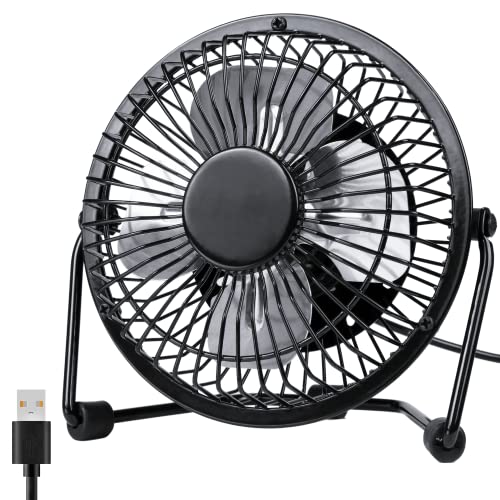
- LFR Score9.0
LFR Score is a ranking system developed by lightfansreviews.com. LFR Score has no relationship or impact from any manufacturers or sales agent websites. Learn more
- BrandZuvas

- LFR Score9.0
LFR Score is a ranking system developed by lightfansreviews.com. LFR Score has no relationship or impact from any manufacturers or sales agent websites. Learn more
- BrandKIMMOO

- LFR Score8.8
LFR Score is a ranking system developed by lightfansreviews.com. LFR Score has no relationship or impact from any manufacturers or sales agent websites. Learn more
- BrandAecooly

- LFR Score8.8
LFR Score is a ranking system developed by lightfansreviews.com. LFR Score has no relationship or impact from any manufacturers or sales agent websites. Learn more
- BrandUMLIFE

- LFR Score8.6
LFR Score is a ranking system developed by lightfansreviews.com. LFR Score has no relationship or impact from any manufacturers or sales agent websites. Learn more
- BrandBESKAR
Last update on 2026-08-19 / Affiliate links / Images, Product Titles, and Product Highlights from Amazon Product Advertising API
SWEETFULL 5-Inch Best Small USB Fan
A warm desk can become irritating long before the whole room feels hot, especially with a laptop throwing off heat and barely any air moving nearby. The SWEETFULL Mini USB Fan tackles that small but persistent problem with a compact five-inch frame, four speed settings, and a head that can rotate through a full 360 degrees. Its appeal isn't about cooling a large room. It delivers focused personal airflow without swallowing desk space or adding a bulky appliance to a nightstand.
SWEETFULL Mini USB Fan
The fan's compact dimensions are one of its most practical strengths. At 5.67 by 2.60 by 6.06 inches, it occupies roughly the space of a small desk accessory rather than a conventional table fan. The slim base can sit beside a monitor, lamp, alarm clock, or stack of books without forcing everything else to shuffle around. Weighing only 0.61 pound, it's also light enough to move between rooms or tuck into a travel bag without becoming dead weight.
That small size does come with a realistic boundary. The five-inch fan head creates a concentrated breeze rather than broad room circulation, so placement matters more than it would with a larger fan. Set it a few feet away and aim it directly toward the face, shoulders, or upper body, and the airflow should feel more useful than placing it across the room. This is personal cooling, plain and simple, not a replacement for a ceiling fan or air conditioner.
The black finish keeps the design understated, which helps it blend into offices, bedrooms, dorm rooms, and cruise cabins without looking like a brightly colored gadget. Its frame appears straightforward, with a physical button handling speed adjustments instead of touch controls or a remote that could get lost. That simplicity is a plus during everyday use because one-button operation means fewer settings to fuss with. Still, anyone wanting timers, oscillation, or smart controls will need to look elsewhere.
Airflow And Noise Balance
Seven curved blades work with a brushless motor to create the fan's airflow, and that pairing is designed to reduce harsh mechanical noise. The supplied specifications list operation as low as 25 dB, though actual sound can vary with speed, placement, and the surface beneath the fan. On a solid desk, the lowest setting should suit reading, computer work, or quiet evenings when a faint breeze is enough. Soft airflow matters in these situations because loose papers and dry eyes can become annoyances when a small fan starts too aggressively.
Four speed settings provide more control than the usual two-speed mini fan. The lower levels are better suited to steady background cooling, while the upper levels are meant for faster relief after walking in from the heat or sitting beside warm electronics. At maximum output, the stated air speed reaches 5.2 meters per second, giving this little unit more flexibility than a single-speed design. Naturally, higher airflow will bring more audible fan noise, so the quietest experience won't come from running it flat out.
The advantage of four settings isn't simply having a bigger number printed on the box. It lets the fan adapt to changing conditions without requiring constant repositioning. A low setting may be plenty during a video call, then a stronger level can take over once afternoon heat builds near a window. That range makes adjustable cooling more useful than an all-or-nothing blast, especially in shared spaces where a loud motor would quickly wear out its welcome.
USB Power And Daily Placement
This model runs through USB power and doesn't include a built-in battery. It can connect to a computer USB port, wall charger, power bank, car charger, or another compatible USB power source, which keeps the setup flexible. The 4.9-foot cable gives more placement freedom than a stubby cord, particularly when the closest outlet sits behind a desk or below a nightstand. Since the fan is wired, it can run continuously without pausing for a recharge.
The missing battery is both a strength and a weakness. Wired operation avoids battery aging, charging delays, and the gradual runtime loss that rechargeable devices often develop after repeated use. On the other hand, the fan can't run independently once it's unplugged, so outdoor tables, power-free campsites, and quick grab-and-go use will require a power bank. That tradeoff makes the USB-only design better for predictable locations than for completely cordless cooling.
Cable management may also affect how tidy the fan feels on a small desk. The longer cord improves reach, but extra cable can bunch up beside a keyboard or nightstand unless it's routed behind furniture. A small cable clip or reusable tie can keep the setup cleaner without changing how the fan operates. Separately, broader room-airflow considerations are discussed in 48-inch ceiling fan options, which serve a different purpose than this compact personal unit.
Adjustable Tilt And Cleaning Access
The fan head rotates through 360 degrees, allowing airflow to be aimed upward, downward, or straight ahead. That flexibility is handy on a low nightstand, where air may need to angle toward a raised mattress, or on a shelf sitting above shoulder level. It also helps when the fan is placed beside rather than directly in front of a computer. A fixed-head model can force awkward placement, while this design lets the airflow direction do the adapting.
Full rotation doesn't mean automatic oscillation, and the distinction matters. The fan stays pointed in the chosen direction until it's moved by hand, so it won't sweep air across a room or share the breeze between several people. For focused cooling, that limitation isn't necessarily a problem because steady directional airflow can feel more consistent at a desk or bedside. Anyone expecting side-to-side motion, though, may find the manual adjustment too basic.
The detac hãy kiểm tra lại bạn đã tạo hyperlink chưa. Lưu ý yêu cầu: Create hyperlink as below rules. In addition, always add relevant CTA hyperlink or relevant hook before hyperlink to increase interaction. Structrue CTA or hooks ANCHOR_TEXT. Only 1 hyperlink in the response. I will provided you url part. "Here is list link:" Anchor text selected a 2–6 word phrase (or longer only if it reads more naturally) that still clearly represents the path topic. Rewrite full response with hyperlinkhable rear cover makes routine cleaning less of a chore. Dust naturally collects on blades and grille surfaces, and that buildup can weaken airflow or introduce an uneven hum over time. Access to the interior allows the blades and housing to be wiped more thoroughly than they could through a fixed grille. Regular cleaning supports stable airflow, especially in bedrooms, pet-friendly homes, or work areas where lint and dust gather quickly.
Practical Strengths And Limitations
The strongest part of this design is how several modest features work together. Compact measurements, low weight, four speeds, a long USB cable, and broad tilt adjustment make the fan easy to fit into everyday routines. It can sit beside a laptop during work, point upward from a cramped cruise-cabin shelf, or provide a gentle breeze near a bed without occupying much surface area. That combination gives the SWEETFULL Mini USB Fan a clear role as a small, direct cooling tool.
Its limitations are just as clear, and that's not a bad thing. There is no battery, no oscillation, no timer, and no claim that it can cool an entire room. The compact blade diameter also means airflow will be narrow compared with a larger desk fan, even at the highest setting. Buyers who value cordless operation or wide air distribution may consider the wired personal-cooling format too restrictive.
For workspaces, bedside tables, travel setups, and other tight areas, the design makes practical sense because it stays focused on the basics. The quiet brushless motor supports calmer use at low speeds, while the stronger settings provide extra airflow when the heat becomes harder to ignore. Its detachable cover also gives it an edge over sealed mini fans that become frustrating to clean after a dusty season. The result is a compact, adjustable desk fan with sensible controls and honest limitations rather than a pile of features that rarely get used.
SCCCF Quiet 80mm Best Small USB Fan
Heat buildup inside an electronics cabinet rarely announces itself until a router begins acting flaky, a console feels unusually hot, or a receiver starts cooking the shelf above it. The SCCCF Quiet 80mm USB Fan addresses that cramped, stagnant-air problem with a compact frame, three selectable speeds, and a design that can rest flat or stand upright. It isn't built to cool a person across a desk like a typical best small USB fan. Instead, its focused job is moving warm air away from electronics that don't have much breathing room.
SCCCF Quiet 80mm USB Fan
The square housing measures 3.64 by 3.64 by 1.81 inches, so it can slip into places where a conventional desk fan would be awkward or downright impossible. That compact shape suits entertainment centers, router shelves, computer cabinets, DVR setups, and other narrow spaces packed with heat-producing equipment. Its proportions also make placement fairly straightforward because the fan doesn't need a tall stand or broad circular base. Small footprint aside, enough clearance around the intake and exhaust is still necessary for the fan to move air effectively.
Shockproof foot pads allow the unit to sit flat or stand upright, giving the airflow direction more flexibility than a fan locked into one position. Flat placement can push air upward or downward through a shelf opening, while upright placement can move heat horizontally away from a console or receiver. The dual-position design is especially handy inside cabinets where outlet locations, cables, and shelf supports often dictate the available space. It won't solve a completely sealed enclosure by itself, though, because hot air still needs somewhere to escape.
The design is functional rather than decorative, and that's appropriate for a fan likely to live behind a television or beside a router. Iron grilles cover both sides, protecting fingers from the blades while also reducing the chance of a loose cable reaching the spinning assembly. That two-sided protection matters around crowded electronics, where power cords and HDMI cables can shift whenever equipment is moved. The grilles add some thickness, but the tradeoff is sensible given the fan's intended placement.
Three Speeds For Controlled Cooling
A built-in controller provides low, medium, and high settings instead of forcing the fan to run at one fixed speed. Low works for equipment that produces mild, steady warmth, while medium gives airflow a noticeable bump as cabinet temperatures rise. High is better reserved for tighter spaces or devices that run hotter during gaming, streaming, recording, or long download sessions. The three-speed control lets noise and cooling be balanced without unplugging or repositioning the fan.
The supplied specification lists the low setting at only 21 dB, which should make it the least intrusive option in quiet rooms. Real-world sound can still change depending on the shelf material, nearby panels, and whether the housing touches something that amplifies vibration. A hollow cabinet can turn a mild hum into a more obvious buzz, so the shockproof pads play an important supporting role. High speed will naturally be more audible, but hiding the fan behind equipment may soften how noticeable it feels from across the room.
Seven blades generate the airflow, and their job is less about producing a dramatic breeze than maintaining circulation around hot components. That distinction matters because cooling electronics depends on exchanging trapped warm air for cooler surrounding air. The seven-blade layout should work most effectively near ventilation slots or at the edge of an open shelf, where it can assist the equipment's existing airflow path. Placing it against a solid wall or blocking either grille would undercut the very benefit it is meant to provide.
Speed selection also affects dust accumulation. Higher airflow can pull more lint and fine particles through the cabinet, especially if the fan sits close to the floor or behind furniture that isn't cleaned often. A quick inspection every few weeks can reveal whether dust is collecting on the grille or blades. Keeping those surfaces clear helps preserve steady airflow and reduces the chance of the motor working harder than necessary.
USB Power Fits Entertainment And Computer Gear
The fan runs on 5V USB power, allowing it to draw electricity from compatible ports on game consoles, televisions, computers, receivers, and other audio-visual equipment. This arrangement can reduce the need for another wall adapter behind an already crowded media center. It also keeps the fan tied neatly to the device area rather than stretching a power cord across the room. Port behavior varies, however, because some equipment cuts USB power when turned off while other ports remain active.
That difference can either help or complicate daily use. A switched USB port allows the fan to start and stop with the connected device, which is convenient for equipment that only needs cooling during operation. An always-on port keeps air moving after shutdown, helping residual heat leave the cabinet rather than lingering around warm components. The USB-powered setup doesn't include a battery, so the fan needs a live connection at all times.
Powering the fan directly from a console or receiver also uses one of that device's available USB ports. That may not matter on equipment with unused connections, but it can be inconvenient if those ports are already occupied by controllers, storage drives, streaming accessories, or charging cables. A compatible powered USB hub or wall adapter may provide another route, though that adds another item to the setup. Cable planning sounds fussy, but behind a packed entertainment center, little details like this can make or break a clean installation.
Room-scale air circulation serves a different purpose from spot cooling around electronics, and bedroom airflow ideas are discussed in ceiling fan designs for bedrooms without confusing them with this compact cabinet fan. The SCCCF model concentrates on a small zone rather than spreading air throughout an entire living space. That narrow role is actually its strength because it can sit close to the heat source. Still, expecting it to lower the temperature of a whole room would miss the point of its localized cooling design.
Double Ball Bearings And Long-Term Use
The manufacturer lists a 65,000-hour service life for the double ball bearing system. That figure comes from the supplied product information rather than independent long-term verification, but it indicates that the fan is designed for extended operating periods. Double ball bearings are commonly associated with stable use in multiple orientations, which supports the option to lay this model flat or stand it upright. For equipment that stays powered for long stretches, bearing durability matters more than flashy controls.
Long operating life still depends on reasonable care and a suitable environment. Heavy dust, blocked airflow, moisture, and excessive heat can shorten the useful life of almost any small fan. The iron grilles protect the blades, though they don't stop fine dust from reaching the interior. Regular cleaning with the power disconnected helps maintain motor efficiency and keeps debris from building up around the hub.
Ball-bearing fans may produce a slightly different mechanical tone than sleeve-bearing models, particularly as they age. That doesn't automatically mean the fan is loud, but sound-sensitive placement deserves a little thought. A media cabinet several feet from a sofa is less demanding than a bedroom shelf inches from a pillow. The 21 dB low-speed specification makes the quiet setting the logical starting point, with higher speeds available only when the equipment's heat calls for them.
Safety Features And Installation Tradeoffs
Iron grilles on the front and back provide useful protection during setup and routine cable changes. Fingers are less likely to touch the blades, and loose cords have a physical barrier preventing them from slipping directly into the fan. This full-grille construction is especially practical behind televisions, where wires tend to gather and shift as devices are added or removed. Even so, cables shouldn't rest against the grille because vibration and blocked airflow can still cause trouble.
The shockproof feet help reduce direct vibration transfer, but cabinet construction will influence the final noise level. Thin wood panels, glass shelves, and hollow compartments can resonate more than solid surfaces. A stable, level position with a little clearance on every side gives the fan its best chance to stay quiet. Wedging it tightly between devices may save space, yet that setup can restrict air intake and transmit more motor vibration.
Orientation should follow the existing ventilation pattern rather than fight it. If a receiver exhausts warm air from the top, placing the fan where it helps pull that heat away makes more sense than pushing air back toward the outlet. A router with side vents may benefit from crossflow across the housing, while a cabinet could need the fan near its rear opening to expel trapped heat. Thoughtful placement often matters more than simply selecting the highest speed.
Strengths, Weaknesses, And Realistic Use
The strongest feature is the fan's narrow focus on electronics cooling. Its 80mm form, three speed levels, USB connection, protected blades, and flexible orientation work together without adding unnecessary extras. It can support airflow around routers, consoles, computers, receivers, DVRs, and cabinet-mounted gear where heat tends to linger. For these situations, compactness isn't merely convenient; it's what allows the fan to fit close enough to the problem.
The limitations are equally specific. This isn't a battery-powered travel fan, it doesn't oscillate, and its square frame isn't designed to aim a breeze toward someone sitting across a room. USB power also means operation depends on a compatible live port or adapter. Those practical constraints make the fan less suitable for personal bedside cooling but much better matched to stationary equipment.
Noise control requires realistic expectations as well. Low speed is rated for quiet operation, while medium and high trade some silence for stronger airflow. A hot gaming console in a tight cabinet may justify that tradeoff, but a mildly warm router on an open shelf probably won't need maximum output. Starting low and stepping upward only when necessary keeps the balance between cooling performance and background noise sensible.
The SCCCF fan makes the most sense where ordinary convection isn't quite enough and installing a larger ventilation system would be overkill. Its double ball bearing construction supports long-running use, while the protective grilles and shockproof pads make placement less precarious around expensive electronics. Cleaning access appears more limited than on fans with detachable covers, so dust maintenance may take a little patience. Even with that drawback, the SCCCF Quiet 80mm USB Fan offers a practical way to move trapped heat without crowding the cabinet it is meant to cool.
TriPole 4.5-Inch Best Small USB Fan
Desk heat has a sneaky way of wearing down concentration, especially after a laptop has been running for hours and the room air barely moves. A full-size fan can hog precious space, while a tiny novelty model may push little more than a whisper. The TriPole Mini Desk Fan takes the middle road as a best small USB fan candidate, pairing a 4.5-inch frame with three airflow levels, a wide base, and a fully adjustable head. It won't chill an entire room, but it aims to make the few feet around a desk, bed, or travel setup feel less stuffy.
TriPole Mini Desk Fan
The compact 4.5-inch diameter keeps this fan from crowding a nightstand or turning a clean desktop into a jumble. It can sit beside a monitor, speaker, lamp, or stack of notebooks without demanding the open space that a traditional table fan needs. That space-saving footprint also makes packing easier for hotel stays, shared rooms, or cruise cabins where every inch seems spoken for. Portability here comes from simple proportions rather than a folding mechanism or built-in handle.
A wide base gives the small housing a steadier stance than narrow pedestal designs. Four silicone pads underneath help reduce sliding and soften the vibration transferred into hard surfaces, which can otherwise turn a quiet motor into an irritating desk buzz. The stable base becomes especially useful at higher speeds, where lightweight fans may creep backward or wobble after being nudged. Even so, an uneven shelf or cluttered surface can still compromise stability, so the fan deserves a flat spot with clear space around it.
The black exterior has a low-key appearance that should blend easily with common office electronics and bedroom furniture. Controls stay basic, with a button on the back cycling through the three speeds rather than adding a remote, display, or complicated menu. This one-button layout keeps operation quick, though reaching behind the fan may feel less convenient if it sits against a wall. Anyone expecting a timer, automatic oscillation, or app control won't get those extras here.
Three Speeds With A Focused Breeze
Three wind modes allow the airflow to shift with the situation instead of staying locked at one intensity. The lowest setting suits mild warmth, quiet reading, or long work sessions where a constant blast would feel distracting. Medium offers a more noticeable breeze for warmer afternoons, while high is intended for quicker personal relief. That three-speed range makes the fan more adaptable than a single-speed model without piling on controls that rarely get used.
The 4.5-inch blade area naturally produces a narrower airflow pattern than a larger desk fan. Positioning it close enough to the face, shoulders, or hands will make the breeze feel more effective than leaving it across a room. This personal cooling focus is useful beside a laptop or on a bedside table, but it isn't designed to circulate air through a large bedroom. Expecting room-wide cooling from a compact USB fan would be a tall order, no matter how strong the highest setting feels nearby.
Higher speed also brings a practical tradeoff between stronger airflow and more audible motor sound. The silicone feet are intended to reduce vibration noise, yet the surface underneath still matters. A solid desk should keep the fan more settled than a hollow shelf, lightweight tray, or loose bedside cabinet. For quieter use, the lowest effective speed is usually the sensible choice rather than automatically running the fan at full power.
Airflow can also feel different depending on temperature and humidity. A fan doesn't create refrigerated air; it moves surrounding air across the skin, which can make heat feel less oppressive through evaporation. In dry indoor conditions, that breeze may feel crisp, while humid air can reduce the cooling sensation. The TriPole's directed airflow works best as a close-range comfort tool rather than a substitute for air conditioning.
USB Power And The 0.8-Amp Requirement
The fan uses a 5V USB-A connection, so it can run from a compatible USB charger, computer port, or power bank. That setup is convenient for desks already surrounded by USB-powered gear, and it avoids the voltage concerns that sometimes complicate overseas travel. There is no built-in battery, which means the fan stops as soon as its external power source is removed. Wired operation trades cordless freedom for steady runtime without recharge breaks.
The supplied note states that the fan needs 0.8 amp of current while operating. A weak USB port may run the lower settings but fail to support the third speed properly, which can look like a fan defect even when the power source is the real bottleneck. The manufacturer recommends testing with a charger rated for 5V/1A if high speed doesn't work. That detail matters because older computer ports, low-output hubs, and some built-in furniture ports may not provide enough current.
A 4.9-foot cable helps solve one of the most common annoyances with small USB fans: having the right power source in the wrong place. The extra reach can span the distance from a desktop to a wall adapter below, or from a nightstand to an outlet tucked behind furniture. This longer power cord improves placement flexibility, although unused cable may need a tie or clip to keep it from tangling with charging cords. Clean cable routing also prevents the wire from pulling against the fan and shifting its aim.
The absence of a battery has another less obvious benefit. There is no internal cell gradually losing capacity, sitting unused between seasons, or requiring a charging routine before the fan can run. A compatible power bank can still provide portable operation during travel, but it becomes a separate item to carry. So, the plug-in design favors desks, bedsides, hotel rooms, and other places where USB power is predictable.
Full Rotation Makes Placement Easier
The fan head rotates 360 degrees vertically, allowing the breeze to point upward, downward, or straight ahead. That range is useful when the base must sit lower than the cooling target, such as on a short nightstand beside a thick mattress. It also helps when a crowded desk forces the fan off to one side rather than directly in front. The adjustable angle lets airflow compensate for awkward placement instead of forcing furniture and equipment to move around.
Full rotation shouldn't be confused with automatic oscillation. The head stays in the angle selected by hand and won't sweep side to side across a wider area. For one-person cooling, that fixed directional breeze can be more consistent because the airflow doesn't repeatedly move away. Shared cooling is less practical, though, since the fan can't alternate between different positions on its own.
A firm adjustment joint matters because a loose head may slowly droop after repeated use. The provided details don't specify tension settings or locking positions, so expectations should remain grounded. Gentle manual adjustment is wiser than forcing the frame quickly through its full range. Used sensibly, the rotation feature adds meaningful flexibility without the weight, noise, and mechanical complexity of an oscillating base.
Cleaning Access And Everyday Upkeep
Dust eventually collects on every small fan, and compact models can lose airflow surprisingly quickly when their narrow grille becomes clogged. The TriPole includes a detachable cover, allowing better access to the fan mask and blades than a sealed design provides. Routine cleaning can reduce stale dust buildup and keep the breeze from carrying loose debris toward a face or keyboard. Power should always be disconnected before the cover or blades are touched.
A soft cloth or brush should handle ordinary surface dust without introducing moisture near the motor. Thick buildup around blade edges can create uneven airflow and may contribute to extra vibration, so cleaning isn't merely cosmetic. The removable grille makes seasonal maintenance less tedious, particularly in bedrooms with fabric lint or offices where paper dust accumulates. Still, the cover must be reattached securely before operation because it also acts as a protective barrier.
Room-scale fans have different installation and maintenance concerns, and a separate style reference appears in antique ceiling fan lighting for spaces that need broader overhead circulation. The TriPole remains a much smaller, task-focused appliance intended to cool a limited personal area. Mixing those roles can lead to unrealistic expectations about what its compact blades can accomplish. Its strength lies in close-range airflow, not whole-room ventilation.
Where The TriPole Design Makes Sense
Tight workspaces are the most natural fit for this fan. The small body leaves room for a keyboard and mouse, the long cable can reach a lower outlet, and the adjustable head directs air around monitors or laptop screens. Silicone pads support desk stability when the fan is operating close to papers, cables, and lightweight accessories. The rear-mounted control may require a little extra clearance, but the setup remains straightforward.
Bedside use brings another practical angle. The low setting can provide gentle airflow without placing a larger fan on the floor, while the rotating head can aim upward from a short table. Since there is no battery, an available USB charger or power bank is necessary through the night. The wired limitation may be acceptable in a fixed bedroom setup but less appealing for anyone who wants to carry a running fan from room to room.
Travel use depends heavily on access to power. The compact size and 5V USB format make the fan easy to pack, and the longer cable helps in rooms where outlets sit in inconvenient places. Yet the fan isn't cordless, so a power bank becomes essential in buses, campsites, outdoor queues, or other situations without a nearby port. Its travel-friendly size is genuine, but its mobility shouldn't be mistaken for total independence from a power source.
Strengths, Weaknesses, And Practical Expectations
The TriPole's main strengths are easy to pin down: three-speed airflow, a stable padded base, a 360-degree vertical adjustment, and a generous 4.9-foot cable. Those features address ordinary frustrations rather than chasing decorative extras. The detachable cover also makes maintenance less awkward than it is with permanently sealed fan housings. For desktop and bedside use, that collection of details feels purposeful.
The biggest weakness is the lack of a built-in battery. USB power is widely available, but dependence on an external source limits truly cordless use and adds another item if a power bank is needed. The 0.8-amp power requirement may also expose weak chargers or older USB ports, particularly on the highest speed. Users who overlook that specification could mistake insufficient power for poor fan performance.
Size creates another tradeoff. A 4.5-inch fan is easier to place and carry, but its airflow is more concentrated than the output of a larger table fan. It suits a single nearby position rather than a group sitting across a room. That compact cooling range is a strength in cramped spaces and a limitation everywhere else.
The TriPole Mini Desk Fan keeps its mission narrow and practical. It offers enough speed variation to handle mild warmth or a hotter stretch of the day, while the rotating head and steady base help put the breeze where it matters. Regular cleaning is manageable, and the long cord removes some of the placement headaches common to USB appliances. As a best small USB fan option for fixed personal cooling, it makes the most sense where compact dimensions and dependable plug-in operation matter more than batteries, oscillation, or room-wide reach.
Gaiatop 5.5-Inch Best Small USB Fan
A cramped desk gets uncomfortable fast once a laptop warms the surface and still air settles around the chair. Large fans solve the airflow problem but often create another one by taking up floor space, rattling papers, or overpowering a quiet room. The Gaiatop USB Desk Fan approaches the issue as a best small USB fan for close-range cooling, using a 5.5-inch body, three defined speeds, and a tilting frame. Its purpose is refreshingly narrow: move enough air around one work, rest, or travel spot without turning the setup upside down.
Gaiatop USB Desk Fan
The housing measures 5.5 by 5.9 by 2.2 inches, which puts it in the compact personal-fan category rather than the room-circulation class. It can sit beside a laptop, alarm clock, sewing machine, or stack of textbooks without claiming a huge patch of surface space. At about 6.5 ounces, the fan is also light enough to slip into a bag for a dorm move, hotel stay, or long day in a warm office. That low weight helps with portability, though it makes the stability features underneath the base more important.
The black finish keeps the overall look subdued and practical. There aren't decorative lights, an oversized control panel, or a tall pedestal competing for attention, so the fan should blend easily with common desktop equipment. Its compact shape also makes storage less troublesome once cooler weather rolls around. A drawer, cabinet shelf, or travel pouch can accommodate it far more easily than a conventional table fan.
Small dimensions do set a clear limit on coverage. The focused airflow is meant to be felt nearby, not from the other side of a large bedroom or office. Placing it within a few feet and directing it toward the face, arms, or upper body will make better use of the available breeze. Anybody expecting one little USB fan to cool several people at once is asking the wrong tool to do a much bigger job.
Three Speeds With Clearly Stated Output
The first speed is listed at 3.1 m/s and 1,500 rpm, providing the softest airflow of the three settings. That level makes sense for reading, studying, or working with loose paper nearby because a gentler breeze is less likely to create a miniature tornado across the desk. It can also reduce the dry, overblown feeling that sometimes comes from pointing a strong fan directly at the face for hours. Mild cooling isn't dramatic, but steady comfort usually matters more during a long work session.
Speed two raises the stated airflow to 4.0 m/s at 2,000 rpm. This middle setting looks like the practical everyday choice when the room is noticeably warm but maximum output feels unnecessary. It offers more air movement after a humid commute, beside a heat-producing monitor, or near a sunlit window. The middle gear also leaves room to step upward later rather than running the motor at its highest setting from the start.
The third level reaches a stated 4.8 m/s at 2,500 rpm, delivering the fan's strongest airflow. That setting should be the most useful for quick relief during hotter stretches or after physical activity, provided the fan remains positioned within its personal cooling range. Stronger output naturally means more motor and air noise than the low setting, even with a design intended to remain quiet. The useful point isn't that high speed is silent; it's that three levels let the noise-to-airflow balance change with the situation.
These supplied speed figures provide a clearer picture than vague promises of powerful wind, but they still shouldn't be confused with room temperature reduction. A fan moves existing air and helps the body shed heat; it doesn't refrigerate the breeze. Humidity, distance, and placement will affect how refreshing each setting feels. The three-speed adjustment gives the fan flexibility, while basic physics still defines what a 5.5-inch unit can accomplish.
Quiet Operation Depends On The Setup
Gaiatop describes the upgraded motor as producing stronger wind with less noise, which is a sensible goal for a fan intended for desks and bedrooms. A quiet motor matters during video calls, late-night reading, study sessions, and other situations where an uneven rattle becomes more irritating than the heat. The product details don't supply a specific decibel rating, so there is no reason to invent one. The honest expectation is lower-noise personal cooling, with sound increasing as speed rises.
The surface underneath the fan plays a surprisingly large role in perceived noise. A thin folding table or hollow nightstand can amplify vibration, while a solid desk usually keeps the motor hum more contained. Four rubber pads beneath the wide base are designed to reduce that vibration transfer and keep the unit from sliding. Those anti-slip pads aren't flashy, but they solve a real nuisance that affects both sound and everyday placement.
High speed creates the toughest test for a lightweight fan. The broad base helps the Gaiatop remain planted instead of creeping backward or tipping after a light bump. Still, a tangled cable pulling from one side can work against that stability, so a little slack in the cord is worthwhile. Keeping the fan clear of loose papers and dangling fabric will also prevent avoidable fluttering noises that have nothing to do with the motor itself.
USB Power Keeps The Fan Flexible
The Gaiatop runs through a USB power connection and can be paired with a laptop, desktop computer, power bank, AC adapter, car charger, or another compatible USB supply. That range of power sources suits workstations and travel setups where USB ports are easier to access than open wall outlets. It also sidesteps the need for disposable batteries. Since no built-in rechargeable battery is described, however, the fan must stay connected while operating.
Wired power brings an underrated advantage: there is no battery runtime to monitor. The fan can continue running through a long workday as long as the connected source remains active. Battery aging, charging pauses, and forgotten overnight charging aren't part of the routine. The obvious tradeoff is limited cordless freedom, particularly outdoors or in transit unless a power bank is available.
A 4.9-foot cord gives the fan more breathing room than models saddled with very short cables. It can reach from the back of a desktop tower, down to a charger below a table, or across a nightstand without forcing the fan into an awkward corner. Extra cord length may create clutter around keyboards and charging cables, but a reusable tie can tidy the excess. Better reach usually beats a perfectly neat cable that can't reach the power source.
Travel use benefits from the universal familiarity of USB power, yet outlet access still deserves some planning. Hotel rooms, dorms, libraries, and offices generally make the setup easy, while outdoor seating and older vehicles may require a separate adapter or power bank. The fan's lightweight body makes it portable, but portability isn't the same as independent operation. That distinction matters before packing it for a day away from reliable power.
Ninety-Degree Tilt Improves Air Direction
The frame can tilt through 90 degrees, allowing the airflow to shift upward or downward rather than remaining fixed straight ahead. A low nightstand can send the breeze toward a taller mattress, while a shelf above desk height can angle air down toward the chair. That adjustability also helps the fan work around monitors, books, and other objects that limit where its base can sit. Direction matters a great deal with compact fans because their narrow airflow loses usefulness when aimed poorly.
The tilt is manual rather than automatic. There is no supplied claim of side-to-side oscillation, so the fan will continue blowing in the chosen direction until someone moves it. That steady directional flow suits a single seated position well because the breeze doesn't keep wandering away. It is less convenient for sharing across a couch, bed, or long table where sweeping circulation would spread the air more evenly.
A ninety-degree range is also more limited than a full-rotation frame, though it covers the common upward and downward adjustments needed on a desk. The hinge should be handled deliberately rather than forced beyond its intended travel. Positioned carefully, the fan can direct air toward the upper body without placing the base directly in front of the keyboard. This simple flexibility often proves more useful than decorative extras that don't change comfort.
Stable Base And Routine Maintenance
The wide base and four rubber pads form the fan's main defense against slipping and vibration. Lightweight devices can feel flimsy when a button press sends them skidding across a polished table, so a planted base makes ordinary adjustments less annoying. The pads also create a small cushion between the motor housing and hard furniture. That combination supports steadier high-speed operation without adding much bulk.
Dust will still collect on the grille and blades over time, especially in bedrooms, dorms, and busy office spaces. The supplied description emphasizes stable construction but doesn't specifically state that the cover is detachable, so cleaning expectations should stay conservative. A soft brush, microfiber cloth, or controlled burst of air can remove surface buildup after the fan is unplugged. Keeping the grille clear helps protect consistent airflow and prevents dust from becoming part of every breeze.
Placement away from fabric, curtains, and paper piles can reduce how quickly the intake gathers debris. It also lowers the chance of lightweight material touching the grille while the fan is running. Small maintenance habits like wiping the pads and checking the cable can preserve stability over repeated travel. The fan is uncomplicated, but uncomplicated equipment still benefits from a little care.
Personal Cooling Versus Whole-Room Airflow
The Gaiatop makes sense as a local comfort device rather than a substitute for overhead circulation. Its compact frame and directed output suit a desk, bedside table, dorm shelf, or small workbench where one nearby spot needs relief. Large patios and broad living spaces demand a different scale of air movement, and that distinction appears naturally in discussions of 60-inch outdoor ceiling fans. The two fan types address separate problems, with this USB model focused on close-range cooling.
That narrow purpose is also why the Gaiatop can be easier to live with than a large fan in a small room. It doesn't require floor space, a permanent mounting point, or a dedicated electrical outlet. The breeze stays concentrated instead of disturbing everything around it. For personal work and rest areas, compact placement can matter more than broad coverage.
A room with poor ventilation may still feel warm beyond the fan's immediate reach. Moving the Gaiatop farther away will spread the breeze but weaken how strongly it feels, so distance becomes a practical compromise. Its highest speed can improve near-field relief, not rewrite the room's climate. Realistic placement turns this limitation into a manageable tradeoff rather than an unpleasant surprise.
Strengths And Weaknesses In Daily Use
The strongest parts of this design are the three documented speed levels, low weight, padded wide base, and useful 90-degree tilt. Each feature addresses a routine problem: adjusting comfort, saving desk space, reducing vibration, or correcting the airflow angle. The long power cable also reduces the frustration of having a USB port just beyond reach. Nothing here is particularly elaborate, and that restraint suits a small personal fan.
The main weakness is dependence on external power. A laptop, adapter, car charger, or power bank must remain connected, which can limit spontaneous use around the house or outdoors. The fan also lacks automatic oscillation and isn't meant for multiple people. Those practical limitations are easy to understand, but they should be weighed against the convenience of continuous wired operation.
Cleaning may require more patience than it would with a model that clearly advertises a removable cover. Surface dust is manageable, yet deeper blade access isn't confirmed in the supplied information. The small frame also creates a concentrated cooling zone rather than a wide one. Neither drawback ruins the design, but both shape where it will feel most satisfying.
The Gaiatop USB Desk Fan is best treated as a compact tool for a specific comfort problem. It brings adjustable airflow to tight spaces, stays steadier through rubberized support, and travels without adding much weight to a bag. Its strongest setting offers the supplied maximum of 4.8 m/s, while the lower levels make calmer desk and bedside use possible. For a best small USB fan setup built around nearby power and focused airflow, the balance is practical, provided room-wide cooling and cordless freedom aren't part of the expectation.
Gaiatop Compact Blue USB Desk Fan
A stuffy corner can drain patience surprisingly fast, whether it’s beside a warm laptop, inside a parked car during a break, or near a bed where the room feels fine but the air around the pillow does not. A large fan would be overkill in those spots, yet a weak novelty fan won’t move enough air to matter. The Gaiatop Compact USB Fan fits the best small USB fan category by keeping the design under eight ounces while offering three speeds, restrained noise, and a modest vertical tilt. It’s built around close-range comfort, not broad room circulation, and that distinction shapes both its usefulness and its limitations.
Gaiatop Compact USB Fan
The classic round design keeps the fan familiar and uncomplicated. Its body is described as compact and weighs less than eight ounces, so it won’t dominate a crowded desk or add much heft to a travel bag. That small frame is handy around monitors, books, cup holders, bedside lamps, and other objects that leave little room for cooling equipment. Portability is a genuine strength here, although the fan still needs a connected USB power source while running.
The blue finish gives the unit more personality than the usual black office accessory without turning it into a flashy gadget. A simple exterior also means fewer decorative parts that could collect dust or snag inside luggage. The compact housing should be easy to reposition between a home desk, office workstation, car, or temporary travel setup. Still, small size naturally narrows the cooling zone, so placement close to the user matters.
This model is not presented as an oscillating fan, rechargeable fan, or room cooler. It works as a focused personal appliance that pushes air toward one nearby position. That single-user airflow suits a keyboard area, reading chair, or passenger seat better than a shared table. Anyone hoping to circulate air through a large bedroom will run into the limits of the compact blade and housing size.
Three Speeds Keep Cooling Straightforward
Low, medium, and high settings give the fan enough range to handle changing comfort needs without burdening the design with complicated controls. Repeated presses of the power button cycle through the available speeds, making adjustment quick once the fan is placed. The low setting makes sense for steady background airflow during reading, typing, or quiet evening use. Medium and high provide stronger movement when the surrounding air feels heavier or the temperature rises.
A three-speed system is often more practical than a long row of nearly identical settings. Low can soften stagnant air without blowing papers around, while medium adds a more noticeable breeze during a warm afternoon. High becomes useful after walking in from outside or sitting beside electronics that release heat. This simple speed range offers meaningful control without turning a small fan into a button-pushing exercise.
The strongest setting will naturally create more audible airflow and motor sound than the lowest one. Gaiatop states that noise remains below 50 dB even while delivering stronger wind, though the actual experience may change with placement and surrounding surfaces. A hollow desk, loose tray, or dashboard compartment can amplify vibration more than a solid table. Running the lowest speed that still feels comfortable will usually provide the best balance between airflow and background sound.
Cooling strength also depends on distance. A compact fan can feel satisfyingly brisk at close range, then lose much of that effect after being moved several feet away. Positioning the Gaiatop near the upper body allows its focused breeze to work as intended. It won’t lower the room temperature, but moving air across the skin can make a warm workspace or resting area feel less oppressive.
Noise Levels Suit Work And Rest With Limits
The stated noise level of less than 50 dB places the emphasis on usable airflow without an excessively harsh motor tone. That can matter during video calls, homework, reading, or light office work where a rattling appliance quickly becomes distracting. The fan is described as quiet enough for work and rest, but quiet should not be mistaken for silent. Its low-speed operation will be the more natural fit for sound-sensitive situations.
Surface vibration can alter how the fan sounds far more than many buyers expect. A lightweight frame placed on glass, thin plastic, or a hollow cabinet may transmit a low hum into the furniture. A sturdy table generally keeps that effect better contained. The small body weight makes the fan easy to carry, though it may also make careful placement more important at higher speed.
Nearby objects can introduce their own noise. Loose paper, charging cables, curtain edges, and lightweight fabric may flutter once they enter the airflow path. Keeping the front and back of the fan clear helps preserve both cleaner airflow and a calmer sound profile. A little space around the housing goes a long way, especially on a packed desk.
Thirty-Degree Tilt Offers Basic Direction Control
The fan head rotates vertically from 0 to 30 degrees, allowing the breeze to angle upward rather than remaining fixed straight ahead. That limited tilt can help when the fan sits below face level on a desk, console, or vehicle surface. It also lets airflow clear a keyboard or small object positioned in front of the base. The adjustment is modest, yet it adds useful flexibility in ordinary close-range setups.
A 30-degree range is noticeably narrower than the 90-degree or full-rotation mechanisms found on some small fans. This means the base may need repositioning if the cooling target sits far above or below the fan. The restricted tilt range is one of the clearest tradeoffs in the design. It works for fine-tuning an already reasonable placement, not for redirecting airflow through dramatic angles.
There is also no stated automatic oscillation. The head remains where it is manually positioned, sending a steady stream toward one spot rather than sweeping across a broader area. For a single person, that fixed airflow can be preferable because the breeze doesn’t keep drifting away. Shared cooling across a table or couch is less practical.
Adjustment should be gentle because compact hinge mechanisms aren’t meant to be forced beyond their intended movement. Setting the angle once and leaving it alone will reduce needless strain on the frame. Used within its range, the tilt helps the fan adapt to common desk and bedside arrangements. It’s a modest feature, but not a throwaway one.
USB Power Expands Everyday Placement
The fan runs from a compatible USB connection, including PCs, laptops, power banks, AC adapters, and car chargers. That USB compatibility makes it easy to use in spaces already filled with charging equipment and computer accessories. It also avoids disposable batteries and eliminates the need to match a dedicated wall plug while traveling. No built-in battery is listed, so operation depends on an external source.
Continuous wired power has its own appeal. There is no waiting for the fan to recharge halfway through a workday, and no internal battery slowly losing runtime over repeated seasons. A laptop or wall adapter can keep the fan operating as long as the power source remains active. The compromise is cord dependence, especially outdoors or in locations where a USB port isn’t nearby.
A power bank can make the setup more mobile, but it becomes an extra item to carry. In a car, a USB adapter or built-in port may provide an easy connection, provided the fan can sit on a stable surface. Home and office use are simpler because power sources tend to remain fixed and predictable. The fan’s portability comes from its size and weight rather than cordless operation.
Different fan sizes address very different airflow needs, and broader overhead circulation is discussed in small ceiling fan lighting as a separate room-scale topic. The Gaiatop model stays firmly in the personal cooling category. Its USB-powered format favors temporary, close-range use instead of permanent installation. Keeping those roles separate prevents unrealistic expectations.
Practical Use At Home, Work, And In The Car
A crowded home workspace is a natural setting for this fan. It can sit near a laptop without blocking the screen or consuming the space needed for a mouse, notebook, or coffee mug. The three-speed control allows a softer breeze during focused work and stronger air after the room warms up. Since the fan is light, moving it from one side of the desk to the other takes little effort.
Office use presents a similar benefit, especially in shared spaces where blasting a large fan might bother coworkers. Personal airflow can relieve stuffiness around one seat without altering the entire room. The stated noise level below 50 dB supports that restrained role, although high speed may still be noticeable nearby. A USB connection to a computer can keep the setup neat, provided an open port is available.
Inside a car, the compact shape may help direct air toward a passenger or a spot poorly served by the main vents. The fan still requires a compatible USB power source and a secure place to sit. Sudden stops, sharp turns, and uneven surfaces make stable placement more important than on a stationary desk. Its low weight is convenient for carrying, but the fan shouldn’t be left loose where it can slide around.
Outdoor use is possible only with suitable power and protection from weather. A power bank can run the fan at a picnic table or covered seating area, but the design isn’t described as water-resistant. Dust, moisture, and unstable surfaces may shorten its useful life or interfere with airflow. The portable design expands where it can be used, not the environmental conditions it can safely tolerate.
Maintenance And Long-Term Practicality
Small fans collect dust quickly because their grilles and blades constantly pull surrounding air through a narrow opening. The provided details don’t describe a detachable cover, so deep cleaning may be less convenient than it is on models designed for easy blade access. A soft brush or dry cloth can remove visible buildup after the fan is unplugged. Keeping the intake clear helps maintain consistent airflow and reduces strain caused by clogged surfaces.
Travel can introduce lint, crumbs, and loose fibers into the grille if the fan is tossed into a bag without protection. A simple pouch can prevent the housing from rubbing against chargers, keys, or other hard objects. The lightweight frame is easy to transport, but it may not appreciate rough handling. Careful packing matters more than it would with a heavier, reinforced appliance.
The USB cable and connector deserve occasional inspection as well. Repeated bending near the plug can weaken a cord over time, particularly if the fan is moved frequently between locations. Leaving a little slack prevents the cable from pulling the housing out of position. Basic care supports reliable use without requiring a complicated maintenance routine.
Strengths And Weaknesses Without The Sales Pitch
The design’s main strengths are its sub-eight-ounce weight, three speeds, broad USB compatibility, and restrained operating noise. Those qualities make it easy to fit into small work and travel routines. The classic shape also avoids unnecessary mechanisms that would add bulk. For a nearby desk or bedside position, the feature set is sensible and easy to understand.
The limited 30-degree tilt is the most obvious weakness. It provides some vertical control, but far less than a fan that rotates through 90 or 360 degrees. The absence of automatic oscillation narrows the coverage further. These directional limits won’t trouble a user sitting in one fixed position, yet they matter in shared or awkwardly arranged spaces.
USB-only operation creates another tradeoff. Continuous power is useful at a desk, but the fan can’t run by itself once disconnected. A power bank solves part of that problem while adding extra weight and another cable. The wired design fits predictable indoor settings better than completely untethered use.
The Gaiatop Compact USB Fan makes sense for someone who values easy packing, uncomplicated controls, and personal airflow over elaborate adjustment. Its three speeds cover gentle to stronger cooling, while the sub-50 dB claim sets a reasonable expectation for work and rest environments. It won’t circulate a large room, and the tilt range is modest, but those compromises are easy to identify before use. As a best small USB fan for desks, cars, offices, and travel setups with reliable power, it offers focused relief without demanding much space.


Best Quiet Ceiling Fan For Bedroom 2026 Ultimate Comfort Picks

Best Ceiling Fan For Master Bedroom 2026 With Ultimate Comfort

Best White Ceiling Fan With Light For Bedroom 2026 Top Picks

Best Quorum Medallion Ceiling Fan 2026 With Style & Breeze

Best Outdoor Fan For Pergola 2026 Comfort Boost

Best Ceiling Fan For Great Room 2026 With Ultimate Comfort

Best Outdoor DC Ceiling Fans 2026 For Breezy Comfort

Best ceiling exhaust bath fan with light and heater 2026




