
Best USB C Fan 2026: Cool Air Without Cable Clutter

A stuffy desk can drain concentration faster than a noisy notification, yet blasting the room’s air conditioner often feels wasteful and leaves everyone arguing over the thermostat. A best USB C fan offers a more personal fix by moving air exactly where it’s needed, whether that’s across a keyboard, beside a bed, or near a cramped kitchen counter. The familiar charging connection also cuts down on cable clutter, which matters when every outlet already has a phone, lamp, monitor, or power bank fighting for space. Small comfort, sure, but it can make a long afternoon feel far less sticky.
The strongest models balance airflow, noise, and placement rather than chasing raw speed alone. A tiny fan screaming at full power may push plenty of air, but that whine gets old during calls, reading sessions, or light sleep. Several speed settings provide more control, letting a gentle breeze handle quiet moments while a stronger setting tackles humid afternoons. Adjustable tilt matters too, since fixed airflow often ends up cooling a coffee mug, a stack of papers, or anything except the person sitting nearby.
Power design deserves a close look because the USB-C port doesn’t automatically guarantee the same experience across every model. Some fans run only while connected, making them sensible for permanent desk use but awkward during outages or outdoor breaks. Rechargeable versions offer more freedom, though larger batteries add weight and usually take longer to refill. A clear battery indicator is worth having because guessing how much power remains is a pain, especially when the fan suddenly quits halfway through a warm commute.
Blade size and housing design shape the breeze more than flashy labels do. Wider blades often create a broader, softer stream of air, while compact blades tend to produce a narrower breeze that feels stronger only at close range. Protective grilles should have narrow gaps, smooth edges, and enough rigidity to survive being tossed into a backpack. Still, a tightly packed grille can collect dust quickly, so a removable front cover makes routine cleaning much less fiddly.
Portability brings its own tradeoffs, and there’s no single shape that suits every setting. Folding models slip into drawers and luggage with little fuss, but weak hinges may loosen after repeated adjustments. Clip-on designs save valuable surface space, though a shallow or overly stiff clamp can wobble on thin shelves and struggle with thick headboards. A weighted tabletop base feels steadier during high-speed operation, but it’s less convenient to carry from room to room.
The practical sweet spot is a fan that stays planted, starts without complicated controls, and produces noticeable airflow without turning into background machinery. Brushless motor designs are commonly favored for smoother operation, yet motor type alone won’t rescue poorly shaped blades or a rattling shell. Rubber feet, balanced blades, and a firm adjustment joint often make a bigger day-to-day difference than decorative lighting or an oversized control panel. Frankly, simple controls are better when the goal is relief, not another gadget that needs a manual.
A realistic purchase should also account for maintenance and expectations. Personal fans circulate nearby air; they don’t lower the entire room temperature or replace proper ventilation during serious heat. Dust buildup can reduce airflow and create extra noise, so the grille and blades need an occasional wipe. Choose stable construction, useful speed control, USB-C convenience, and manageable noise, and the fan is far more likely to earn a permanent spot instead of disappearing into a drawer after one season.
![Warmco 10000mAh Portable Travel Fan 7-inch, [10-24H Runtime] Ultra-thin Digital Display Mini Desk Battery Operated Fan for Bedroom, Camping, Cruise Essentials 2025](https://m.media-amazon.com/images/I/41lT9WEGigL._SL160_.jpg "Warmco 10000mAh Portable Travel Fan 7-inch, [10-24H Runtime] Ultra-thin Digital Display Mini Desk Battery Operated Fan for Bedroom, Camping, Cruise Essentials 2025")
- LFR Score9.4
LFR Score is a ranking system developed by lightfansreviews.com. LFR Score has no relationship or impact from any manufacturers or sales agent websites. Learn more
- BrandWarmco

- LFR Score9.2
LFR Score is a ranking system developed by lightfansreviews.com. LFR Score has no relationship or impact from any manufacturers or sales agent websites. Learn more
- BrandGaiatop
- LFR Score9.2
LFR Score is a ranking system developed by lightfansreviews.com. LFR Score has no relationship or impact from any manufacturers or sales agent websites. Learn more
- BrandGaiatop

- LFR Score9.0
LFR Score is a ranking system developed by lightfansreviews.com. LFR Score has no relationship or impact from any manufacturers or sales agent websites. Learn more
- BrandKoonie

- LFR Score9.0
LFR Score is a ranking system developed by lightfansreviews.com. LFR Score has no relationship or impact from any manufacturers or sales agent websites. Learn more
- BrandKoonie
- LFR Score9.0
LFR Score is a ranking system developed by lightfansreviews.com. LFR Score has no relationship or impact from any manufacturers or sales agent websites. Learn more
- BrandKoonie

- LFR Score9.0
LFR Score is a ranking system developed by lightfansreviews.com. LFR Score has no relationship or impact from any manufacturers or sales agent websites. Learn more
- BrandGaiatop

- LFR Score9.0
LFR Score is a ranking system developed by lightfansreviews.com. LFR Score has no relationship or impact from any manufacturers or sales agent websites. Learn more
- BrandSokelinn-six
- LFR Score8.8
LFR Score is a ranking system developed by lightfansreviews.com. LFR Score has no relationship or impact from any manufacturers or sales agent websites. Learn more
- BrandJOSTRY

- LFR Score8.8
LFR Score is a ranking system developed by lightfansreviews.com. LFR Score has no relationship or impact from any manufacturers or sales agent websites. Learn more
- BrandMomcozy

- LFR Score8.4
LFR Score is a ranking system developed by lightfansreviews.com. LFR Score has no relationship or impact from any manufacturers or sales agent websites. Learn more
- BrandXNMBCRE
Last update on 2026-07-08 / Affiliate links / Images, Product Titles, and Product Highlights from Amazon Product Advertising API
Warmco 10000mAh Portable Travel Fan
A warm room can turn a quiet work session into a sticky battle with concentration, while a bulky floor fan often creates more clutter than comfort. The Warmco 10000mAh Portable Travel Fan takes a more measured approach, pairing a slim seven-inch frame with cordless operation and adjustable airflow. Its appeal lies in solving several small but persistent annoyances at once: limited outlet access, tangled charging cables, uncertain battery life, and the distracting hum produced by cheaper compact fans. It’s positioned as a best USB C fan candidate for desks, bedside tables, camping setups, cruise cabins, and other places where personal airflow matters more than cooling an entire room.
Warmco 10000mAh Travel Fan Review
The first thing that separates this model from many pocket-sized fans is its 10000mAh rechargeable battery. Warmco states a runtime range of 10 to 24 hours, with the actual duration naturally depending on the selected speed. That range gives the fan enough flexibility for a workday, an overnight bedside setup, or several shorter outdoor sessions between charges. Still, the longest runtime should be treated as a low-speed estimate rather than an expectation at maximum airflow.
Four speed settings make the cooling experience easier to tailor. A low setting can provide a soft stream of air while reading or sleeping, while the stronger modes are better suited to stuffy afternoons and outdoor use. The five-blade design is intended to move air smoothly without relying entirely on aggressive motor speed. That balance matters because raw airflow isn’t very helpful if the sound becomes irritating after half an hour.
The built-in display adds practical value instead of functioning as mere decoration. It shows the current speed and remaining battery level, so there’s less guesswork before leaving the house or settling in for the night. A visible battery indicator is especially useful on a travel fan because sudden shutdowns tend to happen at the least convenient moment. Rather than interpreting a fading breeze, the remaining charge can be checked at a glance.
Warmco includes a foldable stand that lets the fan sit upright while also collapsing into a flatter shape for storage. The body measures roughly 1.6 inches deep, 7 inches wide, and 8.4 inches tall, keeping its footprint modest on a crowded surface. At about 0.89 pounds, it isn’t featherlight, but the extra weight may help it remain steadier at higher speeds. The tradeoff is straightforward: greater battery capacity and a stable body require more weight than a tiny handheld fan.
Cooling Performance And Speed Control
Personal fans work best when their airflow is directed toward a specific area, and the Warmco’s seven-inch format fits that role. It won’t lower the temperature of a large bedroom, nor should it be expected to replace air conditioning during extreme heat. What it can do is keep air moving around a desk, sleeping area, tent, or chair where stagnant warmth becomes uncomfortable. That focused cooling often feels more practical than running a large appliance for one occupied corner.
The four-speed control gives the unit a broader working range than a simple low-and-high switch. Gentle airflow can help prevent papers from fluttering across a desk, while a stronger setting can cut through the muggy feeling inside a tent or cruise cabin. Having intermediate levels also makes it easier to avoid the all-or-nothing experience common with inexpensive fans. The benefit is usable control, not merely a bigger number printed on the box.
Blade count alone doesn’t guarantee powerful cooling, but the five-blade layout should support a more continuous stream than a rough, pulsing breeze. Close placement will produce the clearest effect, particularly when the fan is angled toward the face or upper body. Move it too far across a room and the airflow will naturally feel weaker. This is a personal air circulator, and its performance makes the most sense within that boundary.
Higher settings will drain the battery faster and may create more audible airflow, even if the motor itself remains restrained. That’s a normal compromise rather than a flaw unique to this model. Stronger air always asks more from the battery, so the right speed depends on whether immediate cooling or extended runtime matters more. Warmco’s multiple settings make that power-versus-runtime tradeoff easier to manage.
Noise Level In Quiet Spaces
Warmco describes the fan as operating below 40 dB through the use of a brushless motor. On paper, that makes it suitable for environments where constant mechanical noise would be unwelcome, including bedrooms, offices, study areas, and shared cabins. The claim is most meaningful at lower speeds, where both motor sound and moving air should remain less noticeable. Maximum speed may still be audible because pushing more air naturally creates its own sound.
A quiet motor can make a surprising difference during video calls or focused work. Repetitive buzzing tends to stand out in a calm room, particularly when a fan sits only a foot or two away. The Warmco’s design aims to provide airflow without introducing that sharp, cheap-motor whine. Low-distraction operation is arguably more valuable here than squeezing out a slightly stronger breeze.
Bedside use presents a tougher test because even mild sounds can become irritating at night. The lowest setting should be the sensible starting point, providing movement without placing the fan under unnecessary strain. Light sleepers may still notice the sound of air passing through the grille, so placement matters as much as the listed decibel figure. Setting it a little farther away can soften both the breeze and the background noise.
Dust buildup can gradually make any small fan noisier. Particles collecting on the blades may upset their balance, while debris around the grille can create faint rattles or turbulence. Regular surface cleaning should help preserve smoother operation, although the supplied description doesn’t specify whether the front grille is removable. That uncertainty is worth noting because easy maintenance affects long-term quietness.
USB-C Charging And Power Sharing
The charging setup is one of the fan’s strongest practical features. Its USB-C port supports 5V/2.4A input and output, allowing the internal battery to receive power while also serving as a backup source for compatible electronics. That dual-purpose arrangement can be handy during travel, outages, or outdoor breaks where wall outlets are scarce. The USB-C input and output also reduce dependence on a dedicated proprietary cable.
Warmco includes a two-in-one cable with USB-A to USB-C and USB-C to USB-C connections. This helps the fan work with older wall adapters, newer chargers, laptops, and many power banks without requiring an immediate cable purchase. The cable arrangement is especially convenient when packing light because the same general connector may already serve a phone, tablet, or accessory. Fewer loose cords mean less charging clutter inside a bag or desk drawer.
The output feature is useful, but expectations should remain realistic. Charging another device will consume the battery that would otherwise power the fan, shortening its available cooling time. Running the fan and supplying power simultaneously could also place a heavier demand on the internal battery. The feature works best as an emergency power option, not as a full replacement for a dedicated high-capacity power bank.
USB-C labeling can sometimes create assumptions about rapid charging, yet the listed 5V/2.4A specification points to conventional charging rather than unusually fast power delivery. That isn’t necessarily a drawback for this product category, but it does mean a large 10000mAh battery may require planning before a long trip. Charging it overnight or ahead of departure makes more sense than expecting a quick refill at the last minute. The digital display helps by making charging progress easier to monitor.
Portable Design And Everyday Placement
The ultra-thin body makes the Warmco easier to place where a deeper fan would feel awkward. It can sit beside a monitor, on a narrow nightstand, near a kitchen prep area, or inside a crowded travel setup without taking over the surface. Its foldable construction also gives it a flatter profile inside luggage. That space-conscious design is useful in compact rooms where every inch seems spoken for.
At 402 grams, the fan strikes a middle ground between portability and stability. It’s light enough to carry between rooms or pack for a trip, but it has more substance than a flimsy pocket fan. That extra weight may reduce sliding or tipping when the motor reaches higher speeds. Still, anyone seeking something tiny enough for a handbag pocket may consider the seven-inch frame larger than necessary.
The folding stand gives the fan more flexibility than a fixed tabletop model. Adjusting the angle can direct air toward a seated position, a pillow, or a camping chair instead of blowing straight ahead. Hinges are often a wear point on folding products, though, and the provided details don’t describe the joint material or long-term stiffness. The mechanism should be handled with normal care rather than repeatedly forced beyond its intended adjustment range.
Outdoor use makes portability valuable, but the listing doesn’t state that the housing is water-resistant. The fan should therefore be kept away from rain, splashes, and damp ground. Camping gear has a habit of collecting dust and grit as well, so storing the fan in a clean pouch would be sensible. Its travel-friendly shape doesn’t make it a rugged weatherproof appliance.
Strengths, Weaknesses, And Practical Fit
The main strengths are easy to identify: a large rechargeable battery, four speeds, a digital charge display, a slim folding body, and USB-C power sharing. Together, these features address the everyday irritation of carrying a fan that dies quickly or requires an odd cable. The design also avoids loading the product with complicated modes that may never be used. Its clearest advantage is practical cordless cooling with visible power information.
The weaknesses come from the same choices that create those benefits. A 10000mAh battery adds weight, output charging reduces fan runtime, and the strongest speed won’t last as long as the gentlest one. The fan is also intended for personal airflow rather than room-wide temperature control. Those aren’t deal-breakers, but they establish realistic limits that should be understood before purchase.
Its slim dimensions may suit tight desks and travel bags better than conventional round desktop fans. On the other hand, a larger plug-in fan could move more air continuously without requiring battery management. The Warmco makes the most sense where outlet freedom, storage, and quiet nearby airflow matter more than maximum room circulation. That distinction separates a portable desk fan from a household cooling appliance.
Ceiling-mounted airflow belongs to a different category entirely, particularly for permanent outdoor seating areas where a small battery fan can only cool one spot. A neutral reference for broader patio circulation appears in patio ceiling fan options, while the Warmco remains better suited to movable, close-range relief. The two approaches solve different problems rather than competing directly. One favors fixed area coverage; the other favors portability and personal control.
Daily Use Expectations
Simple controls should make the fan easy to live with from day to day. The display removes much of the uncertainty around speed and remaining charge, while the folding stand handles basic angle adjustment without extra accessories. A typical routine might involve using a low setting during work, raising it briefly during hotter periods, and recharging after the battery indicator drops. That straightforward pattern suits a device built around low-fuss operation.
Battery longevity will depend partly on charging habits and storage conditions. Leaving any rechargeable device in a hot car or fully drained for long periods can be hard on its battery. Keeping the Warmco in a dry, moderate environment and charging it before extended storage should help preserve dependable use. The product’s value rests heavily on its rechargeable power system, so reasonable battery care is worthwhile.
Cleaning should focus on the grille, exterior, and any reachable blade surfaces without allowing moisture into the controls or charging port. A soft brush or dry cloth can remove ordinary dust before it builds into a stubborn layer. The unit should be switched off and disconnected from power during maintenance. A cleaner fan usually delivers steadier airflow and is less likely to develop avoidable rattles.
The Warmco 10000mAh Portable Travel Fan appears thoughtfully equipped for personal cooling where silence, battery visibility, and cable compatibility matter. Its strongest qualities are practical rather than flashy, and its compromises are fairly predictable for a slim rechargeable model. It won’t cool a whole room or replace a dedicated power bank, but it can provide controlled airflow without tying the setup to a wall outlet. For a best USB C fan search centered on travel, bedside use, desk comfort, or temporary outdoor placement, that balance is the product’s most convincing trait.
Gaiatop Mini Portable Stroller Fan
Hot air trapped around a stroller canopy or car seat can make a simple outing feel longer than it should. A full-size fan is awkward in those tight spaces, while a basic handheld model usually demands constant repositioning. The Gaiatop Mini Portable Stroller Fan tackles that problem with a flexible tripod, compact body, and rechargeable power, giving the best USB C fan search a practical option for close-range airflow. Its design favors precise placement over broad room cooling, which is exactly where a small fan can earn its keep.
Gaiatop Mini Stroller Fan Review
The Gaiatop fan measures 5.61 by 2.51 by 6.49 inches and weighs 0.52 pounds, so it won’t dominate a diaper bag, backpack, or crowded nightstand. Its small frame is especially helpful around strollers and car seats, where bulky housings can block access or bump into nearby straps. The compact footprint also makes the fan easier to move between a crib rail, treadmill handle, desk edge, and camping chair. Still, its size naturally limits how far the breeze can travel, so close placement gives the strongest result.
A flexible tripod handles mounting rather than relying on a traditional clamp. Each leg can wrap around a rail, bend around a handle, or spread out to form a tabletop base. Gaiatop says the updated fixing method is designed to be more durable and less likely to detach, addressing a common weak point in bendable tripod fans. The food-grade silicone shell also gives the legs a softer surface where they contact stroller frames or furniture.
The removable fan head is a thoughtful detail because it separates charging from the tripod placement. Once the legs are wrapped around a stroller bar or bed rail, repeated removal can loosen the setup or turn a quick recharge into a fiddly chore. Detaching only the head leaves the tripod in place, saving time and preserving the chosen angle. That removable charging design sounds minor until the fan is used several times a day.
Three speed settings cover the basic range from gentle circulation to stronger close-range cooling. The controls stay straightforward, with no long list of modes to cycle through while juggling bags, straps, or other gear. A lower setting should suit calm indoor spaces, while the higher speeds make more sense outdoors or inside a warm parked vehicle before the cabin cools down. The simple speed control keeps operation easy, though anyone wanting fine-grained airflow adjustment may prefer a model with more levels.
Finger-Safe Cover And Family-Friendly Details
The fan cover uses 5.5-millimeter gaps intended to help prevent small fingers from reaching the blades. That spacing addresses a real concern around cribs, strollers, and play areas, where curious hands don’t respect warning labels. The narrow protective grille adds a useful barrier without requiring a bulky cage around the fan head. Even so, the unit should still be positioned securely and kept under normal supervision rather than treated like a toy.
Soft silicone around the tripod is another sensible choice for spaces shared with children. Hard plastic legs can scrape painted crib rails, leave marks on stroller handles, or feel unpleasant when bumped. The flexible coating creates a gentler contact point and gives the legs some grip around smooth surfaces. That soft-touch construction doesn’t eliminate every mounting risk, but it’s better suited to family gear than bare rigid arms.
Placement matters as much as the grille design. Airflow should reach the occupied area without blowing directly into the face from only a few inches away, especially during naps or longer rides. The wide adjustment range makes it easier to aim the breeze across the surrounding space rather than creating one concentrated blast. A carefully angled airflow path can feel more comfortable while reducing the temptation to run the fan at maximum speed.
The tripod must also be wrapped tightly enough that vibration and movement won’t shift the fan. Strollers roll over uneven pavement, treadmill handles shake, and car-seat surroundings rarely stay perfectly still. Bending the legs around multiple contact points should provide better stability than balancing the fan on a narrow edge. The main safety tradeoff is that flexible mounting demands a little more setup than placing a standard fan on a flat table.
Airflow, Noise, And Angle Adjustment
Gaiatop equips the fan with a brushless motor and describes the blade and cover design as aerodynamically upgraded. Those features are intended to produce stronger airflow without the harsh mechanical buzz associated with some tiny fans. The practical goal isn’t room-wide circulation; it’s a steady breeze at close range without making every quiet moment sound like a laptop under heavy load. That balance between air movement and restrained noise matters around sleeping areas, workspaces, and enclosed travel setups.
The fan head rotates 360 degrees horizontally and 210 degrees vertically. That broad range helps compensate for awkward mounting positions, since a stroller handle or bed rail may not sit directly opposite the spot that needs cooling. Once the tripod is secured, the head can be turned and tilted rather than wrapping the legs all over again. The wide directional control is one of the product’s strongest practical features.
Higher speeds will naturally produce more audible air movement, even if the motor itself stays fairly smooth. A whisper-like setting and forceful airflow rarely coexist at maximum output in a fan this small. Low speed makes more sense during sleep or quiet office work, while the strongest setting can handle short bursts of stuffy heat. The noise-versus-airflow tradeoff is normal, and the three settings provide enough room to manage it.
Distance also changes the experience. Mounted too far away, the breeze may feel faint; positioned too close, the airflow can become annoyingly concentrated. The tripod and rotating head make those adjustments easier, but they don’t erase the limitations of a mini fan. Treating it as a personal cooling tool rather than a substitute for ventilation keeps expectations grounded.
Battery Runtime And Charging Flexibility
The built-in 2000mAh battery is rated for roughly 3.5 to 10 hours, depending on the selected speed. That range is believable for a compact rechargeable fan because maximum output draws power much faster than a gentle setting. Low-speed use may cover a longer outing or much of a night, while high speed is better viewed as shorter-term relief. The variable runtime rewards sensible speed choices rather than promising the same endurance in every situation.
The fan can also operate while charging, which makes it more useful at a desk, beside a bed, or near a power bank. Instead of stopping airflow whenever the battery runs low, it can remain active with a suitable power connection. That feature helps bridge the gap between portable and stationary use. The use-while-charging function is especially handy during extended indoor sessions where outlet access isn’t a problem.
A 2000mAh battery keeps weight down, but it won’t match the endurance of larger 5000mAh or 10000mAh models. That’s the central compromise behind the fan’s compact form. Bigger batteries add bulk and can make a tripod-mounted head more difficult to stabilize, while a smaller pack is easier to carry but needs more frequent charging. The Gaiatop leans toward lighter portability rather than all-day maximum-speed operation.
Charging the detachable head is simpler than removing the entire tripod assembly from a fixed location. A power bank can also extend use during camping, beach trips, or long travel days where outlets are scarce. Battery condition will still affect runtime over time, as it does with any rechargeable device. Keeping the fan away from extreme heat and avoiding long periods in a fully drained state should support more dependable battery performance.
Stroller, Crib, Desk, And Travel Use
Stroller use is the most obvious fit because the tripod can wrap around handles, side rails, or canopy supports. The fan head can then be aimed toward the seating area without occupying the storage basket or requiring someone to hold it. Its narrow grille and modest weight suit that setting better than a heavy desktop model. The hands-free mounting makes short walks, theme-park lines, and outdoor errands less cumbersome.
Crib placement requires more care, but the flexible legs and broad angle adjustment provide several mounting options outside immediate reach. The fan can circulate nearby air without sitting loose on the mattress or taking up space on a small bedside surface. Secure attachment remains essential, and cords should be managed away from the sleeping area while charging. Used thoughtfully, the adjustable tripod offers more positioning freedom than a fixed-base fan.
Desktop use reveals a different side of the design. Spread the three legs and the fan becomes a small freestanding unit for a keyboard area, craft table, or kitchen counter. Its low weight makes it easy to relocate, though a flexible tripod base may not feel as planted as a broad weighted stand at the highest speed. The multi-position base gains versatility by accepting a little less rigidity.
Fixed overhead cooling belongs to a separate category, particularly in bedrooms where personal airflow may not cover the entire space. A neutral reference for that broader approach appears in contemporary bedroom ceiling fans, while the Gaiatop remains focused on close, movable cooling. One solution circulates air across a room, while the other follows a stroller, chair, or travel bag. The key difference in coverage prevents an unrealistic side-by-side judgment.
Strengths, Weaknesses, And Realistic Limits
The strongest feature is the combination of flexible mounting and broad head rotation. Many compact fans can tilt, but they still need a flat surface or a compatible clamp edge. The Gaiatop wraps around irregular supports and then allows further directional adjustment after mounting. That two-stage positioning system solves a practical problem around strollers, gym equipment, and camping furniture.
Its protective grille, soft tripod shell, removable head, and use-while-charging capability round out the design. None of these details is flashy, but together they reduce everyday friction. Charging doesn’t require dismantling the entire setup, placement isn’t restricted to a tabletop, and speed control stays easy to understand. The fan’s main strength is thoughtful convenience in small, crowded spaces.
The smaller battery is the clearest weakness for long outings. Maximum-speed use may require a recharge or backup power source before the day is over, and the fan won’t deliver the broad airflow of a larger desk model. Flexible legs can also take a moment to shape securely, especially on smooth or unusually thick supports. Those compromises are reasonable, but they shouldn’t be glossed over.
The fan also lacks any stated weather resistance in the supplied specifications. Beach trips and camping use are possible, yet sand, rain, and splashes could still threaten the motor, controls, or charging port. A storage pouch and dry placement would make sense outdoors. The portable design supports travel, but portability shouldn’t be mistaken for rugged waterproof construction.
Maintenance And Long-Term Usability
Dust can gather quickly inside a narrow grille, especially around strollers, cribs, and outdoor gear. A soft brush or dry cloth should handle ordinary buildup without pushing debris deeper into the motor housing. The fan should be switched off before cleaning, and moisture should stay away from the charging area. Regular care supports steadier airflow and helps prevent avoidable rattling.
The tripod deserves occasional inspection as well. Repeated bending is part of its job, but sharp twisting at the same point could eventually stress the internal structure. Shaping the legs in smooth curves rather than tight kinks should place less strain on the flexible supports. That small habit may help preserve the mounting durability that makes the fan useful in the first place.
Charging habits influence long-term convenience. A fan stored empty for weeks may not be ready when an unexpected hot day arrives, while leaving it in a sun-baked vehicle can be rough on the battery. A partial recharge before travel and moderate storage temperatures are sensible precautions. The rechargeable battery is easy to live with as long as it isn’t treated as maintenance-free.
The Gaiatop Mini Portable Stroller Fan fits best where adjustable, close-range airflow matters more than maximum runtime or whole-room circulation. Its flexible legs, narrow grille gaps, removable fan head, three speeds, and broad rotation make it adaptable without piling on needless controls. The 2000mAh battery and small blade area set clear boundaries, but those limits come with lower weight and easier packing. For a best USB C fan search centered on strollers, cribs, desks, car seats, treadmills, or travel, its practical mounting design is the feature that stands out most.
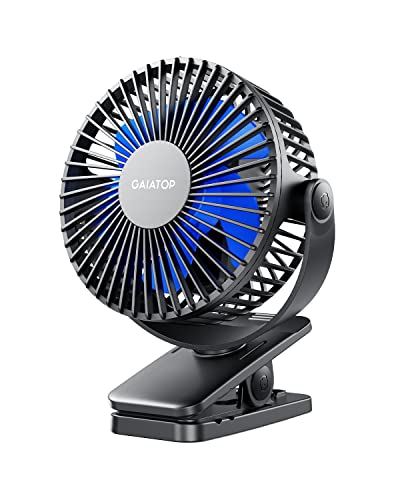
Gaiatop Portable Clip-On Fan
A cramped desk, warm stroller canopy, or stuffy campsite doesn’t leave much room for bulky cooling gear. Small fans often solve the space problem, then create a new one with weak clamps, rattling motors, or batteries that fade before the heat does. The Gaiatop Portable Clip-On Fan approaches the best USB C fan category with a compact body, three airflow levels, rechargeable power, and a clamp designed for surfaces up to one inch thick. Its strongest pitch isn’t raw size or flashy controls; it’s the ability to place a focused breeze exactly where a larger fan would be awkward.
Gaiatop Clip-On Fan Review
The fan measures 5.11 by 1.54 by 6.77 inches, which keeps it from crowding a desktop, stroller frame, shelf edge, or camping table. At 0.71 pounds, it has enough substance to feel less flimsy than many pocket fans while remaining manageable in a travel bag. The compact dimensions also help when outlet access is poor and every inch of surface space already has a job. Its limitation is equally clear: this is a personal fan, not a room-circulation machine.
Three speed settings provide a simple way to balance airflow against battery life. Gaiatop lists approximately 2.5 hours on the highest setting, 4.5 hours at the middle level, and up to 9 hours on low. Those figures make the tradeoff easy to understand without pretending every mode offers all-day endurance. The variable runtime suits short bursts of stronger cooling as well as longer stretches of gentler air movement.
A 2000mAh rechargeable battery powers the fan, and the unit can continue operating while connected to a charging source. That detail matters at a desk or bedside table because airflow doesn’t need to stop simply because the battery is low. Outdoors, a power bank can keep the fan going beyond its internal capacity, though that adds another item to carry. The use-while-charging function gives the fan more flexibility than a battery-only design.
The controls appear intentionally straightforward, which is a plus for a fan meant to move between several settings. There’s no need to sort through decorative modes, timers, or complicated display menus before getting a breeze. Pressing through three speeds is quick, and the uncomplicated layout should be easier to manage around a stroller or crowded workspace. The low-fuss operation fits the product better than a long list of features would.
Clamp Design And Placement Flexibility
The built-in clamp opens wide enough to attach to surfaces up to one inch thick. That range covers many desk edges, stroller bars, shelves, treadmill handles, crib rails, and camping furniture supports. A clip fan earns its place by staying where it’s attached, and the Gaiatop’s clamp is shaped for quick repositioning without tools. The one-inch clamping range gives it more placement freedom than a flat-base fan.
A sponge pad lines the inner side of the clip, helping protect finished surfaces from scratches. That padding also adds friction, which may reduce small shifts caused by vibration. It’s a practical detail around painted furniture, coated stroller frames, and polished desks where bare plastic jaws could leave marks. The surface-protecting pad makes repeated attachment less worrisome.
Clamp strength always comes with a compromise. A firmer spring improves grip, but it can require more hand pressure to open, especially during frequent adjustments. A softer spring feels easier to use yet may struggle on moving equipment or slick surfaces. The Gaiatop is described as easy to open, so the real benefit rests on whether it maintains secure holding pressure without becoming frustrating.
Placement should account for movement and weight distribution rather than simply grabbing the nearest edge. A stroller rolling over rough pavement or a treadmill vibrating under load can test a clip more than a stationary desk ever will. Attaching the fan fully onto a stable support and checking the clamp before use makes more sense than relying on a shallow grip. The mounting stability depends partly on setup, not only on the spring inside the clip.
Airflow And Quiet Motor Behavior
Gaiatop uses a brushless motor, a design commonly chosen for smoother operation and reduced mechanical wear. The supplied description also notes updated blades and a revised fan cover shaped around aerodynamic principles. Those changes are meant to move air efficiently without forcing the motor to sound harsh. The key benefit is strong close-range airflow paired with a calmer sound profile.
Three speeds allow the fan to behave differently across quiet and demanding settings. Low speed fits desk work, reading, or naps where steady movement matters more than force. Medium can handle a warm stroller ride or a muggy corner of a room, while high is better suited to brief periods when immediate relief matters most. The adjustable airflow keeps one setting from trying to handle every situation.
No small fan remains silent at full output because moving air creates its own noise, even when the motor is smooth. The highest setting will likely sound more noticeable than the lowest, particularly when the fan sits close to the face. That doesn’t contradict the low-noise design; it simply reflects the physics of faster blades and stronger airflow. The realistic advantage is reduced motor buzz, not absolute silence.
The compact fan head creates a focused stream rather than a wide wall of air. That works well when cooling one seat, one work area, or one side of a stroller, but the effect fades with distance. Positioning the unit a few feet away may feel more comfortable than placing it directly beside the face. The personal cooling range rewards careful aiming more than maximum speed alone.
Rotation And Directional Control
The fan head rotates 360 degrees horizontally and 360 degrees vertically. That full directional range makes the clip much more useful because the mounting surface doesn’t need to face the exact spot that needs airflow. A shelf edge, stroller rail, or treadmill handle can sit at an awkward angle while the fan head turns independently. The dual-axis rotation removes much of the trial and error from placement.
Wide rotation also saves time during routine changes. The clip can stay attached while the breeze shifts from one side of a desk to another, or from a stroller seat toward a nearby caregiver. Repeatedly opening and moving the clamp would be a nuisance and could eventually wear the contact surfaces. The adjustable fan head lets the mounting point remain stable.
A rotating joint should feel firm enough to hold its angle once the motor starts. If the joint loosens over time, vibration could cause the fan to droop or drift away from the intended direction. The supplied description doesn’t specify the internal hinge construction, so long-term stiffness can’t be guaranteed from the listed details alone. That unknown is a fair durability consideration for any highly adjustable mini fan.
Full rotation doesn’t mean every position will be equally stable. Extreme angles can shift more weight away from the clamp, especially if the fan head extends outward from a narrow surface. Keeping the center of mass reasonably close to the mounting point may reduce strain on both the clip and hinge. The broad angle flexibility is most useful when paired with sensible positioning.
Battery Life In Daily Use
The 2000mAh battery favors portability over maximum endurance. A larger battery could run longer, but it would also add bulk and put more weight on the clip. Gaiatop’s listed runtime of 2.5, 4.5, or 9 hours across the three speeds shows the usual relationship between stronger airflow and faster battery drain. The runtime range is enough for many errands, workouts, work sessions, and short outdoor trips.
High speed makes sense as a temporary setting rather than the default for an entire day. Using medium during the hottest stretch and switching to low once the area feels more comfortable can stretch the charge. That sort of speed management matters more on a compact battery than it would on a heavy desk fan. The fan rewards practical power management rather than set-it-and-forget-it use.
Operating while charging adds a useful safety net indoors. A USB power source can keep the fan running at a desk, next to a bed, or in a parked camper without waiting for a full recharge. The product name and supplied details describe USB rechargeable operation, though they don’t specify an unusually fast charging protocol. The charging flexibility is helpful, but refill speed should remain a modest expectation.
Battery care affects long-term usability. Leaving the fan in a hot car, storing it fully drained, or exposing the charging port to moisture can shorten the battery’s useful life. A partial charge before storage and a dry place away from direct heat are sensible habits. The rechargeable power system asks for a little care, though nothing beyond normal treatment of portable electronics.
Safety Around Strollers And Cribs
The fan cover uses 5.5-millimeter gaps intended to keep small fingers from reaching the blades. That narrow grille is a meaningful design choice around strollers, cribs, and car seats where curious hands may get close. It adds a physical barrier without turning the housing into an oversized cage. The finger-conscious grille is one of the product’s most relevant family-oriented features.
A protective cover doesn’t remove the need for careful placement. The fan should sit beyond easy reach, and the clamp should attach to a solid structure rather than loose fabric or a thin flexible flap. Charging cables also need to stay managed around sleeping or seated areas. The safe setup depends on both the grille design and responsible positioning.
Air direction deserves attention around infants and toddlers. A constant high-speed breeze aimed directly at the face from a short distance can feel harsh, even if the room itself is warm. Angling the fan across the surrounding area at low or medium speed usually creates gentler circulation. The full rotation makes that indirect airflow easier to arrange.
The fan’s compact weight helps, but any clipped object can become unstable if the support flexes or the clamp isn’t fully seated. A quick check after attaching it can reveal slipping, wobbling, or an awkwardly stretched charging cable. Those small precautions take little time and help the fan behave as intended. The safety advantage is strongest when the mounting point is treated thoughtfully.
Desk, Travel, And Outdoor Practicality
Desk use may be the easiest environment for this model. The clip frees up surface space, the low setting can provide steady airflow, and use-while-charging removes battery anxiety during long sessions. A monitor stand, shelf edge, or desk lip can become the mounting point without adding another bulky base. The space-saving setup suits small home offices and shared work areas.
Travel highlights the fan’s small size and adjustable head. It can fit into a backpack, attach to a hotel nightstand, or sit on a narrow surface where a conventional fan would be inconvenient. The 0.71-pound weight remains manageable, though it isn’t as light as the tiniest handheld models. That extra mass supports a more substantial clamp and motor, creating a reasonable portability tradeoff.
Camping and beach use introduce dust, sand, moisture, and uneven mounting surfaces. The supplied details don’t claim water resistance, so the fan shouldn’t be left in rain or exposed to splashes. A pouch can help keep grit out of the grille and charging port between uses. Its outdoor usefulness comes from battery power and clipping flexibility, not rugged weather sealing.
Whole-room circulation solves a different problem from personal cooling, especially when air conditioning needs help distributing cool air across a larger space. A neutral reference for that broader setup appears in ceiling fans for air conditioning, while the Gaiatop remains focused on movable airflow around one seat or work zone. The difference in coverage matters because a clip fan and a ceiling fan aren’t substitutes for the same job. One follows the person; the other serves the room.
Strengths, Weaknesses, And Best Use Cases
The main strength is placement freedom. A one-inch clamp, full horizontal and vertical rotation, and a compact fan head create many workable positions without consuming a flat surface. The padded clip also addresses scratches, which matters on furniture and painted equipment. These details work together rather than feeling like unrelated extras.
Quiet operation, three speeds, a brushless motor, and a narrow protective grille add to the practical appeal. The fan can handle work, stroller use, travel, and light outdoor duty without requiring different accessories for each setting. It’s especially convincing where close airflow and a secure clip matter more than maximum battery capacity. The balanced feature set fits everyday personal cooling.
The clearest weakness is limited high-speed runtime. Two and a half hours may cover a workout, commute, or short outing, but it won’t last through a full hot day without charging support. The small fan head also can’t spread air across a large room, and the product details don’t mention weather resistance. These limits are predictable, but they should shape expectations.
The Gaiatop Portable Clip-On Fan makes the most sense on a stroller bar, desk edge, treadmill handle, crib rail, or camping chair where a standard base would get in the way. Its clamp, padded grip, 360-degree rotation, and rechargeable operation solve genuine placement problems without turning the fan into an oversized gadget. For a best USB C fan search centered on compact, adjustable, close-range cooling, its strongest quality is simple: the breeze can be put where it’s needed, then redirected without rebuilding the entire setup.
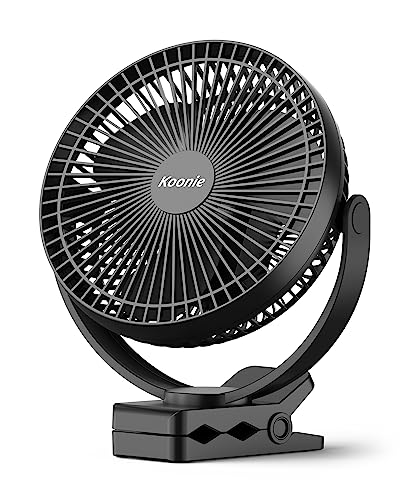
Koonie USB Desk Fan 5-Inch
Long hours at a desk can feel surprisingly exhausting once the air turns warm and stagnant. A large floor fan often takes up valuable space, while tiny novelty fans usually make more noise than they move air. The Koonie USB Desk Fan 5-Inch enters the best USB C fan conversation with a straightforward approach that favors stable placement, focused airflow, and quiet daily operation instead of loading the design with unnecessary extras. It doesn't try to cool an entire room, but it aims to make the area directly around you noticeably more comfortable.
Koonie USB Desk Fan Review
At first glance, the compact footprint stands out more than flashy styling. The five-inch frame occupies very little desktop space, leaving enough room for keyboards, notebooks, coffee mugs, and charging accessories without making the work area feel crowded. That matters because many personal fans lose their convenience once they begin competing with everything else already sitting on a desk. The compact footprint is one of this model's strongest practical advantages.
Koonie also keeps the operation uncomplicated with three adjustable speed settings. A single button cycles through the airflow levels, avoiding confusing control layouts that slow down simple adjustments. Whether the goal is a gentle breeze while reading or stronger airflow during a humid afternoon, switching speeds takes only a quick press. That simplicity fits everyday use much better than complicated feature lists.
Unlike rechargeable travel fans, this model relies on USB-C corded power. That means there's no internal battery to monitor, recharge, or eventually replace. The tradeoff is equally obvious: portability depends on having access to a USB power source, whether that's a laptop, wall adapter, docking station, or power bank. For permanent desk setups, however, continuous power often feels more convenient than worrying about runtime.
The overall design focuses on consistency rather than novelty. Every listed feature appears intended to improve daily usability instead of attracting attention through decorative lighting or unnecessary smart controls. That restrained philosophy gives the fan a more professional feel for office environments. The minimalist design complements crowded workspaces instead of dominating them.
Airflow Performance And Seven-Blade Design
Koonie equips this fan with a seven-blade fan assembly, a noticeable difference from many compact desk fans that use fewer blades. According to the supplied specifications, maximum airflow reaches 15.4 feet per second. While that number shouldn't be interpreted as room-cooling capability, it suggests the fan is designed to create a concentrated stream suitable for nearby seating. Personal cooling is exactly where a compact desk fan performs best.
Airflow quality often matters more than raw speed. A smooth stream of air tends to feel more comfortable than a choppy blast that fluctuates with each blade pass. The seven-blade arrangement is intended to improve consistency while helping maintain efficient circulation across the immediate workspace. That emphasis on balanced airflow makes sense for prolonged use during work or study.
Three speed levels provide enough flexibility without becoming overwhelming. Lower airflow works well for cooler mornings or shared offices where excessive wind would become distracting. The highest setting is better suited for hotter afternoons when stagnant air becomes uncomfortable. The adjustable cooling allows the fan to adapt throughout the day instead of locking users into a single airflow pattern.
Like every compact desktop fan, realistic expectations remain important. Even with respectable airflow, a five-inch model cannot replace central air conditioning or circulate air throughout a large bedroom. Its strength lies in directing fresh movement toward one workstation or seating area. That focused approach is exactly what makes personal cooling efficient instead of wasteful.
Quiet Performance During Daily Work
Noise often determines whether a desk fan stays on the desk or gets pushed into a drawer after a week. Koonie specifies an upgraded motor with an operating level around 35dB, describing it as comparable to gentle natural airflow. While environmental conditions always influence perceived noise, the specification suggests that mechanical motor sound is intended to remain restrained.
Office environments reward quieter equipment because repetitive humming quickly becomes distracting during meetings or concentrated work. Reading, writing, editing, or attending video calls generally requires steady background conditions rather than aggressive airflow accompanied by loud vibration. The quieter motor design helps position the fan for those situations. The low-noise operation becomes one of its strongest everyday characteristics.
Higher fan speeds naturally create more air movement, and moving air always generates some sound. That doesn't necessarily mean the motor becomes unpleasant, only that stronger airflow produces additional wind noise. Users who prioritize silence may find the lower settings more comfortable during long sessions. The balance between noise and airflow remains sensible across the available speed options.
Motor quality also influences long-term comfort beyond simple decibel figures. Smooth-running components typically reduce rattling and vibration, helping the fan feel more refined over extended operation. Although long-term durability can't be confirmed from the provided specifications alone, the upgraded silent motor reflects attention toward continuous indoor use. That emphasis on steady operation fits the product's intended purpose.
Stable Base And Adjustable Tilt
One overlooked detail in many small desk fans is stability. Lightweight housings sometimes creep across smooth desks as vibration builds, forcing constant repositioning. Koonie addresses this with a triangle support structure designed to keep the fan firmly planted during operation. Stable placement becomes especially valuable when the fan sits beside monitors or other equipment.
The fan also offers 180-degree tilt adjustment, allowing airflow to be redirected without moving the entire unit. Small angle changes often make a larger difference than increasing fan speed because airflow reaches the intended position more efficiently. Being able to fine-tune direction helps reduce wasted airflow aimed toward empty desk space.
Adjustability also makes the fan more versatile throughout the day. Morning sunlight, seating posture, or monitor height can all influence the most comfortable airflow angle. Instead of repositioning the entire fan repeatedly, a simple tilt adjustment often solves the problem within seconds. That convenience encourages consistent use rather than constant fiddling.
There is one reasonable limitation worth mentioning. The tilt range covers forward and backward adjustment only, so repositioning across the left or right side of a desk still requires physically rotating the fan itself. Fortunately, the compact size makes that movement quick and uncomplicated. The 180-degree hinge prioritizes vertical control rather than complete directional rotation.
USB-C Power And Everyday Convenience
The USB-C powered design fits naturally into modern workstations where laptops, docking stations, and USB chargers already occupy the desk. Eliminating proprietary power adapters keeps cable management simpler while reducing another item that could be misplaced. The USB-C connection also aligns with many current charging accessories already found around homes and offices.
Corded operation brings one notable advantage over battery-powered competitors: uninterrupted performance. As long as power remains available, there's no concern about battery indicators or declining runtime late in the afternoon. That makes the fan particularly suitable for extended office sessions where consistent airflow matters more than portability. The continuous power supply suits fixed desktop environments well.
The absence of an internal battery also reduces overall maintenance. Rechargeable batteries naturally lose capacity over time, while a corded fan avoids that particular aging process entirely. Of course, portability becomes more limited because operation depends on external power. Choosing between battery and corded designs largely depends on where the fan will spend most of its life.
Power banks remain an option for temporary mobile use if wall outlets aren't available. Although the fan isn't intended primarily as a travel accessory, USB-C compatibility allows some flexibility during camping, temporary workstations, or outdoor events with portable power available. That flexibility broadens the fan's usefulness beyond a permanent office setup without pretending it's primarily a travel product. The USB versatility adds quiet convenience.
Practical Everyday Experience
Living with a desk fan day after day often reveals strengths that specification sheets don't emphasize. Compact dimensions make cleaning around the workspace easier because the fan can be moved quickly without disconnecting multiple accessories. The modest size also leaves room for notebooks, tablets, and coffee cups instead of dominating the desktop. The space-efficient layout quietly improves everyday organization.
Maintenance appears straightforward because the exterior remains simple and uncluttered. Dust accumulation should still be removed periodically to maintain airflow and reduce unnecessary motor strain. A soft brush or microfiber cloth is generally sufficient for routine exterior cleaning. Keeping the fan blades and grille clean helps preserve smooth airflow over time.
This model seems especially well suited for desks positioned in areas with limited ventilation. Rooms where air conditioning struggles to reach every corner often benefit more from localized circulation than additional cooling equipment. Directing airflow toward the immediate workspace frequently creates a greater sense of comfort than lowering the room temperature alone. That's one reason focused circulation continues to make sense for compact fans.
Portable personal cooling and whole-room circulation serve entirely different purposes. Readers comparing localized airflow with permanent ceiling-mounted circulation may notice useful differences through hugger ceiling fan options with remote, while this Koonie model remains dedicated to desktop comfort. Each solution addresses a different environment instead of competing directly. Understanding that difference in application helps set realistic expectations.
Strengths, Tradeoffs, And Daily Fit
The biggest strength lies in its balance between compact dimensions, stable construction, quiet performance, and dependable USB-C power. None of these features attempts to reinvent the category, yet together they create a fan that feels thoughtfully designed for regular desktop use. Reliable fundamentals often matter more than novelty features that rarely get used.
Its most noticeable tradeoff is the absence of a rechargeable battery. Anyone needing cordless operation for beaches, parks, or long walks will likely prefer a battery-powered alternative. Users working mainly from a fixed desk, however, may appreciate never having to think about charging schedules.
The five-inch size also establishes clear limits. It performs best within arm's reach rather than across an entire room, and its airflow is intended for one person instead of multiple occupants. Those limitations aren't flaws so much as natural characteristics of this product category. The fan succeeds by focusing on efficient personal airflow rather than unrealistic promises.
Koonie has assembled a product that emphasizes practical comfort over unnecessary complexity. Quiet operation, stable positioning, adjustable tilt, continuous USB-C power, and focused airflow work together to support long hours at a desk without drawing attention to the fan itself. For anyone narrowing a best USB C fan shortlist toward dependable desktop performance, this model offers a balanced combination of usability, thoughtful engineering, and realistic expectations.
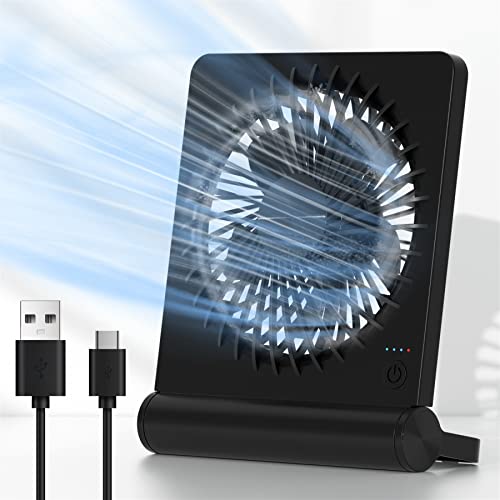
Koonie USB-C Folding Desk Fan
A crowded workstation can turn a small cooling problem into an annoying daily nuisance. Floor fans consume space, rechargeable models need battery management, and fixed-angle desk fans often blow toward everything except the person using them. The Koonie USB-C Folding Desk Fan takes a simpler route, combining corded USB-C power, three speed settings, and a broad 220-degree tilt range in a compact design. Within the best USB C fan category, it makes the most sense for steady personal airflow at a desk, bedside table, or other spot with convenient access to power.
Koonie USB-C Desk Fan Review
The supplied product details are brief, so this review has to stay grounded in the features named directly in the product description. Those features include USB-C powered operation, three adjustable speeds, a folding body, a 220-degree tilt range, and an emphasis on strong yet quiet airflow. There’s no provided battery capacity, runtime figure, dimension, or measured noise level to evaluate. That leaves the fan’s practical design, power arrangement, and positioning flexibility as the clearest points of discussion.
Corded power changes the way this fan fits into daily routines. Rather than carrying an internal battery that eventually runs down, it can operate for as long as the connected USB power source remains available. A laptop port, USB wall adapter, power strip, docking station, or compatible power bank can potentially serve that purpose. The main strength is dependable operation without pausing to recharge the fan itself.
The folding design adds another layer of usefulness. A fan that folds can usually take up less room during storage and may offer more positioning choices than a rigid upright model. That matters on desks where monitors, keyboards, notebooks, speakers, and charging gear already compete for space. The foldable structure sounds practical rather than decorative, especially for people who move between home and office work areas.
Three speeds keep the controls easy to understand. One setting can provide a mild breeze during quiet work, another can handle ordinary warm conditions, and the strongest mode can deliver more immediate relief. There’s no need to scroll through a dozen nearly identical levels just to settle on comfortable airflow. The three-speed layout favors quick adjustment over unnecessary complexity.
USB-C Power For Long Desk Sessions
The most defining feature is the fan’s USB-C power connection. USB-C has become common across laptops, chargers, hubs, and portable batteries, so the fan can fit naturally into many modern workstations. That doesn’t automatically mean every USB-C source will deliver identical performance, since power output can vary between ports and adapters. Still, the connector format is more convenient than an unusual proprietary plug that’s difficult to replace.
A corded fan avoids the uncertainty that comes with battery percentages and shrinking runtime. During an eight-hour work session, airflow can continue without a midafternoon charging break as long as the fan stays connected. That consistency is useful in a home office, reception desk, dorm room, or bedroom where the fan rarely needs to travel far. The continuous power advantage is easy to appreciate once charging becomes one less thing to remember.
Portability does take a hit, of course. Without a built-in battery listed in the supplied information, the fan depends on an external power source whenever it’s running. Carrying it to a park bench or remote campsite would also mean carrying a power bank. The central tradeoff is simple: steady corded performance replaces true untethered operation.
Cable placement deserves a little attention around compact desks. A short route to a laptop or nearby adapter keeps the setup tidy, while a poorly positioned cord can cross the keyboard area or tug on the fan during adjustment. Folding the unit for storage may also require disconnecting the cable first. The corded design is convenient, but good cable management helps it feel less intrusive.
Three Speeds And Focused Personal Airflow
Three airflow settings cover the situations most people expect from a personal desk fan. The gentlest level should suit mild warmth, reading, or tasks where papers and loose notes need to stay put. A middle setting can provide more noticeable circulation without automatically jumping to maximum output. The highest level is there for hotter rooms and moments when stronger focused airflow matters more than minimal sound.
The product name describes the fan as producing strong wind, but no measured airflow figure is provided. It would be careless to attach a speed, distance, or room-size claim that isn’t in the supplied details. The safest expectation is a concentrated breeze designed for nearby use rather than whole-room cooling. A small desk fan succeeds through close-range circulation, not by replacing an air conditioner or full-size pedestal fan.
Placement can affect comfort as much as the chosen speed. A fan aimed directly at the eyes from a few inches away may feel harsh, while the same setting placed farther back can produce a softer, broader sensation. Tilting it slightly across the upper body instead of straight toward the face may also feel more natural during long sessions. The airflow angle often matters more than simply pressing the speed button again.
Three settings also make power-source troubleshooting easier. If the highest level seems inconsistent on a weak USB port, a stronger compatible adapter may provide steadier operation. The supplied description doesn’t state the fan’s electrical input requirements, so no specific adapter output should be assumed. That uncertainty is a small specification limitation worth keeping in mind.
Quiet Operation Without Invented Numbers
The product name describes the fan as ultra quiet, but the supplied information doesn’t include a decibel measurement. That means there’s no honest basis for claiming it operates at a particular sound level. Quietness should be understood as a design intention rather than a verified numerical result. The relevant benefit is reduced distraction during work, reading, conversation, or rest.
Fan noise comes from more than the motor. Air passing through the grille, vibration against a desk, and small movements in the folding joint can all influence what the user hears. Higher speed usually creates more audible airflow even when the motor remains smooth. The realistic noise tradeoff is that stronger cooling tends to sound more noticeable than a gentle breeze.
A stable surface can help keep unnecessary vibration under control. Placing the fan on an uneven stack of papers or a hollow shelf may amplify minor sounds, while a solid desk can provide a calmer base. Keeping the housing free from dust may also reduce rattling and turbulent airflow over time. The quiet experience depends partly on setup and maintenance, not only on the motor.
Low speed will probably be the natural choice during video calls or quiet nighttime use. Medium and high settings may suit warmer periods when airflow takes priority over near-silent operation. Having three levels gives users room to make that judgment without turning the fan off completely. The adjustable sound profile is therefore tied directly to the speed control.
Folding Body And 220-Degree Tilt
The 220-degree tilt range is the standout mechanical feature. A broad adjustment arc allows the fan head to aim upward, forward, or toward other practical angles without requiring the entire base to be moved. That flexibility helps when the fan sits below face level, on a shelf, or beside a raised monitor stand. The wide tilt adjustment makes a compact fan far easier to position accurately.
Folding also supports storage and transport between work areas. A rigid fan can be awkward inside a drawer or backpack because the head and base occupy a fixed shape. A folding model can potentially pack flatter and avoid taking over a small cabinet. The space-saving design fits hybrid workers, students, and anyone who clears the desk after each session.
Adjustable joints introduce a durability question that the supplied details don’t answer. A hinge must remain firm enough to hold the selected angle while still moving smoothly when repositioned. Repeated forcing beyond its intended range could strain the mechanism over time. Treating the folding hinge with ordinary care is more sensible than snapping it rapidly between positions.
The large tilt range doesn’t provide horizontal oscillation, at least not according to the information supplied. Airflow will remain directed toward the selected position unless the fan itself is turned. That makes it better for one-person cooling than for sharing airflow across a wide room. The directional design favors precision over automatic sweeping coverage.
Desk Space And Everyday Placement
A small desk fan is most valuable when it stays out of the way. The product is described as a personal desktop model, suggesting a footprint intended for workstations, side tables, and compact surfaces. No exact measurements are provided, so claiming it fits a particular shelf depth would be guesswork. Its stated small desk format should still appeal where a large fan would create clutter.
Home offices are an obvious fit because USB power is usually close at hand. The fan can sit near a laptop, monitor, or charging hub and provide airflow without occupying floor space. A bedside setup may also work, provided the cable can be routed safely away from walkways. The fixed-station convenience suits places where the fan stays near a dependable power source.
Kitchen counters, craft tables, and hobby benches may benefit from the adjustable angle as well. Airflow can be directed toward the user while avoiding lightweight materials, drying paint, or loose paper. A lower speed may be the smarter choice around delicate work. The focused breeze gives more control than a large fan blowing across the entire area.
Permanent overhead circulation handles a much broader task than a compact USB fan. A neutral reference for rooms where rustic lighting and ceiling-level airflow are both relevant appears in rustic ceiling fan lighting, while the Koonie remains centered on one nearby work or rest zone. The difference in coverage is substantial: one serves an occupied spot, while the other circulates air across a room.
Strengths, Weaknesses, And Practical Limits
The clearest strengths are USB-C power, three straightforward speeds, a folding structure, and a generous 220-degree tilt range. Together, those features address common desk-fan frustrations without making operation complicated. The fan can stay powered during long sessions, aim airflow precisely, and fold away when the desk needs to be cleared. That combination feels purposeful rather than overloaded.
The biggest weakness is its dependence on external power. A corded unit isn’t the natural companion for long walks, stroller use, or locations where no USB source is nearby. A power bank can add mobility, but it also adds weight and another cable. Anyone prioritizing cordless freedom may be better served by a rechargeable model with a clearly stated battery capacity.
The limited supplied specification also leaves several unanswered questions. There’s no stated size, weight, cable length, wattage, measured noise figure, airflow rating, or material description. None of those details should be invented simply to make the review sound more complete. The information gap means this assessment must focus on the features explicitly named.
Room cooling is another realistic boundary. Even a strong personal fan only moves existing air around its immediate area; it doesn’t lower the room’s actual temperature. Its value appears during desk work, reading, gaming, studying, or sleeping close enough to feel the breeze. The best-fit use is localized comfort rather than broad climate control.
Maintenance And Long-Term Use
Dust is the most likely everyday maintenance issue. Small fans pull nearby particles toward the grille, and buildup can gradually reduce airflow or make the unit sound rougher. A dry soft brush or cloth can handle routine exterior cleaning while the fan is unplugged. Keeping the air intake and grille clear supports more consistent performance.
The USB-C port should remain dry and free from lint. Repeatedly pulling the cable at an angle can place unnecessary pressure on both the connector and port, especially if the fan is adjusted while plugged in. Holding the plug itself during disconnection is a small but useful habit. The power connection is central to the fan’s operation, so careless cable handling can create avoidable problems.
Folding the fan before storage can protect space, but it should be done without forcing the hinge. If resistance appears near the end of the travel range, pushing harder isn’t likely to improve anything. Gentle adjustment helps preserve the joint’s ability to hold an angle. The 220-degree mechanism deserves the same care as any movable component.
The Koonie USB-C Folding Desk Fan is built around a practical, narrow mission: steady personal airflow from a compact, adjustable, corded unit. Its three speeds and broad tilt range offer useful control, while USB-C power removes battery-runtime anxiety during long stationary sessions. The missing technical details prevent deeper claims about measured airflow or sound, and the lack of cordless operation limits outdoor independence. As a best USB C fan candidate for desks, bedrooms, and small home-office spaces, its appeal rests on uncomplicated cooling, flexible positioning, and continuous powered use.


Best Quiet Ceiling Fan For Bedroom 2026 Ultimate Comfort Picks

Best Ceiling Fan For Master Bedroom 2026 With Ultimate Comfort

Best White Ceiling Fan With Light For Bedroom 2026 Top Picks

Best Quorum Medallion Ceiling Fan 2026 With Style & Breeze

Best Outdoor Fan For Pergola 2026 Comfort Boost

Best Ceiling Fan For Great Room 2026 With Ultimate Comfort

Best Outdoor DC Ceiling Fans 2026 For Breezy Comfort

Best ceiling exhaust bath fan with light and heater 2026





