
Best USB Personal Fan 2026: Small Fans That Deliver

A best USB personal fan should cool the space right in front of you without rattling across the desk, drowning out a call, or hogging the nearest outlet. That sounds simple, yet plenty of compact fans miss the mark with weak airflow, awkward controls, short cords, or bases that slide whenever the speed changes. A useful model keeps the breeze focused, stays planted, and runs from a laptop, wall adapter, power bank, or USB hub. Small details matter here because daily annoyances add up fast.
Airflow control deserves more attention than raw motor claims. Three or more speed settings make it easier to move from a soft background breeze to stronger cooling after a hot commute or stuffy afternoon. A tilting head also helps direct air toward the face and upper body instead of blowing papers around the room. Fixed-angle designs can still work, but they often require books, boxes, or other makeshift risers to hit the right spot.
Noise can make or break the experience. A fan that seems quiet in a busy store may sound far more distracting beside a microphone, bed, or reading chair. Lower speeds should create a steady hum rather than clicking, pulsing, or high-pitched motor noise. Still, stronger settings usually sound louder, so expecting silent operation at maximum power isn’t realistic.
USB power adds flexibility, though it also brings a few tradeoffs. Standard USB models are easy to use around computers and power banks, but some deliver less force than fans connected to a regular wall outlet. Cable length matters too. A short cord may work beside a laptop yet become frustrating on a deep desk or nightstand where the power source sits farther away.
Size shouldn’t be judged by the fan diameter alone. A broad base may improve stability but steal valuable room from a keyboard, notebook, lamp, or coffee mug. Slim models fit tighter spaces, though very light housings can vibrate or creep forward on smooth surfaces. Rubber feet, balanced blades, and a sturdy frame usually do more for everyday comfort than decorative lights or flashy controls.
Cleaning is another practical concern that rarely gets enough attention. Dust collects on the grille and blade edges, slowly cutting airflow and making the motor work harder. A removable front cover makes routine care much easier, while sealed grilles require brushes, cotton swabs, or compressed air. Anyone dealing with pet hair, open windows, or dusty rooms will notice this difference sooner rather than later.
The strongest pick isn’t always the smartest pick. A powerful fan may feel refreshing from several feet away, but it could be too loud or bulky for close desk use. A tiny folding model travels well, yet it may struggle in a warm room with still air. The right balance comes from matching airflow strength, noise, footprint, adjustment range, and power setup to the place where the fan will actually sit.
- LFR Score9.6
LFR Score is a ranking system developed by lightfansreviews.com. LFR Score has no relationship or impact from any manufacturers or sales agent websites. Learn more
- BrandMagicold

- LFR Score9.2
LFR Score is a ranking system developed by lightfansreviews.com. LFR Score has no relationship or impact from any manufacturers or sales agent websites. Learn more
- BrandTriPole

- LFR Score9.2
LFR Score is a ranking system developed by lightfansreviews.com. LFR Score has no relationship or impact from any manufacturers or sales agent websites. Learn more
- BrandHAUSBELL
![JISULIFE Handheld Mini Fan, 3 IN 1 USB Rechargeable Portable Fan [12-19 Working Hours] with Power Bank, Flashlight, Pocket Design for Travel/Summer/Concerts/Lash, Gifts for Women (Pink)](https://m.media-amazon.com/images/I/318dfxWKmtL._SL500_.jpg "JISULIFE Handheld Mini Fan, 3 IN 1 USB Rechargeable Portable Fan [12-19 Working Hours] with Power Bank, Flashlight, Pocket Design for Travel/Summer/Concerts/Lash, Gifts for Women (Pink)")
- LFR Score9.2
LFR Score is a ranking system developed by lightfansreviews.com. LFR Score has no relationship or impact from any manufacturers or sales agent websites. Learn more
- BrandJISULIFE

- LFR Score9.2
LFR Score is a ranking system developed by lightfansreviews.com. LFR Score has no relationship or impact from any manufacturers or sales agent websites. Learn more
- BrandGaiatop

- LFR Score9.0
LFR Score is a ranking system developed by lightfansreviews.com. LFR Score has no relationship or impact from any manufacturers or sales agent websites. Learn more
- BrandGaiatop

- LFR Score9.0
LFR Score is a ranking system developed by lightfansreviews.com. LFR Score has no relationship or impact from any manufacturers or sales agent websites. Learn more
- BrandGemmac
- LFR Score9.0
LFR Score is a ranking system developed by lightfansreviews.com. LFR Score has no relationship or impact from any manufacturers or sales agent websites. Learn more
- BrandOtlonpe

- LFR Score9.0
LFR Score is a ranking system developed by lightfansreviews.com. LFR Score has no relationship or impact from any manufacturers or sales agent websites. Learn more
- BrandKoonie

- LFR Score8.2
LFR Score is a ranking system developed by lightfansreviews.com. LFR Score has no relationship or impact from any manufacturers or sales agent websites. Learn more
- BrandMOSOKI

- LFR Score8.0
LFR Score is a ranking system developed by lightfansreviews.com. LFR Score has no relationship or impact from any manufacturers or sales agent websites. Learn more
- BrandDynamiKsounds
Last update on 2026-07-18 / Affiliate links / Images, Product Titles, and Product Highlights from Amazon Product Advertising API
Magicold Turbo Fan for Personal USB Cooling
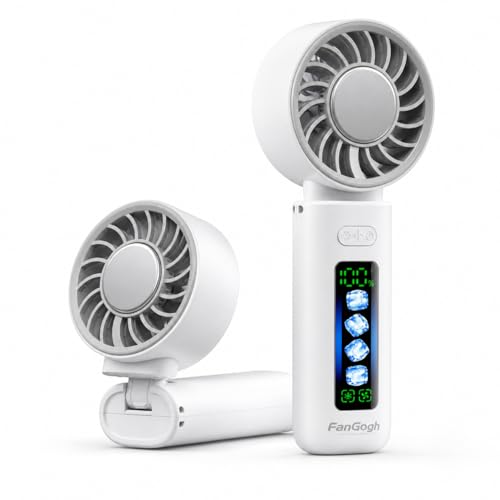
Sticky heat gets old fast when a regular pocket fan only pushes warm air back toward your face. The best USB personal fan needs to feel useful beyond the first few minutes, especially during a commute, crowded event, beach afternoon, or stuffy desk session. Magicold takes a more ambitious route by pairing turbo airflow with a built-in cooling plate, a rechargeable battery, and a folding three-in-one body. That combination gives it more range than a plain handheld fan, though the extra cooling hardware also introduces a few practical tradeoffs worth sorting out.
Magicold Portable Turbo Fan
The main draw is the pairing of high-speed airflow and an instant cold plate. Standard mini fans move surrounding air, so the breeze can still feel warm when temperatures climb. Magicold adds a large cooling surface designed to create a colder sensation where it touches the skin, which may bring faster relief around the neck, forehead, cheeks, or wrists. That direct contact element makes the product more personal than a basic desk fan because the cooling effect isn’t tied only to air movement.
The cooling plate won’t replace air conditioning, and that distinction matters. Its strongest value appears during short bursts of discomfort, such as stepping off a hot train, waiting in an outdoor line, cooking beside a warm stove, or sitting through a humid afternoon. Pressing a cooled surface against pulse points can feel more immediate than simply increasing fan speed, but it cools a limited area rather than the whole body. Realistic expectations keep the feature useful instead of turning it into a promise it can’t fulfill.
Wind adjustment gives the fan more flexibility across different settings. The supplied description mentions four adjustable wind speeds, but it also states that the control cycles through five wind speeds, so the exact number isn’t fully consistent in the provided information. That discrepancy is worth checking in the included manual or product controls before relying on a specific setting count. Either way, multiple levels should make it easier to choose a gentle breeze for close desk use or stronger output outdoors.
Cooling Control Without Guesswork
A small fan becomes frustrating when the battery fades without warning. Magicold addresses that issue with an LED display showing the remaining battery percentage and selected wind level. The screen reduces the usual guesswork, especially before leaving home or settling into a long meeting. Instead of wondering whether the fan has twenty minutes or several hours left, the display gives a clearer reason to recharge.
The listed 3000mAh rechargeable battery supports up to eight hours of operation on low speed and about two hours at full turbo output. Those figures come from the supplied product description rather than independent testing, so actual runtime can vary with cooling-plate use, ambient temperature, battery age, and speed selection. Still, the stated spread tells a familiar story: lower airflow suits long stretches, while turbo mode is better saved for the hottest moments. Running maximum power all afternoon will drain the battery much faster, no two ways about it.
USB-C charging is another practical advantage because it fits the cables already used by many phones, tablets, and accessories. A power bank can keep the fan going during festivals, theme parks, camping trips, or long travel days where wall outlets are scarce. Charging convenience doesn’t erase the need to plan around the two-hour turbo estimate, though. Carrying a cable or compact battery pack makes sense for anyone expecting heavy use away from home.
The one-button control keeps the interface uncluttered, but it can also mean cycling through several settings to reach the desired speed. That’s common on compact fans because there isn’t much room for separate controls. The real-time wind indicator helps soften that inconvenience by showing the selected level instead of forcing you to judge it by sound alone. Simple controls work best here, provided the button responds cleanly and doesn’t require excessive pressure.
Three Ways to Use One Small Fan
The folding construction turns Magicold into a handheld fan, a desktop fan, or a wearable neck unit with the included lanyard. That range is genuinely useful because cooling needs shift throughout the day. A handheld grip works while walking, the folded base suits a desk or bedside table, and the lanyard leaves both hands free during cooking, commuting, or standing in line. One compact body replaces several single-purpose fan shapes, at least on paper.
Desktop use depends heavily on base stability. The foldable handle is designed to form a stand, yet a small footprint can still be sensitive to bumps, uneven surfaces, or higher fan speeds. A smooth office desk should be easier than a soft bed, picnic blanket, or narrow tray table. Positioning the unit away from loose receipts, lightweight papers, and dangling cables will also keep the stronger airflow from creating a small mess.
The neck-worn setup offers convenience, but it isn’t the same as a rigid dual-head neck fan. Because the unit hangs from a lanyard, its angle may shift as the wearer walks, bends, or moves quickly. That arrangement seems better suited to casual strolling, waiting, cooking, or sightseeing than intense running. The 180-gram weight is relatively light for short-term carrying, though any object hanging against the chest can become noticeable after several hours.
Handheld use is probably the most straightforward mode. The ergonomic handle and smartphone-like size should fit naturally in a purse, backpack, or larger pocket without demanding much space. The folding handle also helps protect the shape during storage and makes packing less awkward than carrying a fixed stand. Still, the cooling plate and turbo motor add more complexity than a bare-bones fan, so the body may feel denser than its compact dimensions suggest.
Portable Enough for Daily Summer Routines
At a listed weight of 180 grams, or 6.3 ounces, Magicold aims for a balance between portability and battery capacity. That weight is manageable for travel, school, office use, outdoor events, and short walks, but it isn’t featherlight. Holding any device continuously can tire the wrist, especially at an awkward angle. Switching between handheld, tabletop, and lanyard modes helps spread out that strain.
The durable housing is described as capable of handling normal travel bumps, though no specific impact rating or certification is provided. A compact fan still deserves sensible treatment around sand, moisture, and crowded bags. The cooling plate, display, hinge, and charging port create several areas that should be kept clean and dry. A small pouch would help prevent grit from reaching the grille or scratching the screen during beach and camping trips.
Quiet operation matters in offices, classrooms, bedrooms, flights, and shared living spaces. The product description says the fan is designed to run quietly, but no measured sound level is included. Lower speeds will likely be more suitable for conversations and focused work, while turbo mode should be expected to produce more audible airflow. Tiny high-speed fans rarely stay whisper-soft at maximum output, so the real question is whether the sound remains smooth rather than sharp or rattly.
Strengths That Solve Everyday Heat Problems
The clearest strength is two-part cooling. Airflow handles broader comfort, while the plate offers concentrated relief where a normal fan may feel too mild. That pairing can be especially handy in humid weather, where moving warm air alone sometimes falls flat. It gives the product a stronger reason to exist than decorative lights or novelty settings that don’t improve cooling.
The battery display is another thoughtful detail because it prevents unpleasant surprises. Many inexpensive portable fans rely on a vague blinking light that says little about remaining runtime. Seeing an actual percentage makes it easier to decide whether the fan can handle a commute, lunch break, or evening event. It’s a small feature, sure, but small conveniences often determine whether a gadget stays in regular rotation.
Versatility also works in Magicold’s favor. A single fan can sit beside a laptop, hang from a lanyard, or travel in hand, reducing the need to carry separate cooling accessories. The USB-C power setup fits modern charging routines, and the foldable design makes storage less fussy. Those benefits line up well with people who move between indoor and outdoor environments throughout the day, even though the product should not be mistaken for room-scale cooling.
Weaknesses and Practical Tradeoffs
The biggest uncertainty is the conflicting speed information. One part of the supplied description says four settings, while another says five. That doesn’t automatically make the fan unreliable, but it does create a specification mismatch that should be resolved through the physical controls or included instructions. Clear product information matters because buyers often use speed count to judge flexibility and battery expectations.
Turbo runtime is another limitation. The stated two hours at maximum power may be enough for a commute, outdoor queue, or short event, but it won’t cover a full day without recharging. The cooling plate may also increase power consumption depending on how the system operates. Anyone planning extended outdoor use should treat a power bank as part of the setup rather than an optional extra.
The foldable three-in-one design adds useful modes, yet each mode carries a compromise. A lanyard fan can swing, a tiny desktop base can be easier to knock over, and handheld use occupies one hand. The compact format makes those compromises understandable, but it doesn’t eliminate them. Magicold is better viewed as a flexible personal cooler than a flawless replacement for a dedicated desk fan, rigid neck fan, or larger outdoor unit.
Cleaning may require patience if the front grille isn’t easily removable, and the provided description doesn’t confirm the maintenance method. Dust buildup can reduce airflow, increase noise, and collect around the plate or intake. A soft brush and dry cloth should handle routine surface care, while water should stay away from the charging port and electronic components. Practical upkeep will matter most after repeated use in sandy, dusty, or pet-filled environments.
How It Fits the Best USB Personal Fan Category
A strong best USB personal fan should be easy to charge, simple to carry, adjustable enough for different situations, and honest about its limits. Magicold checks many of those boxes through USB-C power, a 3000mAh battery, several wind settings, and a folding body. The cooling plate gives it a distinct edge for direct relief, especially during moments when a basic breeze isn’t cutting it. Its value rests less on raw fan size and more on having several cooling methods in one compact device.
The product makes the most sense where personal cooling matters more than room circulation. It can ease discomfort at a workstation, on public transit, at an outdoor venue, or beside a bed, but it won’t cool a large space. The focused airflow works within a short range, and the plate requires direct contact for its strongest effect. That narrow purpose is a strength when expectations stay grounded.
Magicold’s overall design feels practical rather than stripped down. The display, folding stand, lanyard support, and rechargeable battery address common frustrations that show up with cheaper pocket fans. The strongest setting carries the expected penalty in runtime and noise, while the wearable mode may move around during active use. Those tradeoffs are reasonable for a compact cooling tool, particularly for someone who values portability and instant localized cooling over all-day maximum airflow.
TriPole USB Desk Fan for Focused Personal Cooling
A cramped desk gets uncomfortable quickly once warm air starts collecting around a laptop, lamp, and coffee mug. The best USB personal fan should solve that problem without swallowing valuable space or rattling through every video call. TriPole keeps the formula straightforward with a compact frame, three speed settings, a long power cord, and a fully adjustable fan head. It isn’t built to cool an entire room, but its focused airflow and stable base make sense for personal use at close range.
TriPole USB Desk Fan
The 4.5-inch diameter gives this fan a noticeably small footprint, which is useful on crowded desks, narrow nightstands, and temporary work surfaces. A larger fan may move more air across a room, but it can also block a monitor corner, crowd a keyboard, or leave little room for notebooks and chargers. The compact size keeps the TriPole close enough for direct cooling without turning the desktop into a balancing act. That matters more than it sounds, especially in small bedrooms, dorm rooms, shared offices, or travel setups.
Three speed modes provide a practical range for different situations. The lowest level suits close placement where too much airflow would dry the eyes or scatter lightweight papers, while the stronger settings can help after a hot walk or during a stuffy afternoon. A rear control button handles the adjustments, keeping the front clean and uncluttered. The three-speed control isn’t fancy, but it gives enough flexibility for daily personal cooling without burying basic functions behind complicated controls.
The fan depends on a wired USB connection, so it won’t run independently like a rechargeable model. That tradeoff removes battery anxiety during long desk sessions, though it also means the fan needs access to a computer, charger, power bank, or another suitable USB source. The included 4.9-foot cable reduces the usual frustration caused by short cords that barely reach beyond a laptop. For a fixed workspace, the long USB cable may be more useful than a battery that eventually needs charging.
Airflow Direction and Everyday Comfort
The 360-degree up-and-down rotation gives the fan more placement freedom than a fixed-angle design. Air can be aimed toward the face from a low shelf, directed upward from a desk, or tilted away slightly when a direct stream feels too harsh. That range helps the fan adapt to different chair heights, table depths, and bedside arrangements. The adjustable fan head also prevents the common workaround of stacking a small fan on books just to hit the right angle.
Focused airflow is the real job here, not broad room circulation. A 4.5-inch fan works best within a short distance, so placement will have a bigger effect than simply switching to the highest setting. Keeping it near the edge of a desk or beside a monitor should deliver a more noticeable breeze than parking it several feet away. The personal cooling range is a strength for close use, but it becomes a limitation if the goal is to refresh a large bedroom or shared office.
Noise control benefits from the wide base and silicone pads underneath. Those pads help reduce vibration against hard surfaces, which can otherwise turn a small motor hum into an irritating buzz through a wooden desk. The manufacturer describes the fan as quiet, though no measured sound level is provided in the supplied details. Lower speeds should be the safer choice for sleep, calls, or focused work, while third-speed airflow will naturally create more audible wind noise.
USB Power and Reliable Desk Use
The 5V USB-A connection makes the TriPole easy to power from common sources such as a desktop computer, laptop dock, wall adapter, or portable battery bank. That setup can also simplify overseas travel because the fan itself doesn’t depend on a region-specific wall plug. A compatible USB charger still matters, of course, and the supplied note says the fan requires 0.8 amps while operating. The 5V USB power keeps the setup familiar, but the power source must provide enough current for the strongest speed.
The manufacturer specifically warns that the third speed may fail to work with an underpowered USB source. A charger rated for 5V/1A is recommended for testing if the highest setting doesn’t operate correctly. That detail is easy to overlook, and it could prevent a perfectly functional fan from being mistaken for a defective one. The 0.8A power requirement is especially relevant when using older computers, low-output hubs, or inexpensive adapters.
A wired fan has one clear practical advantage: runtime isn’t limited by battery capacity. Long workdays, overnight bedside use, and extended study sessions won’t require pausing to recharge the fan. The flip side is reduced mobility because the cable remains part of the setup at all times. The plug-in operation suits stable locations better than walking, outdoor events, or situations where a loose cable would get in the way.
The 4.9-foot cord helps soften that limitation by reaching outlets or power strips located behind furniture. It also gives more freedom to move the fan around a desk without relocating the charger every time. Still, extra cable length can create clutter if the power source sits only a few inches away. A simple cable clip or tie can keep the long cord from tangling with a mouse, keyboard lead, or phone charger.
Stability, Cleaning, and Practical Tradeoffs
Small fans often wobble because the motor sits high above a narrow base. TriPole counters that issue with a wide stand and four silicone pads designed to keep the unit planted on the desk. Those pads should also reduce sliding when the fan is tilted or operated at a stronger speed. The stable base is particularly helpful on smooth nightstands, glass tables, and lightweight folding desks where vibration is easy to notice.
The detachable front cover makes routine cleaning less tedious. Dust collects quickly on compact fan grilles and blade edges, especially near open windows, pet areas, or busy workspaces. Removing the cover allows better access than trying to push a cotton swab through narrow grille openings. Regular care supports cleaner airflow and can help prevent the extra noise that develops when dust builds up around moving parts.
Cleaning still requires a careful approach because the fan is powered through a wired electrical connection. Unplugging it first, using a dry or lightly damp cloth, and allowing every surface to dry fully will reduce unnecessary risk. The motor housing and USB connection shouldn’t be soaked or rinsed. The detachable cover improves access, but it doesn’t turn the entire unit into a washable appliance.
The main weakness is portability in the strict sense. The fan is small enough to pack for a trip, yet it needs a power source wherever it goes. A power bank can solve that problem on a train, in a hotel, or at an outdoor table, though it adds another item to carry. The wired design is more dependable for stationary use than spontaneous handheld cooling.
How It Fits the Best USB Personal Fan Category
The TriPole earns its place in the best USB personal fan conversation through practical details rather than flashy extras. Its small diameter saves room, the rotating head improves airflow placement, and the long cord makes desk positioning less restrictive. The three speed settings cover gentle background cooling and stronger short-range airflow. Those features address the everyday frustrations that matter most around a workstation or bedside table.
Its strongest role is steady, close-range cooling for a fixed spot. A laptop desk, vanity, dorm shelf, hotel nightstand, or kitchen counter all fit that use pattern well. The fan won’t replace a larger circulator, and it won’t follow someone around without a power bank and cable. The focused desktop performance is useful precisely because the product doesn’t pretend to handle whole-room cooling.
Power compatibility deserves a final bit of attention during setup. A weak USB hub may run the first two speeds but struggle with the third, which could make the fan seem less capable than it really is. Using a 5V/1A source aligns with the guidance supplied for full operation. The correct USB adapter can make the difference between basic airflow and access to the strongest setting.
The balance of strengths and compromises is fairly clear. TriPole offers compact placement, stable footing, adjustable direction, easy cleaning, and continuous wired operation, while giving up cordless freedom and broad cooling coverage. That mix suits a desk-centered routine better than travel days spent constantly moving. For personal airflow within arm’s reach, the space-saving design and reliable plug-in power make a sensible pairing.
HAUSBELL Poseable Alien Mini Fan
Small fans usually sit still, point in one direction, and take up more room than expected. This one takes a stranger route. The HAUSBELL model enters the best USB personal fan conversation with bendable limbs, suction-cup feet, five speeds, a digital display, and a soft built-in light. It’s playful on the surface, yet the oddball shape solves a real problem: getting airflow exactly where a standard base fan won’t fit.
HAUSBELL Poseable Alien Fan
The alien styling is impossible to ignore, but the design isn’t just decoration. Its poseable arms and legs can wrap around narrow bars, shelves, lamp stems, bedposts, and similar supports, giving the fan far more mounting freedom than a fixed tabletop model. That flexibility helps in spaces where every inch counts, such as a crowded desk, stroller handle, bunk bed, or small travel setup. Bent into the right shape, the body becomes its own stand instead of depending on a broad plastic base.
Five speed settings give the airflow more range than the common three-speed layout found on many mini fans. The lowest setting is intended for a soft breeze during reading or quiet downtime, while the highest level uses a listed 1.5W turbo mode for stronger close-range cooling. That extra control matters because a gentle bedside breeze and a burst of air beside a hot stove call for very different output. The settings cycle through one button, with another press after speed five shutting the fan down.
The built-in display keeps those adjustments from becoming a guessing game. It shows both the selected speed and the remaining battery level, which is useful before a commute, bedtime, or a long stretch away from an outlet. Many compact fans rely on a blinking indicator that offers little useful information, so a visible percentage is a welcome change. The display also makes it easier to judge whether higher speeds are draining power faster than expected.
Mounting Options That Go Beyond a Desk
The suction-cup feet add another layer of flexibility, provided the mounting surface is smooth and flat. Glass, mirrors, polished desks, ceramic tile, and smooth car windows are among the surfaces named in the supplied description. Pressed down properly, the feet are designed to hold the fan in place without a conventional stand. That opens up cooling positions a normal desk fan simply can’t manage, such as beside a bathroom mirror or against an office window.
Suction mounting does have limits, and smoothness is the deciding factor. Textured walls, dusty glass, unfinished wood, fabric, and curved surfaces may not give the cups enough grip. A quick wipe of both the feet and the mounting area can help maintain secure suction, especially after the fan has spent time in a bag collecting lint. The setup is clever, but it still depends on clean contact rather than magic.
The bendable-limb mode works where suction isn’t practical. Wrapping the arms or legs around a stroller bar, shelf edge, desk lamp, or bed frame lets the fan hang at unusual angles while keeping the airflow directed toward one spot. The 360-degree poseable joints also make small corrections easy without moving the entire setup. That’s handy during cooking, reading, or travel, when a few inches of repositioning can make the breeze noticeably more useful.
A seated pose turns the body into a phone stand, adding a surprisingly practical side job. The arrangement can hold a phone for videos while the fan stays aimed nearby, which suits a nightstand, desk, or kitchen counter. Stability will depend on how the limbs are bent and the size of the phone, so careful positioning matters. Still, the phone-support function gives the unusual shape more purpose than a simple novelty figure.
Portable Cooling With a Built-In Light
The fan weighs a listed 205 grams, keeping it light enough for bags, backpacks, and day-trip packing. That figure is substantial enough to suggest a sturdy body, yet still manageable for portable use. The compact form avoids the bulky cage and base associated with ordinary desk fans. For travel, the small footprint matters just as much as the weight because oddly shaped accessories can eat up bag space fast.
Type-C charging fits easily into a modern cable setup. A compatible wall adapter, laptop, or power bank can recharge the fan without requiring a proprietary cord. The supplied description doesn’t state a full runtime for each speed, so battery expectations should stay tied to the visible percentage rather than assumed all-day performance. Higher airflow and light use will naturally draw more power than a low setting used by itself.
The soft LED light gives the fan a second role near a bed, reading chair, or child’s room. Holding the power button for two seconds switches the light on or off, separating that function from normal speed changes. The gentle illumination sounds better suited to orientation, bedtime reading, or a comforting glow than bright task lighting. That modest output is actually a strength at night because harsh LEDs can feel more annoying than helpful.
Road trips are another setting where the design makes sense, though placement deserves care. A smooth side window can provide a mounting point, while the bendable limbs help angle the breeze toward a passenger. The fan should never obstruct visibility, interfere with controls, or distract the driver. Used sensibly, the direct personal airflow can make a warm seat more comfortable without trying to cool the entire vehicle.
Airflow Strengths and Realistic Limits
The five-speed range is the clearest performance advantage. A soft setting suits close placement because strong air at arm’s length can dry the eyes or become distracting. Middle speeds should handle ordinary desk cooling, while the listed turbo level is better reserved for short bursts during cooking, makeup routines, or humid weather. The adjustable airflow gives the fan room to adapt instead of forcing every situation into one noisy setting.
The product description also suggests using the fan as a small air circulator by placing it a few feet away and bouncing airflow off a wall. That method can soften the direct blast and spread movement through a limited area. Still, a compact 1.5W fan shouldn’t be treated like a full-size room circulator. Its best performance will remain personal and close-range, particularly in warmer rooms where moving air can only do so much.
Noise is described as quiet at the softer settings, but no measured decibel level is provided. That means the safest expectation is a mild motor and airflow sound that becomes more noticeable as speed rises. Turbo output on any tiny fan usually trades silence for force, and this model is unlikely to escape that basic physics. The low-speed mode should be the better fit for reading, bedtime, calls, or shared workspaces.
The open-ended mounting design may also require occasional adjustment. Flexible limbs can slowly shift if they’re wrapped too loosely, while suction cups may lose grip if dust or moisture gets underneath them. Neither issue is unusual, but both call for a quick setup check before leaving the fan attached above a delicate object. The versatile mounting system offers more freedom than a regular base, though that freedom comes with a little extra responsibility.
Materials, Handling, and Everyday Tradeoffs
The supplied description lists soft silicone and impact-resistant ABS as the main materials. Silicone makes sense for the bendable limbs because it provides grip and flexibility, while ABS gives the body a firmer shell. That combination supports repeated posing without making the entire fan feel floppy. The durable mixed-material build also suits backpacks and travel better than thin decorative plastic.
The playful alien appearance won’t suit every room or workspace. A minimalist office may call for something plain, and the purple-and-white color scheme is anything but invisible. On the other hand, the expressive shape can make a practical cooling device feel less clinical on a child’s desk, dorm shelf, or casual home setup. The character-driven design is a genuine difference, not a neutral styling choice.
Cleaning will take more effort than wiping down a flat-bodied desk fan. Dust can collect around the grille, suction cups, flexible joints, and sculpted surfaces, especially after outdoor use or storage in a bag. A soft brush and dry cloth should handle routine care, while the charging port needs to stay free of moisture. The extra shapes and joints bring mounting benefits, but they also create more little places for dirt to hide.
The HAUSBELL fan stands out because its unusual body changes how and where personal airflow can be used. It can sit, cling, wrap, hang, hold a phone, and provide a small nightlight, all while offering five airflow levels and a visible battery readout. The tradeoffs are equally clear: suction needs the right surface, flexible mounting needs careful shaping, and compact output won’t replace room-scale cooling. For the best USB personal fan category, its strongest case comes from placement freedom rather than raw size or conventional simplicity.
JISULIFE 3-in-1 Pocket Mini Fan
Hot sidewalks, packed concert lines, and stuffy commutes have a way of making bulky cooling gear feel like dead weight. A compact device earns its keep only when it slips into a bag without fuss and does more than one job well. The JISULIFE model enters the best USB personal fan category with a folding fan, flashlight, and backup power bank built into one palm-sized body. That setup favors portability and convenience, though its small format naturally brings a few limits alongside the extra functions.
JISULIFE Pocket Bear Fan
The three-in-one design is the main reason this fan stands apart from a basic handheld model. It combines personal airflow, a small flashlight, and emergency phone charging in a single pocket-friendly unit. That mix can be useful during travel, outdoor events, evening walks, or long days away from a dependable outlet. Rather than carrying three separate gadgets, the fan covers several minor problems without taking over a purse or backpack.
The folding body also keeps the blades hidden during storage, which is a smart touch for something meant to live inside a crowded bag. Loose blades can catch on fabric, collect lint, or bend against other items, so the enclosed shape offers better protection than an exposed fan head. The three-stage transformable design also changes how the device sits and feels in use. Folded one way, it works in the hand; folded farther, it can rest on a desk or table.
The pink finish and bear-inspired styling give the fan a playful look rather than a technical one. That visual choice will appeal in casual settings, makeup kits, school bags, and travel pouches, though it may feel less at home in a formal office. Style aside, the important part is that the shape supports function rather than merely adding decoration. The compact pocket design keeps the device approachable while still hiding the fan mechanism safely.
Long Runtime for Busy Summer Days
The supplied description lists a cooling range of 12 to 19 hours on a single charge. That estimate gives the fan enough theoretical endurance for a commute, workday, concert, or sightseeing schedule without constant charging. Actual use will depend on speed, battery condition, and whether the power bank or flashlight is used along the way. Still, the stated range is notably longer than many tiny fans that need a recharge after only a few hours.
Long runtime matters most during slow, drawn-out heat rather than brief bursts. A festival line, outdoor wedding, airport delay, or summer train ride can stretch on far longer than expected, and that’s where extended battery life becomes more valuable than flashy controls. The fan’s strength is not room cooling or large-area airflow. It’s steady relief within arm’s reach, used a little at a time over a long day.
USB recharging keeps the setup simple because the fan can draw power from common adapters, laptops, or portable batteries. The supplied information doesn’t specify the charging connector type or full recharge time, so those details shouldn’t be assumed. A short top-up between outings may help, but the real convenience comes from using standard USB power rather than a proprietary charging dock. The rechargeable format also avoids the hassle and waste of disposable batteries.
Handheld and Desktop Use Without Extra Parts
The folding hinge lets the fan shift between handheld and tabletop positions without a separate stand. At a 180-degree fold, the body works as a handle for direct face cooling. At roughly 270 degrees, the lower section becomes a base for desk use. This dual-position setup makes the fan more adaptable during makeup, lash work, reading, studying, or sitting through a warm meeting.
Desktop mode is especially useful when both hands are busy. A small stream of air can help during makeup application, cooking prep, craft work, or laptop sessions without forcing someone to hold the fan continuously. The catch is that a lightweight pocket device may be more sensitive to bumps than a wide-based desk fan. The folding stand is practical on a flat surface, but it won’t offer the same stability as a larger fan with rubber feet and a heavy base.
Handheld mode feels more natural for walking, waiting, or moving between places. The small body should fit comfortably in one hand, while the hidden-blade design makes it easier to close and store afterward. Because the product description doesn’t specify the number of fan speeds, airflow should be judged as personal and close-range rather than heavily adjustable. The portable cooling format is built for convenience first, not for replacing a full-size circulator.
Backup Power and Flashlight Functions
The power bank feature adds practical value, though it’s best viewed as emergency support rather than a full phone charger. A palm-sized fan has limited battery capacity compared with a dedicated power bank, and any energy sent to a phone reduces what remains for cooling. Still, a little extra power can help keep a device alive long enough for a call, ticket scan, map check, or ride request. The backup charging function makes the fan more useful during travel precisely because it covers those small but urgent moments.
Battery sharing also creates a clear tradeoff. Heavy phone charging may cut into the advertised fan runtime, especially if the device starts the day only partially charged. That means the power bank role should be treated as a reserve rather than the main reason to buy the product. The shared battery system is handy, but every feature draws from the same limited energy supply.
The built-in flashlight may sound like a minor extra until the lights go out, a bag needs searching, or a dark path becomes awkward. A small beam can help locate dropped items, read a lock, walk through a dim campsite, or navigate a hotel room without turning on a bright overhead light. The supplied description doesn’t list brightness or beam distance, so it’s safer to expect basic close-range illumination. The flashlight function adds useful flexibility without pretending to replace a dedicated outdoor light.
Travel Convenience and Everyday Tradeoffs
This fan fits best into routines where space matters more than raw airflow. Concert bags, small purses, school backpacks, makeup cases, and airplane carry-ons all benefit from devices that do several jobs without adding much bulk. The palm-sized build is easier to justify than a larger fan when every pocket is already crowded. Its strongest role is quick, personal comfort that can move from one setting to another.
The hidden blades improve storage, but the folding mechanism also introduces a moving part that deserves reasonable care. Frequent opening, closing, and repositioning can place stress on any hinge over time, especially if the fan is forced beyond its intended angles. Keeping debris out of the joint and avoiding rough twisting should help preserve smooth movement. The transformable body adds flexibility, though it isn’t meant to be handled like a toy during constant use.
Cleaning may also take a little patience because the supplied description doesn’t say whether the fan cover is removable. Pocket devices collect lint, cosmetic powder, and dust quickly, particularly when carried loose in a bag. A soft brush and dry cloth should handle surface buildup while keeping moisture away from the charging and output ports. The small enclosed design protects the blades during travel, but it may make deeper cleaning less convenient than on a detachable-grille desk fan.
Strengths Within the Best USB Personal Fan Category
The JISULIFE model makes its strongest case through multi-use practicality. A fan alone solves heat, but the added flashlight and reserve charging support travel days where several small inconveniences tend to pile up at once. Long listed runtime also helps it stay useful from morning through evening without constant attention. For short-range cooling, the compact body offers a sensible balance between endurance and packability.
Its limits are just as straightforward. The small fan head won’t cool a room, the desk position won’t feel as planted as a full-size base, and using the power bank can shorten available cooling time. The product also lacks detailed airflow specifications in the supplied description, so claims about wind strength or speed settings would be guesswork. The main weakness is that versatility spreads one battery across several functions rather than maximizing any single one.
Within the best USB personal fan field, this model suits situations where portability matters more than powerful circulation. It packs neatly, runs for a listed 12 to 19 hours, stands on a flat surface, and carries a couple of useful backup tools. The result is less like a tiny appliance and more like a summer utility gadget. Its real advantage is being easy to carry before the heat becomes a problem, rather than becoming another bulky item left at home.
Gaiatop 5.5-Inch USB Desk Fan
Heat trapped around a laptop can turn an ordinary work session into a fidgety mess, especially when the nearest room fan barely reaches the desk. A useful entry in the best USB personal fan category should move enough air to feel worthwhile without stealing half the workspace or buzzing through every conversation. The Gaiatop model takes a practical route with three measured airflow levels, a 90-degree tilting frame, a stable base, and continuous USB power. It’s a straightforward personal fan, not a gadget loaded with decorative extras, and that simplicity is part of its appeal.
Gaiatop USB Desk Fan
The compact frame measures 5.5 by 5.9 by 2.2 inches, so it can sit beside a monitor, lamp, alarm clock, or stack of books without making the surface feel crowded. At about 6.5 ounces, it’s also light enough to move between a home office, dorm room, library table, or hotel desk. That low weight helps with travel, though it makes the stability of the base especially important. Gaiatop addresses that concern with a wide footprint and four rubber pads underneath.
Three speed settings cover a sensible range rather than forcing one airflow level to handle every situation. The supplied specifications list the first speed at 3.1 meters per second and 1,500 rpm, the second at 4.0 meters per second and 2,000 rpm, and the third at 4.8 meters per second and 2,500 rpm. Those numbers come directly from the product description and show a clear step between soft, stronger, and maximum airflow. Close to the face, even the lowest setting may be enough during reading, calls, or routine computer work.
The control layout appears intentionally uncomplicated. A small desk fan doesn’t need layers of menus, touch panels, or an app to perform its basic job. The three-speed operation makes quick adjustments easy when the room warms up or the strongest setting begins to feel excessive. That kind of simplicity tends to age well because there’s less to configure and fewer features competing for attention.
Airflow That Matches the Distance
The listed maximum air speed of 4.8 meters per second gives the fan a respectable ceiling for a unit this small. Strong airflow at close range can help after a warm commute, during a stuffy afternoon, or beside equipment that gives off noticeable heat. Still, the compact fan head is designed for a narrow personal zone rather than broad room circulation. Place it several feet away, and the breeze will naturally feel less concentrated.
Speed one makes sense when the fan sits near the keyboard or nightstand. A softer stream is less likely to dry the eyes, scatter receipts, or interrupt quiet reading. Speed two offers a middle ground for ordinary daytime use, while speed three is better suited to brief periods of heavier heat. The graduated airflow gives each level a distinct purpose instead of making the lower settings feel like weaker copies of the same experience.
The fan tilts through a 90-degree range, which solves the common problem of airflow hitting the chest, tabletop, or wall instead of the face. It can point upward from a low desk, angle toward a raised bed, or direct air across a work surface without needing an improvised stand. The adjustable tilt also makes placement more forgiving in cramped rooms where moving the entire fan isn’t convenient. That mechanical flexibility has more everyday value than ornamental lighting or rarely used timer modes.
A tilting frame has limits, of course. This model adjusts vertically rather than oscillating across a room, so the airflow stays fixed once positioned. That’s useful for one person but less effective when several people expect coverage. The focused cooling pattern works best within arm’s reach, where a small adjustment can make a noticeable difference.
Quiet Operation Without Unrealistic Promises
The upgraded motor is described as producing stronger wind with less noise, though the supplied information doesn’t include a measured decibel rating. That means “quiet” should be interpreted as suitable for close personal use rather than completely silent. Air moving at 4.8 meters per second will create some sound, even if the motor itself remains smooth. The lower speed settings are likely the better match for bedrooms, shared offices, calls, and study sessions.
Vibration often causes more irritation than the motor tone on lightweight desk fans. A small hum can become a harsh buzz once it transfers into a hollow desk, metal shelf, or nightstand. Four rubber pads underneath the base help interrupt that vibration while keeping the fan from drifting across smooth surfaces. This anti-slip base becomes especially useful at 2,500 rpm, when a poorly balanced fan might otherwise shuffle around.
Surface choice still affects the experience. A solid wooden desk should damp vibration better than a thin folding table or loose shelf, and objects touching the fan may create extra rattling. Leaving a little space around the housing can prevent cables, pens, or papers from tapping against it. The quiet-cooling benefit depends partly on sensible placement, not just motor design.
Bedroom use calls for another practical judgment. The fan has no battery mentioned in the supplied details, so it must remain connected to a USB power source throughout the night. That avoids the sudden shutdown of a depleted rechargeable model, but the cable needs to stay safely routed away from bedding and walkways. Continuous power is convenient, though the wired setup deserves a tidy arrangement near the bed.
USB Power for Long Desk Sessions
The fan can connect to a PC, laptop, power bank, AC adapter, car charger, or another USB-enabled source. That range makes it easy to move between familiar environments without carrying a dedicated power brick. A laptop can run it during work, while a power bank can support temporary use away from an outlet. The USB-powered design offers flexibility, but it doesn’t provide the cable-free freedom of a built-in battery.
Wired operation has a strong upside during long workdays. There’s no battery percentage to watch, no charging cycle to plan, and no gradual drop in runtime as an internal cell ages. Once connected to a suitable source, the fan can keep running as long as power remains available. For a fixed workstation, that continuous operation may be more dependable than a portable fan that needs regular top-ups.
The included cord measures 4.9 feet, giving the fan more placement freedom than models supplied with very short leads. It can reach behind a desk, across a nightstand, or toward a nearby power strip without forcing the fan to sit beside the USB port. Extra length can create clutter, though, especially near a mouse, keyboard, or phone charger. A simple tie can keep the long power cord controlled without sacrificing reach.
The product description also presents USB operation as an energy-conscious choice, but it doesn’t provide exact wattage or electricity-cost data. No precise savings should be assumed from that claim alone. What can be said is that a small personal fan concentrates cooling around one spot rather than conditioning an entire room. The localized airflow may reduce the urge to lower a thermostat for a problem limited to one desk or bedside area.
Portability, Stability, and Maintenance
The low weight and slim 2.2-inch depth make packing fairly painless. It can slide into luggage, a backpack, or a work tote without occupying the space demanded by a conventional desk fan. The attached base and simple frame also mean there aren’t loose stands or accessories to misplace. As a portable table fan, it travels easily, provided a USB source will be available at the destination.
Travel use still differs from handheld portability. This fan is meant to rest on a surface, not to be carried in front of the face while walking through a station or outdoor event. A power bank can make it usable on a picnic table, train tray, or campsite shelf, but the cord remains attached. The stationary design is best suited to temporary desks and resting spots rather than cooling on the move.
The wide base and four rubber pads provide the grip needed to support the lightweight body. That structure should help the fan stay planted even at its highest listed speed, assuming the surface is flat and clean. Dust or moisture under the pads can reduce traction, so an occasional wipe is worthwhile. The stable footing matters because constant repositioning quickly turns a simple fan into an everyday nuisance.
Routine cleaning keeps airflow from weakening as dust collects on the grille and blades. The supplied description labels the fan easy to clean, although it doesn’t specify whether the front cover detaches or how it opens. A soft brush or dry cloth can handle surface buildup without introducing moisture near the motor or USB connection. Regular fan maintenance is especially relevant in rooms with pets, open windows, or heavy dust.
Strengths, Weaknesses, and Best-Fit Situations
The strongest part of this Gaiatop fan is its balance of size and usable airflow. It remains compact enough for limited desk space while offering three clearly specified speed levels up to 4.8 meters per second. The 90-degree tilt improves aim, and the long cable prevents the power source from dictating the exact placement. Together, those practical strengths address the frustrations that commonly make tiny fans feel weak or awkward.
The limitations are equally easy to spot. It has no cordless mode, no oscillation, and no stated timer, display, or remote control. Its 5.5-inch frame also won’t move air through a large room like a full-size circulator. Those missing features aren’t necessarily flaws, but they narrow the fan’s role to direct cooling for one nearby spot.
The fan fits naturally into an office cubicle, dorm room, bedroom, library station, makeup table, or travel workspace. It’s less convincing for walking outdoors, cooling several people, or operating far from a USB source. A power bank adds flexibility, yet the setup remains a tabletop arrangement rather than a true handheld solution. That distinction matters inside the best USB personal fan category, where “portable” can describe several very different use patterns.
Gaiatop’s design favors dependable basics over novelty. Measured airflow settings, rubberized stability, a useful tilt range, and continuous USB power all serve a clear purpose. The result won’t replace air conditioning or a large fan, and it doesn’t try to. Its main difference is delivering directed, adjustable cooling from a small frame that can stay on the desk without getting in the way.


Best Quiet Ceiling Fan For Bedroom 2026 Ultimate Comfort Picks

Best Ceiling Fan For Master Bedroom 2026 With Ultimate Comfort

Best White Ceiling Fan With Light For Bedroom 2026 Top Picks

Best Quorum Medallion Ceiling Fan 2026 With Style & Breeze

Best Outdoor Fan For Pergola 2026 Comfort Boost

Best Ceiling Fan For Great Room 2026 With Ultimate Comfort

Best Outdoor DC Ceiling Fans 2026 For Breezy Comfort

Best ceiling exhaust bath fan with light and heater 2026





