
How to Fix a Swinging Ceiling Fan Without the Headache

How to fix a swinging ceiling fan usually sounds harder than it really is. That annoying wobble above your head can turn a peaceful room into a constant distraction, especially late at night when every little shake suddenly feels louder. Loose screws, warped blades, uneven weight, or a poorly mounted bracket often sit behind the problem. Thankfully, most of those issues can be handled with patience, a screwdriver, and a few careful adjustments instead of replacing the entire fixture.
Ceiling fans tend to hide small warning signs until the movement becomes impossible to ignore. A faint clicking noise. Slight vibration during higher speeds. Then boom, the fan starts rocking like it’s trying to escape the ceiling. Blade balance plays a huge role here because even one slightly heavier blade can throw the entire rotation off-center. Dust buildup can also create uneven weight distribution over time, which catches plenty of people off guard.
Many homeowners tighten the obvious screws and expect instant results, but the wobble sometimes sticks around because the mounting system gets overlooked. The electrical box above the fan must stay secure enough to handle constant spinning movement day after day. A weak or loose mounting bracket creates instability that spreads through the entire fixture. That’s why checking the ceiling fan mount matters just as much as inspecting the blades themselves.
Blade alignment deserves extra attention too. One slightly bent blade can create enough imbalance to make the whole fan sway side to side. Holding a measuring tape from blade tip to ceiling helps reveal uneven spacing that’s difficult to notice with the naked eye. Small adjustments often solve surprisingly large wobbling problems. Funny enough, many fans only need one blade repositioned to calm everything down.
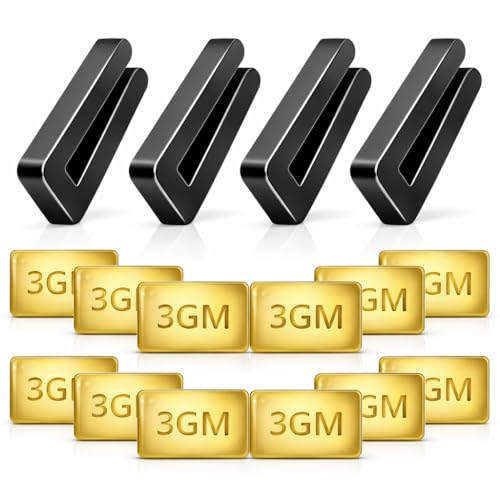
Then there’s the balancing kit, which people often toss aside during installation and completely forget about later. Those tiny balancing clips and adhesive weights actually serve a purpose. Used correctly, they help stabilize stubborn movement without requiring expensive repairs. Ceiling fan balancing works best when adjustments are made gradually instead of randomly sticking weights everywhere and hoping for the best.
Older fans can create a different challenge altogether. Motor wear, weakened blade arms, or years of vibration may slowly reduce stability. Sometimes the fan still functions perfectly well but simply needs a few refreshed components to stop the swinging motion. Replacing worn brackets or warped blades can dramatically improve performance without tearing apart the entire setup.
Good airflow should feel smooth and quiet, not distracting or nerve-racking. A properly balanced fan runs steadily, reduces unnecessary strain on the motor, and helps the entire room feel more comfortable. Once the movement settles down, the difference feels immediate. Suddenly, the room feels calmer again, and that constant wobble no longer steals your attention every few seconds.
- LFR Score10.0
LFR Score is a ranking system developed by lightfansreviews.com. LFR Score has no relationship or impact from any manufacturers or sales agent websites. Learn more
- BrandECNHIVE

- LFR Score9.2
LFR Score is a ranking system developed by lightfansreviews.com. LFR Score has no relationship or impact from any manufacturers or sales agent websites. Learn more
- BrandWestinghouse

- LFR Score9.0
LFR Score is a ranking system developed by lightfansreviews.com. LFR Score has no relationship or impact from any manufacturers or sales agent websites. Learn more
- BrandZNBSIXP
- LFR Score8.8
LFR Score is a ranking system developed by lightfansreviews.com. LFR Score has no relationship or impact from any manufacturers or sales agent websites. Learn more
- BrandHFYHWT

- LFR Score8.8
LFR Score is a ranking system developed by lightfansreviews.com. LFR Score has no relationship or impact from any manufacturers or sales agent websites. Learn more
- BrandWHMVPWT

- LFR Score8.6
LFR Score is a ranking system developed by lightfansreviews.com. LFR Score has no relationship or impact from any manufacturers or sales agent websites. Learn more
- BrandKALIONE

- LFR Score8.6
LFR Score is a ranking system developed by lightfansreviews.com. LFR Score has no relationship or impact from any manufacturers or sales agent websites. Learn more
- BrandFoyods

- LFR Score8.4
LFR Score is a ranking system developed by lightfansreviews.com. LFR Score has no relationship or impact from any manufacturers or sales agent websites. Learn more
- BrandFrienda

- LFR Score8.2
LFR Score is a ranking system developed by lightfansreviews.com. LFR Score has no relationship or impact from any manufacturers or sales agent websites. Learn more
- BrandAlpurple
- LFR Score6.8
LFR Score is a ranking system developed by lightfansreviews.com. LFR Score has no relationship or impact from any manufacturers or sales agent websites. Learn more
- BrandPH PandaHall
Last update on 2026-06-11 / Affiliate links / Images, Product Titles, and Product Highlights from Amazon Product Advertising API
How To Fix A Swinging Ceiling Fan
A quiet room gets annoying fast once the fan starts wobbling above your head like it’s had too much coffee. That side-to-side swing can make sleep harder, make guests stare upward, and leave you wondering whether the whole fixture is safe. The good news is that how to fix a swinging ceiling fan usually starts with simple checks: loose screws, uneven blades, and poor balance. A steady fan should move air, not your nerves.
Start With Safety Before Touching Anything
Safety comes first because a ceiling fan combines height, moving parts, and electrical wiring in one awkward spot. Turn the fan off, wait until the blades stop completely, and cut power at the switch before climbing a ladder. A wobbly fan can shift while you’re reaching upward, so use a stable ladder instead of a chair. Small shortcuts here can turn a simple repair into a bad afternoon.
Power control matters even if you’re only tightening screws or wiping blades. A wall switch can be bumped by mistake, and remote-control fans can surprise you if someone presses a button nearby. Keep the remote away while working and let everyone in the house know the fan is being checked. That little pause keeps the repair calm, careful, and less risky.
Fan height also changes how cautious you need to be. Low ceilings make blade movement easier to notice, but high ceilings make inspection harder and more tiring. If the fan hangs from a long downrod, steady the ladder before reaching toward the canopy. Wobble often feels worse on longer downrods because small movement near the motor becomes larger movement at the blade tips.
Visible damage should stop the repair before it starts. Cracked blade arms, bent brackets, scorched wiring smells, or a ceiling box that shifts by hand are not “tighten it and hope” problems. Those signs point to mounting weakness or worn parts that need a more serious fix. A fan should never feel like it’s loosely hanging from drywall.
Check The Mounting Bracket First
Mounting stability is the backbone of a calm ceiling fan. The bracket above the canopy holds the weight and absorbs the constant spinning force from the motor. If that bracket loosens, even perfectly balanced blades can still swing. Remove the canopy cover gently and look for movement where the fan connects to the ceiling box.
Loose mounting screws are common because fan vibration works like a tiny troublemaker over months of use. Screws that were snug during installation can loosen after repeated speed changes, especially on fans used daily. Tighten the bracket hardware evenly instead of cranking one side down hard. Uneven pressure can create a new tilt that keeps the fan wobbling.
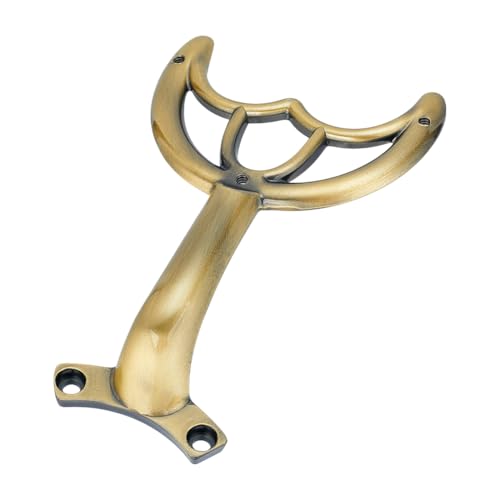
Ceiling fan-rated boxes matter more than many people realize. A standard light fixture box is not built to handle the weight and motion of a fan. If the box flexes, shifts, or looks unsupported, the fan may need a proper fan-rated brace before any balancing work makes sense. A strong ceiling connection keeps the entire repair grounded, literally and practically.
Canopy noise can also trick you into blaming the blades. Sometimes the fan sounds like it’s wobbling badly because the canopy cover taps the ceiling or rubs against a loose screw. Slide the canopy slightly, tighten its set screws, and check whether the noise changes. Small contact points can make a stable fan seem much worse than it is.
Tighten Blade Arms And Hardware
Blade arms take a beating every time the fan starts, stops, or changes speed. These metal brackets connect each blade to the motor housing, and even a small amount of looseness can create visible swinging. Check every screw where the blade meets the bracket and where the bracket meets the motor. Work in a slow circle so you don’t miss one hidden screw on the back side.
Even tightening helps prevent the fan from leaning into a new imbalance. Tighten screws until snug, but don’t strip them by forcing extra turns. Older screws may already have worn heads, so use the right screwdriver size and press firmly. If a screw spins without gripping, that blade connection needs repair before balancing will help.
Blade holder damage often shows up as tiny bends, cracks, or uneven gaps near the motor. One bent arm can drop a blade slightly lower than the others, creating a wobble that gets worse at medium or high speed. Compare each arm from the side while the fan is off. Matching shape and height across all arms is a big clue that the fan can be balanced successfully.
Light kit hardware deserves a quick check too, especially on fans with glass shades. A loose shade, loose bulb cover, or rattling light plate can add vibration and make the whole fan feel unstable. For lighting balance around the room, compare glare and task-light needs with best wattage desk lamp so the fan light doesn’t have to do every job. A fan works better when its lighting parts stay secure and its airflow job stays simple.
Clean Blades Before Balancing
Dust buildup sounds too minor to matter until you see how much collects on the top of each blade. One blade can hold more dust than another, especially near vents, kitchens, or open windows. That uneven weight creates a wobble that feels mysterious from the floor. Wipe each blade from root to tip with a damp cloth, then dry it so moisture doesn’t soak into wood or composite materials.
Blade surface condition matters during cleaning. Warped, swollen, chipped, or cracked blades may never balance correctly because their weight and shape have changed. Press gently along each blade and look for curves that don’t match the others. A blade that sags lower at the tip can pull the fan off-center with every spin.
Consistent cleaning also helps you spot loose parts faster. Dust can hide screw heads, cracks, and separation near the blade bracket. Once everything is clean, the fan’s real condition becomes easier to read. That’s why cleaning should happen before moving weights around or blaming the motor.
Airflow quality improves after cleaning too. Dirty blades move air less smoothly, and rough dust edges can add faint noise as they cut through the room. Clean blades make the fan quieter, lighter, and easier to diagnose. It’s not glamorous, but it’s one of those boring fixes that often pays off.
Measure Blade Height And Alignment
Blade alignment separates a quick fix from a guessing game. Pick one spot on the ceiling and measure from that spot down to the tip of each blade. Write down the measurements instead of eyeballing them because small differences can be hard to see. A blade sitting lower or higher than the rest can create the swinging motion you’re trying to stop.
Consistent spacing tells you whether the blade arms are bent or mounted unevenly. If one blade tip measures differently, gently bend the blade arm back into line only if the metal allows it and shows no cracks. Move slowly because overcorrecting can make the wobble worse. Small adjustments beat big heroic pushes every time.
Blade pitch also affects stability. The pitch is the angle that helps the blade push air downward or upward, depending on fan direction. If one blade sits at a slightly different angle, it catches air differently and pulls against the rotation. That uneven air resistance can make the fan swing even when all screws are tight.
Room setup can exaggerate fan movement too. Strong cross-breezes from open windows, tall furniture near airflow paths, or heavy drapes moving near the fan can make wobble more noticeable. For rooms with camera setups or soft lighting needs, explore best floor lamp streaming so you’re not relying on an unstable fan light during video calls. Steadier lighting and steadier airflow make the room feel less chaotic.
Use A Balancing Kit The Right Way
Balancing kits look tiny, but they solve plenty of stubborn ceiling fan wobble problems. Most kits include a plastic clip and small adhesive weights. The clip temporarily tests where extra weight helps, while the adhesive piece becomes the permanent correction. This method works best after screws are tight, blades are clean, and alignment has already been checked.
Testing one blade at a time keeps the process from turning into a guessing mess. Place the clip near the middle of one blade, run the fan at the speed where it wobbles most, then turn it off and move to the next blade. Notice whether the swinging gets better, worse, or stays the same. The goal is to find the blade where the clip makes the biggest improvement.
Weight placement needs patience because the best spot is not always the blade tip. Once you find the problem blade, slide the clip closer to the motor or farther toward the end and test again. A half-inch change can make a real difference on some fans. After the wobble drops noticeably, stick the adhesive weight on top of the blade where it stays hidden.
Speed testing confirms whether the repair actually worked. A fan may look fine on low speed but wobble badly on high, or the opposite can happen with older motors. Test low, medium, and high after placing the weight. A good balance should reduce visible swing across normal everyday speeds, not just one setting.
Know When The Fan Design Is The Problem
Fan design can limit how much improvement you’ll get from tightening and balancing. Lightweight blades, long downrods, and flexible housings can make some fans more prone to motion. A small wobble may be normal on certain models, but strong swinging is not. The key is judging whether the movement is minor cosmetic sway or a sign of stress at the mount.
Blade size should fit the room. Oversized fans in cramped rooms can look dramatic, but they may move too much air too close to walls and furniture. Undersized fans often get run at higher speeds, which can make weak hardware show itself faster. A well-matched fan usually runs quieter because it doesn’t have to work so hard.
Lighted fan bodies sometimes wobble more if the light kit adds weight below the motor. Glass shades, decorative cages, and large integrated lights can shift the center of gravity. Tight hardware helps, but bulky designs still need careful balancing. For a different airflow setup, compare best bladeless ceiling fans if exposed blades feel too distracting in tight spaces.
Realistic expectations keep the repair honest. A fan that has warped blades, bent arms, and a questionable ceiling box may need parts or replacement rather than endless weight adjustments. A balancing kit can’t fix a weak mount, and tight screws can’t repair damaged metal. The smartest repair is the one that solves the actual cause, not just the symptom you can see from the couch.
Fixing A Wobbling Ceiling Fan Without Replacing It
Most people don’t notice their ceiling fan until it starts acting weird during the quietest part of the evening. One minute the room feels comfortable, then suddenly the blades start wobbling hard enough to pull your attention away from everything else. A shaky fan can feel irritating, distracting, and honestly a little unsafe. The good part is that fixing a wobbling ceiling fan usually takes patience and careful inspection more than expensive tools or advanced repair skills.
Watch How The Fan Behaves At Different Speeds
Fan speed behavior reveals problems many people miss during quick inspections. Some fans stay steady on low speed but begin swinging aggressively once airflow increases. Others wobble more during slow rotation because the blades struggle to maintain even momentum. Watching the fan closely at every speed setting helps narrow down whether the issue comes from balance, motor strain, or mounting instability.
Motor noise also gives useful clues. A humming sound combined with wobbling may point toward loose internal components or aging bearings. Clicking sounds often connect to blade hardware or loose light kits instead of the motor itself. Paying attention to sound patterns can save time and prevent random adjustments that solve nothing.
Direction changes can expose hidden problems too. Ceiling fans spinning clockwise during cooler months sometimes wobble differently than during counterclockwise summer rotation. That shift happens because airflow resistance changes across the blades. A fan that suddenly behaves differently after reversing direction deserves another close inspection of blade alignment.
Room vibration matters more than people think. Lightweight ceilings or older homes sometimes amplify movement that would barely show elsewhere. Heavy footsteps upstairs or nearby door slams can create extra shaking around weak mounting points. Stable airflow should feel smooth instead of making furniture, light fixtures, or walls subtly rattle.
Inspect Blade Material For Warping
Blade condition changes slowly over time, especially in rooms with humidity swings or poor ventilation. Wooden blades can absorb moisture and develop slight warping that throws off balance during rotation. Plastic blades may bend from long-term heat exposure near attic ceilings or enclosed sunrooms. Even tiny shape changes can create noticeable side-to-side movement.
Blade edges should look consistent from every angle. Hold your eye level with the blade tips and compare how each one lines up against the ceiling. One warped blade can dip lower, tilt differently, or catch airflow unevenly. Those subtle differences often explain why tightening screws alone fails to stop the wobble.
Surface damage creates problems beyond appearance. Cracks near screw holes weaken stability because the blade shifts slightly during rotation. Peeling laminate or swollen wood layers can change the blade’s weight distribution too. Replacing damaged blades usually improves performance faster than trying endless balancing adjustments.
Fan appearance still matters in everyday spaces. Some people replace older blade styles simply because the room feels dated after years of wear. If style upgrades are already on your radar, explore black ceiling fans style ideas that blend modern finishes with smoother airflow designs. Fresh blade materials and updated hardware often reduce wobble problems at the same time.
Check The Downrod Connection Carefully
Downrod movement can make a fan appear far worse than it really is. A small amount of movement is normal because many fans are designed to float slightly while spinning. Excessive swaying, though, often points toward a loose ball joint or poorly tightened connection near the mounting bracket. That upper connection deserves a closer look before replacing parts lower down.
Set screws inside the downrod assembly tend to loosen gradually from vibration. Fans used daily for years can slowly work hardware loose without obvious warning signs. Tightening those screws firmly helps stabilize the fan body and reduce extra movement during higher speeds. Loose downrod hardware creates a wobble that balancing kits usually cannot fix.
Downrod length changes the way wobble appears visually. Longer rods exaggerate side movement because the fan hangs farther from the ceiling mount. A tiny imbalance near the motor can look dramatic from the floor once the fan sits several feet lower. That doesn’t always mean the fan is unsafe, but it does mean balance becomes more sensitive.
Ceiling slope creates another challenge in angled rooms. Fans installed on vaulted ceilings rely on angled mounts that must stay perfectly secure. Poor installation angles can make the fan lean awkwardly even before the motor starts spinning. Correct mounting hardware keeps the fan aligned with gravity instead of fighting against it.
Pay Attention To Seasonal Changes Indoors
Humidity levels affect ceiling fans more than most people expect. Warm summer moisture can slightly expand wooden blades, while dry winter air may shrink them again. That constant expansion and contraction changes balance over time. A fan that felt stable for months can suddenly wobble once indoor conditions shift.
Temperature swings also impact mounting materials and screw tightness. Metal components expand slightly during warmer periods and contract again when temperatures drop. Small hardware gaps may appear after seasonal changes, especially in rooms near attics or poorly insulated ceilings. Retightening fan hardware once or twice a year helps prevent those gradual stability problems.
Dust buildup usually increases during heating and cooling season changes too. Air vents push extra particles around the room, and ceiling fan blades collect much of it quietly over time. Uneven dust layers may seem harmless but can absolutely create imbalance during rotation. Consistent cleaning keeps airflow smoother and reduces strain on the motor.
Lighting balance changes with the seasons as well. Rooms relying heavily on overhead lighting sometimes feel harsher during darker months, especially in smaller spaces. For softer task lighting in compact bedrooms or study spaces, compare best desk lamps dorm rooms setups that reduce dependence on bright ceiling fixtures. Less strain on the ceiling fan light kit can help minimize extra vibration too.
Know The Signs Of Motor Trouble
Motor problems create different symptoms than simple blade imbalance. A worn motor often struggles to maintain consistent speed and may sound rough even after balancing adjustments. Fans with failing bearings sometimes wobble slightly because the internal rotation no longer stays smooth. Mechanical wear inside the housing changes the way the blades move through the air.
Burning smells should never be ignored. Overheating motors can produce a faint hot-metal or electrical odor, especially after long operation at high speed. Shut the fan off immediately if unusual smells appear during testing. Continuing to run an overheating fan can damage wiring and increase fire risk.
Motor heat offers another warning sign. Ceiling fan motors naturally get warm, but excessive heat combined with wobbling usually points toward internal strain. Dust-clogged vents, worn bearings, or overloaded components can all contribute to overheating. A struggling motor forces the fan to work harder just to maintain steady rotation.
Repair limits matter here. Tightening screws and balancing blades can solve many wobble problems, but worn motor components may require replacement instead of endless troubleshooting. Spending hours adjusting blade weights won’t repair internal bearing damage. Knowing where simple maintenance ends saves frustration and wasted effort.
Avoid Common Repair Mistakes
Overtightening screws creates problems people rarely expect. Cranking screws down too hard can strip mounting holes or crack blade materials, especially on older fans. Secure hardware should feel firm, not forced. Gentle, even tightening keeps the fan stable without damaging the parts holding everything together.
Random balancing attempts often make wobble worse. Some people stick adhesive weights on multiple blades without testing each adjustment carefully. That approach creates confusion because every added weight changes the fan’s rotation differently. Slow, methodical testing gives far better results than rushed trial and error.
Ignoring the ceiling box is another common mistake. Plenty of wobbling fans get blamed on blades even though the actual movement starts above the canopy. Weak electrical boxes or poor mounting braces allow the entire fan assembly to shift during operation. Stable support matters more than cosmetic blade adjustments.
Skipping regular maintenance lets small issues build quietly over time. Dust collects, screws loosen, and tiny vibrations grow stronger month after month. Quick seasonal inspections take only a few minutes but can prevent bigger repairs later. Ceiling fans usually give subtle warnings before serious wobbling begins.
Balance Comfort And Long Term Reliability
Steady airflow changes the feel of a room more than people realize. A balanced fan creates quieter circulation, smoother sleep conditions, and less visual distraction during everyday routines. Small repairs often restore that calm feeling almost immediately. Once the wobble disappears, the room tends to feel noticeably more relaxing.
Motor lifespan improves when the fan spins evenly. Constant wobbling places extra stress on bearings, brackets, and mounting hardware that were designed for balanced rotation. Reducing vibration helps the motor operate with less strain over time. That smoother operation can delay costly replacement decisions.
Energy efficiency also improves slightly with stable airflow. Fans that wobble aggressively waste movement through uneven rotation instead of directing airflow consistently through the room. Balanced blades move air more predictably, which supports better comfort during hot weather. Stable fans often feel more effective even without changing speed settings.
Confidence in the repair matters too. A ceiling fan should feel dependable instead of making you glance upward every few minutes wondering if something’s loose again. Tight hardware, balanced blades, and solid mounting all work together to create that steady feeling people expect from a properly functioning fan. Quiet operation usually becomes the clearest sign that the repair finally solved the real issue.


Best Small Flush Mount Ceiling Fans 2026 Ultimate Picks

Best Smart Ceiling Fan India 2026 For Effortless Comfort

Best Smart Ceiling Fans with Lights for 2026: Top Picks

Best Smart Home Non Ceiling Fans 2026 For Ultimate Comfort

Best Outdoor Misting Ceiling Fan 2026 For Ultimate Comfort

Best Outdoor Ceiling Fans For Porch 2026 With Style And Breeze

Best Smart Bulb For Ceiling Fan 2026 That Brightens Life

Best Smart Ceiling Fan Control 2026 For Effortless Comfort






