
How To Fix A Wobbly Flush Mount Ceiling Fan Fast

How To Fix A Wobbly Flush Mount Ceiling Fan usually starts with spotting the little things most people ignore. Loose screws, uneven blades, worn mounting brackets, or dust buildup can slowly turn a quiet fan into a noisy headache. That constant wobble isn’t just irritating either. Over time, the shaking can stress electrical connections, damage the motor housing, and make the entire fixture feel unstable every single night.
Most people notice the problem after hearing clicking sounds or seeing the fan sway more aggressively at higher speeds. That’s where frustration kicks in. Nobody wants to sit under a ceiling fan that looks like it’s about to rattle itself loose. Still, replacing the whole fixture often isn’t necessary. A few careful adjustments can dramatically improve stability and reduce the vibration that keeps drawing attention every time the fan spins.
Blade balance plays a huge role in fan movement. Even one slightly warped blade can throw off the entire rotation. Dust buildup may sound harmless, yet uneven debris accumulation changes blade weight enough to create visible wobbling. Tightening blade screws helps, but the mounting system matters just as much. Flush mount fans sit close to the ceiling, so any looseness in the bracket or canopy tends to amplify movement instead of absorbing it.
Electrical box stability often gets overlooked too. A weak or poorly secured ceiling box can shift under the fan’s weight, especially after months of constant use. That subtle movement transfers directly into the fan body, creating shaking that gets worse at medium or high speeds. Checking mounting hardware carefully can prevent ongoing wear and tear before it snowballs into a larger repair.
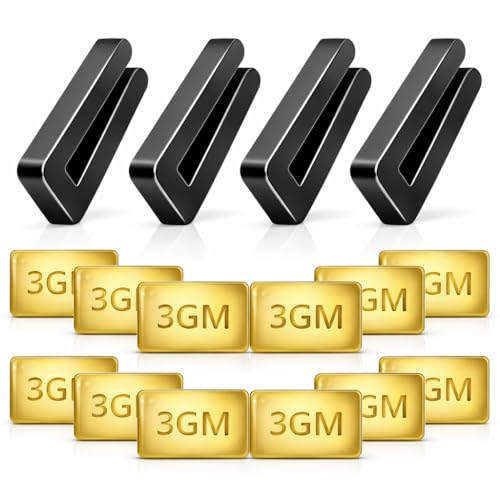
Fan balancing kits can also make a surprising difference. Those tiny balancing clips and adhesive weights might seem insignificant at first glance, yet they help correct uneven rotation with precision. Small adjustments matter here. One clip placed in the right spot can calm an aggressive wobble almost instantly, which honestly feels pretty satisfying after dealing with nonstop rattling noises.
Airflow issues sometimes contribute to the problem as well. Improper blade installation angles can create inconsistent drag, causing the fan to rock back and forth instead of spinning smoothly. Older flush mount models may also develop worn rubber components or loose internal fittings that increase movement over time. Paying attention to those hidden details helps restore quieter operation and steadier airflow.
Routine maintenance keeps things from spiraling out of control later. Cleaning the blades regularly, checking screw tightness every few months, and inspecting mounting hardware can extend the fan’s lifespan significantly. How To Fix A Wobbly Flush Mount Ceiling Fan isn’t always complicated, but ignoring the warning signs can turn a simple adjustment into a much bigger repair down the road.
- LFR Score10.0
LFR Score is a ranking system developed by lightfansreviews.com. LFR Score has no relationship or impact from any manufacturers or sales agent websites. Learn more
- BrandECNHIVE

- LFR Score10.0
LFR Score is a ranking system developed by lightfansreviews.com. LFR Score has no relationship or impact from any manufacturers or sales agent websites. Learn more
- BrandSbarklo

- LFR Score9.4
LFR Score is a ranking system developed by lightfansreviews.com. LFR Score has no relationship or impact from any manufacturers or sales agent websites. Learn more
- BrandSealproof

- LFR Score9.2
LFR Score is a ranking system developed by lightfansreviews.com. LFR Score has no relationship or impact from any manufacturers or sales agent websites. Learn more
- BrandWestinghouse

- LFR Score9.0
LFR Score is a ranking system developed by lightfansreviews.com. LFR Score has no relationship or impact from any manufacturers or sales agent websites. Learn more
- BrandZNBSIXP
- LFR Score8.8
LFR Score is a ranking system developed by lightfansreviews.com. LFR Score has no relationship or impact from any manufacturers or sales agent websites. Learn more
- BrandHFYHWT

- LFR Score8.6
LFR Score is a ranking system developed by lightfansreviews.com. LFR Score has no relationship or impact from any manufacturers or sales agent websites. Learn more
- BrandFoyods

- LFR Score8.6
LFR Score is a ranking system developed by lightfansreviews.com. LFR Score has no relationship or impact from any manufacturers or sales agent websites. Learn more
- BrandKALIONE

- LFR Score8.4
LFR Score is a ranking system developed by lightfansreviews.com. LFR Score has no relationship or impact from any manufacturers or sales agent websites. Learn more
- BrandKALIONE
Last update on 2026-06-11 / Affiliate links / Images, Product Titles, and Product Highlights from Amazon Product Advertising API
How To Fix A Wobbly Flush Mount Ceiling Fan
A shaky fan has a way of stealing the whole room’s peace, especially when the blades start ticking like a tiny ceiling clock with attitude. The problem feels worse with a low-profile fan because the housing sits tight against the ceiling, so every tremble looks more dramatic. Learning how to fix a wobbly flush mount ceiling fan starts with slowing down, checking the obvious stuff first, and not assuming the whole fan needs replacing. Most wobble issues come from loose hardware, blade imbalance, or a mounting box that isn’t holding steady.
Wobbly Fan Fix Basics
A flush mount fan doesn’t have much room to hide movement, so even a small imbalance can look a bit sketchy. The fan may still run, sure, but constant shaking puts stress on screws, blade arms, the motor housing, and the ceiling connection. That’s why the first move is always simple: shut off the fan, let it stop completely, and check the visible parts before touching anything deeper. Safety beats guesswork every single time.
Start with the blades because they take the most abuse from dust, bumps, and small shifts over time. A layer of grime on one blade can weigh more than the buildup on another, and that tiny difference can create uneven rotation. Wipe each blade from root to tip with the same pressure, then dry the surfaces so moisture doesn’t affect the finish. It sounds basic, but clean blades solve more wobble problems than people expect.
Next, look at every blade screw and blade arm screw you can reach. A screw that feels only slightly loose can still cause blade flutter once the fan picks up speed. Tighten them gently rather than cranking down hard, because stripped screws turn a small repair into a headache. The goal is firm contact, not brute force.
Check the canopy and motor housing after the blades are clean and tight. A flush mount fan depends on a snug connection at the ceiling, so mounting stability matters a lot. If the canopy shifts by hand or the fan body rocks before the blades even move, the wobble likely starts above the motor. That clue tells you to focus on the bracket, electrical box, and ceiling support instead of blaming the blades right away.
Check The Ceiling Mount First
The ceiling mount is the backbone of the entire fan, and a weak one can make every other repair feel useless. A fan-rated electrical box should hold the fixture securely, while a regular light box may not handle the moving load well. That difference matters because a ceiling fan creates dynamic force, not just dead weight. If the box shifts or creaks, stop and treat the support as the main problem.
Remove the canopy only after cutting power at the breaker, not just the wall switch. Once the canopy is down, inspect the bracket screws, hanger plate, and any visible movement around the box. A secure mount should feel solid, with no side-to-side play when gently tested. Loose bracket screws can be tightened, but a loose or improper ceiling box may require a fan-rated replacement.
Many wobble complaints start after a fan has run quietly for months, then slowly gets louder. That slow change often points to hardware loosening from vibration rather than a defective fan. Ceiling fans spin thousands of times during regular use, so tiny shifts are normal. Catching them early keeps the motor from fighting against an unstable mount.
Room setup can make the problem feel worse too. A fan near tall shelves, uneven airflow, or strong HVAC vents may show extra movement at certain speeds. For task areas with screens and lighting nearby, reduce eye strain around the workspace by pairing stable airflow with a focused setup like a best desk lamp for dual monitors. A calmer room setup makes fan noise and visible wobble easier to diagnose without other distractions muddying the picture.
Tighten Blades Without Overdoing It
Blade screws deserve patience because they’re easy to overtighten. A loose screw lets the blade shift, but an over-tightened one can distort the blade holder or damage softer materials. That tiny bend can create balance problems that weren’t there before. Tighten each screw evenly, then compare how each blade sits against its bracket.
Blade arms should match each other in angle and height. Stand on a stable ladder, pick one blade tip, and measure the distance from the blade tip to the ceiling. Rotate the fan by hand and check every blade at the same spot. If one blade sits noticeably higher or lower, that difference can cause wobbling at speed.
Small bends in blade arms can happen during cleaning, moving furniture, or replacing bulbs. A slight twist may not look serious, but fan blades depend on consistent pitch. Don’t yank the arm back into place, though. Gentle adjustment works better, and replacement is smarter if the metal looks cracked, warped, or weakened.
Blade material also matters. MDF, wood, and plastic blades can warp with humidity, heat, or age. A warped blade often creates uneven airflow, even if every screw is tight. If one blade looks bowed compared with the others, balancing weights may help a little, but replacement usually gives a cleaner fix.
Balance The Blades The Smart Way
A balancing kit looks almost too simple, but it can calm a fan that still wobbles after tightening and cleaning. The kit usually includes a plastic clip and small adhesive weights. The clip helps locate the heavy or light spot, while the weight creates smoother rotation. It’s a trial-and-error job, so don’t rush it.
Start by placing the clip near the middle of one blade, then run the fan at the speed where the wobble is most obvious. Move blade by blade until the shaking improves. Once you find the best blade, slide the clip inward and outward to fine-tune the spot. That little process helps pinpoint the most effective place for the balancing weight.
Stick the adhesive weight on top of the blade where it won’t be visible from below. Clean the spot first so the adhesive holds properly. A dusty blade can make the weight fall off later, and then, yep, the wobble comes right back. Proper placement gives the fan a better chance at quiet operation without adding strain to the motor.
Speed matters during balancing. Some fans wobble on high but behave on low, while others shake at medium because of resonance. Test each speed after adding the weight so you’re not fixing one setting while making another worse. The best result is steady movement across the speeds used most often, not perfection that only happens on one setting.
Track Noise Clues While Testing
Noise tells a story if you listen closely. A rhythmic clicking sound often points to a loose blade screw, a blade arm touching the housing, or a pull chain tapping the light kit. A deeper knocking sound may suggest mounting movement or internal looseness. Different sounds help narrow the search instead of turning the repair into a guessing game.
Turn off nearby noise sources before testing the fan. Lamps, vents, loose decor, and even window blinds can confuse the sound. Lighting can also affect what you notice during inspection, especially if older bulbs flicker or cast uneven shadows, so compare bulb behavior with practical basics from what is cfl light bulb before blaming every flicker on fan vibration. Clear visibility helps you spot blade wobble, canopy movement, and small gaps around the housing.
Run the fan at low speed first, then medium, then high. Watch the canopy, motor housing, and blade tips separately. If only the blade tips blur unevenly, the issue likely sits in the blades or arms. If the whole fan body moves, the ceiling mount needs closer attention.
Don’t ignore a scraping sound. Scraping can mean the canopy is rubbing the ceiling, the motor housing is misaligned, or a wire is positioned poorly inside the cover. Shut the fan off if the sound gets sharper or more frequent. A wobble fix should never involve letting a suspicious noise “settle in.”
Use Fan Direction To Reduce Seasonal Strain
Fan direction can affect comfort, especially in rooms where heat gathers near the ceiling. During colder months, many ceiling fans run clockwise at a low speed to help circulate warm air without creating a chilly draft. That gentler setting can reduce how often the fan runs at higher speeds, which helps limit vibration stress. Less strain means fewer chances for screws and brackets to loosen quickly.
Direction won’t repair a loose mount or warped blade, but it can reveal how the fan behaves under different airflow loads. Switch direction only after the blades stop completely. Then run the fan at a low setting and watch for new movement. A stable fan should stay steady in either direction, though airflow may feel different.
Seasonal habits matter more than people think. A fan that runs on high all summer and then sits unused for months may develop small issues that show up later. Before changing seasonal settings, compare airflow habits with best ceiling fan direction for winter so the fan supports comfort without unnecessary speed. Smart use protects motor life and keeps the room feeling more even.
Flush mount fans in bedrooms, kitchens, and low-ceiling rooms often get used daily. That constant use makes routine checks worth the effort. Every few months, inspect screws, clean the blades, and watch the fan at each speed for a minute. A quick check can catch small wobble signs before they turn into rattling, shaking, and that uneasy feeling every time the fan spins overhead.
Fixing Flush Mount Ceiling Fan Wobble Permanently
Some fans stop wobbling for a week, then slowly drift right back into that annoying side-to-side shake. That cycle usually means the real issue never got fully handled in the first place. A quick tightening session might calm things temporarily, but long-term stability depends on consistent airflow balance, secure mounting pressure, and keeping stress off the motor assembly. Small details matter more than most people expect with low-profile ceiling fans.
Watch For Motor Housing Movement
A lot of people focus only on the blades while ignoring the fan body itself. The motor housing should stay relatively steady during operation, even at higher speeds. If the center housing rocks while the blades look mostly even, the problem often points toward internal looseness or mounting instability instead of blade balance. That difference changes the entire repair approach.
Older flush mount fans sometimes develop worn rubber bushings or loose internal fasteners near the motor assembly. Those parts absorb vibration during normal use, but years of spinning can dry them out or weaken the fit. The fan may sound deeper and rougher rather than producing a light clicking noise. That heavier vibration usually signals motor strain instead of simple blade imbalance.
Heat buildup can also affect motor stability. A fan installed in kitchens, humid bedrooms, or rooms with poor ventilation may collect grease and moisture inside the housing over time. That residue creates resistance around moving parts and makes the fan work harder than it should. Cleaning visible buildup carefully around vents and housing edges helps maintain smoother airflow and reduces excess vibration.
Fan style plays a role too. Some compact flush mount models prioritize appearance over airflow balance, especially slimmer decorative designs. If appearance matters alongside performance, compare room trends and airflow practicality through are ceiling fans in style before replacing the fixture entirely. A balanced fan should feel visually calm, not distracting every time someone walks into the room.
Spot Blade Warping Early
Blade warping sneaks up slowly, especially in rooms with humidity swings or direct sunlight. One blade may absorb moisture differently than the others, causing slight curvature that changes airflow resistance. The wobble might start subtle, then gradually become impossible to ignore. That uneven drag creates unstable rotation even if every screw feels tight.
Hold a straight edge along each blade if the fan continues wobbling after balancing attempts. Compare the shape carefully rather than relying on a quick glance from below. A warped blade may tilt upward slightly near the tip or twist along one edge. Those little distortions throw off blade pitch consistency, which affects both airflow and stability.
Wood composite blades tend to react more to moisture than metal or thick plastic versions. Bathrooms, laundry areas, and poorly ventilated bedrooms create tougher conditions for lightweight blade materials. A fan that runs fine during dry seasons may wobble noticeably once humidity climbs. Paying attention to room conditions helps prevent repeated repairs caused by environmental stress.
Replacing only one warped blade sounds tempting, but mismatched blade weight or finish can create fresh balance issues. Manufacturers design blade sets to work together with specific pitch and weight ranges. Swapping the full set usually gives more predictable results. It also restores even airflow distribution, which makes the fan feel smoother overall.
Reduce Vibration Through Better Airflow
Airflow resistance changes how hard the motor works, and that pressure can amplify wobble if the fan already has minor balance issues. Thick curtains, tall cabinets, or shelving placed too close to the blades can disrupt circulation patterns. The fan ends up fighting uneven air pockets during rotation. That extra drag often creates visible shaking at medium or high speeds.
Low ceilings make the issue more noticeable because the fan operates in tighter airflow space. Flush mount fans already sit close to the ceiling, so cluttered layouts can worsen turbulence. Rearranging nearby furniture or reducing obstructions sometimes improves stability more than expected. Better circulation helps maintain consistent blade resistance during rotation.
Dust buildup around vents and motor housing also affects airflow efficiency. Fans pull airborne particles constantly, especially in rooms with pets, carpet, or open windows. Over time, debris collects inside gaps and around blade brackets. Cleaning those areas regularly supports motor cooling and reduces strain during long operation periods.
Compact cooling setups in smaller rooms often face similar airflow challenges. Tight layouts, heat buildup, and restricted circulation can affect stability in both ceiling fans and desktop cooling systems. For smaller workspace cooling setups, compare airflow-focused designs through best mini itx cpu fan to see how balanced air movement improves long-term performance. Stable airflow keeps mechanical parts from working harder than necessary.
Know When The Ceiling Box Is The Problem
A ceiling fan can’t stay stable if the electrical box shifts above it. Standard light fixture boxes sometimes get reused during fan installation, and that shortcut causes trouble later. Ceiling fans create movement constantly, even at low speeds. A weak box may hold initially, then loosen gradually until fan wobble becomes obvious.
Watch the ceiling carefully while the fan runs. Tiny movement around the canopy or slight gaps near the mounting area can reveal a shifting box. Creaking sounds during speed changes also hint at support issues. Those warning signs deserve attention before the stress damages drywall or loosens wiring connections.
Fan-rated boxes use stronger mounting systems designed for rotating weight and vibration. Replacing an old box takes extra effort, but it solves recurring instability problems more effectively than endless balancing attempts. A properly secured support system helps protect both the fan and ceiling structure from long-term wear. Strong mounting creates safer operation and quieter performance.
Ignoring a weak ceiling box can eventually affect the fan motor too. Constant movement forces the motor assembly to compensate during rotation, increasing internal strain over time. The fan may start humming louder or slowing unevenly between speeds. Stable mounting reduces mechanical stress and helps the fan maintain smoother rotation.
Prevent Wobble From Returning
A stable fan still needs occasional maintenance because vibration slowly loosens hardware over months of use. Quick seasonal inspections make a huge difference. Tighten screws gently, wipe blades evenly, and check for changes in sound or movement before the wobble becomes obvious again. Five minutes of maintenance can prevent a much larger repair later.
Cleaning routines matter more than people think. Dust rarely settles evenly across all blades, especially near vents or windows. Uneven buildup changes blade weight little by little until balance shifts enough to affect rotation. Regular cleaning keeps blade balance and airflow efficiency more consistent throughout the year.
Pay attention to changes after replacing bulbs or adjusting room layouts too. Added heat, altered airflow, or accidental bumps during cleaning can shift fan behavior. A fan that suddenly develops wobble after moving furniture or changing lighting often reacts to environmental changes rather than mechanical failure. Watching those patterns helps avoid unnecessary part replacements.
Stable operation usually comes down to habits rather than complicated repairs. Consistent cleaning, occasional hardware checks, and balanced airflow help flush mount fans stay quieter and steadier for years. A fan shouldn’t demand constant attention every time it spins. Smooth rotation, low noise, and steady airflow create the kind of comfort people expect when they switch the fan on after a long day.


Best Small Flush Mount Ceiling Fans 2026 Ultimate Picks

Best Smart Ceiling Fan India 2026 For Effortless Comfort

Best Smart Ceiling Fans with Lights for 2026: Top Picks

Best Smart Home Non Ceiling Fans 2026 For Ultimate Comfort

Best Outdoor Misting Ceiling Fan 2026 For Ultimate Comfort

Best Outdoor Ceiling Fans For Porch 2026 With Style And Breeze

Best Smart Bulb For Ceiling Fan 2026 That Brightens Life

Best Smart Ceiling Fan Control 2026 For Effortless Comfort






