
How To Fix An Out Of Balance Ceiling Fan Fast

How to fix an out of balance ceiling fan keeps popping up the second that irritating wobble starts stealing your peace and quiet. One minute the fan spins smoothly, then bam, the blades start shaking like they’ve had too much coffee. That constant clicking noise, the rattling light kit, and the subtle ceiling vibration can turn a relaxing room into a low-key headache. Most people assume the whole fan is worn out, but honestly, the issue usually comes down to a few fixable details.
Loose screws create more trouble than people expect. Tiny gaps around blade brackets or mounting hardware slowly throw the entire fan off balance over time. Dust buildup also plays a sneaky role because uneven weight across the blades changes the fan’s rotation. A thick layer sitting on one blade while the others stay clean can create enough imbalance to cause visible wobbling.
Ceiling fan balancing often sounds technical, yet the actual process is surprisingly manageable with patience and a steady approach. Blade alignment matters a lot because even slight differences in blade angle can affect airflow and rotation. Sometimes one warped blade is the real culprit, especially in humid rooms where moisture gradually bends lightweight materials. Other times, the mounting box inside the ceiling shifts slightly, creating instability that worsens every week.
That annoying shaking doesn’t only affect comfort either. Persistent wobbling places stress on the motor, mounting bracket, and electrical connections. Over time, neglected vibration can shorten the fan’s lifespan and loosen nearby fixtures. Nobody wants to lie in bed wondering whether the fan overhead sounds safe, right?
How to fix an out of balance ceiling fan usually starts with simple troubleshooting instead of expensive replacements. Tightening screws, cleaning blades evenly, checking blade height, and using a balancing kit can dramatically improve stability. Small clip-on balancing weights may look insignificant, but wow, they can calm a shaky fan faster than expected. The trick is testing one adjustment at a time instead of changing everything at once.
Room conditions matter too. Fans installed on angled ceilings or in humid environments tend to drift out of alignment faster than those in dry, stable spaces. Seasonal temperature swings can also loosen hardware little by little. Regular inspections help prevent wobbling from escalating into noisy operation or mechanical wear.
Fan blade alignment, secure mounting, and balanced airflow all work together like pieces of a puzzle. Ignore one detail and the wobble often returns a few weeks later. A properly balanced fan should spin quietly, feel stable at every speed, and move air without that irritating side-to-side sway. Once everything lines up correctly, the entire room feels calmer and noticeably more comfortable.

- LFR Score9.4
LFR Score is a ranking system developed by lightfansreviews.com. LFR Score has no relationship or impact from any manufacturers or sales agent websites. Learn more
- BrandRACO

- LFR Score9.0
LFR Score is a ranking system developed by lightfansreviews.com. LFR Score has no relationship or impact from any manufacturers or sales agent websites. Learn more
- BrandZNBSIXP
- LFR Score8.8
LFR Score is a ranking system developed by lightfansreviews.com. LFR Score has no relationship or impact from any manufacturers or sales agent websites. Learn more
- BrandHFYHWT

- LFR Score8.6
LFR Score is a ranking system developed by lightfansreviews.com. LFR Score has no relationship or impact from any manufacturers or sales agent websites. Learn more
- BrandKALIONE

- LFR Score8.6
LFR Score is a ranking system developed by lightfansreviews.com. LFR Score has no relationship or impact from any manufacturers or sales agent websites. Learn more
- BrandFoyods

- LFR Score8.4
LFR Score is a ranking system developed by lightfansreviews.com. LFR Score has no relationship or impact from any manufacturers or sales agent websites. Learn more
- BrandKALIONE

- LFR Score8.2
LFR Score is a ranking system developed by lightfansreviews.com. LFR Score has no relationship or impact from any manufacturers or sales agent websites. Learn more
- BrandAlpurple
Last update on 2026-06-08 / Affiliate links / Images, Product Titles, and Product Highlights from Amazon Product Advertising API
How To Fix An Out Of Balance Ceiling Fan
A shaky fan can make a quiet room feel oddly tense, especially when the light kit rattles and the blades sway like they’re about to argue with the ceiling. Most wobble problems look worse than they are, and how to fix an out of balance ceiling fan usually starts with small checks that don’t require fancy tools. A loose screw, uneven dust, or one slightly warped blade can throw the whole thing off. The good news is that steady troubleshooting can calm the wobble before it turns into motor strain, annoying noise, or a bigger repair bill.
Ceiling Fan Wobble Signs
Ceiling fan wobble rarely starts with a dramatic swing. Usually, it begins with a faint clicking sound, a light shade that buzzes, or a blade set that seems just a hair uneven at higher speeds. That little movement matters because a ceiling fan spins hundreds of times during a normal cooling session. Left alone, small vibration can work screws loose and make the fan feel less secure over time.
A fan that wobbles only on high speed may still have a balance problem, not a failed motor. Higher speed exaggerates tiny weight differences across the blades, so the issue becomes easier to see. A fan that shakes at every speed needs a closer look at the mounting bracket, downrod, blade arms, and canopy. The trick is not to panic because visible movement doesn’t automatically mean the fan is unsafe.
Noise gives helpful clues too. A rhythmic tick often points to a blade bracket, while a dull knocking sound may come from the canopy or downrod. A scraping sound is more serious because it may mean a moving part is rubbing inside the housing. Listening closely helps separate a simple blade alignment issue from a deeper mechanical problem.
Start by turning the fan off and letting the blades stop fully. Never grab a moving blade, even if the wobble looks mild. Place a sturdy step ladder under the fan, then check the fixture at eye level instead of guessing from the floor. A careful first look saves time because fan stability depends on several connected parts working together.
Check Screws And Mounting
Loose screws are the boring culprit nobody wants to hear about, but they cause a surprising amount of ceiling fan wobble. Blade screws, blade arm screws, canopy screws, and light kit screws can loosen from regular vibration. Tighten each one gently instead of cranking down too hard. Over-tightening can strip threads or crack lightweight blade materials, which creates a new headache.
The mounting bracket deserves special attention because it carries the fan’s weight. A ceiling fan should be attached to a fan-rated electrical box, not a basic light fixture box. If the fan shifts at the ceiling while you gently test the housing, stop and inspect the support before running it again. For nearby lighting projects, compare safe fixture steps with how to replace recessed light so the ceiling work stays tidy and intentional.
Downrod fans need another quick check. The pin, set screw, and ball mount should sit snugly without side-to-side play. A slightly loose downrod can make the entire fan sway even when the blades are balanced. That’s why secure mounting should come before any balancing kit or blade weight.
Flush mount fans have fewer exposed parts, but they can still wobble from a loose canopy or uneven ceiling contact. Press lightly around the canopy and listen for clicking or shifting. If the fan body moves independently from the ceiling bracket, the balance kit won’t solve the root problem. A stable base gives every later fan balancing step a fair shot.
Clean Blades Before Balancing
Dust buildup seems harmless until it collects unevenly across the blade tops. One blade with a heavy strip of dust can weigh more than the others, especially in kitchens, bedrooms, or rooms with open windows. Clean every blade from root to tip with the same pressure. Balanced cleaning matters because wiping only the visible front edge can leave weight hidden on the back side.
Use a microfiber cloth or pillowcase to catch debris instead of pushing dust into the room. Avoid soaking wood or composite blades because moisture can warp edges over time. A lightly damp cloth works for sticky buildup, then a dry wipe helps prevent streaks. Keeping the blades evenly clean supports smooth rotation and better airflow.
Blade condition matters right after cleaning. Look for cracks, swollen edges, peeling veneer, or warped tips. Even one distorted blade can create uneven airflow and wobble that keeps returning after every adjustment. A damaged blade should be replaced as part of a matching set whenever possible.
While you’re cleaning, check the blade arms for bends. A bracket that angles lower than the others changes the blade path and throws off the spin. This small difference can look like a balance issue, but it’s really an alignment problem. Fix the physical position first, then move on to weights if the wobble sticks around.
Measure Blade Height
Blade height tells you whether one blade sits higher or lower than the rest. Hold a tape measure from the ceiling to the tip of each blade, keeping the same spot on every blade. Rotate the fan by hand and write down each measurement. A noticeable difference points to a bent blade arm, warped blade, or loose bracket.
Small differences can make a fan look lopsided while spinning. Try tightening the blade arm screws first because loose hardware can let one blade droop slightly. If the measurement still looks off, gently adjust the bracket only if the manufacturer allows it. Forced bending can weaken metal parts, so careful correction beats rough handling every time.
Blade pitch also plays a role. Each blade should meet the air at the same angle, or the fan may push uneven airflow with every rotation. A blade with a different pitch can pull the fan sideways and create that familiar wobble. Consistent blade angle helps the motor run quietly instead of fighting uneven resistance.
Some fans use lightweight blades that react badly to humidity. Bathrooms, covered patios, and laundry rooms can be rough on blade materials that absorb moisture. A blade that looks slightly twisted may never balance perfectly with weights alone. In that case, replacement blades may be the smarter fix than chasing the wobble all weekend.
Use A Balancing Kit Correctly
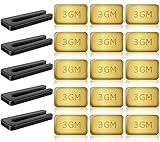
A ceiling fan balancing kit usually includes a plastic clip and small adhesive weights. The clip helps locate the problem blade before the permanent weight goes on. Place the clip near the middle of one blade, run the fan, then move blade by blade until the wobble improves. This slow process feels fussy, but it works because weight placement needs testing.
Move the clip along the blade in small steps after you find the likely blade. Try near the tip, middle, and closer to the motor. The best spot is where the fan shakes the least at the speed that caused the problem. Once that sweet spot shows up, stick the adhesive weight on top of the blade where it won’t be seen easily.
Don’t stack random weights all over the fan. Too much added weight can stress one blade and make the motor work harder. One clean adjustment usually beats several guesses. The goal is balanced rotation, not hiding the wobble with a pile of stick-on pieces.
Run the fan at low, medium, and high after placing the weight. Some fans behave well at one speed and wobble at another, so test all common settings. If the wobble returns, repeat the clip test rather than moving the permanent weight blindly. A patient approach helps fix an out of balance ceiling fan without creating a new imbalance.
Know When The Fan Design Matters
Fan design affects balance more than many people expect. Longer blades create more leverage, so small weight differences become easier to see. Heavy light kits can also amplify movement if the housing isn’t tight. A compact fan may hide minor imbalance better, but it still needs proper mounting and blade alignment.
Blade count changes the feel of airflow and the look of the spin. A five-blade model often looks calmer visually, though balance still depends on hardware, blade shape, and installation quality. For rooms where steady airflow and a traditional look matter, compare options through best 5 blade ceiling fan before replacing a fan that never seems to settle. A better match can reduce ongoing frustration, especially in bedrooms and living rooms.
Older fans may wobble because parts have worn unevenly. Blade arms can fatigue, rubber flywheel components can degrade, and light kit connections can loosen after years of use. If the fan has been adjusted repeatedly and still shakes, part wear may be the real story. At that point, balancing weights only offer a short-term patch.
Cheap replacement blades can also create trouble if they don’t match the original set. Even similar-looking blades may differ in weight, pitch, or hole placement. Mixing blades from another fan is asking for wobble, plain and simple. Consistent parts keep airflow balance and motor strain under control.
Inspect The Remote And Battery Area
Remote-controlled ceiling fans can create confusion because people blame balance when the real issue is inconsistent speed control. A weak remote battery may cause delayed responses, odd speed changes, or intermittent light operation. Those symptoms don’t usually cause physical wobble, but they can make the fan feel unpredictable. Fresh batteries remove one possible distraction before deeper troubleshooting.
Battery corrosion deserves a quick look, especially in remotes left unused for months. White or crusty residue around the contacts can block power and make controls unreliable. For a safe cleaning reference, use remove corroded battery methods that focus on careful handling and contact cleanup. Clean power control supports consistent fan operation, even though balance still depends on the blades and mount.
Wall controls can also affect how the fan behaves. A fan connected to the wrong dimmer or speed control may hum, buzz, or run unevenly. That electrical noise can be mistaken for mechanical wobble from across the room. Proper controls protect the motor and support smooth speed changes.
Electrical issues need a different level of caution. Turn off power at the breaker before opening any canopy or control housing. If wiring looks burned, loose, or confusing, bring in a qualified electrician instead of poking around. Safe troubleshooting keeps ceiling fan repair practical instead of risky.
Fixing Ceiling Fan Balance Problems At Home
A ceiling fan that keeps wobbling after basic tightening can test anyone’s patience. The noise creeps into movie nights, sleep gets interrupted by rattling blades, and eventually the whole fixture starts feeling unreliable. Plenty of people assume the motor is failing, but most balance issues still trace back to airflow resistance, blade alignment, or subtle mounting shifts. A smoother fan usually comes from patient adjustments instead of expensive replacement parts.
Blade Pitch Changes Airflow Stability
Blade pitch controls how aggressively the fan pushes air through the room. A steeper pitch can create stronger airflow, but it also places more stress on the motor and mounting hardware if the blades aren’t balanced properly. That extra resistance sometimes exaggerates wobbling on high speed. A fan with uneven pitch across the blades may look stable at low speed but start swaying once airflow pressure increases.
Some older fans develop blade pitch inconsistencies after years of use. Heat, humidity, and loose blade arms slowly affect alignment without making it obvious right away. One blade may dip slightly lower or push air differently than the others. That imbalance creates a repetitive side pull during rotation, which leads to the familiar ceiling fan wobble people notice from across the room.
Checking blade pitch takes patience more than technical skill. Hold a measuring tool or blade angle guide against each blade and compare the positioning carefully. Even small differences matter because ceiling fans rotate fast enough to magnify tiny imperfections. For airflow upgrades and better blade angle performance, explore best pitch ceiling fan blades before replacing a fan that struggles to circulate air evenly.
Fans installed in humid areas usually need more frequent inspections. Blade materials absorb moisture gradually, especially on covered patios or bathrooms with weak ventilation. That slight swelling changes both weight and pitch over time. Keeping balanced airflow and consistent blade angles helps reduce motor strain while improving room comfort.
Why High Speed Makes Wobble Worse
High fan speed exposes flaws that stay hidden at slower settings. A fan might look completely normal on medium speed, then suddenly wobble once the blades spin faster. That doesn’t always mean the fan is dangerous. Faster rotation simply amplifies tiny balance differences that become impossible to ignore.
Air resistance also changes dramatically at high speed. One slightly heavier blade creates uneven drag as it moves through the air. That imbalance repeats hundreds of times each minute, creating vibration that travels through the mounting bracket and ceiling box. A loose light kit often rattles louder at this stage because the vibration spreads through the fixture.
Motor heat can add another layer to the problem. Older fans sometimes develop worn bearings that struggle under heavy rotation. A fan that hums loudly while wobbling may need more than balancing weights. Persistent grinding or burning smells should never be ignored because motor stress can shorten the fan’s lifespan quickly.
Try testing the fan at every speed after each adjustment. Some balancing changes improve low speed while making high speed worse. That back-and-forth process feels annoying, sure, but it helps isolate the exact source of the instability. Consistent testing supports smoother operation and more reliable airflow across the room.
Ceiling Conditions Affect Fan Stability
Ceiling condition plays a bigger role than many people realize. Older homes sometimes have electrical boxes that shift slightly over time, especially around heavy ceiling fans. A weak mounting point allows the fan to move independently from the ceiling structure. No balancing kit can fully compensate for unstable support overhead.
Vaulted ceilings create another challenge because angled mounting systems rely heavily on proper downrod positioning. A slightly tilted installation changes the fan’s center of gravity and increases visible movement. Fans installed too close to beams or sloped surfaces may also push uneven airflow. That uneven pressure can exaggerate wobbling during operation.
Outdoor humidity affects covered patio fans too. Moisture exposure gradually loosens screws and changes blade weight distribution, especially on older wooden blades. Rooms with poor ventilation tend to collect more dust and airborne grease, which builds unevenly on blade surfaces. Consistent maintenance helps preserve steady rotation and clean airflow.
Nearby cooling equipment can interfere with airflow patterns around the fan. Large open windows, wall-mounted vents, or strong portable fans sometimes create competing air movement. For better circulation control in outdoor spaces, compare airflow setups through best quiet outdoor floor fan options that support quieter cooling without overwhelming the room.
Balancing Problems After Installation
New ceiling fans can wobble immediately after installation, which surprises a lot of homeowners. People often assume brand-new means perfectly balanced, but shipping movement, rushed assembly, or uneven mounting can throw things off right away. A missing rubber washer or slightly loose bracket may create enough instability to start the wobble instantly. Slow, careful installation matters more than speed.
Blade screws deserve another inspection after the first few days of use. Freshly installed fans settle slightly as vibration works through the mounting hardware. That tiny movement can loosen screws enough to affect blade alignment. Tightening everything again after initial operation often improves stability without additional repairs.
Some fans include balancing kits in the original packaging for a reason. Manufacturers know blade weight varies slightly during production. The included balancing clip helps fine-tune rotation after installation instead of expecting factory perfection. Using the balancing kit properly supports quieter performance and reduced ceiling vibration.
Improper electrical box support causes more problems than people expect. Ceiling fans need fan-rated boxes that anchor securely to framing or approved braces. Standard lighting boxes may flex under constant motion. That movement eventually creates wobbling even if the blades themselves stay balanced.
Noise Clues That Point To Specific Problems
Ceiling fan noise tells a story if you pay attention closely enough. Clicking sounds usually point toward blade hardware or loose screws around the brackets. A deep knocking noise often suggests movement inside the mounting system. Buzzing sounds may come from dimmer switches or electrical controls instead of the blades themselves.
Grinding noises deserve immediate attention. Worn bearings inside the motor housing can create rough movement that balancing weights won’t fix. The fan may also feel slower or struggle to maintain speed. Ignoring those sounds puts extra strain on internal components and can lead to full motor failure.
Rattling light shades are another common distraction. Glass shades sometimes loosen from repeated vibration and create noise that mimics severe wobbling. Tightening the shade hardware gently often quiets the fixture dramatically. Stable light kits support smoother fan operation and help reduce distracting vibration sounds.
Fans with remote controls occasionally make soft clicking sounds during speed changes. That’s usually normal relay behavior rather than a balance issue. The important difference is whether the sound repeats continuously during operation. Consistent rattling paired with visible shaking almost always signals a mechanical balance issue somewhere in the system.
Simple Habits That Prevent Future Wobble
Routine maintenance keeps ceiling fan wobble from creeping back unexpectedly. Dusting the blades evenly once or twice each month prevents weight imbalance from building over time. Quick screw inspections also help catch loosened hardware before the wobble becomes obvious. Those small habits save a lot of frustration later.
Seasonal changes deserve attention too. Humid summers and dry winters affect blade materials differently depending on construction. Wood blades may expand slightly, while lightweight composite materials can flex under prolonged heat exposure. Watching for early movement helps maintain stable airflow and longer motor life.
Cleaning products matter more than people think. Heavy furniture sprays or oily cleaners leave sticky residue that attracts dust quickly. A simple microfiber cloth with light cleaner usually works better for regular upkeep. Clean blades create more balanced airflow while reducing strain on the motor housing.
Running the fan at appropriate speeds also extends its lifespan. High speed all day creates more vibration stress than necessary in many rooms. Lower settings often circulate air comfortably without excessive movement or noise. Balanced operation paired with regular maintenance helps keep ceiling fan performance smooth, quiet, and dependable.


Best Small Flush Mount Ceiling Fans 2026 Ultimate Picks

Best Smart Ceiling Fan India 2026 For Effortless Comfort

Best Smart Ceiling Fans with Lights for 2026: Top Picks

Best Smart Home Non Ceiling Fans 2026 For Ultimate Comfort

Best Outdoor Misting Ceiling Fan 2026 For Ultimate Comfort

Best Outdoor Ceiling Fans For Porch 2026 With Style And Breeze

Best Smart Bulb For Ceiling Fan 2026 That Brightens Life

Best Smart Ceiling Fan Control 2026 For Effortless Comfort






