
How To Fix Harbor Breeze Ceiling Fan Remote Fast

How To Fix Harbor Breeze Ceiling Fan Remote usually sounds simple until the fan suddenly ignores every button press and leaves the room stuffy and frustrating. One minute the light works fine, then boom, nothing responds. Small issues like weak batteries, receiver glitches, or dip switch mismatches tend to create the biggest headaches because they’re easy to overlook. A lot of people end up replacing the entire remote way too early, even though the real problem often takes just a few practical checks.
Battery terminals deserve more attention than most people think. Corrosion, loose contact points, or cheap batteries can interrupt the signal and make the remote feel completely dead. Also, remote sensors inside older Harbor Breeze units sometimes struggle after power surges or electrical interruptions. That annoying stop-and-start fan behavior can feel random, but there’s usually a pattern hiding behind it.
Remote pairing problems show up more often after changing batteries or resetting household breakers. Some Harbor Breeze models rely on matching frequency settings between the receiver and remote, and even one incorrect switch position can break communication instantly. Frustration builds fast because the fan itself still has power, making the issue harder to pinpoint. Then people start assuming the motor failed, which sends them down the wrong path entirely.
Signal interference creates another sneaky problem. Wi-Fi routers, LED bulbs, smart home devices, and nearby remotes can interfere with older fan systems in weird ways. A fan that works perfectly in the morning might stop responding later in the evening after more electronics are active around the house. That’s why troubleshooting needs a little patience instead of random trial and error.
How To Fix Harbor Breeze Ceiling Fan Remote also involves understanding what not to do. Pressing every button repeatedly or flipping wall switches nonstop can sometimes confuse the receiver further. Slow, methodical resets usually work better than rushed attempts. Oddly enough, many remote issues clear up after a full power cycle and a proper synchronization sequence.
Physical wear matters too. Dropped remotes often develop loose internal contacts that weaken button response even though the outside looks perfectly fine. Rubber button pads can wear unevenly over time, especially around frequently used fan speed controls. So if certain buttons work while others don’t, the problem may sit inside the handheld unit rather than the ceiling fan itself.
Receiver troubleshooting becomes important once basic fixes fail. Hidden inside the fan canopy, the receiver controls communication between the remote and fan motor. Loose wiring connections, heat buildup, or aging components can slowly reduce reliability. While that sounds intimidating at first, many receiver inspections are surprisingly manageable with careful preparation and power safely turned off.
Comfort matters more than people realize until airflow suddenly disappears during a humid night or a packed family gathering. A stubborn ceiling fan remote can throw off the whole mood of a room. Sorting out the issue with a calm, step-by-step approach saves money, avoids unnecessary replacements, and helps restore normal airflow without turning the situation into a weekend-long hassle.

- LFR Score9.6
LFR Score is a ranking system developed by lightfansreviews.com. LFR Score has no relationship or impact from any manufacturers or sales agent websites. Learn more
- BrandRETROSUN

- LFR Score9.2
LFR Score is a ranking system developed by lightfansreviews.com. LFR Score has no relationship or impact from any manufacturers or sales agent websites. Learn more
- BrandAnderic

- LFR Score8.8
LFR Score is a ranking system developed by lightfansreviews.com. LFR Score has no relationship or impact from any manufacturers or sales agent websites. Learn more
- BrandLPHUMEX
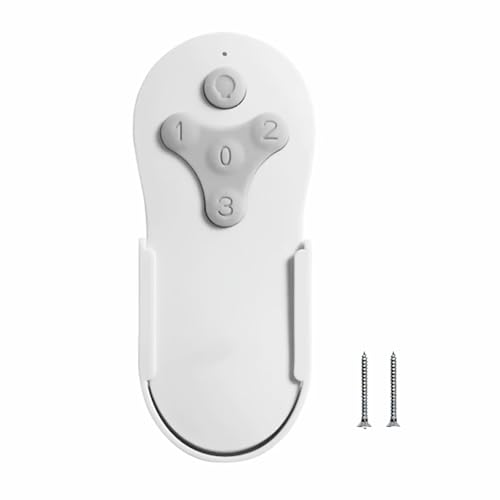
Ceiling Fan Remote Control Compatible with Harbor Breeze KUJCE10311/TR214A KUJCE10712/TR214B
View on Amazon- LFR Score8.8
LFR Score is a ranking system developed by lightfansreviews.com. LFR Score has no relationship or impact from any manufacturers or sales agent websites. Learn more
- BrandBreeze Bay

- LFR Score8.6
LFR Score is a ranking system developed by lightfansreviews.com. LFR Score has no relationship or impact from any manufacturers or sales agent websites. Learn more
- BrandFEKOTS

- LFR Score8.6
LFR Score is a ranking system developed by lightfansreviews.com. LFR Score has no relationship or impact from any manufacturers or sales agent websites. Learn more
- BrandCeilingBreeze
- LFR Score8.4
LFR Score is a ranking system developed by lightfansreviews.com. LFR Score has no relationship or impact from any manufacturers or sales agent websites. Learn more
- BrandCENMING

- LFR Score8.2
LFR Score is a ranking system developed by lightfansreviews.com. LFR Score has no relationship or impact from any manufacturers or sales agent websites. Learn more
- BrandCOREBAY

- LFR Score8.2
LFR Score is a ranking system developed by lightfansreviews.com. LFR Score has no relationship or impact from any manufacturers or sales agent websites. Learn more
- BrandUBORSY

- LFR Score7.6
LFR Score is a ranking system developed by lightfansreviews.com. LFR Score has no relationship or impact from any manufacturers or sales agent websites. Learn more
- BrandCeilingBreeze
Last update on 2026-06-11 / Affiliate links / Images, Product Titles, and Product Highlights from Amazon Product Advertising API
How To Fix Harbor Breeze Ceiling Fan Remote
A quiet room gets annoying fast once the fan stops listening and the air feels stuck. The remote sits in your hand, the buttons click, yet the fan acts like it’s on vacation. That gap between “it worked yesterday” and “nothing works now” is exactly where how to fix harbor breeze ceiling fan remote starts to matter. Most fixes come down to battery contact, signal pairing, receiver power, or a small setting that got knocked out of sync.
Remote Refuses To Respond
A dead remote doesn’t always mean a dead fan, and that’s the first thing worth remembering. The simplest checks often save the most money because weak batteries can mimic a bad receiver. Pull the batteries out, look closely at the metal contacts, and check for corrosion, dust, or bent springs. Even a tiny film on the terminal can interrupt the signal enough to make the remote feel useless.
Fresh batteries should go in before any deeper troubleshooting starts. Cheap or half-used batteries can create weird behavior, like the light working while the fan speed buttons fail. That kind of mixed response usually points to low voltage rather than a total remote failure. Give the contacts a gentle clean with a dry cloth, then press each button slowly instead of rapid-fire tapping like a TV remote.
The wall switch matters too, even if the remote is supposed to control everything. A Harbor Breeze fan receiver still needs steady power from the switch before it can hear the remote. Flip the switch off, wait a bit, then turn it back on to give the receiver a clean reset. This basic power cycle clears minor glitches after storms, breaker trips, or quick electrical flickers.
Ceiling fan remotes also hate being dropped, sat on, or left near moisture. A remote can look fine outside while the button pad or battery bridge has shifted inside. Press around the casing gently and listen for rattling, because a loose part may explain inconsistent button response. If only one or two buttons fail, the issue may sit with the button membrane, not the ceiling fan.
Battery And Signal Checks
Signal problems can be sneaky because they don’t always happen every time. The fan may respond from one side of the room but ignore the remote from another spot. That points toward signal range, nearby interference, or a weak transmitter inside the remote. Stand closer to the fan canopy and aim the remote upward while testing each function one at a time.
LED bulbs sometimes create interference, especially bargain bulbs with noisy electronics. Wi-Fi routers, smart plugs, and other remotes can also muddy the signal in a crowded room. Try turning off nearby electronics for a quick test before blaming the fan. This small step helps separate a real remote failure from an environmental signal problem.
Harbor Breeze fans often use a receiver tucked inside the canopy, and that receiver needs to match the remote’s frequency setting. If the remote has small dip switches, those switches must match the receiver exactly. One switch pushed halfway or set in the wrong position can break communication completely. This is where frequency matching becomes the quiet little detail that makes or breaks the repair.
Cleaning the fan area can help too, especially if dust has built up around the canopy or blades. A thick layer of grime won’t usually kill the remote signal by itself, but it can hide loose screws, wobble issues, or heat buildup near the housing. For safer upkeep around blades and vents, use a practical cleaning setup like best vacuum cleaner for ceiling fans to reduce dust without tugging on the fixture. Cleaner hardware makes every inspection less messy and a whole lot less frustrating.
Pairing Problems After Power Loss
Power interruptions can knock a remote and receiver out of rhythm. After a storm or breaker reset, the fan may still get electricity but fail to obey remote commands. That’s why a controlled reset beats random button smashing every time. Turn the wall switch off, give the receiver a pause, then turn power back on and follow the fan’s pairing sequence for your model.
Many remote systems need a button held down shortly after power returns. The exact button can vary, but pairing often involves holding a learn, reset, or fan button for several seconds. The trick is timing, not force. Pressing too late may do nothing, while pressing too many buttons at once can make the process feel more confusing than it really is.
Listen for small clues after restarting the fan. A beep, light blink, or brief motor twitch can signal that the receiver heard the remote. No response at all may point toward receiver power, a wiring issue, or a failed handheld transmitter. A partial response, like the light working but fan speeds failing, usually narrows the problem to a control channel rather than total failure.
A fan in a porch, sunroom, or breezy patio area may face extra stress from humidity and movement. Outdoor-rated fans handle exposure better, but the remote receiver still needs protection from moisture and unstable power. For rooms exposed to gusts or covered outdoor spaces, compare long-term airflow setups through best outdoor ceiling fan for high wind areas before assuming any indoor-style unit will hold up outside. The right fan environment keeps remote reliability from becoming a repeat headache.
Receiver Issues Inside The Canopy
The receiver is the middleman between your remote and the fan motor. If the remote sends a signal but the receiver can’t process it, the fan won’t move. That small box inside the canopy handles fan speed, light control, and sometimes dimming features too. A failing receiver can create odd symptoms, including delayed starts, random shutoffs, or one function working while another refuses.
Safety comes first before touching anything near the canopy. Turn off power at the breaker, not just the wall switch, because ceiling fan wiring can surprise careless hands. Once power is off, the canopy can be lowered carefully to inspect the receiver and wire connections. Loose wire nuts, cramped wiring, or heat marks deserve attention because electrical contact has to stay firm and clean.
Receiver damage sometimes shows up as discoloration, a burnt smell, or a swollen-looking casing. Those signs usually mean the part needs replacement instead of another reset. A mismatched replacement receiver can cause new problems, so model compatibility matters. Match the fan model, remote type, voltage rating, and light kit setup before buying anything.
A ceiling fan with a light kit adds one more layer to the diagnosis. The fan motor and light may run through separate receiver channels, so one can fail while the other still responds. That split behavior feels strange, but it’s actually useful because it tells you where to look. Keep notes on which buttons work, which ones don’t, and whether the problem changes after each reset attempt.
Light Works But Fan Does Not
A working light with a silent fan narrows the problem nicely. Power is reaching the fixture, and the remote is probably sending at least some commands. The issue may sit with the fan-speed channel, capacitor, receiver output, or motor wiring. That’s better than a total blackout because partial function gives you clues instead of a blank wall.
Start with the remote buttons themselves. Fan speed buttons usually get pressed more often than light buttons, so they wear faster. If low, medium, and high feel mushy or inconsistent, the remote pad may be worn. A careful button test can reveal whether physical wear is causing the signal to fail before it even leaves the remote.
The receiver may also send power to the light but not to the motor. That can happen after heat exposure, age, or internal component failure. A replacement receiver is often cheaper and easier than replacing the whole fan, but compatibility still rules the day. Guessing at parts can turn a simple remote repair into a second problem.
Portable airflow can help while the ceiling fan is being diagnosed, especially in bedrooms, workshops, or covered patios. To keep the room usable during troubleshooting, rely on best rechargeable fan with led light as a backup for cooling and visibility. That separate fan won’t fix the Harbor Breeze receiver, of course, but it keeps the space comfortable while you work through the real cause.
How To Reset Harbor Breeze Fan Remote Receiver
Nothing tests patience quite like a ceiling fan that suddenly ignores every command during a warm, sticky night. The light flickers, the fan hesitates, and the remote feels completely disconnected from reality. After basic battery checks fail, how to reset harbor breeze fan remote receiver becomes the next logical step because the receiver often causes the communication breakdown. Tiny electronic glitches, loose wiring, and interrupted pairing sequences can quietly shut down fan response without warning.
Resetting The Receiver Correctly
Most Harbor Breeze receiver problems improve after a full reset, but timing matters more than people expect. Flip the wall switch off first, then shut off the breaker for extra safety before touching anything near the canopy. Leaving power disconnected for at least a minute helps drain leftover electrical charge trapped inside the receiver. That pause gives the system a clean slate instead of a rushed reboot.
Turn the breaker back on, then restore the wall switch power carefully. Many Harbor Breeze remotes require pressing and holding a specific button within a short time window after power returns. The reset button varies by model, so remote labels like “fan,” “learn,” or “high” may handle the pairing sequence. Slow, steady steps usually fix more problems than frantic button pressing ever will.
A successful reset often creates small clues. The fan blades may twitch slightly, the light may blink, or the receiver may make a faint clicking sound. Those little signs matter because they confirm the receiver still has electrical activity. Complete silence after multiple reset attempts may suggest a failed receiver or interrupted wiring connection instead of a remote issue.
Model numbers become extremely important during receiver troubleshooting because Harbor Breeze uses multiple remote systems across different fan generations. Some older receivers simply won’t communicate with newer replacement remotes. Before replacing parts, compare wiring layouts and remote compatibility through how to find ceiling fan model to avoid buying mismatched hardware. Correct identification prevents a frustrating cycle of returns, rewiring, and wasted time.
Dip Switch Problems And Frequency Mismatch
Dip switches feel old-school, but plenty of Harbor Breeze remotes still rely on them. Those tiny switches inside the battery compartment must match the receiver switches hidden near the canopy. One incorrect position can completely block communication between the remote and the fan. That tiny mismatch creates a surprisingly common signal failure.
People often accidentally move dip switches while replacing batteries or dropping the remote. The change may be so small it barely looks different at first glance. Use good lighting and compare every switch position carefully before assuming the receiver is dead. A flashlight or even a nearby best desk lamp for video conference setup can make those tiny switch positions easier to inspect without straining your eyes.
Some Harbor Breeze models use four switches while others use more complex combinations. Matching only “most” of the switches isn’t enough because the signal depends on exact alignment. Think of the dip switch setup like a password between the remote and receiver. If even one number is wrong, the system stops listening.
Resetting switches should happen with the power disconnected whenever possible. Randomly flipping switch positions while the fan still has live power can create more confusion during troubleshooting. Write down the original switch pattern before changing anything. That simple step protects you from losing track of the original frequency configuration.
Loose Wiring Behind The Canopy
Receiver wiring problems can hide for months before symptoms finally show up. Ceiling vibrations, seasonal temperature swings, and earlier installations sometimes loosen wire nuts over time. A fan may operate normally for years before one connection starts slipping just enough to interrupt communication. Those intermittent failures are often tied to unstable wiring instead of a bad remote.
Lower the canopy carefully after cutting power at the breaker. Look for loose wire nuts, exposed copper, or dark discoloration near connections. A healthy wire connection should feel snug without wobbling when touched gently. Any burnt smell or brittle wire insulation deserves immediate attention because heat damage can spread quickly.
Receiver boxes sometimes get crammed tightly into small canopy spaces during installation. Excess pressure against the receiver housing may stress the wires or damage the internal board over time. Fans mounted in hot attic-adjacent ceilings can also trap extra heat around the receiver. Long-term heat exposure slowly weakens electronic components, especially in older fan systems.
Photographing the wiring before disconnecting anything helps avoid confusion later. Harbor Breeze wiring colors can vary slightly depending on model age and fan type. A quick reference photo makes reassembly far less stressful. Organized troubleshooting almost always beats memory-based guessing during electrical repairs.
Remote Buttons Work Intermittently
Intermittent button response feels especially annoying because the fan teases you with partial functionality. One moment the fan changes speed normally, then suddenly ignores every command again. That inconsistent behavior often points toward worn button contacts or weak signal output inside the remote itself. Random performance changes rarely happen without a physical cause somewhere in the chain.
Open the remote carefully and inspect the rubber button pad underneath the casing. Oils from fingers, dust buildup, and everyday wear can reduce button contact sensitivity over time. Cleaning the contacts gently with a dry microfiber cloth sometimes restores normal response surprisingly well. Harsh cleaners should stay off the table because moisture can damage internal circuitry.
Remote buttons used most often usually fail first. Fan speed controls and light dimmer buttons take constant abuse compared to less-used functions. A button that feels softer, stickier, or uneven may already have weakened underneath. Physical wear inside the remote creates signal interruptions even if the outside still looks clean.
Testing the fan from different room positions also helps identify weak transmission strength. If the remote only works within a few feet of the fan, the transmitter may be fading. Reduced range commonly shows up before total failure. That gradual decline usually signals a weakening remote board rather than a receiver issue.
Receiver Replacement Without Guesswork
Receiver replacement sounds intimidating, but careful preparation keeps it manageable. The biggest mistake people make is buying a random universal kit without checking compatibility first. Harbor Breeze fans vary widely in wiring layouts, light controls, and mounting space. Matching the receiver correctly matters more than rushing to buy the cheapest replacement online.
Check voltage requirements, fan speed support, dimming compatibility, and wire count before ordering anything. Some replacement receivers handle only basic fan control while others support advanced lighting features. Installing the wrong receiver may create flickering lights, inconsistent speeds, or failed pairing attempts. Small specification differences can trigger surprisingly stubborn performance issues.
Removing the old receiver slowly helps prevent unnecessary damage. Tight canopy spaces make it easy to tug wires accidentally while pulling the receiver free. Labeling wires with tape before disconnecting them reduces stress during installation. Organized wiring work keeps the process smoother and lowers the risk of crossed connections.
After installation, run every remote function individually instead of assuming everything works after the fan spins once. Test light dimming, fan direction, speed levels, and response range. A successful installation should feel smooth and predictable instead of delayed or inconsistent. Stable operation confirms the receiver communication has finally been restored properly.


Best Small Flush Mount Ceiling Fans 2026 Ultimate Picks

Best Smart Ceiling Fan India 2026 For Effortless Comfort

Best Smart Ceiling Fans with Lights for 2026: Top Picks

Best Smart Home Non Ceiling Fans 2026 For Ultimate Comfort

Best Outdoor Misting Ceiling Fan 2026 For Ultimate Comfort

Best Outdoor Ceiling Fans For Porch 2026 With Style And Breeze

Best Smart Bulb For Ceiling Fan 2026 That Brightens Life

Best Smart Ceiling Fan Control 2026 For Effortless Comfort






