
How to Make a Ceiling Fan Stop Wobbling Fast

How to Make a Ceiling Fan Stop Wobbling turns into a real headache once the rattling starts echoing through the room every night. One minute the fan seems harmless, then suddenly the blades start shaking like they’ve had too much coffee. Loose screws, uneven blade angles, dusty buildup, or a bent mounting bracket often hide behind the problem. Small issues stack up fast, and before long, that constant wobble becomes impossible to ignore.
Ceiling fans rarely start wobbling out of nowhere. Most of the time, everyday wear quietly throws things out of balance little by little. Dust settles unevenly across the blades, screws loosen from vibration, or blade holders shift after years of spinning overhead. Balance matters more than people expect, and even a tiny weight difference can trigger noticeable movement once the fan reaches higher speeds.
Annoying noise usually tags along with the wobble, too. Clicking sounds, humming motors, or rattling light fixtures can make an otherwise relaxing room feel chaotic. Tightening hardware often solves part of the issue, but stubborn wobbling may point toward warped blades or mounting problems. A fan that shakes heavily can also wear down internal motor parts faster, which nobody wants hanging above the couch or bed.
Safety becomes a bigger concern once the wobble grows stronger over time. Fans mounted improperly may strain the ceiling junction box or loosen the downrod connection little by little. Sure, most fans won’t suddenly crash down, but ignoring severe shaking isn’t exactly a smart gamble either. Catching the problem early usually keeps repairs simple and far less expensive.
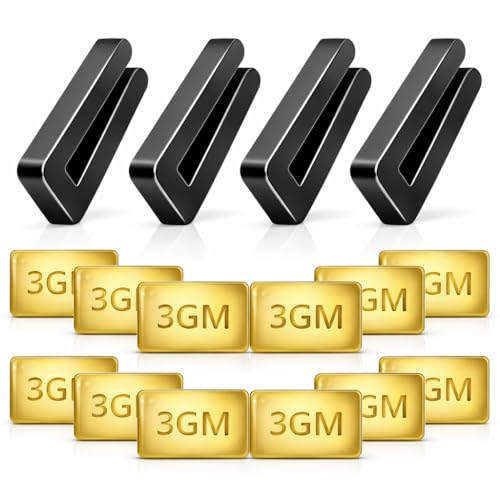
Blade balancing kits often help smooth things out without replacing the entire fan. Those small adhesive weights might look insignificant, yet they can make a dramatic difference in stability. Some fans need only a quick adjustment, while older models may require blade replacement if warping has developed from humidity or long-term use. Consistency in blade spacing and angle plays a huge role in keeping the rotation smooth.
Dust also deserves more blame than it gets. Thick grime buildup creates uneven blade weight distribution, especially in kitchens or humid spaces where residue sticks harder. Cleaning each blade thoroughly with equal pressure can surprisingly reduce wobbling in some situations. Funny enough, many people jump straight to replacing parts before trying a proper deep clean first.
Mounting hardware deserves careful attention as well. Loose canopy screws, weak ceiling boxes, or unstable brackets can make the entire fan shift while spinning. A fan attached to a standard light fixture box instead of a fan-rated electrical box may continue wobbling no matter how perfectly balanced the blades become. Structural support matters just as much as blade alignment.
How to Make a Ceiling Fan Stop Wobbling becomes much easier once the real cause is identified instead of guessing blindly. Some fixes take only a screwdriver and patience, while others involve replacing warped blades or securing the mounting system more firmly. Either way, stopping the wobble restores comfort, cuts down irritating noise, and helps the fan run smoother for years instead of limping along with constant shaking overhead.
- LFR Score10.0
LFR Score is a ranking system developed by lightfansreviews.com. LFR Score has no relationship or impact from any manufacturers or sales agent websites. Learn more
- BrandECNHIVE

- LFR Score10.0
LFR Score is a ranking system developed by lightfansreviews.com. LFR Score has no relationship or impact from any manufacturers or sales agent websites. Learn more
- BrandSbarklo

- LFR Score9.0
LFR Score is a ranking system developed by lightfansreviews.com. LFR Score has no relationship or impact from any manufacturers or sales agent websites. Learn more
- BrandGeneric

- LFR Score9.0
LFR Score is a ranking system developed by lightfansreviews.com. LFR Score has no relationship or impact from any manufacturers or sales agent websites. Learn more
- BrandZNBSIXP
- LFR Score8.8
LFR Score is a ranking system developed by lightfansreviews.com. LFR Score has no relationship or impact from any manufacturers or sales agent websites. Learn more
- BrandHFYHWT

- LFR Score8.8
LFR Score is a ranking system developed by lightfansreviews.com. LFR Score has no relationship or impact from any manufacturers or sales agent websites. Learn more
- BrandWHMVPWT

- LFR Score8.6
LFR Score is a ranking system developed by lightfansreviews.com. LFR Score has no relationship or impact from any manufacturers or sales agent websites. Learn more
- BrandKALIONE

- LFR Score8.6
LFR Score is a ranking system developed by lightfansreviews.com. LFR Score has no relationship or impact from any manufacturers or sales agent websites. Learn more
- BrandFoyods

- LFR Score8.2
LFR Score is a ranking system developed by lightfansreviews.com. LFR Score has no relationship or impact from any manufacturers or sales agent websites. Learn more
- BrandAlpurple
- LFR Score7.8
LFR Score is a ranking system developed by lightfansreviews.com. LFR Score has no relationship or impact from any manufacturers or sales agent websites. Learn more
- BrandOXDFK
Last update on 2026-07-12 / Affiliate links / Images, Product Titles, and Product Highlights from Amazon Product Advertising API
How To Make A Ceiling Fan Stop Wobbling
A shaky fan can ruin the whole mood of a room. The sound nags, the blades look uneven, and that little wobble can make the ceiling feel less trustworthy than it should. Solving how to make a ceiling fan stop wobbling starts with a calm check of the simple stuff first, because most wobble problems come from loose hardware, dirty blades, or uneven blade balance. Skip the guesswork, and the fix usually feels a lot less mysterious.
Start With The Real Cause
A ceiling fan rarely starts shaking for one single dramatic reason. Most wobbling comes from small problems that pile up slowly, like dust weight on one blade, a slightly loose screw, or a blade arm that has shifted after years of spinning. The fan may still move air, sure, but the motion gets choppy once the blades stop sharing the same balance. That’s why the smartest first move is a basic inspection instead of immediately buying new parts.
Turn the fan off and let it stop completely before touching anything. A moving fan can pinch fingers, bend blade arms, or make a simple job more annoying than it needs to be. Check whether the wobble happens on every speed or only at high speed, because speed-specific wobble often points toward blade balance rather than mounting failure. A fan that shakes even on low speed deserves a closer look at the bracket and ceiling box.
Loose screws are the low-hanging fruit. Look at the screws holding each blade to the blade bracket, then check the screws connecting each bracket to the motor housing. Tighten them gently, not like you’re torquing a car wheel, because over-tightening can strip the threads or crack older blade materials. Firm and even pressure works better than brute force here.
Dusty blades can throw off balance more than people expect. Kitchen fans, bedroom fans, and fans near open windows often collect uneven grime, and that buildup can make one blade heavier than the others. Wipe every blade from root to tip with the same care, then dry the surfaces so moisture doesn’t add temporary weight. For small cooling backup in tight spaces, compare best small fan for travel options when ceiling airflow needs a quiet helper nearby.
Check Mounting Before Balancing
Blade balancing won’t fix a fan that’s loose at the ceiling. The mounting system has to be stable before the blades can spin smoothly. Look at the canopy, downrod, ball joint, and mounting bracket for any visible movement. A secure mount is the foundation, and without it, even a perfectly balanced blade set can still wobble.
Ceiling fans should be attached to a fan-rated electrical box, not a basic light fixture box. That detail matters because fans create movement, torque, and vibration during normal use. A light fixture box may hold a lamp just fine, but a spinning fan asks more from the ceiling structure. If the box shifts, flexes, or makes cracking noises, stop using the fan until the support is checked.
Downrod fans need extra attention at the connection points. The hanger ball should sit properly in the mounting bracket, and the set screws near the downrod should be tight. A loose downrod can create a rhythmic sway that looks like blade imbalance even though the real issue sits above the motor. Stable vertical alignment keeps the fan from acting like a pendulum.
Flush-mount fans can wobble too, especially when the canopy screws loosen over time. Tighten the hardware evenly and watch for gaps between the fan base and the ceiling. Uneven pressure can pull the motor housing slightly off center, which affects rotation. A fan should feel solid before any blade work begins.
Clean Blades The Right Way
Cleaning sounds almost too simple, but it’s one of the most practical fixes for how to make a ceiling fan stop wobbling. Dust doesn’t land politely in equal amounts on every blade. One blade might pick up sticky residue from cooking, another might stay cleaner because of airflow patterns, and suddenly the fan is spinning with uneven weight. That imbalance becomes easier to see at medium and high speeds.
Use a microfiber cloth, pillowcase, or slightly damp rag to trap dust instead of knocking it all over the room. Hold each blade gently while wiping so you don’t bend the blade arm. Clean the top, bottom, and edges because buildup along the leading edge can affect airflow. Even cleaning pressure helps prevent accidental bending during the job.
Avoid soaking wooden or composite blades. Too much moisture can warp the blade surface, especially on older fans or cheaper blade sets. Dry each blade after cleaning and give the fan a few minutes before turning it back on. A blade that absorbs moisture unevenly can wobble temporarily, which makes diagnosis confusing.
Check for sticky buildup near the blade brackets. Grease and dust often collect around screw heads and hardware, making the blade sit slightly unevenly. A small toothbrush can help loosen grime in tight corners without scratching the finish. Better lighting near a reading chair can also reduce the need to run a fan light constantly, so compare best wall mounted reading lights if the fan light is part of the daily setup.
Measure Blade Spacing Carefully
Blade spacing tells you whether one blade sits higher, lower, or farther out than the rest. Grab a tape measure and pick one fixed point on the ceiling as your reference. Measure from that point to the tip of each blade, rotating the fan by hand after each measurement. Consistent blade height helps the fan move air without rocking side to side.
A small difference can matter. Even a blade tip sitting slightly lower than the others can create uneven lift as the fan spins. The wobble may look like a motor problem, but the real cause can be a blade bracket that got bumped during cleaning or installation. Gently adjust the bracket only if it’s clearly misaligned, and don’t force it past its natural shape.
Blade pitch matters too. Pitch is the angle of the blade, and every blade needs to match closely. If one blade has a steeper angle, it catches more air, pulls harder, and throws the rotation out of rhythm. Matched blade pitch keeps airflow smoother and reduces stress on the motor.
Large rooms can make wobble feel more noticeable because bigger fans move more air and carry longer blades. Longer blades amplify small alignment problems, so measuring becomes even more important. For bigger spaces where airflow coverage matters, upgrade planning can include best large ceiling fan choices built for wider rooms and steadier circulation. A fan that’s too small may run harder, while an oversized fan with poor mounting may shake more than expected.
Use A Balancing Kit Without Guessing
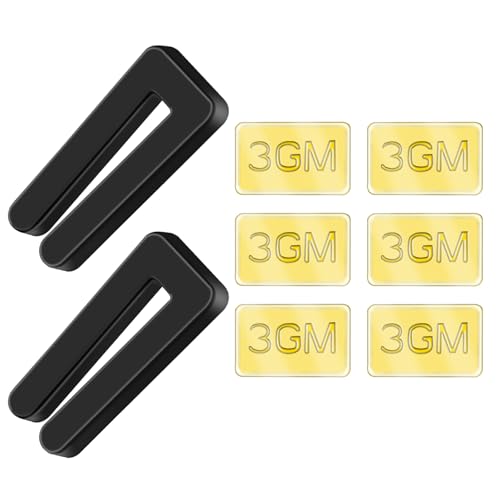
A balancing kit is cheap, simple, and surprisingly effective when the mounting and screws already check out. Most kits include a plastic clip and small adhesive weights. The clip helps identify which blade needs extra weight, while the adhesive weight creates a permanent correction once the right spot is found. Blade balancing works because it evens out the spinning mass.
Start by placing the clip near the middle of one blade, then run the fan at the speed where the wobble shows up most. Turn the fan off, move the clip to the next blade, and repeat the process. This takes patience, but random guessing wastes more time in the end. The blade that reduces the wobble most with the clip is usually the one that needs the adhesive weight.
After finding the best blade, slide the clip along that blade in small steps. Try it closer to the motor, then closer to the tip, watching how the fan behaves each time. The sweet spot is where the wobble drops the most. Small position changes can make a big difference because spinning weight becomes more powerful toward the blade tip.
Once the best spot is clear, attach the adhesive weight to the top of the blade where it won’t be visible from below. Clean that spot first so the weight sticks properly. Press it down firmly and test the fan again on all speeds. A tiny remaining wobble may be normal, but heavy shaking should be gone or clearly reduced.
Know When A Blade Is Warped
Some wobble problems don’t respond well to cleaning, tightening, or balancing because the blade itself has changed shape. Humidity, heat, age, and low-grade blade materials can lead to warping over time. A warped blade may twist slightly, sag at the tip, or look uneven from the side. Warped blades fight the airflow instead of slicing through it evenly.
Lay a removed blade on a flat surface if the fan design allows safe removal. A blade that rocks on the table or shows gaps underneath may be warped. You can also compare blades side by side to spot differences in curve or edge alignment. This is where careful observation beats wishful thinking.
Replacing one blade may not always solve the problem. Fan blades are often sold as matched sets because weight, shape, and finish can vary between batches. Mixing one new blade with several older ones may create a new imbalance. Matched replacement blades usually give better results than swapping a random single blade.
Older fans deserve a practical cost check. A fan with warped blades, noisy bearings, loose mounting, and weak airflow may not be worth repeated repairs. But a solid fan with one damaged blade set can often be saved. The tradeoff comes down to repair cost, ceiling height, room size, and how much you rely on that fan every day.
Listen For Clues In The Noise
Noise tells a story if you slow down and pay attention. A rhythmic clicking sound often points to a loose blade screw, light kit part, or pull chain tapping against the housing. A low hum may come from the motor, wall control, or speed capacitor. Noise patterns help narrow the problem before you start taking things apart.
Rattling near the ceiling usually suggests a canopy, bracket, or downrod issue. Rattling near the blades points more toward blade arms, screws, or decorative covers. A ticking sound that speeds up with the fan often means something is moving once per rotation. That kind of clue is useful because it keeps the repair focused.
Light kits can make a fan seem more unstable than it really is. Loose glass shades, bulbs, or decorative nuts can rattle even if the fan body is fairly steady. Tighten those parts by hand and avoid overdoing it, especially with glass. Quiet hardware makes wobble checks easier because you’re not chasing two problems at once.
Motor noise is different. Grinding, scraping, or harsh vibration can signal worn bearings or internal damage. Balancing won’t fix a failing motor, and pushing the fan harder may make the problem worse. A fan that smells hot, sparks, or trips a breaker needs to stay off until inspected.
how to fix a wobbling ceiling fan permanently
That annoying side-to-side shake usually gets worse right when the room should feel relaxing. A fan starts making noise over the bed, the light fixture rattles during quiet evenings, and suddenly every spin pulls your attention away from everything else. Learning how to fix a wobbling ceiling fan permanently means dealing with the deeper causes instead of masking the symptoms for a week or two. Long-term stability, safe mounting, and balanced airflow all matter if the goal is a fan that stays smooth month after month.
Watch How The Fan Moves
A wobbling fan usually gives clues before anything serious happens. Some fans sway in a smooth circular motion, while others jerk side to side like one blade is dragging harder than the rest. Watching the movement carefully can narrow down the issue faster than randomly tightening screws for an hour. Movement patterns often point directly toward blade imbalance, loose mounting, or warped components.
Stand several feet away and turn the fan on at low speed first. Low speed makes subtle movement easier to spot because the blades aren't blurring together yet. Then raise the speed gradually and notice whether the wobble grows steadily or suddenly appears at one setting. Speed-related vibration often suggests balance problems instead of structural damage.
Listen closely while the fan runs. A clicking sound every rotation can mean a blade arm is slightly bent or a blade edge is brushing something nearby. A deep vibrating hum sometimes points toward the motor housing or loose canopy hardware instead. Matching the sound with the movement helps avoid replacing the wrong parts.
Ceiling height can make wobble feel more dramatic too. Fans hanging lower on long downrods tend to exaggerate small balance problems because the movement swings farther from the ceiling mount. Rooms with echo or hard flooring can also amplify the sound, making minor wobble seem much worse than it really is. Room acoustics can fool people into thinking the motor is failing even when the problem stays fairly simple.
Inspect Blade Arms Closely
Blade arms take more abuse than most people realize. They carry the full weight of the blades while spinning thousands of times every week, so even a slight bend changes how the fan rotates. A fan may look perfectly normal while turned off, yet wobble badly once centrifugal force starts pulling unevenly on the motor. Blade arm alignment matters just as much as the blades themselves.
Look at each blade arm from the side and compare the angles carefully. One arm sitting lower than the others can throw off the entire rotation pattern. Sometimes the difference is tiny, but spinning magnifies tiny flaws surprisingly fast. A fan running at high speed turns small alignment errors into visible shaking.
Never force a blade arm aggressively back into place. Thin metal brackets can crack or weaken if bent too hard. Gentle adjustments work better, especially on older fans where the metal may already be stressed from years of vibration. Controlled adjustments protect the fan from bigger damage later.
Some blade arms loosen where they attach to the motor housing. Tighten those screws evenly and test the fan again before assuming the blades themselves are bad. Fans with decorative covers sometimes hide loose hardware underneath, so remove covers carefully if the wobble refuses to improve. A few extra minutes of inspection can save the cost of replacing perfectly good blades.
Pay Attention To Blade Count
More blades don’t automatically mean smoother airflow. Fan design, motor strength, blade pitch, and blade weight all affect stability differently. Some five-blade fans wobble badly because the motor struggles with the added load, while certain three-blade designs stay surprisingly stable for years. Blade configuration changes how the fan handles balance and airflow.
Extra blades can increase drag, especially if dust builds unevenly over time. One heavier blade out of five creates more imbalance points than one heavier blade out of three. Fans with many blades may also collect more grime simply because there’s more surface area overhead. That buildup quietly changes the weight distribution little by little.
Room size plays a role too. A fan that’s too large for a compact bedroom may create stronger vibration against nearby walls or ceilings. Smaller spaces can exaggerate noise and movement because the airflow bounces around tighter corners. Explore how many blades on a ceiling fan details to compare airflow tradeoffs, blade count behavior, and stability differences across common fan designs.
Blade shape matters just as much as blade quantity. Curved blades, flat blades, and oversized paddle styles each move air differently. Heavier decorative blades may look impressive, but they put extra strain on weak mounting systems or older motors. Balanced blade weight helps the fan stay smoother during long daily use.
Check The Ceiling Box Carefully
Some wobble issues start above the fan itself. The ceiling box hidden behind the canopy carries the full weight and motion of the fan every single day. If that box shifts even slightly, the entire fan may wobble no matter how perfectly balanced the blades become. Strong ceiling support keeps the whole system stable.
Fan-rated electrical boxes are designed to handle vibration and rotational force. Regular light fixture boxes are built for static weight instead, so they can loosen gradually under fan movement. That difference becomes obvious once the fan starts shaking at medium or high speed. A weak box often creates a dull knocking sound inside the ceiling.
Turn power off completely before removing the canopy cover. Look for cracked mounting screws, loose brackets, or movement where the box meets the ceiling joist. Even tiny movement can grow worse over time because the fan constantly repeats the same vibration cycle. Secure hardware matters more than cosmetic appearance here.
Older homes sometimes hide outdated mounting setups that never handled modern ceiling fans very well. A fan replacement may have been installed years ago using whatever hardware already existed in the ceiling. That shortcut often causes long-term wobble problems later. A proper fan brace kit usually provides a steadier solution than trying to reinforce weak old hardware piece by piece.
Reduce Stress On The Motor
A wobbling fan doesn’t just create noise. Constant imbalance forces the motor to work unevenly, which slowly wears internal components faster than normal. Bearings, mounting screws, and blade brackets absorb extra vibration every time the fan spins. Motor strain builds quietly before people notice performance changes.
Fans that suddenly wobble after years of stable use sometimes suffer from worn bearings instead of blade issues. A grinding sound, resistance during manual spinning, or overheating motor housing can point toward internal wear. Balancing kits won’t solve mechanical wear inside the motor assembly. Those problems usually grow gradually rather than appearing overnight.
Running the fan at maximum speed constantly can accelerate wear if the room doesn’t need that much airflow. Medium speed often creates more comfortable circulation while reducing vibration stress. Bedrooms especially benefit from smoother airflow instead of aggressive air movement overhead. Controlled fan speed helps extend motor life.
Fans installed in humid rooms deserve extra attention. Moisture affects blade materials, screws, bearings, and electrical parts over time. Bathrooms, covered patios, and coastal homes often experience faster wobble problems because humidity changes the balance and stability of the components. Damp conditions slowly wear down parts even when the fan looks clean from below.
Handle Seasonal Changes Better
Temperature shifts can affect ceiling fans more than most people expect. Wooden blades may expand slightly during humid months, then shrink once dry air returns. Those subtle changes can alter blade balance enough to create visible wobble at higher speeds. Seasonal movement changes how the blades behave across the year.
Winter often reveals loose hardware because materials contract in cooler temperatures. A fan that stayed stable during summer may suddenly start rattling once colder weather arrives. Tightening hardware during seasonal cleaning helps catch those small shifts before they become larger vibration issues. Maintenance works best before the wobble becomes severe.
Dust patterns also change throughout the year. Open windows during spring and summer pull pollen, dirt, and moisture toward the blades faster than many people realize. Uneven buildup forms gradually, especially near blade edges and mounting screws. Routine cleaning keeps balance more predictable over long periods.
Lighting setups can influence fan usage too. Dim rooms often lead people to rely heavily on ceiling fan light kits for long evening hours. Better task lighting sometimes reduces how often the fan light stays on, which lowers heat buildup near the motor housing. Upgrade focused workspaces with best desk lamps for dorm rooms ideas that improve lighting without depending entirely on overhead fixtures.
Know When Replacement Makes Sense
Some ceiling fans simply reach the point where repeated repairs stop making financial sense. A fan with warped blades, failing bearings, loose mounting hardware, and poor airflow can become a constant source of frustration. Repair costs pile up slowly through replacement parts, balancing kits, and repeated troubleshooting. Long-term reliability matters more than squeezing another few months out of a struggling fan.
Cheap builder-grade fans often show problems sooner because lighter materials flex more under daily use. Thin blade brackets, weaker motors, and low-cost hardware wear faster in busy rooms where the fan runs constantly. A higher-quality replacement may feel steadier immediately because the mounting system and motor housing are built with tighter tolerances. Stability starts with solid construction.
Noise level deserves consideration too. Older fans may keep wobbling even after repairs simply because the motor has aged unevenly over time. A quiet fan creates a huge difference in bedrooms, home offices, and reading spaces where background noise becomes distracting fast. Smooth operation improves comfort more than many people expect until the noise finally disappears.
Room layout should guide replacement decisions as well. A fan that’s too small for the room often runs harder and longer trying to circulate enough air. Oversized fans can create overpowering airflow in compact spaces while adding unnecessary blade weight overhead. Matching the fan size properly helps reduce wobble risks and creates more comfortable airflow throughout the room.


Best Small Flush Mount Ceiling Fans 2026 Ultimate Picks

Best Smart Ceiling Fan India 2026 For Effortless Comfort

Best Smart Ceiling Fans with Lights for 2026: Top Picks

Best Smart Home Non Ceiling Fans 2026 For Ultimate Comfort

Best Outdoor Misting Ceiling Fan 2026 For Ultimate Comfort

Best Outdoor Ceiling Fans For Porch 2026 With Style And Breeze

Best Smart Bulb For Ceiling Fan 2026 That Brightens Life

Best Smart Ceiling Fan Control 2026 For Effortless Comfort






