
How to Make a Ceiling Fan Work With Alexa Easily

How to make a ceiling fan work with Alexa sounds simple at first, yet plenty of setups turn into a frustrating back-and-forth mess. One device says it’s compatible, another app refuses to connect, and suddenly the fan only responds half the time. That kind of stop-and-go experience drives people nuts, especially after spending money on smart home gear that’s supposed to make life easier. A smoother setup starts with knowing how your fan, switch, receiver, and WiFi system actually work together instead of guessing your way through it.
Older ceiling fans create some of the biggest headaches. Pull chains, outdated wall switches, and hidden receiver modules often interfere with voice assistant compatibility. Still, plenty of fans can work with Alexa using a smart ceiling fan switch, a compatible hub, or a universal smart controller. The trick is matching the right hardware to the fan you already own instead of replacing the entire fixture unnecessarily.
WiFi strength also plays a bigger role than most people expect. A ceiling fan installed in a large bedroom or vaulted living room may sit farther from the router than other smart devices. Weak signals can cause delayed responses, random disconnects, or fans that ignore commands altogether. Stable connectivity keeps Alexa voice controls responsive and prevents that annoying cycle of reconnecting devices every few days.
Fan speed control matters too. Some setups only allow on-and-off commands, while others support multiple speed levels and lighting adjustments. Nobody wants to say, “Alexa, turn on the fan,” only to get blasted with maximum airflow at midnight. Proper compatibility between the fan controller and Alexa helps maintain smoother automation, quieter operation, and more practical comfort throughout the day.
Smart home routines make the setup even more useful once everything’s connected correctly. Voice commands can trigger fan schedules based on room temperature, bedtime habits, or seasonal changes. A well-configured setup creates a more comfortable environment without constant manual adjustments. Little conveniences stack up fast, especially during hot summers or stuffy evenings.
Electrical compatibility often gets overlooked, and honestly, that’s where plenty of setups go sideways. Some ceiling fans require neutral wires, while others rely on receiver modules tucked inside the canopy. Ignoring those details can lead to flickering lights, humming motors, or partial functionality. A quick compatibility check saves time, money, and a whole lot of irritation later.
Noise issues can also sneak into poorly matched smart fan systems. Cheap controllers sometimes interfere with motor operation, causing buzzing sounds or inconsistent speed changes. Better smart controls handle voltage adjustments more smoothly and reduce the chances of long-term wear on the motor. Reliable hardware keeps the entire setup feeling seamless instead of cobbled together.
How to make a ceiling fan work with Alexa becomes far less intimidating once the setup process is broken into manageable steps. The right combination of smart switches, stable WiFi, compatible fan controls, and Alexa routines can turn an ordinary ceiling fan into a practical part of a connected home. No gimmicks. No overly technical nonsense. Just a cleaner, simpler way to control airflow without getting up every five minutes.

- LFR Score9.0
LFR Score is a ranking system developed by lightfansreviews.com. LFR Score has no relationship or impact from any manufacturers or sales agent websites. Learn more
- BrandKasa Smart

- LFR Score8.6
LFR Score is a ranking system developed by lightfansreviews.com. LFR Score has no relationship or impact from any manufacturers or sales agent websites. Learn more
- BrandTREATLIFE

- LFR Score8.4
LFR Score is a ranking system developed by lightfansreviews.com. LFR Score has no relationship or impact from any manufacturers or sales agent websites. Learn more
- BrandAubric

- LFR Score8.0
LFR Score is a ranking system developed by lightfansreviews.com. LFR Score has no relationship or impact from any manufacturers or sales agent websites. Learn more
- BrandHumpptom

- LFR Score8.0
LFR Score is a ranking system developed by lightfansreviews.com. LFR Score has no relationship or impact from any manufacturers or sales agent websites. Learn more
- BrandCOREBAY

- LFR Score8.0
LFR Score is a ranking system developed by lightfansreviews.com. LFR Score has no relationship or impact from any manufacturers or sales agent websites. Learn more
- BrandPrichor
- LFR Score7.8
LFR Score is a ranking system developed by lightfansreviews.com. LFR Score has no relationship or impact from any manufacturers or sales agent websites. Learn more
- BrandCeilingBreeze

- LFR Score7.0
LFR Score is a ranking system developed by lightfansreviews.com. LFR Score has no relationship or impact from any manufacturers or sales agent websites. Learn more
- BrandUBORSY

- LFR Score4.0
LFR Score is a ranking system developed by lightfansreviews.com. LFR Score has no relationship or impact from any manufacturers or sales agent websites. Learn more
- BrandOnisamt
Last update on 2026-07-11 / Affiliate links / Images, Product Titles, and Product Highlights from Amazon Product Advertising API
How To Make A Ceiling Fan Work With Alexa
A fan that still needs a pull chain can feel oddly stubborn in a smart home. The lights answer Alexa, the thermostat plays nice, and the speaker behaves, yet the ceiling fan just sits there like it missed the memo. How to make a ceiling fan work with Alexa starts with one practical question: does the fan already have smart control built in, or does it need a smart switch, receiver, or hub to bridge the gap? Get that answer right, and the whole setup becomes far less annoying.
Alexa Fan Setup
Alexa ceiling fan control depends on the fan’s control style, not just the brand name printed on the box. A newer smart ceiling fan may connect directly through WiFi or a supported app, while an older fan may need a smart wall switch or canopy receiver. That difference matters because Alexa can only control devices that show up inside the Alexa app as a supported device. No device connection, no voice command, no magic.
Many people hit trouble because they assume every remote-controlled ceiling fan is automatically Alexa-ready. Sadly, nope. A standard handheld remote often talks to a receiver inside the fan canopy using radio frequency, and Alexa can’t understand that signal unless another smart controller translates it. The cleaner route is to use a compatible smart fan controller that supports speed control, light control, and app pairing.
Wiring also decides what kind of upgrade makes sense. Some wall switches only control fan power, while others separate the fan motor and light kit. A neutral wire may be required for many smart switches, so popping off the wall plate and checking the box can prevent a wasted purchase. If that sounds sketchy, calling an electrician is the safer move because ceiling fan wiring can get messy fast.
Alexa works best after the fan appears in the Alexa app under devices. Once connected, basic commands like “Alexa, turn on the fan” or “Alexa, set the fan to medium” may work depending on controller support. Some setups only allow on and off control, which is fine for simple airflow but frustrating if speed changes matter. That’s why fan speed compatibility deserves attention before buying anything.
Check The Fan Type First
The fan itself tells you more than the packaging hype ever will. A pull-chain fan usually needs a smart wall switch or universal receiver because it has no built-in WiFi brain. A remote-controlled fan may need a bridge device that can copy or replace the remote signal. A smart fan with its own app may only need account linking inside Alexa.
Start with the control path. If the wall switch turns the whole fan on and off, then a smart switch can often handle basic power control. If the fan has separate wiring for the light and motor, you may get better control over both features. If the fan relies fully on a remote, the receiver inside the canopy becomes the key piece.
Pull-chain fans can still work with Alexa, but they need a small reality check. The chain should usually be left in the “on” position so the smart switch or controller can manage power. If someone pulls the chain off, Alexa may think the fan is on while nothing moves. That mismatch is one of those tiny household annoyances that causes way too much confusion.
Remote fans can be trickier because not every receiver supports smart upgrades. Some brands use proprietary modules, and some universal kits won’t fit neatly inside shallow canopies. Measure the canopy space before buying a receiver, especially in older homes where ceiling boxes are tight. A cramped install can turn a simple upgrade into a sweaty afternoon.
For rooms where the current fan is noisy, outdated, or missing separate speed control, replacing it may be cleaner than stacking more adapters onto old hardware. Compare airflow layout and control options before swapping fixtures, and explore best indoor ceiling fans for models that better fit Alexa-friendly rooms. A fresh fan can make sense if the old motor hums, the remote barely works, or the light kit already feels dated.
Pick The Right Smart Controller
Smart fan switches are the neatest option for many homes because they replace the wall control and keep the setup looking normal. They can add Alexa control without dangling extra gadgets from the fan. The catch is wiring. Many models need a neutral wire, and some only work with AC motor fans rather than DC motor designs.
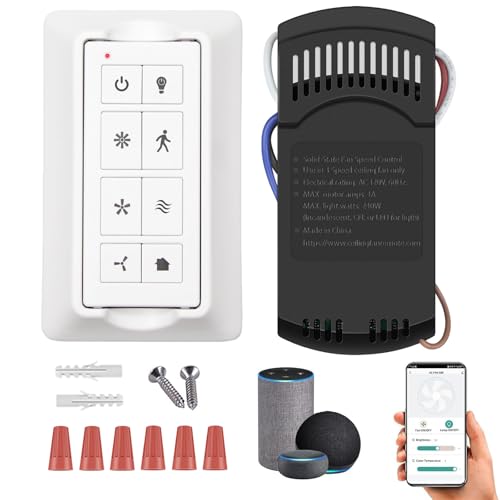
A canopy-mounted receiver can work better for fans controlled by handheld remotes. This small module sits inside the fan canopy and handles speed, light, and sometimes dimming. It can feel like a tidy fix because the wall switch stays mostly unchanged. Still, canopy space and receiver compatibility matter, so guessing is a bad bet.
Smart plugs usually don’t belong in ceiling fan setups. They may work for a plug-in fan, but ceiling fans are hardwired and often need speed-safe motor control. Using the wrong device can create buzzing, unreliable speeds, or unsafe operation. A fan-rated smart controller is the safer and more practical path.
Some smart home hubs can also bridge the gap. Zigbee, Z-Wave, Matter, or brand-specific hubs may connect the fan controller to Alexa. This can be handy if the home already has several smart devices running through one system. But adding a hub just for one fan may feel like buying a toolbox to tighten one screw.
Separately, smart homes often reveal other living-room annoyances once everything gets automated. To troubleshoot display problems during movie nights, use fix black screen on led tv before blaming the remote, streaming stick, or outlet. Keeping the entertainment setup stable makes Alexa routines feel less scattered, especially in rooms where the fan, TV, and lights all run through voice control.
Connect The Fan To Alexa
The setup usually begins in the controller’s own app, not Alexa. Install the smart fan switch, receiver, or compatible fan app first, then connect it to home WiFi if required. After that, open the Alexa app and add the skill or device integration. Device discovery is the bridge between the fan’s app and Alexa voice control.
Device names matter more than people expect. Naming the fan “Bedroom Fan” or “Living Room Fan” makes commands cleaner and reduces confusion with lights or plugs. A vague name like “Switch 1” can lead to Alexa controlling the wrong thing. Simple names create fewer headaches, especially in homes with several smart devices.
Alexa routines can make the fan feel genuinely useful instead of just voice-controlled. A bedtime routine might lower the lights and set the fan to low. A morning routine could turn the fan off after the room cools down. These small automations create hands-free comfort without turning the room into a tech demo.
Speed control depends on how the controller reports the fan to Alexa. Some devices support exact fan speeds, while others show up as a dimmer-style percentage. That can feel odd at first, but it still works if the controller maps percentages to fan speeds properly. Test low, medium, and high before relying on routines.
Fix WiFi And Pairing Problems
Weak WiFi can make a smart fan seem broken even when the wiring is fine. Ceiling fans often sit far from routers, especially in bedrooms, sunrooms, and open living areas. A controller tucked inside a metal canopy may also struggle with signal strength. Stronger placement or a mesh node can improve Alexa response reliability.
Most smart fan devices still prefer 2.4 GHz WiFi. That band reaches farther than 5 GHz, but router band steering can confuse pairing during setup. If the app refuses to connect, temporarily separating the 2.4 GHz network may help. It’s not glamorous, but it saves a lot of “why won’t this thing pair?” frustration.
Account linking can also break quietly. The fan may work inside its own app but disappear from Alexa after a password change, app update, or router swap. Re-linking the skill and running device discovery again often clears the issue. Stable account connection keeps voice commands from failing at the worst time.
Firmware updates deserve a quick check too. A controller with old firmware may miss newer Alexa features or behave inconsistently. Update through the manufacturer’s app before building routines around the fan. That step feels boring, sure, but it can prevent random disconnects later.
For rooms that double as party spaces, lighting can be handled separately instead of forcing the ceiling fan light to do everything. Build a stronger atmosphere with best disco lights for home party while keeping fan control focused on airflow and comfort. Separate devices give Alexa clearer jobs and prevent one fixture from carrying too much of the room’s mood.
Best Way To Connect Ceiling Fan To Alexa
Voice control sounds convenient until the fan randomly ignores commands during the hottest part of the night. Plenty of setups look clean at first, then start acting weird after a few weeks because the wiring, app permissions, or smart controller never matched properly. The best way to connect ceiling fan to Alexa usually comes down to simplifying the setup instead of stacking unnecessary gadgets together. A stable smart fan system feels invisible in daily life, and honestly, that’s the whole point.
Fix Delayed Alexa Commands
A fan that reacts five seconds late can make the whole smart setup feel clunky. Delays usually trace back to weak WiFi coverage, overloaded smart home networks, or budget controllers struggling to maintain stable communication. A stronger router position or mesh extender often improves Alexa response speed more than replacing the fan itself. Small signal issues become very noticeable once voice control enters the routine.
Smart devices packed into one room can also crowd the network. Streaming sticks, smart bulbs, cameras, and speakers constantly compete for bandwidth, especially on older routers. Ceiling fan commands may get pushed behind everything else. Giving the router a cleaner line of sight to the room helps stabilize smart fan connectivity without touching the wiring.
Controller placement matters too. Some receiver modules get buried inside dense metal canopies where signal strength drops noticeably. That can create random disconnects or commands that work one minute and fail the next. Repositioning the antenna slightly during installation can improve consistency more than people expect.
Rooms with poor airflow sometimes benefit from secondary cooling instead of forcing the ceiling fan to handle everything alone. For tighter corners, home gyms, or enclosed offices, compare best 18 inch pedestal fan setups that improve circulation without overloading the ceiling fan system. Splitting airflow between devices can reduce strain on both comfort and automation routines.
Control Fan Speed Smoothly
Fan speed control separates a genuinely useful setup from one that feels half-finished. Turning a fan fully on or off through Alexa sounds neat for about two days. After that, people usually want quieter low speeds at night, medium airflow during work hours, and stronger cooling during warmer afternoons. Better controllers support those adjustments without awkward workarounds.
Some smart switches only support three preset speeds because they’re designed around traditional AC motor fans. Others work with DC motor fans that offer more precise control through the manufacturer’s app. Mixing the wrong controller with the wrong fan motor can create humming noises, flickering lights, or inconsistent speed changes. That mismatch causes more frustration than most setup guides admit.
Alexa routines become much more practical once speed settings behave consistently. A nighttime routine can lower the fan gradually instead of blasting cold air all evening. Morning schedules can increase airflow as sunlight heats the room. Small automation details improve daily comfort without needing constant voice commands.
Older fans may struggle with smooth speed transitions after smart upgrades. Capacitors wear down over time, and aging motors may react unevenly to digital controls. If the fan wobbles, buzzes, or stalls at low speed, the issue may come from the fan hardware rather than Alexa itself. Sometimes the smarter move is repairing the fan before adding more technology.
Use Alexa Routines Better
Alexa routines can quietly solve small everyday annoyances that pile up over time. Instead of constantly adjusting the fan manually, routines handle airflow based on schedules, temperature habits, or bedtime patterns. A setup that reacts automatically feels much less distracting than repeating voice commands throughout the day. Hands-free comfort becomes more noticeable after a few weeks of use.
Bedroom setups benefit especially from routine-based fan control. A fan can switch to low speed after midnight to reduce noise while still circulating air. Morning routines may turn the fan off automatically after everyone leaves the room. These small adjustments help the room stay comfortable without turning smart home control into a full-time hobby.
Living rooms often need more flexible automation because activity changes throughout the day. Movie nights, workouts, and afternoon heat all create different airflow needs. Linking fan speed with lighting scenes or entertainment schedules keeps the room feeling balanced. Alexa handles those transitions quietly once the routines are configured correctly.
Voice commands also become easier if device names stay simple. “Living room fan” works far better than complicated names loaded with brand labels or room numbers. Alexa hears short names more reliably, especially in noisy spaces with TVs, music, or conversations happening nearby. Cleaner naming keeps voice recognition from becoming a constant irritation.
Handle Wiring And Mounting Issues
Ceiling fan wiring surprises plenty of people once the wall plate comes off. Older homes may lack neutral wires, while newer smart switches often depend on them for stable power. Installing the wrong switch can cause flickering, partial operation, or fans that randomly restart. A quick wiring check before purchase prevents expensive guesswork later.
Downrod compatibility can create another headache during fan replacement projects. Some homeowners assume every downrod fits every fan, then realize mounting threads and connector sizes differ between brands. Before upgrading a fan for Alexa support, compare are ceiling fan downrods interchangeable details to avoid ending up with unstable mounting or awkward canopy gaps. Proper fitment matters for both safety and appearance.
High ceilings can complicate signal reliability too. Fans mounted on long downrods may place receiver antennas farther from the controller or router than expected. Weak signal strength may cause inconsistent responses even if the fan itself works normally. Small adjustments to router placement or mesh coverage often stabilize the setup.
Heavy fans also place more stress on aging ceiling boxes. Smart upgrades sometimes involve opening the canopy anyway, making it a good time to confirm the electrical box remains fan-rated and secure. A loose mount combined with high fan speeds can create wobble, noise, or long-term structural strain. Solid mounting keeps fan performance quieter and safer.
Avoid Common Alexa Fan Mistakes
One of the most common mistakes is mixing too many control methods together. A wall switch, handheld remote, smart app, and Alexa routine all fighting for control can confuse the receiver and create inconsistent behavior. Simplifying the control path usually improves reliability immediately. Fewer moving parts often mean fewer random failures.
Another issue appears when people cut power to the fan at the wall after installing a smart controller. Alexa can’t control a fan that no longer receives electricity. Smart systems need consistent power to remain connected and responsive. Keeping the switch in the proper operating position prevents endless reconnect attempts.
Cheap universal controllers sometimes cause subtle motor noise that becomes irritating over time. The fan may technically work with Alexa, but humming during low-speed operation can ruin the whole experience in bedrooms or quiet offices. Spending slightly more on a better-matched controller often prevents those issues entirely.
Firmware neglect creates problems too. Smart controllers and apps receive updates regularly to improve compatibility and security. Ignoring updates may lead to disappearing devices, failed routines, or unreliable commands after Alexa platform changes. Keeping the software current helps the setup stay smooth long after the initial installation.
Build A More Reliable Smart Room
A ceiling fan connected to Alexa works best as part of a balanced room setup instead of a standalone gadget. Stable WiFi, practical lighting, and clean device organization all contribute to smoother daily use. Smart homes feel frustrating when every device demands constant troubleshooting. Reliable setups fade into the background and simply do their job.
Room layout also affects airflow more than many people realize. Furniture placement, window direction, and ceiling height influence how effectively the fan circulates air. Alexa control adds convenience, but it can’t fix poor airflow design alone. Small room adjustments sometimes improve comfort more than increasing fan speed.
Noise management deserves attention too. A fan running at maximum speed all day may create more distraction than comfort, especially during calls, sleep, or TV time. Lower speeds combined with smarter scheduling usually create steadier airflow and quieter operation. Consistent circulation often feels better than nonstop high-speed blasting.
How to make a ceiling fan work with Alexa becomes far easier once the setup focuses on practical compatibility instead of flashy smart home trends. Stable wiring, reliable WiFi, cleaner routines, and compatible controls solve most problems before they start. The goal isn’t showing off voice commands every five minutes. The goal is walking into a room that already feels comfortable without thinking about it.


Best Small Flush Mount Ceiling Fans 2026 Ultimate Picks

Best Smart Ceiling Fan India 2026 For Effortless Comfort

Best Smart Ceiling Fans with Lights for 2026: Top Picks

Best Smart Home Non Ceiling Fans 2026 For Ultimate Comfort

Best Outdoor Misting Ceiling Fan 2026 For Ultimate Comfort

Best Outdoor Ceiling Fans For Porch 2026 With Style And Breeze

Best Smart Bulb For Ceiling Fan 2026 That Brightens Life
Best Smart Ceiling Fan Control 2026 For Effortless Comfort






