
How To Measure Ceiling Fan Speed Without Guesswork

How To Measure Ceiling Fan Speed sounds simple at first, but plenty of people end up scratching their heads once the blades start spinning. Some fans feel weak even on high settings, while others push air so aggressively that papers fly right off the desk. That odd inconsistency usually sparks curiosity. Folks want to know whether the fan actually performs correctly or if something’s quietly wearing out behind the scenes.
Ceiling fans don’t always fail dramatically. Sometimes the change creeps in little by little. Airflow weakens, the motor hums differently, or the room suddenly feels stuffy even though the fan runs all day long. Measuring ceiling fan speed helps pinpoint those subtle problems before they become expensive headaches. A slow-spinning fan may point toward capacitor issues, blade imbalance, dust buildup, or worn electrical components.
Now, here’s the thing. Measuring speed isn’t just about counting rotations like a science project from middle school. Real-world conditions matter. Blade pitch, ceiling height, airflow resistance, and even furniture placement can change how fast a fan feels. That’s why many homeowners get frustrated trying to compare one room to another. A fan spinning quickly doesn’t automatically mean better cooling.
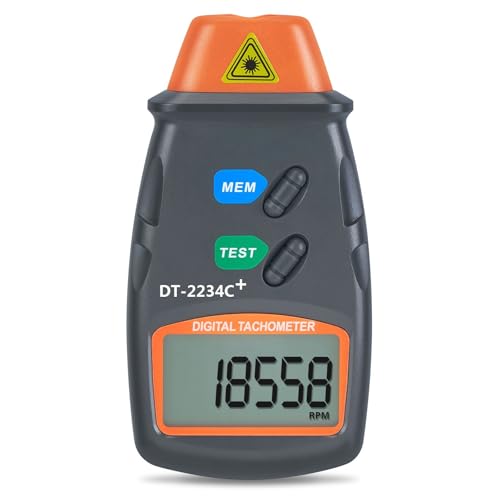
Some people rely on smartphone apps, while others stick with handheld tachometers or manual timing methods. Each approach has tradeoffs. Phone apps can be convenient, but background noise and lighting conditions sometimes throw readings off. Manual counting works in a pinch, though it can become tiring after several attempts. A digital laser tachometer usually delivers cleaner results, especially for larger fans with higher RPM ranges.
Fan performance also changes with maintenance habits. Dust-coated blades create drag, and loose screws often reduce efficiency without making obvious noise. Plenty of ceiling fans keep spinning while quietly losing airflow power month after month. That’s why checking fan speed occasionally gives a clearer picture of overall performance rather than relying on guesswork alone.
Temperature and seasonal settings play a role too. During summer, counterclockwise rotation creates stronger downward airflow, while winter settings typically slow the breeze sensation by reversing direction. Measuring the actual blade speed helps confirm whether the motor responds correctly after changing settings. Odd fluctuations may reveal electrical issues that otherwise stay hidden.
Then there’s energy usage. Nobody likes paying extra utility costs for a fan that barely moves air. Measuring ceiling fan RPM can help identify inefficient operation before replacing the entire fixture unnecessarily. Sometimes a quick capacitor replacement restores proper speed and airflow without the expense of buying a brand-new fan.
Accurate speed measurements also help during upgrades or comparisons between fan models. A larger fan with slower RPM may circulate air more effectively than a smaller fan spinning much faster. That catches many people off guard. Blade span and blade pitch often influence airflow more than raw speed alone.

Ceiling Fan Slide Control 7787200 Replacement For Westinghouse/Hunter/Hampton Bay/Honeywell/Harbor Breeze
View on Amazon- LFR Score9.4
LFR Score is a ranking system developed by lightfansreviews.com. LFR Score has no relationship or impact from any manufacturers or sales agent websites. Learn more
- BrandComfort Direct

- LFR Score9.2
LFR Score is a ranking system developed by lightfansreviews.com. LFR Score has no relationship or impact from any manufacturers or sales agent websites. Learn more
- BrandLutron
- LFR Score9.2
LFR Score is a ranking system developed by lightfansreviews.com. LFR Score has no relationship or impact from any manufacturers or sales agent websites. Learn more
- BrandDAYONE

- LFR Score8.8
LFR Score is a ranking system developed by lightfansreviews.com. LFR Score has no relationship or impact from any manufacturers or sales agent websites. Learn more
- BrandLPHUMEX

- LFR Score8.8
LFR Score is a ranking system developed by lightfansreviews.com. LFR Score has no relationship or impact from any manufacturers or sales agent websites. Learn more
- BrandBN-LINK
- LFR Score8.6
LFR Score is a ranking system developed by lightfansreviews.com. LFR Score has no relationship or impact from any manufacturers or sales agent websites. Learn more
- BrandAGPTEK

- LFR Score8.2
LFR Score is a ranking system developed by lightfansreviews.com. LFR Score has no relationship or impact from any manufacturers or sales agent websites. Learn more
- BrandLeviton

- LFR Score7.6
LFR Score is a ranking system developed by lightfansreviews.com. LFR Score has no relationship or impact from any manufacturers or sales agent websites. Learn more
- BrandLeviton

- LFR Score7.2
LFR Score is a ranking system developed by lightfansreviews.com. LFR Score has no relationship or impact from any manufacturers or sales agent websites. Learn more
- Branduaelua
- LFR Score7.2
LFR Score is a ranking system developed by lightfansreviews.com. LFR Score has no relationship or impact from any manufacturers or sales agent websites. Learn more
- BrandHosyond
Last update on 2026-05-19 / Affiliate links / Images, Product Titles, and Product Highlights from Amazon Product Advertising API
How To Measure Ceiling Fan Speed Accurately
A room can feel oddly stuffy even while the blades are spinning right above your head. That’s usually the moment people start wondering whether the fan is actually moving fast enough, or just making noise and pretending to help. How to measure ceiling fan speed gives you a practical way to check RPM, spot weak airflow, and avoid replacing a fan that may only need cleaning, balancing, or a small electrical fix.
Ceiling Fan Speed Basics
Ceiling fan speed is usually measured in RPM, which means revolutions per minute. In plain English, it tells you how many full turns the blades make in one minute. A higher number doesn’t always mean better comfort, though, because blade pitch, fan size, and room layout all affect how much air actually moves. That’s why a small fan spinning fast can still feel weaker than a large fan spinning slower.
Most household ceiling fans have multiple speed settings, usually low, medium, and high. Each setting should produce a clear difference in air movement, motor sound, and blade rotation. If high speed feels close to medium, that’s a red flag worth checking. A weak top speed can point to a tired capacitor, dirty blades, loose wiring, or a motor that’s starting to lose efficiency.
RPM readings matter because comfort can be misleading. A fan above a tall ceiling may seem slow simply because the breeze spreads before it reaches your skin. A fan in a small room may feel strong even at a lower speed because the air has less space to travel. Measuring the actual speed keeps you from blaming the wrong thing.
Fan speed also connects to noise control. A fan that spins unevenly may create humming, ticking, or wobbling before the airflow drops enough to notice. That tiny shake puts extra stress on screws, blade arms, and the motor housing. Catching speed changes early helps prevent annoying movement and bigger repair bills later.
Simple Tools That Give Better Readings
A laser tachometer is the easiest tool for getting a clean ceiling fan speed reading. You place reflective tape on one blade, aim the tool at it, and let the device count each full rotation. This method works well because you don’t have to guess, squint, or count fast-moving blades by eye. For most people, it’s the neatest way to measure ceiling fan RPM without turning the task into a circus act.
A smartphone app can help too, though it comes with a few quirks. Some apps use the phone camera to estimate blade movement, while others rely on sound or strobe-style visual matching. Bright lighting, shadows, glossy blades, and background noise can throw off the result. Still, a phone app can be handy for a quick speed check before deciding whether a more precise tool is worth using.
Manual counting works in a pinch, but it’s not exactly relaxing. You mark one blade with a small piece of tape, count how many times it passes a fixed point in 15 seconds, then multiply by four. That gives you a rough RPM estimate. The trick is staying focused, because one missed rotation can skew the number pretty quickly.
Safety deserves more attention than people give it. Keep ladders steady, keep fingers far from moving blades, and don’t lean over furniture just to get closer. A fan running at high speed can surprise you, especially with longer blades. Stable footing matters more than shaving a few seconds off the job.
Tool choice depends on how accurate you need to be. A quick manual count may be enough for comparing low, medium, and high settings. A tachometer makes more sense for troubleshooting motor issues, checking repairs, or comparing two fans side by side. For related home fixture work, plan safer electrical updates with install fluorescent lighting if lighting changes are part of the same room refresh.
Step By Step Fan Speed Check
Start by cleaning the blades before measuring anything. Dust may look harmless, but it adds drag and can slightly change fan speed and balance. Wipe the blade tops, blade edges, and motor housing with the fan switched off. A clean fan gives a fairer reading and makes wobble easier to spot.
Next, set the fan to low speed and let it run for a minute. That short wait gives the motor time to settle into a steady rhythm. Place a small piece of tape on one blade if you’re counting manually or using a tachometer. Then record the low-speed RPM so you have a baseline.
Move to medium speed and repeat the same process. The jump from low to medium should feel noticeable, not tiny or uncertain. A small difference may suggest a capacitor problem, especially if the motor hums but doesn’t push much air. Write the result down because speed comparison is more useful than one lonely number.
Switch to high speed and watch the fan carefully. The blades should spin smoothly without heavy wobbling, scraping sounds, or sudden dips in rotation. A strong high setting should produce a clear airflow change, though larger fans may still look slower than compact ones. That’s normal because blade span changes how speed appears to the eye.
After measuring all settings, compare the results with the fan’s manual if you still have it. Many manuals list expected speed ranges, though not every brand provides detailed RPM values. If the numbers seem low across every setting, check the capacitor, wall control, remote receiver, or wiring. For rooms where airflow and lighting both matter, compare layout-friendly upgrades through bladeless ceiling fans with lights before buying another traditional fan.
What Speed Changes Can Reveal
A ceiling fan that slows down over time rarely does it for no reason. Dust buildup, worn capacitors, dry bearings, and loose blade screws can all reduce performance. Sometimes the fan still runs, so the problem hides in plain sight. Measuring speed gives you a clue before the motor starts acting dramatic.
A failing capacitor often shows up as weak startup power or poor high-speed performance. The fan may take longer to get going, hum more than usual, or spin slower even though the setting hasn’t changed. That little part helps regulate motor power, so a bad one can make the whole fan feel lazy. Capacitor trouble is one of the most common reasons speed readings drop.
Remote controls and wall switches can also muddy the waters. A bad receiver may limit voltage to the motor, causing strange speed behavior. Some dimmer switches are not designed for ceiling fans and can create humming or inconsistent rotation. If speed measurements bounce around, inspect the control setup instead of blaming the fan blades right away.
Blade balance affects more than comfort. A wobbly fan wastes energy through movement that doesn’t help airflow. That vibration can loosen screws and increase wear around the mounting bracket. A steady RPM test paired with a visual wobble check tells you whether the fan needs balancing, tightening, or deeper repair.
Room conditions can also make a good fan feel disappointing. Tall ceilings, blocked airflow, heavy furniture, and incorrect seasonal direction all change how air reaches the living space. In summer, most fans should push air downward with counterclockwise rotation. For separate gear that needs steady handheld control during setup shots or room documentation, compare wireless remote control for nikon options before photographing fixture changes.
How To Measure Ceiling Fan Speed For Better Airflow
Some ceiling fans look perfectly fine from the floor while quietly struggling to circulate air properly. The blades spin, the light works, and nothing seems obviously broken, yet the room still feels warm and stale. That disconnect frustrates a lot of people because the fan appears functional on the surface. Measuring ceiling fan speed helps reveal whether the airflow problem comes from the motor, blade setup, maintenance issues, or simply the wrong fan style for the space.
Blade Size Changes Speed Perception
Large ceiling fans often appear slower than smaller models even while moving more air. That visual illusion catches people off guard all the time. A 60-inch fan with deep blade pitch may rotate at a lower RPM yet circulate air more effectively than a compact fan spinning aggressively overhead. Blade span changes how the eye interprets movement.
Shorter blades usually need higher speeds to cover the same amount of floor space. That’s why smaller bedroom fans sometimes sound busier than larger living room models. Fast rotation alone doesn’t guarantee comfort. Air circulation efficiency depends heavily on blade angle, motor torque, and ceiling height.
Flush mount fans deserve extra attention because they sit closer to the ceiling. Reduced clearance can limit airflow if the fan design isn’t optimized properly. Explore cleaner low-profile airflow setups through modern flush mount ceiling fan ideas if standard fans feel bulky or uneven in compact rooms.
Some homeowners panic after seeing a large fan rotate more slowly than expected. Most of the time, that slower movement is completely normal. Larger blades naturally cover more distance per rotation, so the fan doesn’t need extreme speed to move substantial air. Blade geometry matters more than raw motion.
Ceiling Height Affects Air Movement
A ceiling fan installed too high above the floor may struggle to create noticeable airflow where people actually sit or sleep. The breeze spreads and weakens before reaching the occupied space. That often leads people to assume the fan motor is failing, even though the RPM may still be normal. Ceiling distance changes airflow perception dramatically.
Downrods help position the blades closer to the living area, especially in vaulted rooms. Fans mounted too close to tall ceilings waste a chunk of their airflow potential. A properly sized downrod improves circulation without increasing motor strain. The room simply feels more balanced.
Low ceilings create a different challenge. A fan hanging too low can feel overpowering even at moderate speeds. Papers shift around, lightweight curtains flap constantly, and the room becomes irritating instead of comfortable. Adjusting speed settings properly helps maintain steady airflow comfort without turning the room into a wind tunnel.
Seasonal airflow changes also become more noticeable in rooms with unusual ceiling heights. Warm air naturally rises, so winter fan direction matters even more in taller spaces. A properly adjusted fan helps redistribute trapped heat instead of letting it collect uselessly near the ceiling. Balanced circulation reduces hot and cold spots throughout the room.
Motor Problems That Reduce Speed
A weak capacitor remains one of the biggest reasons ceiling fans lose speed over time. The fan may still operate, but the blades struggle to reach full rotation power. High speed suddenly feels sluggish, and startup becomes slower than usual. Capacitor wear tends to appear gradually instead of failing all at once.
Overheating motors create another common issue. Dust buildup around the motor housing traps heat and forces internal components to work harder. That extra strain can reduce RPM and increase humming sounds. Cleaning the housing and vents sometimes restores smoother performance surprisingly quickly.
Loose wiring connections can also affect motor consistency. A fan receiving unstable voltage may fluctuate between speeds or hesitate during operation. Those problems often appear after years of vibration loosening electrical connections. Flickering lights paired with weak airflow sometimes point toward wiring trouble rather than blade imbalance.
Old bearings create friction that slows blade rotation little by little. Some fans produce squeaking or grinding noises before airflow noticeably weakens. Others simply feel sluggish without obvious warning signs. Measuring fan RPM regularly helps track those gradual performance drops before the motor suffers permanent damage.
Airflow Problems Beyond RPM
People often focus only on speed while ignoring airflow obstacles throughout the room. Furniture placement, blocked vents, thick curtains, and awkward room layouts all influence circulation. A ceiling fan can spin at healthy RPM levels yet still leave parts of the room feeling stagnant. Air path obstruction changes comfort more than many expect.
Dusty blades create drag while also reducing aerodynamic efficiency. Even a thin layer of grime changes how smoothly air moves across the blade surface. The fan may not look filthy from below, but the top side often collects heavy buildup. Cleaning the blades improves both speed consistency and airflow quality.
Blade pitch matters too. Steeper blade angles generally push more air, though they also demand stronger motors. A fan with shallow blade pitch may rotate quickly but produce surprisingly weak airflow. That mismatch confuses plenty of homeowners comparing different fan models side by side.
Room humidity can subtly affect comfort as well. Humid spaces tend to feel warmer because sweat evaporates more slowly from the skin. Ceiling fans help by increasing evaporation, but weak circulation reduces that cooling effect. During decorative seasonal setups, avoid overcrowding airflow zones with bulky decor or oversized lighting arrangements. For cleaner room layouts and lighting inspiration, browse led christmas tree lights ideas that keep pathways visually open.
Manual Versus Digital Measurements
Manual blade counting still works reasonably well for basic speed checks. You pick one blade, track rotations for 15 seconds, then multiply by four. It’s simple, cheap, and surprisingly effective for spotting major speed differences between settings. The downside is accuracy fatigue because concentrating on fast-moving blades gets tiring quickly.
Digital tachometers remove much of that guesswork. Reflective tape attached to one blade lets the device count rotations automatically. The reading appears almost instantly, which makes repeated testing much easier. Laser tachometers are especially useful for troubleshooting after repairs or capacitor replacement.
Smartphone apps sit somewhere in the middle. Some apps rely on camera flicker matching, while others estimate speed using sound frequencies. Results vary depending on room lighting, background noise, and blade color. They’re convenient for quick checks, though not always reliable enough for serious diagnostics.
Consistency matters more than perfection for most homeowners. If low, medium, and high settings produce clearly different RPM readings, the fan is probably functioning reasonably well. Trouble starts when those speeds blur together or fluctuate unpredictably. Stable speed progression usually signals healthier motor performance.
Signs Your Fan May Need Replacement
Some ceiling fans simply reach the point where repairs stop making financial sense. Replacing capacitors and tightening screws helps only so much if the motor itself is heavily worn. Persistent overheating, burnt smells, and unstable speeds often suggest deeper internal damage. Motor deterioration tends to worsen gradually over time.
Repeated wobbling can also shorten the lifespan of mounting hardware and blade arms. Even after balancing kits and screw adjustments, certain fans continue shaking because the internal alignment has shifted permanently. That constant vibration stresses the motor and mounting bracket together. The result usually becomes noisier month after month.
Older fan designs sometimes struggle with modern room layouts and energy expectations. Newer motors often operate more quietly while delivering steadier airflow across multiple speeds. A replacement may improve comfort without requiring dramatic electrical changes. Updated fan efficiency can reduce frustration in rooms that never seem evenly cooled.
Pay attention to how the fan behaves during daily use instead of relying only on appearance. Weak airflow, delayed startup, inconsistent speed changes, and excessive heat around the motor housing all point toward declining performance. Measuring ceiling fan speed regularly helps separate normal aging from problems that deserve immediate attention.


Best Small Flush Mount Ceiling Fans 2026 Ultimate Picks

Best Smart Ceiling Fan India 2026 For Effortless Comfort

Best Smart Ceiling Fans with Lights for 2026: Top Picks

Best Smart Home Non Ceiling Fans 2026 For Ultimate Comfort

Best Outdoor Misting Ceiling Fan 2026 For Ultimate Comfort

Best Outdoor Ceiling Fans For Porch 2026 With Style And Breeze

Best Smart Bulb For Ceiling Fan 2026 That Brightens Life

Best Smart Ceiling Fan Control 2026 For Effortless Comfort






