
How to Reset the BMW Engine Oil Light from the Dashboard

Fresh oil is finally in the engine and the tools are put away, but a glowing service icon still greets the driver from the instrument panel. Clearing it takes only a minute: switch on the electronics without starting the engine, then hold down the trip odometer button until the service menu appears. Tapping that same button again resets the counter so the car tracks your next oil change accurately.
The exact sequence varies based on whether the ignition relies on a push button or a standard turn key. Older dashboard dials also show different icons than modern digital screens. Most crucially, this reset only applies to a yellow maintenance reminder; a glowing red oil lamp means the engine lacks oil pressure and must be shut off right away. The steps below walk through each ignition type so you can reset the reminder without an extra trip to a repair shop.
Is your oil light a reminder or an emergency?
Before touching any buttons, look closely at the symbol glowing on your instrument cluster. BMW uses two very different oil indicators, and confusing them can permanently ruin your engine.
A yellow or amber icon showing an oil can, or a message that reads "Service Due," is your routine maintenance reminder system. BMW calls this Condition Based Servicing, or CBS. This indicator tracks the mileage and calendar time since your last service visit. When this yellow icon turns on, your car is simply telling you that the oil has reached the end of its normal working life. It is safe to drive your vehicle, perform the oil change, and complete the reset procedure.
A red oil can symbol represents an immediate mechanical emergency indicating dangerously low oil pressure. Think of the yellow light like an alarm clock reminding you to wake up, while the red light is a smoke alarm warning of an active fire. Engine oil lubricates critical metal bearings spinning thousands of times every minute. Without oil pressure, those parts grind against each other and cause severe damage within seconds.
If you see a red oil light while driving, pull over immediately and shut off the engine. Do not try to drive home or reset the light from the driver seat. Check the oil level with the dipstick under the hood or the electronic monitor on your center screen. If the level is full but the red light remains on, leave the car off and call a tow truck. Resetting a light will never fix low oil pressure.
How do you reset modern push-button start models?
Most BMW models built from the mid-2000s through 2026 use an electronic start button on the dashboard instead of a turned key. Resetting the maintenance reminder system on these cars takes less than two minutes once you know the exact button sequence.
Follow these steps in order to clear the reminder from the driver seat:
- Close all doors and fasten your seatbelt. Ensure the driver door, passenger doors, trunk, and hood are completely shut. Fastening your seatbelt prevents chime alerts from overriding the service menu before you can interact with it.
- Switch the ignition on without starting the engine. Keep your foot off the brake pedal on an automatic car, and off the clutch on a manual car. Press the Start/Stop button once or twice so the dashboard gauges light up while the engine stays off.
- Wait for startup alerts to clear. Give the cluster a few seconds to finish its initial check. Wait for temporary alerts about temperature or washer fluid to fade until the standard odometer reading displays steadily.
- Press and hold the trip button. Locate the trip button, which is the small peg on the speedometer gauge. Press that peg inward and keep holding it down firmly. It takes roughly ten seconds for the service menu icon to appear on the cluster screen.
- Cycle to the engine oil icon. Release the peg once the service menu appears. If the first image shown is not an oil can, tap the trip button with short presses until the oil can symbol appears.
- Trigger the reset prompt. With the oil icon displayed, press and hold the trip button again for about three seconds until the display shows the text "Reset?" on the screen.
- Confirm the reset command. Release the peg for one second, then immediately press and hold it down again for roughly three seconds. A progress bar or "Reset in progress" will appear. Release the button once the screen reads "Reset successful."
- Turn off the vehicle. Press the Start/Stop button once to shut down the electronics. Turn the ignition back on to verify that the yellow service reminder is gone.
How do you reset older key-ignition BMW models?
If your BMW uses a traditional turned key in the steering column, the reset sequence relies on a different physical process. This applies to classic chassis like the late 1990s and early 2000s 3 Series, 5 Series, and first-generation X5.
Here is how to reset the maintenance reminder system using the ignition key and the gauge cluster:
- Keep the key in position 0. Insert your key into the ignition cylinder, but leave it turned completely off. Confirm all doors are shut so warning chimes do not interrupt the computer.
- Hold down the left cluster peg. Find the left trip button on your speedometer cluster. Press and hold it down firmly with your thumb before touching the ignition key.
- Turn the key to position 1. While keeping the peg held down, turn your key one click forward into position 1. This turns on accessory power without activating the full engine electronics. Do not turn the key to position 2 or crank the starter.
- Wait for the service display. Continue holding the peg for roughly five seconds until the digital screen shows "Oil Service" or "Inspection" along with the word "Reset" or "Re."
- Release and hold until the prompt flashes. Let go of the peg for one second, then press and hold it down again for five seconds. The word "Reset" will start flashing on the display.
- Tap the button once to finalize. While the text is flashing, release the peg and immediately tap it once. The screen will display your new service mileage interval and show "End SIA."
- Switch the key off. Turn the key back to position 0 and pull it out. When you next start the car, the service reminder lights will show full green bars.
Why does the dashboard reset fail sometimes?
Struggling with a service reminder that refuses to reset can be frustrating. You hold the peg down, but the screen displays "Reset Unsuccessful" or simply bounces back to the clock.
Here is a checklist of common reasons a manual reset fails and how to solve each one:
- The engine was running. If your foot touched the brake pedal during startup, the engine turned on. BMW computers block service resets while the engine runs to prevent accidental changes while driving. Always verify the tachometer sits at zero RPM before holding the trip button.
- A door or the hood was open. BMW instrument clusters give priority to safety warnings. If a door or the front hood is unlatched, that warning prompt will override the service menu. Shut every door and latch firmly before trying again.
- The vehicle clock lost its date. The maintenance reminder system relies on time calculations to set future service dates. If you disconnected the battery during your oil change, the internal calendar may reset to zero. Set the correct time and date in your center console menu first, then repeat the reset.
- The service is severely overdue. If you drove far past your service interval, the mileage counter drops into deep negative numbers. Some BMW computer versions lock out manual cluster resets once an interval is excessively overdue, requiring a digital reset via the diagnostic port.
- The 12-volt battery voltage is low. When your car battery charge drops below optimal levels, vehicle computers enter a low-power mode. This state can prevent the computer from writing new service dates to memory. Running the car on a short drive can restore battery voltage.
What should you look for in a reset tool?
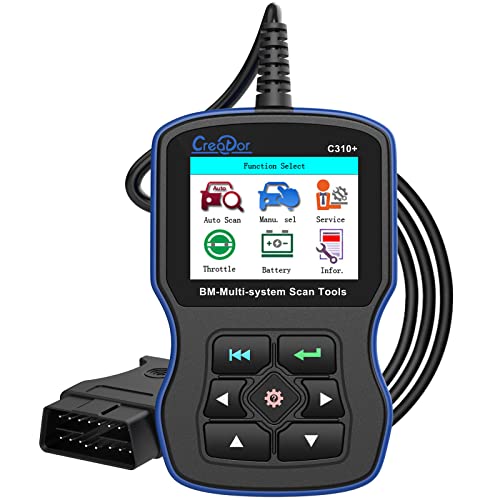
When manual dashboard button sequences continue to show an error, a handheld diagnostic scan tool provides the solution. These tools plug directly into the computer plug under the steering wheel, known as the OBD2 port. Finding this socket in a dark driver footwell can take some effort. Mobile mechanics who service vehicles on the road often outfit their mobile workspaces with the best led strip lights for van cabins to keep under-dash wiring and diagnostic ports clearly visible.
If you decide to purchase a diagnostic tool for home maintenance, keep these practical points in mind:
- BMW-specific protocol compatibility: Basic code readers only communicate with standard emissions systems. They cannot access the proprietary maintenance reminder system. Choose a tool that explicitly states support for BMW Condition Based Servicing.
- Multi-system reset capability: A capable tool should clear oil service reminders as well as brake pad wear sensors, cabin air filters, and spark plug intervals.
- Battery registration functions: Modern BMW models require software registration whenever you install a new 12-volt battery. A tool that includes battery registration saves you a costly dealership appointment later.
- Clear display and long cable: A backlit screen and a flexible cable allow you to read service data comfortably from the driver seat without bending awkwardly under the dashboard.
What other questions do BMW owners often ask?
Can you reset the oil service through the iDrive screen?
On most BMW models, the central iDrive screen only displays vehicle service status and remaining mileage. It acts as an information monitor rather than a control panel for maintenance resets. To clear the light, you must use the physical trip button on the gauge cluster or connect a dedicated scan tool to the diagnostic port under the dashboard.
What does reset unsuccessful mean on the cluster?
This message means the car computer rejected the manual reset request from the dashboard peg. It most commonly happens because the engine was running, a door was open, or the vehicle clock lost its date setting after a battery disconnect. Verify that your doors are shut, set the clock, keep your foot off the brake, and try the button sequence again.
Will resetting the oil reminder turn off a check engine light?
No, the engine oil service indicator and the check engine light operate on two completely separate vehicle systems. The oil light tracks routine calendar and mileage intervals, while a check engine light indicates an active mechanical or electrical fault detected by the engine computer. You must connect a code reader to identify the specific error code, fix the mechanical issue, and clear that fault separately.
How does a BMW calculate oil service intervals?
BMW vehicles do not rely on simple odometer mileage alone to determine when oil needs changing. The maintenance reminder system evaluates fuel consumption, engine operating temperatures, cold starts, and total driving time to judge how hard the oil worked. While most intervals target roughly 10,000 miles or one year under standard highway driving, frequent short trips in cold weather will cause the system to call for service sooner.

- LFR Score9.0
LFR Score is a ranking system developed by lightfansreviews.com. LFR Score has no relationship or impact from any manufacturers or sales agent websites. Learn more
- BrandANCEL

- LFR Score8.8
LFR Score is a ranking system developed by lightfansreviews.com. LFR Score has no relationship or impact from any manufacturers or sales agent websites. Learn more
- BrandANCEL

- LFR Score8.6
LFR Score is a ranking system developed by lightfansreviews.com. LFR Score has no relationship or impact from any manufacturers or sales agent websites. Learn more
- BrandFOXWELL

- LFR Score8.4
LFR Score is a ranking system developed by lightfansreviews.com. LFR Score has no relationship or impact from any manufacturers or sales agent websites. Learn more
- BrandGeneric
- LFR Score8.2
LFR Score is a ranking system developed by lightfansreviews.com. LFR Score has no relationship or impact from any manufacturers or sales agent websites. Learn more
- BrandCreator

- LFR Score8.0
LFR Score is a ranking system developed by lightfansreviews.com. LFR Score has no relationship or impact from any manufacturers or sales agent websites. Learn more
- BrandAupoko

- LFR Score8.0
LFR Score is a ranking system developed by lightfansreviews.com. LFR Score has no relationship or impact from any manufacturers or sales agent websites. Learn more
- BrandiKiKin
![C410 OBD2 Scanner Fit for BMW Mini EPB ABS SRS DPF Oil Reset Multi System Scan Tool with Battery Registration OBDII Code Reader Diagnostic Scan Tool [New Version Update of Creator C110+ C310+]](https://m.media-amazon.com/images/I/51hpLz0j2fL._SL500_.jpg "C410 OBD2 Scanner Fit for BMW Mini EPB ABS SRS DPF Oil Reset Multi System Scan Tool with Battery Registration OBDII Code Reader Diagnostic Scan Tool [New Version Update of Creator C110+ C310+]")
- LFR Score7.8
LFR Score is a ranking system developed by lightfansreviews.com. LFR Score has no relationship or impact from any manufacturers or sales agent websites. Learn more
- BrandUPsicHi

- LFR Score7.4
LFR Score is a ranking system developed by lightfansreviews.com. LFR Score has no relationship or impact from any manufacturers or sales agent websites. Learn more
- BrandiCarsoft

- LFR Score7.2
LFR Score is a ranking system developed by lightfansreviews.com. LFR Score has no relationship or impact from any manufacturers or sales agent websites. Learn more
- BrandBoost Monkey
Last update on 2026-09-30 / Affiliate links / Images, Product Titles, and Product Highlights from Amazon Product Advertising API


Best Lighting For Makeup 2026 Bright Ideas For Flawless Looks

Best Wall Sconces For Staircase 2026 Brighten Your Home

Best Lighting For Computer Desk 2026 For Focused Work

Best Boat Black Lights 2026 For Nighttime Adventure

Best Black 30 Inch Light Bar Reviews – Top Picks of 2026

Best Black Light For Aquarium 2026 For Vibrant Glow

Best Black Light for Authenticating Glass 2026 Top Picks

Best Waterproof Spotlight 2026 That Outshines Expectations






