
How to Reset the Toyota Highlander Oil Light in Two Minutes

Fresh oil is in the engine, but starting the Highlander still brings up that stubborn maintenance message on the dashboard screen. Anyone can clear the reminder from the driver seat in under two minutes without buying special tools or paying a shop fee. The process simply tells the onboard computer to restart its mileage counter until the next service window.
The exact steps vary based on the vehicle setup. Earlier Highlanders rely on the small plastic trip button sticking out of the speedometer, while modern generations use the directional arrows on the steering wheel. A push-button ignition also requires slightly different timing than a traditional turn key. Most importantly, confirm the alert is a routine maintenance note rather than a red oil can icon, which signals dangerous low oil pressure. The steps below show exactly what buttons to press for each model year.
Check Which Warning Light Is Glowing Before You Drive
When a warning lights up on your Toyota Highlander dashboard screen, look closely at the color and symbol before reacting. A yellow or amber message reading "MAINT REQD," "Maintenance Required," or "Maintenance Required Soon" is a routine mileage counter. It triggers automatically every 5,000 miles to remind you that an oil change, tire rotation, or fluid check is due. It does not measure oil cleanliness, thickness, or level. If someone recently changed your oil but forgot to reset the system, the light still turns on right on schedule. You can safely finish your drive without risking engine damage.
A red oil can symbol is a completely different situation. That red icon warns of low engine oil pressure or a severe loss of oil. Engine oil creates a protective barrier between fast-moving metal parts like pistons, bearings, and camshafts. When pressure drops, metal parts grind together, causing severe heat and friction that can destroy an engine within minutes. If that red oil can icon lights up while driving, pull over safely, turn off the ignition, and let the vehicle rest. Check the engine dipstick under the hood. If the dipstick is dry, add oil before starting the car again. If the red light stays on even with full oil, do not drive; call a tow truck immediately. Dashboard buttons cannot clear a red oil pressure warning, because it only turns off when mechanical pressure returns to normal.
Use Your Steering Wheel Controls to Clear Newer Dashboard Screens
Third and fourth generation Toyota Highlanders (built from 2014 through 2026) manage maintenance reminders digitally through menus on the central dashboard screen. You do not have to touch any physical pins on the gauge face. Instead, you navigate the system using the directional keypad and the center OK button on your steering wheel.
Before starting, shift into Park, set the parking brake, and close all doors. An open door message will block access to the maintenance menu. Follow these steps to reset the counter:
- Turn the vehicle on without starting the engine. With a physical key, turn it two clicks forward to the run position. With a push-button start, press the ignition button twice with your foot off the brake pedal. The dashboard screen will turn on, but the engine will remain off.
- Dismiss any active alerts. If a warning like an open door or low washer fluid appears, press the return arrow button on the steering wheel to clear it.
- Navigate to settings. Press the left or right arrow button on your steering wheel until you highlight the gear icon at the top of the screen.
- Open vehicle settings. Press the down arrow until you reach "Vehicle Settings," then press the center OK button.
- Select maintenance data. Scroll down to highlight "Scheduled Maintenance" (labeled "Maintenance Data" on some model years), then press OK.
- Confirm the reset. The screen will ask "Reset Data?". Use the up arrow to highlight "Yes," then press the center OK button.
- Verify the reset. The dashboard screen will display "The Data Has Been Reset." Turn the vehicle off, wait a few seconds, and start the engine to confirm the reminder message is gone.
Hold Down the Trip Button for Older Dashboards
First and second generation Highlanders (built from 2001 to 2013) use a mechanical reset sequence. You complete this using the odometer stem (a small plastic trip button on the dash sticking through the gauge cover). This single button cycles between mileage screens and triggers the reset sequence in the computer.
Highlanders made between 2001 and 2007 generally reset from the main odometer screen, while models from 2008 to 2013 require setting the display to Trip A first. If you are unsure which mode your year uses, start with Trip A. Follow these steps to clear the light:
- Power up the electrical system with the engine off. Turn the key two clicks forward, or tap the start button twice with your foot off the brake.
- Set the mileage display. Tap the small plastic trip button on the dash until the screen shows "Trip A." (If Trip A fails later on a 2001 to 2007 model, repeat using the "ODO" mileage screen instead).
- Turn the ignition switch completely off. Leave the key in the ignition, or keep your smart key fob inside the cabin.
- Press and hold down the small plastic trip button on the dash. Keep holding it down firmly.
- Turn the ignition back to the run position with your other hand while holding the button. Do not start the engine.
- Watch the screen. A series of small horizontal dashes will appear across the odometer display. These dashes will blink and disappear one by one from left to right.
- Wait for zeros. Once the dashes disappear, a row of zeros will flash, followed by your normal mileage returning.
- Release the trip button. Turn the ignition off, then start the engine to confirm the "MAINT REQD" light stays off.
Keep Your Foot Off the Brake When Cycling the Push Button
Failed reset attempts on push-button start Highlanders usually happen because of small timing or pedal errors. The smart key system responds differently depending on your brake pedal position. Keep these practical tips in mind:
- Keep both feet off the pedals. Pressing the brake pedal tells the vehicle to start the engine when you press the button. The reset sequence only works in accessory or ignition ON (car powered up with engine off).
- Press the start button twice deliberately. The first press turns on accessory power for the radio. The second press turns on full ignition power, lighting the dashboard screen and climate controls. That second press is what you need for the reset.
- Coordinate both hands on 2008 to 2013 push-button models. On these models, hold down the small plastic trip button on the dash with one hand before pressing the engine start button twice with the other hand. Pausing too long between taps causes the system to drop out of mode.
- Watch for weak smart key batteries. If your key fob battery is dying, the vehicle may cut power halfway through the countdown. If dash lights shut off mid-reset, hold the key fob directly against the start button while cycling power.
Look for Underlying Engine Faults If the Reminder Returns Immediately
If the maintenance light stays on or returns immediately after you finish the steps, one of these common issues is usually the cause:
- You reset the wrong trip odometer. On older dashboards, holding the button while on Trip B only clears your Trip B mileage, leaving the maintenance timer untouched. Always verify the display shows Trip A before turning off the car.
- The trip button was released too early. The countdown dashes take five to seven seconds to clear. Releasing the button while dashes are still vanishing aborts the reset. Hold it until the zeros flash and your mileage returns.
- An engine fault code is stored in the computer. If an amber Check Engine Light is illuminated alongside your maintenance notice, the car has detected an engine or emissions problem. Active fault codes often keep service notices displayed until the underlying issue is fixed.
- The light was flashing instead of glowing solid. When your Highlander reaches 4,500 miles past its last reset, the light blinks for about fifteen seconds at startup to signal upcoming service. Once you cross 5,000 miles, it stays on solid. You can reset the counter during either stage.
If you use your Highlander for road trips or camping, having reliable interior lighting makes cabin tasks and maintenance checks much simpler. Using the best camping LED strip lights gives you clean interior illumination that will not drain your starter battery. For custom cargo or van builds, following the power setup of the best LED strip lights for van travel keeps your 12V accessories safely separated from vehicle computer circuits.
Keep a Basic Diagnostic Scanner Handy for Persistent Engine Codes
For routine oil changes, you do not need to buy any diagnostic tools or pay a repair shop to clear your dashboard screen. Built-in steering wheel buttons and odometer stems clear the maintenance light for free in under two minutes.
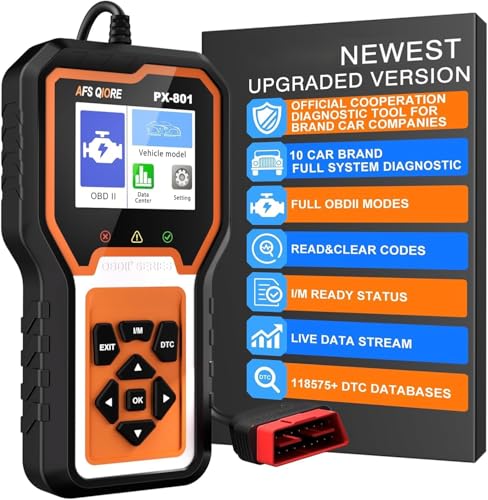
However, if the maintenance light refuses to clear, or if an amber check engine light glows alongside it, an entry-level diagnostic scanner is a helpful tool to keep in your vehicle. These handheld code readers plug directly into the diagnostic port beneath your steering wheel and draw power straight from the car. They communicate with the vehicle computer to read engine fault codes that trigger warning lights.
When choosing a scanner for home maintenance, look for a compact model with a clear, backlit screen that displays code definitions directly, rather than just raw numbers. A reliable reader should read and clear standard engine trouble codes, helping you determine whether an alert comes from a loose gas cap or a part that requires professional repair.

- LFR Score9.2
LFR Score is a ranking system developed by lightfansreviews.com. LFR Score has no relationship or impact from any manufacturers or sales agent websites. Learn more
- BrandANCEL

- LFR Score9.2
LFR Score is a ranking system developed by lightfansreviews.com. LFR Score has no relationship or impact from any manufacturers or sales agent websites. Learn more
- BrandVDIAGTOOL

- LFR Score9.0
LFR Score is a ranking system developed by lightfansreviews.com. LFR Score has no relationship or impact from any manufacturers or sales agent websites. Learn more
- BrandInnova

- LFR Score9.0
LFR Score is a ranking system developed by lightfansreviews.com. LFR Score has no relationship or impact from any manufacturers or sales agent websites. Learn more
- BrandOBDMATE

- LFR Score8.8
LFR Score is a ranking system developed by lightfansreviews.com. LFR Score has no relationship or impact from any manufacturers or sales agent websites. Learn more
- BrandBLCKTEC

AVAPOW AV-D600 4 Systems OBD2 Scanner Engine/Transmission/SRS/ABS Diagnostic Tool, Oil
View on Amazon- LFR Score8.4
LFR Score is a ranking system developed by lightfansreviews.com. LFR Score has no relationship or impact from any manufacturers or sales agent websites. Learn more
- BrandAVAPOW

- LFR Score8.4
LFR Score is a ranking system developed by lightfansreviews.com. LFR Score has no relationship or impact from any manufacturers or sales agent websites. Learn more
- BrandVehpow

- LFR Score8.2
LFR Score is a ranking system developed by lightfansreviews.com. LFR Score has no relationship or impact from any manufacturers or sales agent websites. Learn more
- BrandOBDMATE

- LFR Score8.0
LFR Score is a ranking system developed by lightfansreviews.com. LFR Score has no relationship or impact from any manufacturers or sales agent websites. Learn more
- BrandAupoko

- LFR Score7.2
LFR Score is a ranking system developed by lightfansreviews.com. LFR Score has no relationship or impact from any manufacturers or sales agent websites. Learn more
- BrandAICEL
- LFR Score7.2
LFR Score is a ranking system developed by lightfansreviews.com. LFR Score has no relationship or impact from any manufacturers or sales agent websites. Learn more
- BrandAFS QIORE
Last update on 2026-09-30 / Affiliate links / Images, Product Titles, and Product Highlights from Amazon Product Advertising API
FAQs
Do I need a special tool or scanner to turn off the regular maintenance light?
No, you do not need any scan tools or computer software to clear the standard maintenance reminder. Every generation of the Toyota Highlander includes a free manual reset procedure using either the steering wheel buttons or the small plastic trip button on the dash. You only need a diagnostic scanner if a separate check engine light is also glowing on your dashboard.
Will resetting the oil light clear my radio presets or trip odometer?
Resetting the maintenance reminder only resets the 5,000-mile countdown timer stored in the vehicle computer. Your radio stations, Bluetooth pairings, clock settings, and personal preferences remain completely unchanged. If you drive an older Highlander that uses Trip A for the reset, that specific trip counter will drop to zero, but your main odometer and audio settings stay untouched.
Why does the maintenance required light flash when I first start the car?
A flashing maintenance light means you are approaching your next scheduled service interval. Toyota programs the system to blink the light for about fifteen seconds at startup once you drive 4,500 miles past your last reset. After you reach 5,000 miles, the light stops blinking and stays on continuously until you perform the manual reset procedure.
Can I reset the maintenance reminder before the light actually comes on?
Yes, you can reset the maintenance counter at any time, which is helpful if you change your oil earlier than the standard 5,000-mile interval. Simply follow the exact button procedure for your model year even if the dashboard light is not illuminated. The vehicle computer will restart the 5,000-mile countdown from the moment you complete the reset.


Best Lighting For Makeup 2026 Bright Ideas For Flawless Looks

Best Wall Sconces For Staircase 2026 Brighten Your Home

Best Lighting For Computer Desk 2026 For Focused Work

Best Boat Black Lights 2026 For Nighttime Adventure

Best Black 30 Inch Light Bar Reviews – Top Picks of 2026

Best Black Light For Aquarium 2026 For Vibrant Glow

Best Black Light for Authenticating Glass 2026 Top Picks

Best Waterproof Spotlight 2026 That Outshines Expectations






