
How To Stop a Ceiling Fan From Vibrating Fast

How To Stop a Ceiling Fan From Vibrating becomes a real headache once that constant shaking starts echoing through the room. One minute the fan seems harmless, then suddenly the light fixture rattles, the blades wobble, and the whole thing sounds like it’s hanging on by a thread. Plenty of people ignore the issue at first, hoping the vibration will magically disappear. It rarely does. Small balance problems usually snowball into louder noise, loose screws, and uneven blade movement that gets worse every week.
Loose mounting brackets often sit at the center of the problem, especially after years of daily use. Ceiling fans naturally collect dust on the blade edges, too, and oddly enough, that buildup can throw the entire rotation off balance. A fan doesn’t need major damage to start wobbling like crazy. Tiny alignment issues, warped blades, or uneven blade weight can create enough instability to make the whole room feel irritatingly noisy. That’s why ceiling fan balance matters more than most people expect.
Many shaky fans can be stabilized without replacing the motor or installing a brand-new unit. Tightening hardware, cleaning the blades properly, and checking blade spacing usually solve a huge chunk of the issue. Some fans may also need a balancing kit, especially if one blade sits slightly heavier than the others. It sounds minor, sure, but even a tiny weight difference can trigger annoying movement once the fan reaches higher speeds. Funny how something so small can throw everything out of whack.
Blade alignment also deserves attention because uneven blade angles quietly create extra vibration over time. A slightly bent blade holder may look harmless at first glance, yet the imbalance becomes obvious once the fan spins faster. Rooms with high humidity sometimes make wooden blades warp little by little, creating subtle differences that become impossible to ignore later on. Nobody wants a fan that sounds like it’s preparing for takeoff every evening.
Noise and vibration don’t just affect comfort. Constant wobbling can slowly wear down mounting hardware and strain internal components. That lingering shaking often leads to clicking sounds, humming, or loose light fixtures down the road. Taking care of the issue early usually prevents more expensive repairs later. Stable ceiling fan performance creates quieter airflow, smoother operation, and far less stress during hot nights when the fan practically runs nonstop.
Some fans simply need a few careful adjustments to run smoothly again. Others may reveal hidden wear that’s been building for years behind the canopy or motor housing. Either way, understanding the common causes behind vibration helps narrow down the fix without wasting time or money. A balanced fan doesn’t just look better. It feels calmer, quieter, and far less distracting once everything spins the way it should.

- LFR Score10.0
LFR Score is a ranking system developed by lightfansreviews.com. LFR Score has no relationship or impact from any manufacturers or sales agent websites. Learn more
- BrandSUNIYORS

- LFR Score10.0
LFR Score is a ranking system developed by lightfansreviews.com. LFR Score has no relationship or impact from any manufacturers or sales agent websites. Learn more
- BrandChedin
- LFR Score10.0
LFR Score is a ranking system developed by lightfansreviews.com. LFR Score has no relationship or impact from any manufacturers or sales agent websites. Learn more
- BrandECNHIVE

- LFR Score9.0
LFR Score is a ranking system developed by lightfansreviews.com. LFR Score has no relationship or impact from any manufacturers or sales agent websites. Learn more
- BrandWuno Shop

- LFR Score9.0
LFR Score is a ranking system developed by lightfansreviews.com. LFR Score has no relationship or impact from any manufacturers or sales agent websites. Learn more
- BrandZNBSIXP

- LFR Score8.8
LFR Score is a ranking system developed by lightfansreviews.com. LFR Score has no relationship or impact from any manufacturers or sales agent websites. Learn more
- BrandLPHUMEX

- LFR Score8.8
LFR Score is a ranking system developed by lightfansreviews.com. LFR Score has no relationship or impact from any manufacturers or sales agent websites. Learn more
- BrandQIACHIP

- LFR Score8.6
LFR Score is a ranking system developed by lightfansreviews.com. LFR Score has no relationship or impact from any manufacturers or sales agent websites. Learn more
- BrandKALIONE

- LFR Score8.6
LFR Score is a ranking system developed by lightfansreviews.com. LFR Score has no relationship or impact from any manufacturers or sales agent websites. Learn more
- Brand53T
- LFR Score8.6
LFR Score is a ranking system developed by lightfansreviews.com. LFR Score has no relationship or impact from any manufacturers or sales agent websites. Learn more
- BrandHFYHWT
- LFR Score8.2
LFR Score is a ranking system developed by lightfansreviews.com. LFR Score has no relationship or impact from any manufacturers or sales agent websites. Learn more
- BrandHFYHWT
Last update on 2026-07-28 / Affiliate links / Images, Product Titles, and Product Highlights from Amazon Product Advertising API
How To Stop A Ceiling Fan From Vibrating
A quiet room can turn annoying fast once the fan above you starts shaking like it’s got a mind of its own. The pull chain taps, the light kit buzzes, and every rotation feels a little too dramatic. That’s the exact moment how to stop a ceiling fan from vibrating stops being a random home question and becomes a real comfort problem. The good news is that most vibration issues come from loose parts, dirty blades, or small balance problems, not a doomed fan.
Shaky Fan Clues
A vibrating ceiling fan usually gives itself away before anything dangerous happens. You’ll notice wobbling blades, a faint clicking sound, or a light fixture that trembles at medium and high speeds. That movement may look harmless, but steady vibration can loosen screws and strain the mounting point over time. Small clues matter because they help you fix the problem before the fan turns into a noisy ceiling ornament.
Start by watching the fan from a safe distance while it runs on low, medium, and high. A fan that shakes only at high speed often has a blade balance issue, while one that wobbles at every speed may have loose mounting hardware. A small side-to-side sway can be normal on some downrod fans, but hard shaking is not something to shrug off. A good rule of thumb from many electricians is simple: “A fan should move air, not the ceiling.”
Dust can also create a surprising amount of imbalance. One blade with more buildup than the others adds uneven weight, and that tiny difference gets amplified as the fan spins. Blade dust is especially sneaky because it hides along the top edge where nobody looks during quick cleaning. Before touching screws or brackets, cleaning the blades often saves time and keeps the fix straightforward.
A fan installed on the wrong electrical box can shake more than a properly supported one. Ceiling fans need a fan-rated box, not a basic light fixture box, because the motor creates movement and load. If the fan has always vibrated since installation, the support structure deserves close attention. Safety comes first here, so any loose box, cracked brace, or ceiling movement calls for a qualified electrician.
Clean Blades First
Cleaning sounds too simple, but it’s one of the smartest first moves. Dust collects unevenly, especially in bedrooms, kitchens, and rooms with pets. That buildup changes blade weight just enough to trigger wobble once the motor picks up speed. A microfiber cloth, mild cleaner, and a steady ladder can remove a problem that looks like a bigger repair.
Turn the fan off and let the blades stop completely before touching anything. Support each blade gently while wiping so you don’t bend the blade arm or stress the bracket. Clean the top, bottom, leading edge, and blade tip because vibration often starts where buildup is thickest. This is boring work, yep, but boring fixes beat replacing parts that were never broken.
Sticky kitchen residue needs extra patience because grease grabs dust and turns it into a heavy film. Use a lightly damp cloth instead of soaking the blade, especially with wooden or laminate blades. Too much moisture can swell cheap blade material and create a new warping problem. Separately, to fix a different household gadget issue without guessing, use this repair guide for fix uv led nail lamp when a nail lamp starts acting up.
After cleaning, run the fan again through every speed. Listen for rattles, watch the blade tips, and check whether the shake improved. If the vibration drops but doesn’t disappear, you’ve probably removed one cause while another still remains. That’s common with older fans, where dust buildup and loose screws often team up like bad roommates.
Tighten The Hidden Hardware
Loose screws are the usual suspects behind ceiling fan vibration. Blade screws, blade-arm screws, canopy screws, and light-kit screws can all loosen after months of spinning. The fan may still work, but tiny gaps create movement that turns into clicking, rattling, or wobbling. A screwdriver and a careful hand can make the fan feel steadier almost immediately.
Work with the power off at the wall switch, and use a stable ladder that lets you reach without leaning. Tighten each blade screw evenly instead of cranking one side down hard. Over-tightening can strip the threads or crack older blade material, so aim for snug and secure, not brute force. A fan should feel firm, but the hardware shouldn’t look stressed.
The canopy near the ceiling deserves a close look because it hides the mounting bracket. If the canopy rattles, tighten its screws and check whether it’s rubbing against the ceiling unevenly. A loose canopy can mimic a bigger mounting problem, especially at medium speed. For airflow in cramped travel situations, compare a compact cooling setup like portable fan for airplane instead of expecting a ceiling fan solution to fit every space.
Light kits can create their own noise even when the fan blades are balanced. Loose glass shades, missing rubber washers, or slightly backed-out finials can buzz during rotation. Add or replace rubber dampers where the fixture allows, and tighten glass parts gently. Glass parts hate heavy hands, and nobody wants a cracked shade because one screw got a little too much enthusiasm.
Check Blade Alignment
Blade alignment matters because each blade needs to travel through the same path. If one blade sits higher or lower, the fan pulls unevenly with every rotation. That uneven pull creates ceiling fan wobble, especially once the fan moves past low speed. A simple measuring tape can reveal problems that the naked eye misses.
Measure from the ceiling to the tip of each blade while the fan is off. Rotate the fan by hand and check every blade tip at the same spot. If one measurement differs noticeably, the blade arm may be bent or the blade may not be seated correctly. Small differences can matter because spinning speed exaggerates uneven movement.
Never force a blade arm aggressively back into position. Many brackets are cast metal, and bending them too far can weaken or snap them. Loosen the blade screws first, reseat the blade, then tighten everything evenly before checking again. That slower approach protects the blade bracket and gives you a cleaner fix.
Warped blades are trickier because they may look fine from below. Humidity, heat, and age can twist cheaper wooden or composite blades just enough to create vibration. A warped blade usually needs replacement, not endless adjustment. For a quieter bedroom upgrade with better lighting balance, compare white ceiling fan with light before choosing another fan that may repeat the same comfort issues.
Use A Balancing Kit
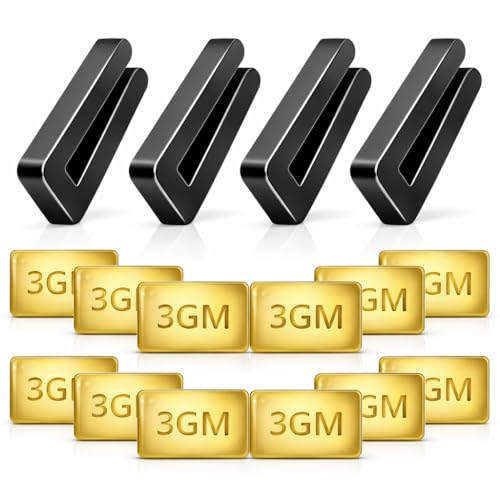
A balancing kit is the go-to fix once cleaning, tightening, and alignment checks don’t fully solve the vibration. Most kits include a plastic clip and small adhesive weights. The clip helps locate the problem blade, while the weight corrects the uneven blade balance. It’s a simple tool, but it rewards patience more than guesswork.
Place the balancing clip near the middle of one blade, then run the fan at the speed where vibration is worst. Move the clip from blade to blade until the wobble improves. Then slide it along the blade, testing different positions until the fan runs smoother. The process feels fussy, sure, but small weight changes can make a big difference.
Once you find the best spot, attach the adhesive weight to the top of the blade where it won’t show from below. Clean that spot first so the weight sticks properly. A dusty or greasy blade will make the weight fall off later, and then the fan vibration comes right back. Press firmly, wait a bit, and test again before calling the job done.
Balancing kits won’t fix every fan problem. A loose ceiling box, damaged motor shaft, cracked blade holder, or badly warped blade needs a different repair. Still, for many ceiling fans, balancing solves the annoying shake without replacing the whole unit. That’s the sweet spot: low-cost repair, cleaner airflow, and less rattling overhead.
How To Fix A Wobbling Ceiling Fan Permanently
Some ceiling fans behave for years, then suddenly start shaking hard enough to make people glance up every few seconds. That constant movement gets irritating fast, especially during quiet evenings or while trying to sleep. A lot of homeowners assume the fan motor is dying, but persistent vibration often comes from smaller mechanical problems hiding in plain sight. Fixing those weak points properly can turn a noisy fan back into something calm, steady, and easy to live with.
Inspect The Ceiling Mount
The ceiling mount handles more stress than most people realize. Every spin of the motor creates movement, and over time that movement can loosen brackets or shift mounting hardware slightly out of position. A shaky mount creates continuous vibration, even if the blades themselves look perfectly fine. That’s why checking the support system matters before replacing expensive parts that may not actually be broken.
Turn the power off completely before removing the canopy cover. Use a flashlight and inspect the bracket, screws, and electrical box carefully. If the bracket wiggles or the screws back out easily, the fan won’t stay stable no matter how balanced the blades are. Explore this guide on open a ceiling fan if the housing feels difficult to access safely.
Fan-rated ceiling boxes matter more than people expect. A standard light fixture box might technically hold the weight, but it often struggles with constant movement from rotating blades. That extra strain slowly transfers vibration into the ceiling itself. Secure support hardware keeps the fan steady and reduces long-term stress on the entire fixture.
Watch for ceiling movement while the fan runs. If the ceiling around the mount flexes slightly or produces cracking sounds, the support brace may be loose above the drywall. That problem won’t fix itself, unfortunately. Tightening visible screws helps temporarily, but unstable support structures usually need deeper inspection before the vibration becomes worse.
Motor Problems That Create Shaking
Fan motors rarely fail overnight. Most develop subtle problems gradually, and those small issues eventually create uneven rotation or strange humming sounds. A worn bearing, loose internal component, or bent motor shaft can throw off the fan’s balance without obvious external damage. Motor vibration often feels different from blade wobble because the entire housing shakes instead of only the blades.
Listen closely during operation at different speeds. Grinding sounds, inconsistent humming, or brief clicking noises usually point toward internal wear. Some older fans produce a mild hum naturally, but strong vibration combined with noise deserves attention. A fan should sound smooth, not like it’s struggling through every rotation.
Heat also affects motor performance over time. Dust buildup inside the motor housing traps warmth and increases friction around moving parts. That extra strain can create rough spinning motion, especially during summer when ceiling fans run for hours every day. Cleaning exterior vents and checking airflow around the housing sometimes improves performance more than expected.
Replacement motors aren’t always practical because older fan models may use discontinued components. At some point, repairing the internal system costs more effort than replacing the entire fixture. Fans that vibrate heavily despite balanced blades and secure mounting hardware often fall into that category. Realistically, some units simply wear out after years of constant use.
Blade Material Makes A Difference
Blade material affects vibration more than appearance-focused shopping guides usually admit. Lightweight blades can flex slightly during operation, while heavier blades place more strain on the motor and mounting bracket. Cheap composite blades sometimes warp after repeated exposure to humidity or temperature changes. That tiny shape difference can trigger persistent wobble at medium and high speed.
Wooden blades look attractive, but they react to moisture over time. Bedrooms with poor ventilation or homes in humid climates often see gradual blade warping after a few years. One blade twists slightly, another stays flat, and suddenly the fan develops an annoying shake nobody can ignore. Consistent blade shape matters more than decorative finishes.
Metal blades create a different set of tradeoffs. They resist moisture better but can amplify vibration noise if mounting screws loosen. Some also create sharper airflow sounds at higher speeds, which bothers light sleepers. Fans designed for quiet rooms usually balance blade weight carefully to reduce both wobble and harsh air movement.
Lighting conditions can make ceiling fan movement feel even more distracting at night. A flickering bulb combined with blade vibration creates visual irritation that wears on people surprisingly fast. Compare lighting setups like best lamp for dark room options if overhead lighting feels too harsh beside a constantly moving fan.
Speed Settings And Airflow Balance
Some fans vibrate only at one specific speed, and that detail actually helps narrow down the problem. Low speed may feel stable while medium speed suddenly introduces wobble or rattling. That usually points toward balance sensitivity rather than catastrophic damage. Small imbalances become amplified once the fan reaches certain rotational speeds.
Airflow resistance inside the room also matters. Ceiling fans positioned too close to walls, beams, or tall furniture sometimes experience uneven air pressure during rotation. That resistance affects blade movement and can create subtle shaking. Tight spaces often magnify air turbulence more than homeowners expect.
High speed settings naturally expose weaknesses faster. Loose screws, uneven blades, and worn brackets all become more obvious once the fan spins aggressively. Some people assume lowering the speed solves the issue permanently, but that only masks the underlying problem temporarily. The real goal is stable operation across every setting.
Reversible fans deserve seasonal adjustments, too. Dust buildup around the reverse switch or inconsistent blade movement between summer and winter modes can affect smooth operation. Test both directions after making repairs. A fan that feels stable in one direction but shakes in reverse still has an imbalance somewhere in the system.
Common Repair Mistakes
One of the biggest mistakes involves tightening every screw with maximum force. Over-tightened hardware can crack blade brackets, damage screw holes, or distort mounting plates. Ceiling fans need firm support, not excessive pressure. Gentle, even tightening usually creates a better long-term result.
Another common issue comes from replacing only one blade after damage. New blades rarely match the exact weight and wear pattern of older ones, even from the same manufacturer. That mismatch creates subtle imbalance immediately. Replacing all blades together keeps weight distribution more consistent.
People also skip blade measurements because the fan “looks fine” from below. Tiny height differences become huge once the blades rotate at speed. Measuring blade tip distance carefully saves frustration later. Ceiling fans reward patience far more than rushed adjustments.
Ignoring the ceiling box creates another expensive mistake. A balanced fan mounted to weak support hardware will still shake no matter how many balancing kits get added. Strong support, clean blades, aligned brackets, and stable hardware all work together. Remove one piece from that equation, and the vibration usually returns sooner or later.
Signs It May Be Time To Replace The Fan
Some fans reach a point where constant repairs stop making sense. Cracked blade holders, recurring motor noise, or wobble that returns every few weeks usually signals deeper wear inside the unit. Spending hours chasing the same vibration problem gets frustrating fast. At that stage, replacing the fan may actually save time, money, and stress.
Older fans sometimes lack modern balancing improvements found in newer models. Better blade engineering, quieter motors, and improved mounting systems help newer fans run more smoothly overall. A replacement fan won’t magically fix poor installation, but modern hardware often feels noticeably steadier. Updated ceiling fan design can reduce long-term maintenance headaches.
Watch for overheating signs near the motor housing. Warm motors are normal after long use, but excessive heat combined with noise or vibration deserves attention immediately. Burning smells, flickering lights, or sudden speed changes should never get ignored. Those symptoms point toward electrical issues rather than simple imbalance.
Comfort matters, too. A fan that rattles every night slowly chips away at relaxation, especially in bedrooms or quiet living spaces. Smooth airflow should feel calming instead of distracting. Replacing an aging fan may finally eliminate the constant wobble, buzzing sounds, and loose hardware that have been stealing comfort from the room for months.


Best Small Flush Mount Ceiling Fans 2026 Ultimate Picks

Best Smart Ceiling Fan India 2026 For Effortless Comfort

Best Smart Ceiling Fans with Lights for 2026: Top Picks

Best Smart Home Non Ceiling Fans 2026 For Ultimate Comfort

Best Outdoor Misting Ceiling Fan 2026 For Ultimate Comfort

Best Outdoor Ceiling Fans For Porch 2026 With Style And Breeze

Best Smart Bulb For Ceiling Fan 2026 That Brightens Life

Best Smart Ceiling Fan Control 2026 For Effortless Comfort






