
How to Stop a Table Fan From Rotating Fast

How to stop a table fan from rotating sounds simple until the fan starts clicking, wobbling, or blowing air in every direction except the one you actually need. Plenty of people deal with restless sleep, messy desks covered in loose papers, or annoying airflow bouncing around a small room. A constantly rotating fan can feel more distracting than helpful, especially during work calls, gaming sessions, or late-night reading. One tiny adjustment can completely change the comfort level of a room, but forcing the wrong part often leads to stripped gears or a damaged oscillation knob.
Fans with worn oscillation systems tend to act up at the worst possible moment. The head keeps drifting sideways, the motor strains harder than usual, and suddenly the fan sounds like it's chewing gravel. That's where practical fixes matter. Stopping fan rotation safely usually comes down to understanding how the oscillation mechanism locks into place rather than yanking or twisting random components. A smoother setup keeps airflow stable while helping the motor avoid unnecessary stress over time.
Small living spaces create another headache. Airflow matters, but uncontrolled movement doesn't always help in compact bedrooms, dorm setups, or office corners. Direct airflow often feels better during hot weather because the cool air stays concentrated where it's needed instead of sweeping across empty walls. Consistent airflow direction can also help reduce dust circulation around electronics, paperwork, and nearby shelves. Little details like this make everyday comfort feel far less frustrating.
Noise complaints pop up all the time with oscillating fans. Clicking sounds, loose neck joints, and shaky rotation can turn a quiet evening into pure irritation. Some fans develop uneven movement after months of use, causing the motor housing to vibrate harder with every sweep. Fixing or disabling oscillation the right way often cuts down that annoying mechanical chatter almost immediately. Reducing vibration and movement helps the entire fan feel steadier and more reliable during long hours of use.
Heat waves push fans into nonstop operation, and that constant movement wears parts down faster than many people expect. Plastic gears inside budget models tend to grind down gradually, especially if the fan head gets pushed manually while oscillation is engaged. So yeah, handling the mechanism carefully matters more than most instruction manuals admit. Protecting the oscillation gear keeps the fan usable longer and avoids that dreaded burnt-motor smell creeping into the room.
Different fan brands also hide their controls in completely different spots. Some use a pull knob on top, while others rely on side levers or rear switches tucked near the motor housing. That inconsistency confuses people constantly because one wrong move can snap a brittle plastic connector. A little patience goes a long way here. Checking the oscillation control design before forcing anything usually prevents accidental damage and saves money on replacement parts later.
Comfort plays a bigger role than people admit. Direct airflow during sleep can ease stuffy rooms, reduce sweating, and make warm nights feel bearable without cranking up expensive air conditioning. Then again, nonstop side-to-side airflow sometimes dries out eyes or causes neck stiffness after hours in one position. Locking the fan into a fixed angle creates a more predictable cooling setup that feels easier on the body. Controlled air direction often delivers a calmer, quieter environment without overcomplicating things.

- LFR Score9.2
LFR Score is a ranking system developed by lightfansreviews.com. LFR Score has no relationship or impact from any manufacturers or sales agent websites. Learn more
- BrandHoneywell

- LFR Score9.0
LFR Score is a ranking system developed by lightfansreviews.com. LFR Score has no relationship or impact from any manufacturers or sales agent websites. Learn more
- BrandDR.PREPARE
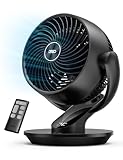
- LFR Score9.0
LFR Score is a ranking system developed by lightfansreviews.com. LFR Score has no relationship or impact from any manufacturers or sales agent websites. Learn more
- BrandDREO

- LFR Score9.0
LFR Score is a ranking system developed by lightfansreviews.com. LFR Score has no relationship or impact from any manufacturers or sales agent websites. Learn more
- BrandIRIS USA

- LFR Score9.0
LFR Score is a ranking system developed by lightfansreviews.com. LFR Score has no relationship or impact from any manufacturers or sales agent websites. Learn more
- BrandDREO

- LFR Score8.8
LFR Score is a ranking system developed by lightfansreviews.com. LFR Score has no relationship or impact from any manufacturers or sales agent websites. Learn more
- BrandBEYOND BREEZE

- LFR Score8.8
LFR Score is a ranking system developed by lightfansreviews.com. LFR Score has no relationship or impact from any manufacturers or sales agent websites. Learn more
- BrandKopBeau

- LFR Score8.6
LFR Score is a ranking system developed by lightfansreviews.com. LFR Score has no relationship or impact from any manufacturers or sales agent websites. Learn more
- BrandHoneywell
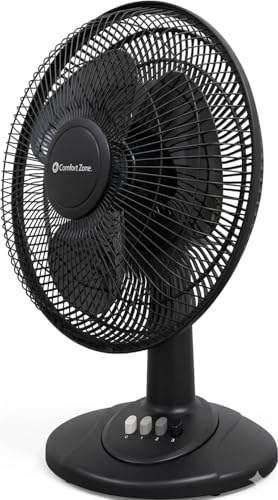
- LFR Score8.6
LFR Score is a ranking system developed by lightfansreviews.com. LFR Score has no relationship or impact from any manufacturers or sales agent websites. Learn more
- BrandComfort Zone

- LFR Score8.4
LFR Score is a ranking system developed by lightfansreviews.com. LFR Score has no relationship or impact from any manufacturers or sales agent websites. Learn more
- BrandEarthuses
Last update on 2026-06-01 / Affiliate links / Images, Product Titles, and Product Highlights from Amazon Product Advertising API
How To Stop A Table Fan From Rotating Safely
A fan that keeps sweeping side to side can turn a calm room into a small daily annoyance. Papers flutter, cool air misses your chair, and that tiny clicking sound starts living rent-free in your head. The fix for how to stop a table fan from rotating usually sits right on the motor housing, but forcing it the wrong way can chew up the oscillation gear faster than you’d think. A careful approach keeps the fan steady, quieter, and pointed exactly where the breeze needs to go.
Stop Fan Rotation
Most table fans use a simple oscillation control that locks or releases the side-to-side motion. On many models, that control is a small push-pull knob on top of the rear motor cover. Pulling the knob up often stops rotation, while pushing it down usually starts the sweeping motion again. Some brands flip that behavior, so gentle testing matters more than muscle.
The fan head should never be grabbed and forced back into place while the motor is running. That move feels harmless, but it can strain the plastic gears inside the neck joint. Once those gears wear down, the fan may click, jerk, or rotate halfway and get stuck. Turn the fan off first, wait for the blades to stop, then adjust the oscillation control with light pressure.
Older fans can feel stiff because dust and heat make small parts less cooperative. A stuck knob doesn’t always mean the fan is broken. Wiggle it gently, check whether it moves vertically or sideways, and avoid using pliers unless the knob is already damaged. Gentle control handling saves the part that actually keeps the fan head fixed.
Some compact desk fans use a rear switch instead of a top knob. Others hide the control near the hinge where the fan head meets the stand. That setup can be annoying because the control blends into the plastic housing. Still, finding the right switch beats pushing the fan head by hand and causing long-term gear wear.
Check The Oscillation Knob First
The fastest place to start is the small knob or lever near the back of the motor. That part controls whether the fan sweeps across the room or stays in one position. Look for a rounded peg, short slider, or raised plastic tab around the top or rear housing. A working oscillation knob should move with a clear click or slight resistance.
Switch the fan to its lowest speed before testing the control. A slower blade speed makes it easier to hear whether the oscillation mechanism engages or stops. If the fan stops rotating after one final sweep, that’s normal. The internal cam often needs a moment to settle into the locked position.
Dust can jam the control, especially on fans stored in garages, bedrooms with pets, or kitchens where greasy air settles on plastic parts. Wipe around the knob with a dry cloth first. If grime is visible, use a barely damp cloth and keep moisture away from vents, switches, and the motor. Clean control movement helps the fan lock into place without extra pressure.
Broken knobs are common on budget fans because the stem underneath is thin. If the top piece spins freely but nothing changes, the internal stem may be cracked. In that case, taping the fan head in place is only a short-term patch, not a real fix. Replacing the knob or locking collar usually works better than fighting the same loose control every day.
Lock The Fan Head Without Damage
A fixed fan angle works best after the head is centered where airflow actually feels useful. Turn the fan off, set the head straight, then adjust the oscillation knob while the blades are still. This prevents the gear from engaging under load. Low-stress adjustment is the quiet little habit that keeps a table fan alive longer.
Never shove the grill left or right while the fan is actively sweeping. That sideways force travels straight into the oscillation linkage. The fan may still run afterward, but the movement can become uneven or noisy. A good rule of thumb is simple: move the control, not the head.
Some fans keep rotating because the knob no longer catches the internal cam. That problem usually feels like a loose click with no real resistance. You may hear a faint ticking near the rear motor cover as the mechanism slips. If that happens, the issue is likely worn internal linkage, not user error.
Small household fixes can help if the fan only needs temporary stability. A soft rubber wedge near the neck joint can reduce drifting, but it should never block vents or touch moving parts. Tape can leave sticky residue and may pull paint or plastic coating from the fan. For related small appliance repair habits, compare the safe disassembly mindset used in fix uv led nail lamp before opening any electrical housing.
Reduce Clicking And Side Movement
Clicking usually points to a worn or dirty oscillation mechanism. The sound often happens once per sweep as the gear changes direction. A fan that clicks only during rotation may become quiet as soon as the oscillation is turned off. That’s a strong clue that the motor itself may still be fine.
Loose screws can also make the fan head shake while it rotates. Check the neck joint, rear grill screws, and base connection after unplugging the fan. Tighten only until snug because plastic housings crack if over-tightened. Stable mounting points help the fan stay fixed without rattling across the desk.
A fan sitting on an uneven table can look like it has an internal problem. Wobbly furniture makes the head sway even after oscillation is disabled. Place the base on a flat surface and check whether the feet sit evenly. A folded paper shim under one foot can stop minor rocking, but a cracked base needs replacement.
Airflow needs differ by room, and a fixed table fan may not suit every setup. Kids’ rooms, play areas, and stroller-side cooling need safer placement and softer airflow, so compare options built around lighter handling through best portable fan for kids before using a heavy table fan nearby. A fixed fan can feel too direct for small children if it points at one spot for hours. Controlled airflow should feel comfortable, not harsh.
Know When Rotation Should Stay On
Stopping rotation isn’t always the better move. A fixed breeze feels great at a desk or bedside, but it can create dry eyes, stiff necks, or chilly skin if aimed too closely. Oscillation spreads air across a wider zone and avoids blasting one person nonstop. The tradeoff is simple: focused cooling versus shared airflow.
Large rooms may feel stuffy if a small table fan stays locked in one direction. The breeze cools one corner while the rest of the space stays warm. In that setup, oscillation helps mix air more evenly, especially during humid afternoons. A fixed fan works better for personal cooling than whole-room circulation.
Ceiling fans handle broad airflow differently because they move air from above rather than pushing it from one small grill. For rooms where a table fan keeps getting shoved around to chase comfort, upgrade planning can start with best high speed ceiling fan for wider air movement. That doesn’t make a table fan useless. It just means the table fan should handle spot cooling while a bigger fan manages room circulation.
Noise sensitivity matters too. Some people barely notice a sweeping fan, while others hear every mechanical click once the room gets quiet. Locking the fan head can cut that distraction, especially at night. Quieter airflow often matters more than maximum air coverage in bedrooms, work corners, and small apartments.
Fix Stiff Or Loose Fan Controls
A stiff oscillation knob usually needs cleaning before repair. Unplug the fan, wipe the control area, and remove visible dust around the rear housing. Avoid spraying liquid cleaners into the motor vents because moisture and electricity don’t play nice. Dry cleaning first is safer than soaking the mechanism and hoping for the best.
A loose control needs a different approach. If the knob lifts off easily, check whether the plastic stem underneath is cracked or rounded. A rounded stem won’t grip the internal switch properly, so the fan may keep rotating even after adjustment. Small replacement parts can solve this better than tape, glue, or repeated twisting.
Lubrication can help some mechanical joints, but it should be used carefully. Thick oil attracts dust, and too much lubricant near the motor housing can create a messy, unsafe situation. A tiny amount on the external neck pivot may reduce stiffness, but internal electrical areas should stay dry. Clean movement matters more than dumping oil into every gap.
Fans with sealed housings are harder to repair without breaking tabs. Cheap plastic clips can snap during opening, especially after years of heat exposure. If the fan still runs safely but only the rotation control is failing, keeping it fixed with an external support may be acceptable for short use. A fan that smells hot, sparks, or slows suddenly needs to be unplugged because electrical safety beats repair savings.
How To Keep A Table Fan Facing One Direction
Sleeping beside a noisy fan that swings back and forth all night can wear anybody down. One minute the breeze feels perfect, then suddenly the airflow drifts toward the wall while your room turns stuffy again. That frustration pushes a lot of people to learn how to keep a table fan facing one direction without damaging the motor or snapping the oscillation control. A stable fan setup feels calmer, quieter, and far less irritating during long summer nights.
Adjust Airflow For Better Sleep
A fixed fan angle can make nighttime cooling feel more predictable. Air stays focused on the bed instead of wandering around the room every few seconds. That consistency helps reduce sweaty wake-ups, especially in smaller bedrooms with weak ventilation. Steady airflow also tends to feel quieter because the fan head stops changing direction over and over.
Position matters more than people think. A fan aimed directly at your face all night may leave your eyes dry or your throat scratchy by morning. Tilting the airflow slightly toward the chest or legs usually feels more comfortable over several hours. Balanced cooling often beats blasting cold air straight at one spot.
Some fans create a low mechanical knock every time the oscillation changes direction. That sound becomes painfully noticeable once the room goes quiet. Locking the fan into one direction cuts out those repeated movement noises and reduces vibration in the neck joint. Reduced mechanical stress helps older fans stay quieter longer.
Bedroom heat can sometimes come from poor air circulation rather than weak fan power alone. Ceiling airflow helps distribute cool air across the room more evenly, especially in larger spaces. For wider overnight circulation, compare room-cooling setups through outdoor ceiling fan with light kit ideas that handle broader airflow patterns without relying entirely on a desk fan. Layered airflow control can make hot nights feel less miserable.
Prevent Gear Damage Inside The Fan
Oscillation gears wear out faster when people manually force the fan head sideways. That grinding pressure hits the small plastic teeth inside the neck assembly. At first, the fan may only click occasionally. Then the movement becomes jerky, uneven, or completely stuck. Protecting the gear mechanism starts with using the oscillation control instead of twisting the fan head by hand.
Turning the fan off before adjusting direction reduces stress on the motor linkage. Moving parts under power create more resistance, especially in older fans with dry gears. A quick pause before repositioning the head can prevent long-term wear. Simple handling habits often matter more than expensive repairs.
Cheap table fans sometimes use brittle internal parts that weaken after years of heat exposure. Sunlight near windows can make plastic housings even more fragile over time. A fan may still spin normally while the oscillation mechanism slowly falls apart inside. Plastic fatigue becomes obvious once the fan struggles to lock into position.
Repair attempts also cause problems if screws get overtightened during reassembly. Plastic housings crack easily around mounting points, especially near the motor neck. Tight enough is enough. Over-tightening can warp the alignment and create new rattling sounds that weren’t there before. Gentle reassembly keeps the fan stable without damaging the shell.
Handle A Fan That Won’t Stay Still
Some fans stop rotating for a few minutes, then slowly drift sideways again. That behavior usually points to a weak locking mechanism or loose neck joint. The fan technically stops oscillating, but the weight of the motor head gradually pulls it off-center. Loose pivot tension often causes that annoying slow movement.
Tightening the neck adjustment knob may help if the fan tilts downward or drifts horizontally. Many table fans include a side tension screw near the tilt hinge. Turning it slightly can stabilize the head without affecting blade speed. Small adjustments usually work better than cranking the knob aggressively.
Rubber pads under the base can also help reduce unwanted movement. Slick desks or uneven tables allow vibration to travel through the stand, making the fan seem unstable even after oscillation stops. A stable surface improves both airflow direction and noise control. Vibration reduction changes how the entire fan feels during operation.
Fans used during injury recovery or physical discomfort often need direct airflow on one area for longer periods. A moving breeze may interrupt comfort instead of helping it. For setups focused on targeted relief, compare recovery-focused room comfort ideas with red light therapy for injury solutions that pair well with quieter personal airflow. Consistent positioning matters more than wide-room circulation in those situations.
Clean Dust Around The Oscillation System
Dust buildup causes more fan problems than most people realize. Fine debris slips into the rear housing and settles around the oscillation linkage over time. Then the fan starts resisting movement, clicking during sweeps, or refusing to lock into one position. Dust-clogged mechanisms often mimic serious mechanical failures.
Unplugging the fan before cleaning sounds obvious, but people skip that step constantly. Blade movement can start unexpectedly if the control switch gets bumped while wiping the housing. A soft brush or dry microfiber cloth handles most surface debris safely. Avoid soaking the rear motor area because moisture can damage internal electrical components.
Fans near kitchens usually collect greasy residue mixed with dust. That sticky buildup makes oscillation controls harder to move smoothly. Mild soap on a lightly damp cloth can help clean exterior surfaces, but liquid should never drip into vents or switches. Controlled cleaning prevents accidental electrical damage.
Grill covers deserve attention too. Dirty front grills reduce airflow and force the fan motor to work harder during long operation. Weak airflow sometimes tricks people into thinking the oscillation system is broken when the real issue is blocked circulation. A cleaner grill allows stronger and steadier airflow without stressing the motor.
Use The Right Fan Position Indoors
Direct airflow feels completely different depending on where the fan sits in the room. A table fan aimed upward from floor level spreads air more gently than one blasting straight across a desk. Tiny placement changes can improve comfort without increasing speed. Smart positioning often solves airflow complaints better than maximum power settings.
Corner placement sometimes creates dead airflow zones where cool air never reaches the center of the room. Moving the fan a few feet away from walls usually improves circulation immediately. Air needs room to travel instead of bouncing straight back into furniture. Open airflow paths help smaller fans feel more effective.
Desk setups create their own frustrations. A rotating fan can constantly blow papers around, shake lightweight cables, or create distracting noise near microphones during calls. Locking the fan into one steady angle makes workspaces feel calmer and easier to manage. Focused desk cooling also reduces random airflow changes during long work sessions.
Pets can react badly to nonstop moving airflow as well. Some animals avoid rotating fans because the sweeping motion changes temperature too suddenly around bedding areas. A fixed airflow angle lets the room stay cooler without startling sensitive pets every few seconds. Stable environmental comfort makes shared spaces feel less chaotic.
Know When Replacement Makes More Sense
Not every fan deserves endless repairs. A unit that smells hot, slows randomly, or sparks near the controls creates a real safety issue. Electrical problems inside aging motors can worsen quickly during heavy summer use. Safety problems should never get ignored just to squeeze another month out of an old appliance.
Replacement may also make sense if the oscillation system keeps failing repeatedly. Buying multiple cheap repair parts for a bargain fan can cost almost as much as replacing it outright. Some low-cost models simply aren’t built for years of heavy daily operation. Long-term reliability matters more than temporary patch jobs.
Noise can become another deciding factor. Older fan motors often grow louder over time even after cleaning and tightening adjustments. A humming or grinding sound during normal operation usually means internal wear is spreading beyond the oscillation system. Quiet airflow becomes harder to maintain once the bearings start aging.
Energy use deserves consideration too. Newer fans generally move air more efficiently while producing less vibration and motor heat. A struggling older unit may run hotter and work harder just to deliver the same airflow you used to get effortlessly. Efficient airflow performance feels more comfortable while putting less strain on the motor during long hot evenings.


Best Small Flush Mount Ceiling Fans 2026 Ultimate Picks

Best Smart Ceiling Fan India 2026 For Effortless Comfort

Best Smart Ceiling Fans with Lights for 2026: Top Picks

Best Smart Home Non Ceiling Fans 2026 For Ultimate Comfort

Best Outdoor Misting Ceiling Fan 2026 For Ultimate Comfort

Best Outdoor Ceiling Fans For Porch 2026 With Style And Breeze

Best Smart Bulb For Ceiling Fan 2026 That Brightens Life

Best Smart Ceiling Fan Control 2026 For Effortless Comfort






