
How To Stop Ceiling Fan From Making Clicking Noise Fast

How To Stop Ceiling Fan From Making Clicking Noise usually sounds simple until that tiny tick keeps echoing through the room night after night. One loose blade screw, a warped blade arm, or even a dangling pull chain can create a noise that slowly drives people up the wall. Quiet spaces suddenly feel irritating, especially during sleep, movie nights, or while trying to focus on work. Small mechanical sounds tend to grow louder in your head over time, and honestly, that's where frustration kicks in fast.
Loose hardware causes more ceiling fan clicking than most people expect. Blade screws gradually shift from vibration, especially in older fans that run daily through changing seasons. A wobbling blade can lightly tap the motor housing or create uneven movement that produces repetitive clicking sounds. Tightening connections carefully, checking blade alignment, and inspecting the mounting bracket often solves the issue without replacing the entire fixture.
Dust buildup also creates sneaky problems that people overlook all the time. Thick grime along blade edges throws off balance, making the fan rotate unevenly and produce rhythmic noise. While cleaning seems basic, uneven dirt accumulation changes airflow and vibration patterns more than expected. A microfiber cloth, gentle cleaner, and steady inspection can dramatically reduce annoying sounds while helping the fan spin smoother.
Some fans develop clicking noises because internal parts expand and contract during temperature changes. That's especially common in bedrooms or covered patios where humidity shifts throughout the day. Metal components rub slightly against each other as the motor heats up, creating those random ticking sounds that appear out of nowhere. Checking the canopy, downrod, and motor housing for movement usually helps narrow down the source before bigger wear develops.
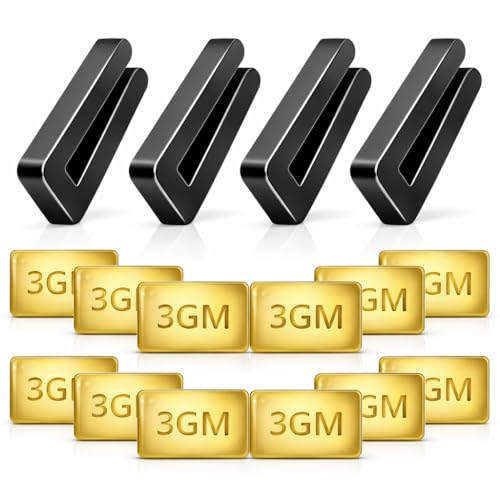
Blade balancing matters more than many realize. Even one slightly bent blade changes rotation stability and creates repetitive clicking every few seconds. Balance kits may look tiny, yet they can calm excessive movement surprisingly well. Stable rotation reduces strain on the motor too, which helps prevent additional mechanical noise later on.
Pull chains frequently become the hidden culprit behind constant clicking. A chain lightly tapping the glass light fixture or motor housing creates a repetitive sound that mimics a serious internal issue. Shortening the chain or securing it with a decorative holder instantly eliminates the problem in many cases. Funny enough, people often spend hours inspecting motors before noticing the chain swinging around.
Motor wear becomes more noticeable in aging ceiling fans that haven't received maintenance in years. Dry bearings, worn mounting parts, or loose internal screws can produce sharper clicking that grows louder over time. Some noises are harmless, while others signal that replacement parts may soon be necessary. Catching those warning signs early helps avoid complete motor failure and keeps the fan operating more quietly for much longer.
- LFR Score10.0
LFR Score is a ranking system developed by lightfansreviews.com. LFR Score has no relationship or impact from any manufacturers or sales agent websites. Learn more
- BrandECNHIVE

- LFR Score10.0
LFR Score is a ranking system developed by lightfansreviews.com. LFR Score has no relationship or impact from any manufacturers or sales agent websites. Learn more
- BrandChedin

- LFR Score9.2
LFR Score is a ranking system developed by lightfansreviews.com. LFR Score has no relationship or impact from any manufacturers or sales agent websites. Learn more
- BrandUniSport

- LFR Score9.2
LFR Score is a ranking system developed by lightfansreviews.com. LFR Score has no relationship or impact from any manufacturers or sales agent websites. Learn more
- BrandLiquid Bearings
- LFR Score8.8
LFR Score is a ranking system developed by lightfansreviews.com. LFR Score has no relationship or impact from any manufacturers or sales agent websites. Learn more
- BrandHFYHWT
- LFR Score8.8
LFR Score is a ranking system developed by lightfansreviews.com. LFR Score has no relationship or impact from any manufacturers or sales agent websites. Learn more
- BrandELEHINSER

- LFR Score8.8
LFR Score is a ranking system developed by lightfansreviews.com. LFR Score has no relationship or impact from any manufacturers or sales agent websites. Learn more
- BrandWHMVPWT

- LFR Score8.8
LFR Score is a ranking system developed by lightfansreviews.com. LFR Score has no relationship or impact from any manufacturers or sales agent websites. Learn more
- BrandGENNEL

- LFR Score8.6
LFR Score is a ranking system developed by lightfansreviews.com. LFR Score has no relationship or impact from any manufacturers or sales agent websites. Learn more
- BrandKALIONE

- LFR Score8.4
LFR Score is a ranking system developed by lightfansreviews.com. LFR Score has no relationship or impact from any manufacturers or sales agent websites. Learn more
- BrandFrienda
Last update on 2026-08-06 / Affiliate links / Images, Product Titles, and Product Highlights from Amazon Product Advertising API
How To Stop Ceiling Fan From Making Clicking Noise
A quiet room can turn annoying fast once a fan starts ticking above your head like a tiny clock with an attitude. The sound may seem harmless at first, then it starts showing up during calls, naps, bedtime, and every slow evening on the couch. That is why how to stop ceiling fan from making clicking noise starts with patient checking, not panic-buying a replacement. Most clicks come from loose parts, blade imbalance, or small contact points that can be fixed before they become bigger headaches.
Start With The Sound Pattern
Clicking noise tells a story if you listen for the rhythm instead of guessing. A steady click on every rotation often points toward a blade, blade arm, or light kit touching something nearby. A random tick may come from heat expansion, a loose canopy, or a wire cap shifting inside the housing. Slow the fan down first because lower speed makes the source easier to track without the whole thing turning into a blur.
Fan speed matters because different parts complain at different speeds. A click that appears only on high speed usually points toward wobble, loose blade screws, or a slightly bent bracket. A click that happens even on low speed may come from the pull chain, glass shade, or motor housing. Turn the fan off between checks, because poking around a moving fan is asking for trouble.
Location clues help narrow the repair path quickly. A noise near the ceiling often means the canopy, mounting bracket, or downrod has shifted. A noise near the blades usually means a screw, blade holder, or light fitter is loose. A noise from the center of the fan deserves closer attention because motor housing movement can hide behind a clean-looking fixture.
Simple observation saves money before parts get replaced for no reason. Stand in different areas of the room and listen from below, from the side, and near the wall switch. A clicking fan can echo off drywall, furniture, or a low ceiling, so the source may not be exactly where it seems. That little detective work keeps the fix practical instead of turning into a guessing game.
Check Loose Screws First
Loose screws are the usual troublemakers behind a clicking ceiling fan. Vibration slowly backs them out, especially on fans that run daily through hot afternoons and cooler nights. Blade screws, blade arm screws, and light kit screws should all feel snug without being forced. Tighten with a steady hand because overtightening can strip threads or crack older blade material.
Blade brackets deserve careful attention because they carry the movement load on every spin. A slightly loose bracket may click each time the blade dips and rises. Check every bracket, not just the one that looks suspicious, because imbalance can make the opposite blade sound guilty. Small differences in tightness can throw off the whole fan.
Light kit hardware often creates a sharper, glassy tick. Frosted shades, decorative caps, and small finials can loosen just enough to rattle against the fixture. Hold the glass gently while tightening the fastener so it sits firm but not stressed. Glass parts hate brute force, and cracked shades are an ugly tradeoff for silence.
Mounting screws inside the canopy can also create a dull click that feels harder to place. The canopy covers the mounting bracket, downrod connection, and wiring area, so loose contact up there may sound like it is coming from the motor. Turn off power at the breaker before opening anything above the fan body. Safety beats speed every single time, especially with overhead electrical work.
Fix Blade Wobble Before It Gets Worse
Blade wobble does more than look annoying. It can make blade arms flex, screws shift, and nearby parts tap during rotation. A fan that wobbles even slightly may produce a clicking sound once the movement lines up with a loose part. Balance should be checked before assuming the motor is failing.
Dust buildup can create wobble because grime rarely collects evenly across all blades. One blade may carry a heavier layer near the tip, while another stays lighter near the base. Clean every blade top and bottom with a damp cloth, then dry them so moisture does not sit on wood or composite surfaces. A cleaner blade set often spins smoother right away.
Blade alignment should be checked after cleaning. Measure from the ceiling to the tip of each blade while the fan is off, then compare the numbers. A blade sitting lower than the others may have a bent bracket or a loose connection. Gently adjusting the bracket may help, but forcing metal back into shape can weaken it.
Balancing kits are cheap, small, and more useful than they look. The clip helps identify which blade needs added weight, while the adhesive weight stays on once the wobble improves. Test one change at a time because stacking adjustments too quickly makes the problem harder to read. For rooms where airflow matters during sleep, compare quieter fan setups with a dedicated best hunter ceiling fan for bedroom option if the old unit keeps wobbling after basic fixes.
Inspect Pull Chains And Light Kits
Pull chains can fool almost anyone because they sound like a mechanical fault when they tap the housing. A chain may swing into the glass shade, metal cup, or blade path during certain speeds. Shorten the chain slightly or add a small decorative weight that keeps it hanging straight. That tiny fix can stop a click that seemed way more serious than it was.
Chain extensions are convenient, but long ones can become noisy in moving air. Beaded chains, metal charms, and decorative pulls may knock against nearby surfaces with every rotation. Remove the extension for a quick test before taking apart the fan. If the clicking disappears, the fan was not broken, just wearing noisy jewelry.
Light shades need a firm seat because loose glass can chatter during vibration. Check each thumb screw around the shade and tighten them evenly by hand. Metal screws pressing too hard against glass can cause cracks, so stop once the shade no longer shifts. A thin rubber washer may help if a shade keeps making contact noise.
Bulb fit can also create odd sounds. A bulb that is not seated correctly may buzz, tick, or lightly shift inside the socket as vibration travels through the fixture. Turn the light off, let bulbs cool, then reseat them gently. Separately, for vehicle lighting rather than ceiling fans, upgrade visibility with best led fog light bulbs when foggy roads call for a clearer beam pattern.
Open The Canopy Safely
Canopy noise often hides above eye level, which is why it gets missed during quick checks. The canopy can rub against the ceiling, downrod, or mounting bracket if it has shifted slightly. A faint click near the ceiling may happen once per rotation as vibration travels upward. Turn off power first, then inspect the canopy instead of trying to adjust it while the fan runs.
Downrod connections should feel secure because movement there affects the entire fan body. A loose set screw can allow tiny shifts that create tapping or clicking under load. Check the pin, ball mount, and set screws according to the fan design. If anything feels unstable, stop using the fan until the connection is tightened properly.
Wire connectors inside the canopy can sometimes tap against metal as the fan vibrates. They should be tucked neatly and safely, with no bare wire exposed. This is a moment where caution matters because electrical repairs are not the place to wing it. If wiring looks messy, scorched, brittle, or confusing, calling an electrician is the smart move.
Ceiling box support matters more than many people realize. A fan must be mounted to a fan-rated electrical box, not a basic light fixture box. If the box shifts, clicks, or flexes, the noise may be a warning sign rather than a minor annoyance. A properly supported fan protects both quiet operation and overhead safety.
Know What Motor Clicks Mean
Motor clicking deserves a slower, more careful approach. Some light ticking can come from normal metal movement as parts warm up and cool down. A louder click that grows over time may point toward worn bearings, loose internal screws, or a failing capacitor. The key is watching whether the noise changes, spreads, or arrives with burning smells or speed problems.
Dry bearings can create a repeating tick or grind that does not go away after blade and light kit checks. Many modern ceiling fans have sealed bearings, so oiling may not be recommended. Older fans may allow lubrication, but the owner manual should guide that choice. Adding oil in the wrong place can attract dust and create a bigger mess.
Capacitor issues can show up as humming, weak starts, speed trouble, or odd clicking from the housing. A fan that struggles to start or changes speed unpredictably should not be ignored. Electrical parts can fail quietly at first, then become more obvious once heat builds. Repairing or replacing a capacitor should be handled carefully because stored electrical charge can be risky.
Replacement becomes more reasonable when the fan has worn bearings, recurring wobble, damaged brackets, and repeated clicking after every basic fix. Small repairs make sense on a sturdy fan, but a cheaply built or very old unit may keep creating new noises. For portable airflow during trips or temporary rooms, compare best small fan for travel choices instead of relying on a noisy ceiling fan in every situation. A realistic repair limit keeps the project from turning into a weekend black hole.
How To Fix A Clicking Ceiling Fan Without Replacing It
That repetitive ticking sound usually gets worse at the exact moment the room finally settles down for the night. Some people crank the TV volume higher just to ignore it, while others stop using the fan altogether even during hot weather. A smarter approach starts with checking the small details first because ceiling fan clicking noise often comes from minor wear instead of major damage. Most fixes cost little more than patience, a screwdriver, and a careful eye.
Check Blade Arms For Hidden Bends
Blade arms can bend slightly over time without looking obviously damaged from below. Even a tiny angle difference changes the rotation path enough to create clicking during each spin cycle. Compare each blade arm side by side while the fan is turned off. A warped arm usually sits lower or higher than the others once you really study it carefully.
Uneven rotation creates stress throughout the fan body, especially near the motor housing. That pressure may start as a faint click, then slowly turn into wobble and rattling over time. Gently tightening the blade arm screws sometimes helps restore balance before replacing any parts. Small corrections matter because ceiling fans depend heavily on equal weight distribution.
Wood blades can also shift shape in humid rooms or covered patios. Moisture exposure gradually changes the blade curve, particularly on older fans that run constantly during warm months. A fan installed near open windows or damp outdoor air may develop movement problems much faster than expected. For spaces exposed to moisture, learn more about can outdoor ceiling fans get wet before seasonal weather creates additional noise issues.
Replacement blade arms are usually cheaper than replacing an entire fan assembly. Matching the exact model matters because different blade weights affect balance and motor strain. Mixing unmatched brackets may create new clicking even after the original issue disappears. Keeping all hardware aligned protects both the fan motor and overall airflow stability.
Watch For Ceiling Movement
Ceiling movement sometimes causes noises that seem like fan problems at first. Older ceilings may flex slightly as the fan rotates, especially in rooms with weak mounting support. Tiny shifts between the electrical box and mounting bracket can create repeating clicks overhead. The sound often feels deeper and duller than blade-related ticking.
Fan-rated electrical boxes are built to handle constant movement and vibration. Standard light fixture boxes are not designed for spinning weight, so they can loosen over time. A shaky mount creates more than noise because it may eventually affect safety as well. Anyone worried about structural movement should also review can a fan fall from the ceiling to recognize early warning signs.
Loose drywall around the mounting area can also create clicking or cracking sounds. Seasonal expansion, humidity shifts, and long-term vibration slowly stress the surrounding material. Press gently near the ceiling canopy while the fan is off and listen for movement or creaking. Cracked paint lines near the mount sometimes reveal hidden shifting above the surface.
Downrod fans tend to amplify ceiling movement more than flush-mount designs. The longer hanging structure transfers vibration through a wider motion range during operation. Taller rooms may need extra stabilization support if the fan swings excessively at higher speeds. Tightening the mount early prevents small noises from turning into larger repair projects.
Clean Dust From The Motor Housing
Dust buildup does more damage than most people expect. Fine debris works its way into vents, around screws, and near moving parts where vibration gradually creates noise. A dirty fan often runs hotter too, which increases expansion sounds inside the housing. Cleaning helps both airflow and mechanical stability at the same time.
Compressed air can help remove trapped dust from tight spaces around the motor vents. Hold the fan blades steady before spraying because sudden movement can shift balance unexpectedly. Dust clouds may look harmless, but thick buildup inside the housing changes airflow around the motor. Cooler operation usually means quieter operation as well.
Greasy residue in kitchens creates especially stubborn buildup on ceiling fans. Oil particles stick to blade edges and motor surfaces, forming uneven weight distribution over time. Warm water with mild soap usually handles surface grime without damaging finishes. Strong chemicals may strip paint or weaken plastic trim pieces, so gentler cleaning works better long term.
Regular maintenance keeps small clicking issues from snowballing into larger repairs. Fans running year-round should be cleaned every few months instead of once a year during spring cleaning. A stable fan motor deals with less stress when blades stay balanced and airflow remains unrestricted. Quiet performance usually starts with consistent care rather than emergency fixes.
Test Fan Speeds One At A Time
Speed settings reveal a lot about where the clicking actually starts. Some fans stay quiet on low speed but click aggressively on medium or high. That pattern often points toward balance problems, loose hardware, or mounting stress rather than direct motor failure. Testing each speed slowly helps isolate the exact condition triggering the noise.
High-speed vibration exaggerates flaws that stay hidden during slower operation. Blade wobble becomes easier to spot, and loose parts tend to click more consistently. Watch the fan carefully from multiple angles while changing speeds. Tiny movements near the blade tips often explain why the sound only appears during faster rotation.
Remote-controlled fans sometimes create clicking from relay switches or receiver components. Those sounds usually happen during speed changes instead of continuous spinning. Electrical clicking inside the control module is different from mechanical ticking at the blades. Listening closely during startup and shutdown helps separate the two.
Wall-mounted fan controls can also affect operation if they are incompatible with the motor type. An incorrect dimmer-style switch may create strange humming, inconsistent speeds, or clicking behavior. Matching the proper control system with the fan model keeps performance smoother. Electrical compatibility problems are sneaky because the fan itself may still look perfectly normal.
Pay Attention To Seasonal Changes
Temperature swings change how metal, plastic, and wood parts behave inside ceiling fans. Some clicking appears only during colder nights or humid afternoons because materials expand and contract differently. A fan that stays quiet during one season may suddenly start ticking months later without any visible damage. That shifting pattern can make troubleshooting feel confusing at first.
Humidity affects blade shape more than many homeowners realize. Wood-composite blades absorb moisture slowly, which changes weight distribution over time. Uneven airflow and slight wobble may follow shortly after those shape changes develop. Rooms with poor ventilation often experience these issues more frequently.
Outdoor-adjacent rooms face extra strain from changing air conditions throughout the year. Covered patios, sunrooms, and open-window bedrooms expose fans to moisture and fluctuating temperatures almost daily. Materials naturally wear faster under those conditions, especially around mounting hardware and blade finishes. Periodic inspections help catch small problems before they create louder mechanical sounds.
Cold weather startup noises are fairly common in older ceiling fans. Bearings and internal components may click briefly until the motor reaches operating temperature. Short-term ticking that disappears after several minutes is usually less concerning than clicking that grows louder during use. Watching for changes in pattern helps separate harmless expansion sounds from actual mechanical wear.
Know When Replacement Makes More Sense
Repeated repairs eventually become more frustrating than practical. A ceiling fan with worn bearings, unstable mounting points, recurring wobble, and motor clicking may continue creating problems even after multiple fixes. At some point, replacing aging hardware saves more time and stress than chasing every new noise. Constant repair cycles can drain patience surprisingly fast.
Older fans sometimes lack replacement parts entirely, especially discontinued models with outdated hardware sizes. Hunting down matching blades, brackets, or capacitors may cost more effort than the fan deserves. Newer fan designs often run quieter because balancing systems and mounting hardware have improved over the years. That difference becomes obvious in bedrooms and quiet living spaces.
Noise tolerance varies from room to room. A faint click in a garage may barely matter, while the same sound in a bedroom feels unbearable after midnight. Sleep disruption, concentration issues, and repetitive irritation all add up over time. A fan should create airflow, not background stress that keeps drawing attention every few seconds.
Reliable airflow matters most when daily comfort depends on it. Quiet operation, stable rotation, and secure mounting all work together to create a calmer room. A properly maintained ceiling fan should hum softly without rattles, wobble, or persistent clicking overhead. Once those sounds disappear, the entire room feels noticeably more relaxed.


Best Small Flush Mount Ceiling Fans 2026 Ultimate Picks

Best Smart Ceiling Fan India 2026 For Effortless Comfort

Best Smart Ceiling Fans with Lights for 2026: Top Picks

Best Smart Home Non Ceiling Fans 2026 For Ultimate Comfort

Best Outdoor Misting Ceiling Fan 2026 For Ultimate Comfort

Best Outdoor Ceiling Fans For Porch 2026 With Style And Breeze

Best Smart Bulb For Ceiling Fan 2026 That Brightens Life

Best Smart Ceiling Fan Control 2026 For Effortless Comfort






