
Best desk lamp for gaming 2026: sharper play

Best desk lamp for gaming isn’t just about throwing more light across a desk. A bright bulb pointed the wrong way can bounce off a monitor, wash out dark scenes, and make a midnight session feel like staring into a vending machine. Good lighting sits in the sweet spot: enough glow to see the keyboard, mousepad, controller, and snacks, but not so much that the screen loses depth. That balance matters more than flashy colors, even though a little RGB flair can still make the setup feel alive.
Glare control should sit near the top of the list. A lamp with an adjustable arm, angled head, or monitor-bar style design helps keep light on the desk instead of the display. That’s a small detail until reflections start showing up during dark game scenes or sweaty ranked matches. Then it becomes the thing nobody wants to deal with, right there in the middle of the action.
Color temperature also changes the mood fast. Cooler light can help the desk feel sharper during focus-heavy play, while warmer light feels easier once the room gets quiet and the night stretches on. Adjustable brightness is just as useful because every room has its own quirks, from dim corners to glossy screens to white walls that bounce light back like a mirror. A fixed-brightness lamp can work, sure, but it leaves less room to tune the setup.
Desk space deserves a real mention. Gaming setups already fight for room between large mousepads, speakers, headsets, stream decks, chargers, and oversized keyboards. A bulky lamp base can crowd the surface and make cable mess worse. Clamp lamps, slim LED bars, and compact task lights often make more sense because they light the gear without stealing the spot where the mouse needs to glide.
Bias lighting can help the whole setup feel less harsh. A soft glow behind the monitor reduces the hard contrast between a bright screen and a dark wall, which is one reason many gaming rooms feel better with indirect light instead of one exposed lamp blasting from the side. Still, RGB shouldn’t be treated like magic dust. Strong colored light can look cool, but too much saturation may make the room feel noisy, especially during longer sessions.
Build quality shows up in boring places, and that’s the point. A wobbly neck, weak clamp, touch controls that misread taps, or a head that droops after a week can get old fast. The better pick usually feels steady, adjusts smoothly, and stays where it’s aimed. No drama, no fuss, just a cleaner desk glow that helps the setup feel less chaotic and more dialed in.

- LFR Score9.6
LFR Score is a ranking system developed by lightfansreviews.com. LFR Score has no relationship or impact from any manufacturers or sales agent websites. Learn more
- BrandHoneywell
- LFR Score9.4
LFR Score is a ranking system developed by lightfansreviews.com. LFR Score has no relationship or impact from any manufacturers or sales agent websites. Learn more
- BrandGovee

- LFR Score9.4
LFR Score is a ranking system developed by lightfansreviews.com. LFR Score has no relationship or impact from any manufacturers or sales agent websites. Learn more
- BrandHoneywell

- LFR Score9.2
LFR Score is a ranking system developed by lightfansreviews.com. LFR Score has no relationship or impact from any manufacturers or sales agent websites. Learn more
- BrandAirlonv
![ROOTRO Touch Bedside Table Lamp, [Sleek Design & RGB Mode] 3 Way Dimmable Small Lamp for Bedroom, LED Lamp with Warm White Lights, Multi-Color Smart Nightstand Lamp for for Living Room Home Gifts](https://m.media-amazon.com/images/I/31HBCOIqHyL._SL160_.jpg "ROOTRO Touch Bedside Table Lamp, [Sleek Design & RGB Mode] 3 Way Dimmable Small Lamp for Bedroom, LED Lamp with Warm White Lights, Multi-Color Smart Nightstand Lamp for for Living Room Home Gifts")
- LFR Score9.2
LFR Score is a ranking system developed by lightfansreviews.com. LFR Score has no relationship or impact from any manufacturers or sales agent websites. Learn more
- BrandROOTRO

- LFR Score9.2
LFR Score is a ranking system developed by lightfansreviews.com. LFR Score has no relationship or impact from any manufacturers or sales agent websites. Learn more
- BrandHONEYWELL

- LFR Score9.0
LFR Score is a ranking system developed by lightfansreviews.com. LFR Score has no relationship or impact from any manufacturers or sales agent websites. Learn more
- BrandDrevet

- LFR Score8.8
LFR Score is a ranking system developed by lightfansreviews.com. LFR Score has no relationship or impact from any manufacturers or sales agent websites. Learn more
- BrandWILIT

- LFR Score8.8
LFR Score is a ranking system developed by lightfansreviews.com. LFR Score has no relationship or impact from any manufacturers or sales agent websites. Learn more
- BrandSUPERDANNY

- LFR Score8.8
LFR Score is a ranking system developed by lightfansreviews.com. LFR Score has no relationship or impact from any manufacturers or sales agent websites. Learn more
- BrandAddtam
- LFR Score8.6
LFR Score is a ranking system developed by lightfansreviews.com. LFR Score has no relationship or impact from any manufacturers or sales agent websites. Learn more
- BrandABCidy

- LFR Score8.6
LFR Score is a ranking system developed by lightfansreviews.com. LFR Score has no relationship or impact from any manufacturers or sales agent websites. Learn more
- BrandMicro-hertz
Last update on 2026-06-01 / Affiliate links / Images, Product Titles, and Product Highlights from Amazon Product Advertising API
Best Desk Lamp For Gaming With Clamp Design
Dark rooms can make a gaming setup feel immersive at first, but after a few hours the downsides creep in. Reflections bounce across the monitor, the keyboard fades into shadow, and tired eyes start begging for a break. A strong best desk lamp for gaming setup fixes those small frustrations without making the room feel like a dentist’s office. Honeywell’s clamp lamp leans into comfort and visibility instead of loud gimmicks, which honestly feels refreshing in a category overloaded with flashy RGB distractions.
Honeywell HJ1BK Clamp Lamp
Honeywell HJ1BK takes a cleaner, more practical approach than most gaming desk lights floating around online right now. The long dual-head structure spreads light across a wider area, which helps larger gaming desks avoid those awkward dark spots around speakers, controllers, and mousepads. Smaller lamps often leave one side of the setup looking dim while the other gets blasted with brightness. This one balances the spread much better.
The 1200LM brightness feels strong without becoming overwhelming. Some desk lamps crank up intensity so aggressively that glossy monitors turn into reflection magnets. Honeywell’s softer diffusion handles that problem surprisingly well. The lighting stays controlled instead of harsh.
The color rendering also deserves attention because washed-out desk lighting can make everything look flat and dull. Here, the CRI 97 output keeps colors looking natural around keyboards, collectibles, and monitor backgrounds. Little details stay visible without creating that sterile office atmosphere people usually try to avoid in gaming rooms.
The clamp system saves a lot of desk space too. Anyone dealing with crowded setups already knows how annoying bulky lamp bases become once cables, audio gear, and charging docks pile up. The clip-on design clears that issue almost immediately.
Gaming Sessions Feel Easier On The Eyes
Eye strain becomes brutal during long gaming sessions, especially with bright monitors sitting in dark rooms. Honeywell pushes its Sunturalux lighting system heavily, and honestly, the softer illumination does make a difference after several hours at the desk. The reduced flicker helps the setup feel calmer compared to cheaper LEDs that create subtle visual fatigue over time.
Color temperature adjustment works nicely depending on the mood of the session. Cooler tones help sharpen focus during competitive games, while warmer lighting feels easier on tired eyes once midnight rolls around. The dedicated 4000K work mode lands somewhere in the middle and ends up being surprisingly versatile.
Stepless dimming avoids the annoying preset brightness jumps found on many budget lamps. Tiny adjustments matter more than expected because even small lighting shifts can completely change how reflections hit a monitor. Having smoother control makes the desk easier to fine-tune.
Dual-monitor setups also benefit from the wider lamp coverage. Narrow beam lamps usually create uneven patches of light, leaving one side of the desk looking noticeably darker. Honeywell’s broader spread handles larger setups much more naturally.
Flexible Design Helps Tight Desk Layouts
The adjustable hinges feel sturdy enough for regular repositioning without becoming stiff or awkward. Some articulated lamps start drifting downward after a few weeks, especially when the joints loosen up. This one stays fairly stable once positioned, which helps during setups that constantly shift between gaming, streaming, and work.
Vertical and horizontal movement gives the lamp more range than basic task lights. A slight downward angle keeps the keyboard visible while avoiding direct monitor glare, which becomes especially useful during darker games or movie watching. The flexibility feels genuinely functional instead of added just for marketing language.
Installation stays simple, thankfully. No tools, no complicated brackets, no strange setup process that takes longer than the gaming session itself. The clamp secures tightly to most desks under 2.46 inches thick and doesn’t wobble much once attached.
Desk organization benefits from the slimmer footprint too. In real-world setups, accessories pile up fast. Headsets, DACs, microphones, charging cables, handheld consoles, and random snacks somehow eat every inch of available surface space. Removing a lamp base helps more than expected.
Touch Controls And Daily Use
Touch controls respond quickly without feeling overly sensitive. Some touch panels react to accidental sleeve brushes or random taps during gameplay, which gets irritating fast. Honeywell avoids most of that frustration by keeping the controls responsive but not overly twitchy.
The memory function quietly improves the everyday experience. Repeating brightness and color adjustments every single night becomes annoying surprisingly fast. Keeping the previous settings makes the lamp feel more consistent and less fussy.
The one-hour timer makes sense for people who accidentally leave desk lights running overnight. Long gaming sessions tend to blur together, especially during weekends or late-night streams. The auto shutoff feature adds a little convenience without getting in the way.
Entertainment setups often overlap with streaming devices and couch gaming too. One practical reference is remote controls for Hulu Live TV, especially for people balancing monitor gaming, media streaming, and multi-device desk layouts in the same room.
Pros And Cons
Pros start with the wide lighting coverage. Larger desks, dual monitors, and accessory-heavy gaming setups benefit immediately from the broader beam spread. The adjustable arm system also makes positioning much easier than rigid desk lamps with limited movement.
Eye-friendly lighting stands out during extended use. Reduced glare, adjustable color temperatures, and smoother dimming create a more comfortable environment around bright screens. The clamp mount also frees up desk space that would normally disappear under a heavy lamp base.
Cons mainly revolve around aesthetics and desk size limitations. People chasing aggressive RGB visuals may find the design too understated or office-like. The large dual-head structure can also feel oversized on compact desks with shelving mounted overhead.
The assembly note about possible color temperature inconsistency feels slightly odd too. Reattaching the lamp head reportedly fixes the issue, but it’s still something worth mentioning because most buyers probably expect the lighting to work perfectly right out of the box.
Lighting Atmosphere Around The Setup
Ambient balance feels more natural here than with heavily stylized gaming lamps that flood the room with oversaturated colors. Honeywell’s softer lighting approach keeps the focus on the monitor while still making the desk feel comfortable to use for hours at a time.
Warm lighting modes work especially well during nighttime gaming. Cooler white light sharpens visibility during daytime sessions, but late at night it can start feeling cold and exhausting. The warmer settings soften the room without making everything look orange or muddy.
Keyboard visibility stays consistent even with darker keycaps and textured desk mats. Tiny details like shortcut keys, charging cables, and controller buttons remain easier to spot without turning the entire room into a spotlight zone. That subtle balance ends up being one of the lamp’s stronger qualities.
The overall experience feels practical first, flashy second. Honestly, that approach ages much better over time because controlled lighting and lower glare usually matter more after the novelty of RGB-heavy setups starts wearing off.
Best Desk Lamp For Gaming With RGB Atmosphere
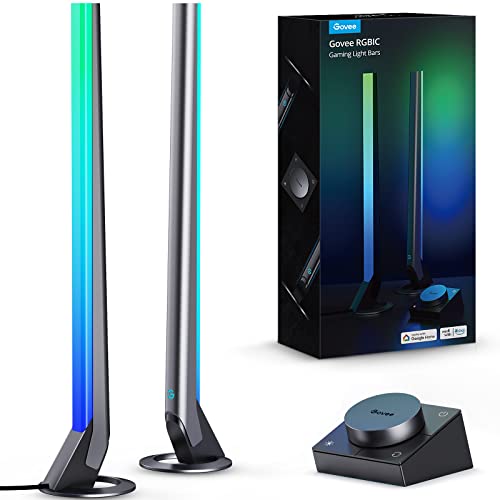
Cold monitor light and a dark room can make a gaming setup feel oddly lifeless after a while. The desk fades into shadow, speakers disappear into the background, and even expensive peripherals lose some of their personality. A strong best desk lamp for gaming setup usually fixes that balance by adding depth and movement around the screen instead of simply blasting brightness across the room. Govee’s RGBIC Gaming Light Bars H6047 lean hard into immersion, though they approach it from an entertainment angle rather than a traditional task-light direction.
Govee RGBIC Gaming Light Bars
Govee H6047 immediately feels different from ordinary desk lamps because the focus sits squarely on atmosphere and reactive lighting. The slim vertical bars throw colorful gradients behind monitors, walls, and shelves in a way that makes gaming spaces feel larger and more animated. Instead of acting like a reading lamp or workspace light, these bars behave more like environmental lighting for the entire setup.
RGBIC technology is the main attraction here. Each section of the light bars can display different colors simultaneously, which creates layered effects that look more dynamic than standard RGB strips stuck on one static tone. Fast-paced games benefit the most because the lighting shifts create extra movement around the desk without becoming overwhelming.
The physical design also deserves credit. The bars stay compact enough for crowded gaming desks while still producing enough glow to fill the background behind a monitor. Plenty of RGB accessories end up looking cheap once installed, but these keep a cleaner appearance that blends naturally with modern setups.
The included smart dial turns out to be more useful than expected. Reaching for a phone every time brightness needs adjustment gets annoying fast, especially during gaming sessions or movie watching. Having quick tactile control nearby feels smoother and less distracting.
Lighting Effects And Gaming Atmosphere
Scene modes are where Govee clearly put most of the personality. More than 60 built-in lighting scenes create wildly different moods depending on the game or activity. Some modes pulse aggressively for action-heavy titles, while others settle into softer gradients that work better for slower evenings or background lighting during streams.
Music sync reacts more naturally than many budget RGB products. Some reactive lights flash randomly without matching the rhythm of the sound at all, but these bars handle game explosions, dialogue, and soundtrack shifts with smoother timing. The ability to react through headphones instead of relying entirely on room speakers adds another layer of flexibility.
Dark-room immersion improves noticeably with the rear wall glow. Bright monitors sitting against pitch-black walls often create eye fatigue after long sessions because the contrast becomes too harsh. The softer background lighting reduces some of that visual tension and helps the setup feel easier on the eyes.
The absence of a camera changes expectations slightly. These bars don’t mirror on-screen colors directly like some advanced sync systems do. That limitation matters for people expecting exact color tracking from gameplay footage. Still, the customizable RGBIC effects create enough visual energy that many setups won’t miss screen-color matching as much as expected.
Razer Chroma Integration Feels More Polished
Razer Synapse 3 support gives the Govee bars a more connected gaming feel than standalone RGB lights. Once synced through the Govee Desktop App and Razer software, the lighting can react alongside compatible peripherals instead of operating independently. That coordination makes the setup feel more cohesive during gameplay.
Lighting synchronization works especially well with mechanical keyboards, RGB mice, and headset stands already tied into the Razer ecosystem. Instead of every accessory running unrelated color effects, the room starts moving with a shared visual rhythm. It sounds excessive on paper, sure, but the effect genuinely adds personality during gaming sessions.
Software customization gives plenty of control without becoming overly technical. The Govee Home App includes enough presets and DIY options to satisfy people who enjoy tweaking their setup constantly. Casual users can simply pick scene modes and move on without digging through endless menus.
WiFi and Bluetooth support help keep control stable across devices. Bluetooth handles quick setup nicely, while WiFi makes voice assistant integration smoother for people already running smart-home gear in the room.
Daily Use Around The Desk
Ambient lighting changes the overall desk experience more than expected. During regular gaming nights, the bars create enough background glow to reduce harsh monitor contrast without turning the room into a neon overload. The softer gradients work surprisingly well for casual browsing, movies, and music sessions too.
Voice assistant compatibility keeps things convenient during multitasking. Quick brightness changes or scene adjustments can happen without pausing gameplay or reaching for controls. Alexa and Google Assistant support won’t matter to everyone, but they fit naturally into modern gaming rooms packed with smart devices.
The compact footprint helps smaller desks avoid clutter. Traditional desk lamps sometimes dominate the surface area around monitors, especially with bulky bases or long arms. These light bars stay tucked neatly beside displays while still creating a larger visual effect behind the setup.
Cooling accessories often become part of the same gaming environment during longer sessions. In some setups, related comfort gear appears alongside handheld fans with spray, especially in warmer rooms where PCs, monitors, and lighting equipment gradually raise the temperature over several hours.
Strengths And Limitations
The strongest feature remains the atmosphere these bars create around a gaming station. The RGBIC layering looks richer than basic single-color RGB lighting, and the reactive modes keep the setup visually active without requiring constant adjustments. For entertainment-focused spaces, that matters more than raw brightness.
Customization options feel generous without becoming intimidating. Scene presets, music sync, app controls, and smart integrations combine into a setup that can shift from calm ambient lighting to energetic game-room visuals within seconds. The flexibility keeps the lights from feeling repetitive after a few weeks.
Task lighting isn’t really the purpose here, though. Anyone expecting direct desk illumination for reading, drawing, or paperwork may feel disappointed because these bars prioritize mood lighting over focused brightness. The glow enhances the room rather than spotlighting the keyboard.
The lack of screen color syncing also creates a tradeoff. Some competing gaming lights use cameras or HDMI syncing for more accurate visual mirroring with games and movies. Govee avoids that approach here, so the lighting remains reactive and customizable rather than perfectly matched to on-screen action.
Setup Mood During Long Sessions
Late-night gaming feels more relaxed with softer ambient lighting filling the space behind the monitor. Harsh overhead lighting can make gaming rooms feel sterile, while complete darkness often creates eye strain after extended sessions. These bars land somewhere in the middle, adding enough atmosphere without becoming visually exhausting.
Streaming setups benefit from the layered background glow too. Shelves, collectibles, and wall panels gain more depth once the lighting shifts across the room dynamically. Static RGB strips usually feel flatter by comparison because they lack the segmented color transitions created by RGBIC lighting.
The lighting transitions stay fairly smooth during scene changes and audio reactions. Abrupt flashes or jittery effects would quickly become irritating during longer use, especially in smaller rooms. Govee avoids most of that harshness by keeping movements fluid and less chaotic.
The overall personality leans heavily toward entertainment rather than practicality, and honestly, that’s exactly why these bars stand out. Plenty of desk lamps focus only on visibility. These focus on turning the entire gaming setup into part of the experience itself.
Best Desk Lamp For Gaming With Auto Dimming
Bright screens can be sneaky little troublemakers after a few hours. The monitor looks fine at first, then the keyboard starts sitting in shadow, the room feels uneven, and your eyes begin doing that tired squint nobody enjoys. A thoughtful best desk lamp for gaming setup can smooth out that contrast without turning the desk into a harsh spotlight. The Honeywell H4 Sunturalux Desk Lamp takes a calmer route, using full-spectrum light, auto dimming, and a flexible frame to make screen-heavy desk time feel less rough around the edges.
Honeywell H4 Sunturalux Desk Lamp
Honeywell H4 Sunturalux Desk Lamp feels more like a serious desk companion than a decorative gaming light. It doesn’t chase loud RGB effects or flashy gimmicks, which may disappoint anyone building a neon-heavy setup. Still, for long gaming sessions mixed with work, reading, or hobby time, its eye-caring light and adjustable brightness make a lot of sense. The whole design seems built around comfort first, atmosphere second.
The 108 full-spectrum LED beads are the heart of this lamp. Honeywell lists a CRI of 97 or higher, which matters because color accuracy can make a desk feel less washed out and more natural. Keycaps, mousepads, artwork, notes, and small desk items look clearer under better-rendered light. That detail won’t win a flashy spec battle, but it makes daily use feel easier on the eyes.
Blue light hazard control is another major part of the pitch. The lamp is described as RG0 level without blue light hazard, paired with a double anti-glare design. For anyone staring at a monitor for long stretches, glare management matters just as much as brightness. Too much sharp light around the screen can make even a beautiful gaming setup feel tiring.
The design language leans clean and practical. The white finish feels more home-office than esports bunker, so it may blend better with bright desks, minimalist setups, or mixed-use rooms. That’s not a flaw, just a style tradeoff. If the room is built around dark gear and RGB strips, this lamp may look a bit polite next to everything else.
Eye Comfort During Long Sessions
Eye comfort is where this lamp earns most of its attention. Gaming in a dark room can feel immersive, but the contrast between a glowing monitor and a dim desk can wear you down fast. The Honeywell H4 adds controlled light around the workspace, which helps reduce that hard visual jump between screen and surroundings. Less strain, less squinting, less of that “why do my eyes feel sandy?” feeling after midnight.
The automatic dimming sensor gives the lamp a more hands-off personality. It detects surrounding brightness and adjusts the light level to match the environment. That’s useful in rooms where daylight changes throughout the day or overhead lights come on and off. Instead of constantly tapping controls, the lamp can quietly adapt in the background.
The double anti-glare design should also help with monitor-adjacent use. A desk lamp for gaming shouldn’t throw harsh reflections across glossy screens or make dark scenes harder to read. The adjustable head gives more control over the direction of the beam, while the anti-glare approach helps keep the lighting softer. Positioning still matters, of course, because even a good lamp can annoy you if it points straight at the display.
Full-spectrum lighting gives this model a different personality from many standard LEDs. It’s not just about making the desk bright. The goal is a clearer, more natural light that works for gaming, reading, studying, painting, sewing, and crafting. That broader usefulness makes the lamp feel less like a single-purpose accessory and more like a daily desk tool.
Brightness And Color Modes
Three color temperatures give the Honeywell H4 enough range for different moods and tasks. The 3000K warm light feels more relaxed, the 4000K natural light sits in the middle, and the 5000K white light brings a crisper tone for focused desk work. Gaming setups can benefit from that range because not every session needs the same lighting mood. A cozy story game and a fast competitive match don’t ask for the same atmosphere.
Five brightness levels add another layer of control. Depending on the color mode, the lamp offers steps such as 100%, 80%, 60%, 40%, and lower dim settings. That makes it easier to avoid the common desk-lamp problem where one setting feels too dim and the next feels too aggressive. Small adjustments can make a big difference once a monitor is already throwing plenty of light.
The night lighting mode is a nice touch for softer evening use. At 3000K and low brightness, it creates a calmer glow that fits quiet rooms, late browsing, or winding down after gaming. It won’t replace ambient RGB lighting for people who want color effects, but it does make the desk feel less stark. Sometimes simple warm light beats a rainbow wall, especially when your eyes are already tired.
The memory function quietly improves daily convenience. The lamp remembers the previous brightness and color mode, so it doesn’t force a reset every time it turns on. That sounds small until you’ve had to readjust a lamp over and over. A consistent desk setup feels better when the lighting comes back the way you left it.
Adjustability And Desk Placement
The four-axis adjustable design gives the lamp plenty of movement for real desk use. The lamp head moves up and down 180 degrees and rotates side to side 270 degrees, which helps direct light exactly where it’s needed. Keyboard area, notes beside the monitor, controller charging space, or a small hobby mat can all get targeted light. That flexibility matters more than raw brightness on a cluttered desk.
The metal base adds stability, which is good news for busy setups. A wobbly lamp near an expensive monitor is the kind of thing that makes people nervous. Honeywell describes the base as sturdy, and that matters for desks that get bumped during gaming, typing, or headset grabs. Stability isn’t glamorous, but it keeps the setup feeling settled.
Desk space is the biggest tradeoff versus clamp-style lamps. A base-mounted lamp always takes up surface area, even if the footprint is reasonable. On a wide desk, that’s probably fine. On a cramped setup with a large mousepad, mic arm, speakers, and charging docks, the base may need a little planning.
The foldable structure helps manage that limitation. Since the arm and head can be adjusted, the lamp can sit off to the side and still send light across the useful part of the desk. That’s handy for gaming setups where the mouse needs freedom to move. No one wants a lamp base sitting right where flick shots happen.
Practical Benefits For Gaming Desks
Gaming desks usually pull double duty. One minute they’re a battlestation, the next they’re a work zone, study corner, streaming station, or hobby table. The Honeywell H4 fits that mixed routine better than lights built purely for decoration. It gives enough lighting control for serious use without making the room feel stiff.
Color accuracy can be surprisingly useful outside gaming too. Painting miniatures, sorting cables by color, reading printed guides, or editing small desk items becomes easier under a lamp with better color rendering. In some desk setups, a related lighting topic sits naturally beside full spectrum light bulbs because both focus on cleaner, more natural illumination rather than just raw brightness.
Auto-off timing adds a practical safety net for late-night habits. The 60-minute timer can shut the lamp down automatically, which helps when gaming sessions slide into tired scrolling or you step away and forget the light is still on. It’s not a flashy feature. It’s just useful in the way small conveniences often are.
The lamp’s biggest strength is comfort across long desk sessions. It won’t create the dramatic wall glow of RGB light bars, and it doesn’t try to. Instead, it helps keep the desk usable, the screen area less visually harsh, and the lighting more controlled. That’s a different kind of value, and honestly, it may matter more over time.
Strengths And Weaknesses
Strengths start with the eye-care feature set. The full-spectrum LEDs, high CRI rating, anti-glare design, and automatic dimming all point toward a lamp built for extended screen time. It feels especially practical for setups where gaming blends with studying, remote work, or creative hobbies. The lamp isn’t just trying to look cool on a desk, which is refreshing.
The adjustment range is another clear advantage. A lamp head that tilts and rotates widely gives far more control than fixed-position lights. That helps reduce glare, highlight specific desk zones, and adapt to different monitor placements. A flexible lamp simply causes fewer headaches in real rooms with awkward angles.
Weaknesses come from the same practical personality. The Honeywell H4 doesn’t offer colorful RGB scenes, music sync, app control, or gaming ecosystem integration. Anyone chasing a dramatic streamer-style background may find it too plain. It’s more about visibility and comfort than spectacle.
The base design may also be a limitation for compact desks. Clamp lamps save more surface area, while this one needs a dedicated spot on the desktop. The sturdy metal base helps stability, but it still occupies space. That tradeoff should be considered if the setup already feels packed to the edges.
Realistic Use Cases And Tradeoffs
Mixed-use desks are where this lamp feels most at home. Gaming, reading, note-taking, sketching, sewing, crafting, and casual browsing all benefit from adjustable white light. A purely decorative RGB product may look more exciting, but it won’t always help with actual visibility. The Honeywell H4 seems more grounded in daily usefulness.
Low-light gaming also gets a noticeable comfort boost. Instead of relying only on the monitor glow, the lamp can fill the desk area with softer controlled light. That makes the room feel less harsh without killing the mood. The key is angling the head so the beam supports the setup rather than competing with the screen.
The white finish may or may not fit the room. On clean desks, bright setups, or home-office gaming corners, it looks right at home. Around black monitors, dark shelves, and heavy RGB accents, it may stand out more than expected. Style matters, even with practical gear.
Expectations should stay realistic. This isn’t a screen-sync lighting system, a decorative wall light, or a colorful gaming bar. It’s a focused, adjustable, eye-caring desk lamp with useful dimming, color temperature control, memory settings, and a timer. For comfort-first gaming spaces, that straightforward role is exactly the point.
Airlonv Clamp Desk Lamp For Gaming
A packed desk can make even a clean gaming setup feel messy once the monitor, keyboard, mousepad, headset stand, and random cables start fighting for space. Add a weak lamp to that mix and the room gets awkward fast, with glare on the screen and shadows sitting exactly where your hands need to move. The best desk lamp for gaming doesn’t have to look loud or futuristic to earn its spot. The Airlonv LED Desk Lamp takes the practical route with a 17-inch wide light bar, stepless dimming, and a clamp design that keeps the desktop open instead of hogging valuable surface space.
Airlonv LED Clamp Lamp
Airlonv LED Clamp Lamp feels built for desks that already have too much going on. Instead of using a heavy base, it clips to the edge of the desk and leaves the main surface clear for a full-size mousepad, speakers, or a controller dock. That’s a smart call for gaming stations where every inch matters. The black finish also blends naturally with most monitors and PC gear without begging for attention.
The 17-inch extra-wide lamp bar is the feature that gives this lamp its real desk value. A narrow light head can leave one side of the keyboard bright while the other sits in shadow, which gets old during late sessions. This wider bar spreads light across more of the workspace and makes the whole setup feel less patchy. For large desks or monitor-heavy layouts, that broader coverage matters.
The adjustable metal clamp supports desktops up to 2.36 inches thick, according to the provided details. That gives it enough flexibility for many common gaming desks, workbenches, and study tables. Still, thicker custom desks or chunky edge designs may need measuring before installation. A clamp lamp only works well if the desk edge actually gives it a clean place to grip.
The included 5V/3A USB adapter is a small but welcome detail. Some USB-powered lamps ship with only a cable, leaving people to hunt for a compatible power brick. Airlonv includes the adapter in the package, which keeps setup less annoying right out of the box. No scavenger hunt through old phone chargers needed.
Lighting Control For Long Sessions
Stepless dimming is where this lamp starts to feel more refined than basic desk lights. Instead of forcing a few fixed brightness levels, it lets brightness move from 1% to 100%. That range helps tune the light around a bright monitor, especially in darker rooms where one notch too high can feel harsh. Small adjustments can make the difference between comfortable visibility and annoying glare.
The 2700K to 6500K color temperature range gives the lamp a wide personality shift. Warmer light at the lower end feels calmer for evening use, while cooler light at the higher end brings a sharper look for detailed tasks. Gaming desks often double as study corners, workstations, drawing spots, or hobby tables, so that extra range doesn’t feel wasted. It lets the same lamp behave differently throughout the day.
Eye-care lighting is a big part of Airlonv’s pitch. The lamp uses 100 lamp beads and is described as providing uniform brightness without bothersome strobe, blue light hazards, or glare. That matters during extended screen time because harsh or flickery lighting can make tired eyes feel worse. A smoother light source won’t fix bad posture or marathon habits, but it can reduce one common irritation.
Energy efficiency also gets a nod here, with the product description stating it consumes 85% less energy than traditional incandescent lamps. That’s useful for a lamp that may stay on through work, study, gaming, and late-night browsing. It’s not the flashiest feature, sure, but lower power use fits the everyday nature of a desk lamp. Practical stuff tends to matter after the novelty wears off.
Gooseneck Flexibility And Placement
The 360-degree flexible gooseneck gives the Airlonv lamp a hands-on, bend-it-where-you-need-it feel. Unlike rigid arm lamps with fixed hinge points, this design lets the light head curve into a more exact position. That’s useful for avoiding monitor reflections while still lighting the keyboard and desk surface. A little tilt can change the whole feel of a setup.
The long gooseneck works well for taller monitor arrangements too. Airlonv lists a maximum work height of about 31 inches, with compatibility for 30-inch monitors and smaller sizes. That makes it more flexible than short lamps that struggle to clear a large display. For stacked or oversized monitor setups, placement will still need some fiddling, but the height range gives more room to work with.
Wire management is another practical touch that shouldn’t be ignored. Desk setups get messy fast once charging cables, display cables, keyboard cords, and headset wires start crossing paths. The built-in wire management feature helps collect and hide the lamp’s cable more neatly. It won’t solve every cable problem, but hey, one less dangling wire is still a win.
The aluminum and ABS construction also supports heat dissipation, according to the description. That matters because desk lamps can stay on for hours at a time, especially during long gaming nights or work sessions. Better heat handling can help the lamp feel more dependable over time. The stated lifespan reaches up to 60,000 hours, though real-world longevity still depends on use and care.
Gaming Desk Experience
Screen glare control depends heavily on positioning, and this lamp gives enough movement to make that possible. A straight blast of light toward the monitor is still a bad idea, but the bendable neck lets the beam sit off-angle and downward. That helps keep the keyboard visible without throwing reflections into dark game scenes. For glossy monitors, that adjustability becomes especially important.
The wide light bar creates a calmer desktop than a small circular lamp head. Instead of one bright hotspot, the workspace gets a broader wash of light across the surface. That feels better for gaming setups with large mousepads because the hand area stays visible without a harsh beam sitting in one spot. The desk looks more even, and the whole room feels less choppy.
Task flexibility gives the Airlonv more value beyond gaming. Reading, studying, drawing, knitting, sewing, and craftwork are all mentioned in the provided details, and the lamp’s wide coverage makes those uses believable. Not every gaming desk stays purely gaming all day. Many setups have to handle homework, bills, sketchbooks, repairs, and half-finished projects too.
Outdoor lighting repairs are a totally different category, but home lighting choices often overlap in the same research rabbit hole. From a practical angle, a related reference can sit beside replace inground pool light topics because both involve thinking through placement, visibility, and safer lighting around everyday spaces.
Pros And Cons
Pros start with space savings. The clamp design frees up the desktop in a way that base lamps simply can’t match. That’s a meaningful advantage for gaming desks with wide mouse movement, large keyboards, and too many accessories. The lamp feels designed around real clutter, not showroom desks.
The lighting range is another strength. Stepless dimming from 1% to 100% and color temperature control from 2700K to 6500K give plenty of room to adjust the mood. Warm, soft light can calm the room at night, while cooler light can sharpen the workspace during focused tasks. That flexibility keeps the lamp from feeling one-note.
Cons show up around style and specialty gaming features. This isn’t an RGB lamp, a music-sync light, or a screen-reactive bar. Anyone wanting colored atmosphere behind the monitor may feel underwhelmed. Airlonv is more about visibility, comfort, and desk organization than dramatic gaming-room effects.
The clamp requirement may also limit placement. Desks with thick edges, rounded backs, wall-mounted surfaces, or no exposed lip could make installation awkward. The lamp supports up to 2.36 inches, so measuring first makes sense. Without a good clamp position, even a flexible lamp becomes frustrating.
Realistic Tradeoffs And Fit
Comfort-first lighting defines this Airlonv lamp more than flashy design. It suits a setup where the goal is to see the desk clearly, reduce glare, and keep the workspace open. That doesn’t sound glamorous, but it solves the kind of everyday problems that actually get annoying. Shadows, clutter, and harsh brightness are the quiet villains of a long desk session.
The lack of RGB may be a dealbreaker for some gaming rooms. A desk filled with colorful fans, LED strips, and reactive lighting might make this lamp look plain by comparison. Still, plain can be useful. A neutral black clamp light often ages better than a trendy accessory that only looks good in one setup style.
The USB power setup feels convenient, especially with the adapter included. At the same time, cable routing matters because a clamp lamp can look messy if the cord hangs across the back of the desk. The built-in wire management helps, but a clean installation still depends on how the desk is arranged. Neat lighting takes a little patience.
The biggest difference between this and decorative gaming lights is purpose. Airlonv focuses on usable light across the desk, not colored atmosphere on the wall. For people who want a steady, adjustable lamp that supports gaming, work, reading, and hands-on hobbies, that practical focus is exactly what gives it a place in the setup.
ROOTRO RGB Touch Lamp Review
A gaming desk doesn’t always need another giant light bar or a glowing tower shouting from the corner. Sometimes the real problem is softer: the room feels too dark after the monitor turns on, the side table looks dead, and the whole setup needs a warmer glow without adding clutter. The best desk lamp for gaming can be small, mood-friendly, and easy to control if the goal is atmosphere more than task lighting. The ROOTRO Touch Bedside Table Lamp fits that quieter lane with RGB color modes, 3 brightness levels, and a compact design that works better as ambient support than a full desk workhorse.
ROOTRO Touch Bedside Lamp
ROOTRO Touch Bedside Lamp feels more like a mood lamp than a classic gaming desk lamp. That distinction matters because it changes expectations right away. This isn’t built to flood a wide desk with focused white light for keyboard visibility, sketching, or monitor-heavy work. It’s better suited for adding a soft side glow, especially in bedrooms, living rooms, or smaller gaming corners.
The sleek white shade gives it a clean, low-key look that doesn’t fight with the rest of a setup. Plenty of gaming accessories look aggressive, angular, and loud, which can be fun but also visually exhausting. ROOTRO keeps the shape simple, so it can sit on a nightstand, shelf, side table, or compact desk without screaming for attention. That makes it easier to blend into mixed spaces where gaming gear shares room with normal home decor.
Touch control is the kind of feature that sounds basic until the room is dark and the lamp is across a cluttered desk. A tap on the top sensor handles power and brightness changes, keeping the interaction quick and fuss-free. No tiny switch hiding on the cord. No awkward reach behind the lamp while a controller, headset, and snack bowl are already in the way.
The compact size is both a strength and a limitation. Small lamps are easier to place, easier to move, and less annoying on tight surfaces. Still, that same small footprint means it won’t replace a proper wide desk lamp for detailed work. Think atmosphere, not precision lighting.
RGB Mood And Gaming Atmosphere
RGB mode is the biggest reason this lamp makes sense near a gaming setup. The cycling color effect can add a playful glow behind a monitor, next to a console, or beside a bed where handheld gaming usually happens. It won’t sync with gameplay or react to audio, but it gives the room a little personality without adding complicated software. Nice and simple, which sometimes beats a dozen app menus.
The soft, flicker-free light helps the lamp feel calmer than harsher decorative LEDs. A gaming room with only a bright monitor can feel unbalanced, especially late at night. ROOTRO’s gentle glow can reduce that cave-like feeling around the screen. The result is more relaxed than dramatic, which fits slow sessions, cozy games, video watching, or winding down after a long day.
Color selection gives the lamp a flexible personality. A cooler tone can make the room feel cleaner, while warmer shades bring a softer lounge feel. The RGB cycle adds movement, though people who dislike changing colors may prefer leaving it on a steadier mode. Not every setup needs motion in the background, especially during focused play.
Brightness expectations should stay realistic here. This lamp creates ambiance, not a bright task zone across a large gaming desk. A useful lighting reference is lumens in light bulbs, especially because brightness numbers often explain why small mood lamps feel different from full-size desk lighting.
Brightness Levels And Night Mode
Three brightness levels keep the ROOTRO lamp easy to understand. Low brightness sits at 10%, medium reaches 50%, and high goes to 100%, based on the provided details. That simple range works well for different parts of the evening. Low feels right for sleep mode, medium suits relaxed browsing, and high helps when the room needs a little more visibility.
The upgraded night light mode is a thoughtful touch for bedrooms and shared spaces. A 3-second press activates a soothing sleep mode with dimmer light, which makes the lamp more useful beyond gaming. That softer setting can help during late-night trips across the room, quiet reading, or keeping a gentle glow nearby without waking everyone up. Small feature, real everyday value.
Warm white lighting is especially useful when the screen already feels too sharp. RGB can look fun, but warm white is often easier on tired eyes during late hours. The lamp’s softer warm mode gives the room a calmer tone and avoids that harsh desk-lamp feeling. For cozy setups, that matters more than raw brightness.
The brightness control is not as flexible as stepless dimming, though. Some lamps allow tiny brightness adjustments, while this one sticks to three fixed levels. That’s easier to use, but less precise. People who like fine-tuning every detail may notice the limitation pretty quickly.
Design, Placement, And Daily Use
The anti-slip pad helps keep the lamp steady on smoother surfaces. That matters on nightstands, painted desks, or small side tables where lightweight lamps can slide around. ROOTRO’s design aims to stay put without looking bulky. It’s a practical detail that doesn’t draw attention until it’s missing.
The power cord design keeps the lamp ready for regular indoor use. Battery-free lamps avoid charging anxiety, but the cord does mean placement depends on outlet access. That tradeoff is pretty common with bedside and desk lamps. A clean setup may need a little cable routing to keep the area from looking messy.
The smooth shade spreads light more evenly than exposed bulb designs. That helps reduce sharp hotspots and makes the lamp feel more comfortable in close quarters. On a gaming desk, it can sit off to the side and add background warmth rather than shining directly into the eyes. Direct glare would ruin the whole point.
Maintenance seems straightforward because the surface is described as durable and easy to maintain. A simple lamp like this shouldn’t demand much attention after setup. Wipe it down, keep the cord tidy, and leave it where the glow makes sense. That’s the charm of a no-fuss ambient lamp.
Pros And Cons
Pros start with the simple mood control. The RGB cycling mode, warm white light, and 3 brightness levels give enough variety for bedrooms, gaming corners, and relaxed living spaces. It doesn’t drown the room in color or require a complicated setup. For small spaces, that restraint can feel pretty welcome.
The touch sensor is another practical win. Quick taps are easier than hunting for a switch behind a monitor or nightstand. The top-mounted control also feels natural during sleepy late-night use. Nobody wants to fumble with a cord switch after already getting comfortable.
Cons come from its limited task-lighting ability. This lamp won’t properly light a large desk, wide keyboard area, or detailed hobby workspace. It’s not the best pick for drawing, paperwork, repairs, or setups that need bright focused illumination. The softer output belongs more to ambiance than productivity.
The lack of smart app control may also matter for some gaming rooms. The provided details don’t mention WiFi, voice assistant support, music sync, or screen matching. That keeps the lamp simple, but it also means it won’t integrate with more advanced RGB ecosystems. People with synchronized lighting setups may find it a little basic.
Best Fit And Realistic Tradeoffs
Bedroom gaming setups are where this lamp makes the most sense. A small desk near the bed, a console corner, or a handheld gaming spot can benefit from soft color without needing a large clamp lamp. It adds atmosphere while keeping the room comfortable. That’s its lane, and it stays in it pretty well.
Large battlestation desks may need more lighting support than ROOTRO provides. A wide monitor setup with a full keyboard, mousepad, mic arm, and speakers usually needs broader illumination. This lamp can still add side glow, but it shouldn’t be expected to handle the whole desk. Pairing it with a proper task light would make more sense in that kind of setup.
Gift-friendly design is another part of its appeal. The product description frames it as suitable for home and office decor, birthdays, families, kids, adults, and colleagues. That broad usability works because the lamp isn’t overly themed. It looks simple enough for many rooms without locking itself into one specific style.
The main difference between ROOTRO and a more serious gaming desk lamp is purpose. ROOTRO focuses on comfort, color, and soft presence. It won’t deliver wide workbench lighting, advanced sync features, or ultra-precise brightness control. As a small ambient lamp for cozy gaming spaces, though, it has a clear role without pretending to be something bigger.


Best Floor Lamps for Dark Rooms: Top Picks 2026

Best Value Outdoor Christmas Lights 2026 Brighten Nights

Best Lighting For Makeup 2026 Bright Ideas For Flawless Looks

Best Quiet Ceiling Fan For Bedroom 2026 Ultimate Comfort Picks

Best Christmas Lights For Bushes 2026 Brighten Your Yard

Best Outdoor Waterproof Christmas Lights 2026 For Festive Glow

Top 16 Kichler Barrington Flush Mount 2026 - Highly Rated

Best Wall Sconces For Staircase 2026 Brighten Your Home





