
How to Replace a Ceiling Fan Pull Chain Switch

Most people assume that a snapped pull chain means taking down the entire ceiling fixture or buying a new fan. In reality, you can replace a broken pull chain switch directly from the bottom housing without loosening the ceiling mount. The whole repair takes under an hour once the circuit breaker (the main power switch in your electrical panel) is shut off. Opening the metal cup beneath the blades gives quick access to the faulty part, keeping the heavy motor safely anchored in place.
Success depends mainly on matching the internal wiring of the original switch. A light kit uses a simple two-wire switch, while motor speed controls rely on a multi-wire part with numbered terminal slots. Snapping a quick phone photo before disconnecting anything prevents crossed lines and reversed fan speeds. Following a few orderly steps will help you free the trapped wires, connect the replacement, and restore normal control right away.
Identifying the Broken Pull Chain Switch
Ceiling fans typically use two different types of pull chain switches inside the lower housing. One switch controls the light kit, while the other regulates the motor speed. Knowing which switch failed determines the exact replacement you need to buy before starting the repair.
The light switch is a simple two-wire switch that clicks between on and off. It sends power directly to the bulbs or cuts it completely. If you are working on the light switch and want to improve room illumination while the housing is open, you can review how to pick the brightest ceiling fan light to find matching bulb options.
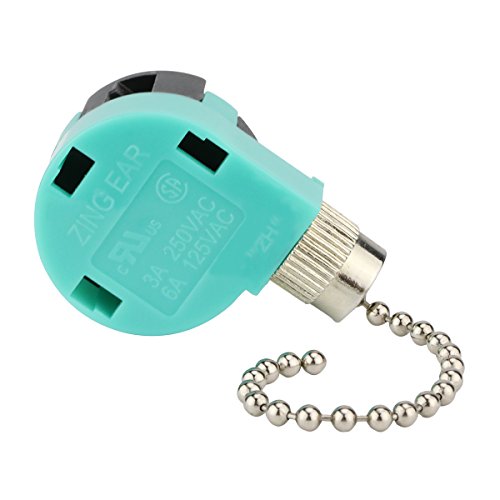
The fan speed control is more complex. It is almost always a four-wire switch that cycles through four positions: off, high speed, medium speed, and low speed. Instead of simply turning power on or off, it routes electricity through different capacitor circuits to vary the motor speed. Look closely at the small plastic body of the broken switch. You will see either two wire leads or four connection points stamped into the plastic shell.
Switches usually fail in one of two ways. Either the metal beaded chain snaps flush against the switch casing, leaving nothing to grab, or the internal mechanical spring jams so the chain will no longer click when pulled. In either situation, the internal mechanism cannot be safely glued or re-strung. Swapping in a fresh switch is the only reliable fix.
Safety Steps and Tools to Gather First
Working on electrical fixtures requires absolute power shutoff at the source. Never rely solely on a wall switch or a handheld remote to kill power, because those controls can still leave hot current flowing into the fan housing. Follow these safety prep steps before picking up any tools:
- Shut off the circuit breaker: Walk to your main breaker box or service panel and flip the breaker that supplies power to the room. If the panel directory is unlabelled, turn on the fan and light, then flip breakers until the entire fixture turns off completely.
- Confirm power is dead: Use a non-contact voltage detector around the switch housing to verify that no live current remains inside the fixture before touching any wires.
- Set up a steady work platform: Use a sturdy stepladder positioned directly beneath the fan blades rather than stretching from a chair.
- Gather hand tools: Keep a small Phillips-head screwdriver, a flat-head screwdriver, needle-nose pliers, and a straightened paperclip or thin finishing nail within arm's reach.
- Have your smartphone ready: A clear photo of the original wiring setup will prevent confusion later when you connect the new switch.
Opening the Switch Housing Without Taking Down the Fan
Many people assume fixing a pull chain means taking the entire fan down from the ceiling. You do not need to lower the motor, remove the fan blades, or disconnect the hanging extension rod. The process for how to remove an old Hunter ceiling fan safely is only necessary when replacing the entire fixture or repairing the ceiling mounting bracket.
All pull chain switches sit inside the switch housing, which is the decorative metal cup located directly beneath the fan blades. In models equipped with lights, this cup sits directly above the light fixture or serves as the central base for the light glass. Look around the exterior rim of this metal cup to find the small retaining screws holding it in place.
Most fans use three small screws spaced evenly around the top edge of the housing. Slowly back these screws out using your screwdriver, keeping one hand under the cup so it does not drop when the last screw comes free. Place the screws in a secure bowl or on a magnetic tray so they do not roll away.
Gently lower the housing cup a few inches. It will remain tethered by the internal wiring bundle. Inside, you will see a cluster of wires, several wire nuts (the twist-on plastic caps joining wires together), a reverse slide switch, and the small plastic box of the pull chain switch. Let the housing rest steadily while you inspect the connections.
Step-by-Step Guide to Replacing the Pull Chain Switch
- Photograph the original wiring layout. Take several clear, well-lit photos of the switch from different angles showing which colored wire enters each numbered terminal. Reason: Wire colors vary widely between fan brands, so an exact visual map of your specific switch prevents wiring mistakes later.
- Unscrew the exterior collar nut. Locate the small knurled metal nut on the outside of the switch housing where the pull chain exits, and spin it counterclockwise using your fingers or needle-nose pliers. Reason: This threaded nut clamps the switch firmly against the metal housing wall, and loosening it lets the switch slide free into your hand.
- Pull the switch body out into view. Push the threaded metal neck inward through the mounting hole and guide the switch away from the surrounding wire bundle. Reason: Giving yourself slack makes it much easier to inspect the terminal markings and manipulate individual wires without pulling on adjacent splices.
- Disconnect the wires from the old switch. For push-in terminals, insert the tip of a stiff paperclip or small pin into the tiny release slot next to the wire hole while gently wiggling the wire loose. If your switch has pre-attached wire leads joined by wire nuts, simply twist the plastic caps counterclockwise to separate the strands. Reason: Releasing the connections properly keeps the copper strands straight and intact so they seat securely in the replacement part.
- Seat the wires into the matching terminals of the new switch. Push each stripped wire end straight into the new switch port that matches the code on your old switch, typically marked L for line power, and 1, 2, and 3 for speeds. For lead-wire switches, twist the corresponding copper ends together clockwise and cap them firmly with a wire nut. Reason: Matching the port letters ensures current reaches the internal motor coils and speed capacitors in the correct sequence.
- Remount the switch through the housing wall. Slide the threaded neck of the new switch through the original hole in the metal cup, thread the beaded chain through the center of the knurled nut, and tighten the nut securely by hand. Reason: A snug collar holds the switch body in place so it cannot twist, strain connections, or slip inside the housing when someone tugs the cord.
- Tuck the wiring back inside and fasten the housing screws. Fold the insulated wires gently back into the metal cup, align the screw holes along the upper lip, and drive the mounting screws back into place. Reason: Careful wire positioning prevents copper leads from getting pinched against sharp metal edges, avoiding short circuits when power returns.
Troubleshooting Speed and Power Issues
Once you put everything back together and switch the circuit breaker back on, test every pull of the chain. If the fan or light does not behave as expected, check these common issues to isolate the problem quickly:
- Speeds run in reverse order (low, medium, high): This happens when the secondary speed wires are swapped. Turn the breaker back off, open the housing, and verify whether wire positions 1 and 3 were accidentally reversed. Port 1 is typically high speed, while port 3 controls low speed.
- The fan hums but the blades do not turn: A loose wire inside the switch or a disconnected capacitor lead prevents the motor from receiving adequate starting current. Inspect each wire connection to verify that the copper lead is gripped tightly inside its push-in terminal.
- Air movement feels weak on high speed: The motor might simply be running in the winter direction. Slide the small reverse switch on the side of the housing cup to change blade rotation. You can learn more about seasonal blade direction and how to make a ceiling fan pull air better during warm weather.
- The chain feels tight or will not click: The switch body may be seated crookedly against the inside of the housing cup. Loosen the exterior knurled nut, straighten the switch body so the chain pulls straight through the center eyelet, and retighten the collar.
- The light bulb stays dark: Check that the bulb is screwed in securely and not burned out. If the bulb is good, make sure the switch controlling the light is a simple two-wire model and that the hot lead is delivering power through both connections.
What to Look for in a Replacement Ceiling Fan Switch
Finding a compatible replacement switch is straightforward once you know what to check on your old part. The primary detail is the wire count. If you are fixing a light, choose a two-wire single-circuit switch. If you are fixing the fan speed control, choose a three-speed, four-wire switch.
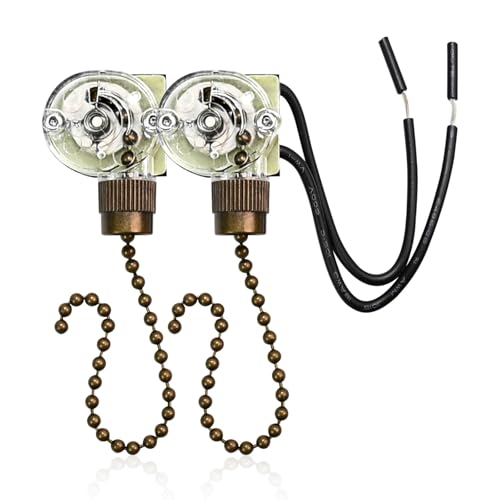
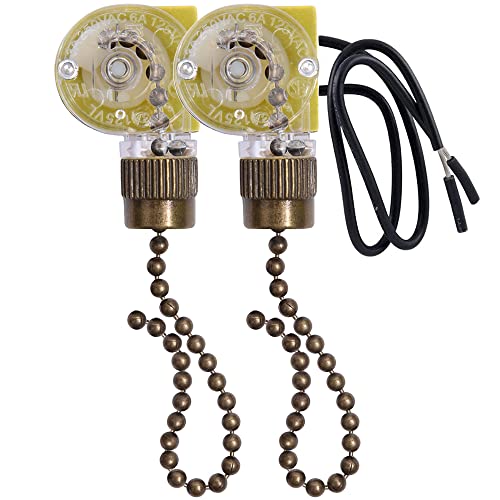
Next, look at the terminal style. Many compact switches use push-in ports where bare copper wire ends snap directly into the casing. Other replacement models come with pre-installed flexible wire leads that you join to your fan wiring using wire nuts. Both styles work well, but pre-installed leads are often easier to connect if your fan has short or brittle factory wiring.
Always verify the electrical rating stamped on the side of the plastic switch casing. Most standard household ceiling fan switches carry ratings of 3 amps at 250 volts or 6 amps at 125 volts, which easily handles standard residential fan motors and light kits. Choosing a switch with recognized safety certifications ensures the internal contacts can handle years of daily switching without overheating.
- LFR Score9.6
LFR Score is a ranking system developed by lightfansreviews.com. LFR Score has no relationship or impact from any manufacturers or sales agent websites. Learn more
- BrandGAQWOK
- LFR Score9.6
LFR Score is a ranking system developed by lightfansreviews.com. LFR Score has no relationship or impact from any manufacturers or sales agent websites. Learn more
- BrandSmoTecQ

- LFR Score9.6
LFR Score is a ranking system developed by lightfansreviews.com. LFR Score has no relationship or impact from any manufacturers or sales agent websites. Learn more
- BrandAkahttbn
- LFR Score9.4
LFR Score is a ranking system developed by lightfansreviews.com. LFR Score has no relationship or impact from any manufacturers or sales agent websites. Learn more
- BrandAkahttbn

- LFR Score9.4
LFR Score is a ranking system developed by lightfansreviews.com. LFR Score has no relationship or impact from any manufacturers or sales agent websites. Learn more
- BrandTopbuti

- LFR Score9.4
LFR Score is a ranking system developed by lightfansreviews.com. LFR Score has no relationship or impact from any manufacturers or sales agent websites. Learn more
- BrandHUAXRUI

- LFR Score9.4
LFR Score is a ranking system developed by lightfansreviews.com. LFR Score has no relationship or impact from any manufacturers or sales agent websites. Learn more
- BrandAkahttbn
- LFR Score9.2
LFR Score is a ranking system developed by lightfansreviews.com. LFR Score has no relationship or impact from any manufacturers or sales agent websites. Learn more
- BrandDAYONE

- LFR Score9.0
LFR Score is a ranking system developed by lightfansreviews.com. LFR Score has no relationship or impact from any manufacturers or sales agent websites. Learn more
- BrandBsentster

- LFR Score9.0
LFR Score is a ranking system developed by lightfansreviews.com. LFR Score has no relationship or impact from any manufacturers or sales agent websites. Learn more
- BrandPaeorRorL

- LFR Score8.4
LFR Score is a ranking system developed by lightfansreviews.com. LFR Score has no relationship or impact from any manufacturers or sales agent websites. Learn more
- BrandYukiHalu

- LFR Score7.2
LFR Score is a ranking system developed by lightfansreviews.com. LFR Score has no relationship or impact from any manufacturers or sales agent websites. Learn more
- Branddierjueyers
Last update on 2026-10-02 / Affiliate links / Images, Product Titles, and Product Highlights from Amazon Product Advertising API
FAQs
Do I need to turn off power to the entire house to replace a fan switch?
No, you do not need to disconnect power to the whole house. Flipping the individual circuit breaker that controls the room where the fan is installed provides complete protection. Always verify that power has stopped by using a non-contact voltage tester inside the housing cup before touching any internal wires.
What if the wire colors on my ceiling fan do not match the new switch?
Ceiling fan makers do not follow a universal color code for internal speed controls. Instead of trying to match wire colors between brands, match the terminal labels stamped on the switch bodies, such as L for the main power input and 1, 2, and 3 for the speeds. Transferring one wire at a time from the old labeled port to the matching new port prevents wiring mistakes regardless of wire color.
How do I disconnect wires that are locked inside push-in switch holes?
Push-in terminals have internal spring clips that grip the copper wire to keep it from slipping out. Look for a tiny rectangular or round slot directly next to each wire hole. Press the stiff tip of a small paperclip or a tiny screwdriver straight into that release slot while gently pulling on the wire to slide it out cleanly.
Can I replace a three-speed pull switch with a simple on-off switch?
No, a simple two-wire on-off switch cannot properly operate a multi-speed ceiling fan motor. Multi-speed switches use four internal connection points to cycle power through speed-controlling capacitors. Installing an on-off switch would either lock the fan onto one single speed or prevent the motor from starting properly altogether.


Best Small Flush Mount Ceiling Fans 2026 Ultimate Picks

Best Smart Ceiling Fan India 2026 For Effortless Comfort

Best Smart Ceiling Fans with Lights for 2026: Top Picks

Best Smart Home Non Ceiling Fans 2026 For Ultimate Comfort

Best Outdoor Misting Ceiling Fan 2026 For Ultimate Comfort

Best Outdoor Ceiling Fans For Porch 2026 With Style And Breeze

Best Smart Bulb For Ceiling Fan 2026 That Brightens Life

Best Smart Ceiling Fan Control 2026 For Effortless Comfort






