
What Is the Blue Wire on a Ceiling Fan?

Staring at a loose wire while holding up a heavy fixture can feel stressful, but there is no reason to panic. The blue wire carries power to the light on your fan. While the black wire keeps the motor spinning, this separate blue line is dedicated entirely to your lighting.
Where this line actually connects depends on your wall controls and ceiling box. A room with two wall switches usually provides a separate red wire to control the light independently from the blades. If the wall has only one switch, or if your unit uses a remote receiver (a small control box tucked into the ceiling mount), the connections change. Even if the fan has no light at all, the blue wire still needs safe handling. Here is how to match your ceiling wires step by step so everything runs safely.
What the Blue Wire Actually Does Inside Your Ceiling Fan
The blue wire inside a ceiling fan carries electrical current directly to the light kit. While the fan motor relies on the black wire for power, the light fixture relies entirely on the blue wire. Fan manufacturers split these two functions into separate wires so you can operate the blades and the lights independently from one another. If both components shared a single internal wire, you would never be able to run the fan on a warm night without keeping the lights burning, or turn on the room lighting without the blades spinning.
Under the canopy (the decorative ceiling cover hiding the wires), you will usually see a small bundle of color-coded wires coming out of the fan downrod or motor housing. The black wire feeds the motor windings to spin the blades. The blue wire routes straight down through the center shaft to provide power to the light sockets. The white wire serves as the neutral wire (the return path that safely carries electricity back to your home electrical panel). Finally, a bare copper or green wire serves as the safety ground wire, directing stray electrical current safely into the earth if a loose connection touches the metal frame.
Working around exposed ceiling wires requires strict safety habits. Always go to your main breaker box or service panel and flip off the circuit breaker (the safety switch controlling electrical flow to that room) before touching anything. Never rely on a wall switch alone, because someone could easily walk into the room and flip the switch back on while you work. Use a reliable non-contact voltage sensor to confirm that no power flows through any of the wires in the electrical box. If you are replacing an older fixture, reviewing how to remove an old ceiling fan safely can help you navigate existing brackets and older house wiring before you start connecting new wires.
Connecting the Blue Wire to a Single Wall Switch
Most older homes and standard bedrooms feature only one standard wall switch dedicated to the ceiling fixture. When you lower the fan canopy, you might find only three wires emerging from your ceiling: one black wire, one white wire, and one bare copper ground wire. Seeing four wires on your new fan (black, blue, white, and green) when your ceiling only provides three wires can feel confusing. In a single-switch setup, your goal is to feed household power to both the fan motor and the light fixture at the exact same time through that single ceiling hot wire (the wire carrying live power from the wall).
To make this setup work, you join the fan's black wire and blue wire together so they share the incoming power from the ceiling's black wire. Here is how to complete that connection safely:
- Turn off the circuit breaker at the main service panel, and use a voltage sensor inside the ceiling box to verify that every wire is dead.
- Connect all ground wires together. Twist the green wire from the fan mounting bracket, the green wire from the fan body, and the bare copper wire from your ceiling box together using a wire nut (a twist-on plastic cap that joins wires safely).
- Connect the white neutral wire from the fan to the white neutral wire coming from the ceiling, twisting them clockwise inside a wire nut until snug.
- Take the black wire (motor power) and the blue wire (light power) from the fan and hold their stripped metal ends flush with the black hot wire from the ceiling. Twist all three wires together clockwise, secure them with a properly sized wire nut, and give each wire a gentle tug to verify they are locked in tight.
- Fold the wires gently up into the fan-rated ceiling outlet box, separating the neutral and hot bundles to opposite sides of the box, and tighten the canopy in place against the ceiling.
When you restore power at the breaker, flipping your wall switch will energize both the fan blades and the light bulbs simultaneously. You can then use the built-in pull chains on the fan body to turn the light off when you only want a cool breeze, or adjust the fan motor speeds while leaving the illumination on.
Wiring the Blue Wire for Dual Wall Switches
If your room features two separate wall switches side by side, your ceiling electrical box usually contains an extra wire. Instead of just black, white, and ground, you will likely see a red wire emerging from the ceiling cable. That red wire is a second hot wire controlled by the second wall switch. This modern setup allows you to control the fan motor from one wall switch and the fan light fixture from the other switch, eliminating the need to reach up and yank pull chains.
Wiring dual switches keeps the motor circuit and the lighting circuit completely separated from the ceiling down to the fan base. Follow these numbered steps to wire dual wall controls correctly:
- Shut down power to the entire room at the breaker box, verifying that power is absent across both wall switches and every wire in the ceiling box.
- Secure the safety grounds by twisting the green fan wires to the bare copper ceiling wire inside a firm wire nut.
- Connect the white neutral wire from your fan directly to the white neutral wire from the ceiling box, capping them securely.
- Connect the black wire from the fan directly to the black wire from your ceiling. This dedicated connection routes wall switch number one straight to your fan motor.
- Connect the blue wire from the fan directly to the red wire from your ceiling. This dedicated connection routes wall switch number two straight to your fan light fixture.
- Tuck the completed wire groupings carefully into the fan-rated ceiling outlet box, keeping the connections neat and unpinched before securing the canopy cover.
Turn the breaker back on and flip switch number one to confirm that the blades begin turning. Then flip switch number two to confirm that the light illuminates. If you find that switch one operates the light and switch two operates the blades, cut the power at the breaker box and simply swap the ceiling black and red wire connections. Having separate wall switch control is especially helpful if you plan to install dimmer switches or aim to pick the brightest ceiling fan light for reading and daily tasks, since dedicated switches handle variable lighting levels smoothly.
Handling Fans Without Lights and Remote Receiver Modules
Not every ceiling fan installation follows a direct switch-to-wire path. Two common situations require a different approach for the blue wire: installing a fan that has no light fixture, or wiring a fan through a wireless remote control receiver module.
If your fan model does not include a light fixture, but the motor housing still features a blue wire, that wire represents an unused electrical path. You must never leave the exposed copper tip bare, and you must never connect an unused blue wire to a neutral or ground wire. Connecting a hot lead to a neutral or ground creates a dead short circuit that will instantly trip your breaker or damage your home wiring. Instead, screw a small wire nut over the bare copper tip of the blue wire, wrap electrical tape around the base of the nut so it cannot shake loose from motor vibrations, and tuck it neatly inside the canopy housing.
When installing a ceiling fan with a remote control, the wiring steps shift because the remote receiver acts as an electronic middleman. The receiver module slides into the mounting bracket right under the ceiling canopy. It takes power coming from your home and divides it electronically based on signals from your handheld remote.
The receiver has two distinct sides. The input side connects to your home wiring (usually labeled AC In L for the ceiling black wire, and AC In N for the ceiling white wire). The output side runs directly to the fan itself. On the output side, you will find a black wire (motor power), a white wire (neutral), and a blue wire (light power). You connect the receiver's blue wire straight to the fan's blue wire. In this setup, your fan's blue wire never touches the ceiling box wires directly. If your remote ever fails to communicate or you need to re-sync direction settings down the road, understanding how to reverse a ceiling fan with a remote ensures your fan spins the right way across different seasons.
Use this quick safety checklist whenever you cap off an unused blue wire or secure wire connections inside the ceiling canopy:
- Confirm the circuit breaker switch in your service panel is completely off before handling bare conductors.
- Twist wire nuts clockwise until the wires begin to twist together slightly, ensuring a tight mechanical grip.
- Verify that no bare copper strands remain visible below the bottom skirt of any wire nut.
- Wrap two turns of quality electrical tape around the bottom of each wire nut and down onto the wire insulation.
- Keep hot wire bundles separated from bare copper ground wires inside the ceiling outlet box to prevent accidental contact.
Upgrades That Improve Fan and Light Control
Homeowners dealing with a single wall switch often become frustrated with managing the blue wire setup. Having both the fan and light tied to one wall switch forces you to reach overhead to pull chains whenever you want fresh air without harsh overhead glare. If your room lacks a second hot wire behind the wall, running new electrical cables through finished drywall can be costly and disruptive.
Fortunately, several simple hardware solutions solve this problem without opening walls. Universal wireless remote control kits can be added to almost any standard ceiling fan during installation or as an aftermarket upgrade. The compact receiver fits neatly inside the ceiling canopy, taking the single hot wire from your ceiling and splitting the power cleanly between the black motor wire and the blue light wire. You mount a sleek wireless control pad over your existing wall switch opening or keep a handheld remote on your bedside table, giving you independent control over fan speeds, dimming, and power timers.
If you prefer a simpler manual setup, replacement multi-wire pull chain switches and decorative pull chain extenders make living with a single switch much easier. Distinctive pull chain charms shaped like miniature fans and light bulbs end the nightly guessing game of pulling the wrong chain in the dark. Before buying an aftermarket remote receiver kit or replacement switch, check the physical dimensions of your fan canopy to ensure the module fits without pinching internal wires. Also confirm that your fan uses an AC motor rather than an integrated DC motor, and make sure your ceiling junction box is a genuine fan-rated ceiling outlet box designed to handle dynamic, moving weight.
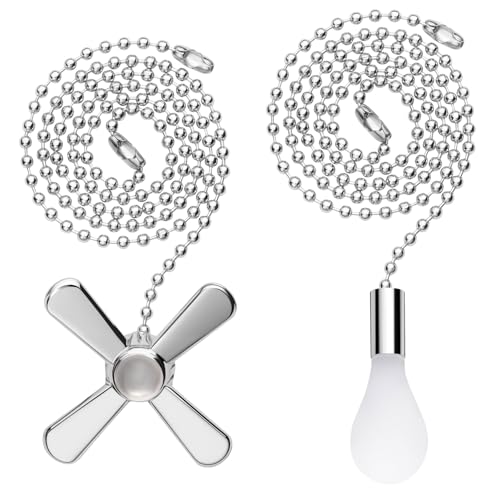
- LFR Score9.6
LFR Score is a ranking system developed by lightfansreviews.com. LFR Score has no relationship or impact from any manufacturers or sales agent websites. Learn more
- BrandSmoTecQ

- LFR Score9.4
LFR Score is a ranking system developed by lightfansreviews.com. LFR Score has no relationship or impact from any manufacturers or sales agent websites. Learn more
- BrandGardner Bender
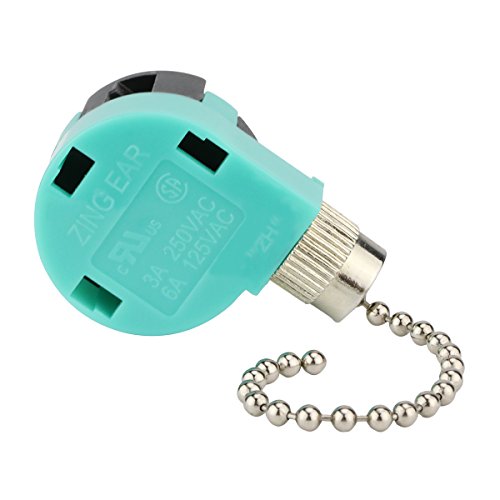
- LFR Score9.2
LFR Score is a ranking system developed by lightfansreviews.com. LFR Score has no relationship or impact from any manufacturers or sales agent websites. Learn more
- BrandDAYONE

- LFR Score9.0
LFR Score is a ranking system developed by lightfansreviews.com. LFR Score has no relationship or impact from any manufacturers or sales agent websites. Learn more
- BrandBsentster

- LFR Score8.8
LFR Score is a ranking system developed by lightfansreviews.com. LFR Score has no relationship or impact from any manufacturers or sales agent websites. Learn more
- BrandLPHUMEX

- LFR Score8.8
LFR Score is a ranking system developed by lightfansreviews.com. LFR Score has no relationship or impact from any manufacturers or sales agent websites. Learn more
- BrandOstrich

- LFR Score8.8
LFR Score is a ranking system developed by lightfansreviews.com. LFR Score has no relationship or impact from any manufacturers or sales agent websites. Learn more
- BrandTaigeguang

- LFR Score8.6
LFR Score is a ranking system developed by lightfansreviews.com. LFR Score has no relationship or impact from any manufacturers or sales agent websites. Learn more
- BrandProgress Lighting

- LFR Score8.6
LFR Score is a ranking system developed by lightfansreviews.com. LFR Score has no relationship or impact from any manufacturers or sales agent websites. Learn more
- BrandBOOSANT

- LFR Score7.2
LFR Score is a ranking system developed by lightfansreviews.com. LFR Score has no relationship or impact from any manufacturers or sales agent websites. Learn more
- Branduaelua
Last update on 2026-10-02 / Affiliate links / Images, Product Titles, and Product Highlights from Amazon Product Advertising API
FAQs
Can I connect the black and blue fan wires together if I only have one wall switch?
Yes, connecting the black motor wire and the blue light wire together to the single black hot wire from your ceiling is the standard method for a single-switch room. This connection ensures both the motor and the light fixture receive power whenever the wall switch is flipped on. You can then operate the individual pull chains on the fan body to turn the light off or adjust blade speed as needed.
What happens if I accidentally connect the blue wire to a white neutral wire?
Connecting the blue wire to a white neutral wire creates a dangerous direct short circuit the moment you supply power. The live current flowing through the lighting circuit will bypass the bulbs and travel straight into the neutral return path, instantly tripping the circuit breaker in your service panel. In worse cases, this wiring error can spark, melt wire nuts, or damage internal fan electronics.
Why does my ceiling fan light stay on constantly even when I turn off the wall switch?
This problem usually happens when the blue wire is connected to an unswitched hot wire in your ceiling box. In some homes, a continuous power wire passes through the ceiling box to feed outlets further down the circuit. If you accidentally tie the fan blue wire into that constant hot line instead of the switched hot wire coming from your wall toggle, the light will remain illuminated regardless of switch position.


Best Small Flush Mount Ceiling Fans 2026 Ultimate Picks

Best Smart Ceiling Fan India 2026 For Effortless Comfort

Best Smart Ceiling Fans with Lights for 2026: Top Picks

Best Smart Home Non Ceiling Fans 2026 For Ultimate Comfort

Best Outdoor Misting Ceiling Fan 2026 For Ultimate Comfort

Best Outdoor Ceiling Fans For Porch 2026 With Style And Breeze

Best Smart Bulb For Ceiling Fan 2026 That Brightens Life

Best Smart Ceiling Fan Control 2026 For Effortless Comfort





